Testing
Selenium? Rich-Clients? Containers?
,Tobias Schneck ConSol Software GmbH
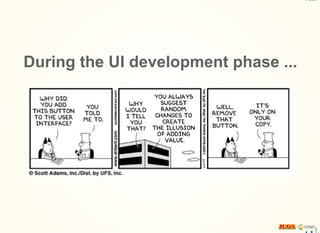
During the UI development phase ...
Yeah - release 1.0 is out!
Next step:
Make this things perfect!
Rewrite all of our tests?
Validate the order confirmation PDF?
Test the rich-client implementation as well?
Where to run the test?
Keep current tests
Use same codebase
Keep it simple
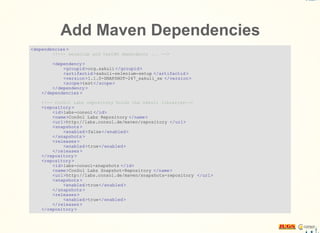
Add Maven Dependencies
<dependencies >
<!--- selenium and testNG dependency ... -->
<dependency >
<groupid>org.sakuli </groupid>
<artifactid >sakuli-selenium-setup </artifactid >
<version>1.1.0-SNAPSHOT-247_sakuli_se </version>
<scope>test</scope>
</dependency >
</dependencies >
<!-- ConSol Labs repository holds the Sakuli libraries-->
<repository >
<id>labs-consol </id>
<name>ConSol Labs Repository </name>
<url>http://labs.consol.de/maven/repository </url>
<snapshots>
<enabled>false</enabled>
</snapshots>
<releases>
<enabled>true</enabled>
</releases>
</repository >
<repository >
<id>labs-consol-snapshots </id>
<name>ConSol Labs Snapshot-Repository </name>
<url>http://labs.consol.de/maven/snapshots-repository </url>
<snapshots>
<enabled>true</enabled>
</snapshots>
<releases>
<enabled>true</enabled>
</releases>
</repository >
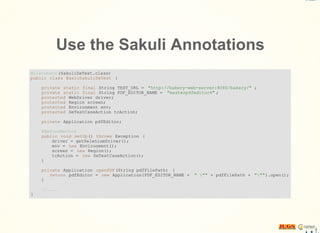
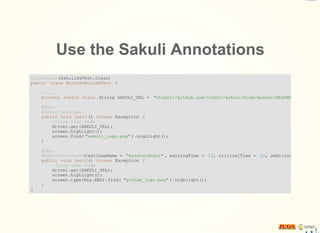
Use the Sakuli Annotations
@Listeners (SakuliSeTest.class)
public class BasicSakuliSeTest {
private static final String TEST_URL = "http://bakery-web-server:8080/bakery/" ;
private static final String PDF_EDITOR_NAME = "masterpdfeditor4" ;
protected WebDriver driver;
protected Region screen;
protected Environment env;
protected SeTestCaseAction tcAction;
private Application pdfEditor;
@BeforeMethod
public void setUp() throws Exception {
driver = getSeleniumDriver();
env = new Environment();
screen = new Region();
tcAction = new SeTestCaseAction();
}
private Application openPDF(String pdfFilePath) {
return pdfEditor = new Application(PDF_EDITOR_NAME + " "" + pdfFilePath + """).open();
}
//....
}
Use the Sakuli Annotations
@Listeners (SakuliSeTest.class)
public class BasicSakuliSeTest {
//....
private static final String SAKULI_URL = "https://github.com/ConSol/sakuli/blob/master/README.md"
@Test
@SakuliTestCase
public void test1() throws Exception {
//your test code
driver.get(SAKULI_URL);
screen.highlight();
screen.find( "sakuli_logo.png" ).highlight();
}
@Test
@SakuliTestCase (testCaseName = "mysecondtest" , warningTime = 10, criticalTime = 20, additionalImagePath
public void test2() throws Exception {
//your test code
driver.get(SAKULI_URL);
screen.highlight();
screen.type(Key.END).find( "github_logo.png" ).highlight();
}
}
Rewrite all of our tests?
Validate the order confirmation PDF?
Test the rich-client implementation as well?
Where to run the test?
Generate PDF file
Open the file in a native PDF viewer
Validate the content
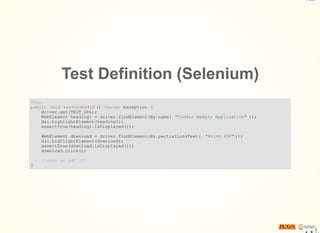
Test Definition (Selenium)
@Test
public void testOrderPDF () throws Exception {
driver.get(TEST_URL);
WebElement heading1 = driver.findElement(By.name( "Cookie Bakery Application" ));
dsl.highlightElement(heading1);
assertTrue(heading1.isDisplayed());
WebElement download = driver.findElement(By.partialLinkText( "Print PDF" ));
dsl.highlightElement(download);
assertTrue(download.isDisplayed());
download.click();
//save as pdf ???
}
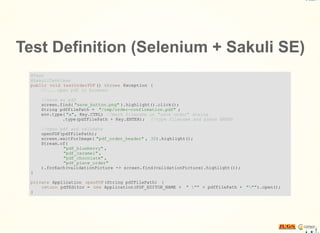
Test Definition (Selenium + Sakuli SE)
@Test
@SakuliTestCase
public void testOrderPDF () throws Exception {
//... open pdf in browser
//save as pdf
screen.find( "save_button.png" ).highlight().click();
String pdfFilePath = "/tmp/order-confirmation.pdf" ;
env.type( "a", Key.CTRL) //mark filename in "save under" dialog
.type(pdfFilePath + Key.ENTER); //type filename and press ENTER
//open pdf and validate
openPDF(pdfFilePath);
screen.waitForImage( "pdf_order_header" , 30).highlight();
Stream.of(
"pdf_blueberry" ,
"pdf_caramel" ,
"pdf_chocolate" ,
"pdf_place_order"
).forEach(validationPicture -> screen.find(validationPicture).highlight());
}
private Application openPDF(String pdfFilePath) {
return pdfEditor = new Application(PDF_EDITOR_NAME + " "" + pdfFilePath + """).open();
}
Rewrite all of our tests?
Validate the order confirmation PDF?
Test the rich-client implementation as well?
Where to run the test?
Make an order at the web client
Trigger the reporting function in the rich client
Validate the reported count of produces orders
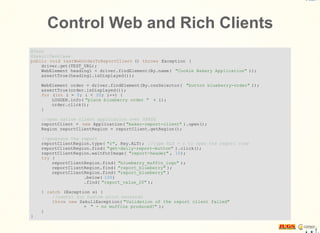
Control Web and Rich Clients
@Test
@SakuliTestCase
public void testWebOrderToReportClient () throws Exception {
driver.get(TEST_URL);
WebElement heading1 = driver.findElement(By.name( "Cookie Bakery Application" ));
assertTrue(heading1.isDisplayed());
WebElement order = driver.findElement(By.cssSelector( "button blueberry-order" ));
assertTrue(order.isDisplayed());
for (int i = 0; i < 20; i++) {
LOGGER.info( "place blueberry order " + i);
order.click();
}
//open native client application over $PATH
reportClient = new Application( "baker-report-client" ).open();
Region reportClientRegion = reportClient.getRegion();
//generate the report
reportClientRegion.type( "r", Key.ALT); //type ALT + r to open the report view
reportClientRegion.find( "get-daily-report-button" ).click();
reportClientRegion.waitForImage( "report-header" , 10);
try {
reportClientRegion.find( "blueberry_muffin_logo" );
reportClientRegion.find( "report_blueberry" );
reportClientRegion.find( "report_blueberry" )
.below( 100)
.find( "report_value_20" );
} catch (Exception e) {
//useful for custom error messaten
throw new SakuliException( "Validation of the report client failed"
+ " - no muffins produced?" );
}
}
Rewrite all of our tests?
Validate the order confirmation PDF?
Test the rich-client implementation as well?
Where to run the test?
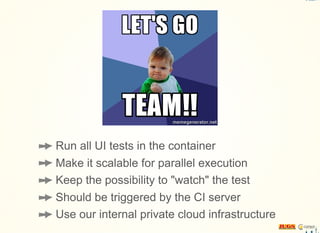
Run all UI tests in the container
Make it scalable for parallel execution
Keep the possibility to "watch" the test
Should be triggered by the CI server
Use our internal private cloud infrastructure
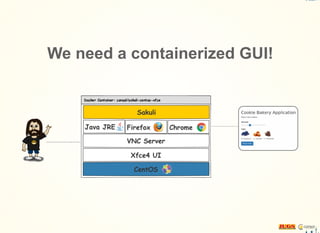
We need a containerized GUI!
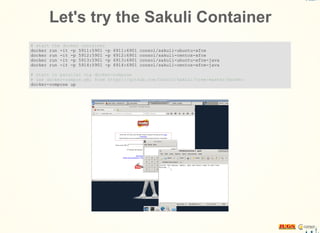
Let's try the Sakuli Container
# start the docker container
docker run -it -p 5911:5901 -p 6911:6901 consol/sakuli-ubuntu-xfce
docker run -it -p 5912:5901 -p 6912:6901 consol/sakuli-centos-xfce
docker run -it -p 5913:5901 -p 6913:6901 consol/sakuli-ubuntu-xfce-java
docker run -it -p 5914:5901 -p 6914:6901 consol/sakuli-centos-xfce-java
# start in parallel via docker-compose
# use docker-compos.yml from https://github.com/ConSol/sakuli/tree/master/docker
docker-compose up
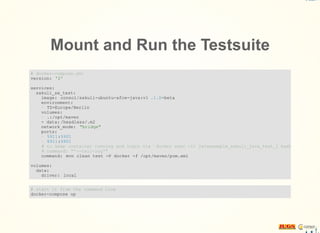
Mount and Run the Testsuite
# docker-compose.yml
version: '2'
services:
sakuli_se_test:
image: consol/sakuli-ubuntu-xfce-java:v1 .1.0-beta
environment:
- TZ=Europe/Berlin
volumes:
- .:/opt/maven
- data: /headless/.m2
network_mode: "bridge"
ports:
- 5911:5901
- 6911:6901
# to keep container running and login via `docker exec -it javaexample_sakuli_java_test_1 bash`
# command: "'--tail-log'"
command: mvn clean test -P docker -f /opt/maven/pom.xml
volumes:
data:
driver: local
# start it from the command line
docker-compose up
Rewrite all of our tests?
Validate the order confirmation PDF?
Test the rich-client implementation as well?
Where to run the test?
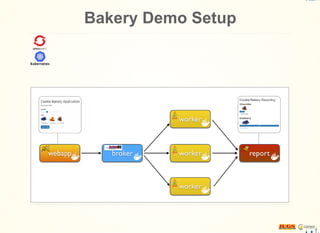
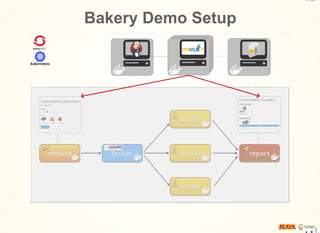
Bakery Demo Setup
Bakery Demo Setup
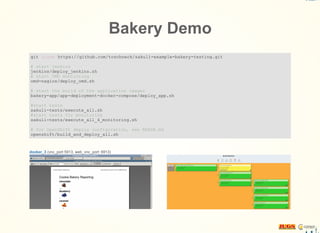
Bakery Demo
git clone https://github.com/toschneck/sakuli-example-bakery-testing.git
# start jenkins
jenkins/deploy_jenkins.sh
# start OMD montioring
omd-nagios/deploy_omd.sh
# start the build of the application images
bakery-app/app-deployment-docker-compose/deploy_app.sh
#start tests
sakuli-tests/execute_all.sh
#start tests for monitoring
sakuli-tests/execute_all_4_monitoring.sh
# for OpenShift deploy configuration, see READE.md
openshift/build_and_deploy_all.sh
What's next?
Headless execution - Linux: VNC & Docker Windows: ?
Video recording of the test execution (error documentation)
Web UI to handle Sakuli test suites
Connect 3rd-party test management tools(HP QC, TestRail, ...)
Improve test result presentation in CI tools
Implement Junit 5 test runner
Links
ConSol/sakuli
ConSol/sakuli-examples
toschneck/sakuli-se-example
toschneck/sakuli-example-bakery-testing
sakuli@consol.de @sakuli_e2e
Thank you!
Tobias Schneck
ConSol Software GmbH
Franziskanerstraße 38
D-81669 München
Tel: +49-89-45841-100
Fax: +49-89-45841-111
tobias.schneck@consol
toschneck
info@consol.de
www.consol.de
ConSol

Testing - Selenium? Rich-Clients? Containers?

  • 1.
  • 2.
    During the UIdevelopment phase ...
  • 3.
    Yeah - release1.0 is out!
  • 4.
    Next step: Make thisthings perfect!
  • 5.
    Rewrite all ofour tests? Validate the order confirmation PDF? Test the rich-client implementation as well? Where to run the test?
  • 6.
    Keep current tests Usesame codebase Keep it simple
  • 7.
    Add Maven Dependencies <dependencies> <!--- selenium and testNG dependency ... --> <dependency > <groupid>org.sakuli </groupid> <artifactid >sakuli-selenium-setup </artifactid > <version>1.1.0-SNAPSHOT-247_sakuli_se </version> <scope>test</scope> </dependency > </dependencies > <!-- ConSol Labs repository holds the Sakuli libraries--> <repository > <id>labs-consol </id> <name>ConSol Labs Repository </name> <url>http://labs.consol.de/maven/repository </url> <snapshots> <enabled>false</enabled> </snapshots> <releases> <enabled>true</enabled> </releases> </repository > <repository > <id>labs-consol-snapshots </id> <name>ConSol Labs Snapshot-Repository </name> <url>http://labs.consol.de/maven/snapshots-repository </url> <snapshots> <enabled>true</enabled> </snapshots> <releases> <enabled>true</enabled> </releases> </repository >
  • 8.
    Use the SakuliAnnotations @Listeners (SakuliSeTest.class) public class BasicSakuliSeTest { private static final String TEST_URL = "http://bakery-web-server:8080/bakery/" ; private static final String PDF_EDITOR_NAME = "masterpdfeditor4" ; protected WebDriver driver; protected Region screen; protected Environment env; protected SeTestCaseAction tcAction; private Application pdfEditor; @BeforeMethod public void setUp() throws Exception { driver = getSeleniumDriver(); env = new Environment(); screen = new Region(); tcAction = new SeTestCaseAction(); } private Application openPDF(String pdfFilePath) { return pdfEditor = new Application(PDF_EDITOR_NAME + " "" + pdfFilePath + """).open(); } //.... }
  • 9.
    Use the SakuliAnnotations @Listeners (SakuliSeTest.class) public class BasicSakuliSeTest { //.... private static final String SAKULI_URL = "https://github.com/ConSol/sakuli/blob/master/README.md" @Test @SakuliTestCase public void test1() throws Exception { //your test code driver.get(SAKULI_URL); screen.highlight(); screen.find( "sakuli_logo.png" ).highlight(); } @Test @SakuliTestCase (testCaseName = "mysecondtest" , warningTime = 10, criticalTime = 20, additionalImagePath public void test2() throws Exception { //your test code driver.get(SAKULI_URL); screen.highlight(); screen.type(Key.END).find( "github_logo.png" ).highlight(); } }
  • 10.
    Rewrite all ofour tests? Validate the order confirmation PDF? Test the rich-client implementation as well? Where to run the test?
  • 11.
    Generate PDF file Openthe file in a native PDF viewer Validate the content
  • 12.
    Test Definition (Selenium) @Test publicvoid testOrderPDF () throws Exception { driver.get(TEST_URL); WebElement heading1 = driver.findElement(By.name( "Cookie Bakery Application" )); dsl.highlightElement(heading1); assertTrue(heading1.isDisplayed()); WebElement download = driver.findElement(By.partialLinkText( "Print PDF" )); dsl.highlightElement(download); assertTrue(download.isDisplayed()); download.click(); //save as pdf ??? }
  • 13.
    Test Definition (Selenium+ Sakuli SE) @Test @SakuliTestCase public void testOrderPDF () throws Exception { //... open pdf in browser //save as pdf screen.find( "save_button.png" ).highlight().click(); String pdfFilePath = "/tmp/order-confirmation.pdf" ; env.type( "a", Key.CTRL) //mark filename in "save under" dialog .type(pdfFilePath + Key.ENTER); //type filename and press ENTER //open pdf and validate openPDF(pdfFilePath); screen.waitForImage( "pdf_order_header" , 30).highlight(); Stream.of( "pdf_blueberry" , "pdf_caramel" , "pdf_chocolate" , "pdf_place_order" ).forEach(validationPicture -> screen.find(validationPicture).highlight()); } private Application openPDF(String pdfFilePath) { return pdfEditor = new Application(PDF_EDITOR_NAME + " "" + pdfFilePath + """).open(); }
  • 14.
    Rewrite all ofour tests? Validate the order confirmation PDF? Test the rich-client implementation as well? Where to run the test?
  • 15.
    Make an orderat the web client Trigger the reporting function in the rich client Validate the reported count of produces orders
  • 16.
    Control Web andRich Clients @Test @SakuliTestCase public void testWebOrderToReportClient () throws Exception { driver.get(TEST_URL); WebElement heading1 = driver.findElement(By.name( "Cookie Bakery Application" )); assertTrue(heading1.isDisplayed()); WebElement order = driver.findElement(By.cssSelector( "button blueberry-order" )); assertTrue(order.isDisplayed()); for (int i = 0; i < 20; i++) { LOGGER.info( "place blueberry order " + i); order.click(); } //open native client application over $PATH reportClient = new Application( "baker-report-client" ).open(); Region reportClientRegion = reportClient.getRegion(); //generate the report reportClientRegion.type( "r", Key.ALT); //type ALT + r to open the report view reportClientRegion.find( "get-daily-report-button" ).click(); reportClientRegion.waitForImage( "report-header" , 10); try { reportClientRegion.find( "blueberry_muffin_logo" ); reportClientRegion.find( "report_blueberry" ); reportClientRegion.find( "report_blueberry" ) .below( 100) .find( "report_value_20" ); } catch (Exception e) { //useful for custom error messaten throw new SakuliException( "Validation of the report client failed" + " - no muffins produced?" ); } }
  • 17.
    Rewrite all ofour tests? Validate the order confirmation PDF? Test the rich-client implementation as well? Where to run the test?
  • 18.
    Run all UItests in the container Make it scalable for parallel execution Keep the possibility to "watch" the test Should be triggered by the CI server Use our internal private cloud infrastructure
  • 19.
    We need acontainerized GUI!
  • 20.
    Let's try theSakuli Container # start the docker container docker run -it -p 5911:5901 -p 6911:6901 consol/sakuli-ubuntu-xfce docker run -it -p 5912:5901 -p 6912:6901 consol/sakuli-centos-xfce docker run -it -p 5913:5901 -p 6913:6901 consol/sakuli-ubuntu-xfce-java docker run -it -p 5914:5901 -p 6914:6901 consol/sakuli-centos-xfce-java # start in parallel via docker-compose # use docker-compos.yml from https://github.com/ConSol/sakuli/tree/master/docker docker-compose up
  • 21.
    Mount and Runthe Testsuite # docker-compose.yml version: '2' services: sakuli_se_test: image: consol/sakuli-ubuntu-xfce-java:v1 .1.0-beta environment: - TZ=Europe/Berlin volumes: - .:/opt/maven - data: /headless/.m2 network_mode: "bridge" ports: - 5911:5901 - 6911:6901 # to keep container running and login via `docker exec -it javaexample_sakuli_java_test_1 bash` # command: "'--tail-log'" command: mvn clean test -P docker -f /opt/maven/pom.xml volumes: data: driver: local # start it from the command line docker-compose up
  • 22.
    Rewrite all ofour tests? Validate the order confirmation PDF? Test the rich-client implementation as well? Where to run the test?
  • 23.
  • 24.
  • 25.
    Bakery Demo git clonehttps://github.com/toschneck/sakuli-example-bakery-testing.git # start jenkins jenkins/deploy_jenkins.sh # start OMD montioring omd-nagios/deploy_omd.sh # start the build of the application images bakery-app/app-deployment-docker-compose/deploy_app.sh #start tests sakuli-tests/execute_all.sh #start tests for monitoring sakuli-tests/execute_all_4_monitoring.sh # for OpenShift deploy configuration, see READE.md openshift/build_and_deploy_all.sh
  • 26.
    What's next? Headless execution- Linux: VNC & Docker Windows: ? Video recording of the test execution (error documentation) Web UI to handle Sakuli test suites Connect 3rd-party test management tools(HP QC, TestRail, ...) Improve test result presentation in CI tools Implement Junit 5 test runner
  • 27.
  • 28.
    Thank you! Tobias Schneck ConSolSoftware GmbH Franziskanerstraße 38 D-81669 München Tel: +49-89-45841-100 Fax: +49-89-45841-111 tobias.schneck@consol toschneck info@consol.de www.consol.de ConSol