Who am I?
Richard North
• Lifelong geek
• Java/iOS/web/'devops' - 'full stack'
• Ex-consultant, now at Skyscanner
• UK and Japan
• Proud father of two!
@whichrich
Testing
Quick poll
Who writes tests?
Who writes unit tests?
Who writes integrated tests?
Code under test
Test suite
'External'/out-of-process dependencies
Who loves creating/maintaining
integrated tests?
Integrated tests
!
"You need to manually install Oracle XE on
your dev machine to run the tests..."
Weakly defined dependencies
"Oops Firefox upgraded itself - nobody can
run Selenium tests today"
Bit rot - variance with time
"Test B always fails if Test A ran before it"
Shared state - tests interfere with each other
"But it worked when we tested against the
mock!"
Mocks provide varying assurance of compatibility
"I can only run that test on CI. I can't connect
a debugger."
Testing capabilities vary through the pipeline
There has to be a better way
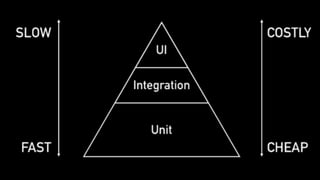
Testing Pyramid
Just don't have any integrated
tests?
"2 Unit Tests, 0 Integration Tests"
Be pragmatic
Have as few integrated tests as we
can get away with
...
Have as few integrated tests as we
can get away with
and make them easier to work with
Deployment and Infrastructure
Once upon a time...
"It'll take you three days to build an
environment"
— My first tech lead
- Slow, manual setup
- No dev/prod parity
- Expensive to do the right thing
Deployment and Infrastructure
!
Fast forward to the future
"we can build an environment in seconds"
- quickly, cheaply
- always the same
- definition is version controlled
- Docker Hub - plentiful base images
Deployment
❤
Docker
What if..?
Docker for Testing?
Testcontainers
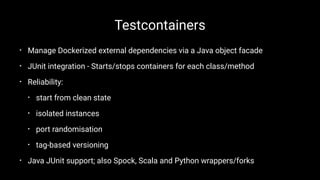
• Manage Dockerized external dependencies via a Java object facade
• JUnit integration - Starts/stops containers for each class/method
• Reliability:
• start from clean state
• isolated instances
• port randomisation
• tag-based versioning
• Java JUnit support; also Spock, Scala and Python wrappers/forks
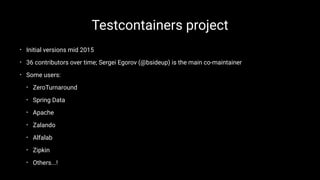
Testcontainers project
• Initial versions mid 2015
• 36 contributors over time; Sergei Egorov (@bsideup) is the main co-maintainer
• Some users:
• ZeroTurnaround
• Spring Data
• Apache
• Zalando
• Alfalab
• Zipkin
• Others...!
Where can Testcontainers help me?
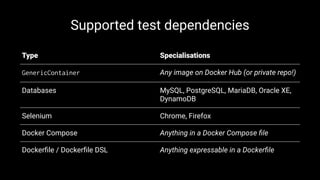
Supported test dependencies
Type Specialisations
GenericContainer Any image on Docker Hub (or private repo!)
Databases MySQL, PostgreSQL, MariaDB, Oracle XE,
DynamoDB
Selenium Chrome, Firefox
Docker Compose Anything in a Docker Compose file
Dockerfile / Dockerfile DSL Anything expressable in a Dockerfile
A simple example
Integrated tests involving a cache
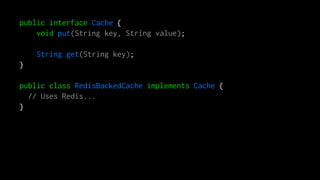
public interface Cache {
void put(String key, String value);
String get(String key);
}
public class RedisBackedCache implements Cache {
// Uses Redis...
}
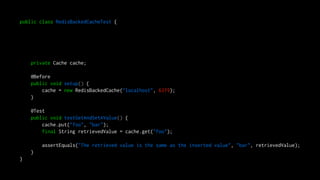
public class RedisBackedCacheTest {
private Cache cache;
@Before
public void setup() {
cache = new RedisBackedCache("localhost", 6379);
}
@Test
public void testGetAndSetAValue() {
cache.put("foo", "bar");
final String retrievedValue = cache.get("foo");
assertEquals("The retrieved value is the same as the inserted value", "bar", retrievedValue);
}
}
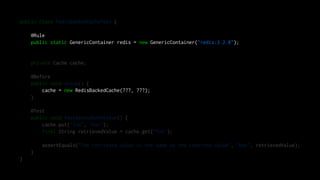
public class RedisBackedCacheTest {
@Rule
public static GenericContainer redis = new GenericContainer("redis:3.2.8");
private Cache cache;
@Before
public void setup() {
cache = new RedisBackedCache(???, ???);
}
@Test
public void testGetAndSetAValue() {
cache.put("foo", "bar");
final String retrievedValue = cache.get("foo");
assertEquals("The retrieved value is the same as the inserted value", "bar", retrievedValue);
}
}
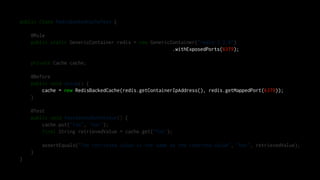
public class RedisBackedCacheTest {
@Rule
public static GenericContainer redis = new GenericContainer("redis:3.2.8")
.withExposedPorts(6379);
private Cache cache;
@Before
public void setup() {
cache = new RedisBackedCache(redis.getContainerIpAddress(), redis.getMappedPort(6379));
}
@Test
public void testGetAndSetAValue() {
cache.put("foo", "bar");
final String retrievedValue = cache.get("foo");
assertEquals("The retrieved value is the same as the inserted value", "bar", retrievedValue);
}
}
What will Testcontainers do here?
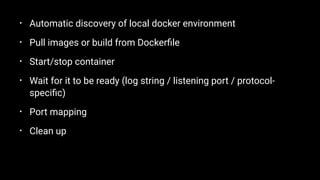
• Automatic discovery of local docker environment
• Pull images or build from Dockerfile
• Start/stop container
• Wait for it to be ready (log string / listening port / protocol-
specific)
• Port mapping
• Clean up
What have we avoided?
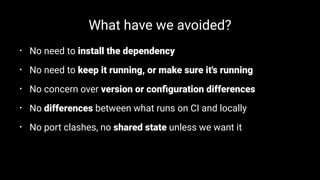
• No need to install the dependency
• No need to keep it running, or make sure it's running
• No concern over version or configuration differences
• No differences between what runs on CI and locally
• No port clashes, no shared state unless we want it
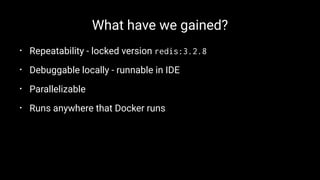
What have we gained?
• Repeatability - locked version redis:3.2.8
• Debuggable locally - runnable in IDE
• Parallelizable
• Runs anywhere that Docker runs
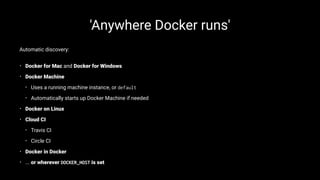
'Anywhere Docker runs'
Automatic discovery:
• Docker for Mac and Docker for Windows
• Docker Machine
• Uses a running machine instance, or default
• Automatically starts up Docker Machine if needed
• Docker on Linux
• Cloud CI
• Travis CI
• Circle CI
• Docker in Docker
• ... or wherever DOCKER_HOST is set
Example 2
Database testing
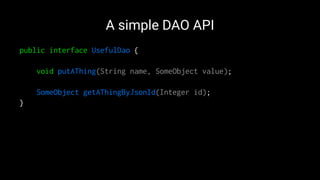
A simple DAO API
public interface UsefulDao {
void putAThing(String name, SomeObject value);
SomeObject getAThingByJsonId(Integer id);
}
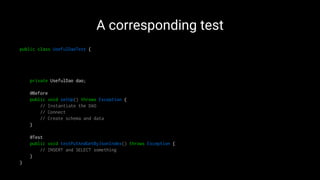
A corresponding test
public class UsefulDaoTest {
private UsefulDao dao;
@Before
public void setUp() throws Exception {
// Instantiate the DAO
// Connect
// Create schema and data
}
@Test
public void testPutAndGetByJsonIndex() throws Exception {
// INSERT and SELECT something
}
}
How can we test this with no
database?
Embedded database!
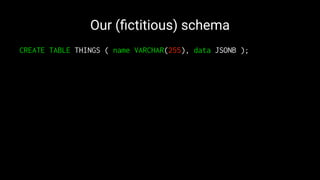
Our (fictitious) schema
CREATE TABLE THINGS ( name VARCHAR(255), data JSONB );
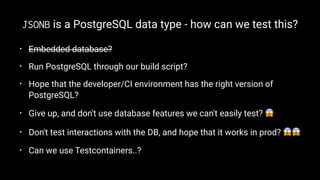
JSONB is a PostgreSQL data type - how can we test this?
• Embedded database?
• Run PostgreSQL through our build script?
• Hope that the developer/CI environment has the right version of
PostgreSQL?
• Give up, and don't use database features we can't easily test? !
• Don't test interactions with the DB, and hope that it works in prod? !!
• Can we use Testcontainers..?
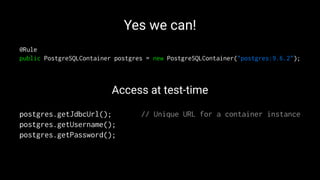
Yes we can!
@Rule
public PostgreSQLContainer postgres = new PostgreSQLContainer("postgres:9.6.2");
Access at test-time
postgres.getJdbcUrl(); // Unique URL for a container instance
postgres.getUsername();
postgres.getPassword();
Example 3
Selenium Webdriver testing
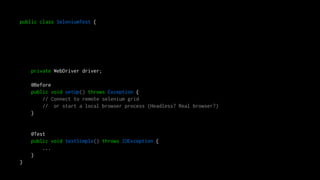
public class SeleniumTest {
private WebDriver driver;
@Before
public void setUp() throws Exception {
// Connect to remote selenium grid
// or start a local browser process (Headless? Real browser?)
}
@Test
public void testSimple() throws IOException {
...
}
}
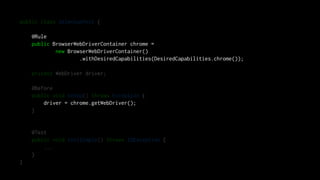
public class SeleniumTest {
@Rule
public BrowserWebDriverContainer chrome =
new BrowserWebDriverContainer()
.withDesiredCapabilities(DesiredCapabilities.chrome());
private WebDriver driver;
@Before
public void setUp() throws Exception {
driver = chrome.getWebDriver();
}
@Test
public void testSimple() throws IOException {
...
}
}
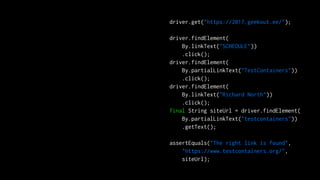
driver.get("https://2017.geekout.ee/");
driver.findElement(
By.linkText("SCHEDULE"))
.click();
driver.findElement(
By.partialLinkText("TestContainers"))
.click();
driver.findElement(
By.linkText("Richard North"))
.click();
final String siteUrl = driver.findElement(
By.partialLinkText("testcontainers"))
.getText();
assertEquals("The right link is found",
"https://www.testcontainers.org/",
siteUrl);
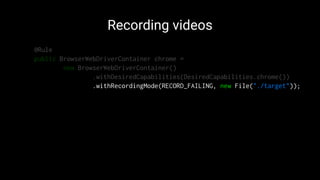
Recording videos
@Rule
public BrowserWebDriverContainer chrome =
new BrowserWebDriverContainer()
.withDesiredCapabilities(DesiredCapabilities.chrome())
.withRecordingMode(RECORD_FAILING, new File("./target"));
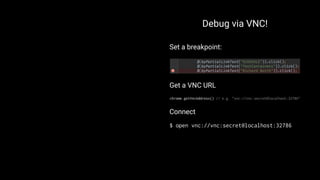
Debug via VNC!
Set a breakpoint:
Get a VNC URL
chrome.getVncAddress() // e.g. "vnc://vnc:secret@localhost:32786"
Connect
$ open vnc://vnc:secret@localhost:32786
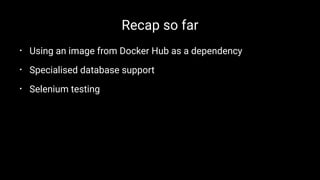
Recap so far
• Using an image from Docker Hub as a dependency
• Specialised database support
• Selenium testing
Example 4
Dockerfile build
Build a container image at test time
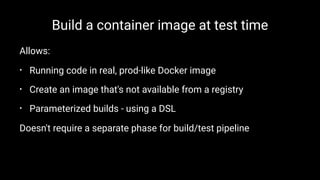
Allows:
• Running code in real, prod-like Docker image
• Create an image that's not available from a registry
• Parameterized builds - using a DSL
Doesn't require a separate phase for build/test pipeline
Build a container image at test time -
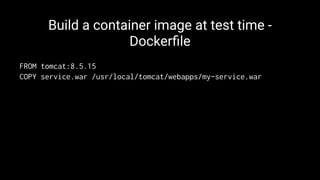
Dockerfile
FROM tomcat:8.5.15
COPY service.war /usr/local/tomcat/webapps/my-service.war
Build a container image at test time -
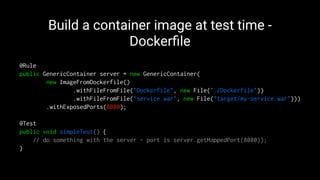
Dockerfile
@Rule
public GenericContainer server = new GenericContainer(
new ImageFromDockerfile()
.withFileFromFile("Dockerfile", new File("./Dockerfile"))
.withFileFromFile("service.war", new File("target/my-service.war")))
.withExposedPorts(8080);
@Test
public void simpleTest() {
// do something with the server - port is server.getMappedPort(8080));
}
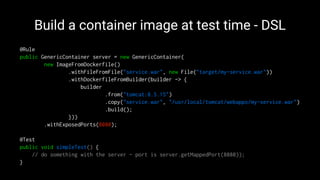
Build a container image at test time - DSL
@Rule
public GenericContainer server = new GenericContainer(
new ImageFromDockerfile()
.withFileFromFile("service.war", new File("target/my-service.war"))
.withDockerfileFromBuilder(builder -> {
builder
.from("tomcat:8.5.15")
.copy("service.war", "/usr/local/tomcat/webapps/my-service.war")
.build();
}))
.withExposedPorts(8080);
@Test
public void simpleTest() {
// do something with the server - port is server.getMappedPort(8080));
}
Example 5
Docker Compose
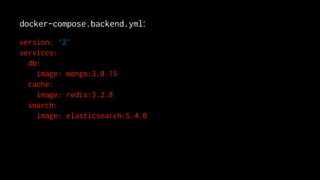
docker-compose.backend.yml:
version: '2'
services:
db:
image: mongo:3.0.15
cache:
image: redis:3.2.8
search:
image: elasticsearch:5.4.0
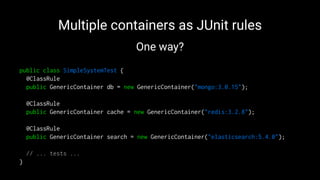
Multiple containers as JUnit rules
One way?
public class SimpleSystemTest {
@ClassRule
public GenericContainer db = new GenericContainer("mongo:3.0.15");
@ClassRule
public GenericContainer cache = new GenericContainer("redis:3.2.8");
@ClassRule
public GenericContainer search = new GenericContainer("elasticsearch:5.4.0");
// ... tests ...
}
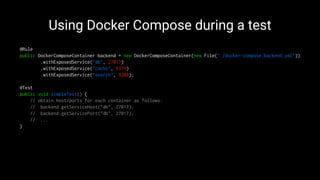
Using Docker Compose during a test
@Rule
public DockerComposeContainer backend = new DockerComposeContainer(new File("./docker-compose.backend.yml"))
.withExposedService("db", 27017)
.withExposedService("cache", 6379)
.withExposedService("search", 9200);
@Test
public void simpleTest() {
// obtain host/ports for each container as follows:
// backend.getServiceHost("db", 27017);
// backend.getServicePort("db", 27017);
// ...
}
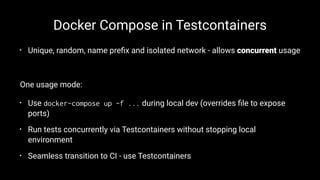
Docker Compose in Testcontainers
• Unique, random, name prefix and isolated network - allows concurrent usage
One usage mode:
• Use docker-compose up -f ... during local dev (overrides file to expose
ports)
• Run tests concurrently via Testcontainers without stopping local
environment
• Seamless transition to CI - use Testcontainers
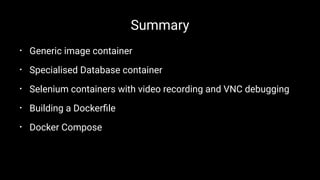
Summary
• Generic image container
• Specialised Database container
• Selenium containers with video recording and VNC debugging
• Building a Dockerfile
• Docker Compose
What's next?
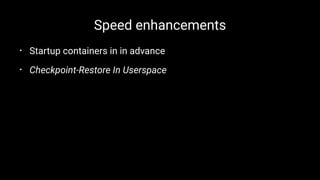
Speed enhancements
• Startup containers in in advance
• Checkpoint-Restore In Userspace
'Version 2'
• API tidyup
• decouple from JUnit 4 and support other frameworks directly
Core elements as a library
• high-level Docker object API as a library, for more than just
testing usage
• planning collaboration with Arquillian Cube project team !
More things!
• Pumba (Chaos testing) - landing soon!
• ...
Conclusion
• Hopefully another useful tool for your testing toolbox
• Easy to use, powerful features for many scenarios
• Please try it out yourselves!
Thanks to
• Everyone who has contributed to the project
• ZeroTurnaround
• You!
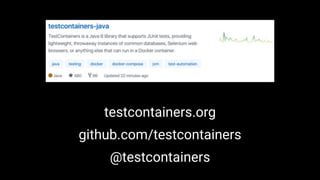
testcontainers.org
github.com/testcontainers
@testcontainers
Thank you!
Testcontainers - Geekout EE 2017 presentation

Testcontainers - Geekout EE 2017 presentation

  • 2.
    Who am I? RichardNorth • Lifelong geek • Java/iOS/web/'devops' - 'full stack' • Ex-consultant, now at Skyscanner • UK and Japan • Proud father of two! @whichrich
  • 3.
  • 4.
  • 5.
  • 6.
    Who writes integratedtests? Code under test Test suite 'External'/out-of-process dependencies
  • 7.
  • 8.
  • 9.
    "You need tomanually install Oracle XE on your dev machine to run the tests..." Weakly defined dependencies
  • 10.
    "Oops Firefox upgradeditself - nobody can run Selenium tests today" Bit rot - variance with time
  • 11.
    "Test B alwaysfails if Test A ran before it" Shared state - tests interfere with each other
  • 12.
    "But it workedwhen we tested against the mock!" Mocks provide varying assurance of compatibility
  • 13.
    "I can onlyrun that test on CI. I can't connect a debugger." Testing capabilities vary through the pipeline
  • 14.
    There has tobe a better way
  • 15.
  • 17.
    Just don't haveany integrated tests?
  • 18.
    "2 Unit Tests,0 Integration Tests"
  • 19.
  • 20.
    Have as fewintegrated tests as we can get away with ...
  • 21.
    Have as fewintegrated tests as we can get away with and make them easier to work with
  • 23.
  • 24.
    Once upon atime...
  • 25.
    "It'll take youthree days to build an environment" — My first tech lead
  • 26.
    - Slow, manualsetup - No dev/prod parity - Expensive to do the right thing
  • 27.
  • 28.
    Fast forward tothe future
  • 32.
    "we can buildan environment in seconds" - quickly, cheaply - always the same - definition is version controlled - Docker Hub - plentiful base images
  • 33.
  • 34.
  • 35.
    Testcontainers • Manage Dockerizedexternal dependencies via a Java object facade • JUnit integration - Starts/stops containers for each class/method • Reliability: • start from clean state • isolated instances • port randomisation • tag-based versioning • Java JUnit support; also Spock, Scala and Python wrappers/forks
  • 36.
    Testcontainers project • Initialversions mid 2015 • 36 contributors over time; Sergei Egorov (@bsideup) is the main co-maintainer • Some users: • ZeroTurnaround • Spring Data • Apache • Zalando • Alfalab • Zipkin • Others...!
  • 37.
  • 38.
    Supported test dependencies TypeSpecialisations GenericContainer Any image on Docker Hub (or private repo!) Databases MySQL, PostgreSQL, MariaDB, Oracle XE, DynamoDB Selenium Chrome, Firefox Docker Compose Anything in a Docker Compose file Dockerfile / Dockerfile DSL Anything expressable in a Dockerfile
  • 39.
    A simple example Integratedtests involving a cache
  • 40.
    public interface Cache{ void put(String key, String value); String get(String key); } public class RedisBackedCache implements Cache { // Uses Redis... }
  • 41.
    public class RedisBackedCacheTest{ private Cache cache; @Before public void setup() { cache = new RedisBackedCache("localhost", 6379); } @Test public void testGetAndSetAValue() { cache.put("foo", "bar"); final String retrievedValue = cache.get("foo"); assertEquals("The retrieved value is the same as the inserted value", "bar", retrievedValue); } }
  • 42.
    public class RedisBackedCacheTest{ @Rule public static GenericContainer redis = new GenericContainer("redis:3.2.8"); private Cache cache; @Before public void setup() { cache = new RedisBackedCache(???, ???); } @Test public void testGetAndSetAValue() { cache.put("foo", "bar"); final String retrievedValue = cache.get("foo"); assertEquals("The retrieved value is the same as the inserted value", "bar", retrievedValue); } }
  • 43.
    public class RedisBackedCacheTest{ @Rule public static GenericContainer redis = new GenericContainer("redis:3.2.8") .withExposedPorts(6379); private Cache cache; @Before public void setup() { cache = new RedisBackedCache(redis.getContainerIpAddress(), redis.getMappedPort(6379)); } @Test public void testGetAndSetAValue() { cache.put("foo", "bar"); final String retrievedValue = cache.get("foo"); assertEquals("The retrieved value is the same as the inserted value", "bar", retrievedValue); } }
  • 44.
  • 45.
    • Automatic discoveryof local docker environment • Pull images or build from Dockerfile • Start/stop container • Wait for it to be ready (log string / listening port / protocol- specific) • Port mapping • Clean up
  • 46.
    What have weavoided? • No need to install the dependency • No need to keep it running, or make sure it's running • No concern over version or configuration differences • No differences between what runs on CI and locally • No port clashes, no shared state unless we want it
  • 47.
    What have wegained? • Repeatability - locked version redis:3.2.8 • Debuggable locally - runnable in IDE • Parallelizable • Runs anywhere that Docker runs
  • 48.
    'Anywhere Docker runs' Automaticdiscovery: • Docker for Mac and Docker for Windows • Docker Machine • Uses a running machine instance, or default • Automatically starts up Docker Machine if needed • Docker on Linux • Cloud CI • Travis CI • Circle CI • Docker in Docker • ... or wherever DOCKER_HOST is set
  • 49.
  • 50.
    A simple DAOAPI public interface UsefulDao { void putAThing(String name, SomeObject value); SomeObject getAThingByJsonId(Integer id); }
  • 51.
    A corresponding test publicclass UsefulDaoTest { private UsefulDao dao; @Before public void setUp() throws Exception { // Instantiate the DAO // Connect // Create schema and data } @Test public void testPutAndGetByJsonIndex() throws Exception { // INSERT and SELECT something } }
  • 52.
    How can wetest this with no database? Embedded database!
  • 53.
    Our (fictitious) schema CREATETABLE THINGS ( name VARCHAR(255), data JSONB );
  • 54.
    JSONB is aPostgreSQL data type - how can we test this? • Embedded database? • Run PostgreSQL through our build script? • Hope that the developer/CI environment has the right version of PostgreSQL? • Give up, and don't use database features we can't easily test? ! • Don't test interactions with the DB, and hope that it works in prod? !! • Can we use Testcontainers..?
  • 55.
    Yes we can! @Rule publicPostgreSQLContainer postgres = new PostgreSQLContainer("postgres:9.6.2"); Access at test-time postgres.getJdbcUrl(); // Unique URL for a container instance postgres.getUsername(); postgres.getPassword();
  • 56.
  • 57.
    public class SeleniumTest{ private WebDriver driver; @Before public void setUp() throws Exception { // Connect to remote selenium grid // or start a local browser process (Headless? Real browser?) } @Test public void testSimple() throws IOException { ... } }
  • 58.
    public class SeleniumTest{ @Rule public BrowserWebDriverContainer chrome = new BrowserWebDriverContainer() .withDesiredCapabilities(DesiredCapabilities.chrome()); private WebDriver driver; @Before public void setUp() throws Exception { driver = chrome.getWebDriver(); } @Test public void testSimple() throws IOException { ... } }
  • 59.
    driver.get("https://2017.geekout.ee/"); driver.findElement( By.linkText("SCHEDULE")) .click(); driver.findElement( By.partialLinkText("TestContainers")) .click(); driver.findElement( By.linkText("Richard North")) .click(); final StringsiteUrl = driver.findElement( By.partialLinkText("testcontainers")) .getText(); assertEquals("The right link is found", "https://www.testcontainers.org/", siteUrl);
  • 60.
    Recording videos @Rule public BrowserWebDriverContainerchrome = new BrowserWebDriverContainer() .withDesiredCapabilities(DesiredCapabilities.chrome()) .withRecordingMode(RECORD_FAILING, new File("./target"));
  • 61.
    Debug via VNC! Seta breakpoint: Get a VNC URL chrome.getVncAddress() // e.g. "vnc://vnc:secret@localhost:32786" Connect $ open vnc://vnc:secret@localhost:32786
  • 62.
    Recap so far •Using an image from Docker Hub as a dependency • Specialised database support • Selenium testing
  • 63.
  • 64.
    Build a containerimage at test time Allows: • Running code in real, prod-like Docker image • Create an image that's not available from a registry • Parameterized builds - using a DSL Doesn't require a separate phase for build/test pipeline
  • 65.
    Build a containerimage at test time - Dockerfile FROM tomcat:8.5.15 COPY service.war /usr/local/tomcat/webapps/my-service.war
  • 66.
    Build a containerimage at test time - Dockerfile @Rule public GenericContainer server = new GenericContainer( new ImageFromDockerfile() .withFileFromFile("Dockerfile", new File("./Dockerfile")) .withFileFromFile("service.war", new File("target/my-service.war"))) .withExposedPorts(8080); @Test public void simpleTest() { // do something with the server - port is server.getMappedPort(8080)); }
  • 67.
    Build a containerimage at test time - DSL @Rule public GenericContainer server = new GenericContainer( new ImageFromDockerfile() .withFileFromFile("service.war", new File("target/my-service.war")) .withDockerfileFromBuilder(builder -> { builder .from("tomcat:8.5.15") .copy("service.war", "/usr/local/tomcat/webapps/my-service.war") .build(); })) .withExposedPorts(8080); @Test public void simpleTest() { // do something with the server - port is server.getMappedPort(8080)); }
  • 68.
  • 69.
  • 70.
    Multiple containers asJUnit rules One way? public class SimpleSystemTest { @ClassRule public GenericContainer db = new GenericContainer("mongo:3.0.15"); @ClassRule public GenericContainer cache = new GenericContainer("redis:3.2.8"); @ClassRule public GenericContainer search = new GenericContainer("elasticsearch:5.4.0"); // ... tests ... }
  • 71.
    Using Docker Composeduring a test @Rule public DockerComposeContainer backend = new DockerComposeContainer(new File("./docker-compose.backend.yml")) .withExposedService("db", 27017) .withExposedService("cache", 6379) .withExposedService("search", 9200); @Test public void simpleTest() { // obtain host/ports for each container as follows: // backend.getServiceHost("db", 27017); // backend.getServicePort("db", 27017); // ... }
  • 72.
    Docker Compose inTestcontainers • Unique, random, name prefix and isolated network - allows concurrent usage One usage mode: • Use docker-compose up -f ... during local dev (overrides file to expose ports) • Run tests concurrently via Testcontainers without stopping local environment • Seamless transition to CI - use Testcontainers
  • 73.
    Summary • Generic imagecontainer • Specialised Database container • Selenium containers with video recording and VNC debugging • Building a Dockerfile • Docker Compose
  • 74.
  • 75.
    Speed enhancements • Startupcontainers in in advance • Checkpoint-Restore In Userspace
  • 76.
    'Version 2' • APItidyup • decouple from JUnit 4 and support other frameworks directly
  • 77.
    Core elements asa library • high-level Docker object API as a library, for more than just testing usage • planning collaboration with Arquillian Cube project team !
  • 78.
    More things! • Pumba(Chaos testing) - landing soon! • ...
  • 79.
    Conclusion • Hopefully anotheruseful tool for your testing toolbox • Easy to use, powerful features for many scenarios • Please try it out yourselves!
  • 80.
    Thanks to • Everyonewho has contributed to the project • ZeroTurnaround • You!
  • 81.
  • 82.