Facebook
Tips, Tricks, & Best Practices
•  Introduction
•  Understanding The Feed
•  Housekeeping
•  Do’s and Don’ts
•  Content Ideas
•  Getting Attention
2
Contents
Facebook is still holding out as the leading social platform user base with 2.07 billion monthly
active users. Holding the largest social media population of American adults on social media
(68% of U.S. adults – mainly millennials), and 67% of the 12-17 year old demographic, it is a no
brainer to have a presence on the platform.
Facebook can be complicated, but successfully managing a page becomes a lot easier thanks
to simple changes you can make in your content strategy. This guide will show you how to
improve your Facebook posts and go from “stressful” to social”
3
Introduction
*stats from Hootsuit
Facebook has been studying the way we interact with content in our feeds for years. Just like
how our habits and preferences online change overtime, Facebook changes the quality and
quantity of content it displays in the feed.
Prioritizing the types of content and fan interactions the current algorithm favors will help
increase feed impressions.
4
Understanding The Feed
5
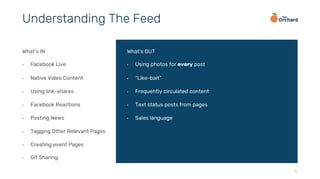
What’s IN
•  Facebook Live
•  Native Video Content
•  Using link-shares
•  Facebook Reactions
•  Posting News
•  Tagging Other Relevant Pages
•  Creating event Pages
•  Gif Sharing
What’s OUT
•  Using photos for every post
•  “Like-bait”
•  Frequently circulated content
•  Text status posts from pages
•  Sales language
Understanding The Feed
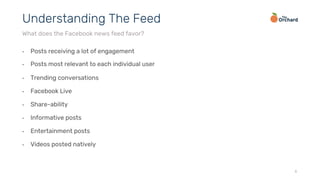
•  Posts receiving a lot of engagement
•  Posts most relevant to each individual user
•  Trending conversations
•  Facebook Live
•  Share-ability
•  Informative posts
•  Entertainment posts
•  Videos posted natively
6
Understanding The Feed
What does the Facebook news feed favor?
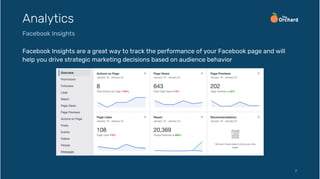
Facebook Insights are a great way to track the performance of your Facebook page and will
help you drive strategic marketing decisions based on audience behavior
7
Analytics
Facebook Insights
•  Add a buy link in your About section for easy access
•  Pin post with album release information to top of profile
•  Use a profile picture with people in it – fans are more likely to pay attention to faces than
logos
•  Include new/recent release info in a cover photo/video – it’s prime real estate!
•  Add a concert app (Bandsintown or Songkick) to make sure fans can always find tour dates
without digging through old posts.
8
Housekeeping
Clean up! Take simple steps to improve your Facebook presence and make your page more
effective
Is this content…
ü  Relevant to my page
ü  Timely?
ü  From a trusted source or safe website?
ü  Interesting enough for others to share?
If you answer yes to all the above, then you’re ready to post!
The following slides have tips for improving your updates
9
Do’s and Don’ts
Before making a post on Facebook, ask these questions:
10
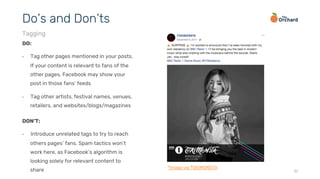
DO:
•  Tag other pages mentioned in your posts.
If your content is relevant to fans of the
other pages, Facebook may show your
post in those fans’ feeds
•  Tag other artists, festival names, venues,
retailers, and websites/blogs/magazines
Do’s and Don’ts
Tagging
DON’T:
•  Introduce unrelated tags to try to reach
others pages’ fans. Spam tactics won’t
work here, as Facebook’s algorithm is
looking solely for relevant content to
share *image via TOKiMONSTA
11
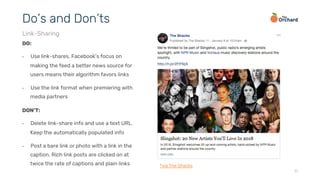
DO:
•  Use link-shares. Facebook’s focus on
making the feed a better news source for
users means their algorithm favors links
•  Use the link format when premiering with
media partners
Do’s and Don’ts
Link-Sharing
DON’T:
•  Delete link-share info and use a text URL.
Keep the automatically populated info
•  Post a bare link or photo with a link in the
caption. Rich link posts are clicked on at
twice the rate of captions and plain links *via The Shacks
12
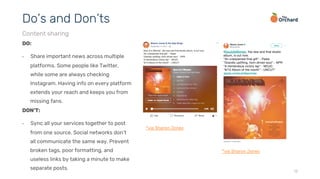
DO:
•  Share important news across multiple
platforms. Some people like Twitter,
while some are always checking
Instagram. Having info on every platform
extends your reach and keeps you from
missing fans.
Do’s and Don’ts
Content sharing
DON’T:
•  Sync all your services together to post
from one source. Social networks don’t
all communicate the same way. Prevent
broken tags, poor formatting, and
useless links by taking a minute to make
separate posts.
*via Sharon Jones
*via Sharon Jones
13
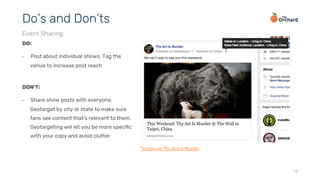
DO:
•  Post about individual shows. Tag the
venue to increase post reach
Do’s and Don’ts
Event Sharing
DON’T:
•  Share show posts with everyone.
Geotarget by city or state to make sure
fans see content that’s relevant to them.
Geotargeting will let you be more specific
with your copy and avoid clutter
*image via Thy Are Is Murder
14
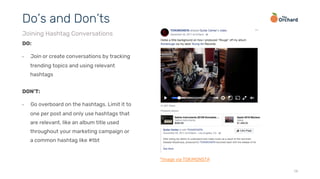
DO:
•  Join or create conversations by tracking
trending topics and using relevant
hashtags
Do’s and Don’ts
Joining Hashtag Conversations
DON’T:
•  Go overboard on the hashtags. Limit it to
one per post and only use hashtags that
are relevant, like an album title used
throughout your marketing campaign or
a common hashtag like #tbt
*image via TOKiMONSTA
15
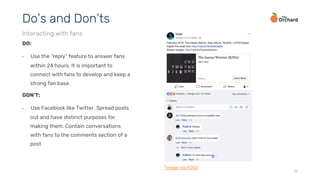
DO:
•  Use the “reply” feature to answer fans
within 24 hours. It is important to
connect with fans to develop and keep a
strong fan base.
Do’s and Don’ts
Interacting with fans
DON’T:
•  Use Facebook like Twitter. Spread posts
out and have distinct purposes for
making them. Contain conversations
with fans to the comments section of a
post
*image via RJD2
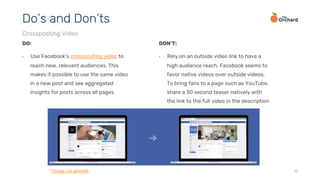
16
DO:
•  Use Facebook’s crossposting video to
reach new, relevant audiences. This
makes it possible to use the same video
in a new post and see aggregated
insights for posts across all pages
Do’s and Don’ts
Crossposting Video
DON’T:
•  Rely on an outside video link to have a
high audience reach. Facebook seems to
favor native videos over outside videos.
To bring fans to a page such as YouTube,
share a 30 second teaser natively with
the link to the full video in the description
*image via adweek
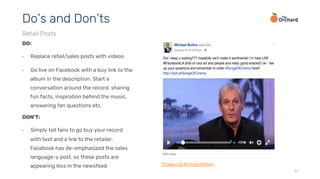
17
DO:
•  Replace retail/sales posts with videos
•  Go live on Facebook with a buy link to the
album in the description. Start a
conversation around the record, sharing
fun facts, inspiration behind the music,
answering fan questions etc.
Do’s and Don’ts
Retail Posts
DON’T:
•  Simply tell fans to go buy your record
with text and a link to the retailer.
Facebook has de-emphasized the sales
language-y post, so these posts are
appearing less in the newsfeed *image via Michael Bolton
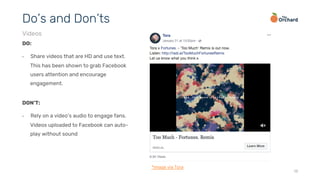
18
DO:
•  Share videos that are HD and use text.
This has been shown to grab Facebook
users attention and encourage
engagement.
Do’s and Don’ts
Videos
DON’T:
•  Rely on a video’s audio to engage fans.
Videos uploaded to Facebook can auto-
play without sound
*image via Tora
19
DO:
•  Ensure that websites can share to Facebook well
•  Use proper Open Graph Tags: FB Tags Best Practices
•  Share links to premiers rather than caption photos
•  Allows for beautiful, full-image posts
•  Optimize images on your site: FB Image Best Practices
•  Ensure a full-size shared image
•  Preview your shares with the Debug Tool
Do’s and Don’ts
Websites
DON’T:
•  Post content without optimizing it for the
platforms you’re sharing it on. Great
looking content will be more engaging
and ultimately be more share-able
20
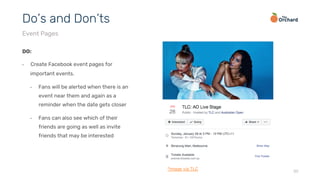
DO:
•  Create Facebook event pages for
important events.
•  Fans will be alerted when there is an
event near them and again as a
reminder when the date gets closer
•  Fans can also see which of their
friends are going as well as invite
friends that may be interested
Do’s and Don’ts
Event Pages
*image via TLC
Coming up with Facebook content is the
biggest struggle for most artists and their
teams. We have suggestions to better plan and
prepare for your Facebook posts.
21
Content Ideas
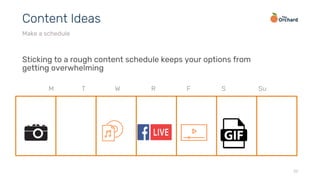
Sticking to a rough content schedule keeps your options from
getting overwhelming
22
Content Ideas
Make a schedule
M T W R F S Su
Fans want to know about you. Having something to post on Facebook can
be as easy as:
•  Photos of gear backstage at a show
•  A cross-posted Instagram video from the van/bus
•  A funny GIF
•  A link to a favorite song or video with a little background on why it’s
important/influential
The next slides have a list of different options for when you’re stuck…
23
Content Ideas
Never doubt that you’re interesting
24
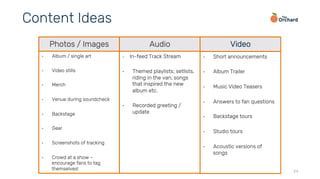
•  Album / single art
•  Video stills
•  Merch
•  Venue during soundcheck
•  Backstage
•  Gear
•  Screenshots of tracking
•  Crowd at a show –
encourage fans to tag
themselves!
•  Short announcements
•  Album Trailer
•  Music Video Teasers
•  Answers to fan questions
•  Backstage tours
•  Studio tours
•  Acoustic versions of
songs
•  In-feed Track Stream
•  Themed playlists; setlists,
riding in the van, songs
that inspired the new
album etc.
•  Recorded greeting /
update
Content Ideas
Photos / Images Audio Video
25
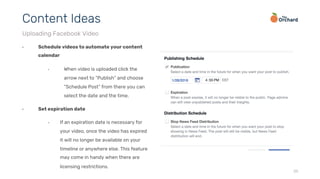
•  Schedule videos to automate your content
calendar
•  When video is uploaded click the
arrow next to “Publish” and choose
“Schedule Post” from there you can
select the date and the time.
•  Set expiration date
•  If an expiration date is necessary for
your video, once the video has expired
it will no longer be available on your
timeline or anywhere else. This feature
may come in handy when there are
licensing restrictions.
Content Ideas
Uploading Facebook Video
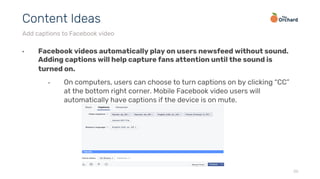
•  Facebook videos automatically play on users newsfeed without sound.
Adding captions will help capture fans attention until the sound is
turned on.
•  On computers, users can choose to turn captions on by clicking “CC”
at the bottom right corner. Mobile Facebook video users will
automatically have captions if the device is on mute.
26
Content Ideas
Add captions to Facebook video
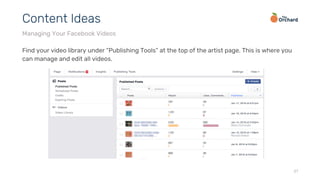
Find your video library under “Publishing Tools” at the top of the artist page. This is where you
can manage and edit all videos.
27
Content Ideas
Managing Your Facebook Videos
28
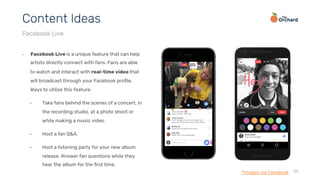
•  Facebook Live is a unique feature that can help
artists directly connect with fans. Fans are able
to watch and interact with real-time video that
will broadcast through your Facebook profile.
Ways to utilize this feature:
•  Take fans behind the scenes of a concert, in
the recording studio, at a photo shoot or
while making a music video.
•  Host a fan Q&A.
•  Host a listening party for your new album
release. Answer fan questions while they
hear the album for the first time.
Content Ideas
Facebook Live
*Images via Facebook
Not quite an image or a video, a GIF is a great way to help enhance your
post with visual content
•  Facebook supports GIF links from external sites (Giphy, Imgur, Tumblr,
and others). Paste the link or GIF file into a post and Facebook will
animate the GIF once the post has been published. It will then
automatically play in News Feeds.
•  You can even update your profile picture to a looping 7 second video!
29
Content Ideas
GIF Sharing
30
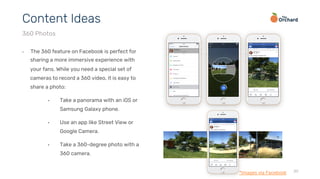
•  The 360 feature on Facebook is perfect for
sharing a more immersive experience with
your fans. While you need a special set of
cameras to record a 360 video, it is easy to
share a photo:
•  Take a panorama with an iOS or
Samsung Galaxy phone.
•  Use an app like Street View or
Google Camera.
•  Take a 360-degree photo with a
360 camera.
Content Ideas
360 Photos
*Images via Facebook
Fans will easily discover your 360 content with the 360 icon that appears over the image
before interaction
When to use:
•  Concerts or festivals
•  While in the studio alerting fans you are recording music
•  At rehearsal
•  Share your favorite spots on tour
31
Content Ideas
360 photo
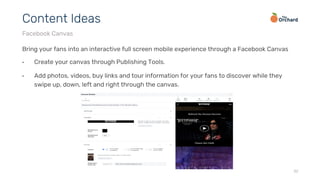
Bring your fans into an interactive full screen mobile experience through a Facebook Canvas
•  Create your canvas through Publishing Tools.
•  Add photos, videos, buy links and tour information for your fans to discover while they
swipe up, down, left and right through the canvas.
32
Content Ideas
Facebook Canvas
33
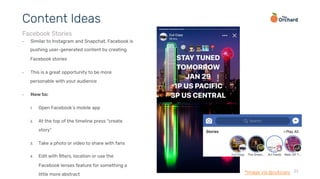
•  Similar to Instagram and Snapchat, Facebook is
pushing user-generated content by creating
Facebook stories
•  This is a great opportunity to be more
personable with your audience
•  How to:
1.  Open Facebook’s mobile app
2.  At the top of the timeline press “create
story”
3.  Take a photo or video to share with fans
4.  Edit with filters, location or use the
Facebook lenses feature for something a
little more abstract
Content Ideas
Facebook Stories
*Image via @cutcopy
34
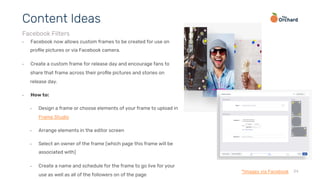
•  Facebook now allows custom frames to be created for use on
profile pictures or via Facebook camera.
•  Create a custom frame for release day and encourage fans to
share that frame across their profile pictures and stories on
release day.
•  How to:
•  Design a frame or choose elements of your frame to upload in
Frame Studio
•  Arrange elements in the editor screen
•  Select an owner of the frame (which page this frame will be
associated with)
•  Create a name and schedule for the frame to go live for your
use as well as all of the followers on of the page
Content Ideas
Facebook Filters
*Images via Facebook
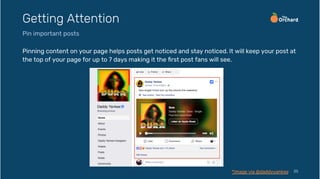
Pinning content on your page helps posts get noticed and stay noticed. It will keep your post at
the top of your page for up to 7 days making it the first post fans will see.
35
Getting Attention
Pin important posts
*Image via @daddyyankee
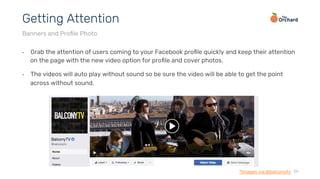
•  Grab the attention of users coming to your Facebook profile quickly and keep their attention
on the page with the new video option for profile and cover photos.
•  The videos will auto play without sound so be sure the video will be able to get the point
across without sound.
36
Getting Attention
Banners and Profile Photo
*Images via @balconytv
37
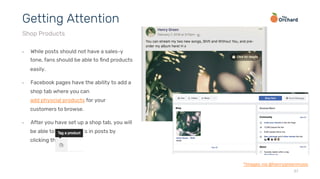
•  While posts should not have a sales-y
tone, fans should be able to find products
easily.
•  Facebook pages have the ability to add a
shop tab where you can
add physcial products for your
customers to browse.
•  After you have set up a shop tab, you will
be able to tag products in posts by
clicking this icon:
Getting Attention
Shop Products
*Images via @henrygreenmusic
twitter.com/orchtweets facebook.com/theorchard linkedin.com/company/the-orchard
Thank You

Facebook Best Practices 2018

  • 1.
  • 2.
    •  Introduction •  UnderstandingThe Feed •  Housekeeping •  Do’s and Don’ts •  Content Ideas •  Getting Attention 2 Contents
  • 3.
    Facebook is stillholding out as the leading social platform user base with 2.07 billion monthly active users. Holding the largest social media population of American adults on social media (68% of U.S. adults – mainly millennials), and 67% of the 12-17 year old demographic, it is a no brainer to have a presence on the platform. Facebook can be complicated, but successfully managing a page becomes a lot easier thanks to simple changes you can make in your content strategy. This guide will show you how to improve your Facebook posts and go from “stressful” to social” 3 Introduction *stats from Hootsuit
  • 4.
    Facebook has beenstudying the way we interact with content in our feeds for years. Just like how our habits and preferences online change overtime, Facebook changes the quality and quantity of content it displays in the feed. Prioritizing the types of content and fan interactions the current algorithm favors will help increase feed impressions. 4 Understanding The Feed
  • 5.
    5 What’s IN •  FacebookLive •  Native Video Content •  Using link-shares •  Facebook Reactions •  Posting News •  Tagging Other Relevant Pages •  Creating event Pages •  Gif Sharing What’s OUT •  Using photos for every post •  “Like-bait” •  Frequently circulated content •  Text status posts from pages •  Sales language Understanding The Feed
  • 6.
    •  Posts receivinga lot of engagement •  Posts most relevant to each individual user •  Trending conversations •  Facebook Live •  Share-ability •  Informative posts •  Entertainment posts •  Videos posted natively 6 Understanding The Feed What does the Facebook news feed favor?
  • 7.
    Facebook Insights area great way to track the performance of your Facebook page and will help you drive strategic marketing decisions based on audience behavior 7 Analytics Facebook Insights
  • 8.
    •  Add abuy link in your About section for easy access •  Pin post with album release information to top of profile •  Use a profile picture with people in it – fans are more likely to pay attention to faces than logos •  Include new/recent release info in a cover photo/video – it’s prime real estate! •  Add a concert app (Bandsintown or Songkick) to make sure fans can always find tour dates without digging through old posts. 8 Housekeeping Clean up! Take simple steps to improve your Facebook presence and make your page more effective
  • 9.
    Is this content… ü Relevant to my page ü  Timely? ü  From a trusted source or safe website? ü  Interesting enough for others to share? If you answer yes to all the above, then you’re ready to post! The following slides have tips for improving your updates 9 Do’s and Don’ts Before making a post on Facebook, ask these questions:
  • 10.
    10 DO: •  Tag otherpages mentioned in your posts. If your content is relevant to fans of the other pages, Facebook may show your post in those fans’ feeds •  Tag other artists, festival names, venues, retailers, and websites/blogs/magazines Do’s and Don’ts Tagging DON’T: •  Introduce unrelated tags to try to reach others pages’ fans. Spam tactics won’t work here, as Facebook’s algorithm is looking solely for relevant content to share *image via TOKiMONSTA
  • 11.
    11 DO: •  Use link-shares.Facebook’s focus on making the feed a better news source for users means their algorithm favors links •  Use the link format when premiering with media partners Do’s and Don’ts Link-Sharing DON’T: •  Delete link-share info and use a text URL. Keep the automatically populated info •  Post a bare link or photo with a link in the caption. Rich link posts are clicked on at twice the rate of captions and plain links *via The Shacks
  • 12.
    12 DO: •  Share importantnews across multiple platforms. Some people like Twitter, while some are always checking Instagram. Having info on every platform extends your reach and keeps you from missing fans. Do’s and Don’ts Content sharing DON’T: •  Sync all your services together to post from one source. Social networks don’t all communicate the same way. Prevent broken tags, poor formatting, and useless links by taking a minute to make separate posts. *via Sharon Jones *via Sharon Jones
  • 13.
    13 DO: •  Post aboutindividual shows. Tag the venue to increase post reach Do’s and Don’ts Event Sharing DON’T: •  Share show posts with everyone. Geotarget by city or state to make sure fans see content that’s relevant to them. Geotargeting will let you be more specific with your copy and avoid clutter *image via Thy Are Is Murder
  • 14.
    14 DO: •  Join orcreate conversations by tracking trending topics and using relevant hashtags Do’s and Don’ts Joining Hashtag Conversations DON’T: •  Go overboard on the hashtags. Limit it to one per post and only use hashtags that are relevant, like an album title used throughout your marketing campaign or a common hashtag like #tbt *image via TOKiMONSTA
  • 15.
    15 DO: •  Use the“reply” feature to answer fans within 24 hours. It is important to connect with fans to develop and keep a strong fan base. Do’s and Don’ts Interacting with fans DON’T: •  Use Facebook like Twitter. Spread posts out and have distinct purposes for making them. Contain conversations with fans to the comments section of a post *image via RJD2
  • 16.
    16 DO: •  Use Facebook’scrossposting video to reach new, relevant audiences. This makes it possible to use the same video in a new post and see aggregated insights for posts across all pages Do’s and Don’ts Crossposting Video DON’T: •  Rely on an outside video link to have a high audience reach. Facebook seems to favor native videos over outside videos. To bring fans to a page such as YouTube, share a 30 second teaser natively with the link to the full video in the description *image via adweek
  • 17.
    17 DO: •  Replace retail/salesposts with videos •  Go live on Facebook with a buy link to the album in the description. Start a conversation around the record, sharing fun facts, inspiration behind the music, answering fan questions etc. Do’s and Don’ts Retail Posts DON’T: •  Simply tell fans to go buy your record with text and a link to the retailer. Facebook has de-emphasized the sales language-y post, so these posts are appearing less in the newsfeed *image via Michael Bolton
  • 18.
    18 DO: •  Share videosthat are HD and use text. This has been shown to grab Facebook users attention and encourage engagement. Do’s and Don’ts Videos DON’T: •  Rely on a video’s audio to engage fans. Videos uploaded to Facebook can auto- play without sound *image via Tora
  • 19.
    19 DO: •  Ensure thatwebsites can share to Facebook well •  Use proper Open Graph Tags: FB Tags Best Practices •  Share links to premiers rather than caption photos •  Allows for beautiful, full-image posts •  Optimize images on your site: FB Image Best Practices •  Ensure a full-size shared image •  Preview your shares with the Debug Tool Do’s and Don’ts Websites DON’T: •  Post content without optimizing it for the platforms you’re sharing it on. Great looking content will be more engaging and ultimately be more share-able
  • 20.
    20 DO: •  Create Facebookevent pages for important events. •  Fans will be alerted when there is an event near them and again as a reminder when the date gets closer •  Fans can also see which of their friends are going as well as invite friends that may be interested Do’s and Don’ts Event Pages *image via TLC
  • 21.
    Coming up withFacebook content is the biggest struggle for most artists and their teams. We have suggestions to better plan and prepare for your Facebook posts. 21 Content Ideas
  • 22.
    Sticking to arough content schedule keeps your options from getting overwhelming 22 Content Ideas Make a schedule M T W R F S Su
  • 23.
    Fans want toknow about you. Having something to post on Facebook can be as easy as: •  Photos of gear backstage at a show •  A cross-posted Instagram video from the van/bus •  A funny GIF •  A link to a favorite song or video with a little background on why it’s important/influential The next slides have a list of different options for when you’re stuck… 23 Content Ideas Never doubt that you’re interesting
  • 24.
    24 •  Album /single art •  Video stills •  Merch •  Venue during soundcheck •  Backstage •  Gear •  Screenshots of tracking •  Crowd at a show – encourage fans to tag themselves! •  Short announcements •  Album Trailer •  Music Video Teasers •  Answers to fan questions •  Backstage tours •  Studio tours •  Acoustic versions of songs •  In-feed Track Stream •  Themed playlists; setlists, riding in the van, songs that inspired the new album etc. •  Recorded greeting / update Content Ideas Photos / Images Audio Video
  • 25.
    25 •  Schedule videosto automate your content calendar •  When video is uploaded click the arrow next to “Publish” and choose “Schedule Post” from there you can select the date and the time. •  Set expiration date •  If an expiration date is necessary for your video, once the video has expired it will no longer be available on your timeline or anywhere else. This feature may come in handy when there are licensing restrictions. Content Ideas Uploading Facebook Video
  • 26.
    •  Facebook videosautomatically play on users newsfeed without sound. Adding captions will help capture fans attention until the sound is turned on. •  On computers, users can choose to turn captions on by clicking “CC” at the bottom right corner. Mobile Facebook video users will automatically have captions if the device is on mute. 26 Content Ideas Add captions to Facebook video
  • 27.
    Find your videolibrary under “Publishing Tools” at the top of the artist page. This is where you can manage and edit all videos. 27 Content Ideas Managing Your Facebook Videos
  • 28.
    28 •  Facebook Liveis a unique feature that can help artists directly connect with fans. Fans are able to watch and interact with real-time video that will broadcast through your Facebook profile. Ways to utilize this feature: •  Take fans behind the scenes of a concert, in the recording studio, at a photo shoot or while making a music video. •  Host a fan Q&A. •  Host a listening party for your new album release. Answer fan questions while they hear the album for the first time. Content Ideas Facebook Live *Images via Facebook
  • 29.
    Not quite animage or a video, a GIF is a great way to help enhance your post with visual content •  Facebook supports GIF links from external sites (Giphy, Imgur, Tumblr, and others). Paste the link or GIF file into a post and Facebook will animate the GIF once the post has been published. It will then automatically play in News Feeds. •  You can even update your profile picture to a looping 7 second video! 29 Content Ideas GIF Sharing
  • 30.
    30 •  The 360feature on Facebook is perfect for sharing a more immersive experience with your fans. While you need a special set of cameras to record a 360 video, it is easy to share a photo: •  Take a panorama with an iOS or Samsung Galaxy phone. •  Use an app like Street View or Google Camera. •  Take a 360-degree photo with a 360 camera. Content Ideas 360 Photos *Images via Facebook
  • 31.
    Fans will easilydiscover your 360 content with the 360 icon that appears over the image before interaction When to use: •  Concerts or festivals •  While in the studio alerting fans you are recording music •  At rehearsal •  Share your favorite spots on tour 31 Content Ideas 360 photo
  • 32.
    Bring your fansinto an interactive full screen mobile experience through a Facebook Canvas •  Create your canvas through Publishing Tools. •  Add photos, videos, buy links and tour information for your fans to discover while they swipe up, down, left and right through the canvas. 32 Content Ideas Facebook Canvas
  • 33.
    33 •  Similar toInstagram and Snapchat, Facebook is pushing user-generated content by creating Facebook stories •  This is a great opportunity to be more personable with your audience •  How to: 1.  Open Facebook’s mobile app 2.  At the top of the timeline press “create story” 3.  Take a photo or video to share with fans 4.  Edit with filters, location or use the Facebook lenses feature for something a little more abstract Content Ideas Facebook Stories *Image via @cutcopy
  • 34.
    34 •  Facebook nowallows custom frames to be created for use on profile pictures or via Facebook camera. •  Create a custom frame for release day and encourage fans to share that frame across their profile pictures and stories on release day. •  How to: •  Design a frame or choose elements of your frame to upload in Frame Studio •  Arrange elements in the editor screen •  Select an owner of the frame (which page this frame will be associated with) •  Create a name and schedule for the frame to go live for your use as well as all of the followers on of the page Content Ideas Facebook Filters *Images via Facebook
  • 35.
    Pinning content onyour page helps posts get noticed and stay noticed. It will keep your post at the top of your page for up to 7 days making it the first post fans will see. 35 Getting Attention Pin important posts *Image via @daddyyankee
  • 36.
    •  Grab theattention of users coming to your Facebook profile quickly and keep their attention on the page with the new video option for profile and cover photos. •  The videos will auto play without sound so be sure the video will be able to get the point across without sound. 36 Getting Attention Banners and Profile Photo *Images via @balconytv
  • 37.
    37 •  While postsshould not have a sales-y tone, fans should be able to find products easily. •  Facebook pages have the ability to add a shop tab where you can add physcial products for your customers to browse. •  After you have set up a shop tab, you will be able to tag products in posts by clicking this icon: Getting Attention Shop Products *Images via @henrygreenmusic
  • 38.