Oleksandr Zinevych
Software Engineer at Datamart inc.
Chrome Extensions
▪ What is Chrome Extensions
▪ Common Architecture
▪ How all parts connects together
▪ Chrome Javascript API’s
▪ Known issues, and possible workarounds
Agenda
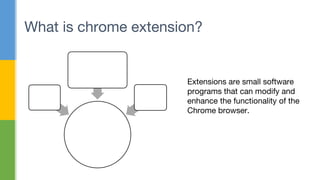
What is chrome extension?
Extensions are small software
programs that can modify and
enhance the functionality of the
Chrome browser.
Chrome
Extension
(.crx)
CSS
JS
HTM
L
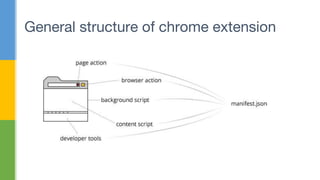
General structure of chrome extension
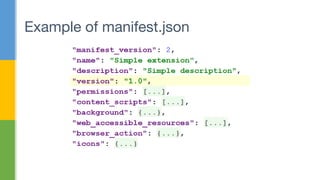
Example of manifest.json
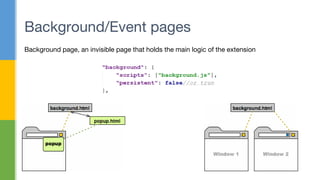
Background/Event pages
Background page, an invisible page that holds the main logic of the extension
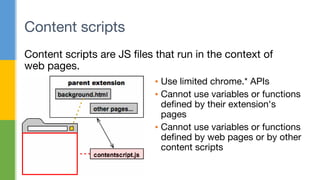
Content scripts
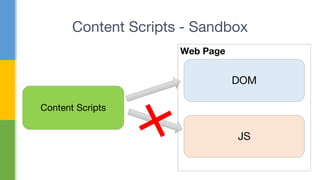
Content scripts are JS files that run in the context of
web pages.
▪ Use limited chrome.* APIs
▪ Cannot use variables or functions
defined by their extension's
pages
▪ Cannot use variables or functions
defined by web pages or by other
content scripts
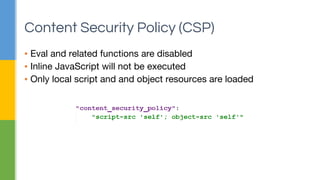
▪ Eval and related functions are disabled
▪ Inline JavaScript will not be executed
▪ Only local script and and object resources are loaded
Content Security Policy (CSP)
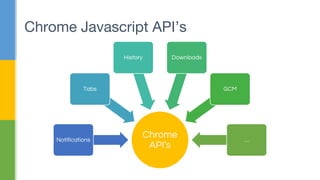
Chrome Javascript API’s
Chrome
API’s
Notifications
Tabs
History Downloads
GCM
…
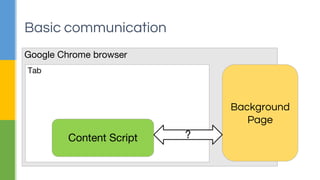
Basic communication
Google Chrome browser
Background
Page
Tab
Content Script ?
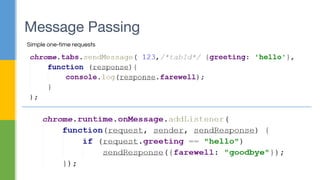
Message Passing
Simple one-time requests
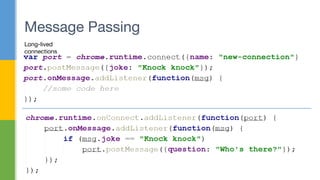
Message Passing
Long-lived
connections
Content Scripts - Sandbox
Content Scripts
Web Page
DOM
JS
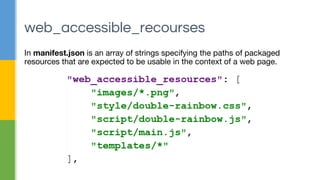
In manifest.json is an array of strings specifying the paths of packaged
resources that are expected to be usable in the context of a web page.
web_accessible_recourses
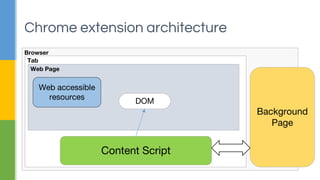
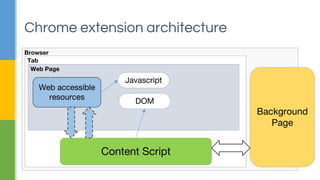
Chrome extension architecture
Browser
Background
Page
Tab
Web Page
Content Script
Web accessible
resources
DOM
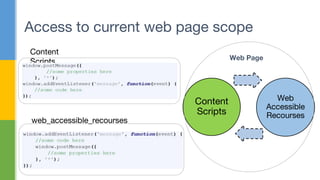
Access to current web page scope
Content
Scripts
Web
Accessible
Recourses
Web Page
Content
Scripts
web_accessible_recourses
Chrome extension architecture
Browser
Background
Page
Tab
Web Page
Content Script
Web accessible
resources
Javascript
DOM
Tips and tricks
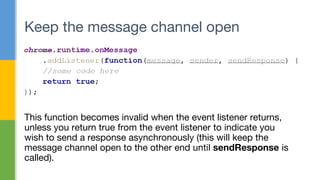
This function becomes invalid when the event listener returns,
unless you return true from the event listener to indicate you
wish to send a response asynchronously (this will keep the
message channel open to the other end until sendResponse is
called).
Keep the message channel open
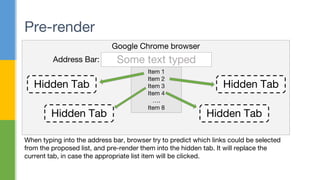
Pre-render
Google Chrome browser
Some text typed
Item 1
Item 2
Item 3
Item 4
….
Item 8
Hidden Tab
When typing into the address bar, browser try to predict which links could be selected
from the proposed list, and pre-render them into the hidden tab. It will replace the
current tab, in case the appropriate list item will be clicked.
Hidden Tab Hidden Tab
Hidden Tab
Address Bar:
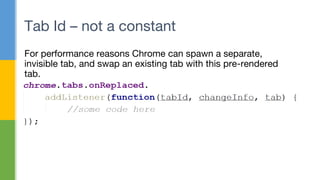
For performance reasons Chrome can spawn a separate,
invisible tab, and swap an existing tab with this pre-rendered
tab.
Tab Id – not a constant
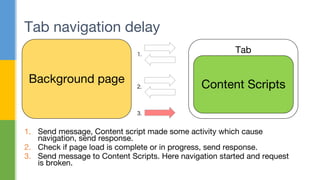
Tab navigation delay
Background page
Tab
Content Scripts
1.
2.
3.
1. Send message, Content script made some activity which cause
navigation, send response.
2. Check if page load is complete or in progress, send response.
3. Send message to Content Scripts. Here navigation started and request
is broken.
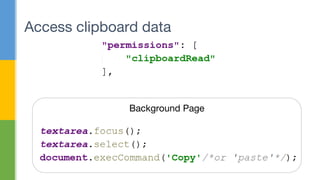
Access clipboard data
Background Page
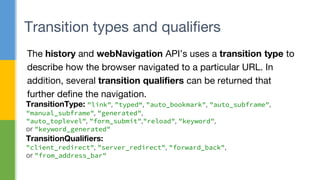
The history and webNavigation API’s uses a transition type to
describe how the browser navigated to a particular URL. In
addition, several transition qualifiers can be returned that
further define the navigation.
Transition types and qualifiers
TransitionType: "link", "typed“, "auto_bookmark", "auto_subframe",
"manual_subframe", "generated",
"auto_toplevel", "form_submit","reload", "keyword",
or "keyword_generated"
TransitionQualifiers:
"client_redirect", "server_redirect", "forward_back",
or "from_address_bar"
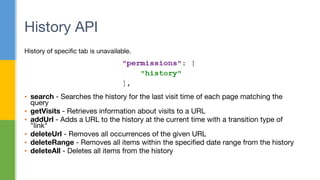
History of specific tab is unavailable.
▪ search - Searches the history for the last visit time of each page matching the
query
▪ getVisits - Retrieves information about visits to a URL
▪ addUrl - Adds a URL to the history at the current time with a transition type of
"link"
▪ deleteUrl - Removes all occurrences of the given URL
▪ deleteRange - Removes all items within the specified date range from the history
▪ deleteAll - Deletes all items from the history
History API
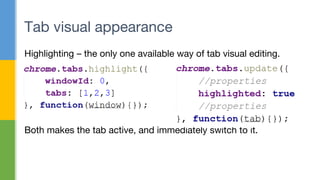
Highlighting – the only one available way of tab visual editing.
Both makes the tab active, and immediately switch to it.
Tab visual appearance
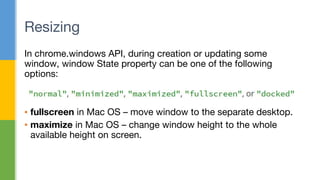
In chrome.windows API, during creation or updating some
window, window State property can be one of the following
options:
▪ fullscreen in Mac OS – move window to the separate desktop.
▪ maximize in Mac OS – change window height to the whole
available height on screen.
Resizing
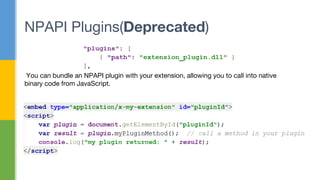
NPAPI Plugins(Deprecated)
You can bundle an NPAPI plugin with your extension, allowing you to call into native
binary code from JavaScript.
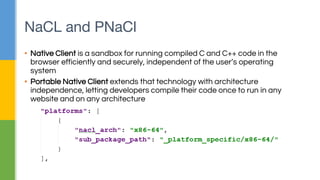
NaCL and PNaCl
▪ Native Client is a sandbox for running compiled C and C++ code in the
browser efficiently and securely, independent of the user’s operating
system
▪ Portable Native Client extends that technology with architecture
independence, letting developers compile their code once to run in any
website and on any architecture
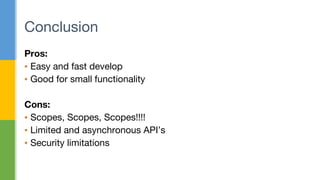
Pros:
▪ Easy and fast develop
▪ Good for small functionality
Cons:
▪ Scopes, Scopes, Scopes!!!!
▪ Limited and asynchronous API’s
▪ Security limitations
Conclusion
Thanks!

Chrome extensions

  • 1.
    Oleksandr Zinevych Software Engineerat Datamart inc. Chrome Extensions
  • 2.
    ▪ What isChrome Extensions ▪ Common Architecture ▪ How all parts connects together ▪ Chrome Javascript API’s ▪ Known issues, and possible workarounds Agenda
  • 3.
    What is chromeextension? Extensions are small software programs that can modify and enhance the functionality of the Chrome browser. Chrome Extension (.crx) CSS JS HTM L
  • 4.
    General structure ofchrome extension
  • 5.
  • 6.
    Background/Event pages Background page,an invisible page that holds the main logic of the extension
  • 7.
    Content scripts Content scriptsare JS files that run in the context of web pages. ▪ Use limited chrome.* APIs ▪ Cannot use variables or functions defined by their extension's pages ▪ Cannot use variables or functions defined by web pages or by other content scripts
  • 8.
    ▪ Eval andrelated functions are disabled ▪ Inline JavaScript will not be executed ▪ Only local script and and object resources are loaded Content Security Policy (CSP)
  • 9.
  • 10.
    Basic communication Google Chromebrowser Background Page Tab Content Script ?
  • 11.
  • 12.
  • 13.
    Content Scripts -Sandbox Content Scripts Web Page DOM JS
  • 14.
    In manifest.json isan array of strings specifying the paths of packaged resources that are expected to be usable in the context of a web page. web_accessible_recourses
  • 15.
    Chrome extension architecture Browser Background Page Tab WebPage Content Script Web accessible resources DOM
  • 16.
    Access to currentweb page scope Content Scripts Web Accessible Recourses Web Page Content Scripts web_accessible_recourses
  • 17.
    Chrome extension architecture Browser Background Page Tab WebPage Content Script Web accessible resources Javascript DOM
  • 18.
  • 19.
    This function becomesinvalid when the event listener returns, unless you return true from the event listener to indicate you wish to send a response asynchronously (this will keep the message channel open to the other end until sendResponse is called). Keep the message channel open
  • 20.
    Pre-render Google Chrome browser Sometext typed Item 1 Item 2 Item 3 Item 4 …. Item 8 Hidden Tab When typing into the address bar, browser try to predict which links could be selected from the proposed list, and pre-render them into the hidden tab. It will replace the current tab, in case the appropriate list item will be clicked. Hidden Tab Hidden Tab Hidden Tab Address Bar:
  • 21.
    For performance reasonsChrome can spawn a separate, invisible tab, and swap an existing tab with this pre-rendered tab. Tab Id – not a constant
  • 22.
    Tab navigation delay Backgroundpage Tab Content Scripts 1. 2. 3. 1. Send message, Content script made some activity which cause navigation, send response. 2. Check if page load is complete or in progress, send response. 3. Send message to Content Scripts. Here navigation started and request is broken.
  • 23.
  • 24.
    The history andwebNavigation API’s uses a transition type to describe how the browser navigated to a particular URL. In addition, several transition qualifiers can be returned that further define the navigation. Transition types and qualifiers TransitionType: "link", "typed“, "auto_bookmark", "auto_subframe", "manual_subframe", "generated", "auto_toplevel", "form_submit","reload", "keyword", or "keyword_generated" TransitionQualifiers: "client_redirect", "server_redirect", "forward_back", or "from_address_bar"
  • 25.
    History of specifictab is unavailable. ▪ search - Searches the history for the last visit time of each page matching the query ▪ getVisits - Retrieves information about visits to a URL ▪ addUrl - Adds a URL to the history at the current time with a transition type of "link" ▪ deleteUrl - Removes all occurrences of the given URL ▪ deleteRange - Removes all items within the specified date range from the history ▪ deleteAll - Deletes all items from the history History API
  • 26.
    Highlighting – theonly one available way of tab visual editing. Both makes the tab active, and immediately switch to it. Tab visual appearance
  • 27.
    In chrome.windows API,during creation or updating some window, window State property can be one of the following options: ▪ fullscreen in Mac OS – move window to the separate desktop. ▪ maximize in Mac OS – change window height to the whole available height on screen. Resizing
  • 28.
    NPAPI Plugins(Deprecated) You canbundle an NPAPI plugin with your extension, allowing you to call into native binary code from JavaScript.
  • 29.
    NaCL and PNaCl ▪Native Client is a sandbox for running compiled C and C++ code in the browser efficiently and securely, independent of the user’s operating system ▪ Portable Native Client extends that technology with architecture independence, letting developers compile their code once to run in any website and on any architecture
  • 30.
    Pros: ▪ Easy andfast develop ▪ Good for small functionality Cons: ▪ Scopes, Scopes, Scopes!!!! ▪ Limited and asynchronous API’s ▪ Security limitations Conclusion
  • 31.