5S Stage 2 – SET TO ORDER
www.optimumfx.com
Stage 2 – Set In Order
• Arrange things so they are easy to find, to use, and to put
away
– Locate items according to their frequency of use
– Store items together if used together and in the sequence of use
– Make storage places larger than the items stored, for ease of removal and
replacement
– Store tools according to function or product
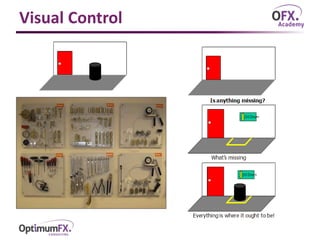
• Use visual controls to show how work is done at a glance
– Where items belong
– How many items belong there
– Details of a standard procedure
– Other information critical to work activities
• Determine best location
• Identify and mark locations
• Register the ‘After 5S’ map
Visual Control
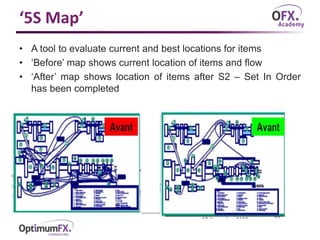
‘5S Map’
• A tool to evaluate current and best locations for items
• ‘Before’ map shows current location of items and flow
• ‘After’ map shows location of items after S2 – Set In Order
has been completed

5S stage 2 - Set to order

  • 1.
    5S Stage 2– SET TO ORDER www.optimumfx.com
  • 2.
    Stage 2 –Set In Order • Arrange things so they are easy to find, to use, and to put away – Locate items according to their frequency of use – Store items together if used together and in the sequence of use – Make storage places larger than the items stored, for ease of removal and replacement – Store tools according to function or product • Use visual controls to show how work is done at a glance – Where items belong – How many items belong there – Details of a standard procedure – Other information critical to work activities • Determine best location • Identify and mark locations • Register the ‘After 5S’ map
  • 3.
  • 4.
    ‘5S Map’ • Atool to evaluate current and best locations for items • ‘Before’ map shows current location of items and flow • ‘After’ map shows location of items after S2 – Set In Order has been completed