MODULE 3

SYSTEM UNIT
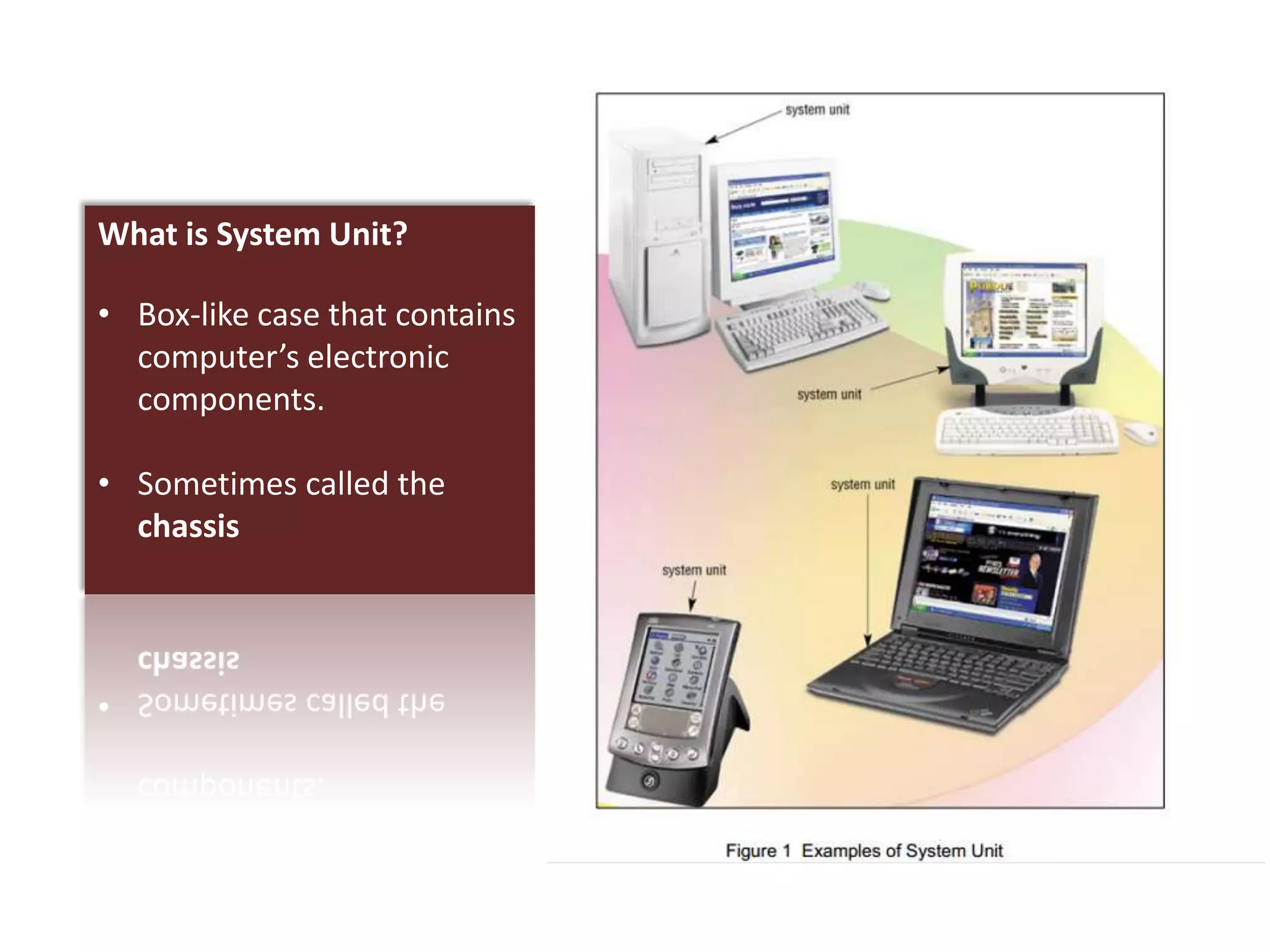
What is System Unit?

• Box-like case that contains
  computer’s electronic
  components.

• Sometimes called the
  chassis
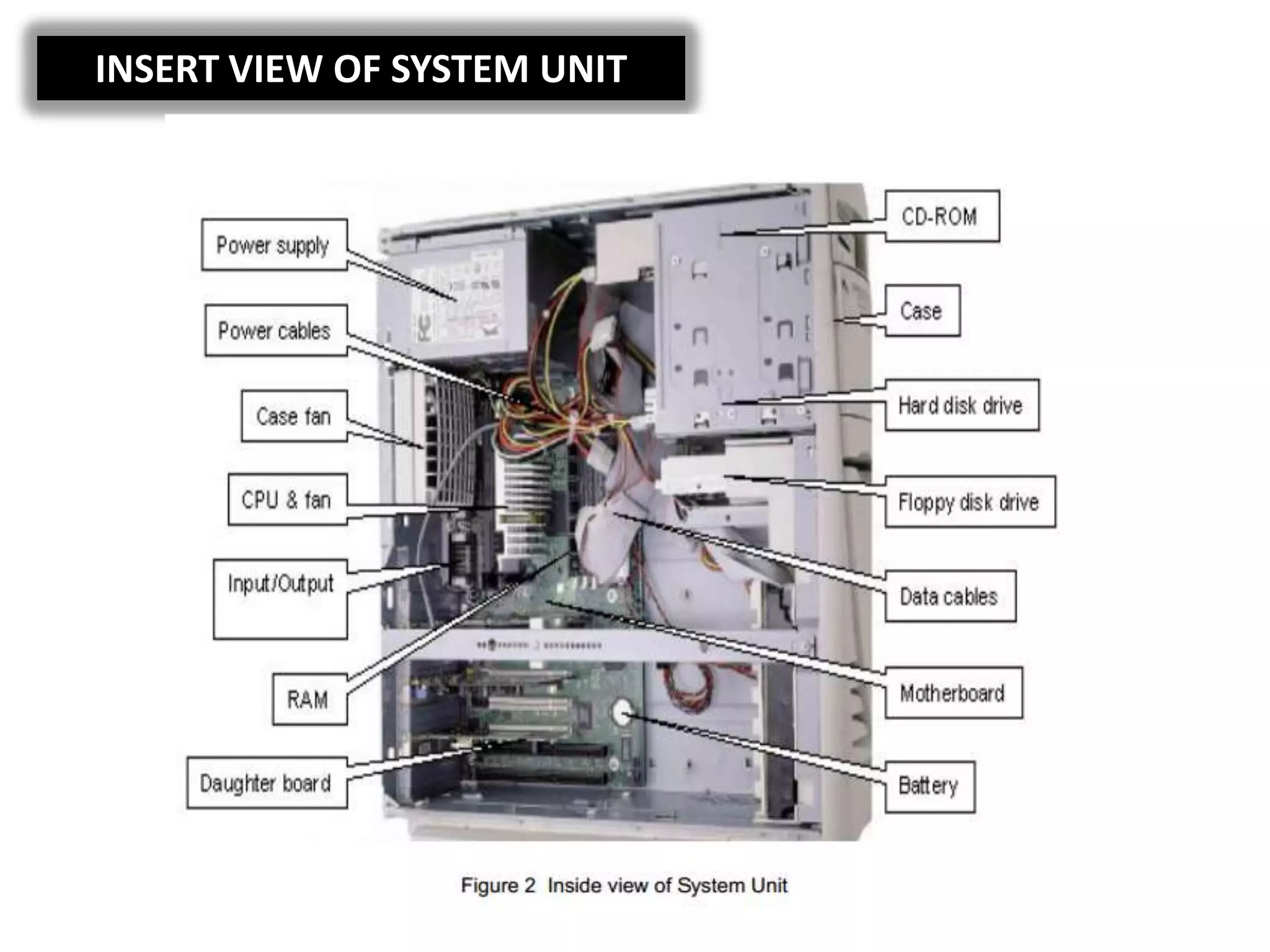
INSERT VIEW OF SYSTEM UNIT
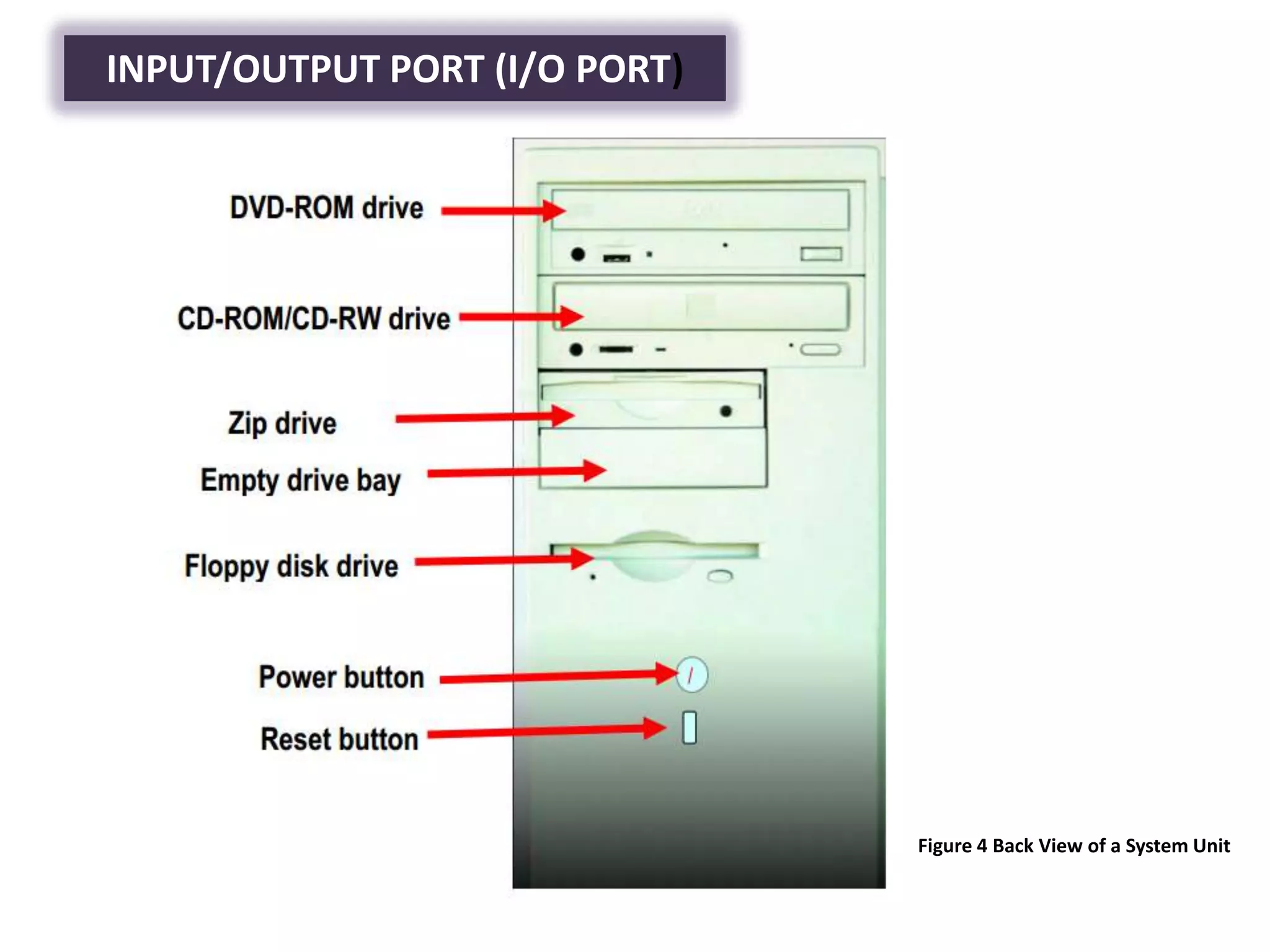
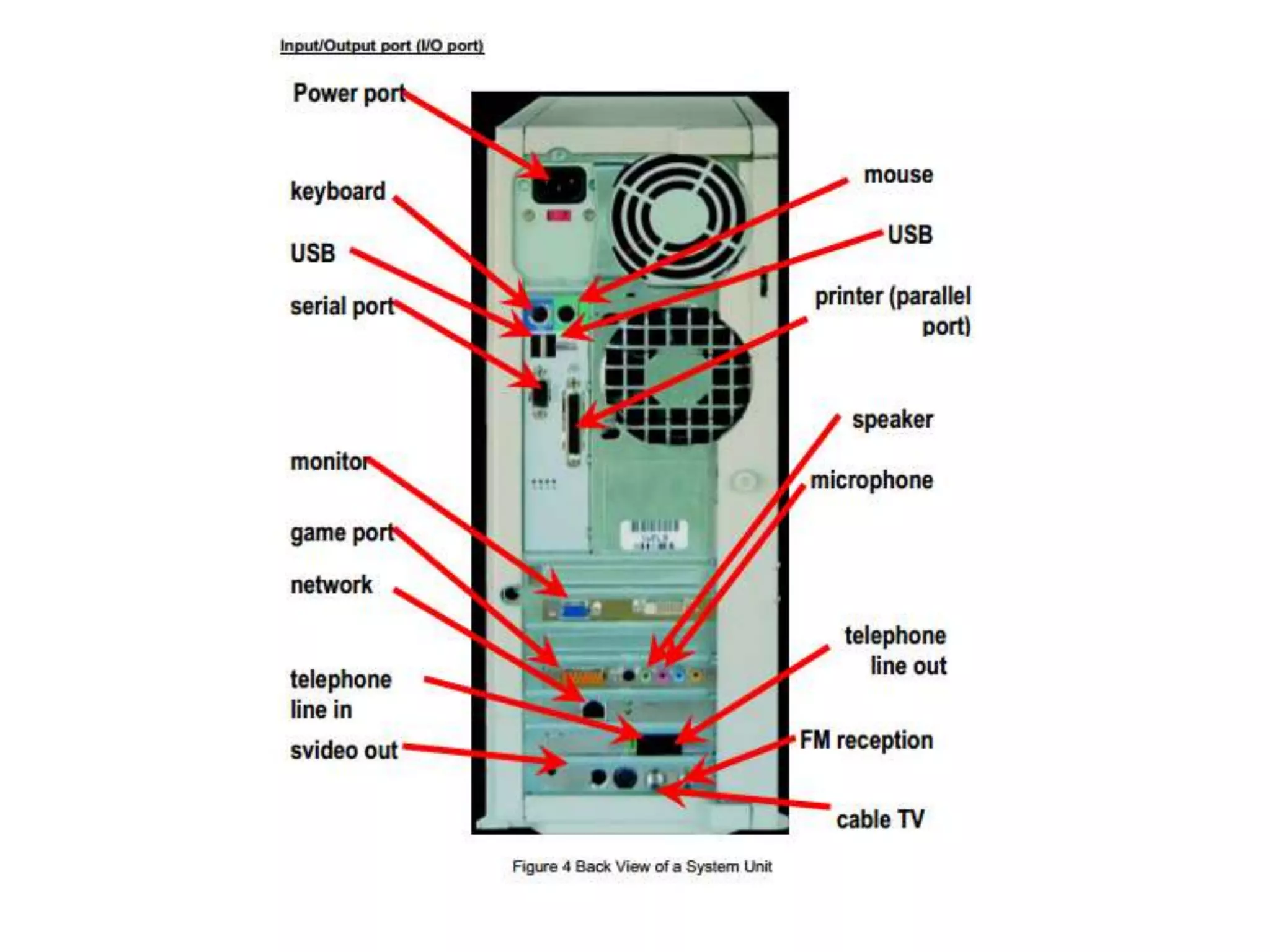
INPUT/OUTPUT PORT (I/O PORT)


                               Figure 4 Back View of a System Unit
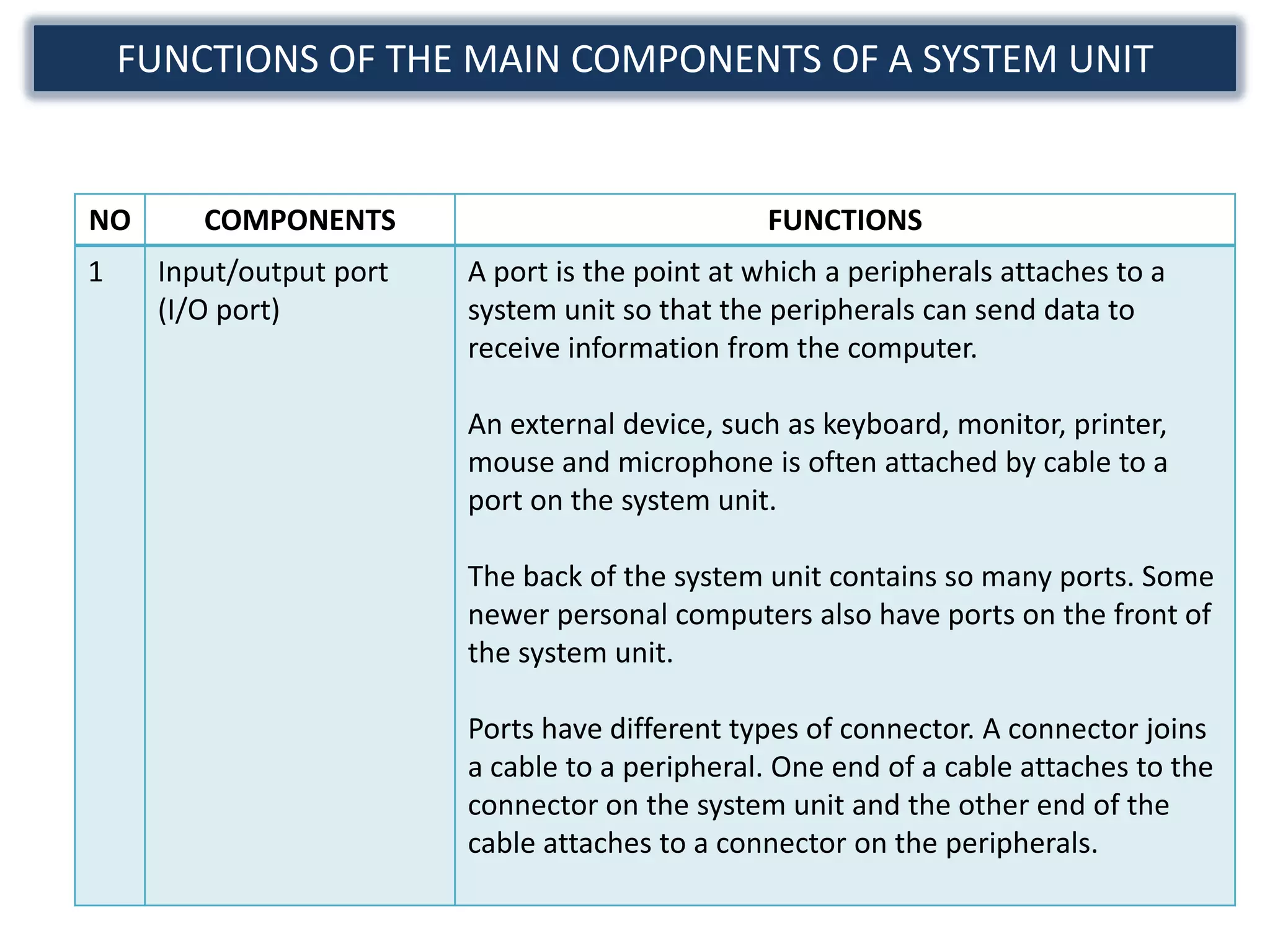
FUNCTIONS OF THE MAIN COMPONENTS OF A SYSTEM UNIT


NO      COMPONENTS                               FUNCTIONS
1    Input/output port   A port is the point at which a peripherals attaches to a
     (I/O port)          system unit so that the peripherals can send data to
                         receive information from the computer.

                         An external device, such as keyboard, monitor, printer,
                         mouse and microphone is often attached by cable to a
                         port on the system unit.

                         The back of the system unit contains so many ports. Some
                         newer personal computers also have ports on the front of
                         the system unit.

                         Ports have different types of connector. A connector joins
                         a cable to a peripheral. One end of a cable attaches to the
                         connector on the system unit and the other end of the
                         cable attaches to a connector on the peripherals.
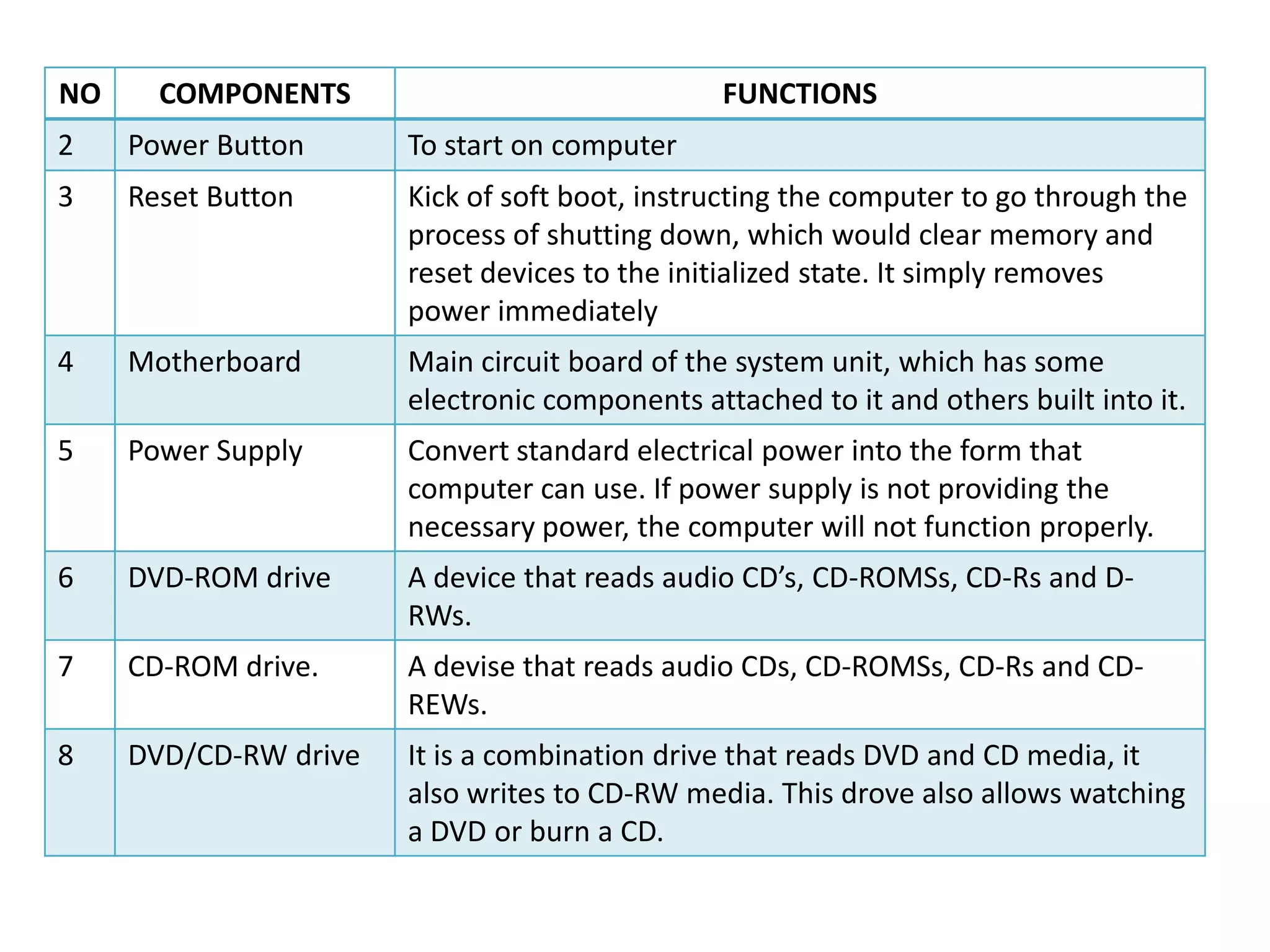
NO     COMPONENTS                               FUNCTIONS
2    Power Button      To start on computer
3    Reset Button      Kick of soft boot, instructing the computer to go through the
                       process of shutting down, which would clear memory and
                       reset devices to the initialized state. It simply removes
                       power immediately
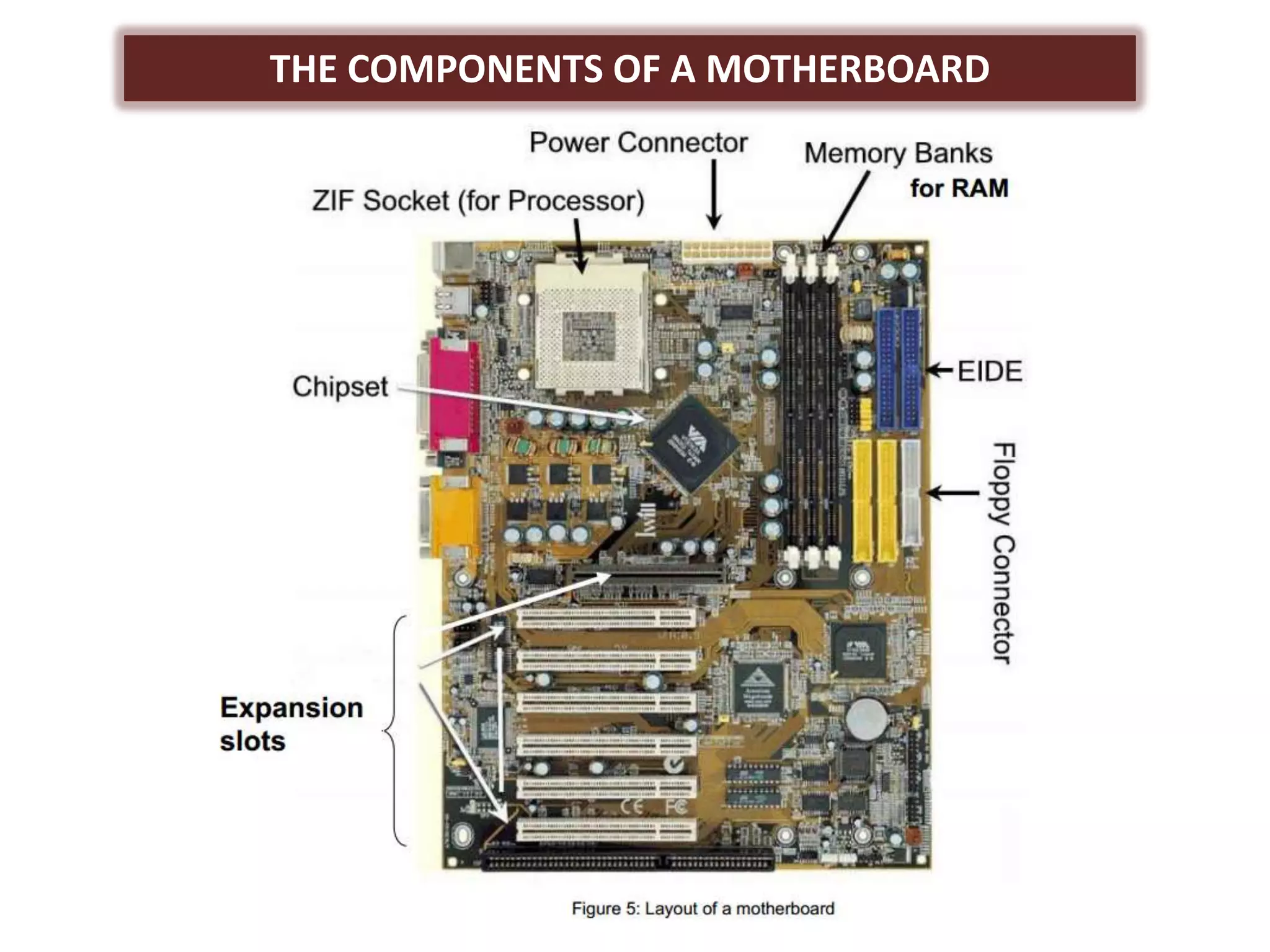
4    Motherboard       Main circuit board of the system unit, which has some
                       electronic components attached to it and others built into it.
5    Power Supply      Convert standard electrical power into the form that
                       computer can use. If power supply is not providing the
                       necessary power, the computer will not function properly.
6    DVD-ROM drive     A device that reads audio CD’s, CD-ROMSs, CD-Rs and D-
                       RWs.
7    CD-ROM drive.     A devise that reads audio CDs, CD-ROMSs, CD-Rs and CD-
                       REWs.
8    DVD/CD-RW drive   It is a combination drive that reads DVD and CD media, it
                       also writes to CD-RW media. This drove also allows watching
                       a DVD or burn a CD.
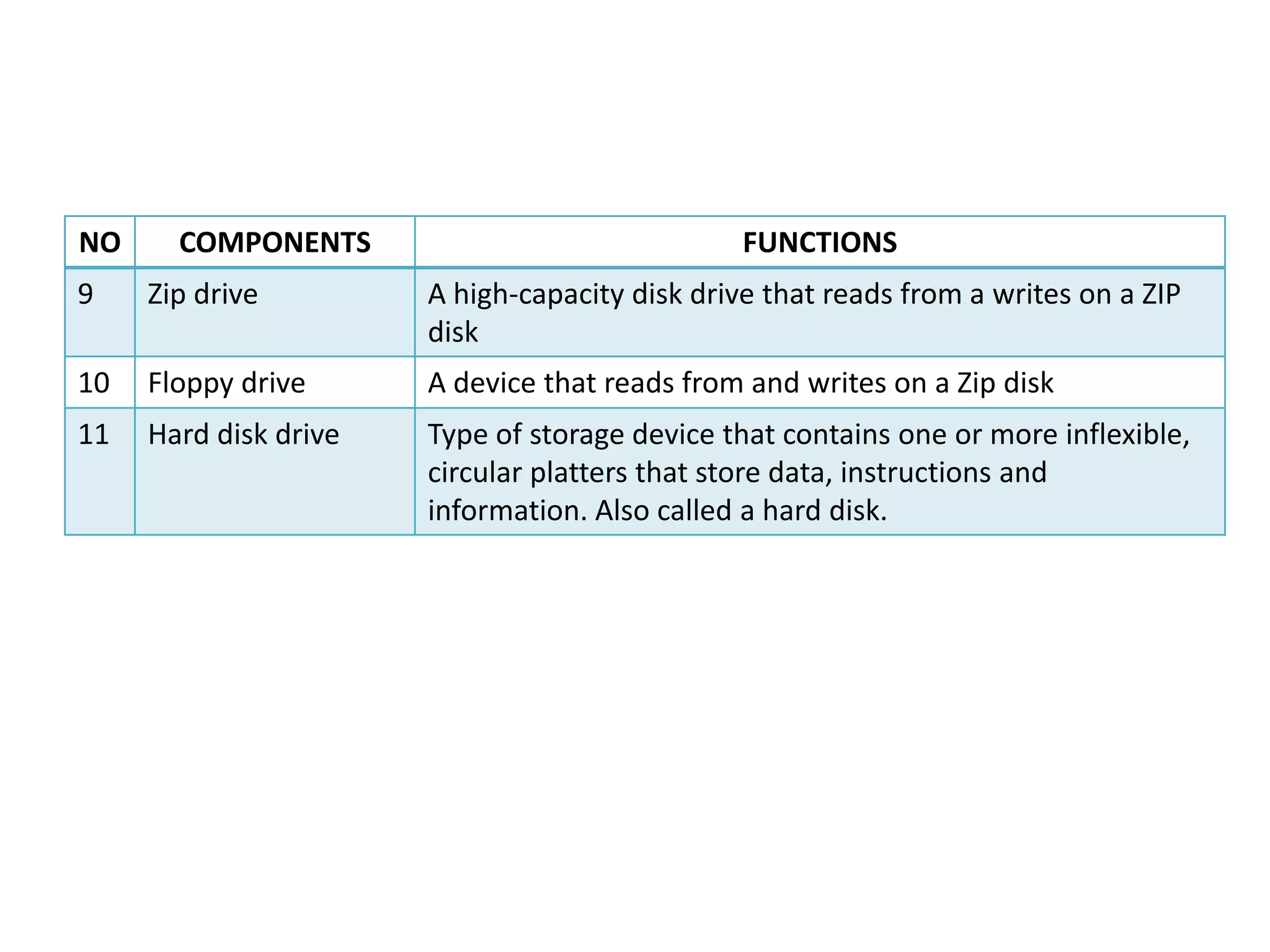
NO     COMPONENTS                               FUNCTIONS
9    Zip drive         A high-capacity disk drive that reads from a writes on a ZIP
                       disk
10   Floppy drive      A device that reads from and writes on a Zip disk
11   Hard disk drive   Type of storage device that contains one or more inflexible,
                       circular platters that store data, instructions and
                       information. Also called a hard disk.
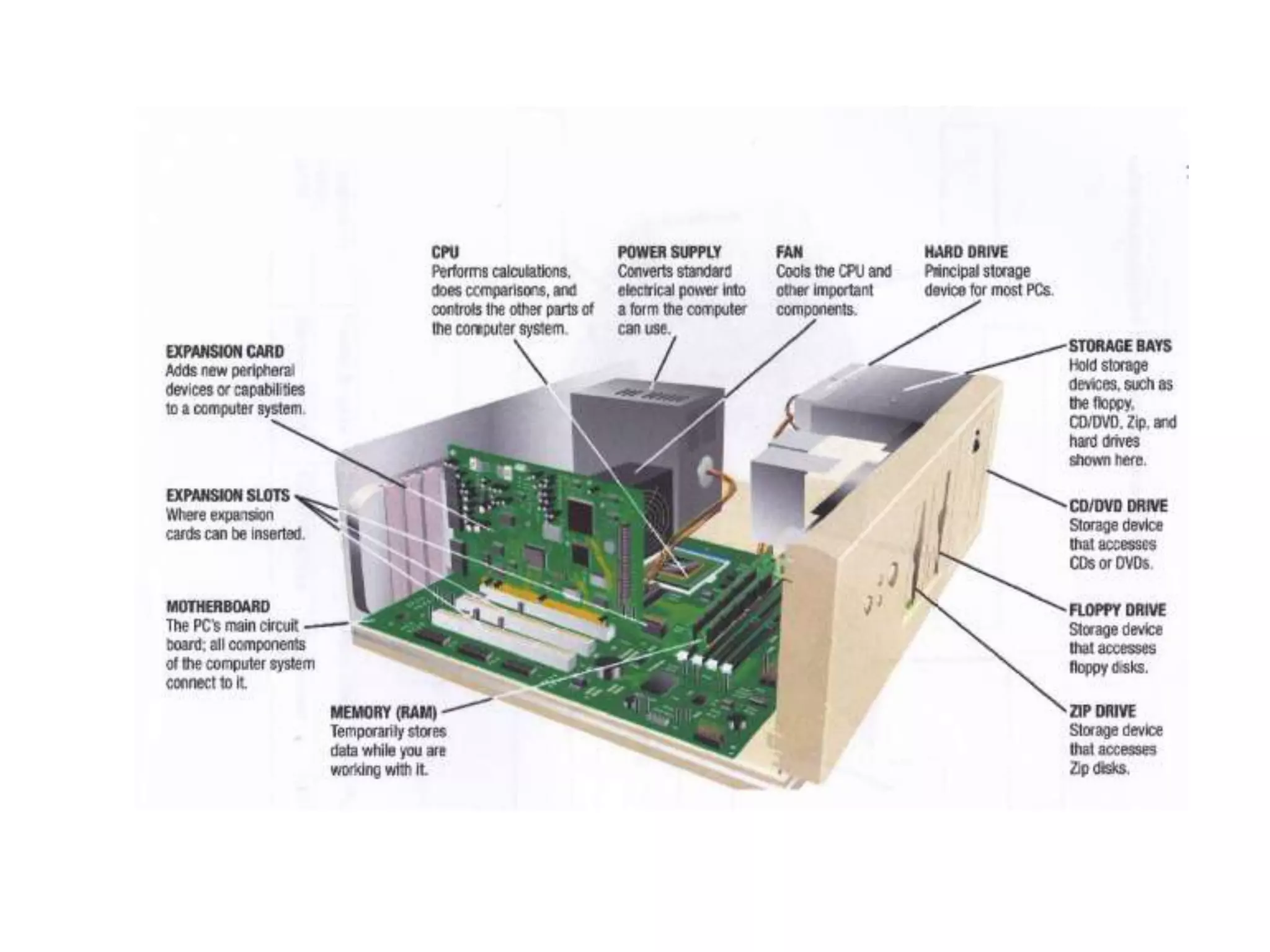
THE COMPONENTS OF A MOTHERBOARD
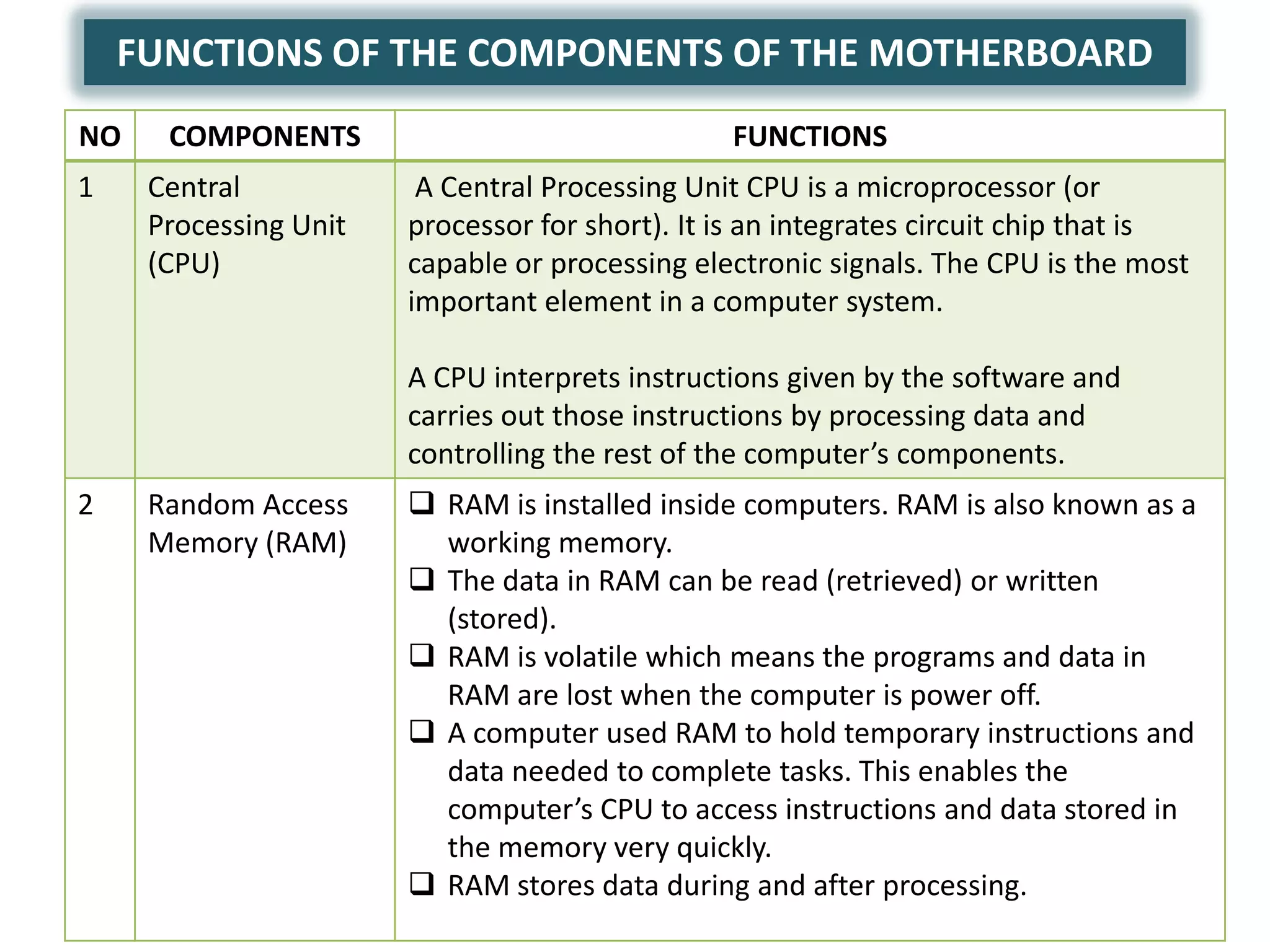
FUNCTIONS OF THE COMPONENTS OF THE MOTHERBOARD
NO    COMPONENTS                                FUNCTIONS
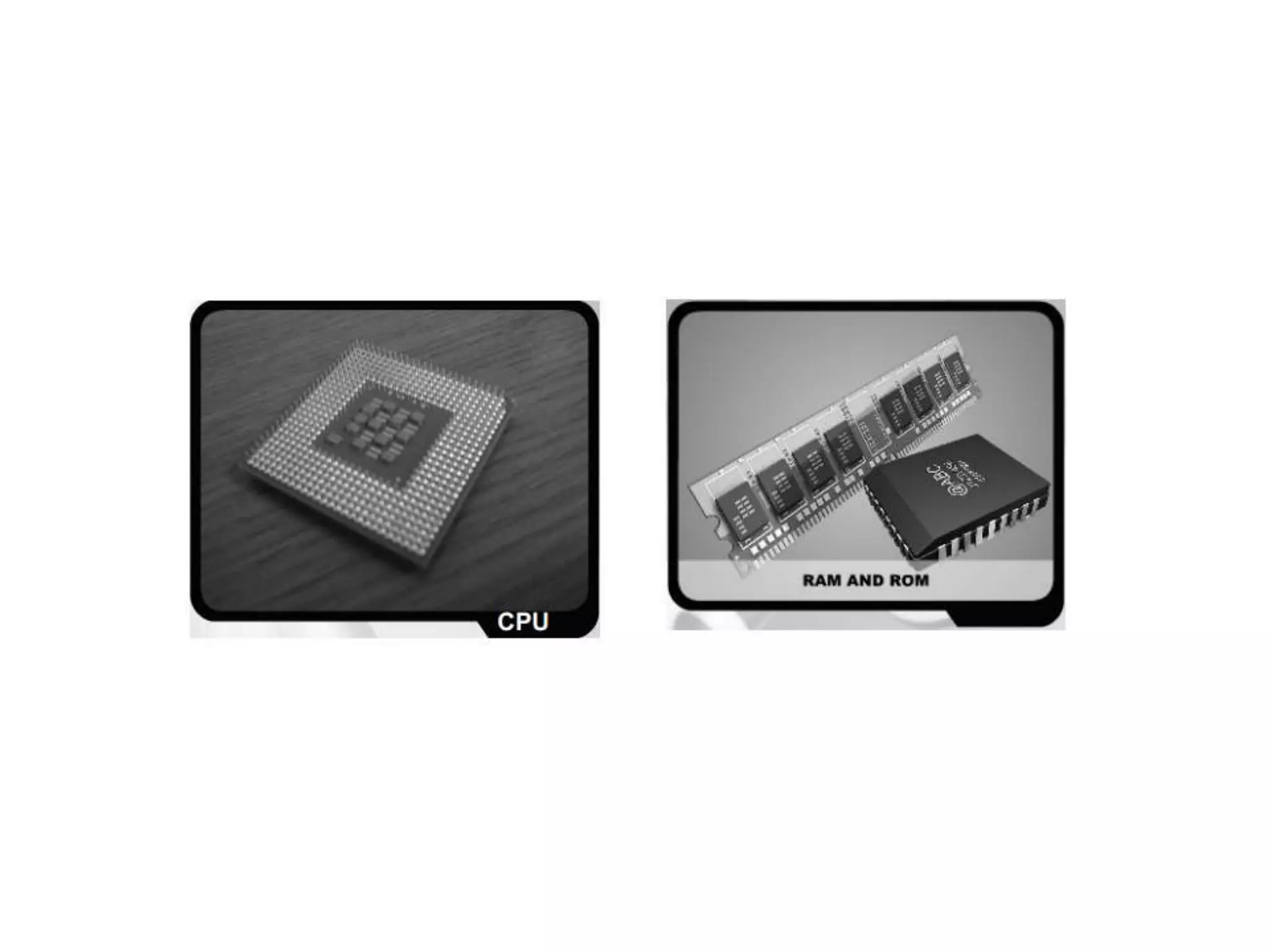
1    Central            A Central Processing Unit CPU is a microprocessor (or
     Processing Unit   processor for short). It is an integrates circuit chip that is
     (CPU)             capable or processing electronic signals. The CPU is the most
                       important element in a computer system.

                       A CPU interprets instructions given by the software and
                       carries out those instructions by processing data and
                       controlling the rest of the computer’s components.
2    Random Access      RAM is installed inside computers. RAM is also known as a
     Memory (RAM)        working memory.
                        The data in RAM can be read (retrieved) or written
                         (stored).
                        RAM is volatile which means the programs and data in
                         RAM are lost when the computer is power off.
                        A computer used RAM to hold temporary instructions and
                         data needed to complete tasks. This enables the
                         computer’s CPU to access instructions and data stored in
                         the memory very quickly.
                        RAM stores data during and after processing.
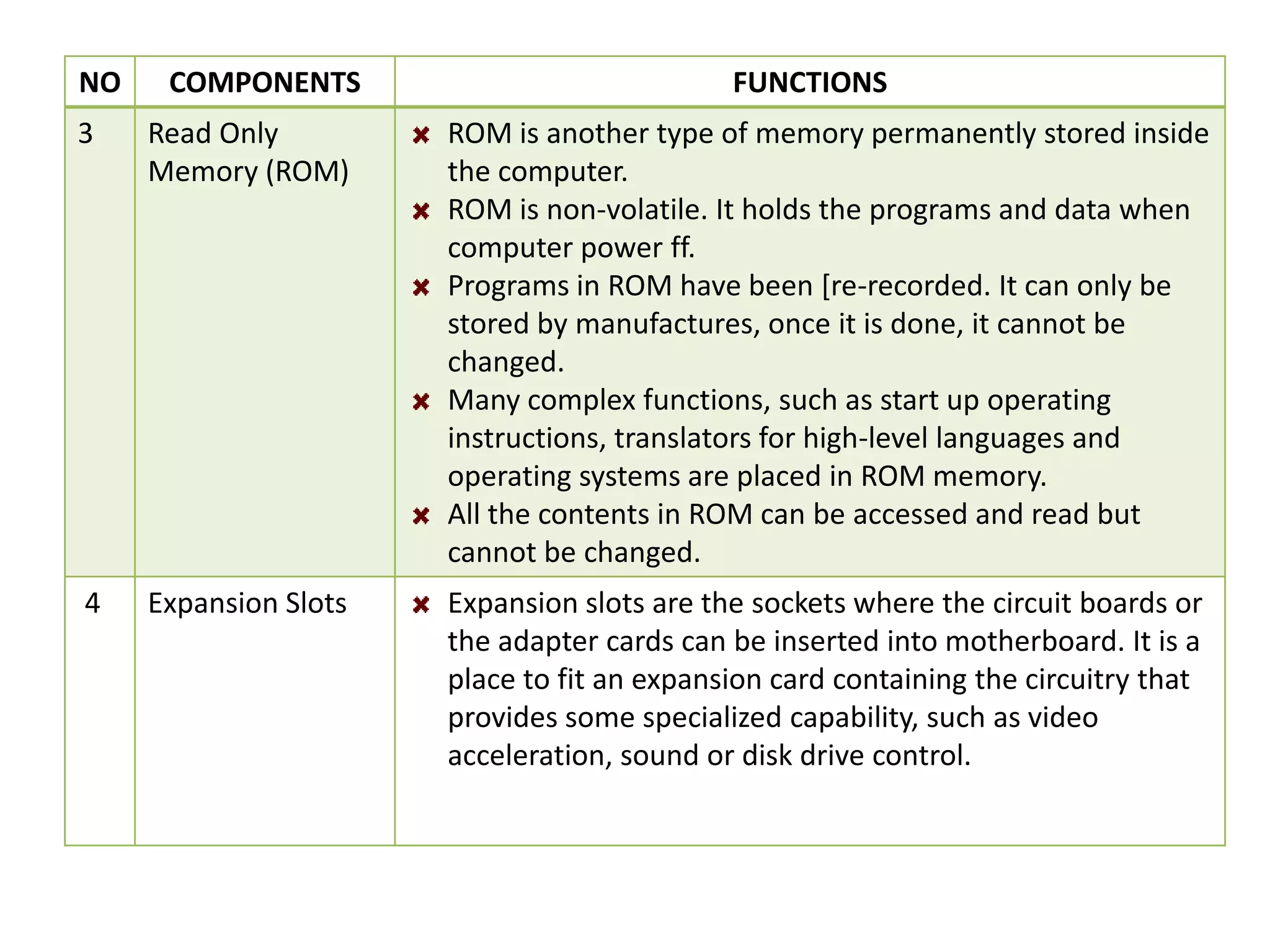
NO    COMPONENTS                             FUNCTIONS
3    Read Only         ROM is another type of memory permanently stored inside
     Memory (ROM)      the computer.
                       ROM is non-volatile. It holds the programs and data when
                       computer power ff.
                       Programs in ROM have been [re-recorded. It can only be
                       stored by manufactures, once it is done, it cannot be
                       changed.
                       Many complex functions, such as start up operating
                       instructions, translators for high-level languages and
                       operating systems are placed in ROM memory.
                       All the contents in ROM can be accessed and read but
                       cannot be changed.
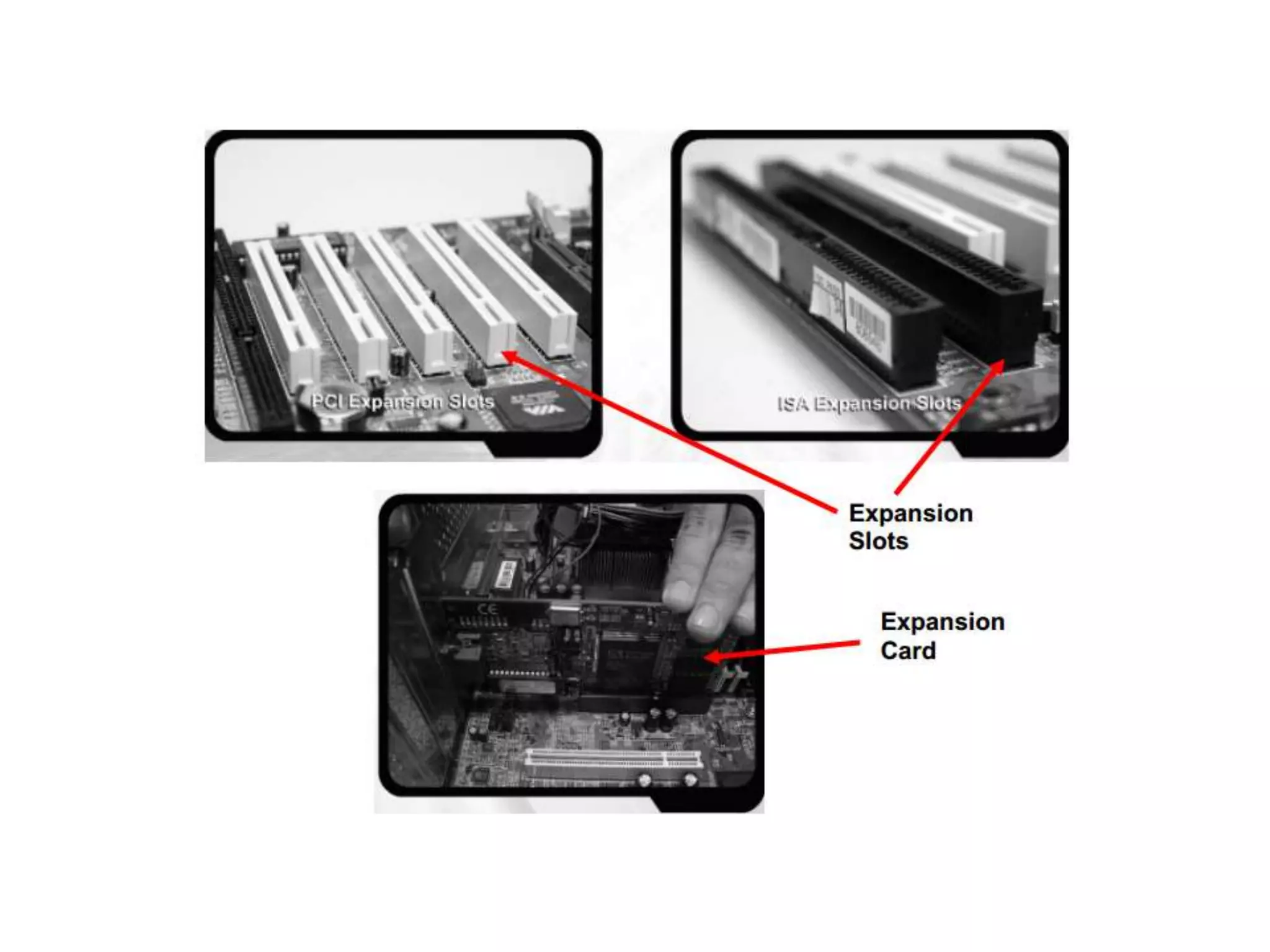
4    Expansion Slots   Expansion slots are the sockets where the circuit boards or
                       the adapter cards can be inserted into motherboard. It is a
                       place to fit an expansion card containing the circuitry that
                       provides some specialized capability, such as video
                       acceleration, sound or disk drive control.
System unit

System unit

  • 1.
  • 2.
    What is SystemUnit? • Box-like case that contains computer’s electronic components. • Sometimes called the chassis
  • 3.
    INSERT VIEW OFSYSTEM UNIT
  • 4.
    INPUT/OUTPUT PORT (I/OPORT) Figure 4 Back View of a System Unit
  • 6.
    FUNCTIONS OF THEMAIN COMPONENTS OF A SYSTEM UNIT NO COMPONENTS FUNCTIONS 1 Input/output port A port is the point at which a peripherals attaches to a (I/O port) system unit so that the peripherals can send data to receive information from the computer. An external device, such as keyboard, monitor, printer, mouse and microphone is often attached by cable to a port on the system unit. The back of the system unit contains so many ports. Some newer personal computers also have ports on the front of the system unit. Ports have different types of connector. A connector joins a cable to a peripheral. One end of a cable attaches to the connector on the system unit and the other end of the cable attaches to a connector on the peripherals.
  • 7.
    NO COMPONENTS FUNCTIONS 2 Power Button To start on computer 3 Reset Button Kick of soft boot, instructing the computer to go through the process of shutting down, which would clear memory and reset devices to the initialized state. It simply removes power immediately 4 Motherboard Main circuit board of the system unit, which has some electronic components attached to it and others built into it. 5 Power Supply Convert standard electrical power into the form that computer can use. If power supply is not providing the necessary power, the computer will not function properly. 6 DVD-ROM drive A device that reads audio CD’s, CD-ROMSs, CD-Rs and D- RWs. 7 CD-ROM drive. A devise that reads audio CDs, CD-ROMSs, CD-Rs and CD- REWs. 8 DVD/CD-RW drive It is a combination drive that reads DVD and CD media, it also writes to CD-RW media. This drove also allows watching a DVD or burn a CD.
  • 8.
    NO COMPONENTS FUNCTIONS 9 Zip drive A high-capacity disk drive that reads from a writes on a ZIP disk 10 Floppy drive A device that reads from and writes on a Zip disk 11 Hard disk drive Type of storage device that contains one or more inflexible, circular platters that store data, instructions and information. Also called a hard disk.
  • 9.
    THE COMPONENTS OFA MOTHERBOARD
  • 12.
    FUNCTIONS OF THECOMPONENTS OF THE MOTHERBOARD NO COMPONENTS FUNCTIONS 1 Central A Central Processing Unit CPU is a microprocessor (or Processing Unit processor for short). It is an integrates circuit chip that is (CPU) capable or processing electronic signals. The CPU is the most important element in a computer system. A CPU interprets instructions given by the software and carries out those instructions by processing data and controlling the rest of the computer’s components. 2 Random Access  RAM is installed inside computers. RAM is also known as a Memory (RAM) working memory.  The data in RAM can be read (retrieved) or written (stored).  RAM is volatile which means the programs and data in RAM are lost when the computer is power off.  A computer used RAM to hold temporary instructions and data needed to complete tasks. This enables the computer’s CPU to access instructions and data stored in the memory very quickly.  RAM stores data during and after processing.
  • 13.
    NO COMPONENTS FUNCTIONS 3 Read Only ROM is another type of memory permanently stored inside Memory (ROM) the computer. ROM is non-volatile. It holds the programs and data when computer power ff. Programs in ROM have been [re-recorded. It can only be stored by manufactures, once it is done, it cannot be changed. Many complex functions, such as start up operating instructions, translators for high-level languages and operating systems are placed in ROM memory. All the contents in ROM can be accessed and read but cannot be changed. 4 Expansion Slots Expansion slots are the sockets where the circuit boards or the adapter cards can be inserted into motherboard. It is a place to fit an expansion card containing the circuitry that provides some specialized capability, such as video acceleration, sound or disk drive control.