OPENNTF WEBINARS
March OpenNTF Webinar:
Nomad Mobile - Tips and
Tricks
AGENDA
• Welcome – Howard Greenberg and Graham Acres
• Thomas Hampel, HCL
• Maxx Sutton, HCL
• Theo Heselmans, HCL Lifetime Ambassador
• Tom Van Aken, HCL Ambassador
• Q and A - All
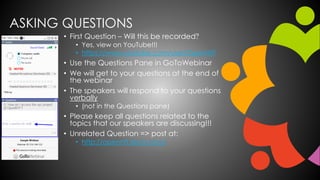
ASKING QUESTIONS
• First Question – Will this be recorded?
• Yes, view on YouTube!!!
• https://www.youtube.com/user/OpenNTF
• Use the Questions Pane in GoToWebinar
• We will get to your questions at the end of
the webinar
• The speakers will respond to your questions
verbally
• (not in the Questions pane)
• Please keep all questions related to the
topics that our speakers are discussing!!!
• Unrelated Question => post at:
• http://openntf.slack.com/
THANKS TO THE OPENNTF SPONSORS
• HCL made a significant contribution to help our
organization
• Funds these webinars!
• Contests like Hackathons
• Running the organization
• Prominic donates all IT related services
• Cloud Hosting for OpenNTF
• Infrastructure management for HCL Domino and Atlassian
Servers
• System Administration for day-to-day operation
THIS IS OUR COMMUNITY
• Join us and get involved!
• We are all volunteers
• No effort is too small
• If your idea is bigger than you can do on your own, we
can connect you to a team to work on it
• Test or help or modify an existing project
• Write guides or documentation
• Add reviews on projects / stars on Snippets
NEXT WEBINAR
• April OpenNTF Webinar: Domino
Administration Best Practices
• For Domino admins/developers who would
like to optimize Domino servers
• Thursday, April 22, 2021 at 11:00 AM (New
York time)
• www.openntf.org/webinars
Copyright © 2020 HCL Technologies Limited | www.hcltechsw.com
Nomad Mobile
Tips and Tricks
Thomas Hampel
Maxx Sutton
HCL’s statements regarding its plans, directions, and intent are subject
to change or withdrawal without notice and at HCL’s sole discretion.
Information regarding potential future products is intended to outline our
general product direction and it should not be relied on in making a
purchasing decision.
The information mentioned regarding potential future products is not a
commitment, promise, or legal obligation to deliver any material, code
or functionality. Information about potential future products may not be
incorporated into any contract.
The development, release, and timing of any future features
or functionality described for our products remains at our sole discretion.
Performance is based on measurements and projections using standard
HCL benchmarks in a controlled environment. The actual throughput or
performance that any user will experience will vary depending upon many
factors, including considerations such as the amount of multiprogramming
in the user’s job stream, the I/O configuration, the storage configuration,
and the workload processed. Therefore, no assurance can be given that an
individual user will achieve results similar to those stated here.
Please Note
Copyright © 2020 HCL Technologies Limited | www.hcltechsw.com
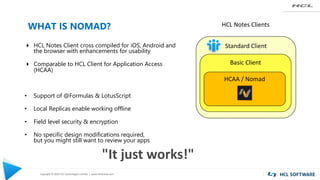
WHAT IS NOMAD?
4 HCL Notes Client cross compiled for iOS, Android and
the browser with enhancements for usability
4 Comparable to HCL Client for Application Access
(HCAA)
• Support of @Formulas & LotusScript
• Local Replicas enable working offline
• Field level security & encryption
• No specific design modifications required,
but you might still want to review your apps
Standard Client
Basic Client
HCAA / Nomad
HCL Notes Clients
"It just works!"
Copyright © 2020 HCL Technologies Limited | www.hcltechsw.com
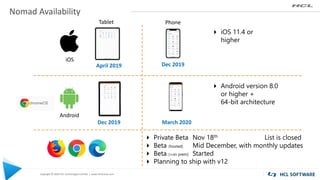
Nomad Availability
Android
iOS
Tablet Phone
4 iOS 11.4 or
higher
4 Android version 8.0
or higher +
64-bit architecture
April 2019 Dec 2019
Dec 2019 March 2020
4 Private Beta Nov 18th List is closed
4 Beta (hosted) Mid December, with monthly updates
4 Beta (+on prem) Started
4 Planning to ship with v12
Copyright © 2020 HCL Technologies Limited | www.hcltechsw.com
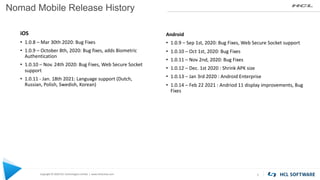
Nomad Mobile Release History
5
iOS
• 1.0.8 – Mar 30th 2020: Bug Fixes
• 1.0.9 – October 8th, 2020: Bug fixes, adds Biometric
Authentication
• 1.0.10 – Nov. 24th 2020: Bug Fixes, Web Secure Socket
support
• 1.0.11 - Jan. 18th 2021: Language support (Dutch,
Russian, Polish, Swedish, Korean)
Android
• 1.0.9 – Sep 1st, 2020: Bug Fixes, Web Secure Socket support
• 1.0.10 – Oct 1st, 2020: Bug Fixes
• 1.0.11 – Nov 2nd, 2020: Bug Fixes
• 1.0.12 – Dec. 1st 2020 : Shrink APK size
• 1.0.13 – Jan 3rd 2020 : Android Enterprise
• 1.0.14 – Feb 22 2021 : Andriod 11 display improvements, Bug
Fixes
Copyright © 2020 HCL Technologies Limited | www.hcltechsw.com
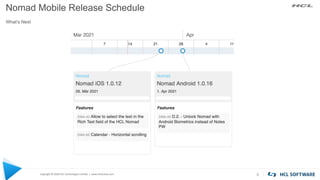
Nomad Mobile Release Schedule
What’s Next
6
Copyright © 2020 HCL Technologies Limited | www.hcltechsw.com
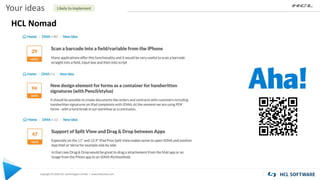
Your ideas
HCL Nomad
Managing HCL Nomad Mobile
8
Copyright © 2020 HCL Technologies Limited | www.hcltechsw.com
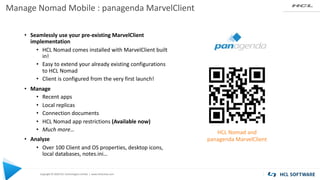
Manage Nomad Mobile : panagenda MarvelClient
• Seamlessly use your pre-existing MarvelClient
implementation
• HCL Nomad comes installed with MarvelClient built
in!
• Easy to extend your already existing configurations
to HCL Nomad
• Client is configured from the very first launch!
• Manage
• Recent apps
• Local replicas
• Connection documents
• HCL Nomad app restrictions (Available now)
• Much more…
• Analyze
• Over 100 Client and OS properties, desktop icons,
local databases, notes.ini…
HCL Nomad and
panagenda MarvelClient
Copyright © 2020 HCL Technologies Limited | www.hcltechsw.com
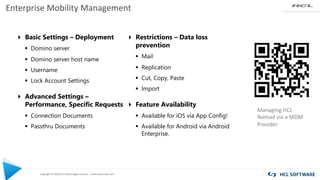
Enterprise Mobility Management
Managing HCL
Nomad via a MDM
Provider
4 Basic Settings – Deployment
§ Domino server
§ Domino server host name
§ Username
§ Lock Account Settings
4 Advanced Settings –
Performance, Specific Requests
§ Connection Documents
§ Passthru Documents
4 Restrictions – Data loss
prevention
§ Mail
§ Replication
§ Cut, Copy, Paste
§ Import
4 Feature Availability
§ Available for iOS via App Config!
§ Available for Android via Android
Enterprise.
Domino Application
Development – Tips and Tricks
11
Copyright © 2020 HCL Technologies Limited | www.hcltechsw.com
Floating Action Button - View Actions
12
Copyright © 2020 HCL Technologies Limited | www.hcltechsw.com
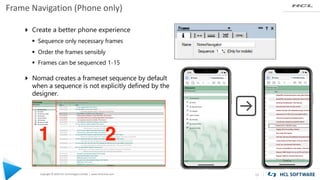
Frame Navigation (Phone only)
13
4 Create a better phone experience
§ Sequence only necessary frames
§ Order the frames sensibly
§ Frames can be sequenced 1-15
4 Nomad creates a frameset sequence by default
when a sequence is not explicitly defined by the
designer.
Copyright © 2020 HCL Technologies Limited | www.hcltechsw.com
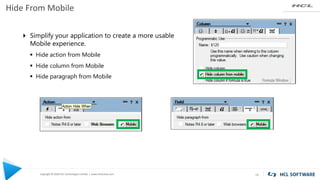
Hide From Mobile
14
4 Simplify your application to create a more usable
Mobile experience.
§ Hide action from Mobile
§ Hide column from Mobile
§ Hide paragraph from Mobile
Copyright © 2020 HCL Technologies Limited | www.hcltechsw.com
@Platform([Specific])
15
§ Android
• PrimaryOSName, for example, Android
• PrimaryOSVersionName, for example, 10
• Model Type, either Tablet or Phone
• Screen size in Notes Pixels, for example, “800,1200”
§ IOS
• PrimaryOSName, for example, iOS
• PrimaryOSVersionName, for example, 12.4
• Model Type, either Tablet or Phone
• Screen size in Notes Pixels, for example,
“800,1200”
https://support.hcltechsw.com/csm?id=kb_article&sysparm_article=KB0082072
Knowledge Article:
The @Platform formula with the Specific parameter used in applications returns a text list containing the
following values:
Copyright © 2020 HCL Technologies Limited | www.hcltechsw.com
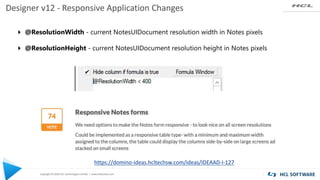
Designer v12 - Responsive Application Changes
4 @ResolutionWidth - current NotesUIDocument resolution width in Notes pixels
4 @ResolutionHeight - current NotesUIDocument resolution height in Notes pixels
https://domino-ideas.hcltechsw.com/ideas/IDEAAD-I-127
Copyright © 2020 HCL Technologies Limited | www.hcltechsw.com
Designer v12 - Responsive Application Changes
4 @Command( [RelayoutWindow] ) - invokes a relayout of the application window
4 New Form/View event "Onsize“ triggers on resolution change
https://domino-ideas.hcltechsw.com/ideas/IDEAAD-I-127
Copyright © 2020 HCL Technologies Limited | www.hcltechsw.com
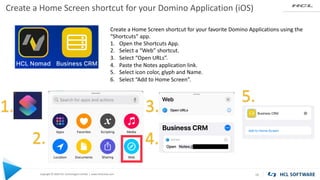
Create a Home Screen shortcut for your Domino Application (iOS)
18
Create a Home Screen shortcut for your favorite Domino Applications using the
“Shortcuts” app.
1. Open the Shortcuts App.
2. Select a “Web” shortcut.
3. Select “Open URLs”.
4. Paste the Notes application link.
5. Select icon color, glyph and Name.
6. Select “Add to Home Screen”.
1.
2.
3.
4.
5.
Now over to Theo and Tom
for more Tips and Tricks
19
Make your Notes Client apps
look great on a mobile device
using HCL Nomad
1
Theo Heselmans, Xceed
Tom Van Aken, Groupwave
@theoheselmans
@vanakentom
Agenda
▪ About us
▪ Why developing for a Touch Device?
▪ Main Advantages
▪ 'Classic' Notes apps work (unmodified) in Nomad, but...
▪ We can do better than this!
▪ How did we do it?
▪ Things to keep in mind
2
About Theo Heselmans
▪ Doing IBM® Notes® Development &
Project Mgt. for more than 20 years!
▪ Independent consultant since 2001 for Xceed
▪ Coordinator of the Engage User Group
for over 10 years
▪ I like wine and other beverages too
▪ Twitter: @theoheselmans
▪ Email: theo@xceed.be
3
About Tom Van Aken
▪ Doing Notes/Domino development since v3.5!
▪ Working for Groupwave for 10 years.
▪ IBM Champion 2019
▪ HCL Ambassador 2020, 2021
▪ I prefer beers, but I like wines too
▪ Tabletennis coach
▪ Blog: https://www.groupwave.be/blog
▪ Twitter: @vanakentom
▪ Email: tom.vanaken@groupwave.be
4
@theoheselmans
@vanakentom
Mobile Devices
▪ More and more devices with Touch interface
▪ iPad, Android and Windows 10
▪ Tablets are practical
▪ Easy and lightweight to carry around
▪ Big screen real estate
▪ Great User Experience
5
@theoheselmans
@vanakentom
Smartphones
▪ Everybody has one
▪ iPhone and Android
▪ Harder to design for
▪ Great User Experience
▪ Small screens
▪ Requires specific design with less data on screen
6
@theoheselmans
@vanakentom
HCL Nomad
7
▪ Run any Notes App on your Tablet or Phone unmodified
▪ Embed images from Library or Camera, use GPS
▪ Supports @Formulas and LotusScript unmodified
▪ Complex forms and logic works
▪ Built-in Replication for offline use
▪ Uses the user's ID, so easy security/policy
@theoheselmans
@vanakentom
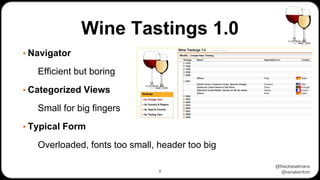
Wine Tastings 1.0
▪ Navigator
Efficient but boring
▪ Categorized Views
Small for big fingers
▪ Typical Form
Overloaded, fonts too small, header too big
8
@theoheselmans
@vanakentom
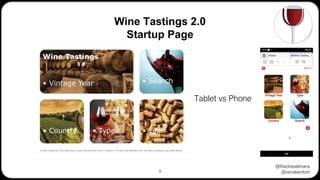
Wine Tastings 2.0
Startup Page
9
Tablet vs Phone
@theoheselmans
@vanakentom
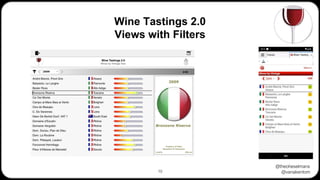
Wine Tastings 2.0
Views with Filters
10
@theoheselmans
@vanakentom
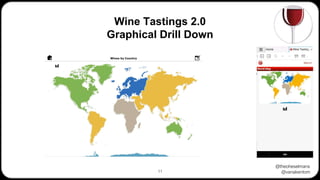
Wine Tastings 2.0
Graphical Drill Down
11
@theoheselmans
@vanakentom
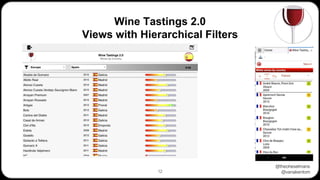
Wine Tastings 2.0
Views with Hierarchical Filters
12
@theoheselmans
@vanakentom
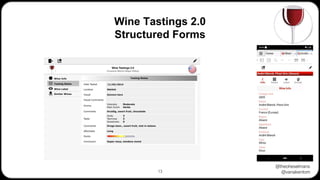
Wine Tastings 2.0
Structured Forms
13
@theoheselmans
@vanakentom
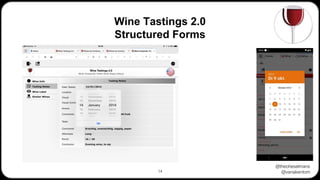
Wine Tastings 2.0
Structured Forms
14
@theoheselmans
@vanakentom
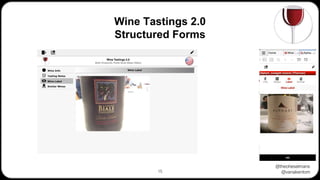
Wine Tastings 2.0
Structured Forms
15
@theoheselmans
@vanakentom
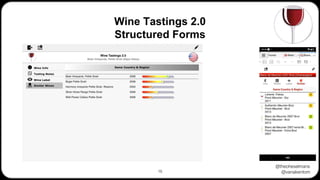
Wine Tastings 2.0
Structured Forms
16
@theoheselmans
@vanakentom
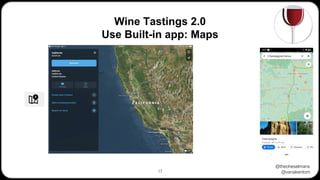
Wine Tastings 2.0
Use Built-in app: Maps
17
@theoheselmans
@vanakentom
18
Wine Tastings 2.0
How to distinguish between devices
• Use @Platform for the OS: e.g. "iOS", “Android”, "Windows/32“
• Use @Platform([Specific]) as it returns:
OS : OS version : Device : Screen resolution
• on iPad
• "iOS" : "14.4" : “tablet" : “820,1180"
• on iPhone
• "iOS" : "14.4" : “phone" : “375,812“
• on Android (smartphone)
• "Android” : “10” : “phone” : “359,678”
• Use tailored forms-subforms-views per device (or OS)
@theoheselmans
@vanakentom
Wine Tastings 2.0
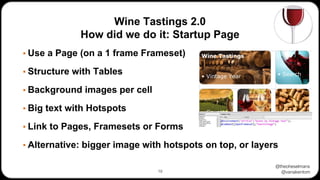
How did we do it: Startup Page
▪ Use a Page (on a 1 frame Frameset)
▪ Structure with Tables
▪ Background images per cell
▪ Big text with Hotspots
▪ Link to Pages, Framesets or Forms
▪ Alternative: bigger image with hotspots on top, or layers
19
@theoheselmans
@vanakentom
Wine Tastings 2.0
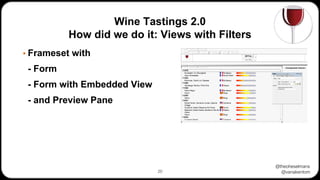
How did we do it: Views with Filters
▪ Frameset with
- Form
- Form with Embedded View
- and Preview Pane
20
@theoheselmans
@vanakentom
Wine Tastings 2.0
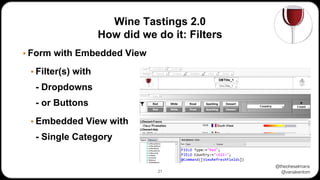
How did we do it: Filters
▪ Form with Embedded View
▪ Filter(s) with
- Dropdowns
- or Buttons
▪ Embedded View with
- Single Category
21
@theoheselmans
@vanakentom
Wine Tastings 2.0
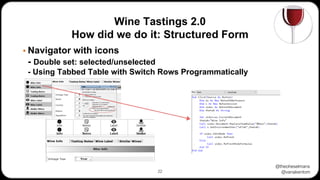
How did we do it: Structured Form
▪ Navigator with icons
- Double set: selected/unselected
- Using Tabbed Table with Switch Rows Programmatically
22
@theoheselmans
@vanakentom
Wine Tastings 2.0
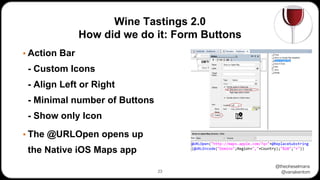
How did we do it: Form Buttons
▪ Action Bar
- Custom Icons
- Align Left or Right
- Minimal number of Buttons
- Show only Icon
▪ The @URLOpen opens up
the Native iOS Maps app
23
@theoheselmans
@vanakentom
Wine Tastings 2.0
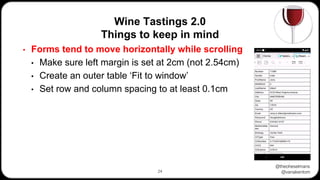
Things to keep in mind
24
• Forms tend to move horizontally while scrolling
• Make sure left margin is set at 2cm (not 2.54cm)
• Create an outer table ‘Fit to window’
• Set row and column spacing to at least 0.1cm
@theoheselmans
@vanakentom
Wine Tastings 2.0
Things to keep in mind
25
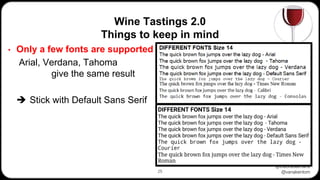
• Only a few fonts are supported
Arial, Verdana, Tahoma
give the same result
➔ Stick with Default Sans Serif
@theoheselmans
@vanakentom
Wine Tastings 2.0
Things to keep in mind
26
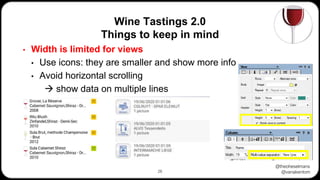
• Width is limited for views
• Use icons: they are smaller and show more info
• Avoid horizontal scrolling
→ show data on multiple lines
@theoheselmans
@vanakentom
Wine Tastings 2.0
Things to keep in mind
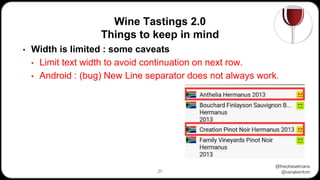
27
• Width is limited : some caveats
• Limit text width to avoid continuation on next row.
• Android : (bug) New Line separator does not always work.
• workaround by adding spaces
@theoheselmans
@vanakentom
Wine Tastings 2.0
Things to keep in mind
28
• New line issue : workaround formula
maxlength := 30;
REM {Combine row values as multivalue variable}
vals := name : region : @Text(Year);
REM {Formula to calculate actual column value)
repeat := @Repeat(" ";maxlength; maxlength);
@For(i:=1;i<=@Elements(vals);i:=i+1;
tmp := vals[i] + repeat;
val := @If(@Length(vals[i])>maxLength;@Left(vals[i];maxLength) +
"...";@Left(tmp;maxLength));
result := @If(result = ""; val;result:val)
);
result
@theoheselmans
@vanakentom
Wine Tastings 2.0
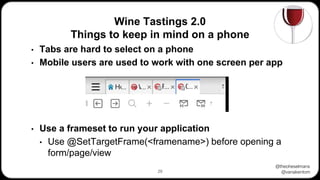
Things to keep in mind on a phone
29
• Tabs are hard to select on a phone
• Mobile users are used to work with one screen per app
• Use a frameset to run your application
• Use @SetTargetFrame(<framename>) before opening a
form/page/view
@theoheselmans
@vanakentom
Wine Tastings 2.0
Things to keep in mind
30
• A lot of devices with a lot of screensizes and resolutions
Larger device ≠ larger resolution!
• This makes it hard to develop, especially when you want to
avoid horizontal scrolling
➔ If possible: Use a limited number of devices
➔ Test on as many devices as possible.
@theoheselmans
@vanakentom
Wine Tastings 2.0
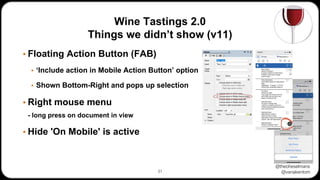
Things we didn’t show (v11)
▪ Floating Action Button (FAB)
▪ ‘Include action in Mobile Action Button’ option
▪ Shown Bottom-Right and pops up selection
▪ Right mouse menu
- long press on document in view
▪ Hide 'On Mobile' is active
31
@theoheselmans
@vanakentom
Wine Tastings 2.0
Things for the (near) future?
▪ Swipe Left/Right
➔ already in Action properties,
currently not implemented in Nomad
▪ @Command([RelayoutWindow])
▪ @ResolutionWidth and @ResolutionHeight
➔ New in V12 beta, not yet implemented in Nomad
32
@theoheselmans
@vanakentom
Wine Tastings 2.0
Design guidelines and icon libraries
▪ The internet is full of icon libraries and style guidelines.
https://www.carbondesignsystem.com/
used by HCL, check out the guidlelines section
https://www.flaticon.com/packs/font-awesome
The well-known font-awesome in png, but flaticon.com has a lot of other free icon-sets
▪ There are tons of (free) icon sets to use in your application. Use Google to find the ones
you need.
33
@theoheselmans
@vanakentom
Questions?
34
@theoheselmans
@vanakentom
That's it
Thanks for Joining In
Download the App & Presentation from OpenNTF
35
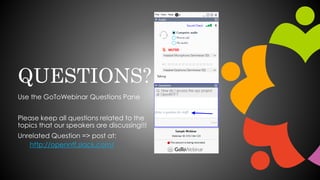
QUESTIONS?
Use the GoToWebinar Questions Pane
Please keep all questions related to the
topics that our speakers are discussing!!!
Unrelated Question => post at:
http://openntf.slack.com/

OpenNTF Webinar, March, 2021

  • 1.
    OPENNTF WEBINARS March OpenNTFWebinar: Nomad Mobile - Tips and Tricks
  • 2.
    AGENDA • Welcome –Howard Greenberg and Graham Acres • Thomas Hampel, HCL • Maxx Sutton, HCL • Theo Heselmans, HCL Lifetime Ambassador • Tom Van Aken, HCL Ambassador • Q and A - All
  • 3.
    ASKING QUESTIONS • FirstQuestion – Will this be recorded? • Yes, view on YouTube!!! • https://www.youtube.com/user/OpenNTF • Use the Questions Pane in GoToWebinar • We will get to your questions at the end of the webinar • The speakers will respond to your questions verbally • (not in the Questions pane) • Please keep all questions related to the topics that our speakers are discussing!!! • Unrelated Question => post at: • http://openntf.slack.com/
  • 4.
    THANKS TO THEOPENNTF SPONSORS • HCL made a significant contribution to help our organization • Funds these webinars! • Contests like Hackathons • Running the organization • Prominic donates all IT related services • Cloud Hosting for OpenNTF • Infrastructure management for HCL Domino and Atlassian Servers • System Administration for day-to-day operation
  • 5.
    THIS IS OURCOMMUNITY • Join us and get involved! • We are all volunteers • No effort is too small • If your idea is bigger than you can do on your own, we can connect you to a team to work on it • Test or help or modify an existing project • Write guides or documentation • Add reviews on projects / stars on Snippets
  • 6.
    NEXT WEBINAR • AprilOpenNTF Webinar: Domino Administration Best Practices • For Domino admins/developers who would like to optimize Domino servers • Thursday, April 22, 2021 at 11:00 AM (New York time) • www.openntf.org/webinars
  • 7.
    Copyright © 2020HCL Technologies Limited | www.hcltechsw.com Nomad Mobile Tips and Tricks Thomas Hampel Maxx Sutton
  • 8.
    HCL’s statements regardingits plans, directions, and intent are subject to change or withdrawal without notice and at HCL’s sole discretion. Information regarding potential future products is intended to outline our general product direction and it should not be relied on in making a purchasing decision. The information mentioned regarding potential future products is not a commitment, promise, or legal obligation to deliver any material, code or functionality. Information about potential future products may not be incorporated into any contract. The development, release, and timing of any future features or functionality described for our products remains at our sole discretion. Performance is based on measurements and projections using standard HCL benchmarks in a controlled environment. The actual throughput or performance that any user will experience will vary depending upon many factors, including considerations such as the amount of multiprogramming in the user’s job stream, the I/O configuration, the storage configuration, and the workload processed. Therefore, no assurance can be given that an individual user will achieve results similar to those stated here. Please Note
  • 9.
    Copyright © 2020HCL Technologies Limited | www.hcltechsw.com WHAT IS NOMAD? 4 HCL Notes Client cross compiled for iOS, Android and the browser with enhancements for usability 4 Comparable to HCL Client for Application Access (HCAA) • Support of @Formulas & LotusScript • Local Replicas enable working offline • Field level security & encryption • No specific design modifications required, but you might still want to review your apps Standard Client Basic Client HCAA / Nomad HCL Notes Clients "It just works!"
  • 10.
    Copyright © 2020HCL Technologies Limited | www.hcltechsw.com Nomad Availability Android iOS Tablet Phone 4 iOS 11.4 or higher 4 Android version 8.0 or higher + 64-bit architecture April 2019 Dec 2019 Dec 2019 March 2020 4 Private Beta Nov 18th List is closed 4 Beta (hosted) Mid December, with monthly updates 4 Beta (+on prem) Started 4 Planning to ship with v12
  • 11.
    Copyright © 2020HCL Technologies Limited | www.hcltechsw.com Nomad Mobile Release History 5 iOS • 1.0.8 – Mar 30th 2020: Bug Fixes • 1.0.9 – October 8th, 2020: Bug fixes, adds Biometric Authentication • 1.0.10 – Nov. 24th 2020: Bug Fixes, Web Secure Socket support • 1.0.11 - Jan. 18th 2021: Language support (Dutch, Russian, Polish, Swedish, Korean) Android • 1.0.9 – Sep 1st, 2020: Bug Fixes, Web Secure Socket support • 1.0.10 – Oct 1st, 2020: Bug Fixes • 1.0.11 – Nov 2nd, 2020: Bug Fixes • 1.0.12 – Dec. 1st 2020 : Shrink APK size • 1.0.13 – Jan 3rd 2020 : Android Enterprise • 1.0.14 – Feb 22 2021 : Andriod 11 display improvements, Bug Fixes
  • 12.
    Copyright © 2020HCL Technologies Limited | www.hcltechsw.com Nomad Mobile Release Schedule What’s Next 6
  • 13.
    Copyright © 2020HCL Technologies Limited | www.hcltechsw.com Your ideas HCL Nomad
  • 14.
  • 15.
    Copyright © 2020HCL Technologies Limited | www.hcltechsw.com Manage Nomad Mobile : panagenda MarvelClient • Seamlessly use your pre-existing MarvelClient implementation • HCL Nomad comes installed with MarvelClient built in! • Easy to extend your already existing configurations to HCL Nomad • Client is configured from the very first launch! • Manage • Recent apps • Local replicas • Connection documents • HCL Nomad app restrictions (Available now) • Much more… • Analyze • Over 100 Client and OS properties, desktop icons, local databases, notes.ini… HCL Nomad and panagenda MarvelClient
  • 16.
    Copyright © 2020HCL Technologies Limited | www.hcltechsw.com Enterprise Mobility Management Managing HCL Nomad via a MDM Provider 4 Basic Settings – Deployment § Domino server § Domino server host name § Username § Lock Account Settings 4 Advanced Settings – Performance, Specific Requests § Connection Documents § Passthru Documents 4 Restrictions – Data loss prevention § Mail § Replication § Cut, Copy, Paste § Import 4 Feature Availability § Available for iOS via App Config! § Available for Android via Android Enterprise.
  • 17.
  • 18.
    Copyright © 2020HCL Technologies Limited | www.hcltechsw.com Floating Action Button - View Actions 12
  • 19.
    Copyright © 2020HCL Technologies Limited | www.hcltechsw.com Frame Navigation (Phone only) 13 4 Create a better phone experience § Sequence only necessary frames § Order the frames sensibly § Frames can be sequenced 1-15 4 Nomad creates a frameset sequence by default when a sequence is not explicitly defined by the designer.
  • 20.
    Copyright © 2020HCL Technologies Limited | www.hcltechsw.com Hide From Mobile 14 4 Simplify your application to create a more usable Mobile experience. § Hide action from Mobile § Hide column from Mobile § Hide paragraph from Mobile
  • 21.
    Copyright © 2020HCL Technologies Limited | www.hcltechsw.com @Platform([Specific]) 15 § Android • PrimaryOSName, for example, Android • PrimaryOSVersionName, for example, 10 • Model Type, either Tablet or Phone • Screen size in Notes Pixels, for example, “800,1200” § IOS • PrimaryOSName, for example, iOS • PrimaryOSVersionName, for example, 12.4 • Model Type, either Tablet or Phone • Screen size in Notes Pixels, for example, “800,1200” https://support.hcltechsw.com/csm?id=kb_article&sysparm_article=KB0082072 Knowledge Article: The @Platform formula with the Specific parameter used in applications returns a text list containing the following values:
  • 22.
    Copyright © 2020HCL Technologies Limited | www.hcltechsw.com Designer v12 - Responsive Application Changes 4 @ResolutionWidth - current NotesUIDocument resolution width in Notes pixels 4 @ResolutionHeight - current NotesUIDocument resolution height in Notes pixels https://domino-ideas.hcltechsw.com/ideas/IDEAAD-I-127
  • 23.
    Copyright © 2020HCL Technologies Limited | www.hcltechsw.com Designer v12 - Responsive Application Changes 4 @Command( [RelayoutWindow] ) - invokes a relayout of the application window 4 New Form/View event "Onsize“ triggers on resolution change https://domino-ideas.hcltechsw.com/ideas/IDEAAD-I-127
  • 24.
    Copyright © 2020HCL Technologies Limited | www.hcltechsw.com Create a Home Screen shortcut for your Domino Application (iOS) 18 Create a Home Screen shortcut for your favorite Domino Applications using the “Shortcuts” app. 1. Open the Shortcuts App. 2. Select a “Web” shortcut. 3. Select “Open URLs”. 4. Paste the Notes application link. 5. Select icon color, glyph and Name. 6. Select “Add to Home Screen”. 1. 2. 3. 4. 5.
  • 25.
    Now over toTheo and Tom for more Tips and Tricks 19
  • 26.
    Make your NotesClient apps look great on a mobile device using HCL Nomad 1 Theo Heselmans, Xceed Tom Van Aken, Groupwave
  • 27.
    @theoheselmans @vanakentom Agenda ▪ About us ▪Why developing for a Touch Device? ▪ Main Advantages ▪ 'Classic' Notes apps work (unmodified) in Nomad, but... ▪ We can do better than this! ▪ How did we do it? ▪ Things to keep in mind 2
  • 28.
    About Theo Heselmans ▪Doing IBM® Notes® Development & Project Mgt. for more than 20 years! ▪ Independent consultant since 2001 for Xceed ▪ Coordinator of the Engage User Group for over 10 years ▪ I like wine and other beverages too ▪ Twitter: @theoheselmans ▪ Email: theo@xceed.be 3
  • 29.
    About Tom VanAken ▪ Doing Notes/Domino development since v3.5! ▪ Working for Groupwave for 10 years. ▪ IBM Champion 2019 ▪ HCL Ambassador 2020, 2021 ▪ I prefer beers, but I like wines too ▪ Tabletennis coach ▪ Blog: https://www.groupwave.be/blog ▪ Twitter: @vanakentom ▪ Email: tom.vanaken@groupwave.be 4
  • 30.
    @theoheselmans @vanakentom Mobile Devices ▪ Moreand more devices with Touch interface ▪ iPad, Android and Windows 10 ▪ Tablets are practical ▪ Easy and lightweight to carry around ▪ Big screen real estate ▪ Great User Experience 5
  • 31.
    @theoheselmans @vanakentom Smartphones ▪ Everybody hasone ▪ iPhone and Android ▪ Harder to design for ▪ Great User Experience ▪ Small screens ▪ Requires specific design with less data on screen 6
  • 32.
    @theoheselmans @vanakentom HCL Nomad 7 ▪ Runany Notes App on your Tablet or Phone unmodified ▪ Embed images from Library or Camera, use GPS ▪ Supports @Formulas and LotusScript unmodified ▪ Complex forms and logic works ▪ Built-in Replication for offline use ▪ Uses the user's ID, so easy security/policy
  • 33.
    @theoheselmans @vanakentom Wine Tastings 1.0 ▪Navigator Efficient but boring ▪ Categorized Views Small for big fingers ▪ Typical Form Overloaded, fonts too small, header too big 8
  • 34.
  • 35.
  • 36.
  • 37.
  • 38.
  • 39.
  • 40.
  • 41.
  • 42.
  • 43.
    @theoheselmans @vanakentom 18 Wine Tastings 2.0 Howto distinguish between devices • Use @Platform for the OS: e.g. "iOS", “Android”, "Windows/32“ • Use @Platform([Specific]) as it returns: OS : OS version : Device : Screen resolution • on iPad • "iOS" : "14.4" : “tablet" : “820,1180" • on iPhone • "iOS" : "14.4" : “phone" : “375,812“ • on Android (smartphone) • "Android” : “10” : “phone” : “359,678” • Use tailored forms-subforms-views per device (or OS)
  • 44.
    @theoheselmans @vanakentom Wine Tastings 2.0 Howdid we do it: Startup Page ▪ Use a Page (on a 1 frame Frameset) ▪ Structure with Tables ▪ Background images per cell ▪ Big text with Hotspots ▪ Link to Pages, Framesets or Forms ▪ Alternative: bigger image with hotspots on top, or layers 19
  • 45.
    @theoheselmans @vanakentom Wine Tastings 2.0 Howdid we do it: Views with Filters ▪ Frameset with - Form - Form with Embedded View - and Preview Pane 20
  • 46.
    @theoheselmans @vanakentom Wine Tastings 2.0 Howdid we do it: Filters ▪ Form with Embedded View ▪ Filter(s) with - Dropdowns - or Buttons ▪ Embedded View with - Single Category 21
  • 47.
    @theoheselmans @vanakentom Wine Tastings 2.0 Howdid we do it: Structured Form ▪ Navigator with icons - Double set: selected/unselected - Using Tabbed Table with Switch Rows Programmatically 22
  • 48.
    @theoheselmans @vanakentom Wine Tastings 2.0 Howdid we do it: Form Buttons ▪ Action Bar - Custom Icons - Align Left or Right - Minimal number of Buttons - Show only Icon ▪ The @URLOpen opens up the Native iOS Maps app 23
  • 49.
    @theoheselmans @vanakentom Wine Tastings 2.0 Thingsto keep in mind 24 • Forms tend to move horizontally while scrolling • Make sure left margin is set at 2cm (not 2.54cm) • Create an outer table ‘Fit to window’ • Set row and column spacing to at least 0.1cm
  • 50.
    @theoheselmans @vanakentom Wine Tastings 2.0 Thingsto keep in mind 25 • Only a few fonts are supported Arial, Verdana, Tahoma give the same result ➔ Stick with Default Sans Serif
  • 51.
    @theoheselmans @vanakentom Wine Tastings 2.0 Thingsto keep in mind 26 • Width is limited for views • Use icons: they are smaller and show more info • Avoid horizontal scrolling → show data on multiple lines
  • 52.
    @theoheselmans @vanakentom Wine Tastings 2.0 Thingsto keep in mind 27 • Width is limited : some caveats • Limit text width to avoid continuation on next row. • Android : (bug) New Line separator does not always work. • workaround by adding spaces
  • 53.
    @theoheselmans @vanakentom Wine Tastings 2.0 Thingsto keep in mind 28 • New line issue : workaround formula maxlength := 30; REM {Combine row values as multivalue variable} vals := name : region : @Text(Year); REM {Formula to calculate actual column value) repeat := @Repeat(" ";maxlength; maxlength); @For(i:=1;i<=@Elements(vals);i:=i+1; tmp := vals[i] + repeat; val := @If(@Length(vals[i])>maxLength;@Left(vals[i];maxLength) + "...";@Left(tmp;maxLength)); result := @If(result = ""; val;result:val) ); result
  • 54.
    @theoheselmans @vanakentom Wine Tastings 2.0 Thingsto keep in mind on a phone 29 • Tabs are hard to select on a phone • Mobile users are used to work with one screen per app • Use a frameset to run your application • Use @SetTargetFrame(<framename>) before opening a form/page/view
  • 55.
    @theoheselmans @vanakentom Wine Tastings 2.0 Thingsto keep in mind 30 • A lot of devices with a lot of screensizes and resolutions Larger device ≠ larger resolution! • This makes it hard to develop, especially when you want to avoid horizontal scrolling ➔ If possible: Use a limited number of devices ➔ Test on as many devices as possible.
  • 56.
    @theoheselmans @vanakentom Wine Tastings 2.0 Thingswe didn’t show (v11) ▪ Floating Action Button (FAB) ▪ ‘Include action in Mobile Action Button’ option ▪ Shown Bottom-Right and pops up selection ▪ Right mouse menu - long press on document in view ▪ Hide 'On Mobile' is active 31
  • 57.
    @theoheselmans @vanakentom Wine Tastings 2.0 Thingsfor the (near) future? ▪ Swipe Left/Right ➔ already in Action properties, currently not implemented in Nomad ▪ @Command([RelayoutWindow]) ▪ @ResolutionWidth and @ResolutionHeight ➔ New in V12 beta, not yet implemented in Nomad 32
  • 58.
    @theoheselmans @vanakentom Wine Tastings 2.0 Designguidelines and icon libraries ▪ The internet is full of icon libraries and style guidelines. https://www.carbondesignsystem.com/ used by HCL, check out the guidlelines section https://www.flaticon.com/packs/font-awesome The well-known font-awesome in png, but flaticon.com has a lot of other free icon-sets ▪ There are tons of (free) icon sets to use in your application. Use Google to find the ones you need. 33
  • 59.
  • 60.
    @theoheselmans @vanakentom That's it Thanks forJoining In Download the App & Presentation from OpenNTF 35
  • 61.
    QUESTIONS? Use the GoToWebinarQuestions Pane Please keep all questions related to the topics that our speakers are discussing!!! Unrelated Question => post at: http://openntf.slack.com/