Slides by Alessandro Zacchera, Vice-President of PoliMappers
Introduction to OpenStreetMap
Federica Gaspari, Social Media & Communication Responsible of PoliMappers
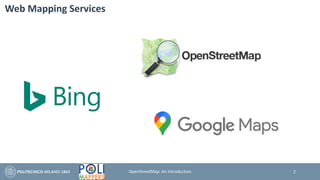
Web Mapping Services
2OpenStreetMap: An Introduction
Genesis of OpenStreetMap
The OpenStreetMap (OSM) project was born in the UK in 2004 to encourage the
development and distribution of free geospatial data for anybody to use and share.
OpenStreetMap is a free and editable map of the whole world that is being built by
volunteers largely from scratch and released with an open-content license.
Anyone can contribute to mapping in different ways.
3OpenStreetMap: An Introduction
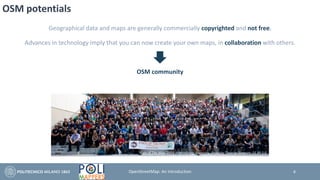
OSM potentials
Geographical data and maps are generally commercially copyrighted and not free.
Advances in technology imply that you can now create your own maps, in collaboration with others.
OSM community
State of The Map 2019 – Heidelberg, Germany. Photo by Thomas Skowron, CC BY 2.0
4OpenStreetMap: An Introduction
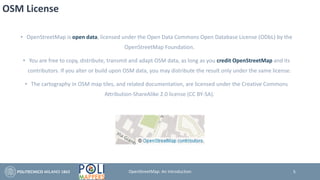
OSM License
• OpenStreetMap is open data, licensed under the Open Data Commons Open Database License (ODbL) by the
OpenStreetMap Foundation.
• You are free to copy, distribute, transmit and adapt OSM data, as long as you credit OpenStreetMap and its
contributors. If you alter or build upon OSM data, you may distribute the result only under the same license.
• The cartography in OSM map tiles, and related documentation, are licensed under the Creative Commons
Attribution-ShareAlike 2.0 license (CC BY-SA).
5OpenStreetMap: An Introduction
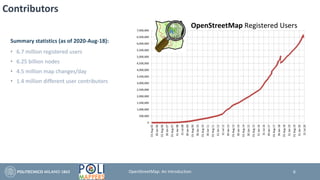
Contributors
Summary statistics (as of 2020-Aug-18):
• 6.7 million registered users
• 6.25 billion nodes
• 4.5 million map changes/day
• 1.4 million different user contributors
6OpenStreetMap: An Introduction
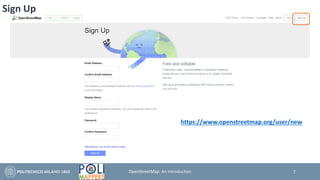
Sign Up
https://www.openstreetmap.org/user/new
7OpenStreetMap: An Introduction
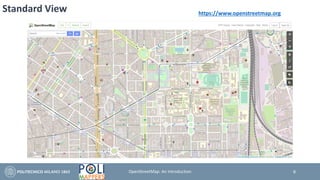
Standard View https://www.openstreetmap.org
8OpenStreetMap: An Introduction
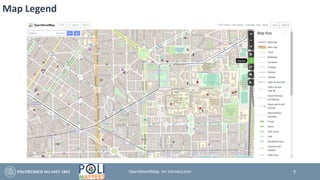
Map Legend
9OpenStreetMap: An Introduction
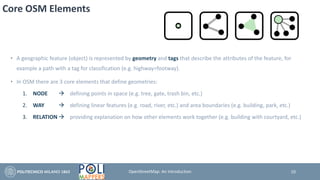
Core OSM Elements
• A geographic feature (object) is represented by geometry and tags that describe the attributes of the feature, for
example a path with a tag for classification (e.g. highway=footway).
• In OSM there are 3 core elements that define geometries:
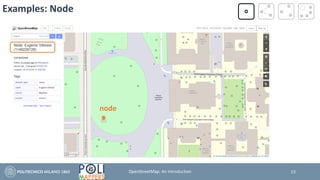
1. NODE → defining points in space (e.g. tree, gate, trash bin, etc.)
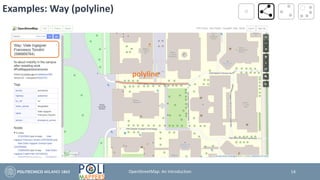
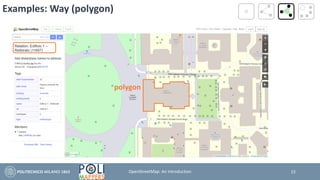
2. WAY → defining linear features (e.g. road, river, etc.) and area boundaries (e.g. building, park, etc.)
3. RELATION → providing explanation on how other elements work together (e.g. building with courtyard, etc.)
10OpenStreetMap: An Introduction
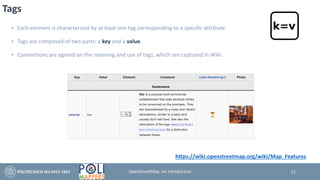
Tags
• Each element is characterized by at least one tag corresponding to a specific attribute.
• Tags are composed of two parts: a key and a value.
• Conventions are agreed on the meaning and use of tags, which are captured in Wiki:
11
https://wiki.openstreetmap.org/wiki/Map_Features
OpenStreetMap: An Introduction
Example of Multiple Tags
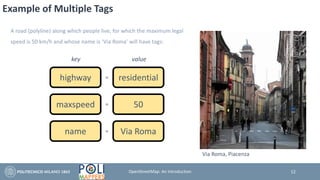
A road (polyline) along which people live, for which the maximum legal
speed is 50 km/h and whose name is ‘Via Roma’ will have tags:
highway residential
key value
=
maxspeed 50=
name Via Roma=
12
Via Roma, Piacenza
OpenStreetMap: An Introduction
Examples: Node
node
13OpenStreetMap: An Introduction
Examples: Way (polyline)
polyline
14OpenStreetMap: An Introduction
Examples: Way (polygon)
polygon
15OpenStreetMap: An Introduction
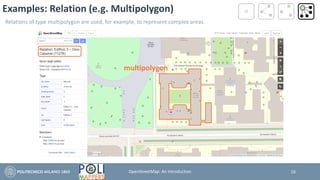
Examples: Relation (e.g. Multipolygon)
multipolygon
16
Relations of type multipolygon are used, for example, to represent complex areas.
OpenStreetMap: An Introduction
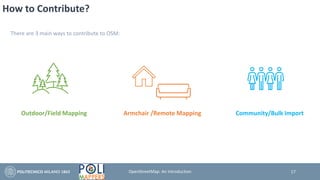
How to Contribute?
There are 3 main ways to contribute to OSM:
Outdoor/Field Mapping Armchair /Remote Mapping Community/Bulk Import
17OpenStreetMap: An Introduction
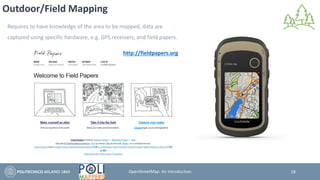
Outdoor/Field Mapping
Requires to have knowledge of the area to be mapped, data are
captured using specific hardware, e.g. GPS receivers, and field papers.
http://fieldpapers.org
18OpenStreetMap: An Introduction
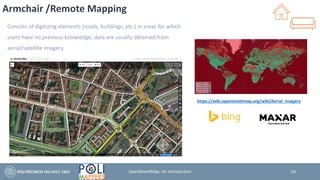
Armchair /Remote Mapping
Consists of digitizing elements (roads, buildings, etc.) in areas for which
users have no previous knowledge, data are usually obtained from
aerial/satellite imagery.
19
https://wiki.openstreetmap.org/wiki/Aerial_imagery
OpenStreetMap: An Introduction
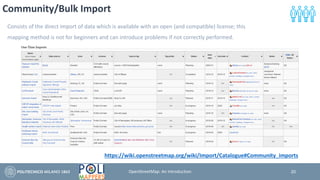
Community/Bulk Import
Consists of the direct import of data which is available with an open (and compatible) license; this
mapping method is not for beginners and can introduce problems if not correctly performed.
https://wiki.openstreetmap.org/wiki/Import/Catalogue#Community_imports
20OpenStreetMap: An Introduction
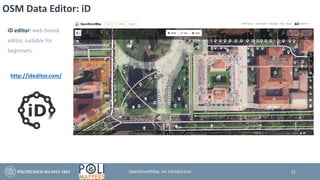
OSM Data Editor: iD
http://ideditor.com/
iD editor: web-based
editor, suitable for
beginners.
21OpenStreetMap: An Introduction
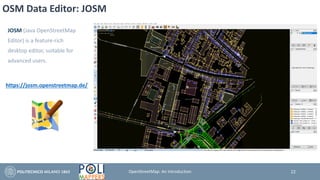
OSM Data Editor: JOSM
https://josm.openstreetmap.de/
JOSM (Java OpenStreetMap
Editor) is a feature-rich
desktop editor, suitable for
advanced users.
22OpenStreetMap: An Introduction
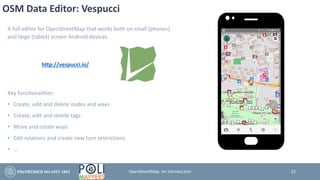
OSM Data Editor: Vespucci
A full editor for OpenStreetMap that works both on small (phones)
and large (tablet) screen Android devices.
Key functionalities:
• Create, edit and delete nodes and ways
• Create, edit and delete tags
• Move and rotate ways
• Edit relations and create new turn restrictions
• …
http://vespucci.io/
23OpenStreetMap: An Introduction
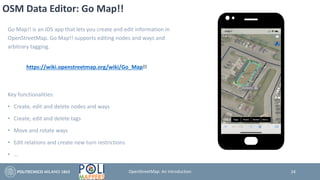
OSM Data Editor: Go Map!!
Go Map!! is an iOS app that lets you create and edit information in
OpenStreetMap. Go Map!! supports editing nodes and ways and
arbitrary tagging.
Key functionalities:
• Create, edit and delete nodes and ways
• Create, edit and delete tags
• Move and rotate ways
• Edit relations and create new turn restrictions
• …
https://wiki.openstreetmap.org/wiki/Go_Map!!
24OpenStreetMap: An Introduction
OSM Mapping Tools: Mapillary
• Mapillary is a collaborative street-level imagery platform for extracting map data at scale using computer vision.
• OSMers can use Mapillary photos directly when editing in OSM editors, such as iD or JOSM.
https://en.wikipedia.org/wiki/Mapillary
https://www.mapillary.com/
25OpenStreetMap: An Introduction
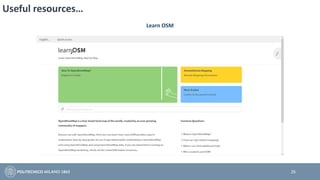
Useful resources…
26
Learn OSM
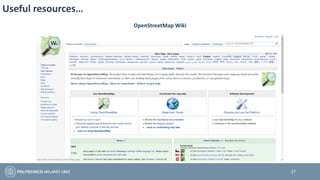
Useful resources…
27
OpenStreetMap Wiki
Introduction to OpenStreetMap
Slides by Alessandro Zacchera, PoliMappers Vice-President
Federica Gaspari
PoliMappers Social Media & Communication Responsible
federica.gaspari@mail.polimi.it
Politecnico di Milano | Department of Civil and Environmental Engineering
28OpenStreetMap: An Introduction

PoliMappers - Introduction to OpenStreetMap

  • 1.
    Slides by AlessandroZacchera, Vice-President of PoliMappers Introduction to OpenStreetMap Federica Gaspari, Social Media & Communication Responsible of PoliMappers
  • 2.
  • 3.
    Genesis of OpenStreetMap TheOpenStreetMap (OSM) project was born in the UK in 2004 to encourage the development and distribution of free geospatial data for anybody to use and share. OpenStreetMap is a free and editable map of the whole world that is being built by volunteers largely from scratch and released with an open-content license. Anyone can contribute to mapping in different ways. 3OpenStreetMap: An Introduction
  • 4.
    OSM potentials Geographical dataand maps are generally commercially copyrighted and not free. Advances in technology imply that you can now create your own maps, in collaboration with others. OSM community State of The Map 2019 – Heidelberg, Germany. Photo by Thomas Skowron, CC BY 2.0 4OpenStreetMap: An Introduction
  • 5.
    OSM License • OpenStreetMapis open data, licensed under the Open Data Commons Open Database License (ODbL) by the OpenStreetMap Foundation. • You are free to copy, distribute, transmit and adapt OSM data, as long as you credit OpenStreetMap and its contributors. If you alter or build upon OSM data, you may distribute the result only under the same license. • The cartography in OSM map tiles, and related documentation, are licensed under the Creative Commons Attribution-ShareAlike 2.0 license (CC BY-SA). 5OpenStreetMap: An Introduction
  • 6.
    Contributors Summary statistics (asof 2020-Aug-18): • 6.7 million registered users • 6.25 billion nodes • 4.5 million map changes/day • 1.4 million different user contributors 6OpenStreetMap: An Introduction
  • 7.
  • 8.
  • 9.
  • 10.
    Core OSM Elements •A geographic feature (object) is represented by geometry and tags that describe the attributes of the feature, for example a path with a tag for classification (e.g. highway=footway). • In OSM there are 3 core elements that define geometries: 1. NODE → defining points in space (e.g. tree, gate, trash bin, etc.) 2. WAY → defining linear features (e.g. road, river, etc.) and area boundaries (e.g. building, park, etc.) 3. RELATION → providing explanation on how other elements work together (e.g. building with courtyard, etc.) 10OpenStreetMap: An Introduction
  • 11.
    Tags • Each elementis characterized by at least one tag corresponding to a specific attribute. • Tags are composed of two parts: a key and a value. • Conventions are agreed on the meaning and use of tags, which are captured in Wiki: 11 https://wiki.openstreetmap.org/wiki/Map_Features OpenStreetMap: An Introduction
  • 12.
    Example of MultipleTags A road (polyline) along which people live, for which the maximum legal speed is 50 km/h and whose name is ‘Via Roma’ will have tags: highway residential key value = maxspeed 50= name Via Roma= 12 Via Roma, Piacenza OpenStreetMap: An Introduction
  • 13.
  • 14.
  • 15.
  • 16.
    Examples: Relation (e.g.Multipolygon) multipolygon 16 Relations of type multipolygon are used, for example, to represent complex areas. OpenStreetMap: An Introduction
  • 17.
    How to Contribute? Thereare 3 main ways to contribute to OSM: Outdoor/Field Mapping Armchair /Remote Mapping Community/Bulk Import 17OpenStreetMap: An Introduction
  • 18.
    Outdoor/Field Mapping Requires tohave knowledge of the area to be mapped, data are captured using specific hardware, e.g. GPS receivers, and field papers. http://fieldpapers.org 18OpenStreetMap: An Introduction
  • 19.
    Armchair /Remote Mapping Consistsof digitizing elements (roads, buildings, etc.) in areas for which users have no previous knowledge, data are usually obtained from aerial/satellite imagery. 19 https://wiki.openstreetmap.org/wiki/Aerial_imagery OpenStreetMap: An Introduction
  • 20.
    Community/Bulk Import Consists ofthe direct import of data which is available with an open (and compatible) license; this mapping method is not for beginners and can introduce problems if not correctly performed. https://wiki.openstreetmap.org/wiki/Import/Catalogue#Community_imports 20OpenStreetMap: An Introduction
  • 21.
    OSM Data Editor:iD http://ideditor.com/ iD editor: web-based editor, suitable for beginners. 21OpenStreetMap: An Introduction
  • 22.
    OSM Data Editor:JOSM https://josm.openstreetmap.de/ JOSM (Java OpenStreetMap Editor) is a feature-rich desktop editor, suitable for advanced users. 22OpenStreetMap: An Introduction
  • 23.
    OSM Data Editor:Vespucci A full editor for OpenStreetMap that works both on small (phones) and large (tablet) screen Android devices. Key functionalities: • Create, edit and delete nodes and ways • Create, edit and delete tags • Move and rotate ways • Edit relations and create new turn restrictions • … http://vespucci.io/ 23OpenStreetMap: An Introduction
  • 24.
    OSM Data Editor:Go Map!! Go Map!! is an iOS app that lets you create and edit information in OpenStreetMap. Go Map!! supports editing nodes and ways and arbitrary tagging. Key functionalities: • Create, edit and delete nodes and ways • Create, edit and delete tags • Move and rotate ways • Edit relations and create new turn restrictions • … https://wiki.openstreetmap.org/wiki/Go_Map!! 24OpenStreetMap: An Introduction
  • 25.
    OSM Mapping Tools:Mapillary • Mapillary is a collaborative street-level imagery platform for extracting map data at scale using computer vision. • OSMers can use Mapillary photos directly when editing in OSM editors, such as iD or JOSM. https://en.wikipedia.org/wiki/Mapillary https://www.mapillary.com/ 25OpenStreetMap: An Introduction
  • 26.
  • 27.
  • 28.
    Introduction to OpenStreetMap Slidesby Alessandro Zacchera, PoliMappers Vice-President Federica Gaspari PoliMappers Social Media & Communication Responsible federica.gaspari@mail.polimi.it Politecnico di Milano | Department of Civil and Environmental Engineering 28OpenStreetMap: An Introduction