CONFIGURATION PARAMETERS
DFS.BLOCK.SIZE

Author

Amit Anand

Date Created

7/15/2013

1
About Me
I am an Oracle Certified Database Administrator and Cloudera Certified Apache Hadoop Administrator. I can be
contacted at anandkamith@gmail.com

Introduction
I have read at many places (blogs, books etc.) about the precedence order of HADOOP configuration files and how the
configuration parameter “dfs.block.size” is used if defined at multiple levels with different values. These levels are defined
as:
 Master – When properties are defined at name node / master node level
 Slave – When properties are defined at data node / slave node level
 Client – There are two type of commands that can be submitted by client
o A client utility like “hadoop fs –put”
o A MapReduce job submitted by the client
I always wanted to see the precedence order in action and hence decide to play with it a little and note down my findings
that also encouraged me to write this document. I will try to explain this to the best of my knowledge.

When files are created using MapReduce
The parameter “dfs.block.size” is defined in “hdfs-site.xml” and can have different values between name node and data
nodes.
Remember that “dfs.block.size” is client specific and has no effect on NN or DN. The only time NN or DN configuration
comes into play is when files are created using MapReduce.
Example 1: In hdfs-site.xml – Used by MapReduce. Client uses this only if it is defined
<configuration>
<property>
<name>dfs.block.size</name>
<value>67108864</value>
</property>
</configuration>

Defined as 64MB

Hadoop environment used
For the purpose of this document I am using Cloudera distribution cdh3u6 on Centos 6.4 with Java 1.6 update 26

Scenarios
Now let's go through each case scenario where the configuration files have different values between master/slave and see
the impact of it on the files that are created in HDFS.

2
Scenario 1: Configuration file has same value on master and slave
Hdfs-site.xml on master node

Hdfs-site.xml on slave node

<configuration>
<property>
<name>dfs.block.size</name>
<value>67108864</value>
</property>
</configuration>

<configuration>
<property>
<name>dfs.block.size</name>
<value>67108864</value>
</property>
</configuration>

Outcome: All the files will be created with 64MB of block size.
Scenario 2: Configuration file has different value on master node
Hdfs-site.xml on master node

Hdfs-site.xml on slave node

<configuration>
<property>
<name>dfs.block.size</name>
<value>134217728</value>
</property>
</configuration>

<configuration>
<property>
<name>dfs.block.size</name>
<value>67108864</value>
</property>
</configuration>

Outcome: All the files will be created with 128MB of block size as defined by hdfs-site.xml on the master node. Master
node has higher precedence than the slave node.
Scenario 3: Configuration file has different value on slave node
Hdfs-site.xml on master node

Hdfs-site.xml on slave node

<configuration>
<property>
<name>dfs.block.size</name>
<value>67108864</value>
</property>
</configuration>

<configuration>
<property>
<name>dfs.block.size</name>
<value>134217728</value>
</property>
</configuration>

Outcome: All the files will be created with 64MB of block size as defined by hdfs-site.xml on the master node. Master
node has higher precedence than the slave node.

So far so good. We have seen that the master node takes higher precedence. Let's make this a little
interesting by adding “<final>true</final>” to the configuration. Remember that setting final=true has the
highest precedence and overrides all other values defined at other levels.
Scenario 4: Configuration file has different value on slave node with final=true
Hdfs-site.xml on master node

Hdfs-site.xml on slave node

<configuration>
<property>
<name>dfs.block.size</name>
<value>67108864</value>
</property>
</configuration>

<configuration>
<property>
<name>dfs.block.size</name>
<value>134217728</value>
<final>true</final>
</property>
</configuration>

3
Outcome: All the files will be created with 128MB of block size as defined by hdfs-site.xml on the slave node. Slave node
has higher precedence than the master node because slave node has final=true.
Scenario 5: Configuration file has different value on master and slave node with final=true
Hdfs-site.xml on master node

Hdfs-site.xml on slave node

<configuration>
<property>
<name>dfs.block.size</name>
<value>67108864</value>
<final>true</final>
</property>
</configuration>

<configuration>
<property>
<name>dfs.block.size</name>
<value>134217728</value>
<final>true</final>
</property>
</configuration>

Outcome: All the files will be created with 128MB of block size as defined by hdfs-site.xml on the slave node. Slave node
has higher precedence than the master node because slave node has final=true. Configuration on master node is ignored
in this case.
Scenario 6: Configuration file has different value on multiple slave nodes with final=true on some of the nodes
Hdfs-site.xml master node

Hdfs-site.xml on some of the slave nodes

<configuration>
<property>
<name>dfs.block.size</name>
<value>67108864</value>
</property>
</configuration>

<configuration>
<property>
<name>dfs.block.size</name>
<value>134217728</value>
<final>true</final>
</property>
</configuration>

Hdfs-site.xml some other slave nodes
<configuration>
<property>
<name>dfs.block.size</name>
<value>33554432</value>
</property>
</configuration>

Outcome:
 data nodes with final=true will create block size of 128MB
 data nodes that do not have final=true will take the value from master node and will create block size of 64 MB
 data nodes that have block size of 32MB configured will create the blocks of 64MB size as specified by the master
node

4
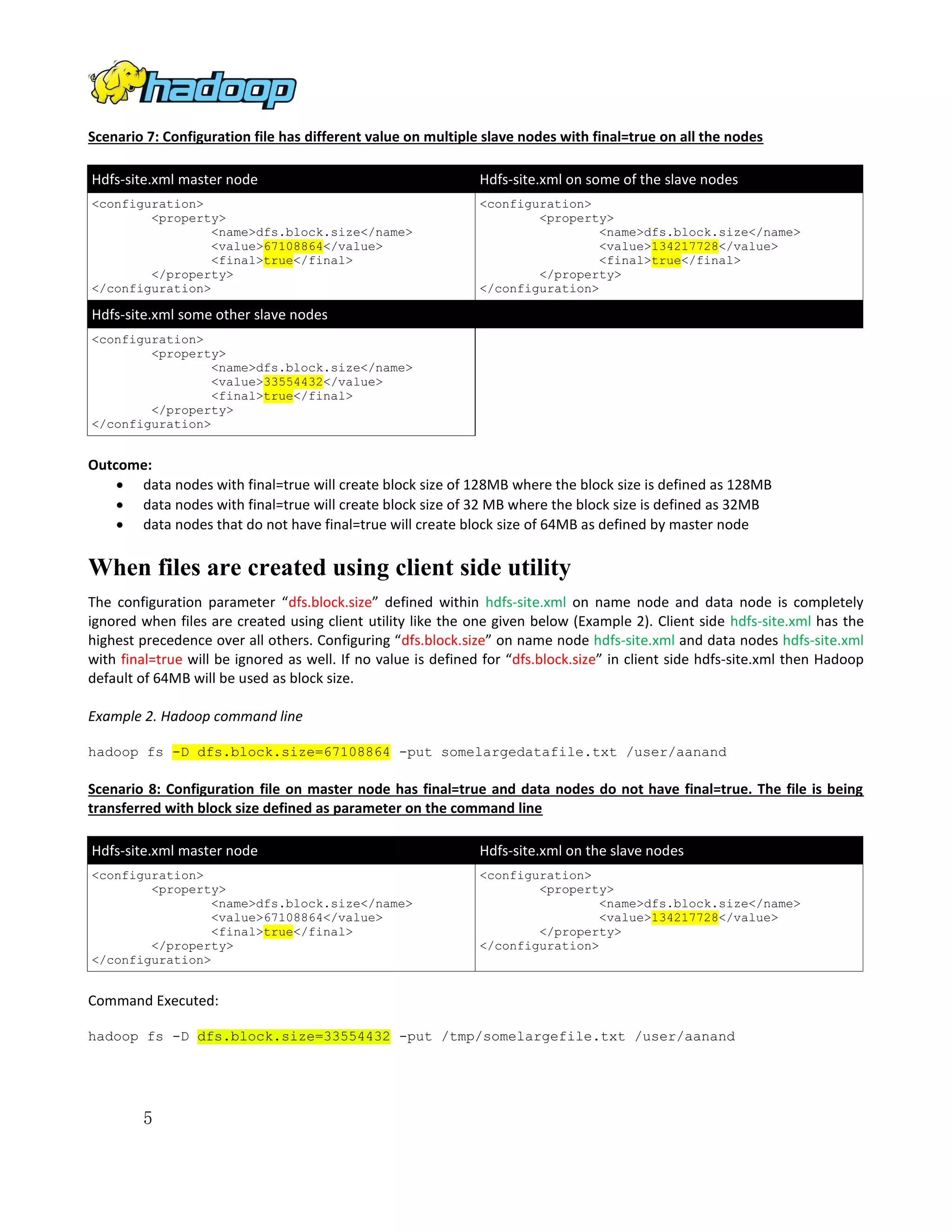
Scenario 7: Configuration file has different value on multiple slave nodes with final=true on all the nodes
Hdfs-site.xml master node

Hdfs-site.xml on some of the slave nodes

<configuration>
<property>
<name>dfs.block.size</name>
<value>67108864</value>
<final>true</final>
</property>
</configuration>

<configuration>
<property>
<name>dfs.block.size</name>
<value>134217728</value>
<final>true</final>
</property>
</configuration>

Hdfs-site.xml some other slave nodes
<configuration>
<property>
<name>dfs.block.size</name>
<value>33554432</value>
<final>true</final>
</property>
</configuration>

Outcome:
 data nodes with final=true will create block size of 128MB where the block size is defined as 128MB
 data nodes with final=true will create block size of 32 MB where the block size is defined as 32MB
 data nodes that do not have final=true will create block size of 64MB as defined by master node

When files are created using client side utility
The configuration parameter “dfs.block.size” defined within hdfs-site.xml on name node and data node is completely
ignored when files are created using client utility like the one given below (Example 2). Client side hdfs-site.xml has the
highest precedence over all others. Configuring “dfs.block.size” on name node hdfs-site.xml and data nodes hdfs-site.xml
with final=true will be ignored as well. If no value is defined for “dfs.block.size” in client side hdfs-site.xml then Hadoop
default of 64MB will be used as block size.
Example 2. Hadoop command line
hadoop fs -D dfs.block.size=67108864 -put somelargedatafile.txt /user/aanand

Scenario 8: Configuration file on master node has final=true and data nodes do not have final=true. The file is being
transferred with block size defined as parameter on the command line
Hdfs-site.xml master node

Hdfs-site.xml on the slave nodes

<configuration>
<property>
<name>dfs.block.size</name>
<value>67108864</value>
<final>true</final>
</property>
</configuration>

<configuration>
<property>
<name>dfs.block.size</name>
<value>134217728</value>
</property>
</configuration>

Command Executed:
hadoop fs -D dfs.block.size=33554432 -put /tmp/somelargefile.txt /user/aanand

5
Outcome:
 File is created with 32MB of block size even though the “dfs.block.size” is defined and final=true on the name
node.
 The NN / DN configuration files have no impact on client side, client reads the value from hdfs-site.xml if defined.
Hadoop default of 64MB is used if client side hdfs-site.xml does not define any value.

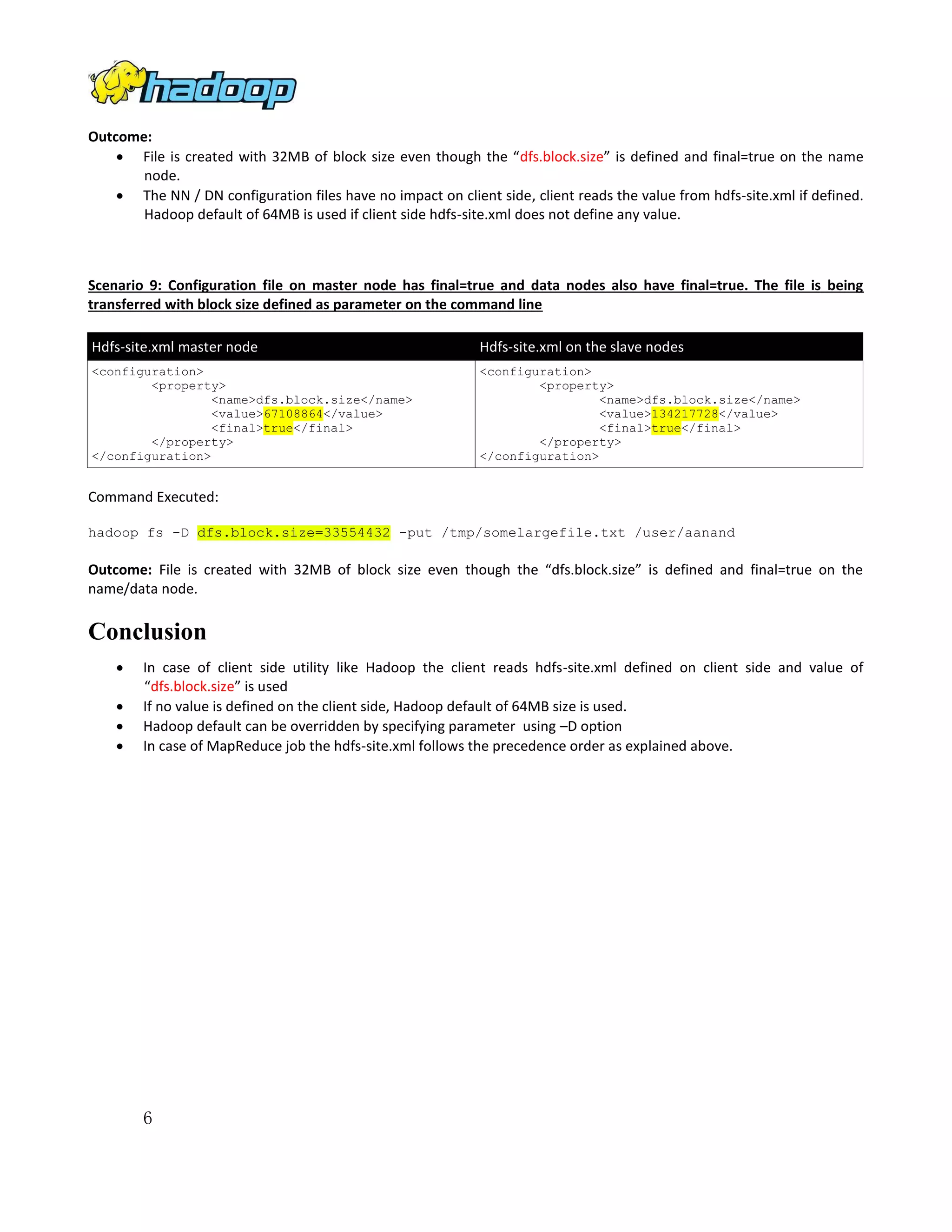
Scenario 9: Configuration file on master node has final=true and data nodes also have final=true. The file is being
transferred with block size defined as parameter on the command line
Hdfs-site.xml master node

Hdfs-site.xml on the slave nodes

<configuration>
<property>
<name>dfs.block.size</name>
<value>67108864</value>
<final>true</final>
</property>
</configuration>

<configuration>
<property>
<name>dfs.block.size</name>
<value>134217728</value>
<final>true</final>
</property>
</configuration>

Command Executed:
hadoop fs -D dfs.block.size=33554432 -put /tmp/somelargefile.txt /user/aanand

Outcome: File is created with 32MB of block size even though the “dfs.block.size” is defined and final=true on the
name/data node.

Conclusion





In case of client side utility like Hadoop the client reads hdfs-site.xml defined on client side and value of
“dfs.block.size” is used
If no value is defined on the client side, Hadoop default of 64MB size is used.
Hadoop default can be overridden by specifying parameter using –D option
In case of MapReduce job the hdfs-site.xml follows the precedence order as explained above.

6

hadoop

  • 1.
  • 2.
    About Me I aman Oracle Certified Database Administrator and Cloudera Certified Apache Hadoop Administrator. I can be contacted at anandkamith@gmail.com Introduction I have read at many places (blogs, books etc.) about the precedence order of HADOOP configuration files and how the configuration parameter “dfs.block.size” is used if defined at multiple levels with different values. These levels are defined as:  Master – When properties are defined at name node / master node level  Slave – When properties are defined at data node / slave node level  Client – There are two type of commands that can be submitted by client o A client utility like “hadoop fs –put” o A MapReduce job submitted by the client I always wanted to see the precedence order in action and hence decide to play with it a little and note down my findings that also encouraged me to write this document. I will try to explain this to the best of my knowledge. When files are created using MapReduce The parameter “dfs.block.size” is defined in “hdfs-site.xml” and can have different values between name node and data nodes. Remember that “dfs.block.size” is client specific and has no effect on NN or DN. The only time NN or DN configuration comes into play is when files are created using MapReduce. Example 1: In hdfs-site.xml – Used by MapReduce. Client uses this only if it is defined <configuration> <property> <name>dfs.block.size</name> <value>67108864</value> </property> </configuration> Defined as 64MB Hadoop environment used For the purpose of this document I am using Cloudera distribution cdh3u6 on Centos 6.4 with Java 1.6 update 26 Scenarios Now let's go through each case scenario where the configuration files have different values between master/slave and see the impact of it on the files that are created in HDFS. 2
  • 3.
    Scenario 1: Configurationfile has same value on master and slave Hdfs-site.xml on master node Hdfs-site.xml on slave node <configuration> <property> <name>dfs.block.size</name> <value>67108864</value> </property> </configuration> <configuration> <property> <name>dfs.block.size</name> <value>67108864</value> </property> </configuration> Outcome: All the files will be created with 64MB of block size. Scenario 2: Configuration file has different value on master node Hdfs-site.xml on master node Hdfs-site.xml on slave node <configuration> <property> <name>dfs.block.size</name> <value>134217728</value> </property> </configuration> <configuration> <property> <name>dfs.block.size</name> <value>67108864</value> </property> </configuration> Outcome: All the files will be created with 128MB of block size as defined by hdfs-site.xml on the master node. Master node has higher precedence than the slave node. Scenario 3: Configuration file has different value on slave node Hdfs-site.xml on master node Hdfs-site.xml on slave node <configuration> <property> <name>dfs.block.size</name> <value>67108864</value> </property> </configuration> <configuration> <property> <name>dfs.block.size</name> <value>134217728</value> </property> </configuration> Outcome: All the files will be created with 64MB of block size as defined by hdfs-site.xml on the master node. Master node has higher precedence than the slave node. So far so good. We have seen that the master node takes higher precedence. Let's make this a little interesting by adding “<final>true</final>” to the configuration. Remember that setting final=true has the highest precedence and overrides all other values defined at other levels. Scenario 4: Configuration file has different value on slave node with final=true Hdfs-site.xml on master node Hdfs-site.xml on slave node <configuration> <property> <name>dfs.block.size</name> <value>67108864</value> </property> </configuration> <configuration> <property> <name>dfs.block.size</name> <value>134217728</value> <final>true</final> </property> </configuration> 3
  • 4.
    Outcome: All thefiles will be created with 128MB of block size as defined by hdfs-site.xml on the slave node. Slave node has higher precedence than the master node because slave node has final=true. Scenario 5: Configuration file has different value on master and slave node with final=true Hdfs-site.xml on master node Hdfs-site.xml on slave node <configuration> <property> <name>dfs.block.size</name> <value>67108864</value> <final>true</final> </property> </configuration> <configuration> <property> <name>dfs.block.size</name> <value>134217728</value> <final>true</final> </property> </configuration> Outcome: All the files will be created with 128MB of block size as defined by hdfs-site.xml on the slave node. Slave node has higher precedence than the master node because slave node has final=true. Configuration on master node is ignored in this case. Scenario 6: Configuration file has different value on multiple slave nodes with final=true on some of the nodes Hdfs-site.xml master node Hdfs-site.xml on some of the slave nodes <configuration> <property> <name>dfs.block.size</name> <value>67108864</value> </property> </configuration> <configuration> <property> <name>dfs.block.size</name> <value>134217728</value> <final>true</final> </property> </configuration> Hdfs-site.xml some other slave nodes <configuration> <property> <name>dfs.block.size</name> <value>33554432</value> </property> </configuration> Outcome:  data nodes with final=true will create block size of 128MB  data nodes that do not have final=true will take the value from master node and will create block size of 64 MB  data nodes that have block size of 32MB configured will create the blocks of 64MB size as specified by the master node 4
  • 5.
    Scenario 7: Configurationfile has different value on multiple slave nodes with final=true on all the nodes Hdfs-site.xml master node Hdfs-site.xml on some of the slave nodes <configuration> <property> <name>dfs.block.size</name> <value>67108864</value> <final>true</final> </property> </configuration> <configuration> <property> <name>dfs.block.size</name> <value>134217728</value> <final>true</final> </property> </configuration> Hdfs-site.xml some other slave nodes <configuration> <property> <name>dfs.block.size</name> <value>33554432</value> <final>true</final> </property> </configuration> Outcome:  data nodes with final=true will create block size of 128MB where the block size is defined as 128MB  data nodes with final=true will create block size of 32 MB where the block size is defined as 32MB  data nodes that do not have final=true will create block size of 64MB as defined by master node When files are created using client side utility The configuration parameter “dfs.block.size” defined within hdfs-site.xml on name node and data node is completely ignored when files are created using client utility like the one given below (Example 2). Client side hdfs-site.xml has the highest precedence over all others. Configuring “dfs.block.size” on name node hdfs-site.xml and data nodes hdfs-site.xml with final=true will be ignored as well. If no value is defined for “dfs.block.size” in client side hdfs-site.xml then Hadoop default of 64MB will be used as block size. Example 2. Hadoop command line hadoop fs -D dfs.block.size=67108864 -put somelargedatafile.txt /user/aanand Scenario 8: Configuration file on master node has final=true and data nodes do not have final=true. The file is being transferred with block size defined as parameter on the command line Hdfs-site.xml master node Hdfs-site.xml on the slave nodes <configuration> <property> <name>dfs.block.size</name> <value>67108864</value> <final>true</final> </property> </configuration> <configuration> <property> <name>dfs.block.size</name> <value>134217728</value> </property> </configuration> Command Executed: hadoop fs -D dfs.block.size=33554432 -put /tmp/somelargefile.txt /user/aanand 5
  • 6.
    Outcome:  File iscreated with 32MB of block size even though the “dfs.block.size” is defined and final=true on the name node.  The NN / DN configuration files have no impact on client side, client reads the value from hdfs-site.xml if defined. Hadoop default of 64MB is used if client side hdfs-site.xml does not define any value. Scenario 9: Configuration file on master node has final=true and data nodes also have final=true. The file is being transferred with block size defined as parameter on the command line Hdfs-site.xml master node Hdfs-site.xml on the slave nodes <configuration> <property> <name>dfs.block.size</name> <value>67108864</value> <final>true</final> </property> </configuration> <configuration> <property> <name>dfs.block.size</name> <value>134217728</value> <final>true</final> </property> </configuration> Command Executed: hadoop fs -D dfs.block.size=33554432 -put /tmp/somelargefile.txt /user/aanand Outcome: File is created with 32MB of block size even though the “dfs.block.size” is defined and final=true on the name/data node. Conclusion     In case of client side utility like Hadoop the client reads hdfs-site.xml defined on client side and value of “dfs.block.size” is used If no value is defined on the client side, Hadoop default of 64MB size is used. Hadoop default can be overridden by specifying parameter using –D option In case of MapReduce job the hdfs-site.xml follows the precedence order as explained above. 6