LTSPICE AUDIO SIMULATION:
A LOUDNESS CONTROL


 Bee Technologies Inc.
20AUG2012
                            1
EQUAL-LOUDNESS CONTOUR
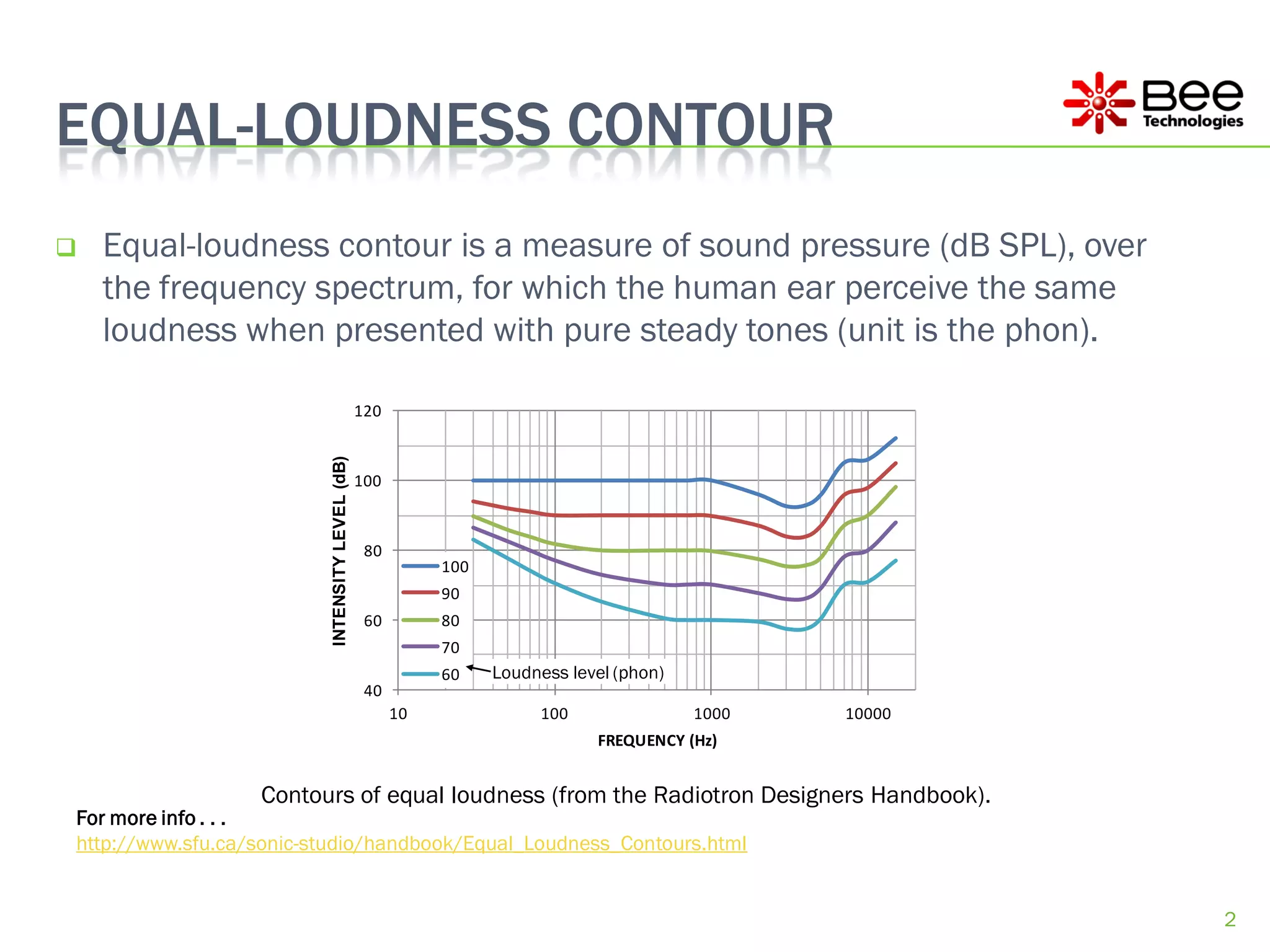
   Equal-loudness contour is a measure of sound pressure (dB SPL), over
    the frequency spectrum, for which the human ear perceive the same
    loudness when presented with pure steady tones (unit is the phon).

                                                 120
                          INTENSITY LEVEL (dB)


                                                 100


                                                  80
                                                            100
                                                            90
                                                  60        80
                                                            70
                                                            60    Loudness level (phon)
                                                  40
                                                       10              100                1000   10000
                                                                              FREQUENCY (Hz)


                  Contours of equal loudness (from the Radiotron Designers Handbook).
For more info . . .
http://www.sfu.ca/sonic-studio/handbook/Equal_Loudness_Contours.html


                                                                                                         2
A LOUDNESS CONTROL
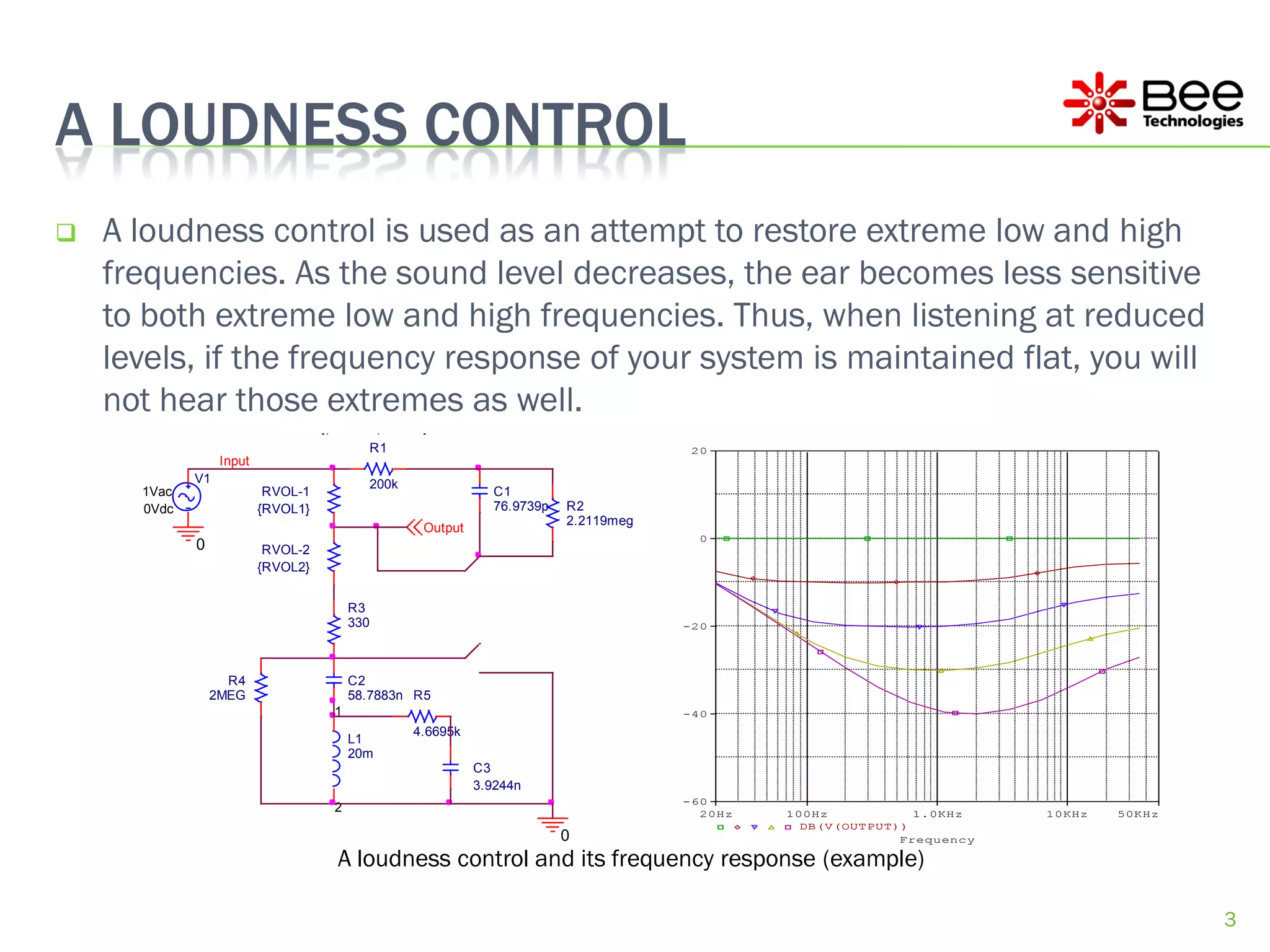
   A loudness control is used as an attempt to restore extreme low and high
    frequencies. As the sound level decreases, the ear becomes less sensitive
    to both extreme low and high frequencies. Thus, when listening at reduced
                 PARAMETERS:
                          RVOL = 500k

    levels, if the frequency response of your system is maintained flat, you will
                          VOL = 0.0245


    not hear those extremes as well.
                 PARAMETERS:
                          RVOL1 = {(1-VOL+1u)*RVOL}
                          RVOL2 = {(VOL+1u)*RVOL}
                                               R1                                         20
                  Input
             V1                                200k
      1Vac                 RVOL-1                                 C1
      0Vdc                {RVOL1}                                 76.9739p   R2
                                                                             2.2119meg
                                                       Output
                                                                                           0
             0             RVOL-2
                          {RVOL2}


                                         R3
                                         330                                             -20


                   R4                    C2
                 2MEG                    58.7883n R5
                                    1                                                    -40
                                                      4.6695k
                                         L1
                                         20m
                                                                C3
                                                                3.9244n
                                                                                         -60
                                    2                                                      20Hz   100Hz           1.0KHz    10KHz   50KHz
                                                                                                    DB(V(OUTPUT))
                                                                             0                                  Frequency

                                     A loudness control and its frequency response (example)

                                                                                                                                            3
THE LOUDNESS CONTROL VS. EQUAL-LOUDNESS CONTOUR

                        20


                         0
 INTENSITY LEVEL (dB)


                        -20
                                   100
                                   100(Sim)
                                   90
                                   90(Sim)
                                   80
                        -40
                                   80(Sim)
                                   70
                                   70(Sim)
                                   60
                                   60(Sim)
                        -60
                              10                 100                        1000                        10000

                                                          FREQUENCY (Hz)

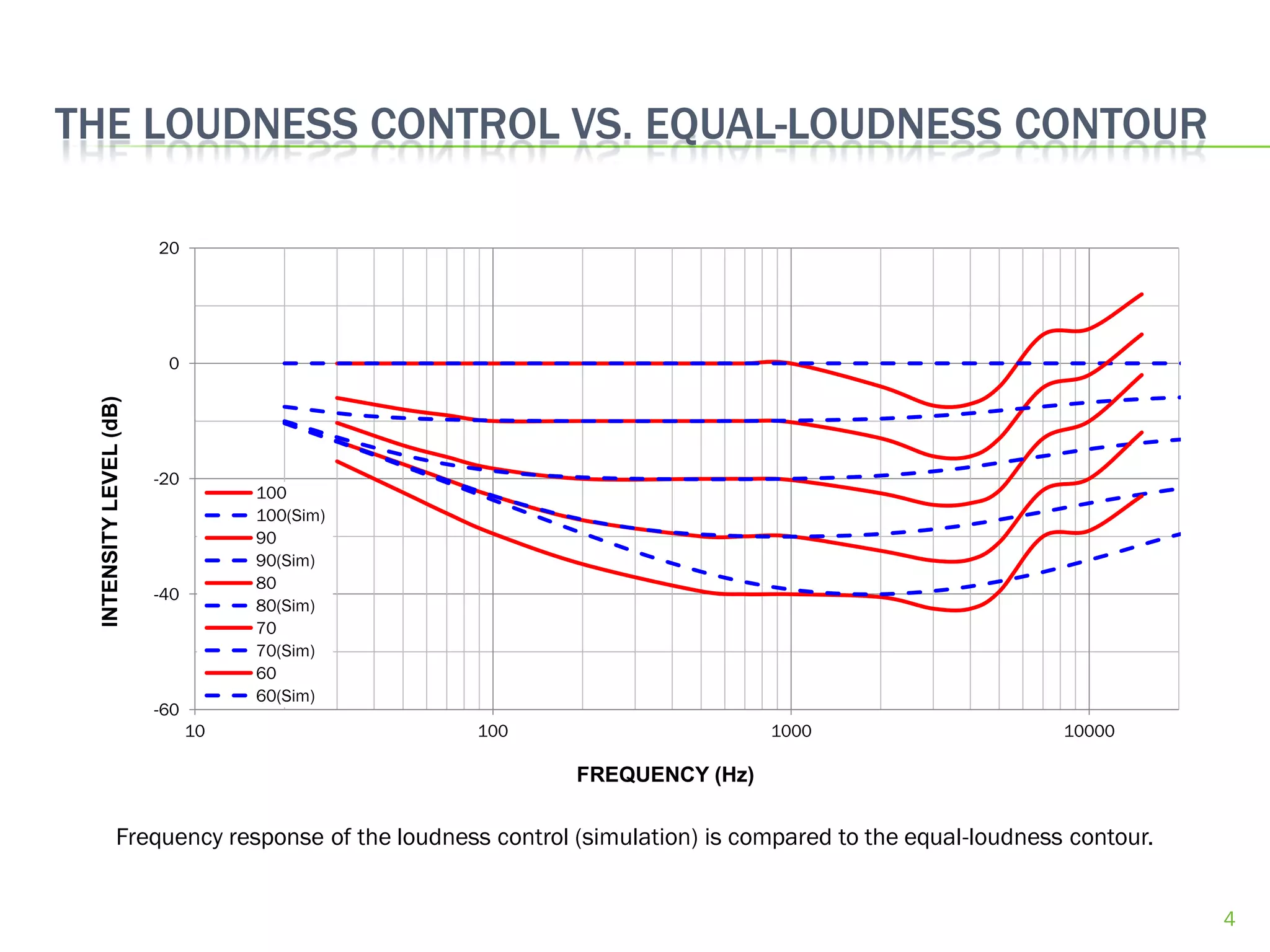
               Frequency response of the loudness control (simulation) is compared to the equal-loudness contour.


                                                                                                                    4
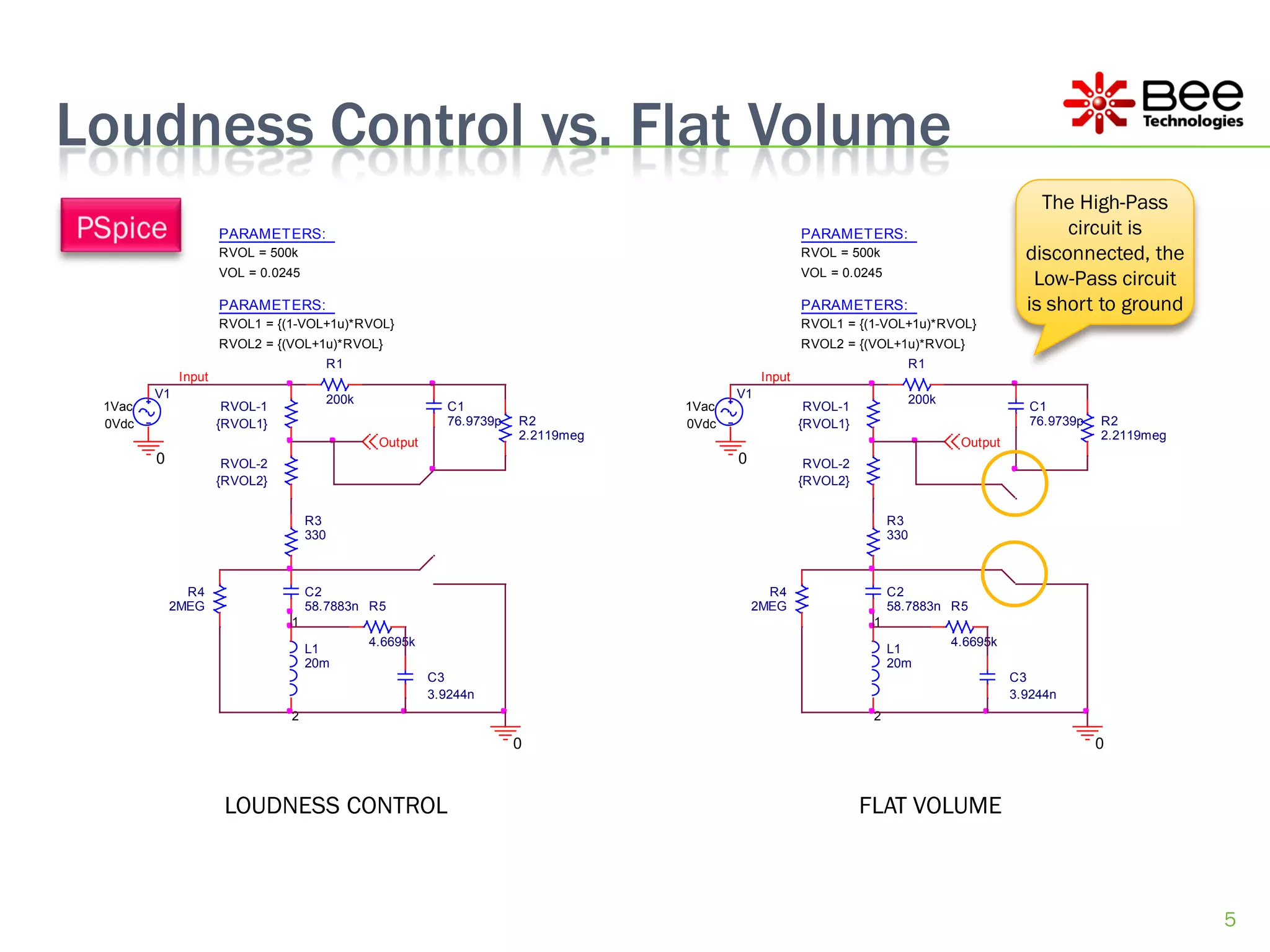
Loudness Control vs. Flat Volume
                                                                                                                                                  The High-Pass
                     PARAMETERS:                                                                        PARAMETERS:                                  circuit is
                     RVOL = 500k                                                                        RVOL = 500k                             disconnected, the
                     VOL = 0.0245                                                                       VOL = 0.0245
                                                                                                                                                 Low-Pass circuit
                     PARAMETERS:                                                                        PARAMETERS:                             is short to ground
                     RVOL1 = {(1-VOL+1u)*RVOL}                                                          RVOL1 = {(1-VOL+1u)*RVOL}
                     RVOL2 = {(VOL+1u)*RVOL}                                                            RVOL2 = {(VOL+1u)*RVOL}
                                          R1                                                                                 R1
             Input                                                                              Input
        V1                                200k                                             V1                                200k
 1Vac                 RVOL-1                                 C1                     1Vac                 RVOL-1                                 C1
 0Vdc                {RVOL1}                                 76.9739p   R2          0Vdc                {RVOL1}                                 76.9739p   R2
                                                                        2.2119meg                                                                          2.2119meg
                                                  Output                                                                             Output
        0             RVOL-2                                                               0             RVOL-2
                     {RVOL2}                                                                            {RVOL2}


                                    R3                                                                                 R3
                                    330                                                                                330


              R4                    C2                                                           R4                    C2
            2MEG                    58.7883n R5                                                2MEG                    58.7883n R5
                               1                                                                                   1
                                                 4.6695k                                                                            4.6695k
                                    L1                                                                                 L1
                                    20m                                                                                20m
                                                           C3                                                                                 C3
                                                           3.9244n                                                                            3.9244n
                               2                                                                                   2

                                                                        0                                                                                  0


                      LOUDNESS CONTROL                                                                            FLAT VOLUME


                                                                                                                                                                       5
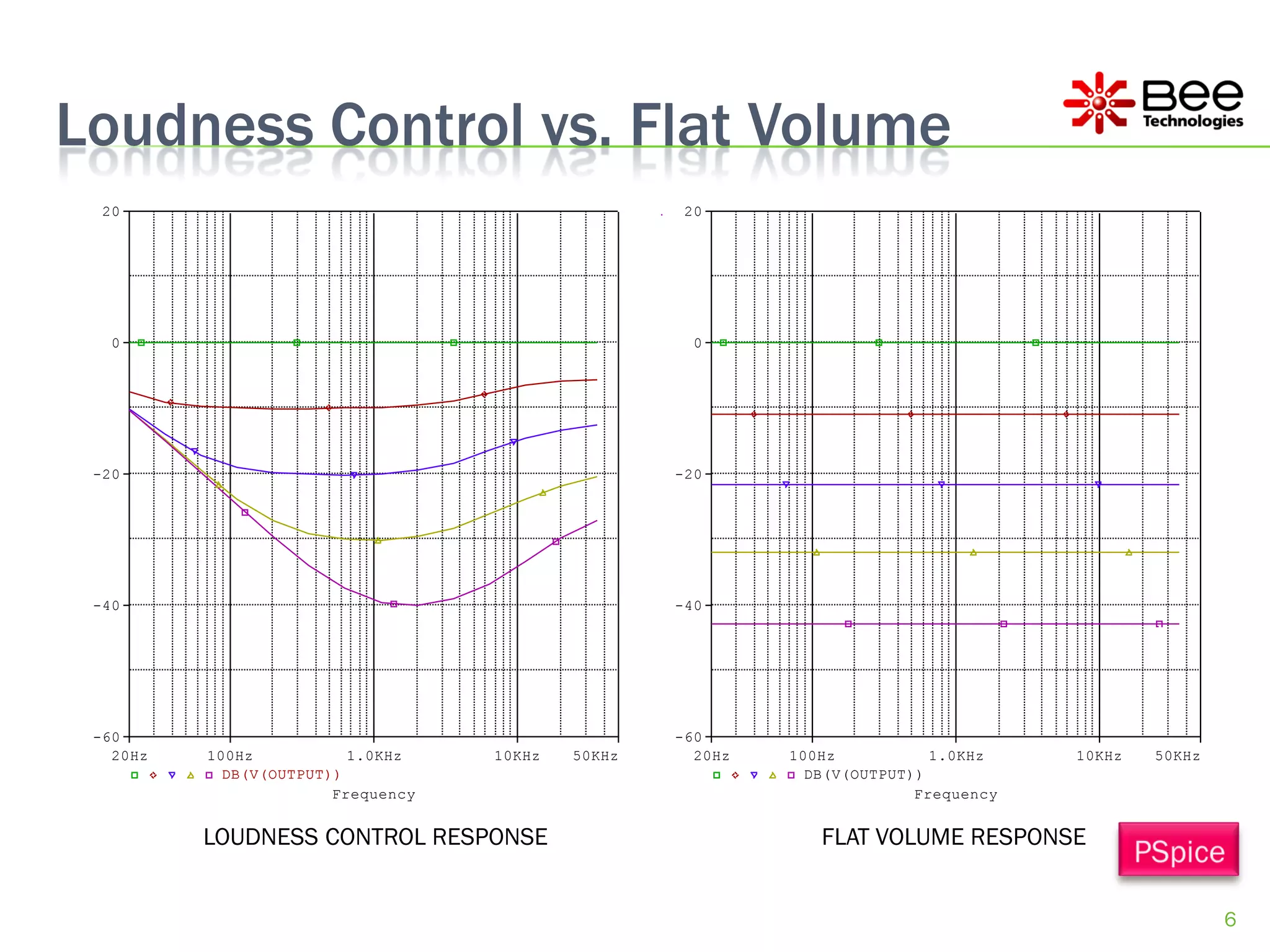
Loudness Control vs. Flat Volume
  20                                                 20


   0                                                  0


 -20                                                -20


 -40                                                -40


 -60                                                -60
   20Hz   100Hz           1.0KHz    10KHz   50KHz     20Hz   100Hz           1.0KHz    10KHz   50KHz
            DB(V(OUTPUT))                                      DB(V(OUTPUT))
                        Frequency                                          Frequency


          LOUDNESS CONTROL RESPONSE                             FLAT VOLUME RESPONSE


                                                                                                       6
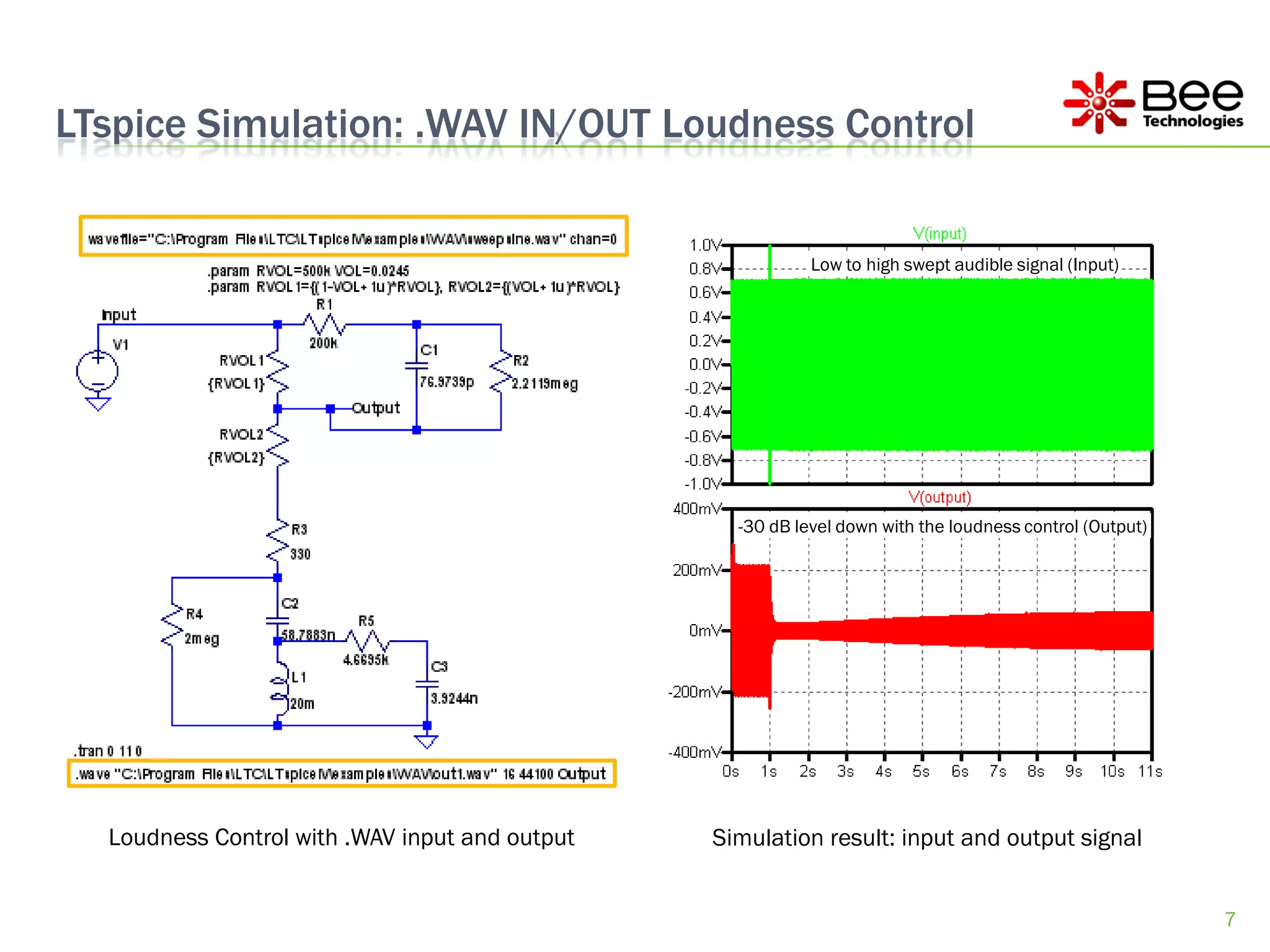
LTspice Simulation: .WAV IN/OUT Loudness Control


                                                           Low to high swept audible signal (Input)


                                                  -30 dB level down with the loudness control (Output)


  Loudness Control with .WAV input and output   Simulation result: input and output signal


                                                                                                         7
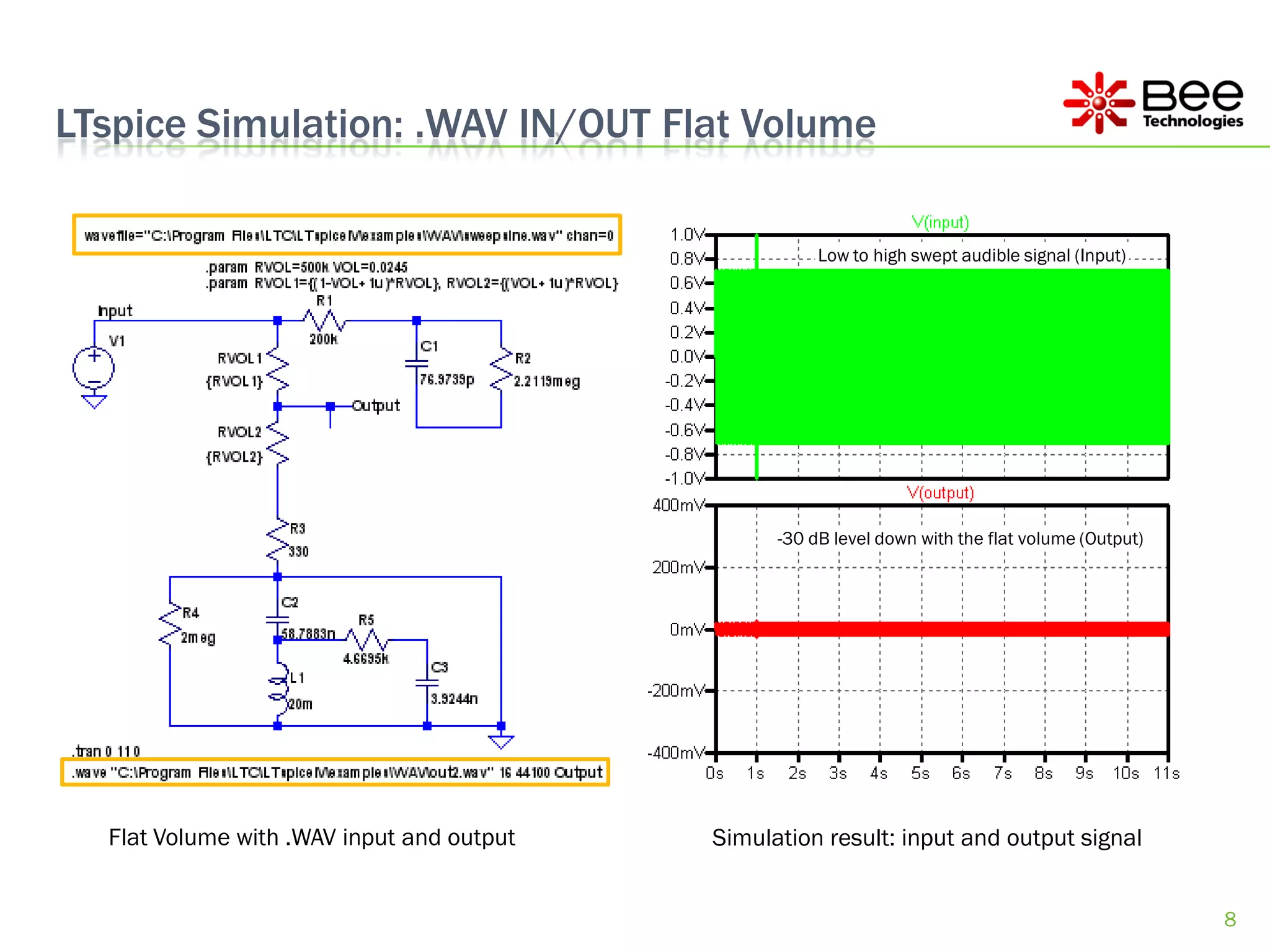
LTspice Simulation: .WAV IN/OUT Flat Volume

                                                      Low to high swept audible signal (Input)


                                                 -30 dB level down with the flat volume (Output)


  Flat Volume with .WAV input and output   Simulation result: input and output signal


                                                                                                   8
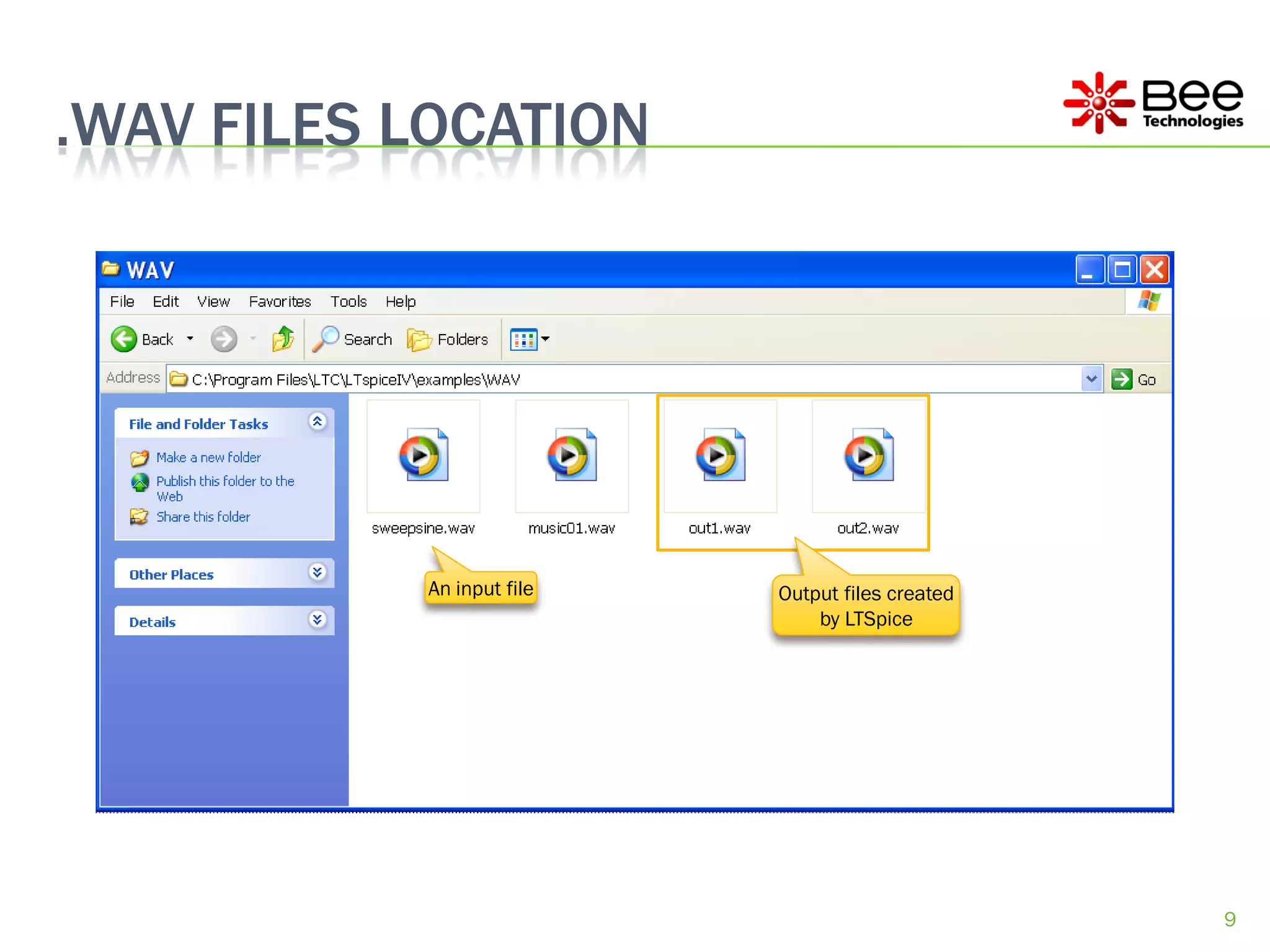
.WAV FILES LOCATION


           An input file   Output files created
                               by LTSpice


                                                  9
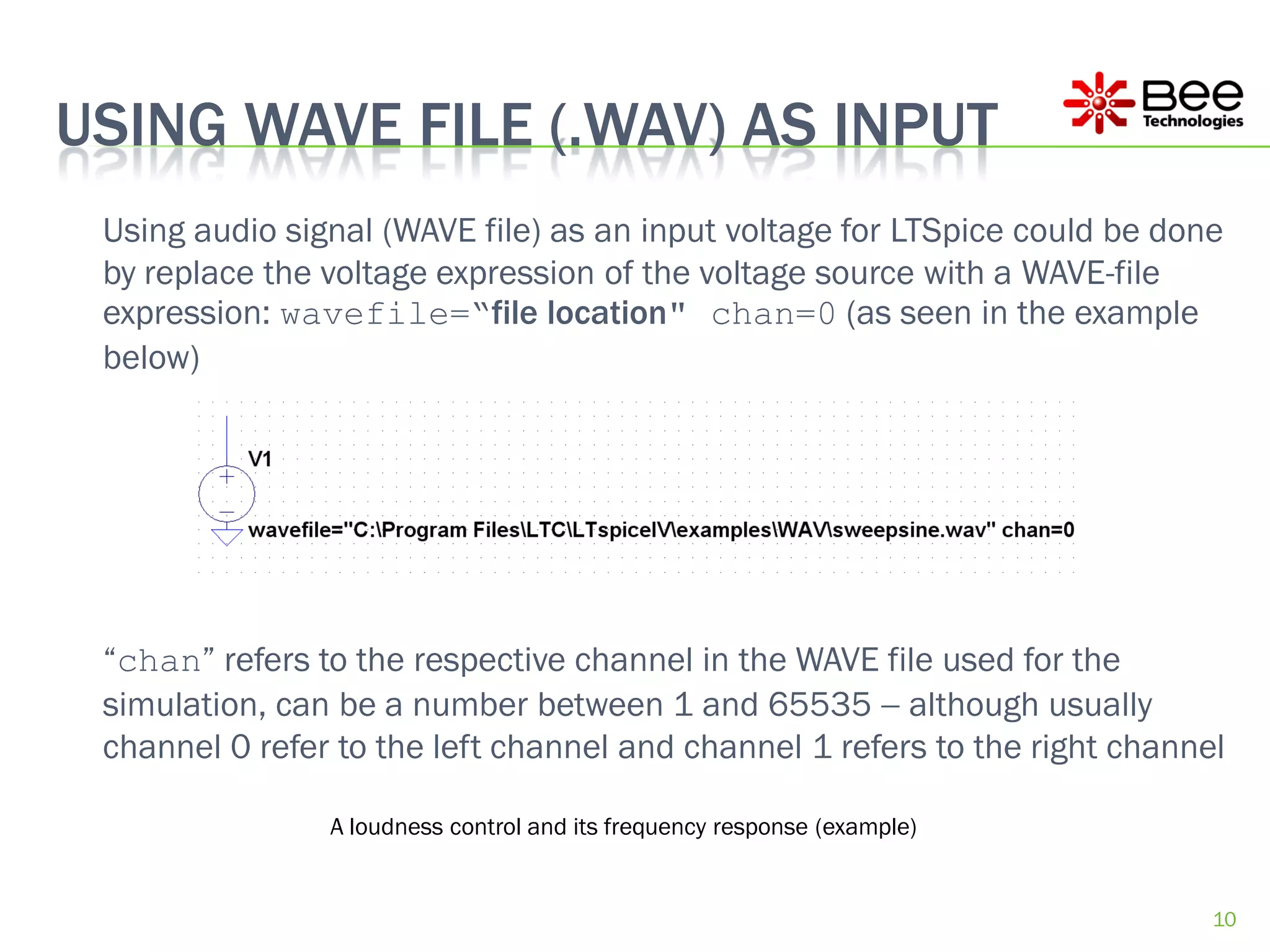
USING WAVE FILE (.WAV) AS INPUT
 Using audio signal (WAVE file) as an input voltage for LTSpice could be done
 by replace the voltage expression of the voltage source with a WAVE-file
 expression: wavefile=“file location" chan=0 (as seen in the example
 below)


 “chan” refers to the respective channel in the WAVE file used for the
 simulation, can be a number between 1 and 65535  although usually
 channel 0 refer to the left channel and channel 1 refers to the right channel

                A loudness control and its frequency response (example)


                                                                             10
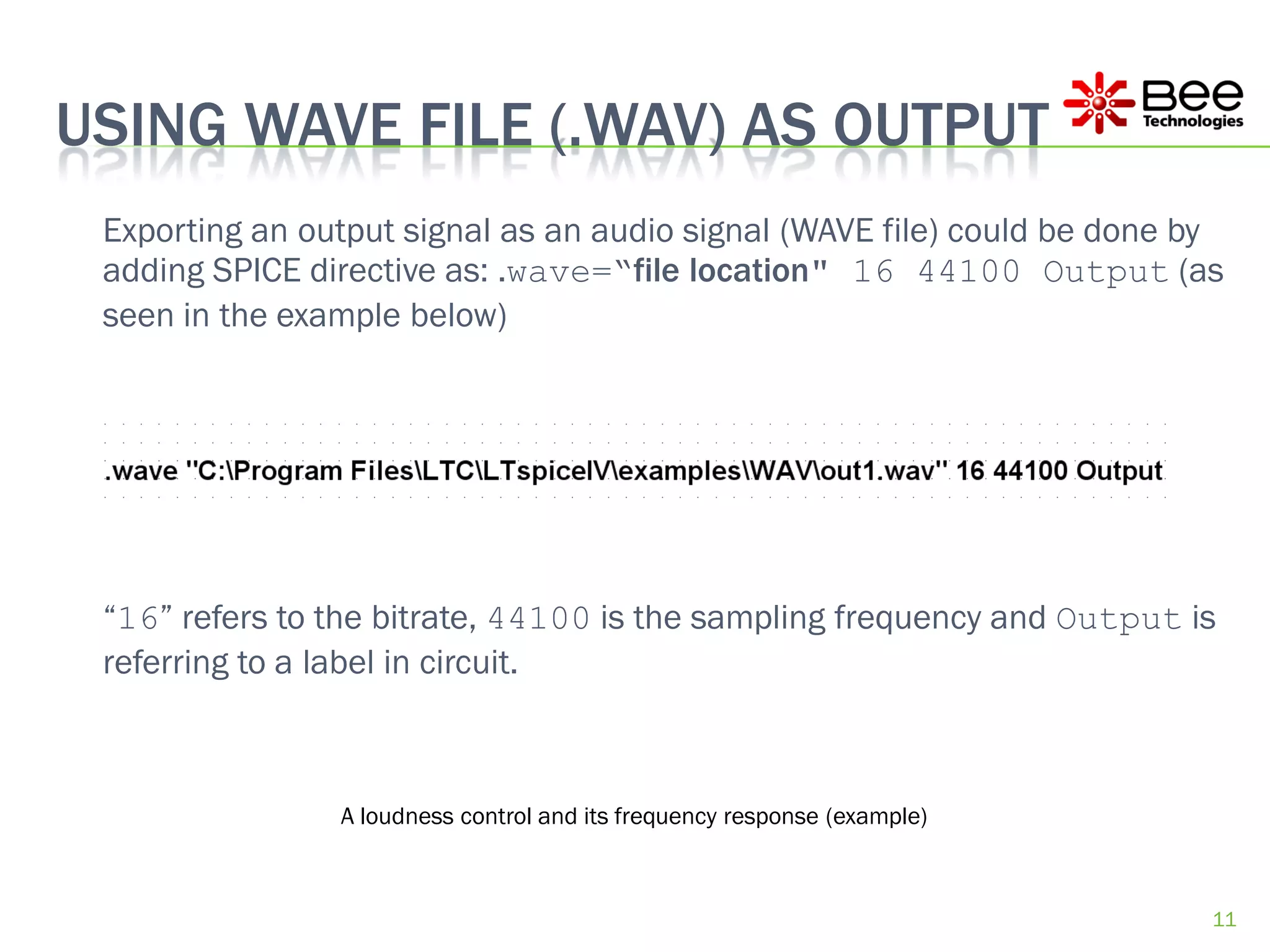
USING WAVE FILE (.WAV) AS OUTPUT
 Exporting an output signal as an audio signal (WAVE file) could be done by
 adding SPICE directive as: .wave=“file location" 16 44100 Output (as
 seen in the example below)


 “16” refers to the bitrate, 44100 is the sampling frequency and Output is
 referring to a label in circuit.


                A loudness control and its frequency response (example)


                                                                          11
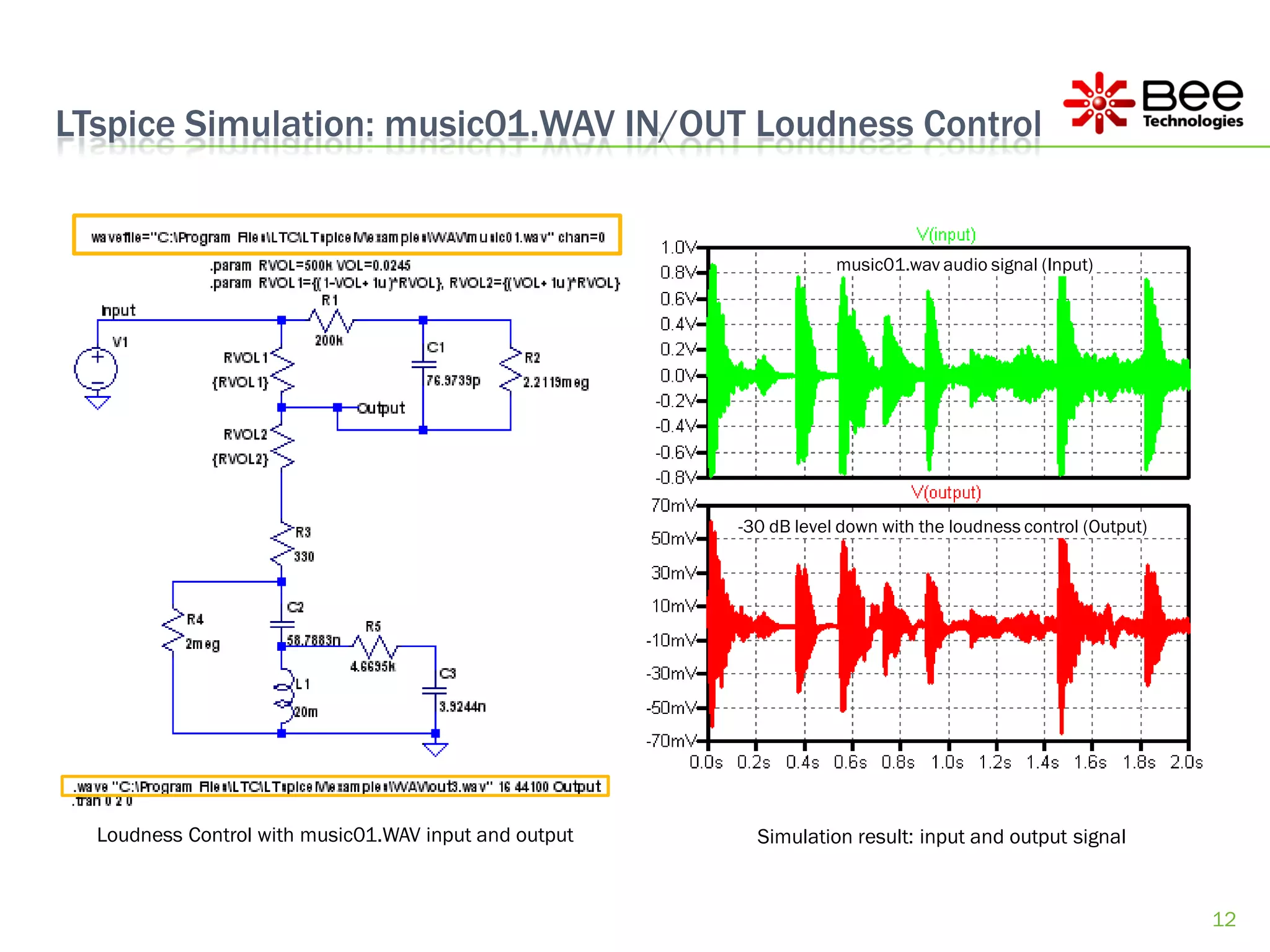
LTspice Simulation: music01.WAV IN/OUT Loudness Control


                                                                   music01.wav audio signal (Input)


                                                       -30 dB level down with the loudness control (Output)


  Loudness Control with music01.WAV input and output     Simulation result: input and output signal


                                                                                                              12
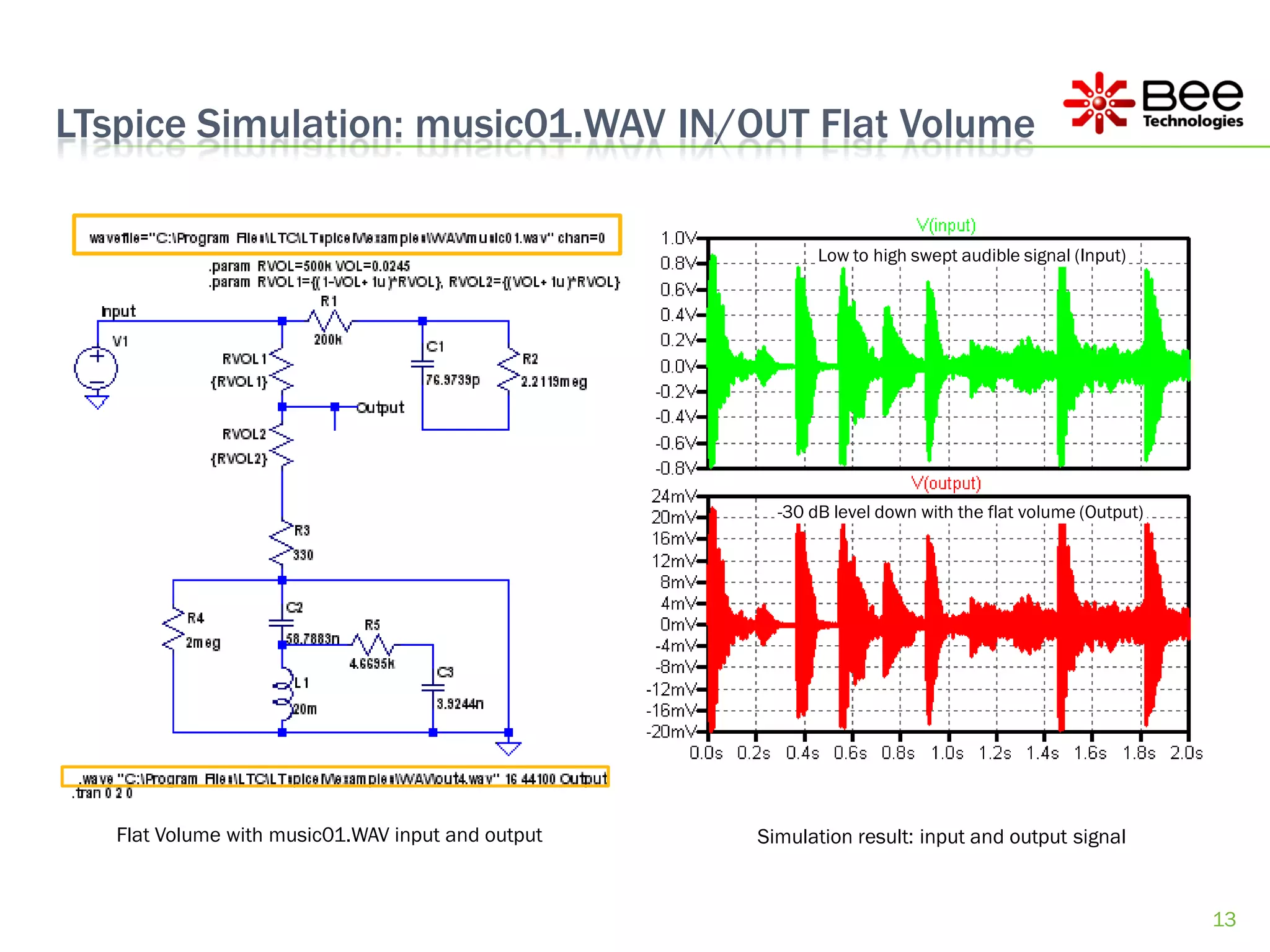
LTspice Simulation: music01.WAV IN/OUT Flat Volume

                                                          Low to high swept audible signal (Input)


                                                     -30 dB level down with the flat volume (Output)


   Flat Volume with music01.WAV input and output   Simulation result: input and output signal


                                                                                                       13
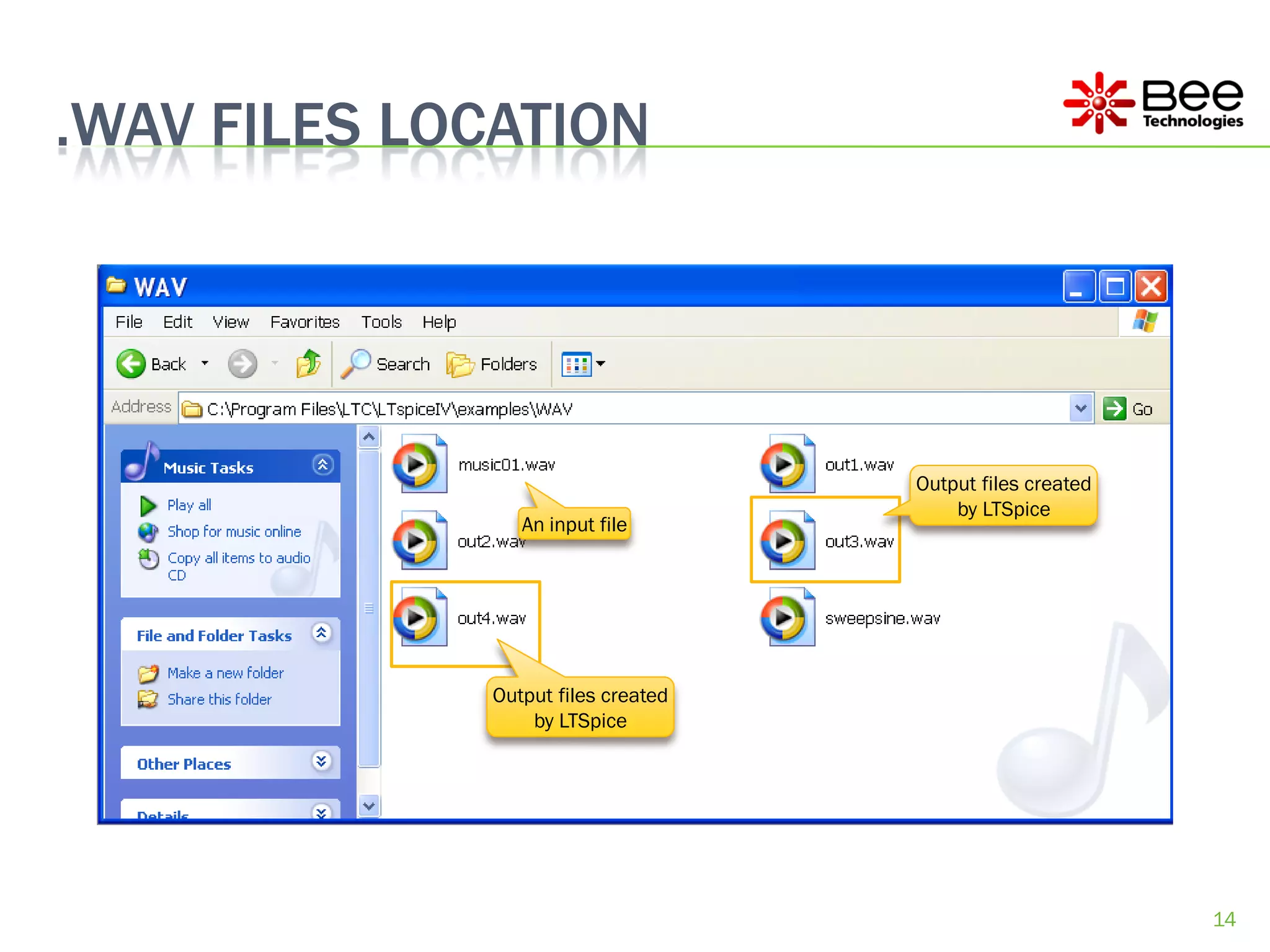
.WAV FILES LOCATION


                                    Output files created
                                        by LTSpice
                An input file


             Output files created
                 by LTSpice


                                                           14
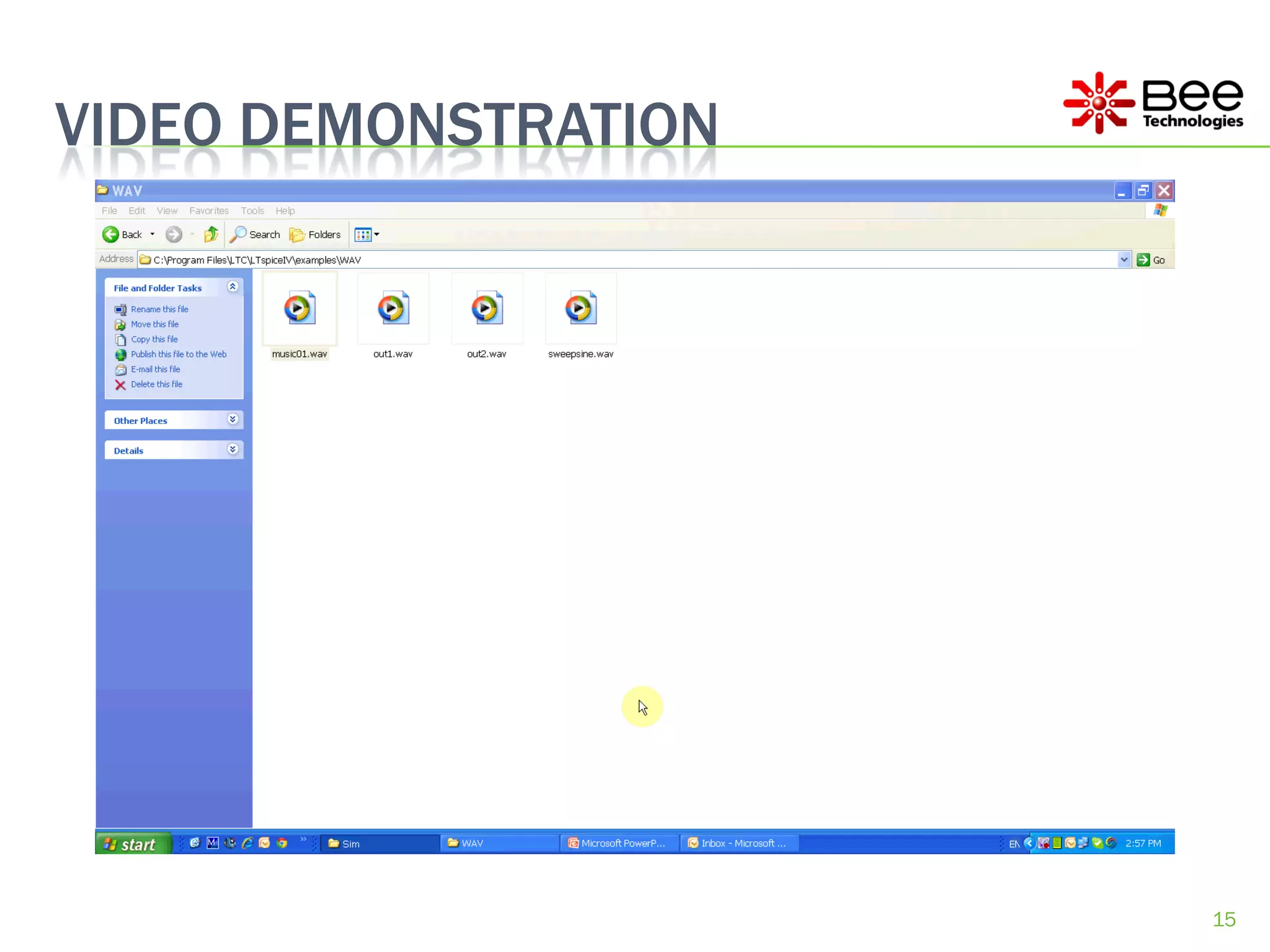
VIDEO DEMONSTRATION


                      15

LTspice audio simulation

  • 1.
    LTSPICE AUDIO SIMULATION: ALOUDNESS CONTROL Bee Technologies Inc. 20AUG2012 1
  • 2.
    EQUAL-LOUDNESS CONTOUR  Equal-loudness contour is a measure of sound pressure (dB SPL), over the frequency spectrum, for which the human ear perceive the same loudness when presented with pure steady tones (unit is the phon). 120 INTENSITY LEVEL (dB) 100 80 100 90 60 80 70 60 Loudness level (phon) 40 10 100 1000 10000 FREQUENCY (Hz) Contours of equal loudness (from the Radiotron Designers Handbook). For more info . . . http://www.sfu.ca/sonic-studio/handbook/Equal_Loudness_Contours.html 2
  • 3.
    A LOUDNESS CONTROL  A loudness control is used as an attempt to restore extreme low and high frequencies. As the sound level decreases, the ear becomes less sensitive to both extreme low and high frequencies. Thus, when listening at reduced PARAMETERS: RVOL = 500k levels, if the frequency response of your system is maintained flat, you will VOL = 0.0245 not hear those extremes as well. PARAMETERS: RVOL1 = {(1-VOL+1u)*RVOL} RVOL2 = {(VOL+1u)*RVOL} R1 20 Input V1 200k 1Vac RVOL-1 C1 0Vdc {RVOL1} 76.9739p R2 2.2119meg Output 0 0 RVOL-2 {RVOL2} R3 330 -20 R4 C2 2MEG 58.7883n R5 1 -40 4.6695k L1 20m C3 3.9244n -60 2 20Hz 100Hz 1.0KHz 10KHz 50KHz DB(V(OUTPUT)) 0 Frequency A loudness control and its frequency response (example) 3
  • 4.
    THE LOUDNESS CONTROLVS. EQUAL-LOUDNESS CONTOUR 20 0 INTENSITY LEVEL (dB) -20 100 100(Sim) 90 90(Sim) 80 -40 80(Sim) 70 70(Sim) 60 60(Sim) -60 10 100 1000 10000 FREQUENCY (Hz) Frequency response of the loudness control (simulation) is compared to the equal-loudness contour. 4
  • 5.
    Loudness Control vs.Flat Volume The High-Pass PARAMETERS: PARAMETERS: circuit is RVOL = 500k RVOL = 500k disconnected, the VOL = 0.0245 VOL = 0.0245 Low-Pass circuit PARAMETERS: PARAMETERS: is short to ground RVOL1 = {(1-VOL+1u)*RVOL} RVOL1 = {(1-VOL+1u)*RVOL} RVOL2 = {(VOL+1u)*RVOL} RVOL2 = {(VOL+1u)*RVOL} R1 R1 Input Input V1 200k V1 200k 1Vac RVOL-1 C1 1Vac RVOL-1 C1 0Vdc {RVOL1} 76.9739p R2 0Vdc {RVOL1} 76.9739p R2 2.2119meg 2.2119meg Output Output 0 RVOL-2 0 RVOL-2 {RVOL2} {RVOL2} R3 R3 330 330 R4 C2 R4 C2 2MEG 58.7883n R5 2MEG 58.7883n R5 1 1 4.6695k 4.6695k L1 L1 20m 20m C3 C3 3.9244n 3.9244n 2 2 0 0 LOUDNESS CONTROL FLAT VOLUME 5
  • 6.
    Loudness Control vs.Flat Volume 20 20 0 0 -20 -20 -40 -40 -60 -60 20Hz 100Hz 1.0KHz 10KHz 50KHz 20Hz 100Hz 1.0KHz 10KHz 50KHz DB(V(OUTPUT)) DB(V(OUTPUT)) Frequency Frequency LOUDNESS CONTROL RESPONSE FLAT VOLUME RESPONSE 6
  • 7.
    LTspice Simulation: .WAVIN/OUT Loudness Control Low to high swept audible signal (Input) -30 dB level down with the loudness control (Output) Loudness Control with .WAV input and output Simulation result: input and output signal 7
  • 8.
    LTspice Simulation: .WAVIN/OUT Flat Volume Low to high swept audible signal (Input) -30 dB level down with the flat volume (Output) Flat Volume with .WAV input and output Simulation result: input and output signal 8
  • 9.
    .WAV FILES LOCATION An input file Output files created by LTSpice 9
  • 10.
    USING WAVE FILE(.WAV) AS INPUT Using audio signal (WAVE file) as an input voltage for LTSpice could be done by replace the voltage expression of the voltage source with a WAVE-file expression: wavefile=“file location" chan=0 (as seen in the example below) “chan” refers to the respective channel in the WAVE file used for the simulation, can be a number between 1 and 65535  although usually channel 0 refer to the left channel and channel 1 refers to the right channel A loudness control and its frequency response (example) 10
  • 11.
    USING WAVE FILE(.WAV) AS OUTPUT Exporting an output signal as an audio signal (WAVE file) could be done by adding SPICE directive as: .wave=“file location" 16 44100 Output (as seen in the example below) “16” refers to the bitrate, 44100 is the sampling frequency and Output is referring to a label in circuit. A loudness control and its frequency response (example) 11
  • 12.
    LTspice Simulation: music01.WAVIN/OUT Loudness Control music01.wav audio signal (Input) -30 dB level down with the loudness control (Output) Loudness Control with music01.WAV input and output Simulation result: input and output signal 12
  • 13.
    LTspice Simulation: music01.WAVIN/OUT Flat Volume Low to high swept audible signal (Input) -30 dB level down with the flat volume (Output) Flat Volume with music01.WAV input and output Simulation result: input and output signal 13
  • 14.
    .WAV FILES LOCATION Output files created by LTSpice An input file Output files created by LTSpice 14
  • 15.