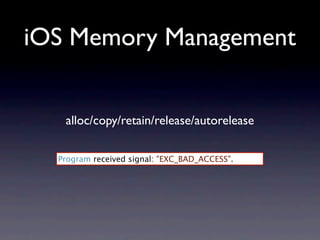

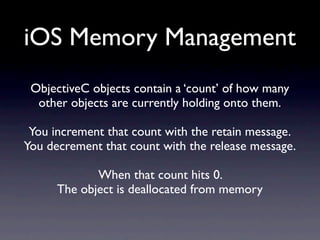
![iOS Memory Management
Memory Management Rules:
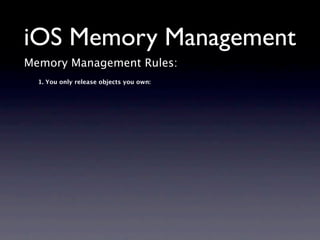
1. You only release objects you own:
[[UPGameViewController alloc] initWithNibName:@"UPGameView" bundle:nil]](https://image.slidesharecdn.com/cocoaheadsseptember2010-100930200916-phpapp01/85/iOS-Memory-Management-Basics-8-320.jpg)
![iOS Memory Management
Memory Management Rules:
1. You only release objects you own:
[[UPGameViewController alloc] initWithNibName:@"UPGameView" bundle:nil]
NSArray *topLevelObjects = [[NSBundle mainBundle]
loadNibNamed:@"UPLeaderboardViewCell"
owner:nil options:nil];
NSMutableArray *mutableTopLevelObjects = [topLevelObjects mutableCopy];](https://image.slidesharecdn.com/cocoaheadsseptember2010-100930200916-phpapp01/85/iOS-Memory-Management-Basics-9-320.jpg)
![iOS Memory Management
Memory Management Rules:
1. You only release objects you own:
[[UPGameViewController alloc] initWithNibName:@"UPGameView" bundle:nil]
NSArray *topLevelObjects = [[NSBundle mainBundle]
loadNibNamed:@"UPLeaderboardViewCell"
owner:nil options:nil];
NSMutableArray *mutableTopLevelObjects = [topLevelObjects mutableCopy];
2. Or objects you take ownership of:](https://image.slidesharecdn.com/cocoaheadsseptember2010-100930200916-phpapp01/85/iOS-Memory-Management-Basics-10-320.jpg)
![iOS Memory Management
Memory Management Rules:
1. You only release objects you own:
[[UPGameViewController alloc] initWithNibName:@"UPGameView" bundle:nil]
NSArray *topLevelObjects = [[NSBundle mainBundle]
loadNibNamed:@"UPLeaderboardViewCell"
owner:nil options:nil];
NSMutableArray *mutableTopLevelObjects = [topLevelObjects mutableCopy];
2. Or objects you take ownership of:
[[UIFont fontWithName:@"HoboStd" size:25] retain]](https://image.slidesharecdn.com/cocoaheadsseptember2010-100930200916-phpapp01/85/iOS-Memory-Management-Basics-11-320.jpg)
![iOS Memory Management
Memory Management Rules:
1. You only release objects you own:
[[UPGameViewController alloc] initWithNibName:@"UPGameView" bundle:nil]
NSArray *topLevelObjects = [[NSBundle mainBundle]
loadNibNamed:@"UPLeaderboardViewCell"
owner:nil options:nil];
NSMutableArray *mutableTopLevelObjects = [topLevelObjects mutableCopy];
2. Or objects you take ownership of:
[[UIFont fontWithName:@"HoboStd" size:25] retain]
Retaining an object simply increments an objects retainCount by 1.](https://image.slidesharecdn.com/cocoaheadsseptember2010-100930200916-phpapp01/85/iOS-Memory-Management-Basics-12-320.jpg)
![iOS Memory Management
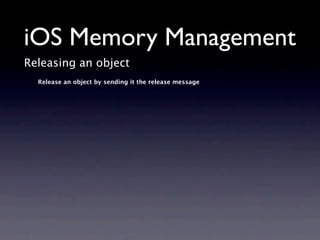
Releasing an object
Release an object by sending it the release message
NSArray *topLevelObjects = [[NSBundle mainBundle]
loadNibNamed:@"UPLeaderboardViewCell"
owner:nil options:nil];
NSMutableArray *mutableTopLevelObjects = [topLevelObjects mutableCopy];
[mutableTopLevelObjects release];](https://image.slidesharecdn.com/cocoaheadsseptember2010-100930200916-phpapp01/85/iOS-Memory-Management-Basics-14-320.jpg)
![iOS Memory Management
Releasing an object
Release an object by sending it the release message
NSArray *topLevelObjects = [[NSBundle mainBundle]
loadNibNamed:@"UPLeaderboardViewCell"
owner:nil options:nil];
NSMutableArray *mutableTopLevelObjects = [topLevelObjects mutableCopy];
[mutableTopLevelObjects release];
Releasing an object doesn’t remove it from memory.
It simply decrements the objects retainCount by 1.
When an objects retainCount is equal to 0.
The object is deallocated by the runtime automatically.](https://image.slidesharecdn.com/cocoaheadsseptember2010-100930200916-phpapp01/85/iOS-Memory-Management-Basics-15-320.jpg)
![iOS Memory Management
Releasing an object
Release an object by sending it the release message
NSMutableArray *mutableTopLevelObjects = [topLevelObjects mutableCopy];
[topLevelObjects retainCount]; // => 1
[topLevelObjects retain];
[topLevelObjects retainCount]; // => 2
[mutableTopLevelObjects release];
[topLevelObjects retainCount]; // => 1
[topLevelObjects release];
[topLevelObjects retainCount]; // => 0
Releasing an object doesn’t remove it from memory.
It simply decrements the objects retainCount by 1.
When an objects retainCount is equal to 0.
The object is deallocated by the runtime automatically.](https://image.slidesharecdn.com/cocoaheadsseptember2010-100930200916-phpapp01/85/iOS-Memory-Management-Basics-16-320.jpg)
![iOS Memory Management
So what about the other objects?
They’re what’s known as autorelease objects.
// This object will be automatically released at some point
// in the future when the autorelease pool is drained
NSString *aString = [NSString stringWithFormat:@"a string with an int %i", 1];](https://image.slidesharecdn.com/cocoaheadsseptember2010-100930200916-phpapp01/85/iOS-Memory-Management-Basics-19-320.jpg)
![iOS Memory Management
So what about the other objects?
They’re what’s known as autorelease objects.
// This object will be automatically released at some point
// in the future when the autorelease pool is drained
NSString *aString = [NSString stringWithFormat:@"a string with an int %i", 1];
You can mark your own objects as autorelease objects](https://image.slidesharecdn.com/cocoaheadsseptember2010-100930200916-phpapp01/85/iOS-Memory-Management-Basics-20-320.jpg)
![iOS Memory Management
So what about the other objects?
They’re what’s known as autorelease objects.
// This object will be automatically released at some point
// in the future when the autorelease pool is drained
NSString *aString = [NSString stringWithFormat:@"a string with an int %i", 1];
You can mark your own objects as autorelease objects
[topLevelObjects retainCount]; // => 1
[topLevelObjects autorelease];
[topLevelObjects retainCount]; // => 1 since it will be released later](https://image.slidesharecdn.com/cocoaheadsseptember2010-100930200916-phpapp01/85/iOS-Memory-Management-Basics-21-320.jpg)
![iOS Memory Management
NSAutoreleasePool
“Cocoa always expects there to be an autorelease pool available”
- Memory Management Programming Guide: Autorelease Pools
// main.m
// The main entry point into the app sets up
// an autorelease pool for us automatically
int main(int argc, char *argv[])
{
NSAutoreleasePool * pool = [[NSAutoreleasePool alloc] init];
int retVal = UIApplicationMain(argc, argv, nil, nil);
[pool release];
return retVal;
}](https://image.slidesharecdn.com/cocoaheadsseptember2010-100930200916-phpapp01/85/iOS-Memory-Management-Basics-22-320.jpg)
![iOS Memory Management
Common mistakes
// You need to mark zero for autorelease or release it
- (void)reset {
NSNumber *zero = [[NSNumber alloc] initWithInteger:0];
[self setCount:zero];
}](https://image.slidesharecdn.com/cocoaheadsseptember2010-100930200916-phpapp01/85/iOS-Memory-Management-Basics-24-320.jpg)
![iOS Memory Management
Common mistakes
// You need to mark zero for autorelease or release it
- (void)reset {
NSNumber *zero = [[NSNumber alloc] initWithInteger:0];
[self setCount:zero];
}
// zero is an autorelease object already.
// you haven't used alloc/copy anywhere
// you are over releasing the zero object
- (void)reset {
NSNumber *zero = [NSNumber numberWithInteger:0];
[self setCount:zero];
[zero release];
}](https://image.slidesharecdn.com/cocoaheadsseptember2010-100930200916-phpapp01/85/iOS-Memory-Management-Basics-25-320.jpg)
![iOS Memory Management
Common confusion
// Adding an object to a collection retains the object
// It transfers ownership to the parent collection
// Since alloc/copy was never called you don’t need
// to release convenienceNumber
NSMutableArray *array = [[NSMutableArray alloc] init];
NSUInteger i = 0;
for (i; i < 10; i++) {
NSNumber *convenienceNumber = [NSNumber numberWithInteger:i];
[array addObject:convenienceNumber];
}](https://image.slidesharecdn.com/cocoaheadsseptember2010-100930200916-phpapp01/85/iOS-Memory-Management-Basics-26-320.jpg)
![iOS Memory Management
Common confusion
// Adding an object to a collection retains the object
// It transfers ownership to the parent collection
// You need to release allocedNumber here since you alloced it.
NSMutableArray *array = [[NSMutableArray alloc] init];
NSUInteger i = 0;
for (i; i < 10; i++) {
NSNumber *allocedNumber = [[NSNumber alloc] initWithInteger: i];
[array addObject:allocedNumber];
[allocedNumber release];
}](https://image.slidesharecdn.com/cocoaheadsseptember2010-100930200916-phpapp01/85/iOS-Memory-Management-Basics-27-320.jpg)
![iOS Memory Management
Returning Objects from Methods
// Correct - You don't own the string object so you should return it as such.
- (NSString *)fullName {
NSString *string = [NSString stringWithFormat:@"%@ %@",
self.firstName, self.lastName];
return string;
}](https://image.slidesharecdn.com/cocoaheadsseptember2010-100930200916-phpapp01/85/iOS-Memory-Management-Basics-29-320.jpg)
![iOS Memory Management
Returning Objects from Methods
// Correct - You don't own the string object so you should return it as such.
- (NSString *)fullName {
NSString *string = [NSString stringWithFormat:@"%@ %@",
self.firstName, self.lastName];
return string;
}
// Incorrect - You're returning an object that has already been released.
- (NSString *)fullName {
NSString *string = [[[NSString alloc] initWithFormat:@"%@ %@",
self.firstName, self.lastName]
release];
return string;
}](https://image.slidesharecdn.com/cocoaheadsseptember2010-100930200916-phpapp01/85/iOS-Memory-Management-Basics-30-320.jpg)
![iOS Memory Management
Returning Objects from Methods
// Correct - You don't own the string object so you should return it as such.
- (NSString *)fullName {
NSString *string = [NSString stringWithFormat:@"%@ %@",
self.firstName, self.lastName];
return string;
}
// Incorrect - You're returning an object that has already been released.
- (NSString *)fullName {
NSString *string = [[[NSString alloc] initWithFormat:@"%@ %@",
self.firstName, self.lastName]
release];
return string;
}
// Correct - You've created an autorelease object.
- (NSString *)fullName {
NSString *string = [[[NSString alloc] initWithFormat:@"%@ %@",
self.firstName, self.lastName]
autorelease];
return string;
}](https://image.slidesharecdn.com/cocoaheadsseptember2010-100930200916-phpapp01/85/iOS-Memory-Management-Basics-31-320.jpg)
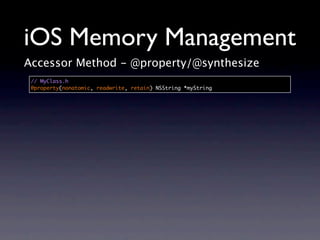
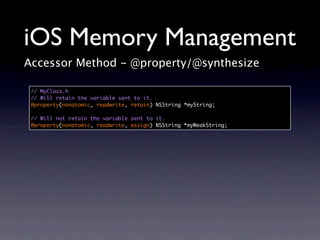
![iOS Memory Management
Accessor Method - @property/@synthesize
// MyClass.h
@property(nonatomic, readwrite, retain) NSString *myString
// MyClass.m
@synthesize myString = _myString;
-(id)init
{
if ((self = [super init]))
{
self.myString = @"A string to be retained";
}
return self;
}
-(void)dealloc
{
[_myString release], _myString = nil;
[super dealloc];
}](https://image.slidesharecdn.com/cocoaheadsseptember2010-100930200916-phpapp01/85/iOS-Memory-Management-Basics-34-320.jpg)
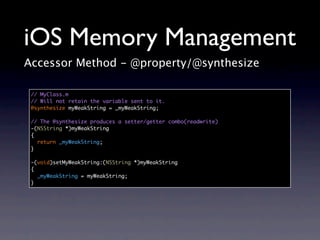
![iOS Memory Management
Accessor Method - @property/@synthesize
// MyClass.m
// Will retain the variable sent to it.
@synthesize myString = _myString;
// The @synthesize produces a setter/getter combo(readwrite)
-(NSString *)myString
{
return _myString;
}
-(void)setMyString:(NSString *)myString
{
if (myString != _myString)
{
[_myString release];
_myString = [myString retain];
}
}](https://image.slidesharecdn.com/cocoaheadsseptember2010-100930200916-phpapp01/85/iOS-Memory-Management-Basics-36-320.jpg)
![iOS Memory Management
Accessor Methods - @property/@synthesize
// MyClass.m
// By synthesizing in this way you are protecting your iVar so it can
// only be accessed through the setter.
// It also means you can pass the argument myString to methods.
@synthesize myString = _myString;
-(id)initWithMyString:(NSString *)myString
{
if ((self = [super init]))
{
self.myString = myString;
}
return self;
}
+(id)myClassWithMyString:(NSString *)myString
{
return [[self initWithMyString:myString] autorelease];
}](https://image.slidesharecdn.com/cocoaheadsseptember2010-100930200916-phpapp01/85/iOS-Memory-Management-Basics-38-320.jpg)
![iOS Memory Management
Accessor Methods - @property/@synthesize
// MyClass.m
// By synthesizing in this way you are protecting your iVar so it can
// only be accessed through the setter.
// It also means you can pass the argument myString to methods.
@synthesize myString;
-(id)initWithMyString:(NSString *)cantBeCalledMyStringNow
{
if ((self = [super init]))
{
// Woops I assigned straight to the iVar. So it’s not retained now
myString = cantBeCalledMyStringNow;
}
return self;
}
+(id)myClassWithMyString:(NSString *)cantBeCalledMyStringNow
{
return [[self initWithMyString: cantBeCalledMyStringNow] autorelease];
}](https://image.slidesharecdn.com/cocoaheadsseptember2010-100930200916-phpapp01/85/iOS-Memory-Management-Basics-39-320.jpg)

The document provides an overview of iOS memory management, highlighting the concepts of retain, release, and autorelease for managing memory in Objective-C. It emphasizes the importance of ownership rules, such as only releasing objects you own, and discusses common mistakes and confusion regarding memory management practices. Additionally, it illustrates how to properly use properties and synthesizers to manage object memory effectively.


![Multithreading and Parallelism on iOS [MobOS 2013]](https://cdn.slidesharecdn.com/ss_thumbnails/mobos2013-131122085438-phpapp02-thumbnail.jpg?width=640&height=640&fit=bounds)


