iOS App Performance 
Things to Take Care 
Gurpreet Singh Sachdeva 
Engineering Manager @ Yahoo
Who should attend this session? 
• If you are developing or planning to develop 
iOS apps and looking for tips to make your 
apps fast then you are right place. 
• Pre-requisite: Basic Objective-C knowledge
Why performance is important? 
• Faster apps provide a better user experience 
• Users expect high performance 
• If your app is slow or unresponsive it is bound 
to get bad reviews and loose user base. 
• Remember, mobile devices have less RAM.
Performance Tips 
• Use ARC 
• In addition to helping you avoid memory leaks, ARC can 
also improve your performance, by making sure that 
objects are de-allocated as soon as they are no longer 
needed. 
• These days, you should always use ARC in your projects!
Performance Tips 
• Don’t block the main thread 
• You should never do any heavy lifting on the main 
thread. Remember, UIKit does all of its work on the 
main thread, such as drawing, managing touches, and 
responding to input. 
• Most cases of blocking the main thread occur when your 
app is performing an I/O operation which involves any 
task that needs to read or write from an external 
source, such as the disk or the network. 
• You can perform network tasks asynchronously by using 
this method on NSURLConnection
Performance Tips 
• Use a reuseIdentifier where appropriate 
• A table view’s data source should generally reuse 
UITableViewCell objects when it assigns cells to rows. 
• Otherwise, table view will configure new cell each time 
a row is displayed. This is an expensive operation and 
will affect the scrolling performance of your app 
• To use reuseIdentifiers, call this method from your data 
source object when asked to provide a new cell for the 
table view: 
static NSString *CellIdentifier = @"Cell"; 
UITableViewCell *cell = [tableView dequeueReusableCellWithIdentifier:CellIdentifier forIndexPath:indexPath];
Performance Tips 
• Avoid fat XIBs 
• If you are still using XIB files for some reason (may be for 
supporting pre iOS 5 devices) then make them as 
uncomplicated as possible. 
• Note that when you load a XIB into memory, all of its 
contents are loaded into memory, including any images. 
• If you have a view you’re not using immediately, then you’re 
wasting precious memory. 
• It’s worth noting that this won’t happen with storyboards, 
since a storyboard will only instantiate a view controller when 
it’s needed.
Performance Tips 
• Size images to Image Views 
• Scaling images on the fly can be expensive, especially if 
your UIImageView is embedded in a UIScrollView. 
• If the image is downloaded from a remote service, 
sometimes you don’t have control over the size, or you 
might not be able to scale it on the server prior to 
downloading.
Performance Tips 
• Choose the correct Collection 
• Learning to use the most appropriate class or object for 
the task at hand is fundamental to writing efficient 
code. This is especially true when dealing with 
collections. 
• There is a document on Apple’s Developer Library that 
explains in detail the differences between the available 
classes, as well as which situations suit each class. It’s a 
must read document for anyone looking to work with 
collections.
Performance Tips 
• Enable GZIP compression 
• Speed up the download of network-based resources by 
enabling GZIP compression on both your server and on 
your client. 
• The good news is that iOS already supports GZIP 
compression by default if you’re using 
NSURLConnection, or a framework built on top of it such 
as AFNetworking. 
• There is a great article about GZIP compression which 
explains how to enable it on your Apache or IIS server.
Performance Tips 
• Reuse and lazy Load Views 
• Create your views as you need them. 
• More views means more drawing; which ultimately 
means more CPU and memory overhead. This is 
especially true if your app embeds many views inside of 
a UIScrollView.
Performance Tips 
• Cache what matters 
• Cache things that are unlikely to change, but are 
accessed frequently. 
• What can you cache? 
• Some candidates for caching are remote server responses, 
images. 
• NSURLConnection already caches resources on disk or in 
memory according to the HTTP headers it processes.
Performance Tips 
• Handle memory warnings 
• iOS notifies all running apps when system memory is 
running low. 
• UIKit provides several ways to receive these low-memory 
warnings, including the following: 
• Implement the applicationDidReceiveMemoryWarning: method of your 
app delegate. 
• Override didReceiveMemoryWarning in your custom UIViewController 
subclass. 
• Register to receive the 
UIApplicationDidReceiveMemoryWarningNotification notification. 
• Upon receiving any of these warnings, free up any unnecessary 
memory. 
• Purge unused data structures, release any images that are not 
currently on-screen.
Performance Tips 
• Reuse expensive Objects 
• Some objects are very slow to initialize — 
NSDateFormatter and NSCalendar are two examples. 
• To avoid performance bottlenecks when working with 
these objects, try to reuse these objects if at all possible. 
• You can do this by either adding a property to your class or 
using static
Performance Tips 
• Optimize Your Table Views 
• Tips for optimizing Table Views 
• Reuse cells by setting the correct reuseIdentifier. 
• Make as many views opaque as possible, including the cell 
itself. 
• Avoid gradients, image scaling. 
• If the cell shows content that comes from the web, be sure to 
make those calls asynchronously and cache the responses. 
• Reduce the number of subviews. 
• Do as little work as possible in cellForRowAtIndexPath:. If you 
need to do some work, do it only once and cache the results. 
• Use the appropriate data structure to hold the information you 
need. Different structures have different costs for different 
operations.
Performance Tips 
• Speed up launch time 
• Launching your app quickly is very important, especially 
when the user launches for the first time. First 
impressions mean a lot for an app! 
• Ensure your app starts as quickly as possible is to 
perform asynchronous tasks. 
• You need to strike a balance between what to fetch before app 
launch and what to fetch once the app is launched. 
• Try to avoid fat XIBs, since they’re loaded on the main 
thread. But recall that storyboards don’t have this 
problem — so use them if you can!
Performance Tips 
• Cache Images (when?) 
• There are two common ways to load a UIImage from an 
app bundle. 
• Using imageNamed and second using 
imageWithContentsOfFile. 
• imageNamed has the advantage of caching the image as it’s loaded. 
• Alternately, imageWithContentsOfFile simply loads the image with no 
caching. 
• When would you use one over the other? 
• If you’re loading a large image that will be used only once, 
there’s no need to cache the image. 
• However, imageNamed is a much better choice for images that 
you’re going to be reusing in your app.
Performance Tips 
• Reduce battery consumption 
• Optimize use of the following features: 
• The CPU 
• Wi-Fi, Bluetooth, and baseband (EDGE, 3G) radios 
• The Core Location framework 
• The accelerometers 
• The disk 
• Consider the following guidelines: 
• Avoid doing work that requires polling. 
• Avoid accessing the disk too frequently. 
• Do not draw to the screen faster than is needed. 
• Connect to external network servers only when needed, and do 
not poll those servers. 
• Disable location updates as soon as you can.
Performance Tips 
• Reduce App’s memory footprint 
• Actions to take 
• Eliminate memory leaks. 
• Make resource files as small as possible. 
• Use Core Data or SQLite for large data sets. 
• Load resources lazily.
Performance Tips 
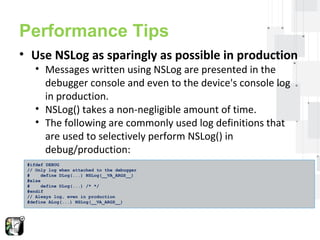
• Use NSLog as sparingly as possible in production 
• Messages written using NSLog are presented in the 
debugger console and even to the device's console log 
in production. 
• NSLog() takes a non-negligible amount of time. 
• The following are commonly used log definitions that 
are used to selectively perform NSLog() in 
debug/production: 
#ifdef DEBUG 
// Only log when attached to the debugger 
# define DLog(...) NSLog(__VA_ARGS__) 
#else 
# define DLog(...) /* */ 
#endif 
// Always log, even in production 
#define ALog(...) NSLog(__VA_ARGS__)
Performance Tips 
• Be Lazy 
• Defer memory allocations until you actually need the 
memory. 
• Defer reading the contents of a file until you actually 
need the information.
Performance Tips 
• Take Advantage of Perceived Performance 
• The perception of performance is just as effective as 
actual performance in many cases. 
• Many program tasks can be performed in the 
background, using a dispatch queue, or at idle time. 
• Doing this keeps the application’s main thread free to handle 
user interactions and makes the program interface feel more 
responsive to the user. 
• If your program needs to scan a number of files or perform 
lengthy calculations, do so using a dispatch queue. 
• There is a good document available on apple’s site for 
Concurrency Programing
Analyzing the performance 
• Using apple tools for analyzing performance 
• https 
://developer.apple.com/library/ios/documentation/Performance/ 
Conceptual/PerformanceOverview/PerformanceTools/Performanc 
eTools.html#//apple_ref/doc/uid/TP40001410-CH205-BCIIHAAJ
References 
Marcelo Fabri - 25 iOS App Performance Tips & Tricks. Retrieved from 
http://www.raywenderlich.com/31166/25-ios-app-performance-tips-tricks
iOS App performance - Things to take care

iOS App performance - Things to take care

  • 1.
    iOS App Performance Things to Take Care Gurpreet Singh Sachdeva Engineering Manager @ Yahoo
  • 2.
    Who should attendthis session? • If you are developing or planning to develop iOS apps and looking for tips to make your apps fast then you are right place. • Pre-requisite: Basic Objective-C knowledge
  • 3.
    Why performance isimportant? • Faster apps provide a better user experience • Users expect high performance • If your app is slow or unresponsive it is bound to get bad reviews and loose user base. • Remember, mobile devices have less RAM.
  • 4.
    Performance Tips •Use ARC • In addition to helping you avoid memory leaks, ARC can also improve your performance, by making sure that objects are de-allocated as soon as they are no longer needed. • These days, you should always use ARC in your projects!
  • 5.
    Performance Tips •Don’t block the main thread • You should never do any heavy lifting on the main thread. Remember, UIKit does all of its work on the main thread, such as drawing, managing touches, and responding to input. • Most cases of blocking the main thread occur when your app is performing an I/O operation which involves any task that needs to read or write from an external source, such as the disk or the network. • You can perform network tasks asynchronously by using this method on NSURLConnection
  • 6.
    Performance Tips •Use a reuseIdentifier where appropriate • A table view’s data source should generally reuse UITableViewCell objects when it assigns cells to rows. • Otherwise, table view will configure new cell each time a row is displayed. This is an expensive operation and will affect the scrolling performance of your app • To use reuseIdentifiers, call this method from your data source object when asked to provide a new cell for the table view: static NSString *CellIdentifier = @"Cell"; UITableViewCell *cell = [tableView dequeueReusableCellWithIdentifier:CellIdentifier forIndexPath:indexPath];
  • 7.
    Performance Tips •Avoid fat XIBs • If you are still using XIB files for some reason (may be for supporting pre iOS 5 devices) then make them as uncomplicated as possible. • Note that when you load a XIB into memory, all of its contents are loaded into memory, including any images. • If you have a view you’re not using immediately, then you’re wasting precious memory. • It’s worth noting that this won’t happen with storyboards, since a storyboard will only instantiate a view controller when it’s needed.
  • 8.
    Performance Tips •Size images to Image Views • Scaling images on the fly can be expensive, especially if your UIImageView is embedded in a UIScrollView. • If the image is downloaded from a remote service, sometimes you don’t have control over the size, or you might not be able to scale it on the server prior to downloading.
  • 9.
    Performance Tips •Choose the correct Collection • Learning to use the most appropriate class or object for the task at hand is fundamental to writing efficient code. This is especially true when dealing with collections. • There is a document on Apple’s Developer Library that explains in detail the differences between the available classes, as well as which situations suit each class. It’s a must read document for anyone looking to work with collections.
  • 10.
    Performance Tips •Enable GZIP compression • Speed up the download of network-based resources by enabling GZIP compression on both your server and on your client. • The good news is that iOS already supports GZIP compression by default if you’re using NSURLConnection, or a framework built on top of it such as AFNetworking. • There is a great article about GZIP compression which explains how to enable it on your Apache or IIS server.
  • 11.
    Performance Tips •Reuse and lazy Load Views • Create your views as you need them. • More views means more drawing; which ultimately means more CPU and memory overhead. This is especially true if your app embeds many views inside of a UIScrollView.
  • 12.
    Performance Tips •Cache what matters • Cache things that are unlikely to change, but are accessed frequently. • What can you cache? • Some candidates for caching are remote server responses, images. • NSURLConnection already caches resources on disk or in memory according to the HTTP headers it processes.
  • 13.
    Performance Tips •Handle memory warnings • iOS notifies all running apps when system memory is running low. • UIKit provides several ways to receive these low-memory warnings, including the following: • Implement the applicationDidReceiveMemoryWarning: method of your app delegate. • Override didReceiveMemoryWarning in your custom UIViewController subclass. • Register to receive the UIApplicationDidReceiveMemoryWarningNotification notification. • Upon receiving any of these warnings, free up any unnecessary memory. • Purge unused data structures, release any images that are not currently on-screen.
  • 14.
    Performance Tips •Reuse expensive Objects • Some objects are very slow to initialize — NSDateFormatter and NSCalendar are two examples. • To avoid performance bottlenecks when working with these objects, try to reuse these objects if at all possible. • You can do this by either adding a property to your class or using static
  • 15.
    Performance Tips •Optimize Your Table Views • Tips for optimizing Table Views • Reuse cells by setting the correct reuseIdentifier. • Make as many views opaque as possible, including the cell itself. • Avoid gradients, image scaling. • If the cell shows content that comes from the web, be sure to make those calls asynchronously and cache the responses. • Reduce the number of subviews. • Do as little work as possible in cellForRowAtIndexPath:. If you need to do some work, do it only once and cache the results. • Use the appropriate data structure to hold the information you need. Different structures have different costs for different operations.
  • 16.
    Performance Tips •Speed up launch time • Launching your app quickly is very important, especially when the user launches for the first time. First impressions mean a lot for an app! • Ensure your app starts as quickly as possible is to perform asynchronous tasks. • You need to strike a balance between what to fetch before app launch and what to fetch once the app is launched. • Try to avoid fat XIBs, since they’re loaded on the main thread. But recall that storyboards don’t have this problem — so use them if you can!
  • 17.
    Performance Tips •Cache Images (when?) • There are two common ways to load a UIImage from an app bundle. • Using imageNamed and second using imageWithContentsOfFile. • imageNamed has the advantage of caching the image as it’s loaded. • Alternately, imageWithContentsOfFile simply loads the image with no caching. • When would you use one over the other? • If you’re loading a large image that will be used only once, there’s no need to cache the image. • However, imageNamed is a much better choice for images that you’re going to be reusing in your app.
  • 18.
    Performance Tips •Reduce battery consumption • Optimize use of the following features: • The CPU • Wi-Fi, Bluetooth, and baseband (EDGE, 3G) radios • The Core Location framework • The accelerometers • The disk • Consider the following guidelines: • Avoid doing work that requires polling. • Avoid accessing the disk too frequently. • Do not draw to the screen faster than is needed. • Connect to external network servers only when needed, and do not poll those servers. • Disable location updates as soon as you can.
  • 19.
    Performance Tips •Reduce App’s memory footprint • Actions to take • Eliminate memory leaks. • Make resource files as small as possible. • Use Core Data or SQLite for large data sets. • Load resources lazily.
  • 20.
    Performance Tips •Use NSLog as sparingly as possible in production • Messages written using NSLog are presented in the debugger console and even to the device's console log in production. • NSLog() takes a non-negligible amount of time. • The following are commonly used log definitions that are used to selectively perform NSLog() in debug/production: #ifdef DEBUG // Only log when attached to the debugger # define DLog(...) NSLog(__VA_ARGS__) #else # define DLog(...) /* */ #endif // Always log, even in production #define ALog(...) NSLog(__VA_ARGS__)
  • 21.
    Performance Tips •Be Lazy • Defer memory allocations until you actually need the memory. • Defer reading the contents of a file until you actually need the information.
  • 22.
    Performance Tips •Take Advantage of Perceived Performance • The perception of performance is just as effective as actual performance in many cases. • Many program tasks can be performed in the background, using a dispatch queue, or at idle time. • Doing this keeps the application’s main thread free to handle user interactions and makes the program interface feel more responsive to the user. • If your program needs to scan a number of files or perform lengthy calculations, do so using a dispatch queue. • There is a good document available on apple’s site for Concurrency Programing
  • 23.
    Analyzing the performance • Using apple tools for analyzing performance • https ://developer.apple.com/library/ios/documentation/Performance/ Conceptual/PerformanceOverview/PerformanceTools/Performanc eTools.html#//apple_ref/doc/uid/TP40001410-CH205-BCIIHAAJ
  • 24.
    References Marcelo Fabri- 25 iOS App Performance Tips & Tricks. Retrieved from http://www.raywenderlich.com/31166/25-ios-app-performance-tips-tricks