Introduction to Database Changes and new experience make life delightful. Unanimous
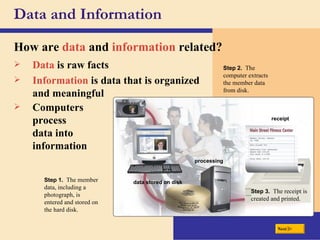
Data and Information How are  data  and  information  related? processing data stored on disk Step 1.  The member data, including a photograph, is entered and stored on the hard disk. Step 2.  The computer extracts the member data from disk. Step 3.  The receipt is created and printed. Data  is raw facts Information  is data that is organized and meaningful receipt Computers process  data into information Next
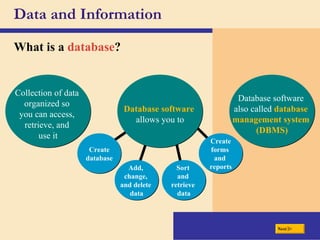
Data and Information What is a  database ? Database software   allows you to Collection of data  organized so  you can access,  retrieve, and  use it Database software  also called  database  management system  (DBMS) Add,  change,  and delete  data Create database Sort  and  retrieve  data Create forms  and  reports Next
To create a database, designers must develop a conceptual design and a physical design  Conceptual design:   An abstract model of a database from the user or business perspective.  Physical design:   Layout that shows how a database is actually arranged on storage devices. Creating the Database
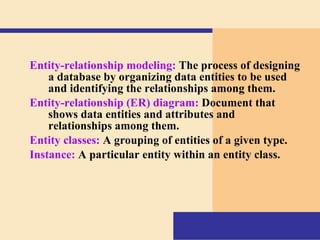
Entity-relationship modeling:   The process of designing a database by organizing data entities to be used and identifying the relationships among them. Entity-relationship (ER) diagram:   Document that shows data entities and attributes and relationships among them. Entity classes:   A grouping of entities of a given type. Instance:   A particular entity within an entity class.
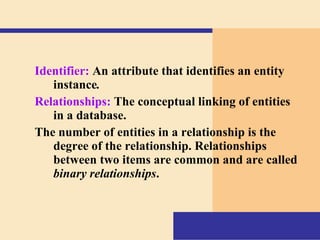
Identifier:   An attribute that identifies an entity instance . Relationships:   The conceptual linking of entities in a database. The number of entities in a relationship is the degree of the relationship. Relationships between two items are common and are called  binary relationships .
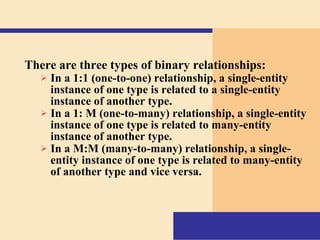
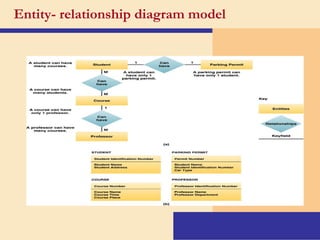
There are three types of binary relationships:   In a 1:1 (one-to-one) relationship, a single-entity instance of one type is related to a single-entity instance of another type. In a 1: M (one-to-many) relationship, a single-entity instance of one type is related to many-entity instance of another type. In a M:M (many-to-many) relationship, a single-entity instance of one type is related to many-entity of another type and vice versa.
Entity- relationship diagram model
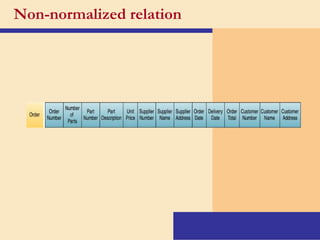
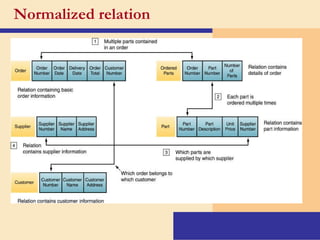
Normalization   A method for analyzing and reducing a relational database to its most streamlined form for minimum redundancy, maximum data integrity, and best processing performance
Non-normalized relation
Normalized relation
Physical view:   The plan for the actual, physical arrangement and location of data in the direct access storage devices (DASDs) of a database management system.  Logical view:   The user’s view of the data and the software programs that process that data in a database management system.
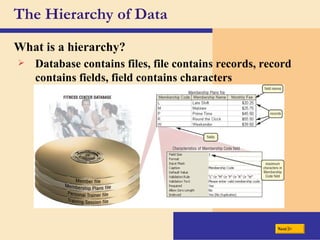
The Hierarchy of Data What is a  hierarchy ? Database contains files, file contains records, record contains fields, field contains characters Next
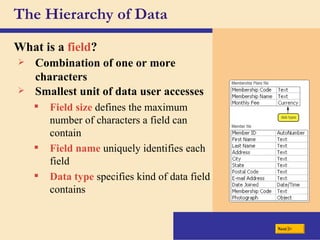
The Hierarchy of Data What is a  field ? Combination of one or more characters Smallest unit of data user accesses Field size   defines the maximum number of characters a field can contain Field name  uniquely identifies each field Data type  specifies kind of data field contains Next
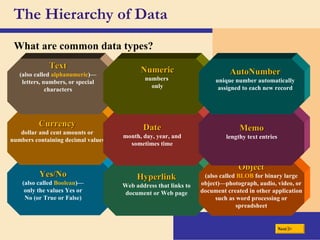
The Hierarchy of Data What are common data types? Yes/No (also called  Boolean )—only the values Yes or No (or True or False) Hyperlink Web address that links to document or Web page Object (also called  BLOB  for binary large object)—photograph, audio, video, or document created in other application such as word processing or spreadsheet Next Currency dollar and cent amounts or numbers containing decimal values Date month, day, year, and sometimes time Memo lengthy text entries Text (also called  alphanumeric )—letters, numbers, or special characters Numeric numbers  only AutoNumber unique number automatically assigned to each new record
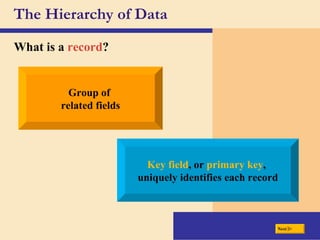
The Hierarchy of Data What is a  record ? Group of  related fields Key field , or  primary key ,  uniquely identifies each record Next
The Hierarchy of Data What is a  data file ? Collection of related records stored on disk Next key field records fields 22 Fifth Avenue P.O. Box 45 15 Duluth Street 33099 Clark Street 1029 Wolf Avenue Address Auburn Clanton Prattville Montgomery Montgomery City AL Weinberg Jonah 3928 AL Marcus 4872 AL Valesquez Adrian 3376 AL Murray Shannon 2928 AL Vandenberg Donna 2295 State Last Name First Name Member ID Green
File Processing Versus Databases What is a  file processing system ? Each department or area within organization has own set of files May have weaknesses Records in one file may not relate to records in any other file Isolated data —data stored in separate files so it is difficult to access Next Data redundancy —same fields stored in multiple files
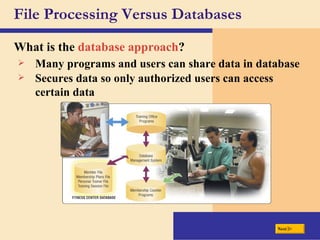
File Processing Versus Databases What is the  database approach ? Many programs and users can share data in database Secures data so only authorized users can access certain data Next
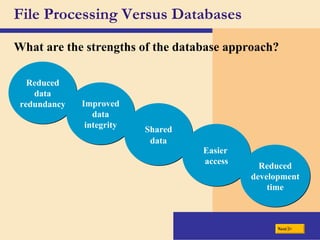
File Processing Versus Databases What are the strengths of the database approach? Reduced data redundancy Improved data integrity Shared data Easier  access Reduced development time Next
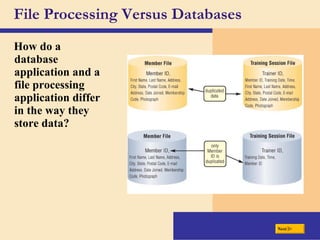
File Processing Versus Databases How do a database application and a file processing application differ in the way they store data? Next
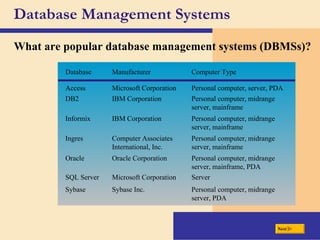
Database Management Systems What are popular database management systems (DBMSs)? Next Personal computer, midrange server, mainframe IBM Corporation DB2 Personal computer, midrange server, mainframe IBM Corporation Informix Server Microsoft Corporation SQL Server Personal computer, midrange server, PDA Sybase Inc. Sybase Personal computer, midrange server, mainframe, PDA Oracle Corporation Oracle Personal computer, midrange server, mainframe Computer Associates International, Inc. Ingres Personal computer, server, PDA Microsoft Corporation Access Computer Type Manufacturer Database
Database Management Systems What is a  data dictionary ? Contains data about each file in database and each field within those files Next
Database Management Systems What is  Structured Query Language (SQL) ? Allows you to manage, update, and retrieve data Has special keywords and rules included in SQL statements SQL statement SQL statement results Next
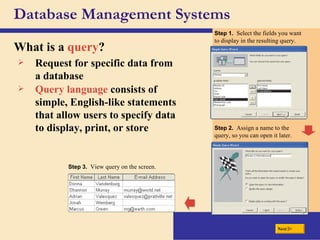
Database Management Systems What is a  query ? Request for specific data from a database Query language  consists of simple, English-like statements that allow users to specify data to display, print, or store Step 1.  Select the fields you want to display in the resulting query. Step 2.  Assign a name to the query, so you can open it later. Step 3.  View query on the screen. Next
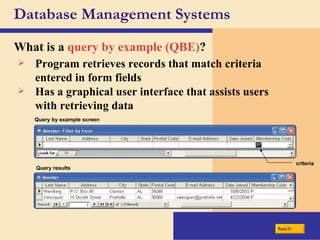
Database Management Systems What is a  query by example (QBE) ? Program retrieves records that match criteria entered in form fields Query by example screen criteria Query results Has a graphical user interface that assists users with retrieving data Next
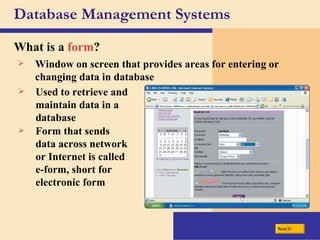
Database Management Systems What is a  form ? Window on screen that provides areas for entering or changing data in database Used to retrieve and maintain data in a database Form that sends data across network or Internet is called e-form, short for electronic form Next
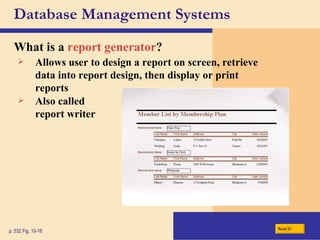
Database Management Systems What is a  report generator ? p. 532 Fig. 10-16 Allows user to design a report on screen, retrieve data into report design, then display or print reports Also called report writer Next
What is a  data model ? Data model p. 534 Fig. 10-18 Rules and standards that define how database  organizes data Defines how users view organization of data The three most common data models are  hierarchical, network , and  relational . Other types of data models include multidimensional, object-relational, hypermedia, embedded, and virtual DATA MODELS FOR POPULAR DBMSs Next
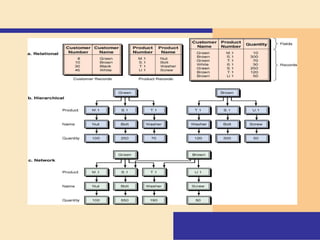
Relational database  What is a  relational database ? Stores data in tables that consist of  rows  and  columns Each row has primary key Each column has unique name Stores data relationships Uses specialized terminology DATA TERMINOLOGY Next
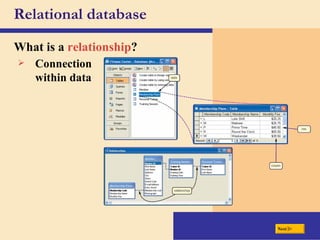
Relational database What is a  relationship ? Connection within data Next
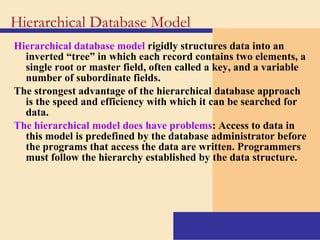
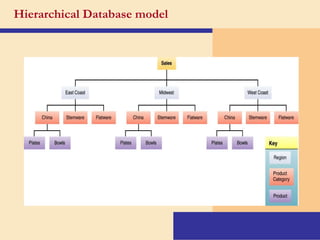
Hierarchical database model   rigidly structures data into an inverted “tree” in which each record contains two elements, a single root or master field, often called a key, and a variable number of subordinate fields.  The strongest advantage of the hierarchical database approach is the speed and efficiency with which it can be searched for data. The hierarchical model does have problems : Access to data in this model is predefined by the database administrator before the programs that access the data are written. Programmers must follow the hierarchy established by the data structure. Hierarchical Database Model
Hierarchical Database model
Data model that creates relationships among data in which subordinate records can be linked to more than one data element. Network Database Model
 
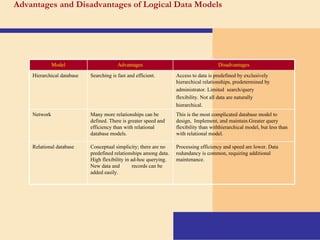
Advantages and  D isadvantages of Logical  D ata Models Processing efficiency and speed  are lower. Data redundancy is common, requiring additional maintenance. Conceptual simplicity; there are no predefined relationships among data. High flexibility in ad-hoc   querying. New data an d   records can be   added easily. Relational database This is the most complicated database model to design,   I mplement, and maintain.Greater query flexibility than withhierarchical model, but less than  with relational mode l . Many more relationships can be defined. There is greater speed and   efficiency than with relational database   models. Network Access to data is predefined by exclusively hierarchical relationships, predetermined by administrator. Limited   search/query  flexibility. Not all data are  n aturally hierarchical.   Searching is fast and   efficient. Hierarchical database Disadvantages Advantages Model
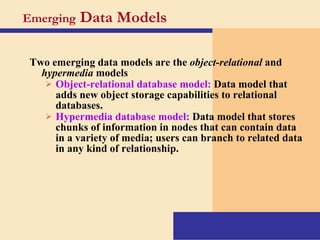
Emerging  Data Models Two emerging data models are the  object-relational  and  hypermedia  models Object-relational database model:   Data model that adds new object storage capabilities to relational databases. Hypermedia database model:   Data model that stores chunks of information in nodes that can contain data in a variety of media; users can branch to related data in any kind of relationship.
Specialized Database Models Geographical information database:   Data model that contains locational data for overlaying on maps or images. Knowledge database:   Data model that can store decision rules that can be used for expert decision making.
Small-footprint database:   The subset of a larger database provided for field workers. Embedded database:   A database built into devices or into applications; designed to be self-sufficient and to require little or no administration.  Virtual database:   A database that consists only of software; manages data that can physically reside anywhere on the network and in a variety of formats.
What is an  object-oriented database (OODB) ? Object  is item that contains data, as well as actions that read or process data Can store more types of data Can access data faster Next Advantages Often uses  object query language (OQL) Stores data in objects
What are examples of applications appropriate for an  object-oriented database? Next Multimedia databases Store images, audio clips,  and/or video clips Groupware databases Store documents such as schedules, calendars, manuals, memos, and reports Computer-aided design  (CAD) databases Store data about  engineering, architectural,  and scientific designs Hypertext databases Contain text links  to other documents Hypermedia databases Contain text, graphics,  video, and sound Web databases Link to e-form on Web page

TID Chapter 10 Introduction To Database

  • 1.
    Introduction to DatabaseChanges and new experience make life delightful. Unanimous
  • 2.
    Data and InformationHow are data and information related? processing data stored on disk Step 1. The member data, including a photograph, is entered and stored on the hard disk. Step 2. The computer extracts the member data from disk. Step 3. The receipt is created and printed. Data is raw facts Information is data that is organized and meaningful receipt Computers process data into information Next
  • 3.
    Data and InformationWhat is a database ? Database software allows you to Collection of data organized so you can access, retrieve, and use it Database software also called database management system (DBMS) Add, change, and delete data Create database Sort and retrieve data Create forms and reports Next
  • 4.
    To create adatabase, designers must develop a conceptual design and a physical design Conceptual design: An abstract model of a database from the user or business perspective. Physical design: Layout that shows how a database is actually arranged on storage devices. Creating the Database
  • 5.
    Entity-relationship modeling: The process of designing a database by organizing data entities to be used and identifying the relationships among them. Entity-relationship (ER) diagram: Document that shows data entities and attributes and relationships among them. Entity classes: A grouping of entities of a given type. Instance: A particular entity within an entity class.
  • 6.
    Identifier: An attribute that identifies an entity instance . Relationships: The conceptual linking of entities in a database. The number of entities in a relationship is the degree of the relationship. Relationships between two items are common and are called binary relationships .
  • 7.
    There are threetypes of binary relationships: In a 1:1 (one-to-one) relationship, a single-entity instance of one type is related to a single-entity instance of another type. In a 1: M (one-to-many) relationship, a single-entity instance of one type is related to many-entity instance of another type. In a M:M (many-to-many) relationship, a single-entity instance of one type is related to many-entity of another type and vice versa.
  • 8.
  • 9.
    Normalization A method for analyzing and reducing a relational database to its most streamlined form for minimum redundancy, maximum data integrity, and best processing performance
  • 10.
  • 11.
  • 12.
    Physical view: The plan for the actual, physical arrangement and location of data in the direct access storage devices (DASDs) of a database management system. Logical view: The user’s view of the data and the software programs that process that data in a database management system.
  • 13.
    The Hierarchy ofData What is a hierarchy ? Database contains files, file contains records, record contains fields, field contains characters Next
  • 14.
    The Hierarchy ofData What is a field ? Combination of one or more characters Smallest unit of data user accesses Field size defines the maximum number of characters a field can contain Field name uniquely identifies each field Data type specifies kind of data field contains Next
  • 15.
    The Hierarchy ofData What are common data types? Yes/No (also called Boolean )—only the values Yes or No (or True or False) Hyperlink Web address that links to document or Web page Object (also called BLOB for binary large object)—photograph, audio, video, or document created in other application such as word processing or spreadsheet Next Currency dollar and cent amounts or numbers containing decimal values Date month, day, year, and sometimes time Memo lengthy text entries Text (also called alphanumeric )—letters, numbers, or special characters Numeric numbers only AutoNumber unique number automatically assigned to each new record
  • 16.
    The Hierarchy ofData What is a record ? Group of related fields Key field , or primary key , uniquely identifies each record Next
  • 17.
    The Hierarchy ofData What is a data file ? Collection of related records stored on disk Next key field records fields 22 Fifth Avenue P.O. Box 45 15 Duluth Street 33099 Clark Street 1029 Wolf Avenue Address Auburn Clanton Prattville Montgomery Montgomery City AL Weinberg Jonah 3928 AL Marcus 4872 AL Valesquez Adrian 3376 AL Murray Shannon 2928 AL Vandenberg Donna 2295 State Last Name First Name Member ID Green
  • 18.
    File Processing VersusDatabases What is a file processing system ? Each department or area within organization has own set of files May have weaknesses Records in one file may not relate to records in any other file Isolated data —data stored in separate files so it is difficult to access Next Data redundancy —same fields stored in multiple files
  • 19.
    File Processing VersusDatabases What is the database approach ? Many programs and users can share data in database Secures data so only authorized users can access certain data Next
  • 20.
    File Processing VersusDatabases What are the strengths of the database approach? Reduced data redundancy Improved data integrity Shared data Easier access Reduced development time Next
  • 21.
    File Processing VersusDatabases How do a database application and a file processing application differ in the way they store data? Next
  • 22.
    Database Management SystemsWhat are popular database management systems (DBMSs)? Next Personal computer, midrange server, mainframe IBM Corporation DB2 Personal computer, midrange server, mainframe IBM Corporation Informix Server Microsoft Corporation SQL Server Personal computer, midrange server, PDA Sybase Inc. Sybase Personal computer, midrange server, mainframe, PDA Oracle Corporation Oracle Personal computer, midrange server, mainframe Computer Associates International, Inc. Ingres Personal computer, server, PDA Microsoft Corporation Access Computer Type Manufacturer Database
  • 23.
    Database Management SystemsWhat is a data dictionary ? Contains data about each file in database and each field within those files Next
  • 24.
    Database Management SystemsWhat is Structured Query Language (SQL) ? Allows you to manage, update, and retrieve data Has special keywords and rules included in SQL statements SQL statement SQL statement results Next
  • 25.
    Database Management SystemsWhat is a query ? Request for specific data from a database Query language consists of simple, English-like statements that allow users to specify data to display, print, or store Step 1. Select the fields you want to display in the resulting query. Step 2. Assign a name to the query, so you can open it later. Step 3. View query on the screen. Next
  • 26.
    Database Management SystemsWhat is a query by example (QBE) ? Program retrieves records that match criteria entered in form fields Query by example screen criteria Query results Has a graphical user interface that assists users with retrieving data Next
  • 27.
    Database Management SystemsWhat is a form ? Window on screen that provides areas for entering or changing data in database Used to retrieve and maintain data in a database Form that sends data across network or Internet is called e-form, short for electronic form Next
  • 28.
    Database Management SystemsWhat is a report generator ? p. 532 Fig. 10-16 Allows user to design a report on screen, retrieve data into report design, then display or print reports Also called report writer Next
  • 29.
    What is a data model ? Data model p. 534 Fig. 10-18 Rules and standards that define how database organizes data Defines how users view organization of data The three most common data models are hierarchical, network , and relational . Other types of data models include multidimensional, object-relational, hypermedia, embedded, and virtual DATA MODELS FOR POPULAR DBMSs Next
  • 30.
    Relational database What is a relational database ? Stores data in tables that consist of rows and columns Each row has primary key Each column has unique name Stores data relationships Uses specialized terminology DATA TERMINOLOGY Next
  • 31.
    Relational database Whatis a relationship ? Connection within data Next
  • 32.
    Hierarchical database model rigidly structures data into an inverted “tree” in which each record contains two elements, a single root or master field, often called a key, and a variable number of subordinate fields. The strongest advantage of the hierarchical database approach is the speed and efficiency with which it can be searched for data. The hierarchical model does have problems : Access to data in this model is predefined by the database administrator before the programs that access the data are written. Programmers must follow the hierarchy established by the data structure. Hierarchical Database Model
  • 33.
  • 34.
    Data model thatcreates relationships among data in which subordinate records can be linked to more than one data element. Network Database Model
  • 35.
  • 36.
    Advantages and D isadvantages of Logical D ata Models Processing efficiency and speed are lower. Data redundancy is common, requiring additional maintenance. Conceptual simplicity; there are no predefined relationships among data. High flexibility in ad-hoc querying. New data an d records can be added easily. Relational database This is the most complicated database model to design, I mplement, and maintain.Greater query flexibility than withhierarchical model, but less than with relational mode l . Many more relationships can be defined. There is greater speed and efficiency than with relational database models. Network Access to data is predefined by exclusively hierarchical relationships, predetermined by administrator. Limited search/query flexibility. Not all data are n aturally hierarchical. Searching is fast and efficient. Hierarchical database Disadvantages Advantages Model
  • 37.
    Emerging DataModels Two emerging data models are the object-relational and hypermedia models Object-relational database model: Data model that adds new object storage capabilities to relational databases. Hypermedia database model: Data model that stores chunks of information in nodes that can contain data in a variety of media; users can branch to related data in any kind of relationship.
  • 38.
    Specialized Database ModelsGeographical information database: Data model that contains locational data for overlaying on maps or images. Knowledge database: Data model that can store decision rules that can be used for expert decision making.
  • 39.
    Small-footprint database: The subset of a larger database provided for field workers. Embedded database: A database built into devices or into applications; designed to be self-sufficient and to require little or no administration. Virtual database: A database that consists only of software; manages data that can physically reside anywhere on the network and in a variety of formats.
  • 40.
    What is an object-oriented database (OODB) ? Object is item that contains data, as well as actions that read or process data Can store more types of data Can access data faster Next Advantages Often uses object query language (OQL) Stores data in objects
  • 41.
    What are examplesof applications appropriate for an object-oriented database? Next Multimedia databases Store images, audio clips, and/or video clips Groupware databases Store documents such as schedules, calendars, manuals, memos, and reports Computer-aided design (CAD) databases Store data about engineering, architectural, and scientific designs Hypertext databases Contain text links to other documents Hypermedia databases Contain text, graphics, video, and sound Web databases Link to e-form on Web page