Sharepoint 2013: Applied
Architecture from the
Field
Tihomir Ignatov
Senior Consultant
Microsoft Corporation
October 23rd 2013
Agenda
What is IT Architecture
The Architect’s Obligations

The IT Architect and Sharepoint
Sharepoint 2013 Apps

Sharepoint Infrastructure Decisions
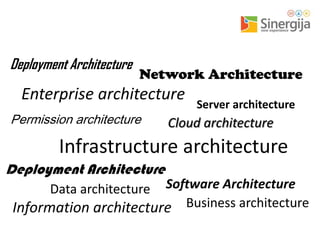
Deployment Architecture

Network Architecture

Deployment Architecture
Software Architecture
What is IT Architecture?
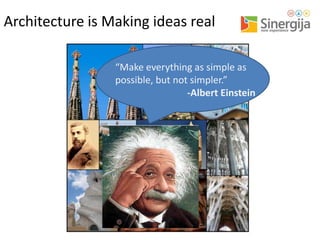
Architecture is Making ideas real
“Make everything as simple as
possible, but not simpler.”
-Albert Einstein
www.iasaglobal.org
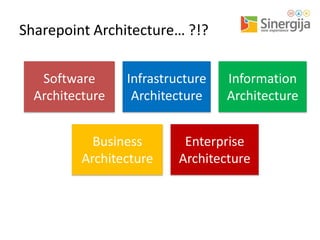
Sharepoint Architecture… ?!?
Software
Architecture

Infrastructure
Architecture

Business
Architecture

Information
Architecture

Enterprise
Architecture
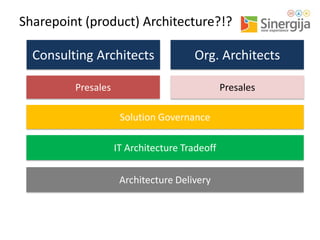
Sharepoint (product) Architecture?!?
Consulting Architects

Org. Architects

Presales

Presales

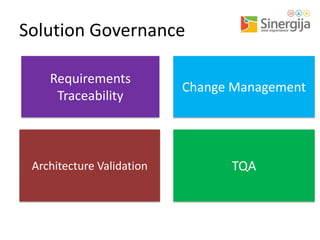
Solution Governance
IT Architecture Tradeoff

Architecture Delivery
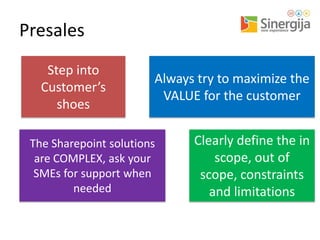
Presales
Step into
Customer’s
shoes

Always try to maximize the
VALUE for the customer

The Sharepoint solutions
are COMPLEX, ask your
SMEs for support when
needed

Clearly define the in
scope, out of
scope, constraints
and limitations
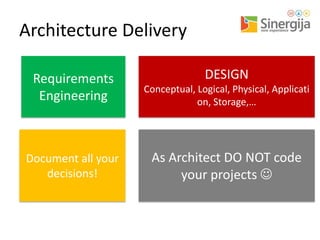
Architecture Delivery
DESIGN

Requirements
Engineering

Conceptual, Logical, Physical, Applicati
on, Storage,…

Document all your
decisions!

As Architect DO NOT code
your projects 
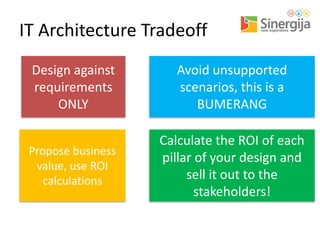
IT Architecture Tradeoff
Design against
requirements
ONLY

Avoid unsupported
scenarios, this is a
BUMERANG

Propose business
value, use ROI
calculations

Calculate the ROI of each
pillar of your design and
sell it out to the
stakeholders!
Solution Governance
Requirements
Traceability

Change Management

Architecture Validation

TQA
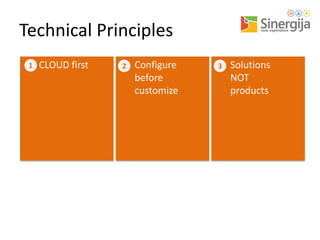
Technical Principles
1

CLOUD first

2

Configure
before
customize

3

Solutions
NOT
products
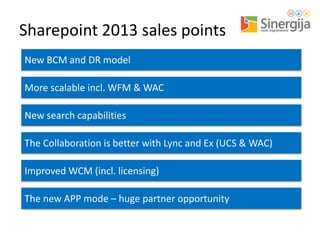
Sharepoint 2013 sales points
New BCM and DR model
More scalable incl. WFM & WAC

New search capabilities
The Collaboration is better with Lync and Ex (UCS & WAC)

Improved WCM (incl. licensing)
The new APP mode – huge partner opportunity
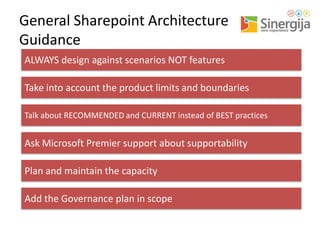
General Sharepoint Architecture
Guidance
ALWAYS design against scenarios NOT features
Take into account the product limits and boundaries
Talk about RECOMMENDED and CURRENT instead of BEST practices

Ask Microsoft Premier support about supportability

Plan and maintain the capacity
Add the Governance plan in scope
WHAT IS PLA?
SHAREPOINT, LYNC & EXCHANGE
MCS, PG & CSS
DELIVERY THROUGH MCS
Lessons Learned – SP Apps
Key Requirements

Possible Approaches
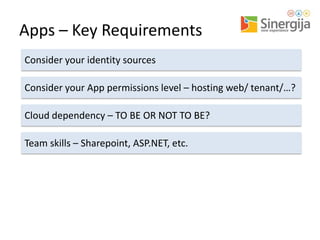
Apps – Key Requirements
Consider your identity sources
Consider your App permissions level – hosting web/ tenant/…?

Cloud dependency – TO BE OR NOT TO BE?
Team skills – Sharepoint, ASP.NET, etc.
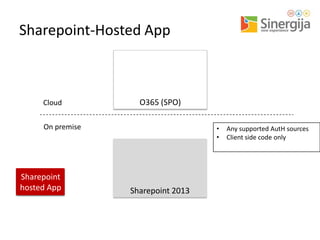
Sharepoint-Hosted App

Cloud

O365 (SPO)

On premise

Sharepoint
hosted App

•
•

Sharepoint 2013

Any supported AutH sources
Client side code only
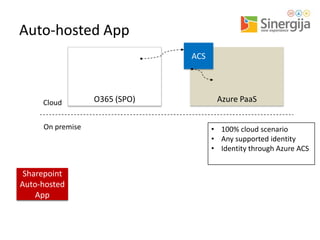
Auto-hosted App
ACS

Cloud

On premise

Sharepoint
Remote
Auto-hosted
App
App

O365 (SPO)

Azure PaaS
• 100% cloud scenario
• Any supported identity
• Identity through Azure ACS
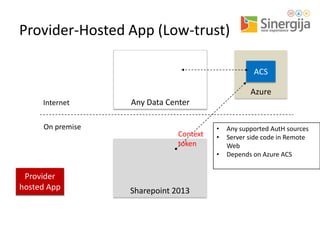
Provider-Hosted App (Low-trust)
ACS
Azure
Internet

On premise

Any Data Center

Context
token

•
•
•

Provider
Remote
hosted App
Web

Sharepoint 2013

Any supported AutH sources
Server side code in Remote
Web
Depends on Azure ACS
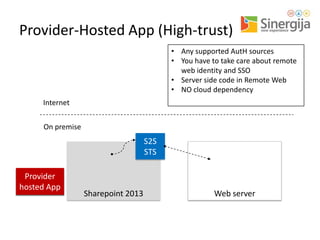
Provider-Hosted App (High-trust)
• Any supported AutH sources
• You have to take care about remote
web identity and SSO
• Server side code in Remote Web
• NO cloud dependency
Internet

On premise

S2S
STS
Provider
Remote
hosted App
Web

Sharepoint 2013

Web server
User

A

E
Presentation
Layer

B

Web UI
F

BizTalk

Application
Layer
10

8

13

Web Services/Web API

I

7
Data Layer

Attached Files and
Metadata

C

G

Entity Framework

SPS and Content DBs

Custom DB

D

H
Lessons Learned – SP Infrastructure
Key Requirements

Possible Approaches
SP Infra – Key Considerations (1)
Consider the availability and resources
Plan your servers and capacity, plan also the data growth…

Take into account the skills of the operations personnel
According to the new SP Apps infrastructure plan to have a SP
Web application with no host header
Use host header site collections when you need site with
unique URL
After Sharepoint deployment always deliver a Governance plan
document, even in “lite” format
SP Infra – Key Considerations (2)
ALWAYS setup at least 2 environments – TEST & PRODUCTION
Create a simple application to track site collection requests
Plan a process for site collections and content DBs management

Use QUOTAs
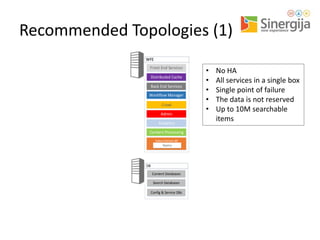
Recommended Topologies (1)
WFE
Front End Services
Distributed Cache
Back End Services
Workflow Manager
Crawl
Admin
Analytics
Content Processing
Index Partition #0
Replica

DB
Content Databases
Search Databases
Config & Service DBs

•
•
•
•
•

No HA
All services in a single box
Single point of failure
The data is not reserved
Up to 10M searchable
items
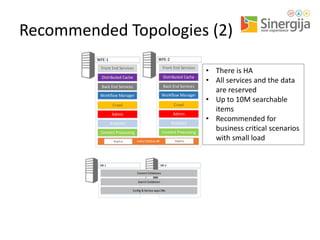
Recommended Topologies (2)
WFE-2

WFE-1
Front End Services

Front End Services

Distributed Cache

Distributed Cache

Back End Services

Back End Services

Workflow Manager

Workflow Manager

Crawl

Crawl

Admin

Admin

Analytics

Analytics

Content Processing

Content Processing

Replica

Replica

Index Partition #0

DB-1

DB-2
Content Databases
Search Databases
Config & Service apps DBs

• There is HA
• All services and the data
are reserved
• Up to 10M searchable
items
• Recommended for
business critical scenarios
with small load
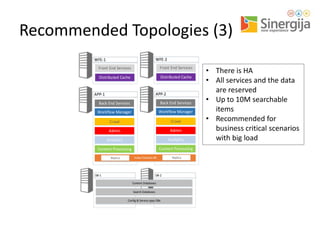
Recommended Topologies (3)
WFE-2

WFE-1

Front End Services

Front End Services

Distributed Cache

Distributed Cache

APP-2

APP-1
Back End Services

Back End Services

Workflow Manager

Workflow Manager

Crawl

Crawl

Admin

Admin

Analytics

Analytics

Content Processing

Content Processing

Replica

Index Partition #0

DB-1

DB-2
Content Databases
Search Databases

Config & Service apps DBs

Replica

• There is HA
• All services and the data
are reserved
• Up to 10M searchable
items
• Recommended for
business critical scenarios
with big load
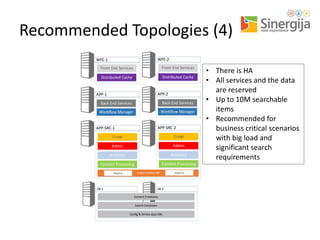
Recommended Topologies (4)
WFE-2

WFE-1

Front End Services

Front End Services

Distributed Cache

Distributed Cache

APP-2

APP-1
Back End Services

Back End Services

Workflow Manager

Workflow Manager

APP-SRC-2

APP-SRC-1

Crawl

Crawl

Admin

Admin

Analytics

Analytics

Content Processing

Content Processing

Replica

Index Partition #0

DB-1

DB-2
Content Databases
Search Databases
Config & Service apps DBs

Replica

• There is HA
• All services and the data
are reserved
• Up to 10M searchable
items
• Recommended for
business critical scenarios
with big load and
significant search
requirements
Contact me
• My blog: http://tihomirignatov.blogspot.com
• Sharepoint User Group Bulgaria:
http://www.sugbg.org
• E-mail: Tihomir.Ignatov@Microsoft.com
Q&A
Please rate this lecture
and win Window Phone NOKIA Lumia 920

Help us choose the best Sinergija lecturer!
Microsoft will award you – at the conference
end, we’ll give one NOKIA Lumia 920 to
someone from the audience – randomly.
Go to www.mssinergija.net, log in and cast your
votes!
You can rate only lectures that you were present
at, just once. More lectures you rate, more
chances you have.

Winner will be announced at the official
Sinergija web portal, www.mssinergija.net

Sharepoint 2013 applied architecture from the field (v2)

  • 1.
    Sharepoint 2013: Applied Architecturefrom the Field Tihomir Ignatov Senior Consultant Microsoft Corporation October 23rd 2013
  • 2.
    Agenda What is ITArchitecture The Architect’s Obligations The IT Architect and Sharepoint Sharepoint 2013 Apps Sharepoint Infrastructure Decisions
  • 3.
  • 4.
    What is ITArchitecture?
  • 5.
    Architecture is Makingideas real “Make everything as simple as possible, but not simpler.” -Albert Einstein
  • 6.
  • 7.
  • 8.
    Sharepoint (product) Architecture?!? ConsultingArchitects Org. Architects Presales Presales Solution Governance IT Architecture Tradeoff Architecture Delivery
  • 9.
    Presales Step into Customer’s shoes Always tryto maximize the VALUE for the customer The Sharepoint solutions are COMPLEX, ask your SMEs for support when needed Clearly define the in scope, out of scope, constraints and limitations
  • 10.
    Architecture Delivery DESIGN Requirements Engineering Conceptual, Logical,Physical, Applicati on, Storage,… Document all your decisions! As Architect DO NOT code your projects 
  • 11.
    IT Architecture Tradeoff Designagainst requirements ONLY Avoid unsupported scenarios, this is a BUMERANG Propose business value, use ROI calculations Calculate the ROI of each pillar of your design and sell it out to the stakeholders!
  • 12.
  • 13.
  • 14.
    Sharepoint 2013 salespoints New BCM and DR model More scalable incl. WFM & WAC New search capabilities The Collaboration is better with Lync and Ex (UCS & WAC) Improved WCM (incl. licensing) The new APP mode – huge partner opportunity
  • 15.
    General Sharepoint Architecture Guidance ALWAYSdesign against scenarios NOT features Take into account the product limits and boundaries Talk about RECOMMENDED and CURRENT instead of BEST practices Ask Microsoft Premier support about supportability Plan and maintain the capacity Add the Governance plan in scope
  • 16.
    WHAT IS PLA? SHAREPOINT,LYNC & EXCHANGE MCS, PG & CSS DELIVERY THROUGH MCS
  • 17.
    Lessons Learned –SP Apps Key Requirements Possible Approaches
  • 18.
    Apps – KeyRequirements Consider your identity sources Consider your App permissions level – hosting web/ tenant/…? Cloud dependency – TO BE OR NOT TO BE? Team skills – Sharepoint, ASP.NET, etc.
  • 19.
    Sharepoint-Hosted App Cloud O365 (SPO) Onpremise Sharepoint hosted App • • Sharepoint 2013 Any supported AutH sources Client side code only
  • 20.
    Auto-hosted App ACS Cloud On premise Sharepoint Remote Auto-hosted App App O365(SPO) Azure PaaS • 100% cloud scenario • Any supported identity • Identity through Azure ACS
  • 21.
    Provider-Hosted App (Low-trust) ACS Azure Internet Onpremise Any Data Center Context token • • • Provider Remote hosted App Web Sharepoint 2013 Any supported AutH sources Server side code in Remote Web Depends on Azure ACS
  • 22.
    Provider-Hosted App (High-trust) •Any supported AutH sources • You have to take care about remote web identity and SSO • Server side code in Remote Web • NO cloud dependency Internet On premise S2S STS Provider Remote hosted App Web Sharepoint 2013 Web server
  • 23.
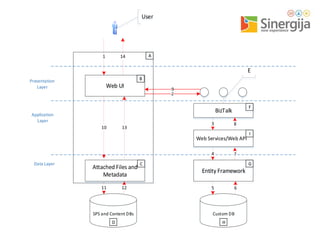
    User A E Presentation Layer B Web UI F BizTalk Application Layer 10 8 13 Web Services/WebAPI I 7 Data Layer Attached Files and Metadata C G Entity Framework SPS and Content DBs Custom DB D H
  • 24.
    Lessons Learned –SP Infrastructure Key Requirements Possible Approaches
  • 25.
    SP Infra –Key Considerations (1) Consider the availability and resources Plan your servers and capacity, plan also the data growth… Take into account the skills of the operations personnel According to the new SP Apps infrastructure plan to have a SP Web application with no host header Use host header site collections when you need site with unique URL After Sharepoint deployment always deliver a Governance plan document, even in “lite” format
  • 26.
    SP Infra –Key Considerations (2) ALWAYS setup at least 2 environments – TEST & PRODUCTION Create a simple application to track site collection requests Plan a process for site collections and content DBs management Use QUOTAs
  • 27.
    Recommended Topologies (1) WFE FrontEnd Services Distributed Cache Back End Services Workflow Manager Crawl Admin Analytics Content Processing Index Partition #0 Replica DB Content Databases Search Databases Config & Service DBs • • • • • No HA All services in a single box Single point of failure The data is not reserved Up to 10M searchable items
  • 28.
    Recommended Topologies (2) WFE-2 WFE-1 FrontEnd Services Front End Services Distributed Cache Distributed Cache Back End Services Back End Services Workflow Manager Workflow Manager Crawl Crawl Admin Admin Analytics Analytics Content Processing Content Processing Replica Replica Index Partition #0 DB-1 DB-2 Content Databases Search Databases Config & Service apps DBs • There is HA • All services and the data are reserved • Up to 10M searchable items • Recommended for business critical scenarios with small load
  • 29.
    Recommended Topologies (3) WFE-2 WFE-1 FrontEnd Services Front End Services Distributed Cache Distributed Cache APP-2 APP-1 Back End Services Back End Services Workflow Manager Workflow Manager Crawl Crawl Admin Admin Analytics Analytics Content Processing Content Processing Replica Index Partition #0 DB-1 DB-2 Content Databases Search Databases Config & Service apps DBs Replica • There is HA • All services and the data are reserved • Up to 10M searchable items • Recommended for business critical scenarios with big load
  • 30.
    Recommended Topologies (4) WFE-2 WFE-1 FrontEnd Services Front End Services Distributed Cache Distributed Cache APP-2 APP-1 Back End Services Back End Services Workflow Manager Workflow Manager APP-SRC-2 APP-SRC-1 Crawl Crawl Admin Admin Analytics Analytics Content Processing Content Processing Replica Index Partition #0 DB-1 DB-2 Content Databases Search Databases Config & Service apps DBs Replica • There is HA • All services and the data are reserved • Up to 10M searchable items • Recommended for business critical scenarios with big load and significant search requirements
  • 31.
    Contact me • Myblog: http://tihomirignatov.blogspot.com • Sharepoint User Group Bulgaria: http://www.sugbg.org • E-mail: Tihomir.Ignatov@Microsoft.com
  • 32.
  • 33.
    Please rate thislecture and win Window Phone NOKIA Lumia 920 Help us choose the best Sinergija lecturer! Microsoft will award you – at the conference end, we’ll give one NOKIA Lumia 920 to someone from the audience – randomly. Go to www.mssinergija.net, log in and cast your votes! You can rate only lectures that you were present at, just once. More lectures you rate, more chances you have. Winner will be announced at the official Sinergija web portal, www.mssinergija.net