KPI Definition With BAM 2.0


Tharindu Mathew – Product Manager, BAM
Buddhika Chamith – Software Engineer, BAM
WSO2
•
    Founded in 2005 by acknowledged leaders in XML, Web Services
    Technologies & Standards and Open Source


•
    Producing entire middleware platform 100% open source under
    Apache license


•
    Business model is to sell comprehensive support & maintenance for
    our products


•
    Venture funded by Intel Capital and Quest Software.


•
    Global corporation with offices in USA, UK & Sri Lanka


•
    150+ employees and growing.
Business Activity Monitoring

“The aggregation, analysis, and
presentation of real-time information
about activities inside organizations
and involving customers and
partners.” - Gartner
BAM In a Nutshell

1. Aggregate

2. Analyze

3. Visualize
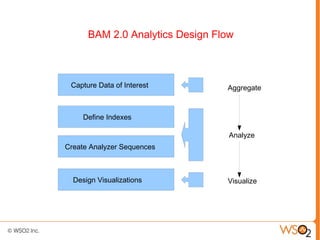
BAM 2.0 Analytics Design Flow


 Capture Data of Interest        Aggregate


     Define Indexes

                                  Analyze
Create Analyzer Sequences


  Design Visualizations          Visualize
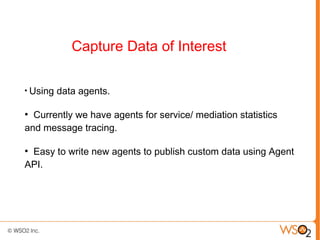
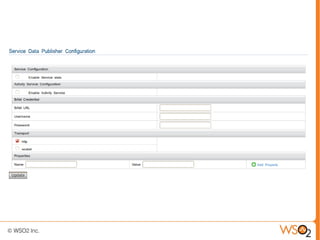
Capture Data of Interest

●
    Using data agents.

●
  Currently we have agents for service/ mediation statistics
and message tracing.

●
 Easy to write new agents to publish custom data using Agent
API.
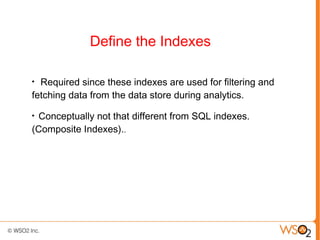
Define the Indexes

●
  Required since these indexes are used for filtering and
fetching data from the data store during analytics.
●
 Conceptually not that different from SQL indexes.
(Composite Indexes)..
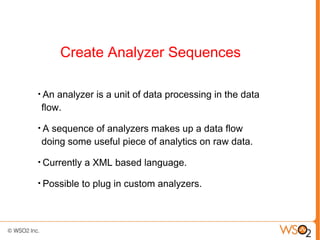
Create Analyzer Sequences

●
    An analyzer is a unit of data processing in the data
    flow.
●
    A sequence of analyzers makes up a data flow
    doing some useful piece of analytics on raw data.
●
    Currently a XML based language.
●
    Possible to plug in custom analyzers.
Design the Visualizations

●
    Visualizations are based on gadgets.
●
    Using a drag and drop style modelling tool, Gadget IDE.
●
    Wire the data source to the visualization elements and
    generate the gadget.
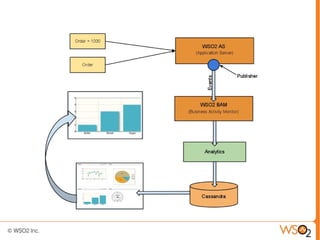
Use Case 1 : Retail Store

Let's assume a retail store. The owner wants to know
the performance of his product line. Total sales for
each of the product is required.
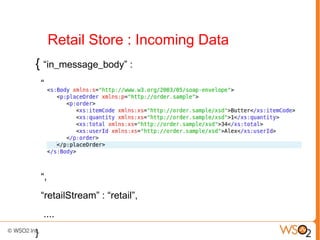
Retail Store : Incoming Data
{ “in_message_body” :
    “


    “,
    “retailStream” : “retail”,
    ....
}
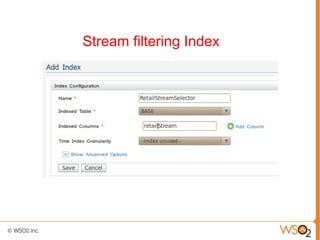
Stream filtering Index
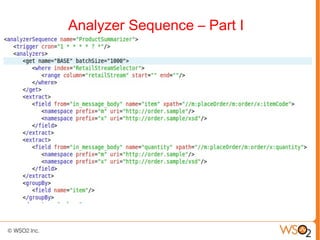
Analyzer Sequence – Part I
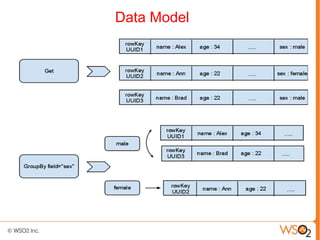
Data Model
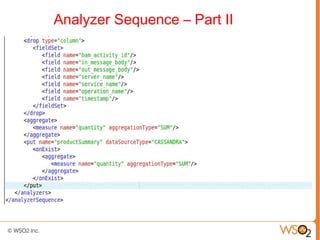
Analyzer Sequence – Part II
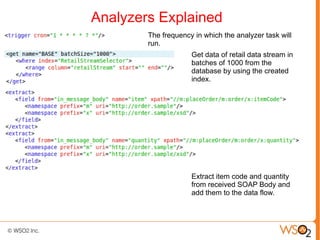
Analyzers Explained
        The frequency in which the analyzer task will
        run.
                     Get data of retail data stream in
                     batches of 1000 from the
                     database by using the created
                     index.


                     Extract item code and quantity
                     from received SOAP Body and
                     add them to the data flow.
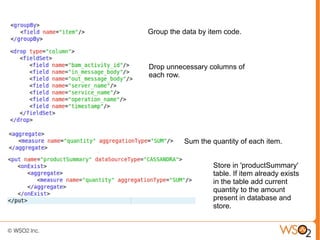
Group the data by item code.


Drop unnecessary columns of
each row.


          Sum the quantity of each item.


                   Store in 'productSummary'
                   table. If item already exists
                   in the table add current
                   quantity to the amount
                   present in database and
                   store.
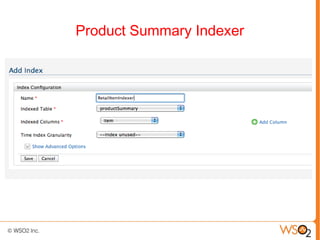
Product Summary Indexer
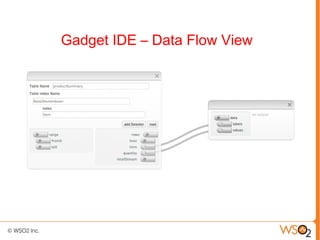
Gadget IDE – Data Flow View
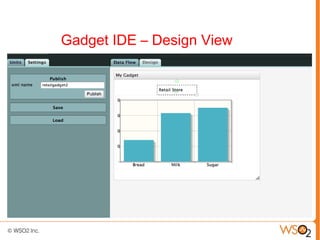
Gadget IDE – Design View
Use Case 2 : Statistics Monitoring


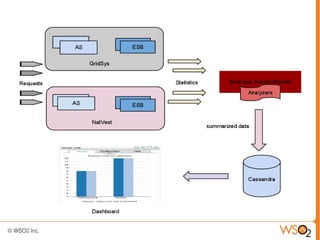
Two data centers each having a cluster of ESB and App server
nodes. It is required to monitor statistics such as request counts,
response times etc. for each data center and cluster.
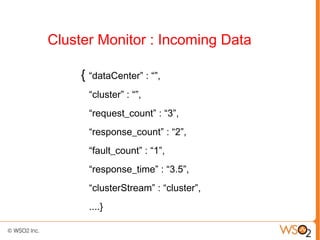
Cluster Monitor : Incoming Data

     { “dataCenter” : “”,
       “cluster” : “”,
       “request_count” : “3”,
       “response_count” : “2”,
       “fault_count” : “1”,
       “response_time” : “3.5”,
       “clusterStream” : “cluster”,
       ....}
Analytics
●
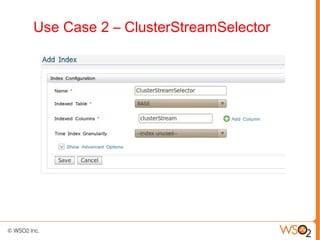
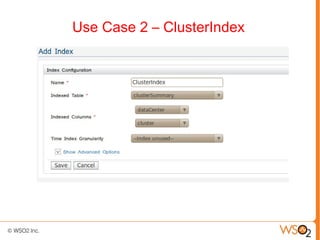
     Define two indexes. One for filtering out data for
    'clusterStream' data stream. Other for querying
    table 'clusterSummary' to which summarized data
    from analytics are stored.

●
    Analyzer sequence groups the data by both data
    data center and cluster and aggregate request,
    response, fault counts and averages the response
    times and store the result in 'clusterSummary'
    table.
Summary

●
    Introduction

●
    BAM 2.0 Analytics Design Flow

●
    Use Case 1 : Retail Store

●
    Use Case 2 : Cluster Statistics Monitoring
Questions?

●
    Alpha available at this link
●
    Beta release in March
●
    GA in Q3 2012
●   Ready for you to start POC/Development work
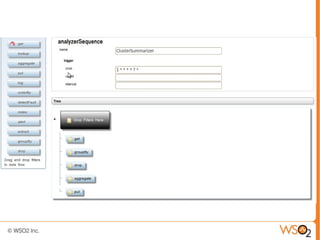
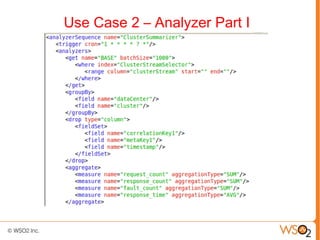
Use Case 2 – Analyzer Part I
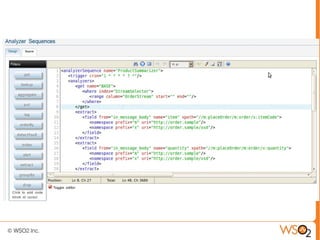
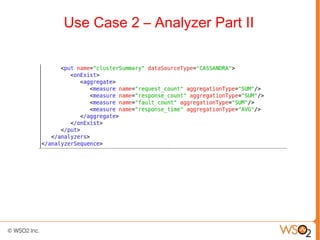
Use Case 2 – Analyzer Part II
Use Case 2 – ClusterStreamSelector
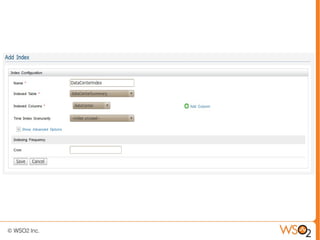
Use Case 2 – ClusterIndex
Selected Customers


        https://ail.google.com/mail/u/0/?
        ui=2&ik=ad9ae58f41&view=att&th=1331a7
        0983344a32&attid=0.1&disp=thd&realattid
        =f_gtxto6mk0&zw
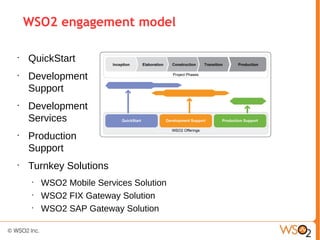
WSO2 engagement model

•
    QuickStart
•
    Development
    Support
•
    Development
    Services
•
    Production
    Support
•
    Turnkey Solutions
     •
         WSO2 Mobile Services Solution
     •
         WSO2 FIX Gateway Solution
     •
         WSO2 SAP Gateway Solution

KPI definition with Business Activity Monitor 2.0

  • 1.
    KPI Definition WithBAM 2.0 Tharindu Mathew – Product Manager, BAM Buddhika Chamith – Software Engineer, BAM
  • 2.
    WSO2 • Founded in 2005 by acknowledged leaders in XML, Web Services Technologies & Standards and Open Source • Producing entire middleware platform 100% open source under Apache license • Business model is to sell comprehensive support & maintenance for our products • Venture funded by Intel Capital and Quest Software. • Global corporation with offices in USA, UK & Sri Lanka • 150+ employees and growing.
  • 3.
    Business Activity Monitoring “Theaggregation, analysis, and presentation of real-time information about activities inside organizations and involving customers and partners.” - Gartner
  • 4.
    BAM In aNutshell 1. Aggregate 2. Analyze 3. Visualize
  • 5.
    BAM 2.0 AnalyticsDesign Flow Capture Data of Interest Aggregate Define Indexes Analyze Create Analyzer Sequences Design Visualizations Visualize
  • 6.
    Capture Data ofInterest ● Using data agents. ● Currently we have agents for service/ mediation statistics and message tracing. ● Easy to write new agents to publish custom data using Agent API.
  • 8.
    Define the Indexes ● Required since these indexes are used for filtering and fetching data from the data store during analytics. ● Conceptually not that different from SQL indexes. (Composite Indexes)..
  • 10.
    Create Analyzer Sequences ● An analyzer is a unit of data processing in the data flow. ● A sequence of analyzers makes up a data flow doing some useful piece of analytics on raw data. ● Currently a XML based language. ● Possible to plug in custom analyzers.
  • 13.
    Design the Visualizations ● Visualizations are based on gadgets. ● Using a drag and drop style modelling tool, Gadget IDE. ● Wire the data source to the visualization elements and generate the gadget.
  • 14.
    Use Case 1: Retail Store Let's assume a retail store. The owner wants to know the performance of his product line. Total sales for each of the product is required.
  • 16.
    Retail Store :Incoming Data { “in_message_body” : “ “, “retailStream” : “retail”, .... }
  • 17.
  • 18.
  • 19.
  • 20.
  • 21.
    Analyzers Explained The frequency in which the analyzer task will run. Get data of retail data stream in batches of 1000 from the database by using the created index. Extract item code and quantity from received SOAP Body and add them to the data flow.
  • 22.
    Group the databy item code. Drop unnecessary columns of each row. Sum the quantity of each item. Store in 'productSummary' table. If item already exists in the table add current quantity to the amount present in database and store.
  • 23.
  • 24.
    Gadget IDE –Data Flow View
  • 25.
    Gadget IDE –Design View
  • 26.
    Use Case 2: Statistics Monitoring Two data centers each having a cluster of ESB and App server nodes. It is required to monitor statistics such as request counts, response times etc. for each data center and cluster.
  • 28.
    Cluster Monitor :Incoming Data { “dataCenter” : “”, “cluster” : “”, “request_count” : “3”, “response_count” : “2”, “fault_count” : “1”, “response_time” : “3.5”, “clusterStream” : “cluster”, ....}
  • 29.
    Analytics ● Define two indexes. One for filtering out data for 'clusterStream' data stream. Other for querying table 'clusterSummary' to which summarized data from analytics are stored. ● Analyzer sequence groups the data by both data data center and cluster and aggregate request, response, fault counts and averages the response times and store the result in 'clusterSummary' table.
  • 30.
    Summary ● Introduction ● BAM 2.0 Analytics Design Flow ● Use Case 1 : Retail Store ● Use Case 2 : Cluster Statistics Monitoring
  • 31.
    Questions? ● Alpha available at this link ● Beta release in March ● GA in Q3 2012 ● Ready for you to start POC/Development work
  • 32.
    Use Case 2– Analyzer Part I
  • 33.
    Use Case 2– Analyzer Part II
  • 34.
    Use Case 2– ClusterStreamSelector
  • 35.
    Use Case 2– ClusterIndex
  • 36.
    Selected Customers https://ail.google.com/mail/u/0/? ui=2&ik=ad9ae58f41&view=att&th=1331a7 0983344a32&attid=0.1&disp=thd&realattid =f_gtxto6mk0&zw
  • 37.
    WSO2 engagement model • QuickStart • Development Support • Development Services • Production Support • Turnkey Solutions • WSO2 Mobile Services Solution • WSO2 FIX Gateway Solution • WSO2 SAP Gateway Solution