Where did we go wrong?
1
Where did we go wrong?
1. Addressing information overload/alert fatigue
2. Blind spots
3. Control over environment
2
3
Hi, I’m the needle in this haystack
Where did we go wrong? Fatigued yet?
BARK!
BARK!
BARK!
BARK!
BARK!
BARK!
BARK!
BARK!
BARK!BARK!
BARK! BARK!
BARK!
BARK!
BARK!
BARK!
BARK!
BARK!
BARK!
BARK!
BARK!
BARK!
BARK!
BARK!
BARK!
BARK!
BARK!
BARK!
BARK!
BARK! BARK!
BARK!
BARK!
BARK!BARK!
Getting better?
Three big (non-malware) problems in Security today
1. Addressing information overload/alert fatigue
2.Blind spots
3. Control over environment
6
Enterprise security spending vs blind spots
7
Blind Spot #3:
The Cloud
Most enterprise spending
is tied up in the perimeter
Blind Spot #1:
The Endpoint
Blind Spot #2:
Internal network Communications
(East-West traffic)
Blind Spot #4:
Data
Three big (non-malware) problems in Security today
1. Addressing information overload/alert fatigue
2. Blind spots
3.Control over environment
8
Where did we go wrong?
1.Not enough root cause
analysis
2.Not enough process
improvement (if any)
3.Even when we do succeed,
we force the attacker to
change tactics.
Are we ready for that?
Where did we go wrong? Prevention and Evasion
Zeus
Trojan
PE (.exe)
Preventative
Controls
Block
Endpoint
Protected
Day1
Where did we go wrong? Prevention and Evasion
Zeus
Trojan
Java (.jar)
Preventative
Controls Fail
JAR
reassembles
EXE on
Endpoint
Endpoint
Infected
Day2
Where did we go wrong? Prevention and Evasion
How did that work?
State of Endpoint Security and
EDR Primer
13
Why is the endpoint important?
1. This is where work happens
2. One of the easiest paths into a company
3. BYOD and ShadowIT are unsolved problems
How I see the market
Prevention
(pre-execution)
Detection and Data
Collection
(post-execution)
Platform
Hardening
80+ Vendors
50/50 split
complementary/
primary
Buzzword Bingo: NGAV and EDR definitions
NGAV: The ability to stop threats without prior
knowledge of them
EDR: Endpoint Data Recorder
(a slight acronym modification)
NGAV
NEED: a better
malware
mousetrap
WHAT: Automated
detection of
unknown threats
WHY: auto-
generated
malware gets
through
EDR
NEED: endpoint
visibility; serious
blind spot
otherwise
WHAT: Record
detailed endpoint
data
WHY: detect
attacks that defeat
1st layers of
defense
Hardening
NEED: More
permanent,
resilient solutions
WHAT: Wide
variety of
approaches
WHY: Passive
defenses reduce
pressure on
frontline defenses
Remediation
NEED: Contain
and clean up
threats
WHAT:
Containment and
automated
remediation
WHY: Reduce
expense and labor
of dealing with
threats
Endpoint categories: What’s driving them?
EDR: Endpoint Detection and Response
Many use cases:
• detection
• forensics
• incident response
• source for automation event triggers
Ultimately, EDR is a sensor that provides rich,
forensic data before you need it
18
Examples: Ransomware prevention
1. Kill any process attempting to stop the volume shadow
service (VSS)
2. If a powershell or CMD process is created shortly after
opening an office document, inspect and/or quarantine
the office document.
3. Create a hidden folder sure to be the first in an
alphabetical list (e.g. __aardvarks). Any file change
triggers a containment action (e.g. isolate machine).
19
What about remediation and response?
20
Let’s Fix This: Where do we start?
21
Strategies to get us back on track
1. Change Mindset
2. Better quality visibility (not quantity!)
3. Plan to mature detection capabilities
22
Changing mindset: things I have a problem with
1. Defeatist statements
2. That ‘dwell time’ has
become a metric
3. The 1m unfilled jobs
myth/rumor
23
Myth #1: Solving malware changes everything!
No, it just shifts the problem – attackers don’t give up, they just change
tactics to things like:
1. Interpreted languages (javascript, python, powershell)
2. Social engineering
3. Credential theft
4. Abuse of valid admin tools
5. Web attacks (SQL Injection, XSS, XSRF, etc)
24
Myth #2: Once the bad guys get in… Game Over!
Common perspective of getting hacked
(prevention only)
1. Attacker’s exploit succeeds.
2.
Reality
1. Attacker’s exploit succeeds
2. Attempts to escalate privileges
3. Begins exploring network
4. Sniffs network
5. Pivots to another host using an
exploit
6. Dumps and cracks credentials
7. Pivots with credentials
8. Creates domain admin account
= detection opportunity
Lesson: Layer detection with prevention
Recon &
early ops
detection
Exfiltration
detection
Dataloss
Detection
Threat
detection and
response
Threat Hunting
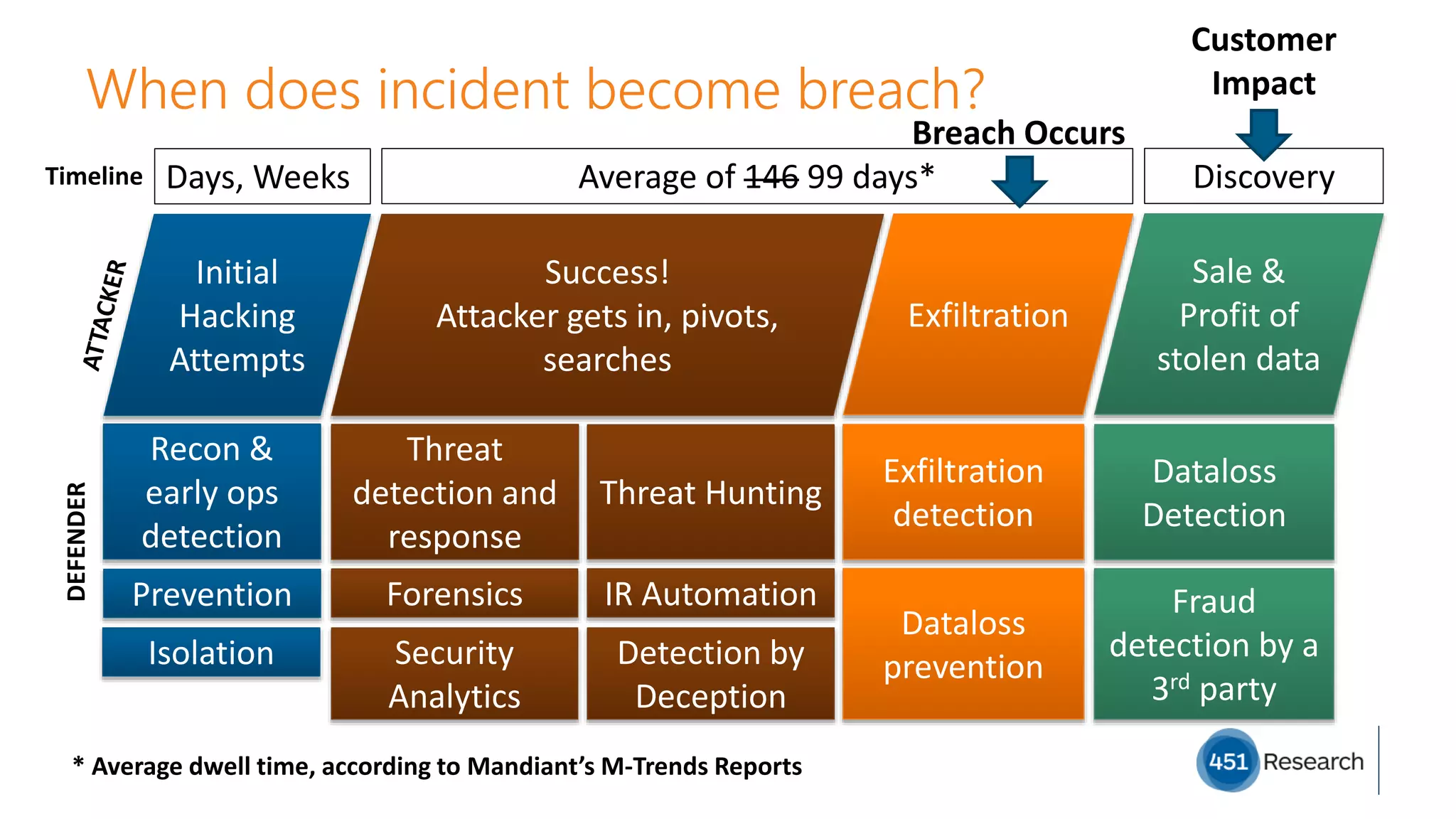
When does incident become breach?
26
Initial
Hacking
Attempts
Success!
Attacker gets in, pivots,
searches
Exfiltration
Days, Weeks Average of 146 99 days*
Sale &
Profit of
stolen data
Discovery
DEFENDER
Prevention
Isolation
Forensics IR Automation
Security
Analytics
Dataloss
preventionDetection by
Deception
Fraud
detection by a
3rd party
Breach Occurs
Customer
Impact
Timeline
* Average dwell time, according to Mandiant’s M-Trends Reports
Reducing the attacker’s ability to hide using red flags
27
Red flags are everywhere
Why aren’t we looking for them?
Basic Red Flag Examples
1. Local account creation
2. VSS disabled; snapshots deleted
3. AV turned off
4. SAM database dumped
5. ARP route poisoning
6. CMD.exe child of POWERPNT.EXE?
28
Strategies to get us back on track
1. Change Mindset
2.Better quality visibility (not quantity!)
3. Plan to mature detection capabilities
29
What are we talking about here, anyway?
The importance of visibility and awareness in
security cannot be overstated!
30
Detection challenges: Spot the difference
Detection challenges: How do we improve quality?
We need a way to separate actionable data from anecdotal data.
The solution isn’t getting rid of the anecdotal data, it’s hiding it from
view until it’s needed.
Detection challenges: fighting the noise
1. Have a baseline – otherwise everything will look suspicious!
2. Instead of tuning the default, consider starting from scratch
3. Explore other methods of alerting (ChatOps, sound, lighting)
4. Understand users/business and apply lessons to monitoring
5. Pick one very important scenario, and build it out...
Strategies to get us back on track
1. Change Mindset
2. Better quality visibility (not quantity!)
3.Plan to mature detection capabilities
35
Detection challenges: fighting the fires
1. Get better prevention
1. Prevention is ‘free’
2. IR is expensive
3. Minimize need for IR
2. Get tools and processes in place to enable root cause analysis
3. Practice IR as much as possible  Process improvement
4. Automate IR workflows  Process improvement
5. Never, ever skip lessons learned
Detection challenges: Less is More
1. Disable, remove and shut down
anything you don’t use. This
reduces attack surface AND noise.
2. Take care of Low Hanging Fruit 
3. Standardize systems. Less variation
makes systems easier to defend &
produce less noise
4. Simplify systems – monitor app use
and remove unused software or
features. Less software = Less
attack surface.
Low Hanging Fruit
• enable click-to-run for Flash
• office macro restrictions
• powershell restrictions
• disable java plugin if not needed
• disable Windows EFS if not needed
• use free security tools
• AppLocker
• LAPS
• EMET (maybe? maybe not?)
• Low or no-impact improvements
from CIS benchmarks
Wrapping up
38
What are your endpoint security pain points and goals?
Pain Points
1. Cleaning up infections 24/7
2. Catch attacks that bypass preventative controls
3. Catch/prevent non-malware threats
4. Catch insider threats
5. Did a breach actually occur?
Goals
1. Better prevention; hardening
2. Better detective controls, better endpoint
visibility
3. Better endpoint visibility; hardening
4. Better endpoint visibility
5. Visibility into file movement, data exfiltration
39
Recommendations
1. Think through and act out worst-case
scenarios. Test and fail repeatedly. Learn
from failures.
2. Don’t turn security products to 11
immediately – deploy slowly.
3. Choose one important attack scenario, and
get really good at defending against it.
4. Don’t break the user.
5. Consider time-to-value and labor-to-value
ratios.
6. Cut down on attack surface and noise by
stripping out everything you don’t need or
use
40
Adrian Sanabria
@sawaba
41

451 and Endgame - Zero breach Tolerance: Earliest protection across the attack lifecycle

  • 1.
    Where did wego wrong? 1
  • 2.
    Where did wego wrong? 1. Addressing information overload/alert fatigue 2. Blind spots 3. Control over environment 2
  • 3.
  • 4.
    Hi, I’m theneedle in this haystack Where did we go wrong? Fatigued yet? BARK! BARK! BARK! BARK! BARK! BARK! BARK! BARK! BARK!BARK! BARK! BARK! BARK! BARK! BARK! BARK! BARK! BARK! BARK! BARK! BARK! BARK! BARK! BARK! BARK! BARK! BARK! BARK! BARK! BARK! BARK! BARK! BARK! BARK!BARK!
  • 5.
  • 6.
    Three big (non-malware)problems in Security today 1. Addressing information overload/alert fatigue 2.Blind spots 3. Control over environment 6
  • 7.
    Enterprise security spendingvs blind spots 7 Blind Spot #3: The Cloud Most enterprise spending is tied up in the perimeter Blind Spot #1: The Endpoint Blind Spot #2: Internal network Communications (East-West traffic) Blind Spot #4: Data
  • 8.
    Three big (non-malware)problems in Security today 1. Addressing information overload/alert fatigue 2. Blind spots 3.Control over environment 8
  • 9.
    Where did wego wrong? 1.Not enough root cause analysis 2.Not enough process improvement (if any) 3.Even when we do succeed, we force the attacker to change tactics. Are we ready for that?
  • 10.
    Where did wego wrong? Prevention and Evasion Zeus Trojan PE (.exe) Preventative Controls Block Endpoint Protected Day1
  • 11.
    Where did wego wrong? Prevention and Evasion Zeus Trojan Java (.jar) Preventative Controls Fail JAR reassembles EXE on Endpoint Endpoint Infected Day2
  • 12.
    Where did wego wrong? Prevention and Evasion How did that work?
  • 13.
    State of EndpointSecurity and EDR Primer 13
  • 14.
    Why is theendpoint important? 1. This is where work happens 2. One of the easiest paths into a company 3. BYOD and ShadowIT are unsolved problems
  • 15.
    How I seethe market Prevention (pre-execution) Detection and Data Collection (post-execution) Platform Hardening 80+ Vendors 50/50 split complementary/ primary
  • 16.
    Buzzword Bingo: NGAVand EDR definitions NGAV: The ability to stop threats without prior knowledge of them EDR: Endpoint Data Recorder (a slight acronym modification)
  • 17.
    NGAV NEED: a better malware mousetrap WHAT:Automated detection of unknown threats WHY: auto- generated malware gets through EDR NEED: endpoint visibility; serious blind spot otherwise WHAT: Record detailed endpoint data WHY: detect attacks that defeat 1st layers of defense Hardening NEED: More permanent, resilient solutions WHAT: Wide variety of approaches WHY: Passive defenses reduce pressure on frontline defenses Remediation NEED: Contain and clean up threats WHAT: Containment and automated remediation WHY: Reduce expense and labor of dealing with threats Endpoint categories: What’s driving them?
  • 18.
    EDR: Endpoint Detectionand Response Many use cases: • detection • forensics • incident response • source for automation event triggers Ultimately, EDR is a sensor that provides rich, forensic data before you need it 18
  • 19.
    Examples: Ransomware prevention 1.Kill any process attempting to stop the volume shadow service (VSS) 2. If a powershell or CMD process is created shortly after opening an office document, inspect and/or quarantine the office document. 3. Create a hidden folder sure to be the first in an alphabetical list (e.g. __aardvarks). Any file change triggers a containment action (e.g. isolate machine). 19
  • 20.
    What about remediationand response? 20
  • 21.
    Let’s Fix This:Where do we start? 21
  • 22.
    Strategies to getus back on track 1. Change Mindset 2. Better quality visibility (not quantity!) 3. Plan to mature detection capabilities 22
  • 23.
    Changing mindset: thingsI have a problem with 1. Defeatist statements 2. That ‘dwell time’ has become a metric 3. The 1m unfilled jobs myth/rumor 23
  • 24.
    Myth #1: Solvingmalware changes everything! No, it just shifts the problem – attackers don’t give up, they just change tactics to things like: 1. Interpreted languages (javascript, python, powershell) 2. Social engineering 3. Credential theft 4. Abuse of valid admin tools 5. Web attacks (SQL Injection, XSS, XSRF, etc) 24
  • 25.
    Myth #2: Oncethe bad guys get in… Game Over! Common perspective of getting hacked (prevention only) 1. Attacker’s exploit succeeds. 2. Reality 1. Attacker’s exploit succeeds 2. Attempts to escalate privileges 3. Begins exploring network 4. Sniffs network 5. Pivots to another host using an exploit 6. Dumps and cracks credentials 7. Pivots with credentials 8. Creates domain admin account = detection opportunity Lesson: Layer detection with prevention
  • 26.
    Recon & early ops detection Exfiltration detection Dataloss Detection Threat detectionand response Threat Hunting When does incident become breach? 26 Initial Hacking Attempts Success! Attacker gets in, pivots, searches Exfiltration Days, Weeks Average of 146 99 days* Sale & Profit of stolen data Discovery DEFENDER Prevention Isolation Forensics IR Automation Security Analytics Dataloss preventionDetection by Deception Fraud detection by a 3rd party Breach Occurs Customer Impact Timeline * Average dwell time, according to Mandiant’s M-Trends Reports
  • 27.
    Reducing the attacker’sability to hide using red flags 27
  • 28.
    Red flags areeverywhere Why aren’t we looking for them? Basic Red Flag Examples 1. Local account creation 2. VSS disabled; snapshots deleted 3. AV turned off 4. SAM database dumped 5. ARP route poisoning 6. CMD.exe child of POWERPNT.EXE? 28
  • 29.
    Strategies to getus back on track 1. Change Mindset 2.Better quality visibility (not quantity!) 3. Plan to mature detection capabilities 29
  • 30.
    What are wetalking about here, anyway? The importance of visibility and awareness in security cannot be overstated! 30
  • 31.
  • 32.
  • 33.
    Detection challenges: Howdo we improve quality? We need a way to separate actionable data from anecdotal data. The solution isn’t getting rid of the anecdotal data, it’s hiding it from view until it’s needed.
  • 34.
    Detection challenges: fightingthe noise 1. Have a baseline – otherwise everything will look suspicious! 2. Instead of tuning the default, consider starting from scratch 3. Explore other methods of alerting (ChatOps, sound, lighting) 4. Understand users/business and apply lessons to monitoring 5. Pick one very important scenario, and build it out...
  • 35.
    Strategies to getus back on track 1. Change Mindset 2. Better quality visibility (not quantity!) 3.Plan to mature detection capabilities 35
  • 36.
    Detection challenges: fightingthe fires 1. Get better prevention 1. Prevention is ‘free’ 2. IR is expensive 3. Minimize need for IR 2. Get tools and processes in place to enable root cause analysis 3. Practice IR as much as possible  Process improvement 4. Automate IR workflows  Process improvement 5. Never, ever skip lessons learned
  • 37.
    Detection challenges: Lessis More 1. Disable, remove and shut down anything you don’t use. This reduces attack surface AND noise. 2. Take care of Low Hanging Fruit  3. Standardize systems. Less variation makes systems easier to defend & produce less noise 4. Simplify systems – monitor app use and remove unused software or features. Less software = Less attack surface. Low Hanging Fruit • enable click-to-run for Flash • office macro restrictions • powershell restrictions • disable java plugin if not needed • disable Windows EFS if not needed • use free security tools • AppLocker • LAPS • EMET (maybe? maybe not?) • Low or no-impact improvements from CIS benchmarks
  • 38.
  • 39.
    What are yourendpoint security pain points and goals? Pain Points 1. Cleaning up infections 24/7 2. Catch attacks that bypass preventative controls 3. Catch/prevent non-malware threats 4. Catch insider threats 5. Did a breach actually occur? Goals 1. Better prevention; hardening 2. Better detective controls, better endpoint visibility 3. Better endpoint visibility; hardening 4. Better endpoint visibility 5. Visibility into file movement, data exfiltration 39
  • 40.
    Recommendations 1. Think throughand act out worst-case scenarios. Test and fail repeatedly. Learn from failures. 2. Don’t turn security products to 11 immediately – deploy slowly. 3. Choose one important attack scenario, and get really good at defending against it. 4. Don’t break the user. 5. Consider time-to-value and labor-to-value ratios. 6. Cut down on attack surface and noise by stripping out everything you don’t need or use 40
  • 41.

Editor's Notes

  • #3 Talk about why I have them in this particular order! Aka Alert Fatigue – we spend far too much time reviewing “alerts” and events that don’t matter – some of this is done through integration/correlation, some is being addressed with security analytics – let a machine go through the noise and pluck out the relevant bits. We have blind spots in the enterprise – primarily the internal network and endpoints (incl asset mgmt, mobile, etc) In the past decade, technologies have given us greater control over on-prem and mobile assets, but we still have little visibility or control over what happens to our DATA
  • #5 Once you hear enough barking, you learn to tune it out, and it all becomes noise. This is the battle in security today: how do we ensure what is really important floats to the top and doesn’t get lost? (Target reference again here) Note: In real life, the really important alert is just another bark, not helpfully highlighted in a different color  Credit to Chuck Beeler for coining the phrase almost 10 years ago
  • #6 Well, turns out, a lot of the people that say none actually check a few alerts and then mark the rest as ‘read’, which isn’t really “checking them all”
  • #7 Talk about why I have them in this particular order! Aka Alert Fatigue – we spend far too much time reviewing “alerts” and events that don’t matter – some of this is done through integration/correlation, some is being addressed with security analytics – let a machine go through the noise and pluck out the relevant bits. We have blind spots in the enterprise – primarily the internal network and endpoints (incl asset mgmt, mobile, etc) In the past decade, technologies have given us greater control over on-prem and mobile assets, but we still have little visibility or control over what happens to our DATA
  • #8 There are red flags everywhere. Some of them are near 100% signs of a compromise, whereas others are more yellow flags. The idea here, is that if you have enough visibility across the enterprise, you can ignore the yellow flags, and the red flags will paint the true picture of a compromise and an attacker’s movements through the enterprise. Also, as we have control over our environment, we have an opportunity to set traps and force generation of our own custom red flats.
  • #9 Talk about why I have them in this particular order! Aka Alert Fatigue – we spend far too much time reviewing “alerts” and events that don’t matter – some of this is done through integration/correlation, some is being addressed with security analytics – let a machine go through the noise and pluck out the relevant bits. We have blind spots in the enterprise – primarily the internal network and endpoints (incl asset mgmt, mobile, etc) In the past decade, technologies have given us greater control over on-prem and mobile assets, but we still have little visibility or control over what happens to our DATA
  • #10 We typically don’t have the skills or spend the time to do root cause analysis When we succeed, we force the attacker to change behavior. Lack of root cause analysis and process improvement We need durable 5 year solutions, not 6 month solutions Ransomware example
  • #11 In fact, there is evidence of the attackers already sidestepping network-based anti-malware sandboxes.
  • #12 In fact, there is evidence of the attackers already sidestepping network-based anti-malware sandboxes.
  • #15 It is where work happens It is one of the easiest paths into a company BYOD and ShadowIT is still an unsolved problem
  • #16 Three Categories Prevention Detection/Data collection Platform Hardening Privilege Management Application Control Removing attack surface Dynamic attack surface reduction Hey, we see you don’t EVER USE X, Y or Z, so we’re going to turn them off, okay? OR, how about we do like Android 6? You don’t get permissions until they’re needed and then you get prompted to turn them on, and decide then and there whether or not you need them.
  • #17 And you know what? I like Endpoint Data Recorder better anyway, because a lot of EDR products out there have little to no detection or response capabilities.
  • #21 Remediation vs containment
  • #24 Helpless and defeatist statements like “It’s only a matter of time before the breach happens” and “there’s only two kinds of organizations, those that know they’ve been breached and those that don’t know yet” I’d argue that you also have the flipside – organizations that THOUGHT they had a breach, but actually DIDN’T. The reason they declared a breach was because, due to the lack of intelligence they had, they were forced to assume the worst! Indications that we’ve messed up as an industry: most of the 1 million cybersecurity jobs we supposedly have a need for are warm bodies in a SOC. Why? To compensate for noisy cybersecurity products the fact that “dwell time” is even a thing
  • #25 No, attacks are the threat we should be worried about, and regardless of what study you look at, a significant percentage of successful breaches don’t use malware at all.
  • #26 Point out: In the “reality” version, no malware was actually necessary, and if it was used, it was only to get the initial foothold. Mention: According to the most recent Verizon data breach report, at least 45% of attacks didn’t use malware at all.
  • #27 The point here is that the defender isn’t helpless – there’s something they can do at each stage of the attack campaign. The attacker stops to order a pizza The attacker stops to eat said pizza Baffled by Structured Query Language, the attacker searches online for ‘SQL CheatSheets’ The attacker takes a break to brag about his exploits to undercover FBI on online forums.
  • #28 There are red flags everywhere. Some of them are near 100% signs of a compromise, whereas others are more yellow flags. The idea here, is that if you have enough visibility across the enterprise, you can ignore the yellow flags, and the red flags will paint the true picture of a compromise and an attacker’s movements through the enterprise. Also, as we have control over our environment, we have an opportunity to set traps and force generation of our own custom red flats.
  • #29 Sure, someone gets in, fine. You have about 30,000 more opportunities to catch them. Take a deep breath and start looking for red flags (IoAs). You know what would be REALLY handy? If you could AUTOMATE the search for red flags. THAT would be NICE (HINT HINT NUDGE) I’m just gonna call them “red flags from now on. That’s what they are - we don’t need a fancy name! Lots of examples Things that are ALWAYS representative of something suspicious Mention automated honeynets/decoys/deception? Malware isn’t necessarily used! Verizon DBIR statistic here. Most next-gen anti-malware, anti-APT and stuff labeled “advanced” is just looking for Win32 binaries that are threats. What happens when someone doesn’t use malware at all? What happens when they come right in the appropriate door with the appropriate credentials?
  • #31 Keep this in mind, because it applies to a lot more than just what we’re talking about today – nearly every big trend we’re seeing in security today stems from lessons we’ve learned from over a decade of breaches.
  • #32 Realistically, it is unlikely you’ll block 100% of attacks or even malware, so you need to know what’s going on when an attacker or malware DOES get in. Relates to a concept Will will touch on – breaches don’t happen instantly.
  • #33 Realistically, it is unlikely you’ll block 100% of attacks or even malware, so you need to know what’s going on when an attacker or malware DOES get in. Relates to a concept Will will touch on – breaches don’t happen instantly.
  • #34 For #2, mention Eric Ogren’s 200k/daily DLP alert anecdote
  • #35 For #2, mention Eric Ogren’s 200k/daily DLP alert anecdote
  • #37 For #2, mention Eric Ogren’s 200k/daily DLP alert anecdote
  • #38 For #2, mention Eric Ogren’s 200k/daily DLP alert anecdote
  • #41 if you couldn’t patch and couldn’t use endpoint security software, what would your anti-malware strategy look like? --- test and enable AV/NGAV/EDR functionality a bit at a time Security products are far from infallible Any product that prevents the user from getting the job done will fail or be bypassed. How long before you get it up and working? How much effort/people do you need to get there and keep it there?