2
Introduction to IncidentResponse (IR)
• Definition: Incident Response (IR) is a structured approach to
managing and addressing security breaches, cyberattacks, or
other incidents that threaten an organization’s IT systems.
• Importance: A well-structured IR process minimizes damage,
recovery time, and costs associated with incidents.
• Key Objective: Protecting sensitive data and preserving the
organization's reputation.
3.
3
Key Goals ofIncident Response
• Minimize Damage: Quickly identifying and mitigating incidents
to limit data loss and operational disruption.
• Preserve Evidence: Ensuring that digital evidence is protected for
analysis and legal processes.
• Restore Normal Operations: Recovering systems and returning
to business continuity as quickly as possible.
4.
4
Incident Response Lifecycle
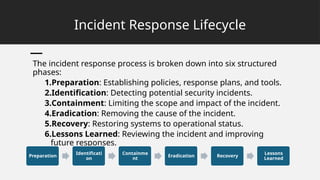
Theincident response process is broken down into six structured
phases:
1.Preparation: Establishing policies, response plans, and tools.
2.Identification: Detecting potential security incidents.
3.Containment: Limiting the scope and impact of the incident.
4.Eradication: Removing the cause of the incident.
5.Recovery: Restoring systems to operational status.
6.Lessons Learned: Reviewing the incident and improving
future responses.
Preparation
Identificati
on
Containme
nt
Eradication Recovery
Lessons
Learned
5.
5
Phase 1: Preparation
•Objective: Ensure the organization is ready to respond to
incidents.
• Key Activities:Creating an Incident Response Plan (IRP) tailored
to the organization’s risks.
• Training the incident response team (IRT) regularly.
• Developing communication protocols.
• Gathering necessary tools and resources for incident detection
and response.
6.
6
Preparing for Incidents
•Tools and Technologies:
• Firewalls, Intrusion Detection Systems (IDS), and Intrusion
Prevention Systems (IPS) to monitor and defend against
attacks.
• Security Information and Event Management (SIEM) systems
for logging and monitoring.
• Training and Awareness: Regular training for both the
IR team and employees to detect phishing, social
engineering, and other attacks.
7.
7
Identification
• Objective: Determineif a security incident has occurred.
• Key Activities:
• Monitoring systems for suspicious activity (e.g., abnormal
logins, unauthorized access).
• Using SIEM systems and logs for threat detection.
• Alerts from security tools and anomaly detection systems.
8.
8
Identifying Types ofIncidents
• Common Incident Types:
• Malware Infections: Viruses, ransomware, spyware.
• Phishing Attacks: Attempting to steal sensitive information.
• Insider Threats: Malicious or unintentional actions by
employees or contractors.
• Data Breaches: Unauthorized access to confidential data.
9.
9
Phase 3: Containment
•Objective: Isolate the incident to prevent further
damage.
• Key Activities:
• Short-term containment: Isolating affected systems or
networks to stop the spread of the threat.
• Long-term containment: Applying temporary fixes (e.g.,
patches) and ensuring that compromised systems are
quarantined until recovery is complete.
10.
10
Containment Strategies
• NetworkSegmentation: Isolating parts of the network to
contain the spread of the threat.
• Disabling Affected Accounts: Temporarily disabling user or
system accounts that may have been compromised.
• Preserving Forensic Evidence: Ensuring that logs, files, and data
related to the incident are securely stored for investigation.
11.
11
Phase 4: Eradication
•Objective: Remove the root cause of the security
incident from the environment.
• Key Activities:
• Removing malware from infected systems.
• Patching vulnerabilities that were exploited.
• Deleting or replacing compromised files or systems.
12.
12
Eradication Best Practices
•System Clean-Up: Ensure malware and infected files are
completely removed from affected systems.
• Software and Hardware Patching: Applying updates and
patches to fix vulnerabilities.
• Removing Backdoors: Ensuring that attackers cannot re-enter
systems through hidden pathways.
13.
13
Phase 5: Recovery
•Objective: Safely restore systems to normal operation
and verify security before fully resuming operations.
• Key Activities:
• Rebuilding or restoring systems from backups.
• Ensuring no residual malware or threats are present.
• Validating that systems are functioning as intended post-
recovery.
14.
14
Recovery Steps
• Validationof Systems: Conduct integrity checks on restored
systems.
• Continuous Monitoring: Ensure that monitoring tools are
actively tracking any post-recovery anomalies.
• Testing: Conducting tests on recovered systems to ensure full
operational capability.
15.
15
Phase 6: LessonsLearned
• Objective: Review the incident, evaluate the response,
and identify areas for improvement.
• Key Activities:
• Post-incident debriefing with the IR team.
• Updating response procedures, playbooks, and policies.
• Ensuring security measures are strengthened.
16.
16
Importance of IncidentReview
• Continuous Improvement: Using the knowledge gained from
each incident to improve the organization’s incident response
capability.
• Identifying Security Gaps: Understanding the root cause of
incidents and ensuring that security gaps are addressed.
17.
17
Incident Response Team(IRT)
• Key Roles:
• Incident Manager: Oversees the incident response and
makes critical decisions.
• Security Analysts: Analyze the nature of the threat and
suggest actions.
• Legal Advisors: Ensure compliance with regulations during
and after incidents.
18.
18
Effective Communication DuringIncidents
• Internal Communication: Keeping executives, key stakeholders,
and team members informed of the incident's status.
• External Communication: Communicating with customers,
partners, and possibly the media, depending on the severity of
the incident.
19.
19
Incident Classification andPrioritization
• Criteria:
• Severity: Impact on business operations, financial costs, data
exposure.
• Urgency: How quickly the incident needs to be addressed.
• Response Timeframes: Prioritizing incidents to ensure
a timely response.
20.
20
Legal and RegulatoryConsiderations
• Data Breach Notification Laws: Understanding when and how
to notify affected parties (e.g., GDPR, HIPAA).
• Chain of Custody: Maintaining a clear record of evidence for legal
proceedings.
21.
21
Tools for IncidentDetection and Response
• SIEM Systems: Centralized logging and monitoring tools.
• Forensic Tools: Tools for analyzing malware, logs, and other
digital artifacts.
22.
22
Threat Intelligence inIncident Response
• Threat Feeds: Regular updates on new and emerging threats.
• Proactive Defense: Using intelligence to anticipate and prevent
attacks before they happen.
23.
23
Automating Incident Response
•SOAR (Security Orchestration, Automation, and Response):
Automating repetitive tasks and reducing response time.
• Benefits: Quicker resolution, fewer manual errors, and more
efficient use of resources.
24.
24
Challenges in IncidentResponse
• False Positives: Addressing and reducing incorrect incident
alerts.
• Resource Constraints: Limited personnel and tools for handling
incidents.
• Complex Attacks: Managing sophisticated and coordinated
cyberattacks.
25.
25
Building an EffectiveIncident Response Plan
• Key Components: Roles, responsibilities, communication plans,
tools.
• Plan Testing: Regularly testing the plan through simulations and
tabletop exercises.
26.
26
Preserve Evidence
Types ofEvidence Collection:
1.Live Response: Collects real-time data from a running system, including both
volatile (e.g., memory) and non-volatile information (e.g., logs, active
connections). Automated tools help rapidly gather critical data without taking
the system offline.
2.Memory Collection: Used when the attacker might be hiding in memory (e.g.,
rootkits), and no disk image is available. Memory collection is useful when the
malicious activity is only in memory, but analysis may not always provide in-
depth answers.
3.Forensic Disk Image: Complete duplication of a system’s hard drive, taken
while the system remains live. This is used in cases where long-term or detailed
investigations are needed to recover additional information from disk artifacts.
27.
27
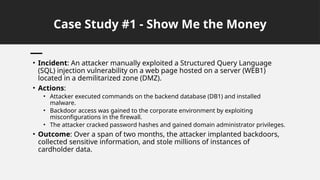
Case Study #1- Show Me the Money
• Incident: An attacker manually exploited a Structured Query Language
(SQL) injection vulnerability on a web page hosted on a server (WEB1)
located in a demilitarized zone (DMZ).
• Actions:
• Attacker executed commands on the backend database (DB1) and installed
malware.
• Backdoor access was gained to the corporate environment by exploiting
misconfigurations in the firewall.
• The attacker cracked password hashes and gained domain administrator privileges.
• Outcome: Over a span of two months, the attacker implanted backdoors,
collected sensitive information, and stole millions of instances of
cardholder data.
28.
28
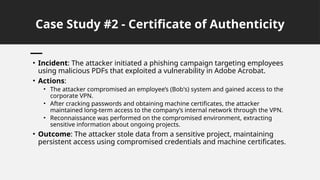
Case Study #2- Certificate of Authenticity
• Incident: The attacker initiated a phishing campaign targeting employees
using malicious PDFs that exploited a vulnerability in Adobe Acrobat.
• Actions:
• The attacker compromised an employee’s (Bob's) system and gained access to the
corporate VPN.
• After cracking passwords and obtaining machine certificates, the attacker
maintained long-term access to the company’s internal network through the VPN.
• Reconnaissance was performed on the compromised environment, extracting
sensitive information about ongoing projects.
• Outcome: The attacker stole data from a sensitive project, maintaining
persistent access using compromised credentials and machine certificates.
 Most read