

HOME
Subject : DATA PROCESSING
Term: 1ST Session :2014-2015
School: CHRISLAND HIGH SCHOOL IKEJA
Class : YEAR 11
Educator : ISAAC-JOSEPH O. O.
HOME
SCHEME OF WORK.
Week 1: Data models
Week 2: Data modelling
Week 3: Normalization
Week 4: Normalization
Week 5: Database using Microsoft Access
Week 6: Mid term
Week 7: Data models
Week 8: Relational model
Week 9: File organisation
Week 10: Revision
Week 10: End of term examination.
HOME
WEEK 1
DATA MODELS
HOME
Data types
When setting up a database, one needs to think about the 'data type'
which to be used for each field.
The most common data types are:
1. Alphanumeric/text
2. Numeric
3. Date and time
4. Currency
5. Boolean/logical
6. Auto number
HOME
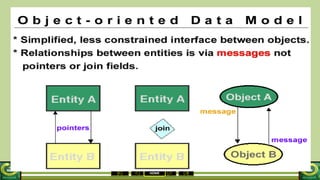
Alphanumeric or Text
This allows you to type in text, numbers and symbols
Examples:
• Name: James
• Surname: Smith
• Address: 73, High Street
• Postcode: CV34 5TR
• Car Registration: EP06 5TV
• Telephone Number: 01926 123456*
HOME
Number
This allows a whole number or a decimal number.
Only numbers can be entered, no letters or symbols
Examples:
15
21.35
Currency
This automatically formats the data to have a £ or $ or Euro symbol in front of the data
and also ensures there are two decimal places.
Examples:
=N=50
£5.75
$54.99
HOME
Date/Time
This restricts data entry to 1-31 for day (28 or 30 in appropriate months) and 1-12 for month.
It checks that a date can actually exist, for example, it would not allow 31/02/06 to be entered.
It formats the data into long, medium or short date/time
Examples:
• Long Date: 20 February 2006
• Medium Date: 20-Feb-06
• Short Date: 20/02/06
• Long Time: 18:21:35
• Medium Time: 06:21 PM
• Short Time: 18:21
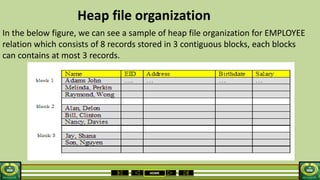
HOME
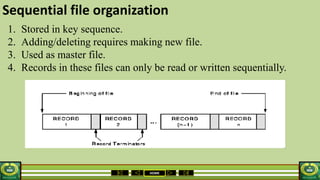
AUTONUMBER
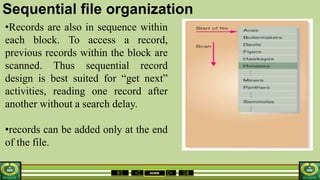
This datatype will automatically increase by 1 as records are
added to the database
1, 2, 3, 4, 5, …….
Logical, Boolean, Yes/No
This datatype is often referred to as different things, you may hear it called 'logical', or
‘Boolean' or 'yes/no'.
All it means is that the data is restricted to one of only two choices
Examples:
• Yes/No
• Male/Female
• Hot/Cold
• On/Off
HOME
This datatype is often referred to as different things, you may hear it
called 'logical', or 'boolean' or 'yes/no'.
All it means is that the data is restricted to one of only two choices
Examples:
• Yes/No
• Male/Female
• Hot/Cold
• On/Off
HOME
Assignment
Give examples of the following types of data:
1. Numeric
2. Alphanumeric
3. Date and time
HOME
WEEK 2
DATA MODELLING
HOME
PROCESS AND DATA MODELLING
• Process modelling: Involves the design of the different
modules of the system, each of which is a process with clearly
defined inputs and outputs and a transformation process.
Dataflow diagrams are often used to define processes in the
system.
• Data modelling: Data modelling involves considering how to
represent data objects within a system, both logically and
physically. The entity relationship diagram is used to model the
data.
HOME
A data model can be thought of as a diagram or flowchart that
illustrates the relationships between data. Although capturing all
the possible relationships in a data model can be very time-
intensive, it's an important step and shouldn't be rushed.
Well-documented models allow stake-holders to identify errors
and make changes before any programming code has been
written.
DATA MODELLING
HOME
Components of A Data Model
The data model gets its inputs from the planning and
analysis stage. Here the modeler, along with analysts,
collects information about the requirements of the
database by reviewing existing documentation and
interviewing end-users.
The data model has two outputs. The first is an entity-
relationship diagram which represents the data
structures in a pictorial form.
HOME
IMPORTANCE OF DATA MODELLING
The goal of the data model is to make sure that all
the data objects required by the database are
completely and accurately represented. Because the
data model uses easily understood notations and
natural language , it can be reviewed and verified as
correct by the end-users.
HOME
Summary
A data model is a plan for building a database. To
be effective, it must be simple enough to
communicate to the end user the data structure
required by the database yet detailed enough for
the database design to use to create the physical
structure.
HOME
WEEK 3 & 4
NORMALIZATION IN DATABASES
HOME
What is Normalization?
Unnormalised data exists in flat files
Normalization is the process of moving data into related tables
It is the process of organizing the fields and tables of a relational database to
minimize redundancy and dependency. Normalization usually involves dividing
large tables into smaller (and less redundant) tables and defining relationships
between them.
Normalization works through a series of stages called normal forms:
• FIRST NORMAL FORM (1NF)
• SECOND NORMAL FORM (2NF)
• THIRD NORMAL FORM (3NF)
HOME
First normal form (1NF)
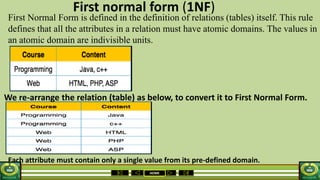
First Normal Form is defined in the definition of relations (tables) itself. This rule
defines that all the attributes in a relation must have atomic domains. The values in
an atomic domain are indivisible units.
We re-arrange the relation (table) as below, to convert it to First Normal Form.
Each attribute must contain only a single value from its pre-defined domain.
HOME
A design that complies with 1NF
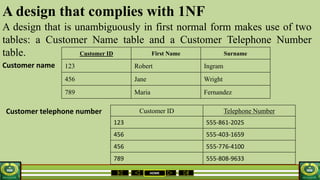
A design that is unambiguously in first normal form makes use of two
tables: a Customer Name table and a Customer Telephone Number
table.
Customer name
Customer telephone number
Customer ID First Name Surname
123 Robert Ingram
456 Jane Wright
789 Maria Fernandez
Customer ID Telephone Number
123 555-861-2025
456 555-403-1659
456 555-776-4100
789 555-808-9633
HOME
Second normal form (2NF)
• Before we learn about the second normal form, we need to understand the following −
• Prime attribute − An attribute, which is a part of the prime-key, is known as a prime
attribute.
• Non-prime attribute − An attribute, which is not a part of the prime-key, is said to be a non-
prime attribute.
A table is in 2NF if and only if it is in 1NF and every most important attribute of the table is
dependent on the whole of a candidate key.
If we follow second normal form, then every non-prime attribute should be fully functionally
dependent on prime key attribute. That is, if X → A holds, then there should not be any proper
subset Y of X, for which Y → A also holds true.
HOME
2nd Normal Form Example
Consider the following example:
This table has a composite primary key [Customer ID, Store ID]. The
non-key attribute is [Purchase Location]. In this case, [Purchase
Location] only depends on [Store ID], which is only part of the primary
key. Therefore, this table does not satisfy second normal form.
HOME
To bring this table to second
normal form, we break the table
into two tables, and now we
have the following:
What we have done is to remove
the partial functional
dependency that we initially had.
Now, in the table [TABLE_STORE],
the column [Purchase Location]
is fully dependent on the primary
key of that table, which is [Store
ID].
HOME
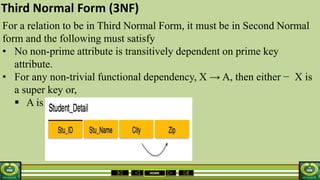
Third Normal Form (3NF)
For a relation to be in Third Normal Form, it must be in Second Normal
form and the following must satisfy
• No non-prime attribute is transitively dependent on prime key
attribute.
• For any non-trivial functional dependency, X → A, then either − X is
a super key or,
 A is prime attribute.
HOME
Third Normal Form (3NF)
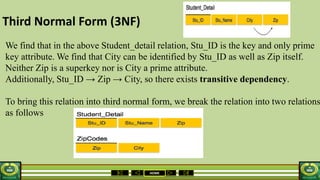
We find that in the above Student_detail relation, Stu_ID is the key and only prime
key attribute. We find that City can be identified by Stu_ID as well as Zip itself.
Neither Zip is a superkey nor is City a prime attribute.
Additionally, Stu_ID → Zip → City, so there exists transitive dependency.
To bring this relation into third normal form, we break the relation into two relations
as follows
HOME
Referential Integrity
Is a property of data which, when satisfied, requires every
value of one attribute (column) of a relation(table) to exist as a
value of another attribute in a different (or the same) relation
(table).
For referential integrity to hold in a relational database, any
field in a table that is declared a foreign key can contain either
a null value, or only values from a parent table's primary key or
a candidate key. In other words, when a foreign key value is
used it must reference a valid, existing primary key in the
parent table.
HOME
Denormalization and Unnormalization
Denormalization is the process of attempting to optimize the read
performance of a database by adding redundant data or by grouping data. In
some cases, denormalization is a means of
addressing performance or scalability in relational database software.
Unnormalization is a table that does not meet the definition of a relation.
– it contains rows with multiple values for an attribute (repeating groups)
or
– contains duplicate rows.
• A table is said to be in first normal form if it meets the definition of a
relation
– Generally this means it contains no repeating groups of attributes.
HOME
Assignment
1. What do you mean by referential integrity?
2. What are second and third normal forms?
HOME
Types of Data Model
1. Database Model
A database model is a specification describing how a database is
structured and used. Several database models have been
suggested.
Some common ones include:
1. Flat
2. Hierarchical
3. Network
4. Relational
5. Object oriented models
6. Star schema
HOME
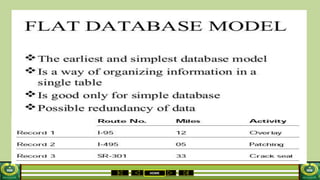
Flat Model
This may not strictly qualify as a data model. The flat
(or table) model consists of a single, two-dimensional
array of data elements, where all members of a given
column are assumed to be similar values, and all
members of a row are assumed to be related to one
another.
HOME
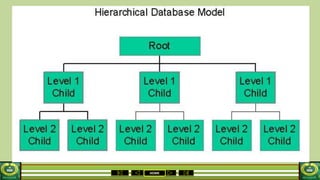
Hierarchical model
In this model data is organized into a tree-like
structure, implying a single upward link in each
record to describe the nesting, and a sort field to
keep the records in a particular order in each
same-level list.
HOME
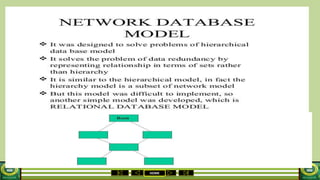
Network Model
This model organizes data using two fundamental
constructs, called records and sets. Records
contain fields, and sets define one-to-many
relationships between records: one owner, many
members.
HOME
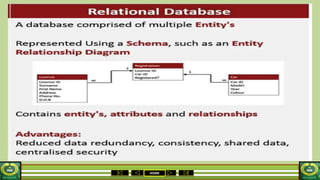
Relational Model
This is a database model based on first-order predicate
logic. Its core idea is to describe a database as a
collection of predicates over a finite set of predicate
variables, describing constraints on the possible values
and combinations of values
HOME
Object-Relational Model
The object-relational model is similar to a
relational database model, but objects, classes
and inheritance are directly supported
in database schemas and in the query
language.
HOME
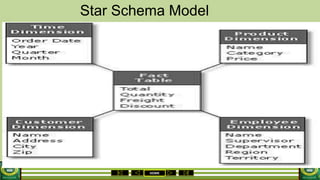
Star schema
This is the simplest style of data warehouse
schema. The star schema consists of a few "fact
tables" (possibly only one, justifying the name)
referencing any number of "dimension tables".
The star schema is considered an important
special case of the snowflake schema.
HOME
2. Entity-Relationship Model
An entity-relationship model (ERM) is an
abstract conceptual data model (or semantic data
model) used in software engineering to represent
structured data. There are several notations used for
ERMs.
HOME
3. Generic Data Model
Generic data models are developed as an approach to solve
some shortcomings of conventional data models. For example,
different modelers usually produce different conventional data
models of the same domain. This can lead to difficulty in
bringing the models of different people together and is an
obstacle for data exchange and data integration.
HOME
4. Semantic data model
A semantic data model in software engineering is a
technique to define the meaning of data within the
context of its interrelationships with other data. A
semantic data model is an abstraction which defines how
the stored symbols relate to the real world. A semantic
data model is sometimes called a conceptual data model.
HOME
CHARACTERISTICS OF SUITABLE SET OF RELATIONS IN A DATA MODEL
• Minimal number of attributes necessary to support data
requirements of enterprise
• Attributes with close logical relationship found in same relation
• Minimal redundancy with each attribute
• Represented once except for attributes that form all or part of
foreign keys
HOME
WEEK 5
HOME
HOME
HOME
HOME
HOME
HOME
Star Schema Model
HOME
Week 7
Database using Microsoft Access
HOME
Week 8
Data Models
HOME
Data Models
• Data Model: A set of concepts to describe the structure of
a database, and certain constraints that the database should
obey.
• It is a conceptual representation of the data structures that
are required by a database. The data structures include the
data objects, the association between the data objects and
the rules which govern operations on the objects.
HOME
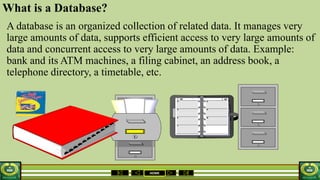
What is a Database?
A database is an organized collection of related data. It manages very
large amounts of data, supports efficient access to very large amounts of
data and concurrent access to very large amounts of data. Example:
bank and its ATM machines, a filing cabinet, an address book, a
telephone directory, a timetable, etc.
HOME
Database Management System (DBMS)
A Database Management System (DBMS) is a collection of
software programs which provide management of databases,
control access to data and contain a query language to retrieve
information easily.
Examples include
1. Microsoft Access
2. FileMaker
3. Lotus Notes
4. Oracle SQL Server
HOME
RDBMS
A relational database management system is a type of database
that stores data in form of related tables.
HOME
Data vs. Information
• Data
Data is a collection of raw facts made up of text, numbers and dates:
Murray 35000 7/18/86
• Information
This is the result of data that has been processed in a meaningful way
Mr. Murray is a sales person whose annual salary is $35,000 and
whose hire date is July 18, 1986.
HOME
Basic Database Concepts
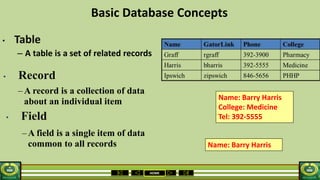
• Table
– A table is a set of related records
Name: Barry Harris
College: Medicine
Tel: 392-5555
Name: Barry Harris
• Field
• Record
–A record is a collection of data
about an individual item
–A field is a single item of data
common to all records
HOME
• Queries
A database "query" is basically a "question" that you ask the
database in order to get information back from the database.
It is used as the way of retrieving the information from
database.
• Reports
Database reports are the formatted result of database queries
and contain useful data for decision-making and analysis.
HOME
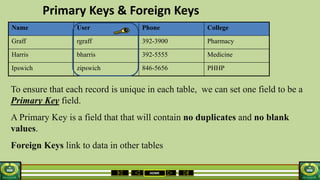
Primary Keys & Foreign Keys
Name User Phone College
Graff rgraff 392-3900 Pharmacy
Harris bharris 392-5555 Medicine
Ipswich zipswich 846-5656 PHHP
To ensure that each record is unique in each table, we can set one field to be a
Primary Key field.
A Primary Key is a field that that will contain no duplicates and no blank
values.
Foreign Keys link to data in other tables
HOME
Types of Databases
Relational databases
In relational databases, fields can be used in a number of ways (and
can be of variable length), provided that they are linked in tables.
Non-relational databases
Non-relational databases place information in field categories that we
create so that information is available for sorting and disseminating the
way we need it. The data can only be "copied and pasted.“ Example: a
spread sheet
HOME
File Organization
HOME
File Organization
Physical arrangement of the records of a file on secondary storage devices.
It is used to determine an efficient file organization for each base relation.
For example, if we want to retrieve student records in alphabetical order of
name, sorting the file by student name is a good file organization.
However, if we want to retrieve all students whose marks is in a certain range,
a file ordered by student name would not be a good file organization. Some file
organizations are efficient for bulk loading data into the database but
inefficient for retrieve and other activities.
1. Sequential
2. Linked List
3. Indexed
4. Hashed
HOME
Physical Design
1. Volume and Usage analysis
2. Distribution Strategy
3. File Organizations
4. Indexes and Access Methods
5. Integrity Constraints
HOME
Physical Design Issues
1. Size
2. Speed of access
3. Speed of update
4. Growth issues: performance and degradation
5. Security
6. Maintenance
HOME
DBMS Organization
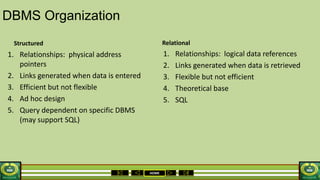
1. Relationships: physical address
pointers
2. Links generated when data is entered
3. Efficient but not flexible
4. Ad hoc design
5. Query dependent on specific DBMS
(may support SQL)
1. Relationships: logical data references
2. Links generated when data is retrieved
3. Flexible but not efficient
4. Theoretical base
5. SQL
Structured Relational
HOME
DBMS Technology
1. CPU
• Components
• Operation
2. DASD
• Technology
• Organization
3. Data Transfer
4. Access methods
HOME
Physical Design
Data Distribution
1. Centralized
2. Partitioned
–Horizontal
–Vertical
3. Replicated
4. Hybrid
HOME
Methods of organizing files
Different methods of organizing files-
1.Heap
2.Sequential
3.Indexed-sequential
4.Inverted list
5.Direct access
HOME
Choosing a file organization is a design decision, hence it must be
done having in mind the achievement of good performance with
respect to the most likely usage of the file. The criteria usually
considered important are:
1. Fast access to single record or collection of related records.
2. Easy record adding/update/removal, without disrupting .
3. Storage efficiency.
4. Redundancy as a warranty against data corruption.
HOME
HEAP FILES(UNORDERED)
Basically these files are unordered files. It is the simplest and most basic type.
These files consist of randomly ordered records. The records will have no
particular order.
The operations we can perform on the records are insert, retrieve and delete. The
features of the heap file or the pile file Organisation are:
1.New records can be inserted in any empty space that can accommodate them.
2.When old records are deleted, the occupied space becomes empty and
available for any new insertion.
3.If updated records grow; they may need to be relocated (moved) to a new
empty space. This needs to keep a list of empty space.
HOME
Advantages and disadvantages of HEAP FILES
Advantages
1.This is a simple file Organisation method.
2. Insertion is somehow efficient.
3. Good for bulk-loading data into a table.
4. Best if file scans are common or insertions are frequent.
Disadvantages
1.Retrieval requires a linear search and is inefficient.
2. Deletion can result in unused space/need for
reorganisation.
HOME
Heap file organization
In the below figure, we can see a sample of heap file organization for EMPLOYEE
relation which consists of 8 records stored in 3 contiguous blocks, each blocks
can contains at most 3 records.
HOME
Sequential file organization
1. Stored in key sequence.
2. Adding/deleting requires making new file.
3. Used as master file.
4. Records in these files can only be read or written sequentially.
HOME
Sequential file organization
•Records are also in sequence within
each block. To access a record,
previous records within the block are
scanned. Thus sequential record
design is best suited for “get next”
activities, reading one record after
another without a search delay.
•records can be added only at the end
of the file.
HOME
Advantages and disadvantages of Sequential file
ADVANTAGES
1. Simple file design
2. Very efficient when most of the records must be processed e.g. Payroll
3. Very efficient if the data has a natural order
4. Can be stored on inexpensive devices like magnetic tape.
DISADVANTAGES
1. Entire file must be processed even if a single record is to be searched.
2. Transactions have to be sorted before processing
3. Overall processing is slow.
HOME
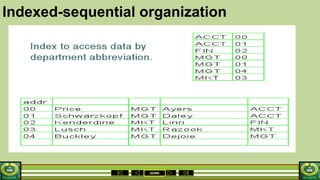
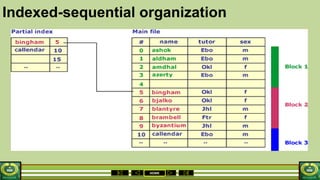
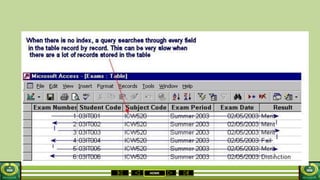
Indexed-sequential organization
1. Each record of a file has a key field which uniquely identifies that record.
2. An index consists of keys and addresses.
3. An indexed sequential file is a sequential file (i.e. sorted into order of a key
field) which has an index.
4. A full index to a file is one in which there is an entry for every record.
5. When a record is inserted or deleted in a file the data can be added at any
location in the data file. Each index must also be updated to reflect the change.
For a simple sequential index this may mean rewriting the
index for each insertion.
HOME
Indexed-sequential organization
HOME
Indexed-sequential organization
HOME
HOME
Indexed-sequential organization
Indexed sequential files are important for applications where data needs
to be accessed.....
Sequentially
randomly using the index.
An indexed sequential file can only be stored on a random access device
e.g. magnetic disc, CD.
HOME
ADVANTAGES AND DISADVANTAGES
Advantages
Provides flexibility for users who need both type of accesses with the same file.
Faster than sequential.
Disadvantages
Extra storage space for the index is required
HOME
Inverted list organization
Like the indexed-sequential storage method, the inverted list
organization maintains an index. The two methods differ, however, in
the index level and record storage. The indexed- sequential method has
a multiple index for a given key, whereas
the inverted list method has a single index for each key type.
The records are not necessarily stored in a sequence. They are placed
in the are data storage area, but indexes are updated for the record keys
and location.
HOME
ADVANTAGES AND DISADVANTAGES
Advantages
The benefits are apparent immediately because searching is fast
disadvantages
inverted list files use more media space and the storage devices get
full quickly with this type of organization.
updating is much slower.
HOME
Advantages and disadvantages
Advantages
Any record can be directly accessed.
Speed of record processing is very fast.
Up-to-date file because of online updating.
Concurrent processing is possible.
 Transactions need not be sorted.
Disadvantages
More complex than sequential.
Does not fully use memory locations.
More security and backup problems.
 Expensive hardware and software are required.
 System design is complex and costly.
 File updation is more difficult as compared to sequential files.
HOME
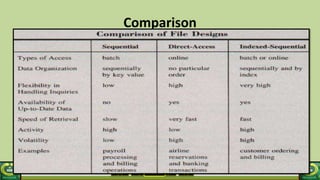
Comparison
wps.cn/moban
HOME
Quiz1.Different types of files are
a)Master
Transaction
Backup
b)Archive
Table
Report
c)Dump
Library
2. Major criteria for selecting a File organization are
1. Method of processing of file
2. Size of data
3. File inquiry capability
4. File volatility
5. Response time
6. Activity ratio

Year 11 DATA PROCESSING 1st Term

  • 1.
    HOME Subject : DATAPROCESSING Term: 1ST Session :2014-2015 School: CHRISLAND HIGH SCHOOL IKEJA Class : YEAR 11 Educator : ISAAC-JOSEPH O. O.
  • 2.
    HOME SCHEME OF WORK. Week1: Data models Week 2: Data modelling Week 3: Normalization Week 4: Normalization Week 5: Database using Microsoft Access Week 6: Mid term Week 7: Data models Week 8: Relational model Week 9: File organisation Week 10: Revision Week 10: End of term examination.
  • 3.
  • 4.
    HOME Data types When settingup a database, one needs to think about the 'data type' which to be used for each field. The most common data types are: 1. Alphanumeric/text 2. Numeric 3. Date and time 4. Currency 5. Boolean/logical 6. Auto number
  • 5.
    HOME Alphanumeric or Text Thisallows you to type in text, numbers and symbols Examples: • Name: James • Surname: Smith • Address: 73, High Street • Postcode: CV34 5TR • Car Registration: EP06 5TV • Telephone Number: 01926 123456*
  • 6.
    HOME Number This allows awhole number or a decimal number. Only numbers can be entered, no letters or symbols Examples: 15 21.35 Currency This automatically formats the data to have a £ or $ or Euro symbol in front of the data and also ensures there are two decimal places. Examples: =N=50 £5.75 $54.99
  • 7.
    HOME Date/Time This restricts dataentry to 1-31 for day (28 or 30 in appropriate months) and 1-12 for month. It checks that a date can actually exist, for example, it would not allow 31/02/06 to be entered. It formats the data into long, medium or short date/time Examples: • Long Date: 20 February 2006 • Medium Date: 20-Feb-06 • Short Date: 20/02/06 • Long Time: 18:21:35 • Medium Time: 06:21 PM • Short Time: 18:21
  • 8.
    HOME AUTONUMBER This datatype willautomatically increase by 1 as records are added to the database 1, 2, 3, 4, 5, ……. Logical, Boolean, Yes/No This datatype is often referred to as different things, you may hear it called 'logical', or ‘Boolean' or 'yes/no'. All it means is that the data is restricted to one of only two choices Examples: • Yes/No • Male/Female • Hot/Cold • On/Off
  • 9.
    HOME This datatype isoften referred to as different things, you may hear it called 'logical', or 'boolean' or 'yes/no'. All it means is that the data is restricted to one of only two choices Examples: • Yes/No • Male/Female • Hot/Cold • On/Off
  • 10.
    HOME Assignment Give examples ofthe following types of data: 1. Numeric 2. Alphanumeric 3. Date and time
  • 11.
  • 12.
    HOME PROCESS AND DATAMODELLING • Process modelling: Involves the design of the different modules of the system, each of which is a process with clearly defined inputs and outputs and a transformation process. Dataflow diagrams are often used to define processes in the system. • Data modelling: Data modelling involves considering how to represent data objects within a system, both logically and physically. The entity relationship diagram is used to model the data.
  • 13.
    HOME A data modelcan be thought of as a diagram or flowchart that illustrates the relationships between data. Although capturing all the possible relationships in a data model can be very time- intensive, it's an important step and shouldn't be rushed. Well-documented models allow stake-holders to identify errors and make changes before any programming code has been written. DATA MODELLING
  • 14.
    HOME Components of AData Model The data model gets its inputs from the planning and analysis stage. Here the modeler, along with analysts, collects information about the requirements of the database by reviewing existing documentation and interviewing end-users. The data model has two outputs. The first is an entity- relationship diagram which represents the data structures in a pictorial form.
  • 15.
    HOME IMPORTANCE OF DATAMODELLING The goal of the data model is to make sure that all the data objects required by the database are completely and accurately represented. Because the data model uses easily understood notations and natural language , it can be reviewed and verified as correct by the end-users.
  • 16.
    HOME Summary A data modelis a plan for building a database. To be effective, it must be simple enough to communicate to the end user the data structure required by the database yet detailed enough for the database design to use to create the physical structure.
  • 17.
    HOME WEEK 3 &4 NORMALIZATION IN DATABASES
  • 18.
    HOME What is Normalization? Unnormaliseddata exists in flat files Normalization is the process of moving data into related tables It is the process of organizing the fields and tables of a relational database to minimize redundancy and dependency. Normalization usually involves dividing large tables into smaller (and less redundant) tables and defining relationships between them. Normalization works through a series of stages called normal forms: • FIRST NORMAL FORM (1NF) • SECOND NORMAL FORM (2NF) • THIRD NORMAL FORM (3NF)
  • 19.
    HOME First normal form(1NF) First Normal Form is defined in the definition of relations (tables) itself. This rule defines that all the attributes in a relation must have atomic domains. The values in an atomic domain are indivisible units. We re-arrange the relation (table) as below, to convert it to First Normal Form. Each attribute must contain only a single value from its pre-defined domain.
  • 20.
    HOME A design thatcomplies with 1NF A design that is unambiguously in first normal form makes use of two tables: a Customer Name table and a Customer Telephone Number table. Customer name Customer telephone number Customer ID First Name Surname 123 Robert Ingram 456 Jane Wright 789 Maria Fernandez Customer ID Telephone Number 123 555-861-2025 456 555-403-1659 456 555-776-4100 789 555-808-9633
  • 21.
    HOME Second normal form(2NF) • Before we learn about the second normal form, we need to understand the following − • Prime attribute − An attribute, which is a part of the prime-key, is known as a prime attribute. • Non-prime attribute − An attribute, which is not a part of the prime-key, is said to be a non- prime attribute. A table is in 2NF if and only if it is in 1NF and every most important attribute of the table is dependent on the whole of a candidate key. If we follow second normal form, then every non-prime attribute should be fully functionally dependent on prime key attribute. That is, if X → A holds, then there should not be any proper subset Y of X, for which Y → A also holds true.
  • 22.
    HOME 2nd Normal FormExample Consider the following example: This table has a composite primary key [Customer ID, Store ID]. The non-key attribute is [Purchase Location]. In this case, [Purchase Location] only depends on [Store ID], which is only part of the primary key. Therefore, this table does not satisfy second normal form.
  • 23.
    HOME To bring thistable to second normal form, we break the table into two tables, and now we have the following: What we have done is to remove the partial functional dependency that we initially had. Now, in the table [TABLE_STORE], the column [Purchase Location] is fully dependent on the primary key of that table, which is [Store ID].
  • 24.
    HOME Third Normal Form(3NF) For a relation to be in Third Normal Form, it must be in Second Normal form and the following must satisfy • No non-prime attribute is transitively dependent on prime key attribute. • For any non-trivial functional dependency, X → A, then either − X is a super key or,  A is prime attribute.
  • 25.
    HOME Third Normal Form(3NF) We find that in the above Student_detail relation, Stu_ID is the key and only prime key attribute. We find that City can be identified by Stu_ID as well as Zip itself. Neither Zip is a superkey nor is City a prime attribute. Additionally, Stu_ID → Zip → City, so there exists transitive dependency. To bring this relation into third normal form, we break the relation into two relations as follows
  • 26.
    HOME Referential Integrity Is aproperty of data which, when satisfied, requires every value of one attribute (column) of a relation(table) to exist as a value of another attribute in a different (or the same) relation (table). For referential integrity to hold in a relational database, any field in a table that is declared a foreign key can contain either a null value, or only values from a parent table's primary key or a candidate key. In other words, when a foreign key value is used it must reference a valid, existing primary key in the parent table.
  • 27.
    HOME Denormalization and Unnormalization Denormalizationis the process of attempting to optimize the read performance of a database by adding redundant data or by grouping data. In some cases, denormalization is a means of addressing performance or scalability in relational database software. Unnormalization is a table that does not meet the definition of a relation. – it contains rows with multiple values for an attribute (repeating groups) or – contains duplicate rows. • A table is said to be in first normal form if it meets the definition of a relation – Generally this means it contains no repeating groups of attributes.
  • 28.
    HOME Assignment 1. What doyou mean by referential integrity? 2. What are second and third normal forms?
  • 29.
    HOME Types of DataModel 1. Database Model A database model is a specification describing how a database is structured and used. Several database models have been suggested. Some common ones include: 1. Flat 2. Hierarchical 3. Network 4. Relational 5. Object oriented models 6. Star schema
  • 30.
    HOME Flat Model This maynot strictly qualify as a data model. The flat (or table) model consists of a single, two-dimensional array of data elements, where all members of a given column are assumed to be similar values, and all members of a row are assumed to be related to one another.
  • 31.
    HOME Hierarchical model In thismodel data is organized into a tree-like structure, implying a single upward link in each record to describe the nesting, and a sort field to keep the records in a particular order in each same-level list.
  • 32.
    HOME Network Model This modelorganizes data using two fundamental constructs, called records and sets. Records contain fields, and sets define one-to-many relationships between records: one owner, many members.
  • 33.
    HOME Relational Model This isa database model based on first-order predicate logic. Its core idea is to describe a database as a collection of predicates over a finite set of predicate variables, describing constraints on the possible values and combinations of values
  • 34.
    HOME Object-Relational Model The object-relationalmodel is similar to a relational database model, but objects, classes and inheritance are directly supported in database schemas and in the query language.
  • 35.
    HOME Star schema This isthe simplest style of data warehouse schema. The star schema consists of a few "fact tables" (possibly only one, justifying the name) referencing any number of "dimension tables". The star schema is considered an important special case of the snowflake schema.
  • 36.
    HOME 2. Entity-Relationship Model Anentity-relationship model (ERM) is an abstract conceptual data model (or semantic data model) used in software engineering to represent structured data. There are several notations used for ERMs.
  • 37.
    HOME 3. Generic DataModel Generic data models are developed as an approach to solve some shortcomings of conventional data models. For example, different modelers usually produce different conventional data models of the same domain. This can lead to difficulty in bringing the models of different people together and is an obstacle for data exchange and data integration.
  • 38.
    HOME 4. Semantic datamodel A semantic data model in software engineering is a technique to define the meaning of data within the context of its interrelationships with other data. A semantic data model is an abstraction which defines how the stored symbols relate to the real world. A semantic data model is sometimes called a conceptual data model.
  • 39.
    HOME CHARACTERISTICS OF SUITABLESET OF RELATIONS IN A DATA MODEL • Minimal number of attributes necessary to support data requirements of enterprise • Attributes with close logical relationship found in same relation • Minimal redundancy with each attribute • Represented once except for attributes that form all or part of foreign keys
  • 40.
  • 41.
  • 42.
  • 43.
  • 44.
  • 45.
  • 46.
  • 47.
  • 48.
  • 49.
    HOME Data Models • DataModel: A set of concepts to describe the structure of a database, and certain constraints that the database should obey. • It is a conceptual representation of the data structures that are required by a database. The data structures include the data objects, the association between the data objects and the rules which govern operations on the objects.
  • 50.
    HOME What is aDatabase? A database is an organized collection of related data. It manages very large amounts of data, supports efficient access to very large amounts of data and concurrent access to very large amounts of data. Example: bank and its ATM machines, a filing cabinet, an address book, a telephone directory, a timetable, etc.
  • 51.
    HOME Database Management System(DBMS) A Database Management System (DBMS) is a collection of software programs which provide management of databases, control access to data and contain a query language to retrieve information easily. Examples include 1. Microsoft Access 2. FileMaker 3. Lotus Notes 4. Oracle SQL Server
  • 52.
    HOME RDBMS A relational databasemanagement system is a type of database that stores data in form of related tables.
  • 53.
    HOME Data vs. Information •Data Data is a collection of raw facts made up of text, numbers and dates: Murray 35000 7/18/86 • Information This is the result of data that has been processed in a meaningful way Mr. Murray is a sales person whose annual salary is $35,000 and whose hire date is July 18, 1986.
  • 54.
    HOME Basic Database Concepts •Table – A table is a set of related records Name: Barry Harris College: Medicine Tel: 392-5555 Name: Barry Harris • Field • Record –A record is a collection of data about an individual item –A field is a single item of data common to all records
  • 55.
    HOME • Queries A database"query" is basically a "question" that you ask the database in order to get information back from the database. It is used as the way of retrieving the information from database. • Reports Database reports are the formatted result of database queries and contain useful data for decision-making and analysis.
  • 56.
    HOME Primary Keys &Foreign Keys Name User Phone College Graff rgraff 392-3900 Pharmacy Harris bharris 392-5555 Medicine Ipswich zipswich 846-5656 PHHP To ensure that each record is unique in each table, we can set one field to be a Primary Key field. A Primary Key is a field that that will contain no duplicates and no blank values. Foreign Keys link to data in other tables
  • 57.
    HOME Types of Databases Relationaldatabases In relational databases, fields can be used in a number of ways (and can be of variable length), provided that they are linked in tables. Non-relational databases Non-relational databases place information in field categories that we create so that information is available for sorting and disseminating the way we need it. The data can only be "copied and pasted.“ Example: a spread sheet
  • 58.
  • 59.
    HOME File Organization Physical arrangementof the records of a file on secondary storage devices. It is used to determine an efficient file organization for each base relation. For example, if we want to retrieve student records in alphabetical order of name, sorting the file by student name is a good file organization. However, if we want to retrieve all students whose marks is in a certain range, a file ordered by student name would not be a good file organization. Some file organizations are efficient for bulk loading data into the database but inefficient for retrieve and other activities. 1. Sequential 2. Linked List 3. Indexed 4. Hashed
  • 60.
    HOME Physical Design 1. Volumeand Usage analysis 2. Distribution Strategy 3. File Organizations 4. Indexes and Access Methods 5. Integrity Constraints
  • 61.
    HOME Physical Design Issues 1.Size 2. Speed of access 3. Speed of update 4. Growth issues: performance and degradation 5. Security 6. Maintenance
  • 62.
    HOME DBMS Organization 1. Relationships:physical address pointers 2. Links generated when data is entered 3. Efficient but not flexible 4. Ad hoc design 5. Query dependent on specific DBMS (may support SQL) 1. Relationships: logical data references 2. Links generated when data is retrieved 3. Flexible but not efficient 4. Theoretical base 5. SQL Structured Relational
  • 63.
    HOME DBMS Technology 1. CPU •Components • Operation 2. DASD • Technology • Organization 3. Data Transfer 4. Access methods
  • 64.
    HOME Physical Design Data Distribution 1.Centralized 2. Partitioned –Horizontal –Vertical 3. Replicated 4. Hybrid
  • 65.
    HOME Methods of organizingfiles Different methods of organizing files- 1.Heap 2.Sequential 3.Indexed-sequential 4.Inverted list 5.Direct access
  • 66.
    HOME Choosing a fileorganization is a design decision, hence it must be done having in mind the achievement of good performance with respect to the most likely usage of the file. The criteria usually considered important are: 1. Fast access to single record or collection of related records. 2. Easy record adding/update/removal, without disrupting . 3. Storage efficiency. 4. Redundancy as a warranty against data corruption.
  • 67.
    HOME HEAP FILES(UNORDERED) Basically thesefiles are unordered files. It is the simplest and most basic type. These files consist of randomly ordered records. The records will have no particular order. The operations we can perform on the records are insert, retrieve and delete. The features of the heap file or the pile file Organisation are: 1.New records can be inserted in any empty space that can accommodate them. 2.When old records are deleted, the occupied space becomes empty and available for any new insertion. 3.If updated records grow; they may need to be relocated (moved) to a new empty space. This needs to keep a list of empty space.
  • 68.
    HOME Advantages and disadvantagesof HEAP FILES Advantages 1.This is a simple file Organisation method. 2. Insertion is somehow efficient. 3. Good for bulk-loading data into a table. 4. Best if file scans are common or insertions are frequent. Disadvantages 1.Retrieval requires a linear search and is inefficient. 2. Deletion can result in unused space/need for reorganisation.
  • 69.
    HOME Heap file organization Inthe below figure, we can see a sample of heap file organization for EMPLOYEE relation which consists of 8 records stored in 3 contiguous blocks, each blocks can contains at most 3 records.
  • 70.
    HOME Sequential file organization 1.Stored in key sequence. 2. Adding/deleting requires making new file. 3. Used as master file. 4. Records in these files can only be read or written sequentially.
  • 71.
    HOME Sequential file organization •Recordsare also in sequence within each block. To access a record, previous records within the block are scanned. Thus sequential record design is best suited for “get next” activities, reading one record after another without a search delay. •records can be added only at the end of the file.
  • 72.
    HOME Advantages and disadvantagesof Sequential file ADVANTAGES 1. Simple file design 2. Very efficient when most of the records must be processed e.g. Payroll 3. Very efficient if the data has a natural order 4. Can be stored on inexpensive devices like magnetic tape. DISADVANTAGES 1. Entire file must be processed even if a single record is to be searched. 2. Transactions have to be sorted before processing 3. Overall processing is slow.
  • 73.
    HOME Indexed-sequential organization 1. Eachrecord of a file has a key field which uniquely identifies that record. 2. An index consists of keys and addresses. 3. An indexed sequential file is a sequential file (i.e. sorted into order of a key field) which has an index. 4. A full index to a file is one in which there is an entry for every record. 5. When a record is inserted or deleted in a file the data can be added at any location in the data file. Each index must also be updated to reflect the change. For a simple sequential index this may mean rewriting the index for each insertion.
  • 74.
  • 75.
  • 76.
  • 77.
    HOME Indexed-sequential organization Indexed sequentialfiles are important for applications where data needs to be accessed..... Sequentially randomly using the index. An indexed sequential file can only be stored on a random access device e.g. magnetic disc, CD.
  • 78.
    HOME ADVANTAGES AND DISADVANTAGES Advantages Providesflexibility for users who need both type of accesses with the same file. Faster than sequential. Disadvantages Extra storage space for the index is required
  • 79.
    HOME Inverted list organization Likethe indexed-sequential storage method, the inverted list organization maintains an index. The two methods differ, however, in the index level and record storage. The indexed- sequential method has a multiple index for a given key, whereas the inverted list method has a single index for each key type. The records are not necessarily stored in a sequence. They are placed in the are data storage area, but indexes are updated for the record keys and location.
  • 80.
    HOME ADVANTAGES AND DISADVANTAGES Advantages Thebenefits are apparent immediately because searching is fast disadvantages inverted list files use more media space and the storage devices get full quickly with this type of organization. updating is much slower.
  • 81.
    HOME Advantages and disadvantages Advantages Anyrecord can be directly accessed. Speed of record processing is very fast. Up-to-date file because of online updating. Concurrent processing is possible.  Transactions need not be sorted. Disadvantages More complex than sequential. Does not fully use memory locations. More security and backup problems.  Expensive hardware and software are required.  System design is complex and costly.  File updation is more difficult as compared to sequential files.
  • 82.
  • 83.
    HOME Quiz1.Different types offiles are a)Master Transaction Backup b)Archive Table Report c)Dump Library 2. Major criteria for selecting a File organization are 1. Method of processing of file 2. Size of data 3. File inquiry capability 4. File volatility 5. Response time 6. Activity ratio