KIT-Kalaignarkarunanidhi
Institute of Technology
C.SARANYA/AP/CSE
DATABASEDESIGN
Relational Data Model – ER Diagram – Data
Dictionary – Normalization – Boyce Code
Normal Form - Integrity – Relational Database
Languages – Database Administration.
Relational Data Model
• Relational Model represents how data is stored
in Relational Databases.
• A relational database stores data in the form of
relations (tables).
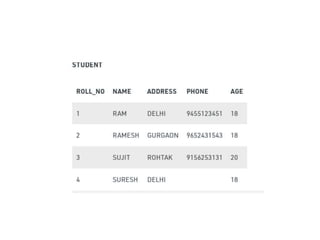
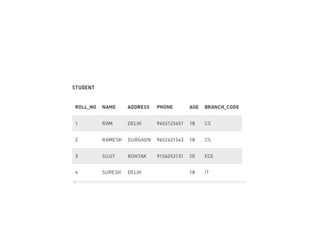
• Consider a relation STUDENT with attributes
ROLL_NO, NAME, ADDRESS, PHONE and
AGE shown in the followingTable.
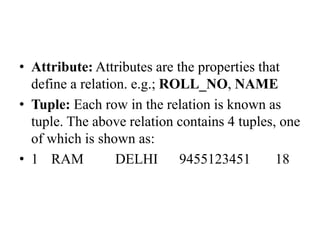
• Attribute: Attributes are the properties that
define a relation. e.g.; ROLL_NO, NAME
• Tuple: Each row in the relation is known as
tuple. The above relation contains 4 tuples, one
of which is shown as:
• 1 RAM DELHI 9455123451 18
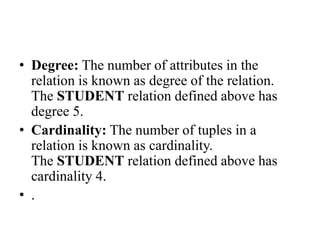
• Degree: The number of attributes in the
relation is known as degree of the relation.
The STUDENT relation defined above has
degree 5.
• Cardinality: The number of tuples in a
relation is known as cardinality.
The STUDENT relation defined above has
cardinality 4.
• .
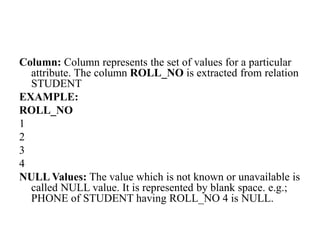
Column: Column represents the set of values for a particular
attribute. The column ROLL_NO is extracted from relation
STUDENT
EXAMPLE:
ROLL_NO
1
2
3
4
NULL Values: The value which is not known or unavailable is
called NULL value. It is represented by blank space. e.g.;
PHONE of STUDENT having ROLL_NO 4 is NULL.
Constraints in Relational Model
• While designing Relational Model, we define
some conditions which must hold for data
present in database are called Constraints.
• These constraints are checked before
performing any operation (insertion, deletion
and updation) in database.
• If there is a violation in any of constrains,
operation will fail.
• Domain Constraints: These are attribute level
constraints. An attribute can only take values
which lie inside the domain range. e.g,; If a
constrains AGE>0 is applied on STUDENT
relation, inserting negative value of AGE will
result in failure.
• Key Integrity: Every relation in the database
should have atleast one set of attributes which
defines a tuple uniquely.
• Those set of attributes is called key. e.g.;
ROLL_NO in STUDENT is a key.
• No two students can have same roll number.
So a key has two properties:
• It should be unique for all tuples.
• It can’t have NULL values.
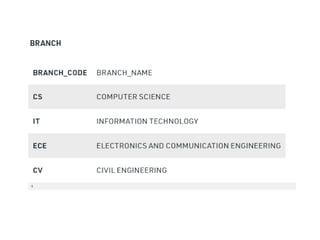
• Referential Integrity: When one attribute of a
relation can only take values from other
attribute of same relation or any other relation,
it is called referential integrity. Let us suppose
we have 2 relations
• BRANCH_CODE of STUDENT can only take
the values which are present in
BRANCH_CODE of BRANCH which is
called referential integrity constraint. The
relation which is referencing to other relation
is called REFERENCING RELATION
ER Diagram
• ER model stands for an Entity-Relationship
model. It is a high-level data model. This
model is used to define the data elements
and relationship for a specified system.
• It develops a conceptual design for the
database. It also develops a very simple and
easy to design view of data.
11/21/2023 9:18:28 AM 15
11/21/2023 9:18:28 AM 16
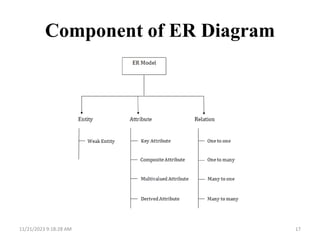
Component of ER Diagram
11/21/2023 9:18:28 AM 17
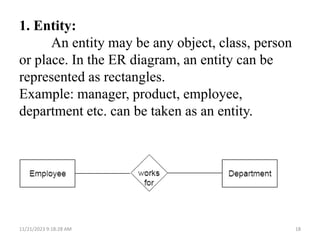
1. Entity:
An entity may be any object, class, person
or place. In the ER diagram, an entity can be
represented as rectangles.
Example: manager, product, employee,
department etc. can be taken as an entity.
11/21/2023 9:18:28 AM 18
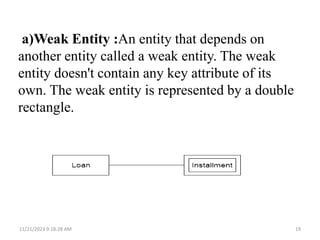
a)Weak Entity :An entity that depends on
another entity called a weak entity. The weak
entity doesn't contain any key attribute of its
own. The weak entity is represented by a double
rectangle.
11/21/2023 9:18:28 AM 19
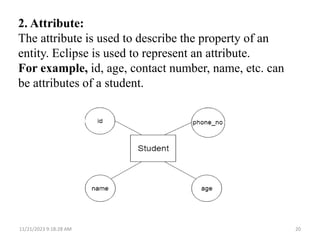
2. Attribute:
The attribute is used to describe the property of an
entity. Eclipse is used to represent an attribute.
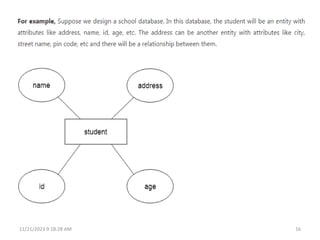
For example, id, age, contact number, name, etc. can
be attributes of a student.
11/21/2023 9:18:28 AM 20
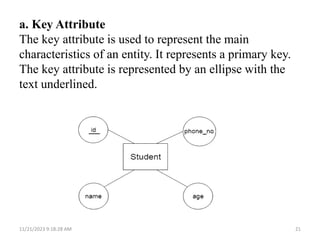
a. Key Attribute
The key attribute is used to represent the main
characteristics of an entity. It represents a primary key.
The key attribute is represented by an ellipse with the
text underlined.
11/21/2023 9:18:28 AM 21
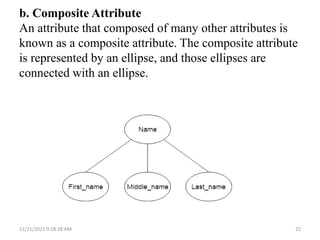
b. Composite Attribute
An attribute that composed of many other attributes is
known as a composite attribute. The composite attribute
is represented by an ellipse, and those ellipses are
connected with an ellipse.
11/21/2023 9:18:28 AM 22
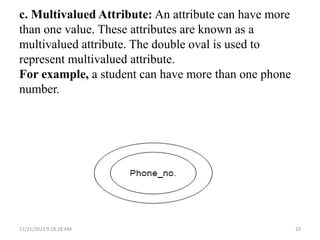
c. Multivalued Attribute: An attribute can have more
than one value. These attributes are known as a
multivalued attribute. The double oval is used to
represent multivalued attribute.
For example, a student can have more than one phone
number.
11/21/2023 9:18:28 AM 23
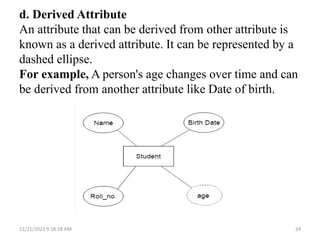
d. Derived Attribute
An attribute that can be derived from other attribute is
known as a derived attribute. It can be represented by a
dashed ellipse.
For example, A person's age changes over time and can
be derived from another attribute like Date of birth.
11/21/2023 9:18:28 AM 24
Data Dictionary
• A data dictionary is a file or a set of files that
contains a database's metadata.
• The data dictionary contains records about other
objects in the database, such as data ownership,
data relationships to other objects, and other data.
• It provides additional information about
relationships between different database tables,
helps to organize data in a neat and easily
searchable way, and prevents data redundancy
issues.
A Data Dictionary contains information about attributes or
fields of a certain data set. In a relational database, the
metadata in the data dictionary includes the following:
• Names of all tables in the database and their owners.
• Names of all indexes and the columns to which the
tables in those indexes relate.
• Constraints defined on tables, including primary
keys, foreign-key relationships to other tables, and not-
null constraints.
• Additional physical information about the tables
including their storage location, storage method, etc.
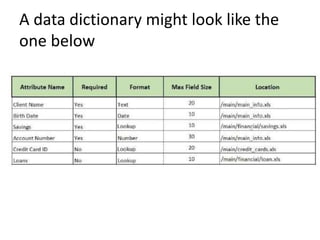
A data dictionary might look like the
one below
Types
Active Data Dictionary
• If the structure of the database or its specifications
change at any point of time, it should be reflected
in the data dictionary. This is the responsibility of
the database management system in which the
data dictionary resides.
• So, the data dictionary is automatically updated
by the database management system when any
changes are made in the database. This is known
as an active data dictionary as it is self updating.
Passive Data Dictionary
• A passive data dictionary is maintained
separately to the database whose contents are
stored in the dictionary. That means that if the
database is modified the database dictionary is
not automatically updated as in the case of
Active Data Dictionary.
• So, the passive data dictionary has to be
manually updated to match the database
Normalization
• Normalization is the process of organizing the
data in the database.
• Normalization is used to minimize the
redundancy from a relation or set of relations. It is
also used to eliminate the undesirable
characteristics like Insertion, Update and Deletion
Anomalies.
• Normalization divides the larger table into the
smaller table and links them using relationship.
• The normal form is used to reduce redundancy
from the database table.
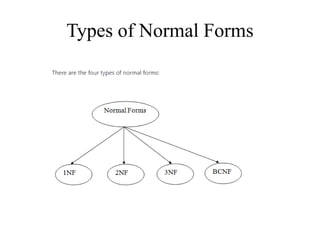
Types of Normal Forms
First Normal Form (1NF)
• A relation will be 1NF if it contains an atomic
value.
• It states that an attribute of a table cannot hold
multiple values. It must hold only single-
valued attribute.
• First normal form disallows the multi-valued
attribute, composite attribute, and their
combinations.
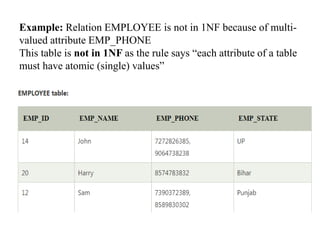
Example: Relation EMPLOYEE is not in 1NF because of multi-
valued attribute EMP_PHONE
This table is not in 1NF as the rule says “each attribute of a table
must have atomic (single) values”
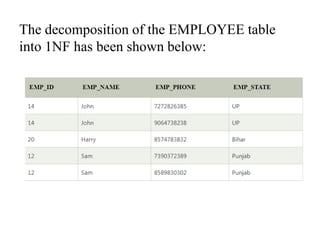
The decomposition of the EMPLOYEE table
into 1NF has been shown below:
Second Normal Form (2NF)
• In the 2NF, relational must be in 1NF.
• In the second normal form, all non-key
attributes are fully functional dependent on the
primary key
• The Second Normal Form eliminates partial
dependencies.
• Partial Dependency
– when a nonprime attribute is functionally
dependent on part of a candidate key.
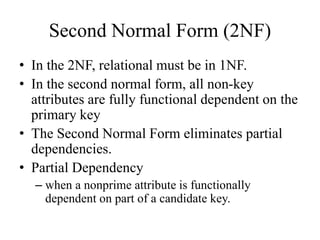
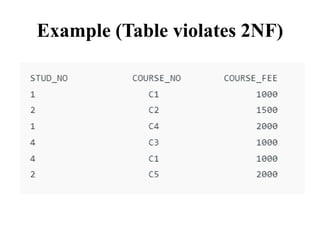
Example (Table violates 2NF)
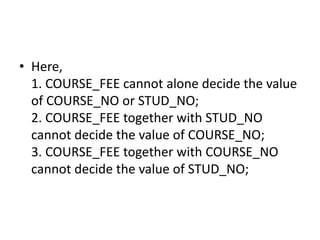
• Here,
1. COURSE_FEE cannot alone decide the value
of COURSE_NO or STUD_NO;
2. COURSE_FEE together with STUD_NO
cannot decide the value of COURSE_NO;
3. COURSE_FEE together with COURSE_NO
cannot decide the value of STUD_NO;
• COURSE_NO -> COURSE_FEE, i.e.,
COURSE_FEE is dependent on COURSE_NO,
which is a proper subset of the candidate key.
Non-prime attribute COURSE_FEE is
dependent on a proper subset of the
candidate key, which is a partial dependency
and so this relation is not in 2NF.
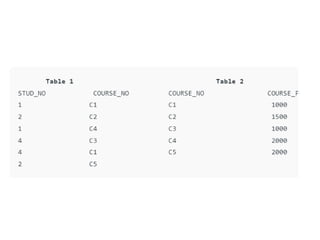
• To convert the above relation to 2NF,
we need to split the table into two tables such
as :
Table 1: STUD_NO, COURSE_NO
Table 2: COURSE_NO, COURSE_FEE
Third Normal Form (3NF)
• A relation will be in 3NF if it is in 2NF and not
contain any transitive partial dependency.
• If there is no transitive dependency for non-
prime attributes, then the relation must be in
third normal form.
• 3NF is used to reduce the data duplication.
EXAMPLE
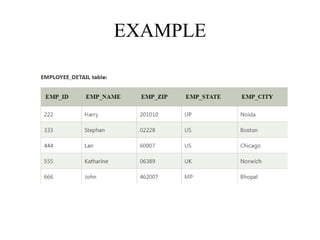
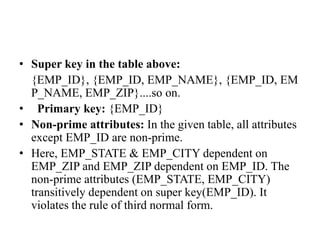
• Super key in the table above:
{EMP_ID}, {EMP_ID, EMP_NAME}, {EMP_ID, EM
P_NAME, EMP_ZIP}....so on.
• Primary key: {EMP_ID}
• Non-prime attributes: In the given table, all attributes
except EMP_ID are non-prime.
• Here, EMP_STATE & EMP_CITY dependent on
EMP_ZIP and EMP_ZIP dependent on EMP_ID. The
non-prime attributes (EMP_STATE, EMP_CITY)
transitively dependent on super key(EMP_ID). It
violates the rule of third normal form.
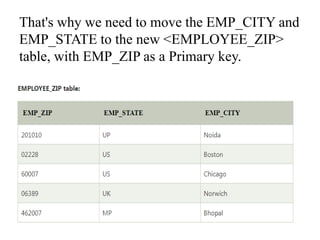
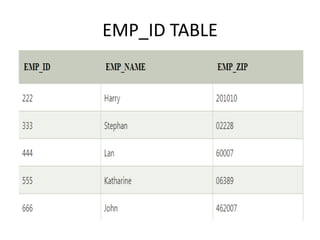
That's why we need to move the EMP_CITY and
EMP_STATE to the new <EMPLOYEE_ZIP>
table, with EMP_ZIP as a Primary key.
EMP_ID TABLE
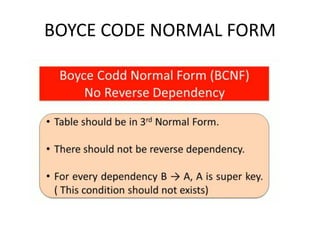
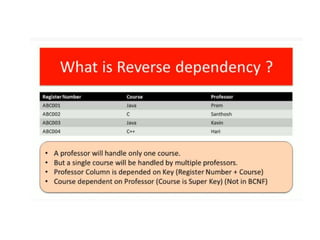
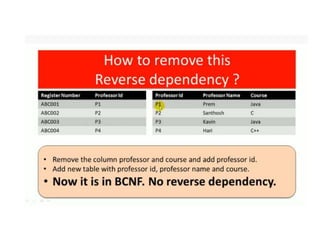
BOYCE CODE NORMAL FORM
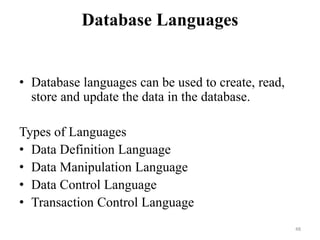
Database Languages
• Database languages can be used to create, read,
store and update the data in the database.
Types of Languages
• Data Definition Language
• Data Manipulation Language
• Data Control Language
• Transaction Control Language
48
Data Definition Language
• DDL stands for Data Definition Language. It is
used to define database structure or pattern.
• It is used to create schema, tables, indexes,
constraints, etc. in the database.
• Using the DDL statements, you can create the
skeleton of the database.
• Data definition language is used to store the
information of metadata like the number of tables
and schemas, their names, indexes, columns in
each table, constraints, etc.
49
Here are some tasks that come under DDL:
• Create: It is used to create objects in the
database.
• Alter: It is used to alter the structure of
the database.
• Drop: It is used to delete objects from the
database.
• Truncate: It is used to remove all records
from a table.
• Rename: It is used to rename an object.
50
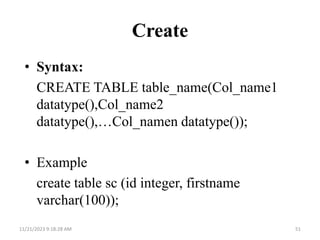
Create
• Syntax:
CREATE TABLE table_name(Col_name1
datatype(),Col_name2
datatype(),…Col_namen datatype());
• Example
create table sc (id integer, firstname
varchar(100));
11/21/2023 9:18:28 AM 51
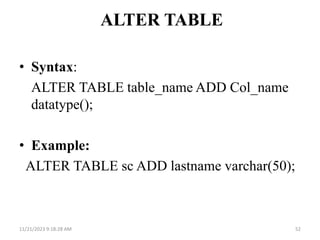
ALTER TABLE
• Syntax:
ALTER TABLE table_name ADD Col_name
datatype();
• Example:
ALTER TABLE sc ADD lastname varchar(50);
11/21/2023 9:18:28 AM 52
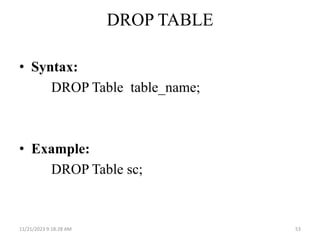
DROP TABLE
• Syntax:
DROP Table table_name;
• Example:
DROP Table sc;
11/21/2023 9:18:28 AM 53
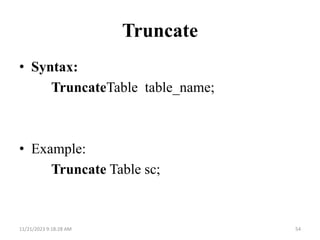
Truncate
• Syntax:
TruncateTable table_name;
• Example:
Truncate Table sc;
11/21/2023 9:18:28 AM 54
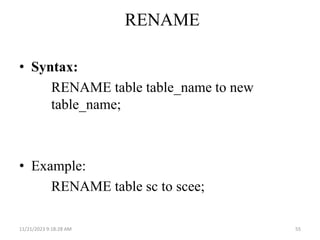
RENAME
• Syntax:
RENAME table table_name to new
table_name;
• Example:
RENAME table sc to scee;
11/21/2023 9:18:28 AM 55
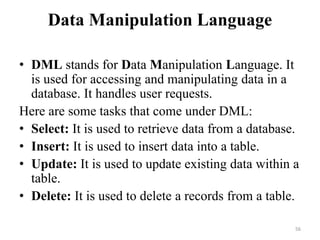
Data Manipulation Language
• DML stands for Data Manipulation Language. It
is used for accessing and manipulating data in a
database. It handles user requests.
Here are some tasks that come under DML:
• Select: It is used to retrieve data from a database.
• Insert: It is used to insert data into a table.
• Update: It is used to update existing data within a
table.
• Delete: It is used to delete a records from a table.
56
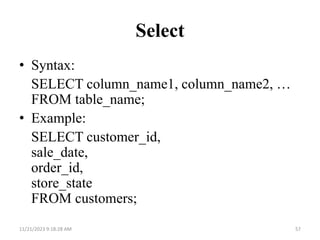
Select
• Syntax:
SELECT column_name1, column_name2, …
FROM table_name;
• Example:
SELECT customer_id,
sale_date,
order_id,
store_state
FROM customers;
11/21/2023 9:18:28 AM 57
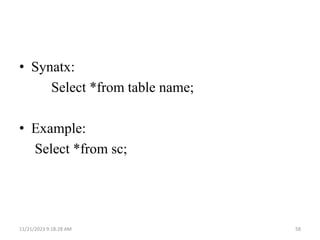
• Synatx:
Select *from table name;
• Example:
Select *from sc;
11/21/2023 9:18:28 AM 58
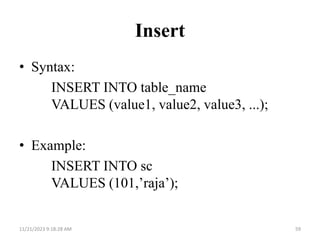
Insert
• Syntax:
INSERT INTO table_name
VALUES (value1, value2, value3, ...);
• Example:
INSERT INTO sc
VALUES (101,’raja’);
11/21/2023 9:18:28 AM 59
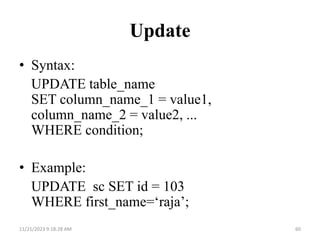
Update
• Syntax:
UPDATE table_name
SET column_name_1 = value1,
column_name_2 = value2, ...
WHERE condition;
• Example:
UPDATE sc SET id = 103
WHERE first_name=‘raja’;
11/21/2023 9:18:28 AM 60
DELETE
• Syntax:
DELETE FROM table_name WHERE
condition;
• Example:
DELETE FROM sc WHERE id=101;
11/21/2023 9:18:28 AM 61
Transaction Control Language
• TCL is used to run the changes made by the DML
statement. TCL can be grouped into a logical
transaction.
Here are some tasks that come under TCL:
• Commit: It is used to save the transaction on the
database.
• Rollback: It is used to restore the database to
original since the last Commit.
• Savepoint: It is used to roll the transaction back to
a certain point without rolling back the entire
transaction.
62
Commit
Syntax:
COMMIT;
EXAMPLE:
DELETE FROM CUSTOMER where Age=25;
COMMIT;
11/21/2023 9:18:28 AM 63
Savepoint
• Syntax:
SAVEPOINT savepoint_name;
EXAMPLE:
DELETE FROM CUSTOMER where Age=25;
SAVEPOINT b;
11/21/2023 9:18:28 AM 64
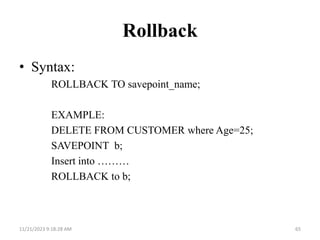
Rollback
• Syntax:
ROLLBACK TO savepoint_name;
EXAMPLE:
DELETE FROM CUSTOMER where Age=25;
SAVEPOINT b;
Insert into ………
ROLLBACK to b;
11/21/2023 9:18:28 AM 65
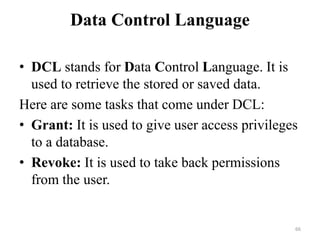
Data Control Language
• DCL stands for Data Control Language. It is
used to retrieve the stored or saved data.
Here are some tasks that come under DCL:
• Grant: It is used to give user access privileges
to a database.
• Revoke: It is used to take back permissions
from the user.
66
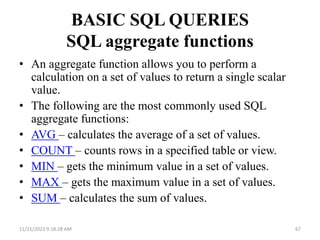
BASIC SQL QUERIES
SQL aggregate functions
• An aggregate function allows you to perform a
calculation on a set of values to return a single scalar
value.
• The following are the most commonly used SQL
aggregate functions:
• AVG – calculates the average of a set of values.
• COUNT – counts rows in a specified table or view.
• MIN – gets the minimum value in a set of values.
• MAX – gets the maximum value in a set of values.
• SUM – calculates the sum of values.
11/21/2023 9:18:28 AM 67
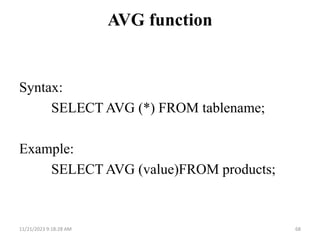
AVG function
Syntax:
SELECT AVG (*) FROM tablename;
Example:
SELECT AVG (value)FROM products;
11/21/2023 9:18:28 AM 68
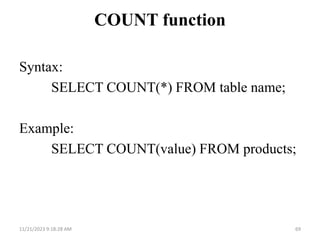
COUNT function
Syntax:
SELECT COUNT(*) FROM table name;
Example:
SELECT COUNT(value) FROM products;
11/21/2023 9:18:28 AM 69
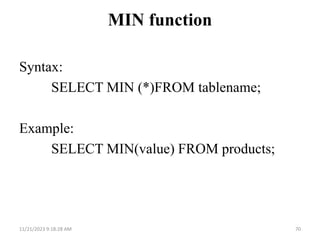
MIN function
Syntax:
SELECT MIN (*)FROM tablename;
Example:
SELECT MIN(value) FROM products;
11/21/2023 9:18:28 AM 70
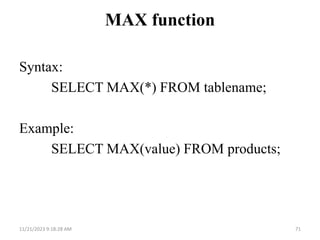
MAX function
Syntax:
SELECT MAX(*) FROM tablename;
Example:
SELECT MAX(value) FROM products;
11/21/2023 9:18:28 AM 71
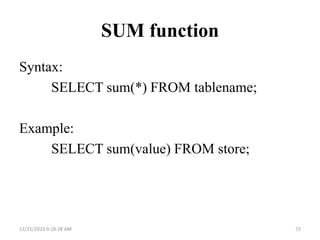
SUM function
Syntax:
SELECT sum(*) FROM tablename;
Example:
SELECT sum(value) FROM store;
11/21/2023 9:18:28 AM 72
Database Administration (DBA)
• DBA is a resource that supervises both the
database and the use of the DBMS.
• DBA is usually a group, but sometimes it refers
to the database administrator.
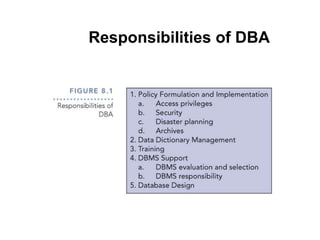
Responsibilities of DBA
Policy Formulation and Implementation
• Access Privileges
– Users should access the database only in ways in
which they are entitled.
• Security
– Access restrictions ensure that the database is
secure.
– Passwords, encryption, and views implement
security.
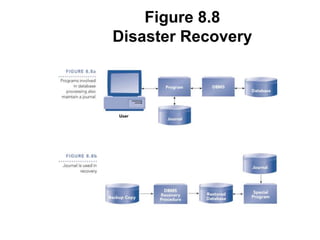
Planning for Disaster
• Databases can be harmed from hardware and
software malfunctions, and outsides forces
like floods and power outages.
• DBA’s must take active role in formulating
disaster recovery plans.
Figure 8.8
Disaster Recovery
Archives
• An archive is a place where corporate data is kept.
• Information in an archive is removed from the
database and stored in the archive for future
reference.
• Archives are usually kept in a mass-storage device
like a disk, tape, CD, or a DVD.
• It is important such archives be kept off-site to allow
recovery should disaster strike
Data Dictionary Management
• Essentially the catalog, but it contains a wider
range of information, including information on
tables, fields, indexes, and programs.
• The DBA manages and updates the data
dictionary, which establishes naming
conventions for tables, fields, etc., and data
integrity rules.
Additional responsibilities of DBA
• Training
– DBA gives training on the DBMS and how to
access the database
• DBMS Support
– The DBA is charged with all aspects of a DBMS,
including selection and management
– DBA must evaluate each prospective DBMS using
a checklist like that shown in
Figure 8.10.
Additional Responsibilities of DBA
• Database design
– DBA is responsible for tuning the design, i.e.,
making changes that improve system
performance.

DATABASE DESIGN.pptx

  • 1.
  • 2.
    Relational Data Model– ER Diagram – Data Dictionary – Normalization – Boyce Code Normal Form - Integrity – Relational Database Languages – Database Administration.
  • 3.
    Relational Data Model •Relational Model represents how data is stored in Relational Databases. • A relational database stores data in the form of relations (tables). • Consider a relation STUDENT with attributes ROLL_NO, NAME, ADDRESS, PHONE and AGE shown in the followingTable.
  • 5.
    • Attribute: Attributesare the properties that define a relation. e.g.; ROLL_NO, NAME • Tuple: Each row in the relation is known as tuple. The above relation contains 4 tuples, one of which is shown as: • 1 RAM DELHI 9455123451 18
  • 6.
    • Degree: Thenumber of attributes in the relation is known as degree of the relation. The STUDENT relation defined above has degree 5. • Cardinality: The number of tuples in a relation is known as cardinality. The STUDENT relation defined above has cardinality 4. • .
  • 7.
    Column: Column representsthe set of values for a particular attribute. The column ROLL_NO is extracted from relation STUDENT EXAMPLE: ROLL_NO 1 2 3 4 NULL Values: The value which is not known or unavailable is called NULL value. It is represented by blank space. e.g.; PHONE of STUDENT having ROLL_NO 4 is NULL.
  • 8.
    Constraints in RelationalModel • While designing Relational Model, we define some conditions which must hold for data present in database are called Constraints. • These constraints are checked before performing any operation (insertion, deletion and updation) in database. • If there is a violation in any of constrains, operation will fail.
  • 9.
    • Domain Constraints:These are attribute level constraints. An attribute can only take values which lie inside the domain range. e.g,; If a constrains AGE>0 is applied on STUDENT relation, inserting negative value of AGE will result in failure.
  • 10.
    • Key Integrity:Every relation in the database should have atleast one set of attributes which defines a tuple uniquely. • Those set of attributes is called key. e.g.; ROLL_NO in STUDENT is a key. • No two students can have same roll number. So a key has two properties: • It should be unique for all tuples. • It can’t have NULL values.
  • 11.
    • Referential Integrity:When one attribute of a relation can only take values from other attribute of same relation or any other relation, it is called referential integrity. Let us suppose we have 2 relations
  • 14.
    • BRANCH_CODE ofSTUDENT can only take the values which are present in BRANCH_CODE of BRANCH which is called referential integrity constraint. The relation which is referencing to other relation is called REFERENCING RELATION
  • 15.
    ER Diagram • ERmodel stands for an Entity-Relationship model. It is a high-level data model. This model is used to define the data elements and relationship for a specified system. • It develops a conceptual design for the database. It also develops a very simple and easy to design view of data. 11/21/2023 9:18:28 AM 15
  • 16.
  • 17.
    Component of ERDiagram 11/21/2023 9:18:28 AM 17
  • 18.
    1. Entity: An entitymay be any object, class, person or place. In the ER diagram, an entity can be represented as rectangles. Example: manager, product, employee, department etc. can be taken as an entity. 11/21/2023 9:18:28 AM 18
  • 19.
    a)Weak Entity :Anentity that depends on another entity called a weak entity. The weak entity doesn't contain any key attribute of its own. The weak entity is represented by a double rectangle. 11/21/2023 9:18:28 AM 19
  • 20.
    2. Attribute: The attributeis used to describe the property of an entity. Eclipse is used to represent an attribute. For example, id, age, contact number, name, etc. can be attributes of a student. 11/21/2023 9:18:28 AM 20
  • 21.
    a. Key Attribute Thekey attribute is used to represent the main characteristics of an entity. It represents a primary key. The key attribute is represented by an ellipse with the text underlined. 11/21/2023 9:18:28 AM 21
  • 22.
    b. Composite Attribute Anattribute that composed of many other attributes is known as a composite attribute. The composite attribute is represented by an ellipse, and those ellipses are connected with an ellipse. 11/21/2023 9:18:28 AM 22
  • 23.
    c. Multivalued Attribute:An attribute can have more than one value. These attributes are known as a multivalued attribute. The double oval is used to represent multivalued attribute. For example, a student can have more than one phone number. 11/21/2023 9:18:28 AM 23
  • 24.
    d. Derived Attribute Anattribute that can be derived from other attribute is known as a derived attribute. It can be represented by a dashed ellipse. For example, A person's age changes over time and can be derived from another attribute like Date of birth. 11/21/2023 9:18:28 AM 24
  • 25.
    Data Dictionary • Adata dictionary is a file or a set of files that contains a database's metadata. • The data dictionary contains records about other objects in the database, such as data ownership, data relationships to other objects, and other data. • It provides additional information about relationships between different database tables, helps to organize data in a neat and easily searchable way, and prevents data redundancy issues.
  • 26.
    A Data Dictionarycontains information about attributes or fields of a certain data set. In a relational database, the metadata in the data dictionary includes the following: • Names of all tables in the database and their owners. • Names of all indexes and the columns to which the tables in those indexes relate. • Constraints defined on tables, including primary keys, foreign-key relationships to other tables, and not- null constraints. • Additional physical information about the tables including their storage location, storage method, etc.
  • 27.
    A data dictionarymight look like the one below
  • 28.
    Types Active Data Dictionary •If the structure of the database or its specifications change at any point of time, it should be reflected in the data dictionary. This is the responsibility of the database management system in which the data dictionary resides. • So, the data dictionary is automatically updated by the database management system when any changes are made in the database. This is known as an active data dictionary as it is self updating.
  • 29.
    Passive Data Dictionary •A passive data dictionary is maintained separately to the database whose contents are stored in the dictionary. That means that if the database is modified the database dictionary is not automatically updated as in the case of Active Data Dictionary. • So, the passive data dictionary has to be manually updated to match the database
  • 30.
    Normalization • Normalization isthe process of organizing the data in the database. • Normalization is used to minimize the redundancy from a relation or set of relations. It is also used to eliminate the undesirable characteristics like Insertion, Update and Deletion Anomalies. • Normalization divides the larger table into the smaller table and links them using relationship. • The normal form is used to reduce redundancy from the database table.
  • 31.
  • 32.
    First Normal Form(1NF) • A relation will be 1NF if it contains an atomic value. • It states that an attribute of a table cannot hold multiple values. It must hold only single- valued attribute. • First normal form disallows the multi-valued attribute, composite attribute, and their combinations.
  • 33.
    Example: Relation EMPLOYEEis not in 1NF because of multi- valued attribute EMP_PHONE This table is not in 1NF as the rule says “each attribute of a table must have atomic (single) values”
  • 34.
    The decomposition ofthe EMPLOYEE table into 1NF has been shown below:
  • 35.
    Second Normal Form(2NF) • In the 2NF, relational must be in 1NF. • In the second normal form, all non-key attributes are fully functional dependent on the primary key • The Second Normal Form eliminates partial dependencies. • Partial Dependency – when a nonprime attribute is functionally dependent on part of a candidate key.
  • 36.
  • 37.
    • Here, 1. COURSE_FEEcannot alone decide the value of COURSE_NO or STUD_NO; 2. COURSE_FEE together with STUD_NO cannot decide the value of COURSE_NO; 3. COURSE_FEE together with COURSE_NO cannot decide the value of STUD_NO;
  • 38.
    • COURSE_NO ->COURSE_FEE, i.e., COURSE_FEE is dependent on COURSE_NO, which is a proper subset of the candidate key. Non-prime attribute COURSE_FEE is dependent on a proper subset of the candidate key, which is a partial dependency and so this relation is not in 2NF. • To convert the above relation to 2NF, we need to split the table into two tables such as : Table 1: STUD_NO, COURSE_NO Table 2: COURSE_NO, COURSE_FEE
  • 40.
    Third Normal Form(3NF) • A relation will be in 3NF if it is in 2NF and not contain any transitive partial dependency. • If there is no transitive dependency for non- prime attributes, then the relation must be in third normal form. • 3NF is used to reduce the data duplication.
  • 41.
  • 42.
    • Super keyin the table above: {EMP_ID}, {EMP_ID, EMP_NAME}, {EMP_ID, EM P_NAME, EMP_ZIP}....so on. • Primary key: {EMP_ID} • Non-prime attributes: In the given table, all attributes except EMP_ID are non-prime. • Here, EMP_STATE & EMP_CITY dependent on EMP_ZIP and EMP_ZIP dependent on EMP_ID. The non-prime attributes (EMP_STATE, EMP_CITY) transitively dependent on super key(EMP_ID). It violates the rule of third normal form.
  • 43.
    That's why weneed to move the EMP_CITY and EMP_STATE to the new <EMPLOYEE_ZIP> table, with EMP_ZIP as a Primary key.
  • 44.
  • 45.
  • 48.
    Database Languages • Databaselanguages can be used to create, read, store and update the data in the database. Types of Languages • Data Definition Language • Data Manipulation Language • Data Control Language • Transaction Control Language 48
  • 49.
    Data Definition Language •DDL stands for Data Definition Language. It is used to define database structure or pattern. • It is used to create schema, tables, indexes, constraints, etc. in the database. • Using the DDL statements, you can create the skeleton of the database. • Data definition language is used to store the information of metadata like the number of tables and schemas, their names, indexes, columns in each table, constraints, etc. 49
  • 50.
    Here are sometasks that come under DDL: • Create: It is used to create objects in the database. • Alter: It is used to alter the structure of the database. • Drop: It is used to delete objects from the database. • Truncate: It is used to remove all records from a table. • Rename: It is used to rename an object. 50
  • 51.
    Create • Syntax: CREATE TABLEtable_name(Col_name1 datatype(),Col_name2 datatype(),…Col_namen datatype()); • Example create table sc (id integer, firstname varchar(100)); 11/21/2023 9:18:28 AM 51
  • 52.
    ALTER TABLE • Syntax: ALTERTABLE table_name ADD Col_name datatype(); • Example: ALTER TABLE sc ADD lastname varchar(50); 11/21/2023 9:18:28 AM 52
  • 53.
    DROP TABLE • Syntax: DROPTable table_name; • Example: DROP Table sc; 11/21/2023 9:18:28 AM 53
  • 54.
    Truncate • Syntax: TruncateTable table_name; •Example: Truncate Table sc; 11/21/2023 9:18:28 AM 54
  • 55.
    RENAME • Syntax: RENAME tabletable_name to new table_name; • Example: RENAME table sc to scee; 11/21/2023 9:18:28 AM 55
  • 56.
    Data Manipulation Language •DML stands for Data Manipulation Language. It is used for accessing and manipulating data in a database. It handles user requests. Here are some tasks that come under DML: • Select: It is used to retrieve data from a database. • Insert: It is used to insert data into a table. • Update: It is used to update existing data within a table. • Delete: It is used to delete a records from a table. 56
  • 57.
    Select • Syntax: SELECT column_name1,column_name2, … FROM table_name; • Example: SELECT customer_id, sale_date, order_id, store_state FROM customers; 11/21/2023 9:18:28 AM 57
  • 58.
    • Synatx: Select *fromtable name; • Example: Select *from sc; 11/21/2023 9:18:28 AM 58
  • 59.
    Insert • Syntax: INSERT INTOtable_name VALUES (value1, value2, value3, ...); • Example: INSERT INTO sc VALUES (101,’raja’); 11/21/2023 9:18:28 AM 59
  • 60.
    Update • Syntax: UPDATE table_name SETcolumn_name_1 = value1, column_name_2 = value2, ... WHERE condition; • Example: UPDATE sc SET id = 103 WHERE first_name=‘raja’; 11/21/2023 9:18:28 AM 60
  • 61.
    DELETE • Syntax: DELETE FROMtable_name WHERE condition; • Example: DELETE FROM sc WHERE id=101; 11/21/2023 9:18:28 AM 61
  • 62.
    Transaction Control Language •TCL is used to run the changes made by the DML statement. TCL can be grouped into a logical transaction. Here are some tasks that come under TCL: • Commit: It is used to save the transaction on the database. • Rollback: It is used to restore the database to original since the last Commit. • Savepoint: It is used to roll the transaction back to a certain point without rolling back the entire transaction. 62
  • 63.
    Commit Syntax: COMMIT; EXAMPLE: DELETE FROM CUSTOMERwhere Age=25; COMMIT; 11/21/2023 9:18:28 AM 63
  • 64.
    Savepoint • Syntax: SAVEPOINT savepoint_name; EXAMPLE: DELETEFROM CUSTOMER where Age=25; SAVEPOINT b; 11/21/2023 9:18:28 AM 64
  • 65.
    Rollback • Syntax: ROLLBACK TOsavepoint_name; EXAMPLE: DELETE FROM CUSTOMER where Age=25; SAVEPOINT b; Insert into ……… ROLLBACK to b; 11/21/2023 9:18:28 AM 65
  • 66.
    Data Control Language •DCL stands for Data Control Language. It is used to retrieve the stored or saved data. Here are some tasks that come under DCL: • Grant: It is used to give user access privileges to a database. • Revoke: It is used to take back permissions from the user. 66
  • 67.
    BASIC SQL QUERIES SQLaggregate functions • An aggregate function allows you to perform a calculation on a set of values to return a single scalar value. • The following are the most commonly used SQL aggregate functions: • AVG – calculates the average of a set of values. • COUNT – counts rows in a specified table or view. • MIN – gets the minimum value in a set of values. • MAX – gets the maximum value in a set of values. • SUM – calculates the sum of values. 11/21/2023 9:18:28 AM 67
  • 68.
    AVG function Syntax: SELECT AVG(*) FROM tablename; Example: SELECT AVG (value)FROM products; 11/21/2023 9:18:28 AM 68
  • 69.
    COUNT function Syntax: SELECT COUNT(*)FROM table name; Example: SELECT COUNT(value) FROM products; 11/21/2023 9:18:28 AM 69
  • 70.
    MIN function Syntax: SELECT MIN(*)FROM tablename; Example: SELECT MIN(value) FROM products; 11/21/2023 9:18:28 AM 70
  • 71.
    MAX function Syntax: SELECT MAX(*)FROM tablename; Example: SELECT MAX(value) FROM products; 11/21/2023 9:18:28 AM 71
  • 72.
    SUM function Syntax: SELECT sum(*)FROM tablename; Example: SELECT sum(value) FROM store; 11/21/2023 9:18:28 AM 72
  • 73.
    Database Administration (DBA) •DBA is a resource that supervises both the database and the use of the DBMS. • DBA is usually a group, but sometimes it refers to the database administrator.
  • 74.
  • 75.
    Policy Formulation andImplementation • Access Privileges – Users should access the database only in ways in which they are entitled. • Security – Access restrictions ensure that the database is secure. – Passwords, encryption, and views implement security.
  • 76.
    Planning for Disaster •Databases can be harmed from hardware and software malfunctions, and outsides forces like floods and power outages. • DBA’s must take active role in formulating disaster recovery plans.
  • 77.
  • 78.
    Archives • An archiveis a place where corporate data is kept. • Information in an archive is removed from the database and stored in the archive for future reference. • Archives are usually kept in a mass-storage device like a disk, tape, CD, or a DVD. • It is important such archives be kept off-site to allow recovery should disaster strike
  • 79.
    Data Dictionary Management •Essentially the catalog, but it contains a wider range of information, including information on tables, fields, indexes, and programs. • The DBA manages and updates the data dictionary, which establishes naming conventions for tables, fields, etc., and data integrity rules.
  • 80.
    Additional responsibilities ofDBA • Training – DBA gives training on the DBMS and how to access the database • DBMS Support – The DBA is charged with all aspects of a DBMS, including selection and management – DBA must evaluate each prospective DBMS using a checklist like that shown in Figure 8.10.
  • 81.
    Additional Responsibilities ofDBA • Database design – DBA is responsible for tuning the design, i.e., making changes that improve system performance.