Unit-2
Introduction to XML
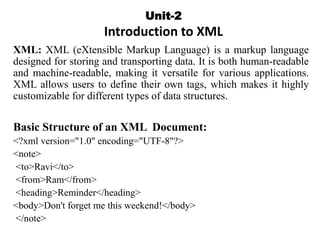
XML: XML (eXtensible Markup Language) is a markup language
designed for storing and transporting data. It is both human-readable
and machine-readable, making it versatile for various applications.
XML allows users to define their own tags, which makes it highly
customizable for different types of data structures.
Basic Structure of an XML Document:
<?xml version="1.0" encoding="UTF-8"?>
<note>
<to>Ravi</to>
<from>Ram</from>
<heading>Reminder</heading>
<body>Don't forget me this weekend!</body>
</note>
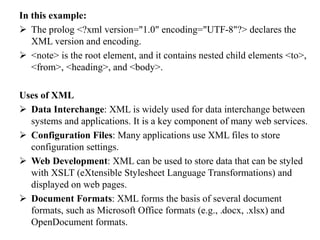
In this example:
 The prolog <?xml version="1.0" encoding="UTF-8"?> declares the
XML version and encoding.
 <note> is the root element, and it contains nested child elements <to>,
<from>, <heading>, and <body>.
Uses of XML
 Data Interchange: XML is widely used for data interchange between
systems and applications. It is a key component of many web services.
 Configuration Files: Many applications use XML files to store
configuration settings.
 Web Development: XML can be used to store data that can be styled
with XSLT (eXtensible Stylesheet Language Transformations) and
displayed on web pages.
 Document Formats: XML forms the basis of several document
formats, such as Microsoft Office formats (e.g., .docx, .xlsx) and
OpenDocument formats.
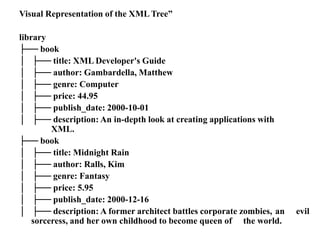
XML Tree Structure
An XML document is structured as a tree. The tree structure starts
with a single root element and branches out to child elements. This
hierarchical structure makes it easy to model complex data
relationships and dependencies.
Key Concepts of XML Tree
 Root Element: The top-level element of the XML document. There is
only one root element, and it encloses all other elements in the
document.
 Child Elements: Elements nested within other elements. Each
element can have multiple child elements.
 Parent Elements: Elements that contain other elements. Every
element (except the root) has one parent element.
 Sibling Elements: Elements that share the same parent. They are on
the same level in the hierarchy.
 Leaf Elements: Elements that do not have any child elements. They
are the end nodes of the tree structure
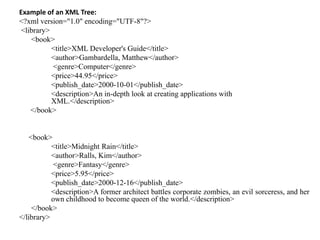
Example of an XML Tree:
<?xml version="1.0" encoding="UTF-8"?>
<library>
<book>
<title>XML Developer's Guide</title>
<author>Gambardella, Matthew</author>
<genre>Computer</genre>
<price>44.95</price>
<publish_date>2000-10-01</publish_date>
<description>An in-depth look at creating applications with
XML.</description>
</book>
<book>
<title>Midnight Rain</title>
<author>Ralls, Kim</author>
<genre>Fantasy</genre>
<price>5.95</price>
<publish_date>2000-12-16</publish_date>
<description>A former architect battles corporate zombies, an evil sorceress, and her
own childhood to become queen of the world.</description>
</book>
</library>
Navigating the XML Tree:
 Root Element: In the example, <library> is the root element.
 Child Elements: <book> elements are children of the <library>
element.
 Parent Elements: <library> is the parent of <book>.
 Sibling Elements: The two <book> elements are siblings.
 Leaf Elements: <title>, <author>, <genre>, <price>,
<publish_date>, and <description> are leaf elements.
Visual Representation of the XML Tree”
library
├── book
│ ├── title: XML Developer's Guide
│ ├── author: Gambardella, Matthew
│ ├── genre: Computer
│ ├── price: 44.95
│ ├── publish_date: 2000-10-01
│ ├── description: An in-depth look at creating applications with
XML.
├── book
│ ├── title: Midnight Rain
│ ├── author: Ralls, Kim
│ ├── genre: Fantasy
│ ├── price: 5.95
│ ├── publish_date: 2000-12-16
│ ├── description: A former architect battles corporate zombies, an evil
sorceress, and her own childhood to become queen of the world.
XML Elements, Attributes, Namespace
1. Elements
Elements are the basic building blocks of XML documents. They are used
to define and structure the data.
 Start Tag: Marks the beginning of an element.
 End Tag: Marks the end of an element.
 Content: The data enclosed within the start and end tags.
 Empty Elements: Elements that do not have any content and can be
self-closing.
Example:
<book>
<title>XML Developer's Guide</title>
<author>Gambardella, Matthew</author>
<genre>Computer</genre>
<price>44.95</price>
</book>
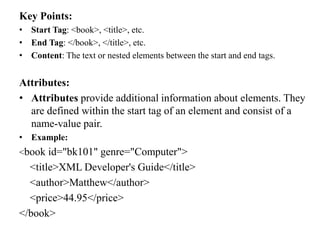
Key Points:
• Start Tag: <book>, <title>, etc.
• End Tag: </book>, </title>, etc.
• Content: The text or nested elements between the start and end tags.
Attributes:
• Attributes provide additional information about elements. They
are defined within the start tag of an element and consist of a
name-value pair.
• Example:
<book id="bk101" genre="Computer">
<title>XML Developer's Guide</title>
<author>Matthew</author>
<price>44.95</price>
</book>
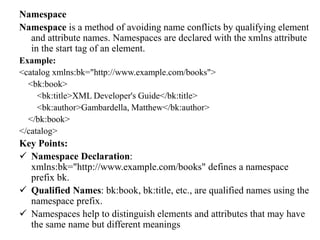
Namespace
Namespace is a method of avoiding name conflicts by qualifying element
and attribute names. Namespaces are declared with the xmlns attribute
in the start tag of an element.
Example:
<catalog xmlns:bk="http://www.example.com/books">
<bk:book>
<bk:title>XML Developer's Guide</bk:title>
<bk:author>Gambardella, Matthew</bk:author>
</bk:book>
</catalog>
Key Points:
 Namespace Declaration:
xmlns:bk="http://www.example.com/books" defines a namespace
prefix bk.
 Qualified Names: bk:book, bk:title, etc., are qualified names using the
namespace prefix.
 Namespaces help to distinguish elements and attributes that may have
the same name but different meanings
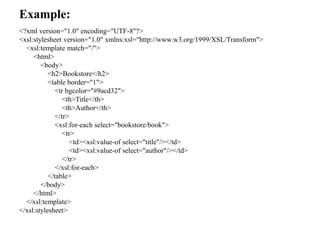
Example:
<?xml version="1.0" encoding="UTF-8"?>
<xsl:stylesheet version="1.0" xmlns:xsl="http://www.w3.org/1999/XSL/Transform">
<xsl:template match="/">
<html>
<body>
<h2>Bookstore</h2>
<table border="1">
<tr bgcolor="#9acd32">
<th>Title</th>
<th>Author</th>
</tr>
<xsl:for-each select="bookstore/book">
<tr>
<td><xsl:value-of select="title"/></td>
<td><xsl:value-of select="author"/></td>
</tr>
</xsl:for-each>
</table>
</body>
</html>
</xsl:template>
</xsl:stylesheet>
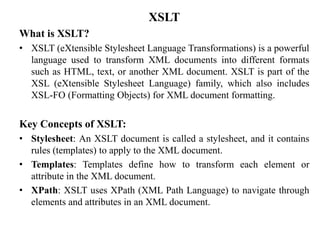
XSLT
What is XSLT?
• XSLT (eXtensible Stylesheet Language Transformations) is a powerful
language used to transform XML documents into different formats
such as HTML, text, or another XML document. XSLT is part of the
XSL (eXtensible Stylesheet Language) family, which also includes
XSL-FO (Formatting Objects) for XML document formatting.
Key Concepts of XSLT:
• Stylesheet: An XSLT document is called a stylesheet, and it contains
rules (templates) to apply to the XML document.
• Templates: Templates define how to transform each element or
attribute in the XML document.
• XPath: XSLT uses XPath (XML Path Language) to navigate through
elements and attributes in an XML document.
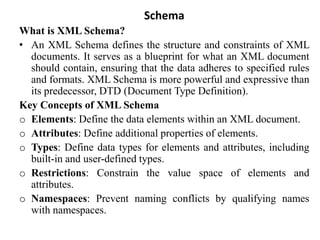
Schema
What is XML Schema?
• An XML Schema defines the structure and constraints of XML
documents. It serves as a blueprint for what an XML document
should contain, ensuring that the data adheres to specified rules
and formats. XML Schema is more powerful and expressive than
its predecessor, DTD (Document Type Definition).
Key Concepts of XML Schema
o Elements: Define the data elements within an XML document.
o Attributes: Define additional properties of elements.
o Types: Define data types for elements and attributes, including
built-in and user-defined types.
o Restrictions: Constrain the value space of elements and
attributes.
o Namespaces: Prevent naming conflicts by qualifying names
with namespaces.
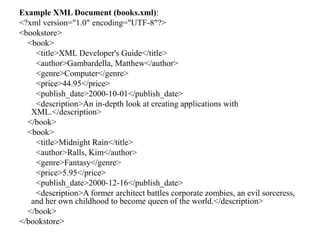
Example XML Document (books.xml):
<?xml version="1.0" encoding="UTF-8"?>
<bookstore>
<book>
<title>XML Developer's Guide</title>
<author>Gambardella, Matthew</author>
<genre>Computer</genre>
<price>44.95</price>
<publish_date>2000-10-01</publish_date>
<description>An in-depth look at creating applications with
XML.</description>
</book>
<book>
<title>Midnight Rain</title>
<author>Ralls, Kim</author>
<genre>Fantasy</genre>
<price>5.95</price>
<publish_date>2000-12-16</publish_date>
<description>A former architect battles corporate zombies, an evil sorceress,
and her own childhood to become queen of the world.</description>
</book>
</bookstore>
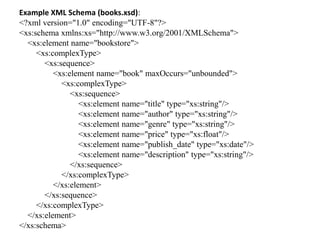
Example XML Schema (books.xsd):
<?xml version="1.0" encoding="UTF-8"?>
<xs:schema xmlns:xs="http://www.w3.org/2001/XMLSchema">
<xs:element name="bookstore">
<xs:complexType>
<xs:sequence>
<xs:element name="book" maxOccurs="unbounded">
<xs:complexType>
<xs:sequence>
<xs:element name="title" type="xs:string"/>
<xs:element name="author" type="xs:string"/>
<xs:element name="genre" type="xs:string"/>
<xs:element name="price" type="xs:float"/>
<xs:element name="publish_date" type="xs:date"/>
<xs:element name="description" type="xs:string"/>
</xs:sequence>
</xs:complexType>
</xs:element>
</xs:sequence>
</xs:complexType>
</xs:element>
</xs:schema>
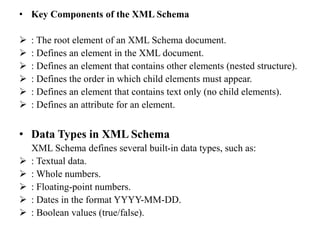
• Key Components of the XML Schema
 : The root element of an XML Schema document.
 : Defines an element in the XML document.
 : Defines an element that contains other elements (nested structure).
 : Defines the order in which child elements must appear.
 : Defines an element that contains text only (no child elements).
 : Defines an attribute for an element.
• Data Types in XML Schema
XML Schema defines several built-in data types, such as:
 : Textual data.
 : Whole numbers.
 : Floating-point numbers.
 : Dates in the format YYYY-MM-DD.
 : Boolean values (true/false).

Unit-2_XMxvvxvxvxvLccccccccccccccccccccccccccc.pptx

  • 1.
    Unit-2 Introduction to XML XML:XML (eXtensible Markup Language) is a markup language designed for storing and transporting data. It is both human-readable and machine-readable, making it versatile for various applications. XML allows users to define their own tags, which makes it highly customizable for different types of data structures. Basic Structure of an XML Document: <?xml version="1.0" encoding="UTF-8"?> <note> <to>Ravi</to> <from>Ram</from> <heading>Reminder</heading> <body>Don't forget me this weekend!</body> </note>
  • 2.
    In this example: The prolog <?xml version="1.0" encoding="UTF-8"?> declares the XML version and encoding.  <note> is the root element, and it contains nested child elements <to>, <from>, <heading>, and <body>. Uses of XML  Data Interchange: XML is widely used for data interchange between systems and applications. It is a key component of many web services.  Configuration Files: Many applications use XML files to store configuration settings.  Web Development: XML can be used to store data that can be styled with XSLT (eXtensible Stylesheet Language Transformations) and displayed on web pages.  Document Formats: XML forms the basis of several document formats, such as Microsoft Office formats (e.g., .docx, .xlsx) and OpenDocument formats.
  • 3.
    XML Tree Structure AnXML document is structured as a tree. The tree structure starts with a single root element and branches out to child elements. This hierarchical structure makes it easy to model complex data relationships and dependencies. Key Concepts of XML Tree  Root Element: The top-level element of the XML document. There is only one root element, and it encloses all other elements in the document.  Child Elements: Elements nested within other elements. Each element can have multiple child elements.  Parent Elements: Elements that contain other elements. Every element (except the root) has one parent element.  Sibling Elements: Elements that share the same parent. They are on the same level in the hierarchy.  Leaf Elements: Elements that do not have any child elements. They are the end nodes of the tree structure
  • 4.
    Example of anXML Tree: <?xml version="1.0" encoding="UTF-8"?> <library> <book> <title>XML Developer's Guide</title> <author>Gambardella, Matthew</author> <genre>Computer</genre> <price>44.95</price> <publish_date>2000-10-01</publish_date> <description>An in-depth look at creating applications with XML.</description> </book> <book> <title>Midnight Rain</title> <author>Ralls, Kim</author> <genre>Fantasy</genre> <price>5.95</price> <publish_date>2000-12-16</publish_date> <description>A former architect battles corporate zombies, an evil sorceress, and her own childhood to become queen of the world.</description> </book> </library>
  • 5.
    Navigating the XMLTree:  Root Element: In the example, <library> is the root element.  Child Elements: <book> elements are children of the <library> element.  Parent Elements: <library> is the parent of <book>.  Sibling Elements: The two <book> elements are siblings.  Leaf Elements: <title>, <author>, <genre>, <price>, <publish_date>, and <description> are leaf elements.
  • 6.
    Visual Representation ofthe XML Tree” library ├── book │ ├── title: XML Developer's Guide │ ├── author: Gambardella, Matthew │ ├── genre: Computer │ ├── price: 44.95 │ ├── publish_date: 2000-10-01 │ ├── description: An in-depth look at creating applications with XML. ├── book │ ├── title: Midnight Rain │ ├── author: Ralls, Kim │ ├── genre: Fantasy │ ├── price: 5.95 │ ├── publish_date: 2000-12-16 │ ├── description: A former architect battles corporate zombies, an evil sorceress, and her own childhood to become queen of the world.
  • 7.
    XML Elements, Attributes,Namespace 1. Elements Elements are the basic building blocks of XML documents. They are used to define and structure the data.  Start Tag: Marks the beginning of an element.  End Tag: Marks the end of an element.  Content: The data enclosed within the start and end tags.  Empty Elements: Elements that do not have any content and can be self-closing. Example: <book> <title>XML Developer's Guide</title> <author>Gambardella, Matthew</author> <genre>Computer</genre> <price>44.95</price> </book>
  • 8.
    Key Points: • StartTag: <book>, <title>, etc. • End Tag: </book>, </title>, etc. • Content: The text or nested elements between the start and end tags. Attributes: • Attributes provide additional information about elements. They are defined within the start tag of an element and consist of a name-value pair. • Example: <book id="bk101" genre="Computer"> <title>XML Developer's Guide</title> <author>Matthew</author> <price>44.95</price> </book>
  • 9.
    Namespace Namespace is amethod of avoiding name conflicts by qualifying element and attribute names. Namespaces are declared with the xmlns attribute in the start tag of an element. Example: <catalog xmlns:bk="http://www.example.com/books"> <bk:book> <bk:title>XML Developer's Guide</bk:title> <bk:author>Gambardella, Matthew</bk:author> </bk:book> </catalog> Key Points:  Namespace Declaration: xmlns:bk="http://www.example.com/books" defines a namespace prefix bk.  Qualified Names: bk:book, bk:title, etc., are qualified names using the namespace prefix.  Namespaces help to distinguish elements and attributes that may have the same name but different meanings
  • 10.
    Example: <?xml version="1.0" encoding="UTF-8"?> <xsl:stylesheetversion="1.0" xmlns:xsl="http://www.w3.org/1999/XSL/Transform"> <xsl:template match="/"> <html> <body> <h2>Bookstore</h2> <table border="1"> <tr bgcolor="#9acd32"> <th>Title</th> <th>Author</th> </tr> <xsl:for-each select="bookstore/book"> <tr> <td><xsl:value-of select="title"/></td> <td><xsl:value-of select="author"/></td> </tr> </xsl:for-each> </table> </body> </html> </xsl:template> </xsl:stylesheet>
  • 11.
    XSLT What is XSLT? •XSLT (eXtensible Stylesheet Language Transformations) is a powerful language used to transform XML documents into different formats such as HTML, text, or another XML document. XSLT is part of the XSL (eXtensible Stylesheet Language) family, which also includes XSL-FO (Formatting Objects) for XML document formatting. Key Concepts of XSLT: • Stylesheet: An XSLT document is called a stylesheet, and it contains rules (templates) to apply to the XML document. • Templates: Templates define how to transform each element or attribute in the XML document. • XPath: XSLT uses XPath (XML Path Language) to navigate through elements and attributes in an XML document.
  • 12.
    Schema What is XMLSchema? • An XML Schema defines the structure and constraints of XML documents. It serves as a blueprint for what an XML document should contain, ensuring that the data adheres to specified rules and formats. XML Schema is more powerful and expressive than its predecessor, DTD (Document Type Definition). Key Concepts of XML Schema o Elements: Define the data elements within an XML document. o Attributes: Define additional properties of elements. o Types: Define data types for elements and attributes, including built-in and user-defined types. o Restrictions: Constrain the value space of elements and attributes. o Namespaces: Prevent naming conflicts by qualifying names with namespaces.
  • 13.
    Example XML Document(books.xml): <?xml version="1.0" encoding="UTF-8"?> <bookstore> <book> <title>XML Developer's Guide</title> <author>Gambardella, Matthew</author> <genre>Computer</genre> <price>44.95</price> <publish_date>2000-10-01</publish_date> <description>An in-depth look at creating applications with XML.</description> </book> <book> <title>Midnight Rain</title> <author>Ralls, Kim</author> <genre>Fantasy</genre> <price>5.95</price> <publish_date>2000-12-16</publish_date> <description>A former architect battles corporate zombies, an evil sorceress, and her own childhood to become queen of the world.</description> </book> </bookstore>
  • 14.
    Example XML Schema(books.xsd): <?xml version="1.0" encoding="UTF-8"?> <xs:schema xmlns:xs="http://www.w3.org/2001/XMLSchema"> <xs:element name="bookstore"> <xs:complexType> <xs:sequence> <xs:element name="book" maxOccurs="unbounded"> <xs:complexType> <xs:sequence> <xs:element name="title" type="xs:string"/> <xs:element name="author" type="xs:string"/> <xs:element name="genre" type="xs:string"/> <xs:element name="price" type="xs:float"/> <xs:element name="publish_date" type="xs:date"/> <xs:element name="description" type="xs:string"/> </xs:sequence> </xs:complexType> </xs:element> </xs:sequence> </xs:complexType> </xs:element> </xs:schema>
  • 15.
    • Key Componentsof the XML Schema  : The root element of an XML Schema document.  : Defines an element in the XML document.  : Defines an element that contains other elements (nested structure).  : Defines the order in which child elements must appear.  : Defines an element that contains text only (no child elements).  : Defines an attribute for an element. • Data Types in XML Schema XML Schema defines several built-in data types, such as:  : Textual data.  : Whole numbers.  : Floating-point numbers.  : Dates in the format YYYY-MM-DD.  : Boolean values (true/false).