Mohammad Shaker 
mohammadshaker.com 
@ZGTRShaker 
2011, 2012, 2013, 2014 
C# Advanced 
L03-XML & LINQ TO XML
XML
XML –The Definition
XML 
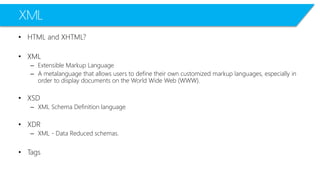
•HTML and XHTML? 
•XML 
–Extensible Markup Language 
–A metalanguagethat allows users to define their own customized markup languages, especially in order to display documents on the World Wide Web (WWW). 
•XSD 
–XML Schema Definition language 
•XDR 
–XML -Data Reduced schemas. 
•Tags
XML 
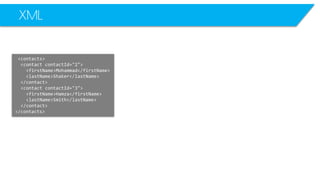
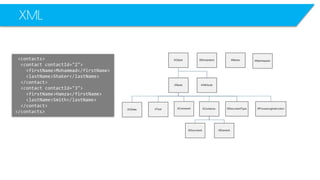
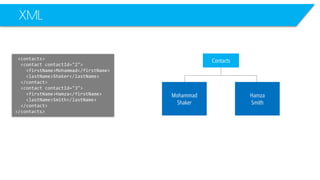
<contacts> 
<contactcontactId="2"> 
<firstName>Mohammad</firstName> 
<lastName>Shaker</lastName> 
</contact> 
<contactcontactId="3"> 
<firstName>Hamza</firstName> 
<lastName>Smith</lastName> 
</contact> 
</contacts>
XML 
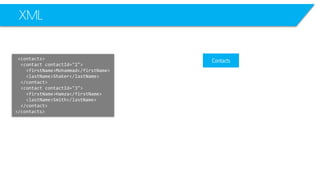
<contacts> 
<contactcontactId="2"> 
<firstName>Mohammad</firstName> 
<lastName>Shaker</lastName> 
</contact> 
<contactcontactId="3"> 
<firstName>Hamza</firstName> 
<lastName>Smith</lastName> 
</contact> 
</contacts>
XML 
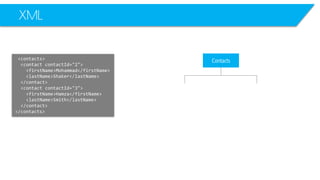
<contacts> 
<contactcontactId="2"> 
<firstName>Mohammad</firstName> 
<lastName>Shaker</lastName> 
</contact> 
<contactcontactId="3"> 
<firstName>Hamza</firstName> 
<lastName>Smith</lastName> 
</contact> 
</contacts> 
Contacts
XML 
<contacts> 
<contactcontactId="2"> 
<firstName>Mohammad</firstName> 
<lastName>Shaker</lastName> 
</contact> 
<contactcontactId="3"> 
<firstName>Hamza</firstName> 
<lastName>Smith</lastName> 
</contact> 
</contacts> 
Contacts
XML 
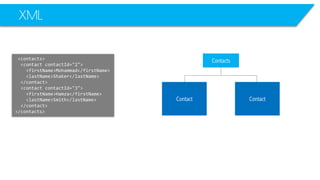
<contacts> 
<contactcontactId="2"> 
<firstName>Mohammad</firstName> 
<lastName>Shaker</lastName> 
</contact> 
<contactcontactId="3"> 
<firstName>Hamza</firstName> 
<lastName>Smith</lastName> 
</contact> 
</contacts> 
Contacts 
Contact 
Contact
XML 
<contacts> 
<contactcontactId="2"> 
<firstName>Mohammad</firstName> 
<lastName>Shaker</lastName> 
</contact> 
<contactcontactId="3"> 
<firstName>Hamza</firstName> 
<lastName>Smith</lastName> 
</contact> 
</contacts> 
Contacts 
Mohammad 
Shaker 
Hamza 
Smith
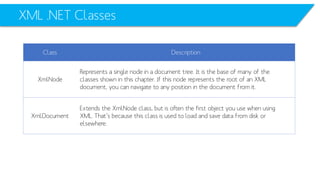
XML .NET Classes 
Class 
Description 
XmlNode 
Represents a single node in a document tree. It is the base of many of the 
classes shown in this chapter. If this node represents the root of an XML 
document, you can navigate to any position in the document from it. 
XmlDocument 
Extends the XmlNodeclass, but is often the first object you use when using 
XML. That’s because this class is used to load and save data from disk or 
elsewhere.
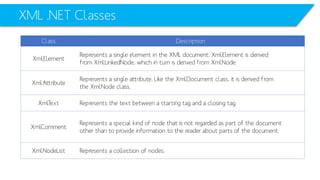
XML .NET Classes 
Class 
Description 
XmlElement 
Represents a single element in the XML document. XmlElementis derived 
from XmlLinkedNode, which in turn is derived from XmlNode. 
XmlAttribute 
Represents a single attribute. Like the XmlDocumentclass, it is derived from 
the XmlNodeclass. 
XmlText 
Represents the text between a starting tag and a closing tag. 
XmlComment 
Represents a special kind of node that is not regarded as part of the document 
other than to provide information to the reader about parts of the document. 
XmlNodeList 
Represents a collection of nodes.
Creating an XML Node in an XML FileProgrammatically
Creating XML Node 
static void Main(string[] args) 
{ 
XmlDocumentxmlDoc= new XmlDocument(); 
XmlNoderootNode= xmlDoc.CreateElement("users"); 
xmlDoc.AppendChild(rootNode); 
XmlNodeuserNode= xmlDoc.CreateElement("user"); 
XmlAttributeattribute = xmlDoc.CreateAttribute("age"); 
attribute.Value= "42"; 
userNode.Attributes.Append(attribute); 
userNode.InnerText= "John Doe"; 
rootNode.AppendChild(userNode); 
userNode= xmlDoc.CreateElement("user"); 
attribute = xmlDoc.CreateAttribute("age"); 
attribute.Value= "39"; 
userNode.Attributes.Append(attribute); 
userNode.InnerText= "Jane Doe"; 
rootNode.AppendChild(userNode); 
xmlDoc.Save("test-doc.xml"); 
} 
Create an XML File 
<users> 
<user age="42">John Doe</user> 
<user age="39">Jane Doe</user> 
</users>
Creating XML Node 
static void Main(string[] args) 
{ 
XmlDocumentxmlDoc= new XmlDocument(); 
XmlNoderootNode= xmlDoc.CreateElement("users"); 
xmlDoc.AppendChild(rootNode); 
XmlNodeuserNode= xmlDoc.CreateElement("user"); 
XmlAttributeattribute = xmlDoc.CreateAttribute("age"); 
attribute.Value= "42"; 
userNode.Attributes.Append(attribute); 
userNode.InnerText= "John Doe"; 
rootNode.AppendChild(userNode); 
userNode= xmlDoc.CreateElement("user"); 
attribute = xmlDoc.CreateAttribute("age"); 
attribute.Value= "39"; 
userNode.Attributes.Append(attribute); 
userNode.InnerText= "Jane Doe"; 
rootNode.AppendChild(userNode); 
xmlDoc.Save("test-doc.xml"); 
} 
Create an XML Node 
users 
<users> 
<user age="42">John Doe</user> 
<user age="39">Jane Doe</user> 
</users>
Creating XML Node 
static void Main(string[] args) 
{ 
XmlDocumentxmlDoc= new XmlDocument(); 
XmlNoderootNode= xmlDoc.CreateElement("users"); 
xmlDoc.AppendChild(rootNode); 
XmlNodeuserNode= xmlDoc.CreateElement("user"); 
XmlAttributeattribute = xmlDoc.CreateAttribute("age"); 
attribute.Value= "42"; 
userNode.Attributes.Append(attribute); 
userNode.InnerText= "John Doe"; 
rootNode.AppendChild(userNode); 
userNode= xmlDoc.CreateElement("user"); 
attribute = xmlDoc.CreateAttribute("age"); 
attribute.Value= "39"; 
userNode.Attributes.Append(attribute); 
userNode.InnerText= "Jane Doe"; 
rootNode.AppendChild(userNode); 
xmlDoc.Save("test-doc.xml"); 
} 
Append the XML Node to the XML File 
<users> 
<user age="42">John Doe</user> 
<user age="39">Jane Doe</user> 
</users>
Creating XML Node 
static void Main(string[] args) 
{ 
XmlDocumentxmlDoc= new XmlDocument(); 
XmlNoderootNode= xmlDoc.CreateElement("users"); 
xmlDoc.AppendChild(rootNode); 
XmlNodeuserNode= xmlDoc.CreateElement("user"); 
XmlAttributeattribute = xmlDoc.CreateAttribute("age"); 
attribute.Value= "42"; 
userNode.Attributes.Append(attribute); 
userNode.InnerText= "John Doe"; 
rootNode.AppendChild(userNode); 
userNode= xmlDoc.CreateElement("user"); 
attribute = xmlDoc.CreateAttribute("age"); 
attribute.Value= "39"; 
userNode.Attributes.Append(attribute); 
userNode.InnerText= "Jane Doe"; 
rootNode.AppendChild(userNode); 
xmlDoc.Save("test-doc.xml"); 
} 
Create an XML Node 
user 
<users> 
<user age="42">John Doe</user> 
<user age="39">Jane Doe</user> 
</users>
Creating XML Node 
static void Main(string[] args) 
{ 
XmlDocumentxmlDoc= new XmlDocument(); 
XmlNoderootNode= xmlDoc.CreateElement("users"); 
xmlDoc.AppendChild(rootNode); 
XmlNodeuserNode= xmlDoc.CreateElement("user"); 
XmlAttributeattribute = xmlDoc.CreateAttribute("age"); 
attribute.Value= "42"; 
userNode.Attributes.Append(attribute); 
userNode.InnerText= "John Doe"; 
rootNode.AppendChild(userNode); 
userNode= xmlDoc.CreateElement("user"); 
attribute = xmlDoc.CreateAttribute("age"); 
attribute.Value= "39"; 
userNode.Attributes.Append(attribute); 
userNode.InnerText= "Jane Doe"; 
rootNode.AppendChild(userNode); 
xmlDoc.Save("test-doc.xml"); 
} 
Append the node: user to the root node: users 
<users> 
<user age="42">John Doe</user> 
<user age="39">Jane Doe</user> 
</users>
Creating XML Node 
static void Main(string[] args) 
{ 
XmlDocumentxmlDoc= new XmlDocument(); 
XmlNoderootNode= xmlDoc.CreateElement("users"); 
xmlDoc.AppendChild(rootNode); 
XmlNodeuserNode= xmlDoc.CreateElement("user"); 
XmlAttributeattribute = xmlDoc.CreateAttribute("age"); 
attribute.Value= "42"; 
userNode.Attributes.Append(attribute); 
userNode.InnerText= "John Doe"; 
rootNode.AppendChild(userNode); 
userNode= xmlDoc.CreateElement("user"); 
attribute = xmlDoc.CreateAttribute("age"); 
attribute.Value= "39"; 
userNode.Attributes.Append(attribute); 
userNode.InnerText= "Jane Doe"; 
rootNode.AppendChild(userNode); 
xmlDoc.Save("test-doc.xml"); 
} 
Create another XML Node user 
<users> 
<user age="42">John Doe</user> 
<user age="39">Jane Doe</user> 
</users>
Creating XML Node 
static void Main(string[] args) 
{ 
XmlDocumentxmlDoc= new XmlDocument(); 
XmlNoderootNode= xmlDoc.CreateElement("users"); 
xmlDoc.AppendChild(rootNode); 
XmlNodeuserNode= xmlDoc.CreateElement("user"); 
XmlAttributeattribute = xmlDoc.CreateAttribute("age"); 
attribute.Value= "42"; 
userNode.Attributes.Append(attribute); 
userNode.InnerText= "John Doe"; 
rootNode.AppendChild(userNode); 
userNode= xmlDoc.CreateElement("user"); 
attribute = xmlDoc.CreateAttribute("age"); 
attribute.Value= "39"; 
userNode.Attributes.Append(attribute); 
userNode.InnerText= "Jane Doe"; 
rootNode.AppendChild(userNode); 
xmlDoc.Save("test-doc.xml"); 
} 
Save the file where you want 
<users> 
<user age="42">John Doe</user> 
<user age="39">Jane Doe</user> 
</users>
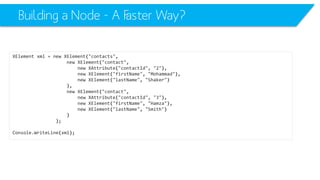
Building a Node -A Faster Way? 
XElementxml=newXElement("contacts", 
newXElement("contact", 
newXAttribute("contactId", "2"), 
newXElement("firstName", "Mohammad"), 
newXElement("lastName", "Shaker") 
), 
newXElement("contact", 
newXAttribute("contactId", "3"), 
newXElement("firstName", "Hamza"), 
newXElement("lastName", "Smith") 
) 
); 
Console.WriteLine(xml);
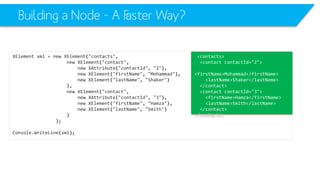
Building a Node -A Faster Way? 
XElementxml=newXElement("contacts", 
newXElement("contact", 
newXAttribute("contactId", "2"), 
newXElement("firstName", "Mohammad"), 
newXElement("lastName", "Shaker") 
), 
newXElement("contact", 
newXAttribute("contactId", "3"), 
newXElement("firstName", "Hamza"), 
newXElement("lastName", "Smith") 
) 
); 
Console.WriteLine(xml); 
<contacts> 
<contactcontactId="2"> 
<firstName>Mohammad</firstName> 
<lastName>Shaker</lastName> 
</contact> 
<contactcontactId="3"> 
<firstName>Hamza</firstName> 
<lastName>Smith</lastName> 
</contact> 
</contacts>
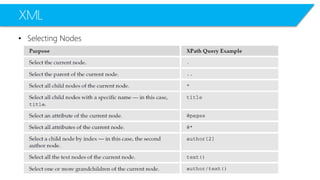
Searching an XML
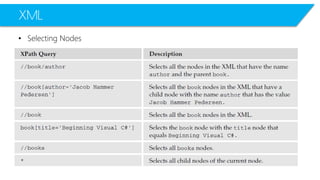
XML 
•Selecting Nodes
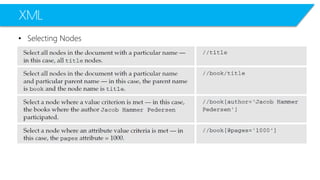
XML 
•Selecting Nodes
XML 
•Selecting Nodes
Getting XML Node Values
XML 
<?xml version="1.0" encoding="utf-8"?> 
<RoomsCoordProperties> 
<LocationDimension> 10 </LocationDimension> 
<Number> 5 </Number> 
<Width> 12 </Width> 
<Length> 12 </Length> 
<Height> 3 </Height> 
<Opacity> 0.3 </Opacity> 
<BasicLocationLength> 4 </BasicLocationLength> 
<Room id="3"> 
<LocationID> 0 </LocationID> 
<Width> 12 </Width> 
<Length> 12 </Length> 
<Height> 3 </Height> 
<Opacity> 0.3 </Opacity> 
</Room> 
… 
public static void InitializeRoomFromXMLFile(Room myRoom, introomNumber) 
{ 
XmlDocumentxmlDoc= new XmlDocument(); 
xmlDoc.Load(XMLFilePath); 
XmlNodeListxmlNodeList= xmlDoc.GetElementsByTagName("Room"); 
myRoom.RoomID= Int32.Parse(xmlNodeList[roomNumber].Attributes[0].FirstChild.Value); 
myRoom.RoomLocationID= Int32.Parse(xmlNodeList[roomNumber].ChildNodes[0].FirstChild.Value); 
myRoom.RoomWidth= Int32.Parse(xmlNodeList[roomNumber].ChildNodes[1].FirstChild.Value); 
myRoom.RoomLength= Int32.Parse(xmlNodeList[roomNumber].ChildNodes[2].FirstChild.Value); 
myRoom.RoomHeight= Int32.Parse(xmlNodeList[roomNumber].ChildNodes[3].FirstChild.Value); 
myRoom.RoomOpacity= Double.Parse(xmlNodeList[roomNumber].ChildNodes[4].FirstChild.Value); 
}
XML 
<?xml version="1.0" encoding="utf-8"?> 
<RoomsCoordProperties> 
<LocationDimension> 10 </LocationDimension> 
<Number> 5 </Number> 
<Width> 12 </Width> 
<Length> 12 </Length> 
<Height> 3 </Height> 
<Opacity> 0.3 </Opacity> 
<BasicLocationLength> 4 </BasicLocationLength> 
<Room id="3"> 
<LocationID> 0 </LocationID> 
<Width> 12 </Width> 
<Length> 12 </Length> 
<Height> 3 </Height> 
<Opacity> 0.3 </Opacity> 
</Room> 
… 
public static void InitializeRoomFromXMLFile(Room myRoom, introomNumber) 
{ 
XmlDocumentxmlDoc= new XmlDocument(); 
xmlDoc.Load(XMLFilePath); 
XmlNodeListxmlNodeList= xmlDoc.GetElementsByTagName("Room"); 
myRoom.RoomID= Int32.Parse(xmlNodeList[roomNumber].Attributes[0].FirstChild.Value); 
myRoom.RoomLocationID= Int32.Parse(xmlNodeList[roomNumber].ChildNodes[0].FirstChild.Value); 
myRoom.RoomWidth= Int32.Parse(xmlNodeList[roomNumber].ChildNodes[1].FirstChild.Value); 
myRoom.RoomLength= Int32.Parse(xmlNodeList[roomNumber].ChildNodes[2].FirstChild.Value); 
myRoom.RoomHeight= Int32.Parse(xmlNodeList[roomNumber].ChildNodes[3].FirstChild.Value); 
myRoom.RoomOpacity= Double.Parse(xmlNodeList[roomNumber].ChildNodes[4].FirstChild.Value); 
}
XML 
<?xml version="1.0" encoding="utf-8"?> 
<RoomsCoordProperties> 
<LocationDimension> 10 </LocationDimension> 
<Number> 5 </Number> 
<Width> 12 </Width> 
<Length> 12 </Length> 
<Height> 3 </Height> 
<Opacity> 0.3 </Opacity> 
<BasicLocationLength> 4 </BasicLocationLength> 
<Room id="3"> 
<LocationID> 0 </LocationID> 
<Width> 12 </Width> 
<Length> 12 </Length> 
<Height> 3 </Height> 
<Opacity> 0.3 </Opacity> 
</Room> 
… 
public static void InitializeRoomFromXMLFile(Room myRoom, introomNumber) 
{ 
XmlDocumentxmlDoc= new XmlDocument(); 
xmlDoc.Load(XMLFilePath); 
XmlNodeListxmlNodeList= xmlDoc.GetElementsByTagName("Room"); 
myRoom.RoomID= Int32.Parse(xmlNodeList[roomNumber].Attributes[0].FirstChild.Value); 
myRoom.RoomLocationID= Int32.Parse(xmlNodeList[roomNumber].ChildNodes[0].FirstChild.Value); 
myRoom.RoomWidth= Int32.Parse(xmlNodeList[roomNumber].ChildNodes[1].FirstChild.Value); 
myRoom.RoomLength= Int32.Parse(xmlNodeList[roomNumber].ChildNodes[2].FirstChild.Value); 
myRoom.RoomHeight= Int32.Parse(xmlNodeList[roomNumber].ChildNodes[3].FirstChild.Value); 
myRoom.RoomOpacity= Double.Parse(xmlNodeList[roomNumber].ChildNodes[4].FirstChild.Value); 
}
XML 
<?xml version="1.0" encoding="utf-8"?> 
<RoomsCoordProperties> 
<LocationDimension> 10 </LocationDimension> 
<Number> 5 </Number> 
<Width> 12 </Width> 
<Length> 12 </Length> 
<Height> 3 </Height> 
<Opacity> 0.3 </Opacity> 
<BasicLocationLength> 4 </BasicLocationLength> 
<Room id="3"> 
<LocationID> 0 </LocationID> 
<Width> 12 </Width> 
<Length> 12 </Length> 
<Height> 3 </Height> 
<Opacity> 0.3 </Opacity> 
</Room> 
… 
public static void InitializeRoomFromXMLFile(Room myRoom, introomNumber) 
{ 
XmlDocumentxmlDoc= new XmlDocument(); 
xmlDoc.Load(XMLFilePath); 
XmlNodeListxmlNodeList= xmlDoc.GetElementsByTagName("Room"); 
myRoom.RoomID= Int32.Parse(xmlNodeList[roomNumber].Attributes[0].FirstChild.Value); 
myRoom.RoomLocationID= Int32.Parse(xmlNodeList[roomNumber].ChildNodes[0].FirstChild.Value); 
myRoom.RoomWidth= Int32.Parse(xmlNodeList[roomNumber].ChildNodes[1].FirstChild.Value); 
myRoom.RoomLength= Int32.Parse(xmlNodeList[roomNumber].ChildNodes[2].FirstChild.Value); 
myRoom.RoomHeight= Int32.Parse(xmlNodeList[roomNumber].ChildNodes[3].FirstChild.Value); 
myRoom.RoomOpacity= Double.Parse(xmlNodeList[roomNumber].ChildNodes[4].FirstChild.Value); 
}
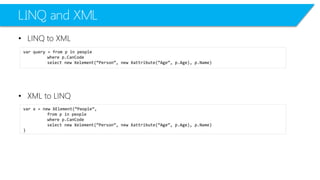
LINQ to XMLXML to LINQ
LINQ and XML 
•LINQ to XML 
•XML to LINQ 
varquery = from p in people 
where p.CanCode 
select new Xelement(“Person”, new Xattribute(“Age”, p.Age), p.Name) 
varx = new XElement(“People”, 
from p in people 
where p.CanCode 
select new Xelement(“Person”, new Xattribute(“Age”, p.Age), p.Name) 
)
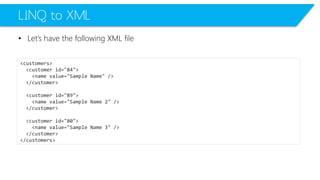
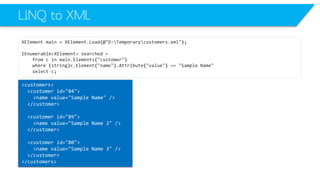
LINQ to XML 
•Let’s have the following XML file 
<customers> 
<customerid="84"> 
<namevalue="Sample Name"/> 
</customer> 
<customerid="89"> 
<namevalue="Sample Name 2"/> 
</customer> 
<customerid="80"> 
<namevalue="Sample Name 3"/> 
</customer> 
</customers>
LINQ to XML 
XmlNodesearched=null; 
XmlDocumentdoc=newXmlDocument(); 
doc.Load(@"D:Temporarycustomers.xml"); 
foreach(XmlNodenodeindoc.SelectNodes("/customers/customer")) 
{ 
if(node.Attributes["id"].InnerText=="80") 
{ 
searched=node; 
break; 
} 
}
LINQ to XML 
XmlNodesearched=null; 
XmlDocumentdoc=newXmlDocument(); 
doc.Load(@"D:Temporarycustomers.xml"); 
foreach(XmlNodenodeindoc.SelectNodes("/customers/customer")) 
{ 
if(node.Attributes["id"].InnerText=="80") 
{ 
searched=node; 
break; 
} 
} 
XElementmain=XElement.Load(@"D:Temporarycustomers.xml"); 
IEnumerable<XElement>searched= 
fromcinmain.Elements("customer") 
where(string)c.Attribute("id") =="80" 
selectc;
LINQ to XML 
XmlNodesearched=null; 
XmlDocumentdoc=newXmlDocument(); 
doc.Load(@"D:Temporarycustomers.xml"); 
foreach(XmlNodenodeindoc.SelectNodes("/customers/customer")) 
{ 
if(node.Attributes["id"].InnerText=="80") 
{ 
searched=node; 
break; 
} 
} 
XElementmain=XElement.Load(@"D:Temporarycustomers.xml"); 
IEnumerable<XElement>searched= 
fromcinmain.Elements("customer") 
where(string)c.Attribute("id") =="80" 
selectc; 
<customers> 
<customerid="84"> 
<namevalue="Sample Name"/> 
</customer> 
<customerid="89"> 
<namevalue="Sample Name 2"/> 
</customer> 
<customerid="80"> 
<namevalue="Sample Name 3"/> 
</customer> 
</customers>
LINQ to XML 
XmlNodesearched=null; 
XmlDocumentdoc=newXmlDocument(); 
doc.Load(@"D:Temporarycustomers.xml"); 
foreach(XmlNodenodeindoc.SelectNodes("/customers/customer")) 
{ 
if(node.Attributes["id"].InnerText=="80") 
{ 
searched=node; 
break; 
} 
} 
XElementmain=XElement.Load(@"D:Temporarycustomers.xml"); 
IEnumerable<XElement>searched= 
fromcinmain.Elements("customer") 
where(string)c.Attribute("id") =="80" 
selectc; 
<customerid="80"> 
<namevalue="Sample Name 3"/> 
</customer> 
<customers> 
<customerid="84"> 
<namevalue="Sample Name"/> 
</customer> 
<customerid="89"> 
<namevalue="Sample Name 2"/> 
</customer> 
<customerid="80"> 
<namevalue="Sample Name 3"/> 
</customer> 
</customers>
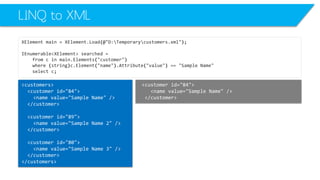
LINQ to XML 
XElementmain=XElement.Load(@"D:Temporarycustomers.xml"); 
IEnumerable<XElement>searched= 
fromcinmain.Elements("customer") 
where(string)c.Element("name").Attribute("value") =="Sample Name" 
selectc; 
<customers> 
<customerid="84"> 
<namevalue="Sample Name"/> 
</customer> 
<customerid="89"> 
<namevalue="Sample Name 2"/> 
</customer> 
<customerid="80"> 
<namevalue="Sample Name 3"/> 
</customer> 
</customers>
LINQ to XML 
XElementmain=XElement.Load(@"D:Temporarycustomers.xml"); 
IEnumerable<XElement>searched= 
fromcinmain.Elements("customer") 
where(string)c.Element("name").Attribute("value") =="Sample Name" 
selectc; 
<customerid="84"> 
<namevalue="Sample Name"/> 
</customer> 
<customers> 
<customerid="84"> 
<namevalue="Sample Name"/> 
</customer> 
<customerid="89"> 
<namevalue="Sample Name 2"/> 
</customer> 
<customerid="80"> 
<namevalue="Sample Name 3"/> 
</customer> 
</customers>
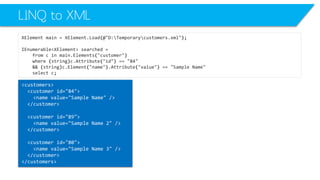
LINQ to XML 
XElementmain=XElement.Load(@"D:Temporarycustomers.xml"); 
IEnumerable<XElement>searched= 
fromcinmain.Elements("customer") 
where(string)c.Attribute("id") =="84" 
&&(string)c.Element("name").Attribute("value") =="Sample Name" 
selectc; 
<customers> 
<customerid="84"> 
<namevalue="Sample Name"/> 
</customer> 
<customerid="89"> 
<namevalue="Sample Name 2"/> 
</customer> 
<customerid="80"> 
<namevalue="Sample Name 3"/> 
</customer> 
</customers>
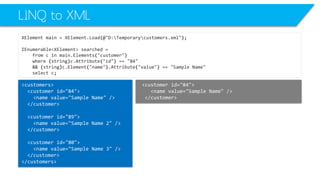
LINQ to XML 
XElementmain=XElement.Load(@"D:Temporarycustomers.xml"); 
IEnumerable<XElement>searched= 
fromcinmain.Elements("customer") 
where(string)c.Attribute("id") =="84" 
&&(string)c.Element("name").Attribute("value") =="Sample Name" 
selectc; 
<customerid="84"> 
<namevalue="Sample Name"/> 
</customer> 
<customers> 
<customerid="84"> 
<namevalue="Sample Name"/> 
</customer> 
<customerid="89"> 
<namevalue="Sample Name 2"/> 
</customer> 
<customerid="80"> 
<namevalue="Sample Name 3"/> 
</customer> 
</customers>
Performanceof LINQ 
•LINQ has more control and efficiency in O/R Mapping than NHibernate 
–LINQ: ExternlMapping or Attribute Mapping 
–NHibernate: ExternlMapping 
•Because of mapping, LINQ is lower than database tools such as SqlDataReaderor SqlDataAdapter 
–In large dataset, their performance are more and more similar
XML Serialization
XML SerializationNot Always an Easy, Straightforward Task
XML SerializationWhy to?
XML SerializationSerialize a class that simply consists of public fields and properties into an XML file
XML SerializationUse XML serialization to generate an XML stream that conforms to a specific XML Schema (XSD) document.
Test CaseSerializing a Class
XML Serialization 
namespace XMLTest1 
{ 
public class Test 
{ 
public String value1; 
public String value2; 
} 
class Program 
{ 
static void Main(string[] args) 
{ 
Test myTest= new Test() { value1 = "Value 1", value2 = "Value 2" }; 
XmlSerializerx = new XmlSerializer(myTest.GetType()); 
x.Serialize(Console.Out, myTest); 
Console.ReadKey(); 
} 
} 
}
XML Serialization 
namespace XMLTest1 
{ 
public class Test 
{ 
public String value1; 
public String value2; 
} 
class Program 
{ 
static void Main(string[] args) 
{ 
Test myTest= new Test() { value1 = "Value 1", value2 = "Value 2" }; 
XmlSerializerx = new XmlSerializer(myTest.GetType()); 
x.Serialize(Console.Out, myTest); 
Console.ReadKey(); 
} 
} 
} 
<?xml version="1.0" encoding="ibm850"?> 
<Test xmlns:xsi="http://www.w3.org/2001/XMLSchema-instance" xmlns:xsd="http://www.w3.org/2001/XMLSchema"> 
<value1>Value 1</value1> 
<value2>Value 2</value2> 
</Test> 
That’s Cool!
Test CaseDeSerializinga Class
XML DeSerialization 
namespace XMLTest1 
{ 
public class Test 
{ 
public String value1; 
public String value2; 
} 
class Program 
{ 
static void Main(string[] args) 
{ 
String xData= "<?xml version="1.0" encoding="ibm850"?><Test xmlns:xsi="http://www.w3.org/2001/XMLSchema- instance" xmlns:xsd="http://www.w3.org/2001/XMLSchema"><value1>Value 1</value1><value2>Value 2</value2></Test>"; 
XmlSerializerx = new XmlSerializer(typeof(Test)); 
Test myTest= (Test)x.Deserialize(new StringReader(xData)); 
Console.WriteLine("V1: " + myTest.value1); 
Console.WriteLine("V2: " + myTest.value2); 
Console.ReadKey(); 
} 
} 
}
XML DeSerialization 
namespace XMLTest1 
{ 
public class Test 
{ 
public String value1; 
public String value2; 
} 
class Program 
{ 
static void Main(string[] args) 
{ 
String xData= "<?xml version="1.0" encoding="ibm850"?><Test xmlns:xsi="http://www.w3.org/2001/XMLSchema- instance" xmlns:xsd="http://www.w3.org/2001/XMLSchema"><value1>Value 1</value1><value2>Value 2</value2></Test>"; 
XmlSerializerx = new XmlSerializer(typeof(Test)); 
Test myTest= (Test)x.Deserialize(new StringReader(xData)); 
Console.WriteLine("V1: " + myTest.value1); 
Console.WriteLine("V2: " + myTest.value2); 
Console.ReadKey(); 
} 
} 
}
XML Serialization and Attributes
XML Serialization and Attributes 
[XmlRoot("XTest")] 
public class Test 
{ 
[XmlElement(ElementName="V1")] 
public String value1; 
[XmlElement(ElementName="V2")] 
public String value2; 
[XmlArray("OtherValues")] 
[XmlArrayItem("OValue")] 
public List others = new List(); 
}
XML Serialization and Attributes 
[XmlRoot("XTest")] 
public class Test 
{ 
[XmlElement(ElementName="V1")] 
public String value1; 
[XmlElement(ElementName="V2")] 
public String value2; 
[XmlArray("OtherValues")] 
[XmlArrayItem("OValue")] 
public List others = new List(); 
} 
<?xml version="1.0" encoding="ibm850"?> 
<XTestxmlns:xsi="http://www.w3.org/2001/XMLSchema-instance" xmlns:xsd="http://www.w3.org/2001/XMLSchema"> 
<V1>A1</V1> 
<V2>B1</V2> 
<OtherValues> 
<OValue>Test</OValue> 
</OtherValues> 
</XTest>
XML Serialization and Attributes 
[XmlRoot("XTest")] 
public class Test 
{ 
[XmlElement(ElementName="V1")] 
public String value1; 
[XmlElement(ElementName="V2")] 
public String value2; 
[XmlArray("OtherValues")] 
[XmlArrayItem("OValue")] 
public List others = new List(); 
} 
<?xml version="1.0" encoding="ibm850"?> 
<XTestxmlns:xsi="http://www.w3.org/2001/XMLSchema-instance" xmlns:xsd="http://www.w3.org/2001/XMLSchema"> 
<V1>A1</V1> 
<V2>B1</V2> 
<OtherValues> 
<OValue>Test</OValue> 
</OtherValues> 
</XTest>
XML Serialization and Attributes 
[XmlRoot("XTest")] 
public class Test 
{ 
[XmlElement(ElementName="V1")] 
public String value1; 
[XmlElement(ElementName="V2")] 
public String value2; 
[XmlArray("OtherValues")] 
[XmlArrayItem("OValue")] 
public List others = new List(); 
} 
<?xml version="1.0" encoding="ibm850"?> 
<XTestxmlns:xsi="http://www.w3.org/2001/XMLSchema-instance" xmlns:xsd="http://www.w3.org/2001/XMLSchema"> 
<V1>A1</V1> 
<V2>B1</V2> 
<OtherValues> 
<OValue>Test</OValue> 
</OtherValues> 
</XTest>
XML Serialization and Attributes 
[XmlRoot("XTest")] 
public class Test 
{ 
[XmlElement(ElementName="V1")] 
public String value1; 
[XmlElement(ElementName="V2")] 
public String value2; 
[XmlArray("OtherValues")] 
[XmlArrayItem("OValue")] 
public List others = new List(); 
} 
<?xml version="1.0" encoding="ibm850"?> 
<XTestxmlns:xsi="http://www.w3.org/2001/XMLSchema-instance" xmlns:xsd="http://www.w3.org/2001/XMLSchema"> 
<V1>A1</V1> 
<V2>B1</V2> 
<OtherValues> 
<OValue>Test</OValue> 
</OtherValues> 
</XTest>
XML Serialization and Attributes 
[XmlRoot("XTest")] 
public class Test 
{ 
[XmlElement(ElementName="V1")] 
public String value1; 
[XmlElement(ElementName="V2")] 
public String value2; 
[XmlArray("OtherValues")] 
[XmlArrayItem("OValue")] 
public List others = new List(); 
} 
<?xml version="1.0" encoding="ibm850"?> 
<XTestxmlns:xsi="http://www.w3.org/2001/XMLSchema-instance" xmlns:xsd="http://www.w3.org/2001/XMLSchema"> 
<V1>A1</V1> 
<V2>B1</V2> 
<OtherValues> 
<OValue>Test</OValue> 
</OtherValues> 
</XTest>
XML Documentation
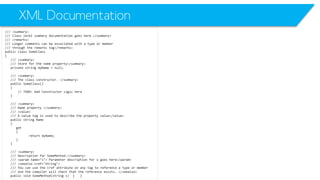
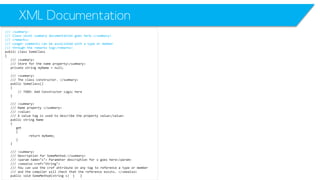
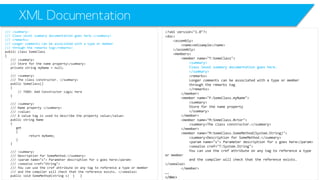
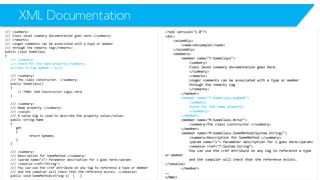
XML DocumentationC# provides a mechanism for developers to document their code using XML. In source code files, lines that begin with ///and that precede a user-defined type such as a class, delegate, or interface; a member such as a field, event, property, or method; or a namespace declaration can be processed as comments and placed in a file.
XML Documentation 
/// <summary> 
/// Class level summary documentation goes here.</summary> 
/// <remarks> 
/// Longer comments can be associated with a type or member 
/// through the remarks tag</remarks> 
public class SomeClass 
{ 
/// <summary> 
/// Store for the name property</summary> 
private string myName= null; 
/// <summary> 
/// The class constructor. </summary> 
public SomeClass() 
{ 
// TODO: Add Constructor Logic here 
} 
/// <summary> 
/// Name property </summary> 
/// <value> 
/// A value tag is used to describe the property value</value> 
public string Name 
{ 
get 
{ 
return myName; 
} 
} 
/// <summary> 
/// Description for SomeMethod.</summary> 
/// <paramname="s"> Parameter description for s goes here</param> 
/// <seealsocref="String"> 
/// You can use the crefattribute on any tag to reference a type or member 
/// and the compiler will check that the reference exists. </seealso> 
public void SomeMethod(string s) { }
XML Documentation 
/// <summary> 
/// Class level summary documentation goes here.</summary> 
/// <remarks> 
/// Longer comments can be associated with a type or member 
/// through the remarks tag</remarks> 
public class SomeClass 
{ 
/// <summary> 
/// Store for the name property</summary> 
private string myName= null; 
/// <summary> 
/// The class constructor. </summary> 
public SomeClass() 
{ 
// TODO: Add Constructor Logic here 
} 
/// <summary> 
/// Name property </summary> 
/// <value> 
/// A value tag is used to describe the property value</value> 
public string Name 
{ 
get 
{ 
return myName; 
} 
} 
/// <summary> 
/// Description for SomeMethod.</summary> 
/// <paramname="s"> Parameter description for s goes here</param> 
/// <seealsocref="String"> 
/// You can use the crefattribute on any tag to reference a type or member 
/// and the compiler will check that the reference exists. </seealso> 
public void SomeMethod(string s) { }
XML Documentation 
/// <summary> 
/// Class level summary documentation goes here.</summary> 
/// <remarks> 
/// Longer comments can be associated with a type or member 
/// through the remarks tag</remarks> 
public class SomeClass 
{ 
/// <summary> 
/// Store for the name property</summary> 
private string myName= null; 
/// <summary> 
/// The class constructor. </summary> 
public SomeClass() 
{ 
// TODO: Add Constructor Logic here 
} 
/// <summary> 
/// Name property </summary> 
/// <value> 
/// A value tag is used to describe the property value</value> 
public string Name 
{ 
get 
{ 
return myName; 
} 
} 
/// <summary> 
/// Description for SomeMethod.</summary> 
/// <paramname="s"> Parameter description for s goes here</param> 
/// <seealsocref="String"> 
/// You can use the crefattribute on any tag to reference a type or member 
/// and the compiler will check that the reference exists. </seealso> 
public void SomeMethod(string s) { } 
<?xml version="1.0"?> 
<doc> 
<assembly> 
<name>xmlsample</name> 
</assembly> 
<members> 
<member name="T:SomeClass"> 
<summary> 
Class level summary documentation goes here. 
</summary> 
<remarks> 
Longer comments can be associated with a type or member 
through the remarks tag 
</remarks> 
</member> 
<member name="F:SomeClass.myName"> 
<summary> 
Store for the name property 
</summary> 
</member> 
<member name="M:SomeClass.#ctor"> 
<summary>The class constructor.</summary> 
</member> 
<member name="M:SomeClass.SomeMethod(System.String)"> 
<summary>Description for SomeMethod.</summary> 
<paramname="s"> Parameter description for s goes here</param> 
<seealsocref="T:System.String"> 
You can use the crefattribute on any tag to reference a type or member 
and the compiler will check that the reference exists. </seealso> 
</member> 
…. 
</doc>
XML Documentation 
/// <summary> 
/// Class level summary documentation goes here.</summary> 
/// <remarks> 
/// Longer comments can be associated with a type or member 
/// through the remarks tag</remarks> 
public class SomeClass 
{ 
/// <summary> 
/// Store for the name property</summary> 
private string myName= null; 
/// <summary> 
/// The class constructor. </summary> 
public SomeClass() 
{ 
// TODO: Add Constructor Logic here 
} 
/// <summary> 
/// Name property </summary> 
/// <value> 
/// A value tag is used to describe the property value</value> 
public string Name 
{ 
get 
{ 
return myName; 
} 
} 
/// <summary> 
/// Description for SomeMethod.</summary> 
/// <paramname="s"> Parameter description for s goes here</param> 
/// <seealsocref="String"> 
/// You can use the crefattribute on any tag to reference a type or member 
/// and the compiler will check that the reference exists. </seealso> 
public void SomeMethod(string s) { } 
<?xml version="1.0"?> 
<doc> 
<assembly> 
<name>xmlsample</name> 
</assembly> 
<members> 
<member name="T:SomeClass"> 
<summary> 
Class level summary documentation goes here. 
</summary> 
<remarks> 
Longer comments can be associated with a type or member 
through the remarks tag 
</remarks> 
</member> 
<member name="F:SomeClass.myName"> 
<summary> 
Store for the name property 
</summary> 
</member> 
<member name="M:SomeClass.#ctor"> 
<summary>The class constructor.</summary> 
</member> 
<member name="M:SomeClass.SomeMethod(System.String)"> 
<summary>Description for SomeMethod.</summary> 
<paramname="s"> Parameter description for s goes here</param> 
<seealsocref="T:System.String"> 
You can use the crefattribute on any tag to reference a type or member 
and the compiler will check that the reference exists. </seealso> 
</member> 
…. 
</doc>
XML Documentation 
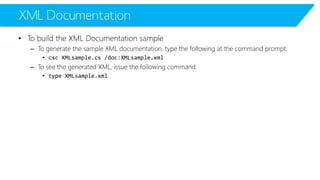
•To build the XML Documentation sample 
–To generate the sample XML documentation, type the following at the command prompt: 
•cscXMLsample.cs/doc:XMLsample.xml 
–To see the generated XML, issue the following command: 
•type XMLsample.xml

C# Advanced L03-XML+LINQ to XML

  • 1.
    Mohammad Shaker mohammadshaker.com @ZGTRShaker 2011, 2012, 2013, 2014 C# Advanced L03-XML & LINQ TO XML
  • 2.
  • 3.
  • 4.
    XML •HTML andXHTML? •XML –Extensible Markup Language –A metalanguagethat allows users to define their own customized markup languages, especially in order to display documents on the World Wide Web (WWW). •XSD –XML Schema Definition language •XDR –XML -Data Reduced schemas. •Tags
  • 5.
    XML <contacts> <contactcontactId="2"> <firstName>Mohammad</firstName> <lastName>Shaker</lastName> </contact> <contactcontactId="3"> <firstName>Hamza</firstName> <lastName>Smith</lastName> </contact> </contacts>
  • 6.
    XML <contacts> <contactcontactId="2"> <firstName>Mohammad</firstName> <lastName>Shaker</lastName> </contact> <contactcontactId="3"> <firstName>Hamza</firstName> <lastName>Smith</lastName> </contact> </contacts>
  • 7.
    XML <contacts> <contactcontactId="2"> <firstName>Mohammad</firstName> <lastName>Shaker</lastName> </contact> <contactcontactId="3"> <firstName>Hamza</firstName> <lastName>Smith</lastName> </contact> </contacts> Contacts
  • 8.
    XML <contacts> <contactcontactId="2"> <firstName>Mohammad</firstName> <lastName>Shaker</lastName> </contact> <contactcontactId="3"> <firstName>Hamza</firstName> <lastName>Smith</lastName> </contact> </contacts> Contacts
  • 9.
    XML <contacts> <contactcontactId="2"> <firstName>Mohammad</firstName> <lastName>Shaker</lastName> </contact> <contactcontactId="3"> <firstName>Hamza</firstName> <lastName>Smith</lastName> </contact> </contacts> Contacts Contact Contact
  • 10.
    XML <contacts> <contactcontactId="2"> <firstName>Mohammad</firstName> <lastName>Shaker</lastName> </contact> <contactcontactId="3"> <firstName>Hamza</firstName> <lastName>Smith</lastName> </contact> </contacts> Contacts Mohammad Shaker Hamza Smith
  • 11.
    XML .NET Classes Class Description XmlNode Represents a single node in a document tree. It is the base of many of the classes shown in this chapter. If this node represents the root of an XML document, you can navigate to any position in the document from it. XmlDocument Extends the XmlNodeclass, but is often the first object you use when using XML. That’s because this class is used to load and save data from disk or elsewhere.
  • 12.
    XML .NET Classes Class Description XmlElement Represents a single element in the XML document. XmlElementis derived from XmlLinkedNode, which in turn is derived from XmlNode. XmlAttribute Represents a single attribute. Like the XmlDocumentclass, it is derived from the XmlNodeclass. XmlText Represents the text between a starting tag and a closing tag. XmlComment Represents a special kind of node that is not regarded as part of the document other than to provide information to the reader about parts of the document. XmlNodeList Represents a collection of nodes.
  • 13.
    Creating an XMLNode in an XML FileProgrammatically
  • 14.
    Creating XML Node static void Main(string[] args) { XmlDocumentxmlDoc= new XmlDocument(); XmlNoderootNode= xmlDoc.CreateElement("users"); xmlDoc.AppendChild(rootNode); XmlNodeuserNode= xmlDoc.CreateElement("user"); XmlAttributeattribute = xmlDoc.CreateAttribute("age"); attribute.Value= "42"; userNode.Attributes.Append(attribute); userNode.InnerText= "John Doe"; rootNode.AppendChild(userNode); userNode= xmlDoc.CreateElement("user"); attribute = xmlDoc.CreateAttribute("age"); attribute.Value= "39"; userNode.Attributes.Append(attribute); userNode.InnerText= "Jane Doe"; rootNode.AppendChild(userNode); xmlDoc.Save("test-doc.xml"); } Create an XML File <users> <user age="42">John Doe</user> <user age="39">Jane Doe</user> </users>
  • 15.
    Creating XML Node static void Main(string[] args) { XmlDocumentxmlDoc= new XmlDocument(); XmlNoderootNode= xmlDoc.CreateElement("users"); xmlDoc.AppendChild(rootNode); XmlNodeuserNode= xmlDoc.CreateElement("user"); XmlAttributeattribute = xmlDoc.CreateAttribute("age"); attribute.Value= "42"; userNode.Attributes.Append(attribute); userNode.InnerText= "John Doe"; rootNode.AppendChild(userNode); userNode= xmlDoc.CreateElement("user"); attribute = xmlDoc.CreateAttribute("age"); attribute.Value= "39"; userNode.Attributes.Append(attribute); userNode.InnerText= "Jane Doe"; rootNode.AppendChild(userNode); xmlDoc.Save("test-doc.xml"); } Create an XML Node users <users> <user age="42">John Doe</user> <user age="39">Jane Doe</user> </users>
  • 16.
    Creating XML Node static void Main(string[] args) { XmlDocumentxmlDoc= new XmlDocument(); XmlNoderootNode= xmlDoc.CreateElement("users"); xmlDoc.AppendChild(rootNode); XmlNodeuserNode= xmlDoc.CreateElement("user"); XmlAttributeattribute = xmlDoc.CreateAttribute("age"); attribute.Value= "42"; userNode.Attributes.Append(attribute); userNode.InnerText= "John Doe"; rootNode.AppendChild(userNode); userNode= xmlDoc.CreateElement("user"); attribute = xmlDoc.CreateAttribute("age"); attribute.Value= "39"; userNode.Attributes.Append(attribute); userNode.InnerText= "Jane Doe"; rootNode.AppendChild(userNode); xmlDoc.Save("test-doc.xml"); } Append the XML Node to the XML File <users> <user age="42">John Doe</user> <user age="39">Jane Doe</user> </users>
  • 17.
    Creating XML Node static void Main(string[] args) { XmlDocumentxmlDoc= new XmlDocument(); XmlNoderootNode= xmlDoc.CreateElement("users"); xmlDoc.AppendChild(rootNode); XmlNodeuserNode= xmlDoc.CreateElement("user"); XmlAttributeattribute = xmlDoc.CreateAttribute("age"); attribute.Value= "42"; userNode.Attributes.Append(attribute); userNode.InnerText= "John Doe"; rootNode.AppendChild(userNode); userNode= xmlDoc.CreateElement("user"); attribute = xmlDoc.CreateAttribute("age"); attribute.Value= "39"; userNode.Attributes.Append(attribute); userNode.InnerText= "Jane Doe"; rootNode.AppendChild(userNode); xmlDoc.Save("test-doc.xml"); } Create an XML Node user <users> <user age="42">John Doe</user> <user age="39">Jane Doe</user> </users>
  • 18.
    Creating XML Node static void Main(string[] args) { XmlDocumentxmlDoc= new XmlDocument(); XmlNoderootNode= xmlDoc.CreateElement("users"); xmlDoc.AppendChild(rootNode); XmlNodeuserNode= xmlDoc.CreateElement("user"); XmlAttributeattribute = xmlDoc.CreateAttribute("age"); attribute.Value= "42"; userNode.Attributes.Append(attribute); userNode.InnerText= "John Doe"; rootNode.AppendChild(userNode); userNode= xmlDoc.CreateElement("user"); attribute = xmlDoc.CreateAttribute("age"); attribute.Value= "39"; userNode.Attributes.Append(attribute); userNode.InnerText= "Jane Doe"; rootNode.AppendChild(userNode); xmlDoc.Save("test-doc.xml"); } Append the node: user to the root node: users <users> <user age="42">John Doe</user> <user age="39">Jane Doe</user> </users>
  • 19.
    Creating XML Node static void Main(string[] args) { XmlDocumentxmlDoc= new XmlDocument(); XmlNoderootNode= xmlDoc.CreateElement("users"); xmlDoc.AppendChild(rootNode); XmlNodeuserNode= xmlDoc.CreateElement("user"); XmlAttributeattribute = xmlDoc.CreateAttribute("age"); attribute.Value= "42"; userNode.Attributes.Append(attribute); userNode.InnerText= "John Doe"; rootNode.AppendChild(userNode); userNode= xmlDoc.CreateElement("user"); attribute = xmlDoc.CreateAttribute("age"); attribute.Value= "39"; userNode.Attributes.Append(attribute); userNode.InnerText= "Jane Doe"; rootNode.AppendChild(userNode); xmlDoc.Save("test-doc.xml"); } Create another XML Node user <users> <user age="42">John Doe</user> <user age="39">Jane Doe</user> </users>
  • 20.
    Creating XML Node static void Main(string[] args) { XmlDocumentxmlDoc= new XmlDocument(); XmlNoderootNode= xmlDoc.CreateElement("users"); xmlDoc.AppendChild(rootNode); XmlNodeuserNode= xmlDoc.CreateElement("user"); XmlAttributeattribute = xmlDoc.CreateAttribute("age"); attribute.Value= "42"; userNode.Attributes.Append(attribute); userNode.InnerText= "John Doe"; rootNode.AppendChild(userNode); userNode= xmlDoc.CreateElement("user"); attribute = xmlDoc.CreateAttribute("age"); attribute.Value= "39"; userNode.Attributes.Append(attribute); userNode.InnerText= "Jane Doe"; rootNode.AppendChild(userNode); xmlDoc.Save("test-doc.xml"); } Save the file where you want <users> <user age="42">John Doe</user> <user age="39">Jane Doe</user> </users>
  • 21.
    Building a Node-A Faster Way? XElementxml=newXElement("contacts", newXElement("contact", newXAttribute("contactId", "2"), newXElement("firstName", "Mohammad"), newXElement("lastName", "Shaker") ), newXElement("contact", newXAttribute("contactId", "3"), newXElement("firstName", "Hamza"), newXElement("lastName", "Smith") ) ); Console.WriteLine(xml);
  • 22.
    Building a Node-A Faster Way? XElementxml=newXElement("contacts", newXElement("contact", newXAttribute("contactId", "2"), newXElement("firstName", "Mohammad"), newXElement("lastName", "Shaker") ), newXElement("contact", newXAttribute("contactId", "3"), newXElement("firstName", "Hamza"), newXElement("lastName", "Smith") ) ); Console.WriteLine(xml); <contacts> <contactcontactId="2"> <firstName>Mohammad</firstName> <lastName>Shaker</lastName> </contact> <contactcontactId="3"> <firstName>Hamza</firstName> <lastName>Smith</lastName> </contact> </contacts>
  • 23.
  • 24.
  • 25.
  • 26.
  • 27.
  • 28.
    XML <?xml version="1.0"encoding="utf-8"?> <RoomsCoordProperties> <LocationDimension> 10 </LocationDimension> <Number> 5 </Number> <Width> 12 </Width> <Length> 12 </Length> <Height> 3 </Height> <Opacity> 0.3 </Opacity> <BasicLocationLength> 4 </BasicLocationLength> <Room id="3"> <LocationID> 0 </LocationID> <Width> 12 </Width> <Length> 12 </Length> <Height> 3 </Height> <Opacity> 0.3 </Opacity> </Room> … public static void InitializeRoomFromXMLFile(Room myRoom, introomNumber) { XmlDocumentxmlDoc= new XmlDocument(); xmlDoc.Load(XMLFilePath); XmlNodeListxmlNodeList= xmlDoc.GetElementsByTagName("Room"); myRoom.RoomID= Int32.Parse(xmlNodeList[roomNumber].Attributes[0].FirstChild.Value); myRoom.RoomLocationID= Int32.Parse(xmlNodeList[roomNumber].ChildNodes[0].FirstChild.Value); myRoom.RoomWidth= Int32.Parse(xmlNodeList[roomNumber].ChildNodes[1].FirstChild.Value); myRoom.RoomLength= Int32.Parse(xmlNodeList[roomNumber].ChildNodes[2].FirstChild.Value); myRoom.RoomHeight= Int32.Parse(xmlNodeList[roomNumber].ChildNodes[3].FirstChild.Value); myRoom.RoomOpacity= Double.Parse(xmlNodeList[roomNumber].ChildNodes[4].FirstChild.Value); }
  • 29.
    XML <?xml version="1.0"encoding="utf-8"?> <RoomsCoordProperties> <LocationDimension> 10 </LocationDimension> <Number> 5 </Number> <Width> 12 </Width> <Length> 12 </Length> <Height> 3 </Height> <Opacity> 0.3 </Opacity> <BasicLocationLength> 4 </BasicLocationLength> <Room id="3"> <LocationID> 0 </LocationID> <Width> 12 </Width> <Length> 12 </Length> <Height> 3 </Height> <Opacity> 0.3 </Opacity> </Room> … public static void InitializeRoomFromXMLFile(Room myRoom, introomNumber) { XmlDocumentxmlDoc= new XmlDocument(); xmlDoc.Load(XMLFilePath); XmlNodeListxmlNodeList= xmlDoc.GetElementsByTagName("Room"); myRoom.RoomID= Int32.Parse(xmlNodeList[roomNumber].Attributes[0].FirstChild.Value); myRoom.RoomLocationID= Int32.Parse(xmlNodeList[roomNumber].ChildNodes[0].FirstChild.Value); myRoom.RoomWidth= Int32.Parse(xmlNodeList[roomNumber].ChildNodes[1].FirstChild.Value); myRoom.RoomLength= Int32.Parse(xmlNodeList[roomNumber].ChildNodes[2].FirstChild.Value); myRoom.RoomHeight= Int32.Parse(xmlNodeList[roomNumber].ChildNodes[3].FirstChild.Value); myRoom.RoomOpacity= Double.Parse(xmlNodeList[roomNumber].ChildNodes[4].FirstChild.Value); }
  • 30.
    XML <?xml version="1.0"encoding="utf-8"?> <RoomsCoordProperties> <LocationDimension> 10 </LocationDimension> <Number> 5 </Number> <Width> 12 </Width> <Length> 12 </Length> <Height> 3 </Height> <Opacity> 0.3 </Opacity> <BasicLocationLength> 4 </BasicLocationLength> <Room id="3"> <LocationID> 0 </LocationID> <Width> 12 </Width> <Length> 12 </Length> <Height> 3 </Height> <Opacity> 0.3 </Opacity> </Room> … public static void InitializeRoomFromXMLFile(Room myRoom, introomNumber) { XmlDocumentxmlDoc= new XmlDocument(); xmlDoc.Load(XMLFilePath); XmlNodeListxmlNodeList= xmlDoc.GetElementsByTagName("Room"); myRoom.RoomID= Int32.Parse(xmlNodeList[roomNumber].Attributes[0].FirstChild.Value); myRoom.RoomLocationID= Int32.Parse(xmlNodeList[roomNumber].ChildNodes[0].FirstChild.Value); myRoom.RoomWidth= Int32.Parse(xmlNodeList[roomNumber].ChildNodes[1].FirstChild.Value); myRoom.RoomLength= Int32.Parse(xmlNodeList[roomNumber].ChildNodes[2].FirstChild.Value); myRoom.RoomHeight= Int32.Parse(xmlNodeList[roomNumber].ChildNodes[3].FirstChild.Value); myRoom.RoomOpacity= Double.Parse(xmlNodeList[roomNumber].ChildNodes[4].FirstChild.Value); }
  • 31.
    XML <?xml version="1.0"encoding="utf-8"?> <RoomsCoordProperties> <LocationDimension> 10 </LocationDimension> <Number> 5 </Number> <Width> 12 </Width> <Length> 12 </Length> <Height> 3 </Height> <Opacity> 0.3 </Opacity> <BasicLocationLength> 4 </BasicLocationLength> <Room id="3"> <LocationID> 0 </LocationID> <Width> 12 </Width> <Length> 12 </Length> <Height> 3 </Height> <Opacity> 0.3 </Opacity> </Room> … public static void InitializeRoomFromXMLFile(Room myRoom, introomNumber) { XmlDocumentxmlDoc= new XmlDocument(); xmlDoc.Load(XMLFilePath); XmlNodeListxmlNodeList= xmlDoc.GetElementsByTagName("Room"); myRoom.RoomID= Int32.Parse(xmlNodeList[roomNumber].Attributes[0].FirstChild.Value); myRoom.RoomLocationID= Int32.Parse(xmlNodeList[roomNumber].ChildNodes[0].FirstChild.Value); myRoom.RoomWidth= Int32.Parse(xmlNodeList[roomNumber].ChildNodes[1].FirstChild.Value); myRoom.RoomLength= Int32.Parse(xmlNodeList[roomNumber].ChildNodes[2].FirstChild.Value); myRoom.RoomHeight= Int32.Parse(xmlNodeList[roomNumber].ChildNodes[3].FirstChild.Value); myRoom.RoomOpacity= Double.Parse(xmlNodeList[roomNumber].ChildNodes[4].FirstChild.Value); }
  • 32.
  • 33.
    LINQ and XML •LINQ to XML •XML to LINQ varquery = from p in people where p.CanCode select new Xelement(“Person”, new Xattribute(“Age”, p.Age), p.Name) varx = new XElement(“People”, from p in people where p.CanCode select new Xelement(“Person”, new Xattribute(“Age”, p.Age), p.Name) )
  • 34.
    LINQ to XML •Let’s have the following XML file <customers> <customerid="84"> <namevalue="Sample Name"/> </customer> <customerid="89"> <namevalue="Sample Name 2"/> </customer> <customerid="80"> <namevalue="Sample Name 3"/> </customer> </customers>
  • 35.
    LINQ to XML XmlNodesearched=null; XmlDocumentdoc=newXmlDocument(); doc.Load(@"D:Temporarycustomers.xml"); foreach(XmlNodenodeindoc.SelectNodes("/customers/customer")) { if(node.Attributes["id"].InnerText=="80") { searched=node; break; } }
  • 36.
    LINQ to XML XmlNodesearched=null; XmlDocumentdoc=newXmlDocument(); doc.Load(@"D:Temporarycustomers.xml"); foreach(XmlNodenodeindoc.SelectNodes("/customers/customer")) { if(node.Attributes["id"].InnerText=="80") { searched=node; break; } } XElementmain=XElement.Load(@"D:Temporarycustomers.xml"); IEnumerable<XElement>searched= fromcinmain.Elements("customer") where(string)c.Attribute("id") =="80" selectc;
  • 37.
    LINQ to XML XmlNodesearched=null; XmlDocumentdoc=newXmlDocument(); doc.Load(@"D:Temporarycustomers.xml"); foreach(XmlNodenodeindoc.SelectNodes("/customers/customer")) { if(node.Attributes["id"].InnerText=="80") { searched=node; break; } } XElementmain=XElement.Load(@"D:Temporarycustomers.xml"); IEnumerable<XElement>searched= fromcinmain.Elements("customer") where(string)c.Attribute("id") =="80" selectc; <customers> <customerid="84"> <namevalue="Sample Name"/> </customer> <customerid="89"> <namevalue="Sample Name 2"/> </customer> <customerid="80"> <namevalue="Sample Name 3"/> </customer> </customers>
  • 38.
    LINQ to XML XmlNodesearched=null; XmlDocumentdoc=newXmlDocument(); doc.Load(@"D:Temporarycustomers.xml"); foreach(XmlNodenodeindoc.SelectNodes("/customers/customer")) { if(node.Attributes["id"].InnerText=="80") { searched=node; break; } } XElementmain=XElement.Load(@"D:Temporarycustomers.xml"); IEnumerable<XElement>searched= fromcinmain.Elements("customer") where(string)c.Attribute("id") =="80" selectc; <customerid="80"> <namevalue="Sample Name 3"/> </customer> <customers> <customerid="84"> <namevalue="Sample Name"/> </customer> <customerid="89"> <namevalue="Sample Name 2"/> </customer> <customerid="80"> <namevalue="Sample Name 3"/> </customer> </customers>
  • 39.
    LINQ to XML XElementmain=XElement.Load(@"D:Temporarycustomers.xml"); IEnumerable<XElement>searched= fromcinmain.Elements("customer") where(string)c.Element("name").Attribute("value") =="Sample Name" selectc; <customers> <customerid="84"> <namevalue="Sample Name"/> </customer> <customerid="89"> <namevalue="Sample Name 2"/> </customer> <customerid="80"> <namevalue="Sample Name 3"/> </customer> </customers>
  • 40.
    LINQ to XML XElementmain=XElement.Load(@"D:Temporarycustomers.xml"); IEnumerable<XElement>searched= fromcinmain.Elements("customer") where(string)c.Element("name").Attribute("value") =="Sample Name" selectc; <customerid="84"> <namevalue="Sample Name"/> </customer> <customers> <customerid="84"> <namevalue="Sample Name"/> </customer> <customerid="89"> <namevalue="Sample Name 2"/> </customer> <customerid="80"> <namevalue="Sample Name 3"/> </customer> </customers>
  • 41.
    LINQ to XML XElementmain=XElement.Load(@"D:Temporarycustomers.xml"); IEnumerable<XElement>searched= fromcinmain.Elements("customer") where(string)c.Attribute("id") =="84" &&(string)c.Element("name").Attribute("value") =="Sample Name" selectc; <customers> <customerid="84"> <namevalue="Sample Name"/> </customer> <customerid="89"> <namevalue="Sample Name 2"/> </customer> <customerid="80"> <namevalue="Sample Name 3"/> </customer> </customers>
  • 42.
    LINQ to XML XElementmain=XElement.Load(@"D:Temporarycustomers.xml"); IEnumerable<XElement>searched= fromcinmain.Elements("customer") where(string)c.Attribute("id") =="84" &&(string)c.Element("name").Attribute("value") =="Sample Name" selectc; <customerid="84"> <namevalue="Sample Name"/> </customer> <customers> <customerid="84"> <namevalue="Sample Name"/> </customer> <customerid="89"> <namevalue="Sample Name 2"/> </customer> <customerid="80"> <namevalue="Sample Name 3"/> </customer> </customers>
  • 43.
    Performanceof LINQ •LINQhas more control and efficiency in O/R Mapping than NHibernate –LINQ: ExternlMapping or Attribute Mapping –NHibernate: ExternlMapping •Because of mapping, LINQ is lower than database tools such as SqlDataReaderor SqlDataAdapter –In large dataset, their performance are more and more similar
  • 44.
  • 45.
    XML SerializationNot Alwaysan Easy, Straightforward Task
  • 46.
  • 47.
    XML SerializationSerialize aclass that simply consists of public fields and properties into an XML file
  • 48.
    XML SerializationUse XMLserialization to generate an XML stream that conforms to a specific XML Schema (XSD) document.
  • 49.
  • 50.
    XML Serialization namespaceXMLTest1 { public class Test { public String value1; public String value2; } class Program { static void Main(string[] args) { Test myTest= new Test() { value1 = "Value 1", value2 = "Value 2" }; XmlSerializerx = new XmlSerializer(myTest.GetType()); x.Serialize(Console.Out, myTest); Console.ReadKey(); } } }
  • 51.
    XML Serialization namespaceXMLTest1 { public class Test { public String value1; public String value2; } class Program { static void Main(string[] args) { Test myTest= new Test() { value1 = "Value 1", value2 = "Value 2" }; XmlSerializerx = new XmlSerializer(myTest.GetType()); x.Serialize(Console.Out, myTest); Console.ReadKey(); } } } <?xml version="1.0" encoding="ibm850"?> <Test xmlns:xsi="http://www.w3.org/2001/XMLSchema-instance" xmlns:xsd="http://www.w3.org/2001/XMLSchema"> <value1>Value 1</value1> <value2>Value 2</value2> </Test> That’s Cool!
  • 52.
  • 53.
    XML DeSerialization namespaceXMLTest1 { public class Test { public String value1; public String value2; } class Program { static void Main(string[] args) { String xData= "<?xml version="1.0" encoding="ibm850"?><Test xmlns:xsi="http://www.w3.org/2001/XMLSchema- instance" xmlns:xsd="http://www.w3.org/2001/XMLSchema"><value1>Value 1</value1><value2>Value 2</value2></Test>"; XmlSerializerx = new XmlSerializer(typeof(Test)); Test myTest= (Test)x.Deserialize(new StringReader(xData)); Console.WriteLine("V1: " + myTest.value1); Console.WriteLine("V2: " + myTest.value2); Console.ReadKey(); } } }
  • 54.
    XML DeSerialization namespaceXMLTest1 { public class Test { public String value1; public String value2; } class Program { static void Main(string[] args) { String xData= "<?xml version="1.0" encoding="ibm850"?><Test xmlns:xsi="http://www.w3.org/2001/XMLSchema- instance" xmlns:xsd="http://www.w3.org/2001/XMLSchema"><value1>Value 1</value1><value2>Value 2</value2></Test>"; XmlSerializerx = new XmlSerializer(typeof(Test)); Test myTest= (Test)x.Deserialize(new StringReader(xData)); Console.WriteLine("V1: " + myTest.value1); Console.WriteLine("V2: " + myTest.value2); Console.ReadKey(); } } }
  • 55.
  • 56.
    XML Serialization andAttributes [XmlRoot("XTest")] public class Test { [XmlElement(ElementName="V1")] public String value1; [XmlElement(ElementName="V2")] public String value2; [XmlArray("OtherValues")] [XmlArrayItem("OValue")] public List others = new List(); }
  • 57.
    XML Serialization andAttributes [XmlRoot("XTest")] public class Test { [XmlElement(ElementName="V1")] public String value1; [XmlElement(ElementName="V2")] public String value2; [XmlArray("OtherValues")] [XmlArrayItem("OValue")] public List others = new List(); } <?xml version="1.0" encoding="ibm850"?> <XTestxmlns:xsi="http://www.w3.org/2001/XMLSchema-instance" xmlns:xsd="http://www.w3.org/2001/XMLSchema"> <V1>A1</V1> <V2>B1</V2> <OtherValues> <OValue>Test</OValue> </OtherValues> </XTest>
  • 58.
    XML Serialization andAttributes [XmlRoot("XTest")] public class Test { [XmlElement(ElementName="V1")] public String value1; [XmlElement(ElementName="V2")] public String value2; [XmlArray("OtherValues")] [XmlArrayItem("OValue")] public List others = new List(); } <?xml version="1.0" encoding="ibm850"?> <XTestxmlns:xsi="http://www.w3.org/2001/XMLSchema-instance" xmlns:xsd="http://www.w3.org/2001/XMLSchema"> <V1>A1</V1> <V2>B1</V2> <OtherValues> <OValue>Test</OValue> </OtherValues> </XTest>
  • 59.
    XML Serialization andAttributes [XmlRoot("XTest")] public class Test { [XmlElement(ElementName="V1")] public String value1; [XmlElement(ElementName="V2")] public String value2; [XmlArray("OtherValues")] [XmlArrayItem("OValue")] public List others = new List(); } <?xml version="1.0" encoding="ibm850"?> <XTestxmlns:xsi="http://www.w3.org/2001/XMLSchema-instance" xmlns:xsd="http://www.w3.org/2001/XMLSchema"> <V1>A1</V1> <V2>B1</V2> <OtherValues> <OValue>Test</OValue> </OtherValues> </XTest>
  • 60.
    XML Serialization andAttributes [XmlRoot("XTest")] public class Test { [XmlElement(ElementName="V1")] public String value1; [XmlElement(ElementName="V2")] public String value2; [XmlArray("OtherValues")] [XmlArrayItem("OValue")] public List others = new List(); } <?xml version="1.0" encoding="ibm850"?> <XTestxmlns:xsi="http://www.w3.org/2001/XMLSchema-instance" xmlns:xsd="http://www.w3.org/2001/XMLSchema"> <V1>A1</V1> <V2>B1</V2> <OtherValues> <OValue>Test</OValue> </OtherValues> </XTest>
  • 61.
    XML Serialization andAttributes [XmlRoot("XTest")] public class Test { [XmlElement(ElementName="V1")] public String value1; [XmlElement(ElementName="V2")] public String value2; [XmlArray("OtherValues")] [XmlArrayItem("OValue")] public List others = new List(); } <?xml version="1.0" encoding="ibm850"?> <XTestxmlns:xsi="http://www.w3.org/2001/XMLSchema-instance" xmlns:xsd="http://www.w3.org/2001/XMLSchema"> <V1>A1</V1> <V2>B1</V2> <OtherValues> <OValue>Test</OValue> </OtherValues> </XTest>
  • 62.
  • 63.
    XML DocumentationC# providesa mechanism for developers to document their code using XML. In source code files, lines that begin with ///and that precede a user-defined type such as a class, delegate, or interface; a member such as a field, event, property, or method; or a namespace declaration can be processed as comments and placed in a file.
  • 64.
    XML Documentation ///<summary> /// Class level summary documentation goes here.</summary> /// <remarks> /// Longer comments can be associated with a type or member /// through the remarks tag</remarks> public class SomeClass { /// <summary> /// Store for the name property</summary> private string myName= null; /// <summary> /// The class constructor. </summary> public SomeClass() { // TODO: Add Constructor Logic here } /// <summary> /// Name property </summary> /// <value> /// A value tag is used to describe the property value</value> public string Name { get { return myName; } } /// <summary> /// Description for SomeMethod.</summary> /// <paramname="s"> Parameter description for s goes here</param> /// <seealsocref="String"> /// You can use the crefattribute on any tag to reference a type or member /// and the compiler will check that the reference exists. </seealso> public void SomeMethod(string s) { }
  • 65.
    XML Documentation ///<summary> /// Class level summary documentation goes here.</summary> /// <remarks> /// Longer comments can be associated with a type or member /// through the remarks tag</remarks> public class SomeClass { /// <summary> /// Store for the name property</summary> private string myName= null; /// <summary> /// The class constructor. </summary> public SomeClass() { // TODO: Add Constructor Logic here } /// <summary> /// Name property </summary> /// <value> /// A value tag is used to describe the property value</value> public string Name { get { return myName; } } /// <summary> /// Description for SomeMethod.</summary> /// <paramname="s"> Parameter description for s goes here</param> /// <seealsocref="String"> /// You can use the crefattribute on any tag to reference a type or member /// and the compiler will check that the reference exists. </seealso> public void SomeMethod(string s) { }
  • 66.
    XML Documentation ///<summary> /// Class level summary documentation goes here.</summary> /// <remarks> /// Longer comments can be associated with a type or member /// through the remarks tag</remarks> public class SomeClass { /// <summary> /// Store for the name property</summary> private string myName= null; /// <summary> /// The class constructor. </summary> public SomeClass() { // TODO: Add Constructor Logic here } /// <summary> /// Name property </summary> /// <value> /// A value tag is used to describe the property value</value> public string Name { get { return myName; } } /// <summary> /// Description for SomeMethod.</summary> /// <paramname="s"> Parameter description for s goes here</param> /// <seealsocref="String"> /// You can use the crefattribute on any tag to reference a type or member /// and the compiler will check that the reference exists. </seealso> public void SomeMethod(string s) { } <?xml version="1.0"?> <doc> <assembly> <name>xmlsample</name> </assembly> <members> <member name="T:SomeClass"> <summary> Class level summary documentation goes here. </summary> <remarks> Longer comments can be associated with a type or member through the remarks tag </remarks> </member> <member name="F:SomeClass.myName"> <summary> Store for the name property </summary> </member> <member name="M:SomeClass.#ctor"> <summary>The class constructor.</summary> </member> <member name="M:SomeClass.SomeMethod(System.String)"> <summary>Description for SomeMethod.</summary> <paramname="s"> Parameter description for s goes here</param> <seealsocref="T:System.String"> You can use the crefattribute on any tag to reference a type or member and the compiler will check that the reference exists. </seealso> </member> …. </doc>
  • 67.
    XML Documentation ///<summary> /// Class level summary documentation goes here.</summary> /// <remarks> /// Longer comments can be associated with a type or member /// through the remarks tag</remarks> public class SomeClass { /// <summary> /// Store for the name property</summary> private string myName= null; /// <summary> /// The class constructor. </summary> public SomeClass() { // TODO: Add Constructor Logic here } /// <summary> /// Name property </summary> /// <value> /// A value tag is used to describe the property value</value> public string Name { get { return myName; } } /// <summary> /// Description for SomeMethod.</summary> /// <paramname="s"> Parameter description for s goes here</param> /// <seealsocref="String"> /// You can use the crefattribute on any tag to reference a type or member /// and the compiler will check that the reference exists. </seealso> public void SomeMethod(string s) { } <?xml version="1.0"?> <doc> <assembly> <name>xmlsample</name> </assembly> <members> <member name="T:SomeClass"> <summary> Class level summary documentation goes here. </summary> <remarks> Longer comments can be associated with a type or member through the remarks tag </remarks> </member> <member name="F:SomeClass.myName"> <summary> Store for the name property </summary> </member> <member name="M:SomeClass.#ctor"> <summary>The class constructor.</summary> </member> <member name="M:SomeClass.SomeMethod(System.String)"> <summary>Description for SomeMethod.</summary> <paramname="s"> Parameter description for s goes here</param> <seealsocref="T:System.String"> You can use the crefattribute on any tag to reference a type or member and the compiler will check that the reference exists. </seealso> </member> …. </doc>
  • 68.
    XML Documentation •Tobuild the XML Documentation sample –To generate the sample XML documentation, type the following at the command prompt: •cscXMLsample.cs/doc:XMLsample.xml –To see the generated XML, issue the following command: •type XMLsample.xml