
















TIMETOACT GROUP, Cologne, Germany
http://timetoact.de/xcc
XCC – IBM Connections Extension
Self Study Guide
(Mar. 2015)
XCC Overview
Introduction *
Layout Samples
Widget Overview
Mobile Experience
Personalization *
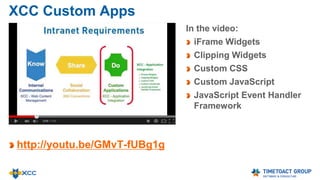
Custom Applications *
XCC for Content Masters
XCC for Web Masters
XCC Settings
About XCC & Team
* See special presentations
Layout
Layout
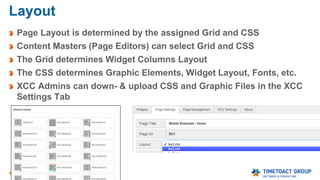
Page Layout is determined by the assigned Grid and CSS
Content Masters (Page Editors) can select Grid and CSS
The Grid determines Widget Columns Layout
The CSS determines Graphic Elements, Widget Layout, Fonts, etc.
XCC Admins can down- & upload CSS and Graphic Files in the XCC
Settings Tab
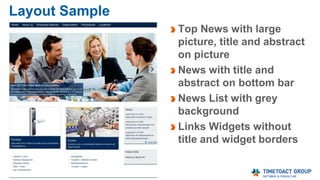
Layout Sample
Top News with large
picture, title and abstract
on picture
News with title and
abstract on bottom bar
News List with grey
background
Links Widgets without
title and widget borders
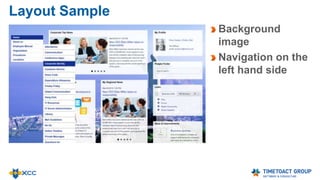
Layout Sample
Background
image
Navigation on the
left hand side
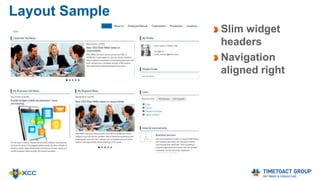
Layout Sample
Slim widget
headers
Navigation
aligned right
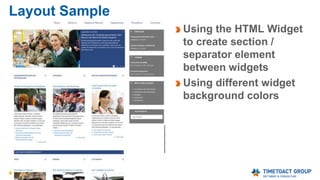
Layout Sample
Using the HTML Widget
to create section /
separator element
between widgets
Using different widget
background colors
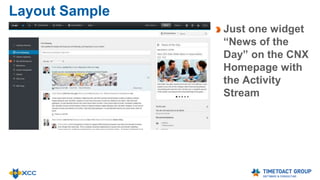
Layout Sample
Just one widget
“News of the
Day” on the CNX
Homepage with
the Activity
Stream
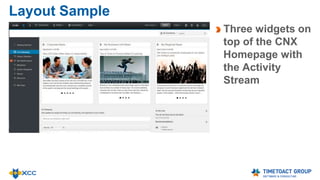
Layout Sample
Three widgets on
top of the CNX
Homepage with
the Activity
Stream
Mobile Experience
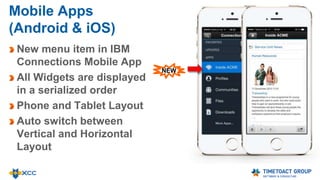
Mobile Apps
(Android & iOS)
New menu item in IBM
Connections Mobile App
All Widgets are displayed
in a serialized order
Phone and Tablet Layout
Auto switch between
Vertical and Horizontal
Layout
NEW
Widget Overview
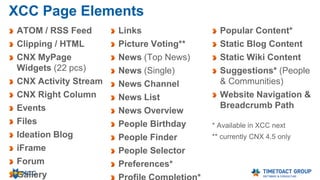
50 XCC Widgets & Page Elements
1. ATOM / RSS Feed
2. Clipping / HTML
3. Events
4. Files
5. Ideation Blog
6. iFrame
7. Forum
8. Gallery
9. Important Links
10. Links
11. Picture Voting*
12. Navigation
13. News (Top News)
14. News (Single)
15. News Channel
16. News List
17. News Overview
18. People Birthday
19. People Finder
20. People Selector
21. Preferences
22. Profile Completion
23. Popular Content
24. Saved Search
25. Static Blog Content
26. Static Wiki Content
27. Suggestions
(People &
Communities)
28. Website Navigation &
Breadcrumb Path
29. 22 x CNX MyPage
Widgets
49. CNX Activity Stream
50. CNX Right Column
* currently CNX 4.5 only
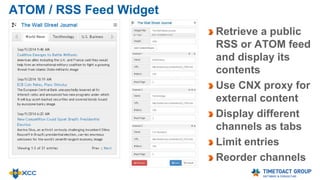
ATOM / RSS Feed Widget
Retrieve a public
RSS or ATOM feed
and display its
contents
Use CNX proxy for
external content
Display different
channels as tabs
Limit entries
Reorder channels
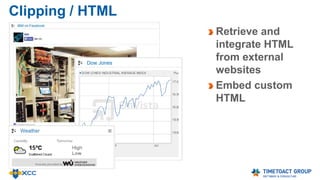
Clipping / HTML
Retrieve and
integrate HTML
from external
websites
Embed custom
HTML
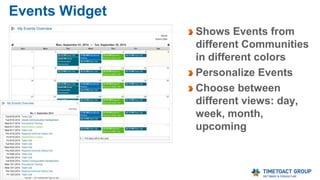
Events Widget
Shows Events from
different Communities
in different colors
Personalize Events
Choose between
different views: day,
week, month,
upcoming
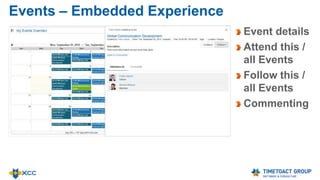
Events – Embedded Experience
Event details
Attend this /
all Events
Follow this /
all Events
Commenting
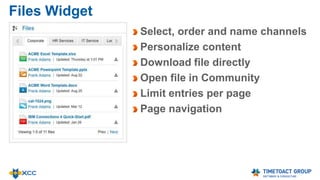
Files Widget
Select, order and name channels
Personalize content
Download file directly
Open file in Community
Limit entries per page
Page navigation
Files –
Full Page File Archive
‘# Items’ and ‘# Items per Page’
parameters allow to create
archives of files, bookmarks,
news / blog entries etc.
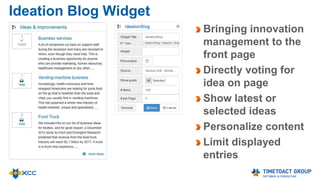
Ideation Blog Widget
Bringing innovation
management to the
front page
Directly voting for
idea on page
Show latest or
selected ideas
Personalize content
Limit displayed
entries
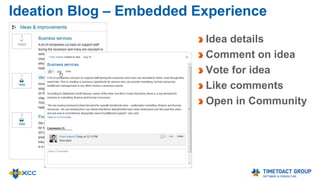
Ideation Blog – Embedded Experience
Idea details
Comment on idea
Vote for idea
Like comments
Open in Community
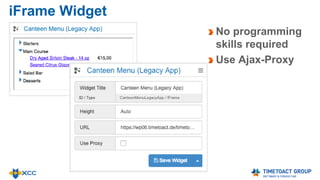
iFrame Widget
No programming
skills required
Use Ajax-Proxy
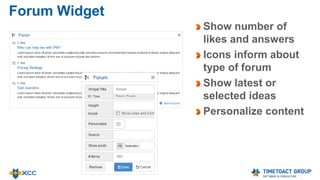
Forum Widget
Show number of
likes and answers
Icons inform about
type of forum
Show latest or
selected ideas
Personalize content
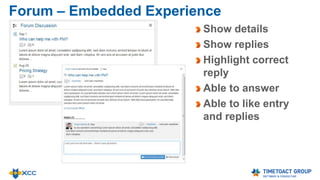
Forum – Embedded Experience
Show details
Show replies
Highlight correct
reply
Able to answer
Able to like entry
and replies
Important Links
Display most
relevant links
Limit entries
Set page size
Personalize
content
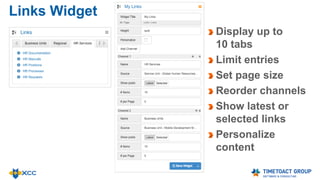
Links Widget
Display up to
10 tabs
Limit entries
Set page size
Reorder channels
Show latest or
selected links
Personalize
content
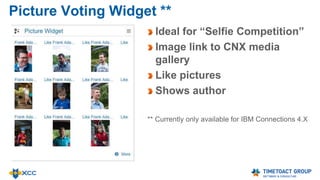
Picture Voting Widget **
Ideal for “Selfie Competition”
Image link to CNX media
gallery
Like pictures
Shows author
** Currently only available for IBM Connections 4.X
Navigation
Displays all Wiki
entries including all
sub-Wikis
Personalize Content
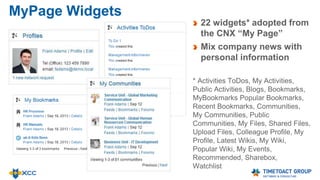
MyPage Widgets
22 widgets* adopted from
the CNX “My Page”
Mix company news with
personal information
* Activities ToDos, My Activities,
Public Activities, Blogs, Bookmarks,
MyBookmarks Popular Bookmarks,
Recent Bookmarks, Communities,
My Communities, Public
Communities, My Files, Shared Files,
Upload Files, Colleague Profile, My
Profile, Latest Wikis, My Wiki,
Popular Wiki, My Events,
Recommended, Sharebox,
Watchlist
News Widget (Top News)
Display video or
image from blog
entry as teaser
Display as slider
or single news
Show latest or
selected posts
Personalize
content
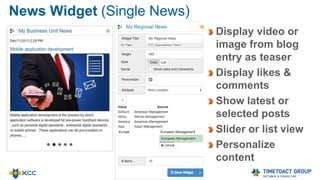
News Widget (Single News)
Display video or
image from blog
entry as teaser
Display likes &
comments
Show latest or
selected posts
Slider or list view
Personalize
content
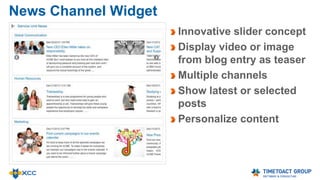
News Channel Widget
Innovative slider concept
Display video or image
from blog entry as teaser
Multiple channels
Show latest or selected
posts
Personalize content
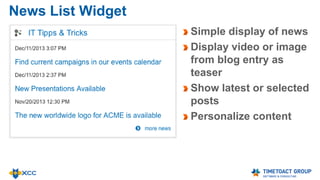
News List Widget
Simple display of news
Display video or image
from blog entry as
teaser
Show latest or selected
posts
Personalize content
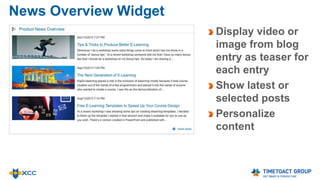
News Overview Widget
Display video or
image from blog
entry as teaser for
each entry
Show latest or
selected posts
Personalize
content
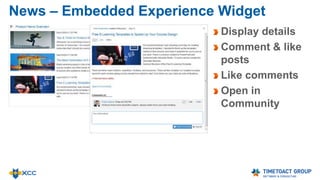
News – Embedded Experience Widget
Display details
Comment & like
posts
Like comments
Open in
Community
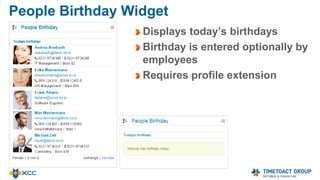
People Birthday Widget
Displays today’s birthdays
Birthday is entered optionally by
employees
Requires profile extension
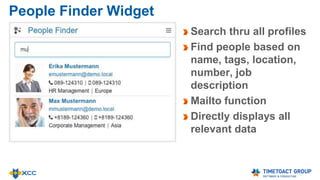
People Finder Widget
Search thru all profiles
Find people based on
name, tags, location,
number, job
description
Mailto function
Directly displays all
relevant data
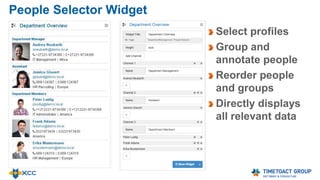
People Selector Widget
Select profiles
Group and
annotate people
Reorder people
and groups
Directly displays
all relevant data
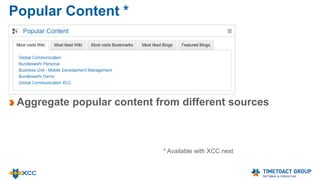
Popular Content
Aggregate popular content from different sources
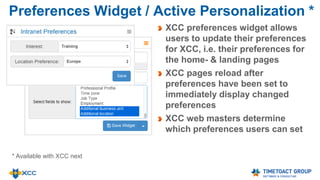
Preferences Widget / Active Personalization
XCC preferences widget allows
users to update their preferences
for XCC, i.e. their preferences for
the home- & landing pages
XCC pages reload after
preferences have been set to
immediately display changed
preferences
XCC web masters determine
which preferences users can set
Saved Search Saved Search
(across all
Connections)
Saved Custom
Search
Limit search results to
Activities, Blogs,
Bookmarks, Communities,
Files, Forums, Profiles,
Wikis, Status Updates
Public Content, My
Content
Sort by Relevance or
Date
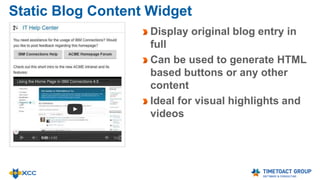
Static Blog Content Widget
Display original blog entry in
full
Can be used to generate HTML
based buttons or any other
content
Ideal for visual highlights and
videos
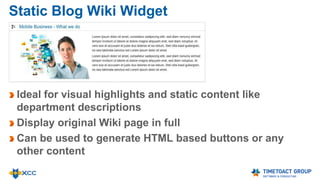
Static Blog Wiki Widget
Ideal for visual highlights and static content like
department descriptions
Display original Wiki page in full
Can be used to generate HTML based buttons or any
other content
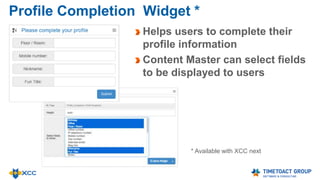
Profile Completion Widget
Helps users to complete their
profile information
Content Master can select fields
to be displayed to users
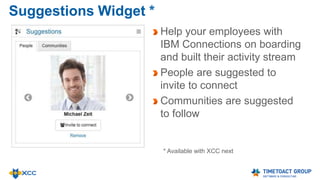
Suggestions Widget
Help your employees with
IBM Connections on boarding
and built their activity stream
People are suggested to
invite to connect
Communities are suggested
to follow
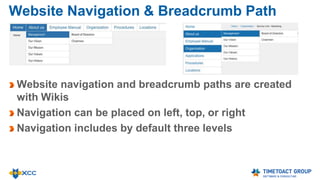
Website Navigation & Breadcrumb Path
Website navigation and breadcrumb paths are created
with Wikis
Navigation can be placed on left, top, or right
Navigation includes by default three levels
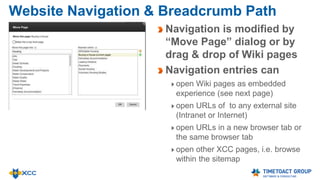
Website Navigation & Breadcrumb Path
Navigation is modified by
“Move Page” dialog or by
drag & drop of Wiki pages
Navigation entries can
open Wiki pages as embedded
experience (see next page)
open URLs of to any external site
(Intranet or Internet)
open URLs in a new browser tab or
the same browser tab
open other XCC pages, i.e. browse
within the sitemap
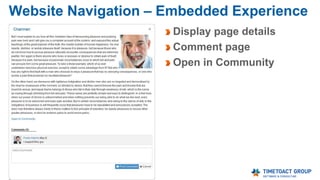
Website Navigation – Embedded Experience
Display page details
Comment page
Open in Community
Personalization
Personalization
See special presentation
http://www.slideshare.net/timetoact/xcc-personalization
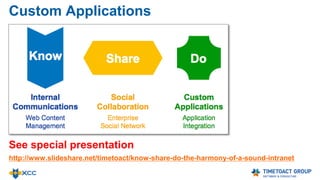
Custom Applications
Custom Applications
See special presentation
http://www.slideshare.net/timetoact/know-share-do-the-harmony-of-a-sound-intranet
XCC Access Rights
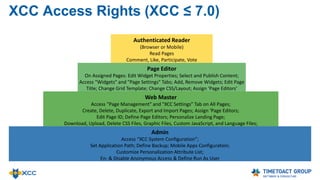
XCC Access Rights (XCC ≤ 7.0)
Authenticated Reader
(Browser or Mobile)
Read Pages
Comment, Like, Participate, Vote
Page Editor
On Assigned Pages: Edit Widget Properties; Select and Publish Content;
Access "Widgets" and "Page Settings" Tabs; Add, Remove Widgets; Edit Page
Title; Change Grid Template; Change CSS/Layout; Assign ‘Page Editors’
Web Master
Access "Page Management" and "XCC Settings” Tab on All Pages;
Create, Delete, Duplicate, Export and Import Pages; Assign ‘Page Editors;
Edit Page ID; Define Page Editors; Personalize Landing Page;
Download, Upload, Delete CSS Files, Graphic Files, Custom JavaScript, and Language Files;
Admin
Access “XCC System Configuration”;
Set Application Path; Define Backup; Mobile Apps Configuration;
Customize Personalization Attribute List;
En- & Disable Anonymous Access & Define Run As User
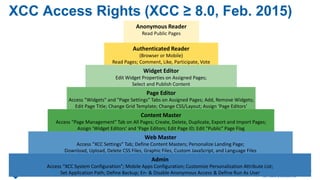
XCC Access Rights (XCC ≥ 8.0, Feb. 2015)
Anonymous Reader
Read Public Pages
Authenticated Reader
(Browser or Mobile)
Read Pages; Comment, Like, Participate, Vote
Widget Editor
Edit Widget Properties on Assigned Pages;
Select and Publish Content
Page Editor
Access "Widgets" and "Page Settings" Tabs on Assigned Pages; Add, Remove Widgets;
Edit Page Title; Change Grid Template; Change CSS/Layout; Assign ‘Page Editors’
Content Master
Access "Page Management" Tab on All Pages; Create, Delete, Duplicate, Export and Import Pages;
Assign ‘Widget Editors’ and ‘Page Editors; Edit Page ID; Edit "Public" Page Flag
Web Master
Access "XCC Settings” Tab; Define Content Masters; Personalize Landing Page;
Download, Upload, Delete CSS Files, Graphic Files, Custom JavaScript, and Language Files
Admin
Access “XCC System Configuration”; Mobile Apps Configuration; Customize Personalization Attribute List;
Set Application Path; Define Backup; En- & Disable Anonymous Access & Define Run As User
XCC for Page Editors
Page Editors can edit XCC pages only when listed as page
editor
Edit Widget Properties
Drag & Drop Widgets
Access ‘Widgets Tab’ and ‘Page Settings tabs’
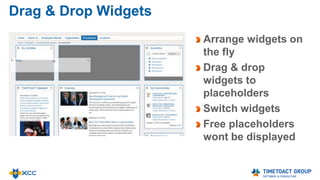
Drag & Drop Widgets
Arrange widgets on
the fly
Drag & drop
widgets to
placeholders
Switch widgets
Free placeholders
wont be displayed
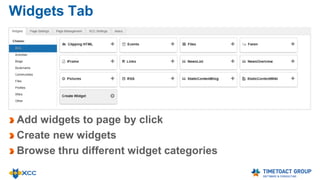
Widgets Tab
Add widgets to page by click
Create new widgets
Browse thru different widget categories
XCC for Content Masters
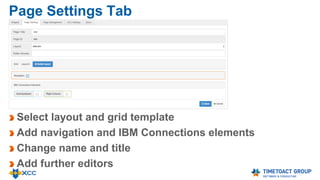
Page Settings Tab
Select layout and grid template
Add navigation and IBM Connections elements
Change name and title
Add further editors
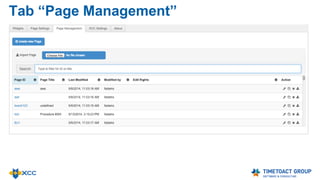
Tab “Page Management”
Create and manage pages
Search thru existing pages and sort by different values
Copy and delete pages
Quick edit name, title and editor access
Im- & Export Pages
XCC for Web Masters
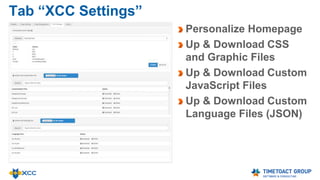
Tab “XCC Settings”
Personalize Homepage
Up & Download CSS
and Graphic Files
Up & Download Custom
JavaScript Files
Up & Download Custom
Language Files (JSON)
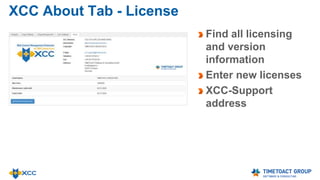
XCC About Tab - License
Find all licensing
and version
information
Enter new licenses
XCC-Support
address
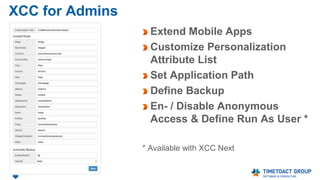
XCC for Admins
XCC for Admins
Extend Mobile Apps
Customize Personalization
Attribute List
Set Application Path
Define Backup
En- / Disable Anonymous
Access & Define Run As User *
* Available with XCC Next
About XCC & Team
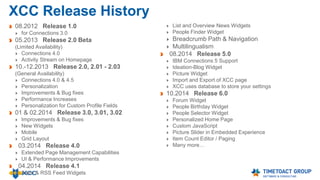
XCC Release History
08.2012 Release 1.0
for Connections 3.0
05.2013 Release 2.0 Beta
(Limited Availability)
Connections 4.0
Activity Stream on Homepage
10.-12.2013 Release 2.0, 2.01 - 2.03
(General Availability)
Connections 4.0 & 4.5
Personalization
Improvements & Bug fixes
Performance Increases
Personalization for Custom Profile Fields
01 & 02.2014 Release 3.0, 3.01, 3.02
Improvements & Bug fixes
New Widgets
Mobile
Grid Layout
03.2014 Release 4.0
Extended Page Management Capabilities
UI & Performance Improvements
04.2014 Release 4.1
Atom & RSS Feed Widgets
List and Overview News Widgets
People Finder Widget
Breadcrumb Path & Navigation
Multilingualism
IBM Connections 5 Support
Ideation-Blog Widget
Picture Widget
Import and Export of XCC page
XCC uses database to store your settings
10.2014 Release 6.0
Forum Widget
People Birthday Widget
People Selector Widget
Personalized Home Page
Custom JavaScript
Picture Slider in Embedded Experience
Item Count Editor / Paging
Many more…
XCC Release History
12.2014 Release 7.0
Suggestions Widget
Profile Completion Widget
Intranet Preferences Widget
Popular Content Widget
03.2015 Release 8.0
Important Links Widget
Saved Search Widget
News Aggregation
XCC as App for Communities
XCC as Community Landing Page
Anonymous Access
Mobile: Improved Navigation,
Mobile: Improved Source Selection
Web Content Management Extension (XCC)
Team Members
Felix Binsack (XCC Product Idea & Sponsor)
+49 221 97343-10
felix.binsack@timetoact.de
Babett Schäfer (XCC Consultant, QA)
+ 49 221 97343-38
babett.schaefer@timetoact.de
Philipp van den Boom (XCC Inside Sales)
+ 49 221 97343-66
Philipp.vandenBoom@timetoact.de
XCC Architects & Developers
Support Hotline
xcc-support@timetoact.de
+ 49 221 97343-53
Plus 15 IBM Connections FTEs
(Architects, Consultants, Admins,
Trainer, Support etc.)
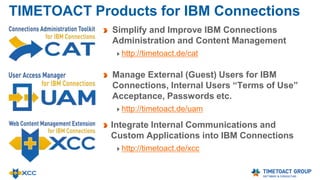
TIMETOACT Products for IBM Connections
Simplify and Improve IBM Connections
Administration, Content Management and User
Management
http://connections-apps.com/cat
Self Services and User Management,
Password and Security Management for
External (Guest) Usershttp://connections-
apps.com/uam
Integrate Internal Communications and
Custom Applications into IBM Connections
http://connections-apps.com/xcc
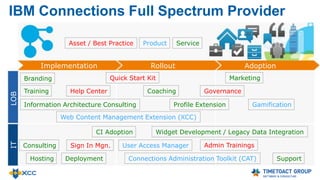
IBM Connections Full Spectrum Provider
Implementation Rollout Adoption
ITLOB
Deployment
Information Architecture Consulting
Web Content Management Extension (XCC)
Quick Start Kit
Help CenterTraining Coaching
CI Adoption Widget Development / Legacy Data Integration
Connections Administration Toolkit (CAT)
Consulting
Hosting
Gamification
MarketingBranding
Governance
Support
Admin TrainingsUser Access ManagerSign In Mgn.
Asset / Best Practice ServiceProduct
Profile Extension
Our Social Business
Implementation
Checklist
The ROOTS and FRUITS
of a Successful
Social Intranet
Implementation
http://socialintranet.de
Thank you for your interest
xcc@timetoact.de
+49 221 97343 0
http://connections-apps.com/xcc
http://www.slideshare.net/timetoact/
http://www.youtube.com/user/TIMETOACTGROUP
http://greenhouse.lotus.com/communities/community/XCC

XCC Self Study Guide

  • 1.
    TIMETOACT GROUP, Cologne,Germany http://timetoact.de/xcc XCC – IBM Connections Extension Self Study Guide (Mar. 2015)
  • 2.
    XCC Overview Introduction * LayoutSamples Widget Overview Mobile Experience Personalization * Custom Applications * XCC for Content Masters XCC for Web Masters XCC Settings About XCC & Team * See special presentations
  • 3.
  • 4.
    Layout Page Layout isdetermined by the assigned Grid and CSS Content Masters (Page Editors) can select Grid and CSS The Grid determines Widget Columns Layout The CSS determines Graphic Elements, Widget Layout, Fonts, etc. XCC Admins can down- & upload CSS and Graphic Files in the XCC Settings Tab
  • 5.
    Layout Sample Top Newswith large picture, title and abstract on picture News with title and abstract on bottom bar News List with grey background Links Widgets without title and widget borders
  • 6.
  • 7.
  • 8.
    Layout Sample Using theHTML Widget to create section / separator element between widgets Using different widget background colors
  • 9.
    Layout Sample Just onewidget “News of the Day” on the CNX Homepage with the Activity Stream
  • 10.
    Layout Sample Three widgetson top of the CNX Homepage with the Activity Stream
  • 11.
  • 12.
    Mobile Apps (Android &iOS) New menu item in IBM Connections Mobile App All Widgets are displayed in a serialized order Phone and Tablet Layout Auto switch between Vertical and Horizontal Layout NEW
  • 13.
  • 14.
    50 XCC Widgets& Page Elements 1. ATOM / RSS Feed 2. Clipping / HTML 3. Events 4. Files 5. Ideation Blog 6. iFrame 7. Forum 8. Gallery 9. Important Links 10. Links 11. Picture Voting* 12. Navigation 13. News (Top News) 14. News (Single) 15. News Channel 16. News List 17. News Overview 18. People Birthday 19. People Finder 20. People Selector 21. Preferences 22. Profile Completion 23. Popular Content 24. Saved Search 25. Static Blog Content 26. Static Wiki Content 27. Suggestions (People & Communities) 28. Website Navigation & Breadcrumb Path 29. 22 x CNX MyPage Widgets 49. CNX Activity Stream 50. CNX Right Column * currently CNX 4.5 only
  • 15.
    ATOM / RSSFeed Widget Retrieve a public RSS or ATOM feed and display its contents Use CNX proxy for external content Display different channels as tabs Limit entries Reorder channels
  • 16.
    Clipping / HTML Retrieveand integrate HTML from external websites Embed custom HTML
  • 17.
    Events Widget Shows Eventsfrom different Communities in different colors Personalize Events Choose between different views: day, week, month, upcoming
  • 18.
    Events – EmbeddedExperience Event details Attend this / all Events Follow this / all Events Commenting
  • 19.
    Files Widget Select, orderand name channels Personalize content Download file directly Open file in Community Limit entries per page Page navigation
  • 20.
    Files – Full PageFile Archive ‘# Items’ and ‘# Items per Page’ parameters allow to create archives of files, bookmarks, news / blog entries etc.
  • 21.
    Ideation Blog Widget Bringinginnovation management to the front page Directly voting for idea on page Show latest or selected ideas Personalize content Limit displayed entries
  • 22.
    Ideation Blog –Embedded Experience Idea details Comment on idea Vote for idea Like comments Open in Community
  • 23.
    iFrame Widget No programming skillsrequired Use Ajax-Proxy
  • 24.
    Forum Widget Show numberof likes and answers Icons inform about type of forum Show latest or selected ideas Personalize content
  • 25.
    Forum – EmbeddedExperience Show details Show replies Highlight correct reply Able to answer Able to like entry and replies
  • 26.
    Important Links Display most relevantlinks Limit entries Set page size Personalize content
  • 27.
    Links Widget Display upto 10 tabs Limit entries Set page size Reorder channels Show latest or selected links Personalize content
  • 28.
    Picture Voting Widget** Ideal for “Selfie Competition” Image link to CNX media gallery Like pictures Shows author ** Currently only available for IBM Connections 4.X
  • 29.
    Navigation Displays all Wiki entriesincluding all sub-Wikis Personalize Content
  • 30.
    MyPage Widgets 22 widgets*adopted from the CNX “My Page” Mix company news with personal information * Activities ToDos, My Activities, Public Activities, Blogs, Bookmarks, MyBookmarks Popular Bookmarks, Recent Bookmarks, Communities, My Communities, Public Communities, My Files, Shared Files, Upload Files, Colleague Profile, My Profile, Latest Wikis, My Wiki, Popular Wiki, My Events, Recommended, Sharebox, Watchlist
  • 31.
    News Widget (TopNews) Display video or image from blog entry as teaser Display as slider or single news Show latest or selected posts Personalize content
  • 32.
    News Widget (SingleNews) Display video or image from blog entry as teaser Display likes & comments Show latest or selected posts Slider or list view Personalize content
  • 33.
    News Channel Widget Innovativeslider concept Display video or image from blog entry as teaser Multiple channels Show latest or selected posts Personalize content
  • 34.
    News List Widget Simpledisplay of news Display video or image from blog entry as teaser Show latest or selected posts Personalize content
  • 35.
    News Overview Widget Displayvideo or image from blog entry as teaser for each entry Show latest or selected posts Personalize content
  • 36.
    News – EmbeddedExperience Widget Display details Comment & like posts Like comments Open in Community
  • 37.
    People Birthday Widget Displaystoday’s birthdays Birthday is entered optionally by employees Requires profile extension
  • 38.
    People Finder Widget Searchthru all profiles Find people based on name, tags, location, number, job description Mailto function Directly displays all relevant data
  • 39.
    People Selector Widget Selectprofiles Group and annotate people Reorder people and groups Directly displays all relevant data
  • 40.
    Popular Content Aggregate popularcontent from different sources
  • 41.
    Preferences Widget /Active Personalization XCC preferences widget allows users to update their preferences for XCC, i.e. their preferences for the home- & landing pages XCC pages reload after preferences have been set to immediately display changed preferences XCC web masters determine which preferences users can set
  • 42.
    Saved Search SavedSearch (across all Connections) Saved Custom Search Limit search results to Activities, Blogs, Bookmarks, Communities, Files, Forums, Profiles, Wikis, Status Updates Public Content, My Content Sort by Relevance or Date
  • 43.
    Static Blog ContentWidget Display original blog entry in full Can be used to generate HTML based buttons or any other content Ideal for visual highlights and videos
  • 44.
    Static Blog WikiWidget Ideal for visual highlights and static content like department descriptions Display original Wiki page in full Can be used to generate HTML based buttons or any other content
  • 45.
    Profile Completion Widget Helpsusers to complete their profile information Content Master can select fields to be displayed to users
  • 46.
    Suggestions Widget Help youremployees with IBM Connections on boarding and built their activity stream People are suggested to invite to connect Communities are suggested to follow
  • 47.
    Website Navigation &Breadcrumb Path Website navigation and breadcrumb paths are created with Wikis Navigation can be placed on left, top, or right Navigation includes by default three levels
  • 48.
    Website Navigation &Breadcrumb Path Navigation is modified by “Move Page” dialog or by drag & drop of Wiki pages Navigation entries can open Wiki pages as embedded experience (see next page) open URLs of to any external site (Intranet or Internet) open URLs in a new browser tab or the same browser tab open other XCC pages, i.e. browse within the sitemap
  • 49.
    Website Navigation –Embedded Experience Display page details Comment page Open in Community
  • 50.
  • 51.
  • 52.
  • 53.
    Custom Applications See specialpresentation http://www.slideshare.net/timetoact/know-share-do-the-harmony-of-a-sound-intranet
  • 54.
  • 55.
    XCC Access Rights(XCC ≤ 7.0) Authenticated Reader (Browser or Mobile) Read Pages Comment, Like, Participate, Vote Page Editor On Assigned Pages: Edit Widget Properties; Select and Publish Content; Access "Widgets" and "Page Settings" Tabs; Add, Remove Widgets; Edit Page Title; Change Grid Template; Change CSS/Layout; Assign ‘Page Editors’ Web Master Access "Page Management" and "XCC Settings” Tab on All Pages; Create, Delete, Duplicate, Export and Import Pages; Assign ‘Page Editors; Edit Page ID; Define Page Editors; Personalize Landing Page; Download, Upload, Delete CSS Files, Graphic Files, Custom JavaScript, and Language Files; Admin Access “XCC System Configuration”; Set Application Path; Define Backup; Mobile Apps Configuration; Customize Personalization Attribute List; En- & Disable Anonymous Access & Define Run As User
  • 56.
    XCC Access Rights(XCC ≥ 8.0, Feb. 2015) Anonymous Reader Read Public Pages Authenticated Reader (Browser or Mobile) Read Pages; Comment, Like, Participate, Vote Widget Editor Edit Widget Properties on Assigned Pages; Select and Publish Content Page Editor Access "Widgets" and "Page Settings" Tabs on Assigned Pages; Add, Remove Widgets; Edit Page Title; Change Grid Template; Change CSS/Layout; Assign ‘Page Editors’ Content Master Access "Page Management" Tab on All Pages; Create, Delete, Duplicate, Export and Import Pages; Assign ‘Widget Editors’ and ‘Page Editors; Edit Page ID; Edit "Public" Page Flag Web Master Access "XCC Settings” Tab; Define Content Masters; Personalize Landing Page; Download, Upload, Delete CSS Files, Graphic Files, Custom JavaScript, and Language Files Admin Access “XCC System Configuration”; Mobile Apps Configuration; Customize Personalization Attribute List; Set Application Path; Define Backup; En- & Disable Anonymous Access & Define Run As User
  • 57.
    XCC for PageEditors
  • 58.
    XCC for PageEditors Page Editors can edit XCC pages only when listed as page editor Edit Widget Properties Drag & Drop Widgets Access ‘Widgets Tab’ and ‘Page Settings tabs’
  • 59.
    Drag & DropWidgets Arrange widgets on the fly Drag & drop widgets to placeholders Switch widgets Free placeholders wont be displayed
  • 60.
    Widgets Tab Add widgetsto page by click Create new widgets Browse thru different widget categories
  • 61.
  • 62.
    Page Settings Tab Selectlayout and grid template Add navigation and IBM Connections elements Change name and title Add further editors
  • 63.
  • 64.
    Tab “Page Management” Createand manage pages Search thru existing pages and sort by different values Copy and delete pages Quick edit name, title and editor access Im- & Export Pages
  • 65.
    XCC for WebMasters
  • 66.
    Tab “XCC Settings” PersonalizeHomepage Up & Download CSS and Graphic Files Up & Download Custom JavaScript Files Up & Download Custom Language Files (JSON)
  • 67.
    XCC About Tab- License Find all licensing and version information Enter new licenses XCC-Support address
  • 68.
  • 69.
    XCC for Admins ExtendMobile Apps Customize Personalization Attribute List Set Application Path Define Backup En- / Disable Anonymous Access & Define Run As User * * Available with XCC Next
  • 70.
  • 71.
    XCC Release History 08.2012Release 1.0 for Connections 3.0 05.2013 Release 2.0 Beta (Limited Availability) Connections 4.0 Activity Stream on Homepage 10.-12.2013 Release 2.0, 2.01 - 2.03 (General Availability) Connections 4.0 & 4.5 Personalization Improvements & Bug fixes Performance Increases Personalization for Custom Profile Fields 01 & 02.2014 Release 3.0, 3.01, 3.02 Improvements & Bug fixes New Widgets Mobile Grid Layout 03.2014 Release 4.0 Extended Page Management Capabilities UI & Performance Improvements 04.2014 Release 4.1 Atom & RSS Feed Widgets List and Overview News Widgets People Finder Widget Breadcrumb Path & Navigation Multilingualism IBM Connections 5 Support Ideation-Blog Widget Picture Widget Import and Export of XCC page XCC uses database to store your settings 10.2014 Release 6.0 Forum Widget People Birthday Widget People Selector Widget Personalized Home Page Custom JavaScript Picture Slider in Embedded Experience Item Count Editor / Paging Many more…
  • 72.
    XCC Release History 12.2014Release 7.0 Suggestions Widget Profile Completion Widget Intranet Preferences Widget Popular Content Widget 03.2015 Release 8.0 Important Links Widget Saved Search Widget News Aggregation XCC as App for Communities XCC as Community Landing Page Anonymous Access Mobile: Improved Navigation, Mobile: Improved Source Selection
  • 73.
    Web Content ManagementExtension (XCC) Team Members Felix Binsack (XCC Product Idea & Sponsor) +49 221 97343-10 felix.binsack@timetoact.de Babett Schäfer (XCC Consultant, QA) + 49 221 97343-38 babett.schaefer@timetoact.de Philipp van den Boom (XCC Inside Sales) + 49 221 97343-66 Philipp.vandenBoom@timetoact.de XCC Architects & Developers Support Hotline xcc-support@timetoact.de + 49 221 97343-53 Plus 15 IBM Connections FTEs (Architects, Consultants, Admins, Trainer, Support etc.)
  • 74.
    TIMETOACT Products forIBM Connections Simplify and Improve IBM Connections Administration, Content Management and User Management http://connections-apps.com/cat Self Services and User Management, Password and Security Management for External (Guest) Usershttp://connections- apps.com/uam Integrate Internal Communications and Custom Applications into IBM Connections http://connections-apps.com/xcc
  • 75.
    IBM Connections FullSpectrum Provider Implementation Rollout Adoption ITLOB Deployment Information Architecture Consulting Web Content Management Extension (XCC) Quick Start Kit Help CenterTraining Coaching CI Adoption Widget Development / Legacy Data Integration Connections Administration Toolkit (CAT) Consulting Hosting Gamification MarketingBranding Governance Support Admin TrainingsUser Access ManagerSign In Mgn. Asset / Best Practice ServiceProduct Profile Extension
  • 76.
    Our Social Business Implementation Checklist TheROOTS and FRUITS of a Successful Social Intranet Implementation http://socialintranet.de
  • 77.
    Thank you foryour interest xcc@timetoact.de +49 221 97343 0 http://connections-apps.com/xcc http://www.slideshare.net/timetoact/ http://www.youtube.com/user/TIMETOACTGROUP http://greenhouse.lotus.com/communities/community/XCC