Web Content Management
Textual, Visual or Aural contents which are the parts of
any Website is known as Web Content and it may
include Text, Images, Document, e-Service, audio and
Video clip.
Managing all these
contents for any
business or usability
purpose is known as
Web Content
Management
Delivers a robust web experience delivery system
Powers some of the most sophisticated sites
Deliver the most engaging online experiences
See a rapid return on your online investments
Focus on your message, not the tools
Create & modify online content with consistency,
accuracy and speed
Improve efficiency
Empowering content owners
Keeping stringent guidelines and safety checks in place
Features of Content Management
Vignette Content Management
Vignette Content Management is a powerful solution for
creating and managing content for enterprise applications.
this product was the first of its kind in the early days of the
Internet.
VCM provides the rich and deep functionality that an
enterprise application demands. Its usability feature makes it
more significant Content Management Tool.
It is now a part of the OpenText an enterprise software
company and leader in Enterprise Content Management
Stage Diagram of Vignette CMS
VCM
VAP
Dynamic Site Module
Dynamic Portal Module
Management Stage
JSP /
Servlets
based
Apps
Delivery Stage
Navigates to Home Page
(Default Page of Vignette AppConsole)
Takes you to the Personal Home Page.
Note that this link will not appear if your
administrator has set the Personal
Home Page to appear as your Home
Page.
Takes you to pages where you can
create and manage sites and
channels.
Takes you to pages where you can
create and manage content items.
Takes you to pages where you can
view reports.
Here you can perform such administrator and
developer actions as creating and managing
classification, roles, workflows, creating
Content Type Definitions, and so on.
Site
Channel
Project Folder
Project folder, Channel and Site
CI CICI
Sites are vehicles for delivering content & application
functionality to a targeted set of users, such as employees,
customers, partners or geographical groups.
Sites function as container object for channels.
Site
A project Folder is to contain content items.
A project is simply a container or “folder” you can use to
organize your content if you wish.
Project Folder
 The term “channel” refers to a chunk of your website for users
of the old CMS, these would have been called “section”. Think of
channel as place holders on your site.
Channel
Provides a means for
organizing & grouping content
items for presenting to end
users.
A Channel can be associated
with only one site
 Home channel
 Unassigned content channel
 Archive content channel
 Application assets channel
Root Channel
THE CONTENT EXPERTSOPEN TEXT
A Content Type Definition(CTD) serves as a template
that can be used for creating an arbitrary number of
content instances.
Content Type Definition
THE CONTENT EXPERTSOPEN TEXT
Attribute correspond to specific records within a database table.
(they retrieve data from & store data to a column in a
database)
That is, there is one-to-one correlation b/w an attribute &
database column.
Attributes in a content instance must conforms to its Content
Type object.
. Data Source Attributes
. Extensible Attributes
Attributes in CTDs
THE CONTENT EXPERTSOPEN TEXT
 Widgets are HTML input type
 For each attribute in a content type
definition, a widget is assigned to a
attribute.
 Widgets let you control the
appearance of the attributes in the
Content Item Create/Edit pages.
(The Content Item Create/Edit pages are
the forms that display to help you create
instances of the content type definition).
Widgets
THE CONTENT EXPERTSOPEN TEXT
Widgets
GUID It is a hidden widget that maps 40 digit Unique Identifier
Text Field It is used for simple text field input
Text Area It is used for text area input
Edit Live It is used as an HTML Editor
Relator
This widget creates a contained relationship between two data
base tables for an attribute
Data Select Data Select is a drop down select list
Content Select This widget is used to select or create other contents to
THE CONTENT EXPERTSOPEN TEXT
A Content Item can be either a Content Instance or a
Static File
Content Instances are the Instances of any CTD.
On the other hand Static files may be any of html, XML,
Script or any executable file
Content Items
THE CONTENT EXPERTSOPEN TEXT
 Creating a Database Table
 Creating a Site
 Creating a Content Type Definition
 Registering the Content Type Definition with the Site
 Creating a Project
 Creating Content Items
 Associating the Content Items with Channels
Lifecycle of creating Content Items
THE CONTENT EXPERTSOPEN TEXT
Parker News Releases Activity
THE CONTENT EXPERTSOPEN TEXT
CTD of news release
THE CONTENT EXPERTSOPEN TEXT
Table1
THE CONTENT EXPERTSOPEN TEXT
Table2
THE CONTENT EXPERTSOPEN TEXT
CTD
Already
created CTDs
THE CONTENT EXPERTSOPEN TEXT
Attribute
THE CONTENT EXPERTSOPEN TEXT
Attribute2
THE CONTENT EXPERTSOPEN TEXT
Attribute3
ProFolder
THE CONTENT EXPERTSOPEN TEXT
CTD of news release
THE CONTENT EXPERTSOPEN TEXT
At the management stage there may be a chance where
you need to use already created Channels, Project
Folders, Content Type Definition, Content Instances and
all then you can accomplish this task through Import and
Export feature of VCM Suit.
Import & Export
THE CONTENT EXPERTSOPEN TEXT
• Create the database tables for the content types
• Import the content types and the workflow
• Update the Roles with the Capabilities required to work
with the new content types
• Deploy the war file containing the XSL files required for
preview to work
Steps for Import
Import db
THE CONTENT EXPERTSOPEN TEXT
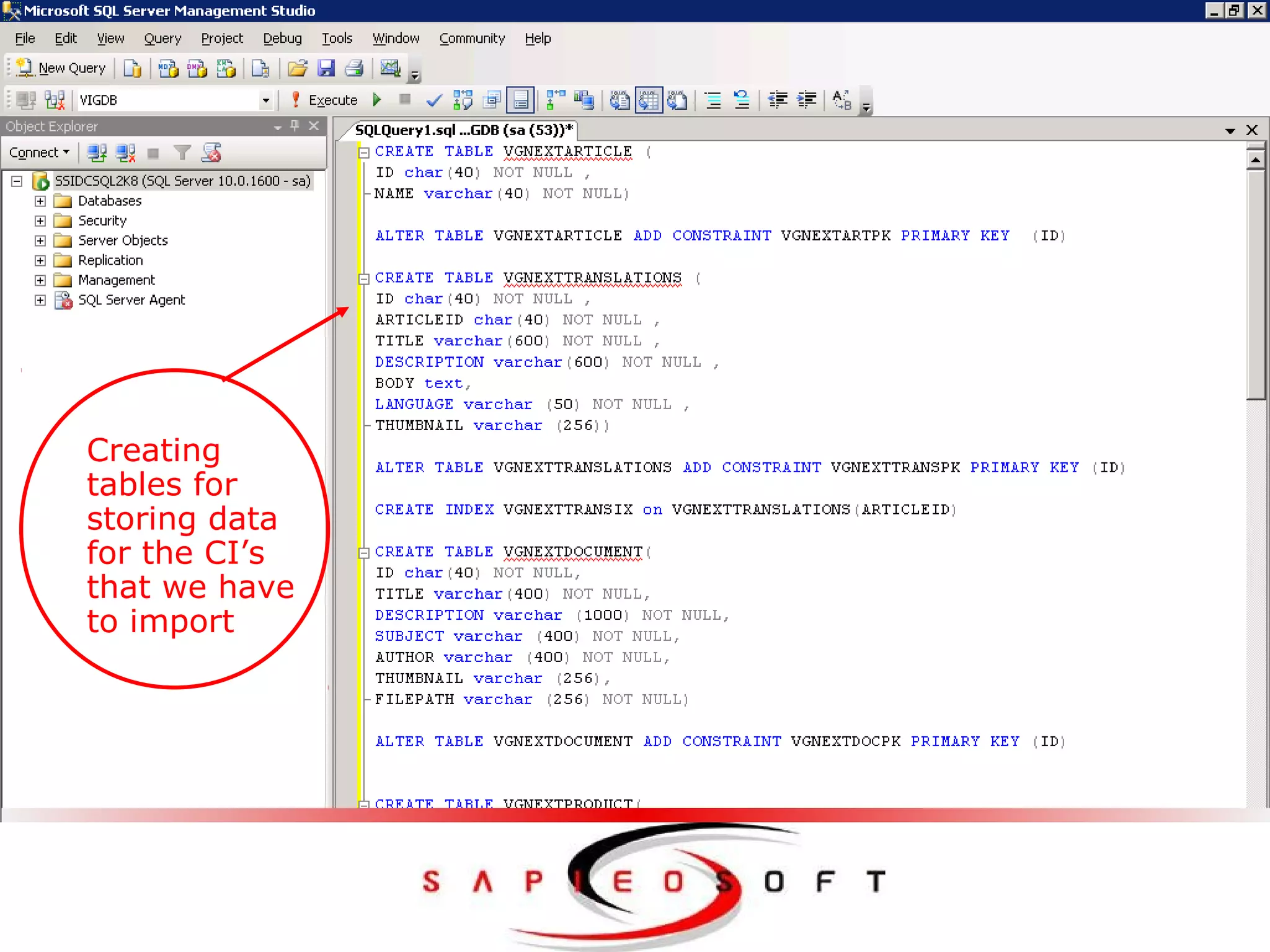
Creating
tables for
storing data
for the CI’s
that we have
to import
Setting enviornment var
THE CONTENT EXPERTSOPEN TEXT
vgnimport -u <username> -h <host:port> -f <path to zip
file>/vgnext.zip
Path – where vgnext.zip file exists. Host – 10.212.0.35
Username – vgnadmin Port – 27110
Import command
THE CONTENT EXPERTSOPEN TEXT
Imported Pro
THE CONTENT EXPERTSOPEN TEXT
Imported CTD
THE CONTENT EXPERTSOPEN TEXT
• The role manager is launched by selecting 'Workbench | Roles'
from the management console.
• To assign these capabilities to the Developer role, for example,
click on 'Developer', select the 'Capabilities' tab, then select the
'Add' button
Roles with the capability
THE CONTENT EXPERTSOPEN TEXT
• The role manager is launched by selecting 'Workbench | Roles'
from the management console.
• To assign these capabilities to the Developer role, for example,
click on 'Developer', select the 'Capabilities' tab, then select the
'Add' button
Roles with the capability
THE CONTENT EXPERTSOPEN TEXT
QuizFeel
free
to
ask
THE CONTENT EXPERTSOPEN TEXT
Presented by
KAUSHAL VARSHNEY
SHUBHAM AGARWAL
[Trainee Software Engineer]

Presentation kaushal

  • 1.
    Web Content Management Textual,Visual or Aural contents which are the parts of any Website is known as Web Content and it may include Text, Images, Document, e-Service, audio and Video clip. Managing all these contents for any business or usability purpose is known as Web Content Management
  • 2.
    Delivers a robustweb experience delivery system Powers some of the most sophisticated sites Deliver the most engaging online experiences See a rapid return on your online investments Focus on your message, not the tools Create & modify online content with consistency, accuracy and speed Improve efficiency Empowering content owners Keeping stringent guidelines and safety checks in place Features of Content Management
  • 3.
    Vignette Content Management VignetteContent Management is a powerful solution for creating and managing content for enterprise applications. this product was the first of its kind in the early days of the Internet. VCM provides the rich and deep functionality that an enterprise application demands. Its usability feature makes it more significant Content Management Tool. It is now a part of the OpenText an enterprise software company and leader in Enterprise Content Management
  • 4.
    Stage Diagram ofVignette CMS VCM VAP Dynamic Site Module Dynamic Portal Module Management Stage JSP / Servlets based Apps Delivery Stage
  • 5.
    Navigates to HomePage (Default Page of Vignette AppConsole)
  • 6.
    Takes you tothe Personal Home Page. Note that this link will not appear if your administrator has set the Personal Home Page to appear as your Home Page.
  • 7.
    Takes you topages where you can create and manage sites and channels.
  • 8.
    Takes you topages where you can create and manage content items.
  • 9.
    Takes you topages where you can view reports.
  • 10.
    Here you canperform such administrator and developer actions as creating and managing classification, roles, workflows, creating Content Type Definitions, and so on.
  • 11.
  • 12.
    Sites are vehiclesfor delivering content & application functionality to a targeted set of users, such as employees, customers, partners or geographical groups. Sites function as container object for channels. Site
  • 13.
    A project Folderis to contain content items. A project is simply a container or “folder” you can use to organize your content if you wish. Project Folder
  • 14.
     The term“channel” refers to a chunk of your website for users of the old CMS, these would have been called “section”. Think of channel as place holders on your site. Channel Provides a means for organizing & grouping content items for presenting to end users. A Channel can be associated with only one site
  • 15.
     Home channel Unassigned content channel  Archive content channel  Application assets channel Root Channel
  • 16.
    THE CONTENT EXPERTSOPENTEXT A Content Type Definition(CTD) serves as a template that can be used for creating an arbitrary number of content instances. Content Type Definition
  • 17.
    THE CONTENT EXPERTSOPENTEXT Attribute correspond to specific records within a database table. (they retrieve data from & store data to a column in a database) That is, there is one-to-one correlation b/w an attribute & database column. Attributes in a content instance must conforms to its Content Type object. . Data Source Attributes . Extensible Attributes Attributes in CTDs
  • 18.
    THE CONTENT EXPERTSOPENTEXT  Widgets are HTML input type  For each attribute in a content type definition, a widget is assigned to a attribute.  Widgets let you control the appearance of the attributes in the Content Item Create/Edit pages. (The Content Item Create/Edit pages are the forms that display to help you create instances of the content type definition). Widgets
  • 19.
    THE CONTENT EXPERTSOPENTEXT Widgets GUID It is a hidden widget that maps 40 digit Unique Identifier Text Field It is used for simple text field input Text Area It is used for text area input Edit Live It is used as an HTML Editor Relator This widget creates a contained relationship between two data base tables for an attribute Data Select Data Select is a drop down select list Content Select This widget is used to select or create other contents to
  • 20.
    THE CONTENT EXPERTSOPENTEXT A Content Item can be either a Content Instance or a Static File Content Instances are the Instances of any CTD. On the other hand Static files may be any of html, XML, Script or any executable file Content Items
  • 21.
    THE CONTENT EXPERTSOPENTEXT  Creating a Database Table  Creating a Site  Creating a Content Type Definition  Registering the Content Type Definition with the Site  Creating a Project  Creating Content Items  Associating the Content Items with Channels Lifecycle of creating Content Items
  • 22.
    THE CONTENT EXPERTSOPENTEXT Parker News Releases Activity
  • 23.
    THE CONTENT EXPERTSOPENTEXT CTD of news release
  • 24.
  • 25.
  • 26.
    THE CONTENT EXPERTSOPENTEXT CTD Already created CTDs
  • 27.
  • 28.
    THE CONTENT EXPERTSOPENTEXT Attribute2
  • 29.
    THE CONTENT EXPERTSOPENTEXT Attribute3
  • 30.
  • 31.
    THE CONTENT EXPERTSOPENTEXT CTD of news release
  • 32.
    THE CONTENT EXPERTSOPENTEXT At the management stage there may be a chance where you need to use already created Channels, Project Folders, Content Type Definition, Content Instances and all then you can accomplish this task through Import and Export feature of VCM Suit. Import & Export
  • 33.
    THE CONTENT EXPERTSOPENTEXT • Create the database tables for the content types • Import the content types and the workflow • Update the Roles with the Capabilities required to work with the new content types • Deploy the war file containing the XSL files required for preview to work Steps for Import
  • 34.
    Import db THE CONTENTEXPERTSOPEN TEXT Creating tables for storing data for the CI’s that we have to import
  • 35.
    Setting enviornment var THECONTENT EXPERTSOPEN TEXT
  • 36.
    THE CONTENT EXPERTSOPENTEXT vgnimport -u <username> -h <host:port> -f <path to zip file>/vgnext.zip Path – where vgnext.zip file exists. Host – 10.212.0.35 Username – vgnadmin Port – 27110 Import command
  • 37.
    THE CONTENT EXPERTSOPENTEXT Imported Pro
  • 38.
    THE CONTENT EXPERTSOPENTEXT Imported CTD
  • 39.
    THE CONTENT EXPERTSOPENTEXT • The role manager is launched by selecting 'Workbench | Roles' from the management console. • To assign these capabilities to the Developer role, for example, click on 'Developer', select the 'Capabilities' tab, then select the 'Add' button Roles with the capability
  • 40.
    THE CONTENT EXPERTSOPENTEXT • The role manager is launched by selecting 'Workbench | Roles' from the management console. • To assign these capabilities to the Developer role, for example, click on 'Developer', select the 'Capabilities' tab, then select the 'Add' button Roles with the capability
  • 41.
    THE CONTENT EXPERTSOPENTEXT QuizFeel free to ask
  • 42.
    THE CONTENT EXPERTSOPENTEXT Presented by KAUSHAL VARSHNEY SHUBHAM AGARWAL [Trainee Software Engineer]