1
What‘s New in XCC 12
October 30th, 2016
http://connections-apps.com/xcc
IBM Digital Workplace Hub
Powered by IBM Connections and
XCC – Web Content & Custom Apps
Extension
2
A. Branding “IBM Digital Workplace Hub”
B. New Features
1. Page Templating / Inheritance
2. Lock Functionality for Widgets
3. Set XCC Page Access to
Community Access
4. New Capabilities for
IBM Connections Cloud
5. XCC4Communities now in
IBM Connections Cloud
6. IFrame Widget in
IBM Connections Cloud
7. Full Responsive Layout
8. Text on Widget Title Graphics
9. Localizable Widget Title
10. XCC4Communities with Navigation
11. Embedded Experience Printing
C. New Widgets
12. ActivityStream Widget
13. Files Explorer Widget
with Folder Support
14. My Quicklinks Widget
15. My Notes Widget
16. Teaser Widget
17. Navigation Widget for XCC4Mobile
What’s New in XCC 12 (I/II)
3
D. Improvements
18. Page Management - Filters
19. Drag & Drop Upload of Files
20. Selected Option for Navigation
Widget
21. Page Settings - ‘Advanced section’
22. Direct Saving - Save with CTRL + S
23. Performance & Compatibility
24. Internal Improvements
25. IBM System I support
E. Best Practices
25. Layout with Parallax Effect
26. Employee Training and Testing with
FEB
27. Connections Content Manager (CCM)
Widget
F. Bugfixes
What’s New in XCC 12 (II/II)
4
A. Branding “IBM Digital Workplace Hub”
IBM now offers an IBM Connections
and XCC in a software bundle as the
“IBM Digital Workplace Hub”.
TIMETOACT will now refer to the
bundle as the “IBM Digital Workplace
Hub - Powered by IBM Connections
and XCC – Web Content & Custom
Apps Extension”.
Additionally TIMETOACT uses the term
“TIMETOACT Universal Intranet” for
the bundle.
Please don’t get confused !
5
New Features
What’s New in XCC 12
6
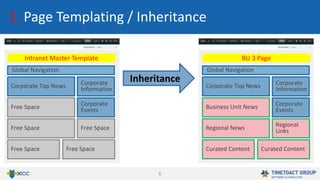
1. Page Templating / Inheritance
Inheritance
Global Navigation
Corporate Top News
Intranet Master Template
Corporate
Information
Free Space Free Space
Corporate
EventsFree Space
Global Navigation
Corporate Top News
BU 3 Page
Corporate
Information
Regional News Regional
Links
Curated Content Curated Content
Corporate
EventsBusiness Unit News
7
1. Page Templating / Inheritance
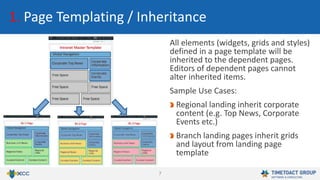
All elements (widgets, grids and styles)
defined in a page template will be
inherited to the dependent pages.
Editors of dependent pages cannot
alter inherited items.
Sample Use Cases:
Regional landing inherit corporate
content (e.g. Top News, Corporate
Events etc.)
Branch landing pages inherit grids
and layout from landing page
template
8
1. Page Templating / Inheritance
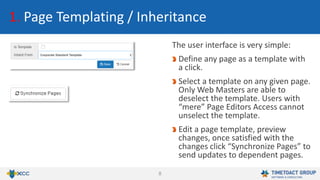
The user interface is very simple:
Define any page as a template with
a click.
Select a template on any given page.
Only Web Masters are able to
deselect the template. Users with
“mere” Page Editors Access cannot
unselect the template.
Edit a page template, preview
changes, once satisfied with the
changes click “Synchronize Pages” to
send updates to dependent pages.
9
2. Lock Functionality for Widgets
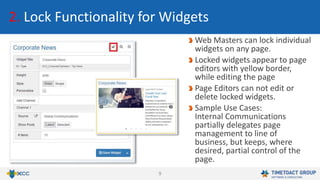
Web Masters can lock individual
widgets on any page.
Locked widgets appear to page
editors with yellow border,
while editing the page
Page Editors can not edit or
delete locked widgets.
Sample Use Cases:
Internal Communications
partially delegates page
management to line of
business, but keeps, where
desired, partial control of the
page.
10
3. Set XCC Page Access to Community Access
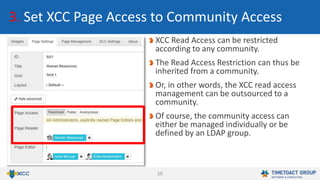
XCC Read Access can be restricted
according to any community.
The Read Access Restriction can thus be
inherited from a community.
Or, in other words, the XCC read access
management can be outsourced to a
community.
Of course, the community access can
either be managed individually or be
defined by an LDAP group.
11
Feature XCC 11 for
IBM Connections Cloud
XCC 12 for
IBM Connections Cloud
Header-Customization Limited Capabilities Full Header Customization available for all XCC
Pages incl. Home Icon, Flyout Page, Full
Responsiveness and Complete Layout Control
XCC for Anonymous Not Available Available
XCC for Communities Not Available Available
Activity Stream on XCC Pages Not Available Available with XCC Activity Stream Widget
iFrame Widget Not Available Available
4. New Capabilities for IBM Connections Cloud
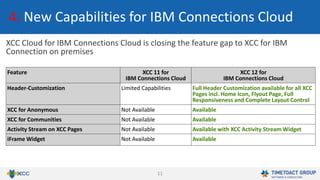
XCC Cloud for IBM Connections Cloud is closing the feature gap to XCC for IBM
Connection on premises
12
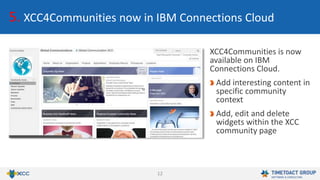
5. XCC4Communities now in IBM Connections Cloud
XCC4Communities is now
available on IBM
Connections Cloud.
Add interesting content in
specific community
context
Add, edit and delete
widgets within the XCC
community page
13
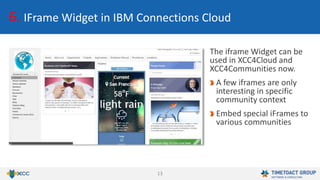
6. IFrame Widget in IBM Connections Cloud
The iframe Widget can be
used in XCC4Cloud and
XCC4Communities now.
A few iframes are only
interesting in specific
community context
Embed special iFrames to
various communities
14
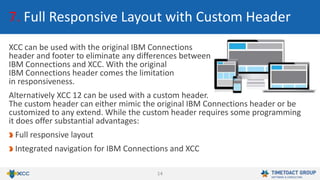
7. Full Responsive Layout with Custom Header
XCC can be used with the original IBM Connections
header and footer to eliminate any differences between
IBM Connections and XCC. With the original
IBM Connections header comes the limitation
in responsiveness.
Alternatively XCC 12 can be used with a custom header.
The custom header can either mimic the original IBM Connections header or be
customized to any extend. While the custom header requires some programming
it does offer substantial advantages:
Full responsive layout
Integrated navigation for IBM Connections and XCC
15
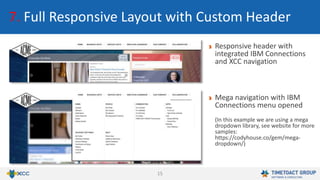
7. Full Responsive Layout with Custom Header
Responsive header with
integrated IBM Connections
and XCC navigation
Mega navigation with IBM
Connections menu opened
(In this example we are using a mega
dropdown library, see website for more
samples:
https://codyhouse.co/gem/mega-
dropdown/)
16
7. Full Responsive Layout with Custom Header
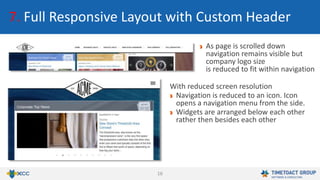
As page is scrolled down
navigation remains visible but
company logo size
is reduced to fit within navigation
With reduced screen resolution
Navigation is reduced to an icon. Icon
opens a navigation menu from the side.
Widgets are arranged below each other
rather then besides each other
17
8. Text on Widget Title Graphics
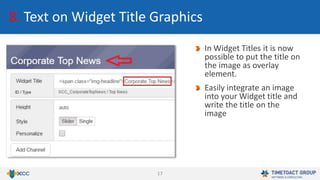
In Widget Titles it is now
possible to put the title on
the image as overlay
element.
Easily integrate an image
into your Widget title and
write the title on the
image
18
9. Localizable Widget Title
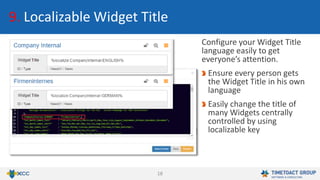
Configure your Widget Title
language easily to get
everyone’s attention.
Ensure every person gets
the Widget Title in his own
language
Easily change the title of
many Widgets centrally
controlled by using
localizable key
19
10. XCC4Communities with Navigation
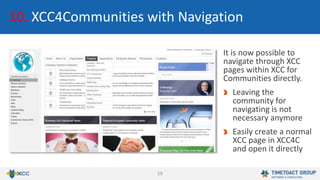
It is now possible to
navigate through XCC
pages within XCC for
Communities directly.
Leaving the
community for
navigating is not
necessary anymore
Easily create a normal
XCC page in XCC4C
and open it directly
20
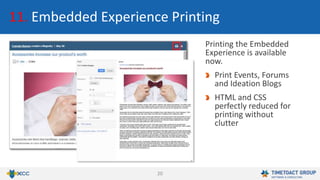
11. Embedded Experience Printing
Printing the Embedded
Experience is available
now.
Print Events, Forums
and Ideation Blogs
HTML and CSS
perfectly reduced for
printing without
clutter
21
New Widgets
What’s New in XCC 12
22
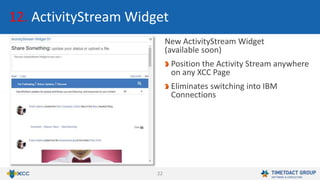
12. ActivityStream Widget
New ActivityStream Widget
(available soon)
Position the Activity Stream anywhere
on any XCC Page
Eliminates switching into IBM
Connections
23
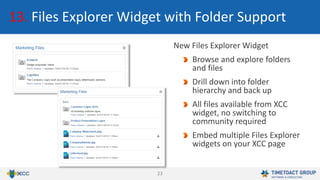
13. Files Explorer Widget with Folder Support
New Files Explorer Widget
Browse and explore folders
and files
Drill down into folder
hierarchy and back up
All files available from XCC
widget, no switching to
community required
Embed multiple Files Explorer
widgets on your XCC page
24
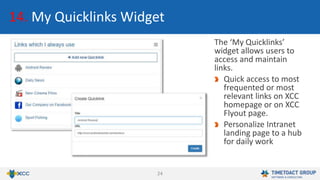
14. My Quicklinks Widget
The ‘My Quicklinks’
widget allows users to
access and maintain
links.
Quick access to most
frequented or most
relevant links on XCC
homepage or on XCC
Flyout page.
Personalize Intranet
landing page to a hub
for daily work
25
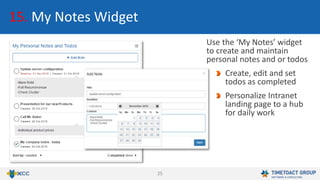
15. My Notes Widget
Use the ‘My Notes’ widget
to create and maintain
personal notes and or todos
Create, edit and set
todos as completed
Personalize Intranet
landing page to a hub
for daily work
26
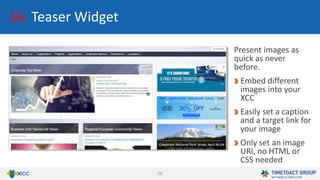
16. Teaser Widget
Present images as
quick as never
before.
Embed different
images into your
XCC
Easily set a caption
and a target link for
your image
Only set an image
URI, no HTML or
CSS needed
27
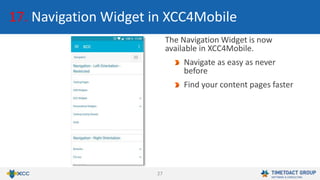
17. Navigation Widget in XCC4Mobile
The Navigation Widget is now
available in XCC4Mobile.
Navigate as easy as never
before
Find your content pages faster
28
Improvements
What’s New in XCC 12
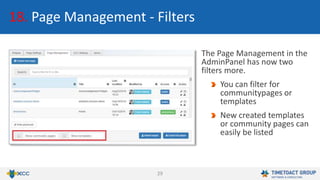
29
18. Page Management - Filters
The Page Management in the
AdminPanel has now two
filters more.
You can filter for
communitypages or
templates
New created templates
or community pages can
easily be listed
30
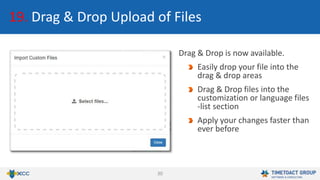
19. Drag & Drop Upload of Files
Drag & Drop is now available.
Easily drop your file into the
drag & drop areas
Drag & Drop files into the
customization or language files
-list section
Apply your changes faster than
ever before
31
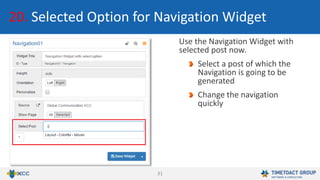
20. Selected Option for Navigation Widget
Use the Navigation Widget with
selected post now.
Select a post of which the
Navigation is going to be
generated
Change the navigation
quickly
32
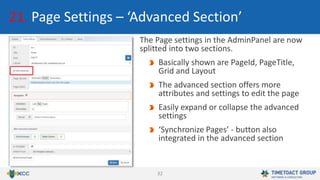
21. Page Settings – ‘Advanced Section’
The Page settings in the AdminPanel are now
splitted into two sections.
Basically shown are PageId, PageTitle,
Grid and Layout
The advanced section offers more
attributes and settings to edit the page
Easily expand or collapse the advanced
settings
‘Synchronize Pages’ - button also
integrated in the advanced section
33
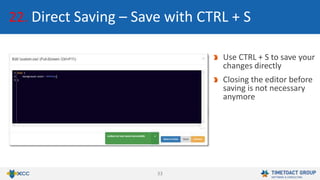
22. Direct Saving – Save with CTRL + S
Use CTRL + S to save your
changes directly
Closing the editor before
saving is not necessary
anymore
34
23. Performance & Compability
Optimized internal Database Access
Fewer, more efficient queries
Improved result caching
Improved connection pooling
Better Error-State-Handling
Overall better database access performance
35
23. Performance & Compability
JQuery updated from 2.14 to JQuery 3.0
Slick Slider Update to 1.6.0
Moment.js Update to 2.14.1
36
24. Internal Improvements
Better encapsulated object instances
New, efficient function calls (JQuery 3.0)
Shorter code
New sorting consolidation
37
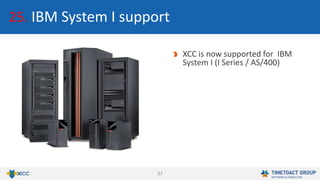
25. IBM System I support
XCC is now supported for IBM
System I (I Series / AS/400)
38
Best Practices
What’s New in XCC 12
39
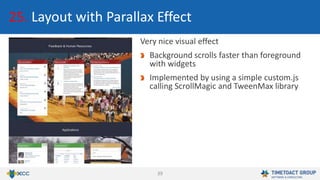
Very nice visual effect
Background scrolls faster than foreground
with widgets
Implemented by using a simple custom.js
calling ScrollMagic and TweenMax library
25. Layout with Parallax Effect
40
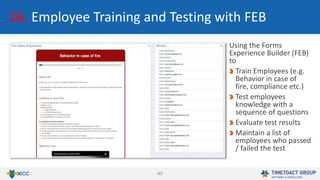
Using the Forms
Experience Builder (FEB)
to
Train Employees (e.g.
Behavior in case of
fire, compliance etc.)
Test employees
knowledge with a
sequence of questions
Evaluate test results
Maintain a list of
employees who passed
/ failed the test
26. Employee Training and Testing with FEB
41
27. Connections Content Manager (CCM) Widget
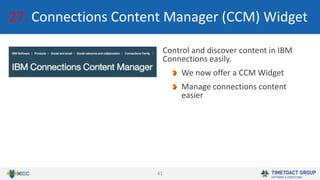
Control and discover content in IBM
Connections easily.
We now offer a CCM Widget
Manage connections content
easier
42
Bug Fixes
What’s New in XCC 12
43
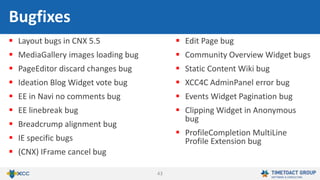
 Layout bugs in CNX 5.5
 MediaGallery images loading bug
 PageEditor discard changes bug
 Ideation Blog Widget vote bug
 EE in Navi no comments bug
 EE linebreak bug
 Breadcrump alignment bug
 IE specific bugs
 (CNX) IFrame cancel bug
 Edit Page bug
 Community Overview Widget bugs
 Static Content Wiki bug
 XCC4C AdminPanel error bug
 Events Widget Pagination bug
 Clipping Widget in Anonymous
bug
 ProfileCompletion MultiLine
Profile Extension bug
Bugfixes
44
E. Mobile Bugfixes
 Ideation Blog click on entry results
error bug
 Saved Search
 News/Forum Widget – Likes and
Comments bug
Mobile Bugfixes
45
Appendix
What‘s New in XCC 12
46
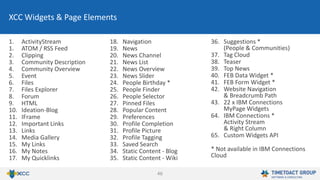
1. ActivityStream
1. ATOM / RSS Feed
2. Clipping
3. Community Description
4. Community Overview
5. Event
6. Files
7. Files Explorer
8. Forum
9. HTML
10. Ideation-Blog
11. IFrame
12. Important Links
13. Links
14. Media Gallery
15. My Links
16. My Notes
17. My Quicklinks
18. Navigation
19. News
20. News Channel
21. News List
22. News Overview
23. News Slider
24. People Birthday *
25. People Finder
26. People Selector
27. Pinned Files
28. Popular Content
29. Preferences
30. Profile Completion
31. Profile Picture
32. Profile Tagging
33. Saved Search
34. Static Content - Blog
35. Static Content - Wiki
36. Suggestions *
(People & Communities)
37. Tag Cloud
38. Teaser
39. Top News
40. FEB Data Widget *
41. FEB Form Widget *
42. Website Navigation
& Breadcrumb Path
43. 22 x IBM Connections
MyPage Widgets
64. IBM Connections *
Activity Stream
& Right Column
65. Custom Widgets API
* Not available in IBM Connections
Cloud
XCC Widgets & Page Elements
47
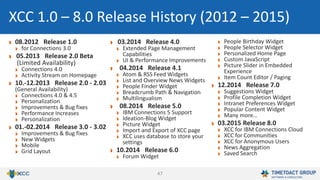
08.2012 Release 1.0
for Connections 3.0
05.2013 Release 2.0 Beta
(Limited Availability)
Connections 4.0
Activity Stream on Homepage
10.-12.2013 Release 2.0 - 2.03
(General Availability)
Connections 4.0 & 4.5
Personalization
Improvements & Bug fixes
Performance Increases
Personalization
01.-02.2014 Release 3.0 - 3.02
Improvements & Bug fixes
New Widgets
Mobile
Grid Layout
03.2014 Release 4.0
Extended Page Management
Capabilities
UI & Performance Improvements
04.2014 Release 4.1
Atom & RSS Feed Widgets
List and Overview News Widgets
People Finder Widget
Breadcrumb Path & Navigation
Multilingualism
08.2014 Release 5.0
IBM Connections 5 Support
Ideation-Blog Widget
Picture Widget
Import and Export of XCC page
XCC uses database to store your
settings
10.2014 Release 6.0
Forum Widget
People Birthday Widget
People Selector Widget
Personalized Home Page
Custom JavaScript
Picture Slider in Embedded
Experience
Item Count Editor / Paging
12.2014 Release 7.0
Suggestions Widget
Profile Completion Widget
Intranet Preferences Widget
Popular Content Widget
Many more…
03.2015 Release 8.0
XCC for IBM Connections Cloud
XCC for Communities
XCC for Anonymous Users
News Aggregation
Saved Search
XCC 1.0 – 8.0 Release History (2012 – 2015)
48
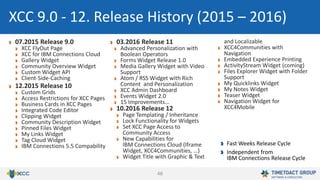
07.2015 Release 9.0
XCC FlyOut Page
XCC for IBM Connections Cloud
Gallery Widget
Community Overview Widget
Custom Widget API
Client-Side-Caching
12.2015 Release 10
Custom Grids
Access Restrictions for XCC Pages
Business Cards in XCC Pages
Integrated Code Editor
Clipping Widget
Community Description Widget
Pinned Files Widget
My Links Widget
Tag Cloud Widget
IBM Connections 5.5 Compability
03.2016 Release 11
Advanced Personalization with
Boolean Operators
Forms Widget Release 1.0
Media Gallery Widget with Video
Support
Atom / RSS Widget with Rich
Content and Personalization
XCC Admin Dashboard
Events Widget 2.0
15 Improvements…
10.2016 Release 12
Page Templating / Inheritance
Lock Functionality for Widgets
Set XCC Page Access to
Community Access
New Capabilities for
IBM Connections Cloud (Iframe
Widget, XCC4Communities, …)
Widget Title with Graphic & Text
and Localizable
XCC4Communities with
Navigation
Embedded Experience Printing
ActivityStream Widget (coming)
Files Explorer Widget with Folder
Support
My Quicklinks Widget
My Notes Widget
Teaser Widget
Navigation Widget for
XCC4Mobile
XCC 9.0 - 12. Release History (2015 – 2016)
Fast Weeks Release Cycle
Independent from
IBM Connections Release Cycle
49
New Videos
Universal Intranet – Introduction
https://youtu.be/oAjlVsmkAtE
Universal Intranet - A Truly Integrated User Interface
https://youtu.be/8TslN2ZE2vo
Universal Intranet - An Example
https://youtu.be/ePWjNOy3PAQ
Info Graphic with Sample Page
https://connections-apps.com/new-infographic-for-the-universal-intranet-
ibm-connections-and-xcc/
More Information
50
Infos & Sales
xcc-sales@timetoact.de
http://connections-apps.com/xcc
+49 221 97343 0
Felix Binsack
XCC Product Idea & Sponsor
+49 221 97343-10
felix.binsack@timetoact.de
Philipp van den Boom
XCC Inside Sales
+ 49 221 97343-66
philipp.vandenboom@timetoact.de
Babett Schäfer
Consultant
+ 49 221 97343-38
babett.schaefer@timetoact.de
Call or Mail us for Questions!
Tech Support
xcc-support@timetoact.de
http://xcc-support.timetoact.de
+ 49 221 97343-53
Björn Greulich
XCC Inside Sales
+ 49 221 97343-244
bjoern.greulich@timetoact.de
Jan Hendrik Groene
Consultant
+49 89 3840850
jan.groene@timetoact.de
Otto Foerg
Consultant
+49 89 38408529
otto.foerg@timetoact.de
51
Thank you for your interest
xcc@timetoact.de
+49 221 97343 0
http://connections-apps.com/xcc

What's New in XCC 12 - Release

  • 1.
    1 What‘s New inXCC 12 October 30th, 2016 http://connections-apps.com/xcc IBM Digital Workplace Hub Powered by IBM Connections and XCC – Web Content & Custom Apps Extension
  • 2.
    2 A. Branding “IBMDigital Workplace Hub” B. New Features 1. Page Templating / Inheritance 2. Lock Functionality for Widgets 3. Set XCC Page Access to Community Access 4. New Capabilities for IBM Connections Cloud 5. XCC4Communities now in IBM Connections Cloud 6. IFrame Widget in IBM Connections Cloud 7. Full Responsive Layout 8. Text on Widget Title Graphics 9. Localizable Widget Title 10. XCC4Communities with Navigation 11. Embedded Experience Printing C. New Widgets 12. ActivityStream Widget 13. Files Explorer Widget with Folder Support 14. My Quicklinks Widget 15. My Notes Widget 16. Teaser Widget 17. Navigation Widget for XCC4Mobile What’s New in XCC 12 (I/II)
  • 3.
    3 D. Improvements 18. PageManagement - Filters 19. Drag & Drop Upload of Files 20. Selected Option for Navigation Widget 21. Page Settings - ‘Advanced section’ 22. Direct Saving - Save with CTRL + S 23. Performance & Compatibility 24. Internal Improvements 25. IBM System I support E. Best Practices 25. Layout with Parallax Effect 26. Employee Training and Testing with FEB 27. Connections Content Manager (CCM) Widget F. Bugfixes What’s New in XCC 12 (II/II)
  • 4.
    4 A. Branding “IBMDigital Workplace Hub” IBM now offers an IBM Connections and XCC in a software bundle as the “IBM Digital Workplace Hub”. TIMETOACT will now refer to the bundle as the “IBM Digital Workplace Hub - Powered by IBM Connections and XCC – Web Content & Custom Apps Extension”. Additionally TIMETOACT uses the term “TIMETOACT Universal Intranet” for the bundle. Please don’t get confused !
  • 5.
  • 6.
    6 1. Page Templating/ Inheritance Inheritance Global Navigation Corporate Top News Intranet Master Template Corporate Information Free Space Free Space Free Space Free Space Corporate EventsFree Space Global Navigation Corporate Top News BU 3 Page Corporate Information Regional News Regional Links Curated Content Curated Content Corporate EventsBusiness Unit News
  • 7.
    7 1. Page Templating/ Inheritance All elements (widgets, grids and styles) defined in a page template will be inherited to the dependent pages. Editors of dependent pages cannot alter inherited items. Sample Use Cases: Regional landing inherit corporate content (e.g. Top News, Corporate Events etc.) Branch landing pages inherit grids and layout from landing page template
  • 8.
    8 1. Page Templating/ Inheritance The user interface is very simple: Define any page as a template with a click. Select a template on any given page. Only Web Masters are able to deselect the template. Users with “mere” Page Editors Access cannot unselect the template. Edit a page template, preview changes, once satisfied with the changes click “Synchronize Pages” to send updates to dependent pages.
  • 9.
    9 2. Lock Functionalityfor Widgets Web Masters can lock individual widgets on any page. Locked widgets appear to page editors with yellow border, while editing the page Page Editors can not edit or delete locked widgets. Sample Use Cases: Internal Communications partially delegates page management to line of business, but keeps, where desired, partial control of the page.
  • 10.
    10 3. Set XCCPage Access to Community Access XCC Read Access can be restricted according to any community. The Read Access Restriction can thus be inherited from a community. Or, in other words, the XCC read access management can be outsourced to a community. Of course, the community access can either be managed individually or be defined by an LDAP group.
  • 11.
    11 Feature XCC 11for IBM Connections Cloud XCC 12 for IBM Connections Cloud Header-Customization Limited Capabilities Full Header Customization available for all XCC Pages incl. Home Icon, Flyout Page, Full Responsiveness and Complete Layout Control XCC for Anonymous Not Available Available XCC for Communities Not Available Available Activity Stream on XCC Pages Not Available Available with XCC Activity Stream Widget iFrame Widget Not Available Available 4. New Capabilities for IBM Connections Cloud XCC Cloud for IBM Connections Cloud is closing the feature gap to XCC for IBM Connection on premises
  • 12.
    12 5. XCC4Communities nowin IBM Connections Cloud XCC4Communities is now available on IBM Connections Cloud. Add interesting content in specific community context Add, edit and delete widgets within the XCC community page
  • 13.
    13 6. IFrame Widgetin IBM Connections Cloud The iframe Widget can be used in XCC4Cloud and XCC4Communities now. A few iframes are only interesting in specific community context Embed special iFrames to various communities
  • 14.
    14 7. Full ResponsiveLayout with Custom Header XCC can be used with the original IBM Connections header and footer to eliminate any differences between IBM Connections and XCC. With the original IBM Connections header comes the limitation in responsiveness. Alternatively XCC 12 can be used with a custom header. The custom header can either mimic the original IBM Connections header or be customized to any extend. While the custom header requires some programming it does offer substantial advantages: Full responsive layout Integrated navigation for IBM Connections and XCC
  • 15.
    15 7. Full ResponsiveLayout with Custom Header Responsive header with integrated IBM Connections and XCC navigation Mega navigation with IBM Connections menu opened (In this example we are using a mega dropdown library, see website for more samples: https://codyhouse.co/gem/mega- dropdown/)
  • 16.
    16 7. Full ResponsiveLayout with Custom Header As page is scrolled down navigation remains visible but company logo size is reduced to fit within navigation With reduced screen resolution Navigation is reduced to an icon. Icon opens a navigation menu from the side. Widgets are arranged below each other rather then besides each other
  • 17.
    17 8. Text onWidget Title Graphics In Widget Titles it is now possible to put the title on the image as overlay element. Easily integrate an image into your Widget title and write the title on the image
  • 18.
    18 9. Localizable WidgetTitle Configure your Widget Title language easily to get everyone’s attention. Ensure every person gets the Widget Title in his own language Easily change the title of many Widgets centrally controlled by using localizable key
  • 19.
    19 10. XCC4Communities withNavigation It is now possible to navigate through XCC pages within XCC for Communities directly. Leaving the community for navigating is not necessary anymore Easily create a normal XCC page in XCC4C and open it directly
  • 20.
    20 11. Embedded ExperiencePrinting Printing the Embedded Experience is available now. Print Events, Forums and Ideation Blogs HTML and CSS perfectly reduced for printing without clutter
  • 21.
  • 22.
    22 12. ActivityStream Widget NewActivityStream Widget (available soon) Position the Activity Stream anywhere on any XCC Page Eliminates switching into IBM Connections
  • 23.
    23 13. Files ExplorerWidget with Folder Support New Files Explorer Widget Browse and explore folders and files Drill down into folder hierarchy and back up All files available from XCC widget, no switching to community required Embed multiple Files Explorer widgets on your XCC page
  • 24.
    24 14. My QuicklinksWidget The ‘My Quicklinks’ widget allows users to access and maintain links. Quick access to most frequented or most relevant links on XCC homepage or on XCC Flyout page. Personalize Intranet landing page to a hub for daily work
  • 25.
    25 15. My NotesWidget Use the ‘My Notes’ widget to create and maintain personal notes and or todos Create, edit and set todos as completed Personalize Intranet landing page to a hub for daily work
  • 26.
    26 16. Teaser Widget Presentimages as quick as never before. Embed different images into your XCC Easily set a caption and a target link for your image Only set an image URI, no HTML or CSS needed
  • 27.
    27 17. Navigation Widgetin XCC4Mobile The Navigation Widget is now available in XCC4Mobile. Navigate as easy as never before Find your content pages faster
  • 28.
  • 29.
    29 18. Page Management- Filters The Page Management in the AdminPanel has now two filters more. You can filter for communitypages or templates New created templates or community pages can easily be listed
  • 30.
    30 19. Drag &Drop Upload of Files Drag & Drop is now available. Easily drop your file into the drag & drop areas Drag & Drop files into the customization or language files -list section Apply your changes faster than ever before
  • 31.
    31 20. Selected Optionfor Navigation Widget Use the Navigation Widget with selected post now. Select a post of which the Navigation is going to be generated Change the navigation quickly
  • 32.
    32 21. Page Settings– ‘Advanced Section’ The Page settings in the AdminPanel are now splitted into two sections. Basically shown are PageId, PageTitle, Grid and Layout The advanced section offers more attributes and settings to edit the page Easily expand or collapse the advanced settings ‘Synchronize Pages’ - button also integrated in the advanced section
  • 33.
    33 22. Direct Saving– Save with CTRL + S Use CTRL + S to save your changes directly Closing the editor before saving is not necessary anymore
  • 34.
    34 23. Performance &Compability Optimized internal Database Access Fewer, more efficient queries Improved result caching Improved connection pooling Better Error-State-Handling Overall better database access performance
  • 35.
    35 23. Performance &Compability JQuery updated from 2.14 to JQuery 3.0 Slick Slider Update to 1.6.0 Moment.js Update to 2.14.1
  • 36.
    36 24. Internal Improvements Betterencapsulated object instances New, efficient function calls (JQuery 3.0) Shorter code New sorting consolidation
  • 37.
    37 25. IBM SystemI support XCC is now supported for IBM System I (I Series / AS/400)
  • 38.
  • 39.
    39 Very nice visualeffect Background scrolls faster than foreground with widgets Implemented by using a simple custom.js calling ScrollMagic and TweenMax library 25. Layout with Parallax Effect
  • 40.
    40 Using the Forms ExperienceBuilder (FEB) to Train Employees (e.g. Behavior in case of fire, compliance etc.) Test employees knowledge with a sequence of questions Evaluate test results Maintain a list of employees who passed / failed the test 26. Employee Training and Testing with FEB
  • 41.
    41 27. Connections ContentManager (CCM) Widget Control and discover content in IBM Connections easily. We now offer a CCM Widget Manage connections content easier
  • 42.
  • 43.
    43  Layout bugsin CNX 5.5  MediaGallery images loading bug  PageEditor discard changes bug  Ideation Blog Widget vote bug  EE in Navi no comments bug  EE linebreak bug  Breadcrump alignment bug  IE specific bugs  (CNX) IFrame cancel bug  Edit Page bug  Community Overview Widget bugs  Static Content Wiki bug  XCC4C AdminPanel error bug  Events Widget Pagination bug  Clipping Widget in Anonymous bug  ProfileCompletion MultiLine Profile Extension bug Bugfixes
  • 44.
    44 E. Mobile Bugfixes Ideation Blog click on entry results error bug  Saved Search  News/Forum Widget – Likes and Comments bug Mobile Bugfixes
  • 45.
  • 46.
    46 1. ActivityStream 1. ATOM/ RSS Feed 2. Clipping 3. Community Description 4. Community Overview 5. Event 6. Files 7. Files Explorer 8. Forum 9. HTML 10. Ideation-Blog 11. IFrame 12. Important Links 13. Links 14. Media Gallery 15. My Links 16. My Notes 17. My Quicklinks 18. Navigation 19. News 20. News Channel 21. News List 22. News Overview 23. News Slider 24. People Birthday * 25. People Finder 26. People Selector 27. Pinned Files 28. Popular Content 29. Preferences 30. Profile Completion 31. Profile Picture 32. Profile Tagging 33. Saved Search 34. Static Content - Blog 35. Static Content - Wiki 36. Suggestions * (People & Communities) 37. Tag Cloud 38. Teaser 39. Top News 40. FEB Data Widget * 41. FEB Form Widget * 42. Website Navigation & Breadcrumb Path 43. 22 x IBM Connections MyPage Widgets 64. IBM Connections * Activity Stream & Right Column 65. Custom Widgets API * Not available in IBM Connections Cloud XCC Widgets & Page Elements
  • 47.
    47 08.2012 Release 1.0 forConnections 3.0 05.2013 Release 2.0 Beta (Limited Availability) Connections 4.0 Activity Stream on Homepage 10.-12.2013 Release 2.0 - 2.03 (General Availability) Connections 4.0 & 4.5 Personalization Improvements & Bug fixes Performance Increases Personalization 01.-02.2014 Release 3.0 - 3.02 Improvements & Bug fixes New Widgets Mobile Grid Layout 03.2014 Release 4.0 Extended Page Management Capabilities UI & Performance Improvements 04.2014 Release 4.1 Atom & RSS Feed Widgets List and Overview News Widgets People Finder Widget Breadcrumb Path & Navigation Multilingualism 08.2014 Release 5.0 IBM Connections 5 Support Ideation-Blog Widget Picture Widget Import and Export of XCC page XCC uses database to store your settings 10.2014 Release 6.0 Forum Widget People Birthday Widget People Selector Widget Personalized Home Page Custom JavaScript Picture Slider in Embedded Experience Item Count Editor / Paging 12.2014 Release 7.0 Suggestions Widget Profile Completion Widget Intranet Preferences Widget Popular Content Widget Many more… 03.2015 Release 8.0 XCC for IBM Connections Cloud XCC for Communities XCC for Anonymous Users News Aggregation Saved Search XCC 1.0 – 8.0 Release History (2012 – 2015)
  • 48.
    48 07.2015 Release 9.0 XCCFlyOut Page XCC for IBM Connections Cloud Gallery Widget Community Overview Widget Custom Widget API Client-Side-Caching 12.2015 Release 10 Custom Grids Access Restrictions for XCC Pages Business Cards in XCC Pages Integrated Code Editor Clipping Widget Community Description Widget Pinned Files Widget My Links Widget Tag Cloud Widget IBM Connections 5.5 Compability 03.2016 Release 11 Advanced Personalization with Boolean Operators Forms Widget Release 1.0 Media Gallery Widget with Video Support Atom / RSS Widget with Rich Content and Personalization XCC Admin Dashboard Events Widget 2.0 15 Improvements… 10.2016 Release 12 Page Templating / Inheritance Lock Functionality for Widgets Set XCC Page Access to Community Access New Capabilities for IBM Connections Cloud (Iframe Widget, XCC4Communities, …) Widget Title with Graphic & Text and Localizable XCC4Communities with Navigation Embedded Experience Printing ActivityStream Widget (coming) Files Explorer Widget with Folder Support My Quicklinks Widget My Notes Widget Teaser Widget Navigation Widget for XCC4Mobile XCC 9.0 - 12. Release History (2015 – 2016) Fast Weeks Release Cycle Independent from IBM Connections Release Cycle
  • 49.
    49 New Videos Universal Intranet– Introduction https://youtu.be/oAjlVsmkAtE Universal Intranet - A Truly Integrated User Interface https://youtu.be/8TslN2ZE2vo Universal Intranet - An Example https://youtu.be/ePWjNOy3PAQ Info Graphic with Sample Page https://connections-apps.com/new-infographic-for-the-universal-intranet- ibm-connections-and-xcc/ More Information
  • 50.
    50 Infos & Sales xcc-sales@timetoact.de http://connections-apps.com/xcc +49221 97343 0 Felix Binsack XCC Product Idea & Sponsor +49 221 97343-10 felix.binsack@timetoact.de Philipp van den Boom XCC Inside Sales + 49 221 97343-66 philipp.vandenboom@timetoact.de Babett Schäfer Consultant + 49 221 97343-38 babett.schaefer@timetoact.de Call or Mail us for Questions! Tech Support xcc-support@timetoact.de http://xcc-support.timetoact.de + 49 221 97343-53 Björn Greulich XCC Inside Sales + 49 221 97343-244 bjoern.greulich@timetoact.de Jan Hendrik Groene Consultant +49 89 3840850 jan.groene@timetoact.de Otto Foerg Consultant +49 89 38408529 otto.foerg@timetoact.de
  • 51.
    51 Thank you foryour interest xcc@timetoact.de +49 221 97343 0 http://connections-apps.com/xcc