Layout Options
& Sample Use CasesOct. 2015
Layout Options
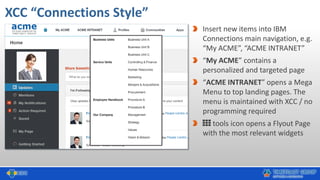
XCC “Connections Style”
Insert new items into IBM
Connections main navigation, e.g.
“My ACME”, “ACME INTRANET”
“My ACME” contains a
personalized and targeted page
“ACME INTRANET” opens a Mega
Menu to top landing pages. The
menu is maintained with XCC / no
programming required
tools icon opens a Flyout Page
with the most relevant widgets
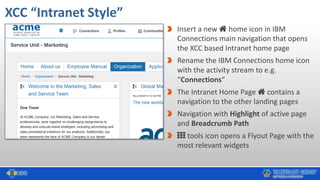
XCC “Intranet Style”
Insert a new home icon in IBM
Connections main navigation that opens
the XCC based Intranet home page
Rename the IBM Connections home icon
with the activity stream to e.g.
“Connections”
The Intranet Home Page contains a
navigation to the other landing pages
Navigation with Highlight of active page
and Breadcrumb Path
tools icon opens a Flyout Page with the
most relevant widgets
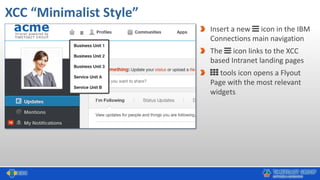
XCC “Minimalist Style”
Insert a new icon in the IBM
Connections main navigation
The icon links to the XCC
based Intranet landing pages
tools icon opens a Flyout
Page with the most relevant
widgets
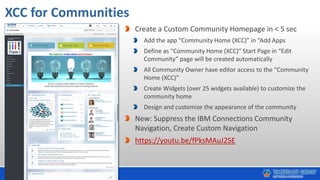
XCC for Communities
Create a Custom Community Homepage in < 5 sec
Add the app “Community Home (XCC)” in “Add Apps
Define as “Community Home (XCC)” Start Page in “Edit
Community” page will be created automatically
All Community Owner have editor access to the “Community
Home (XCC)”
Create Widgets (over 25 widgets available) to customize the
community home
Design and customize the appearance of the community
New: Suppress the IBM Connections Community
Navigation, Create Custom Navigation
https://youtu.be/fPksMAuJ2SE
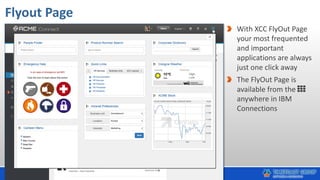
Flyout Page
With XCC FlyOut Page
your most frequented
and important
applications are always
just one click away
The FlyOut Page is
available from the
anywhere in IBM
Connections
Layout Examples “Connections Style”
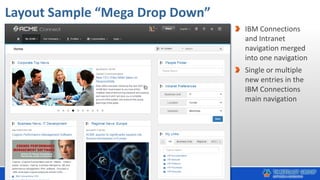
Layout Sample “Mega Drop Down”
IBM Connections
and Intranet
navigation merged
into one navigation
Single or multiple
new entries in the
IBM Connections
main navigation
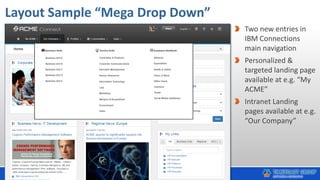
Layout Sample “Mega Drop Down”
Two new entries in
IBM Connections
main navigation
Personalized &
targeted landing page
available at e.g. “My
ACME”
Intranet Landing
pages available at e.g.
“Our Company”
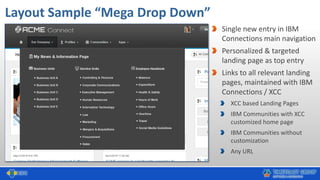
Layout Sample “Mega Drop Down”
Single new entry in IBM
Connections main navigation
Personalized & targeted
landing page as top entry
Links to all relevant landing
pages, maintained with IBM
Connections / XCC
XCC based Landing Pages
IBM Communities with XCC
customized home page
IBM Communities without
customization
Any URL
Layout Examples “Intranet Style”
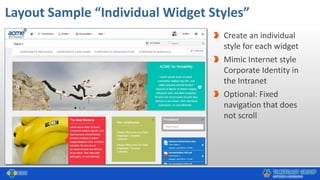
Layout Sample “Individual Widget Styles”
Create an individual
style for each widget
Mimic Internet style
Corporate Identity in
the Intranet
Optional: Fixed
navigation that does
not scroll
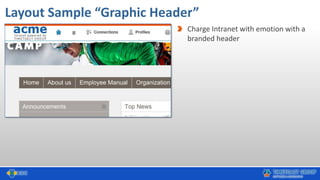
Layout Sample “Graphic Header”
Charge Intranet with emotion with a
branded header
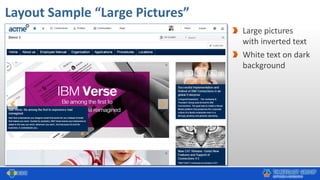
Layout Sample “Large Pictures”
Large pictures
with inverted text
White text on dark
background
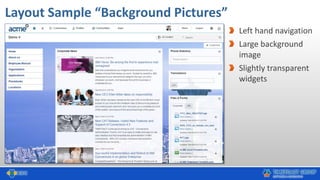
Layout Sample “Background Pictures”
Left hand navigation
Large background
image
Slightly transparent
widgets
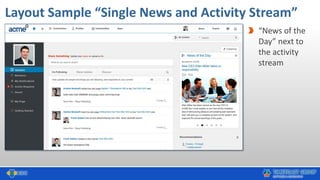
Layout Sample “Single News and Activity Stream”
“News of the
Day” next to
the activity
stream
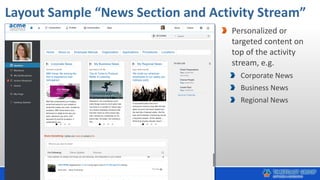
Layout Sample “News Section and Activity Stream”
Personalized or
targeted content on
top of the activity
stream, e.g.
Corporate News
Business News
Regional News
Sample Use Cases
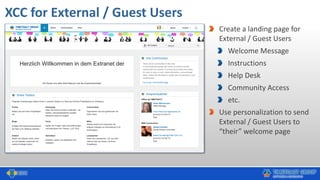
XCC for External / Guest Users
Create a landing page for
External / Guest Users
Welcome Message
Instructions
Help Desk
Community Access
etc.
Use personalization to send
External / Guest Users to
“their” welcome page
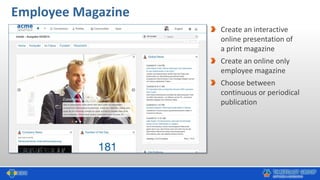
Employee Magazine
Create an interactive
online presentation of
a print magazine
Create an online only
employee magazine
Choose between
continuous or periodical
publication
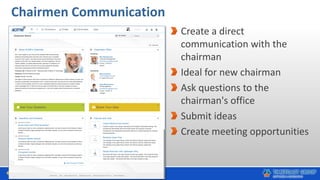
Chairmen Communication
Create a direct
communication with the
chairman
Ideal for new chairman
Ask questions to the
chairman's office
Submit ideas
Create meeting opportunities
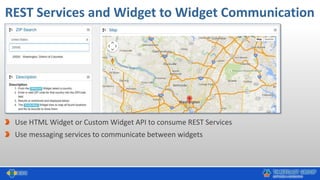
REST Services and Widget to Widget Communication
Use HTML Widget or Custom Widget API to consume REST Services
Use messaging services to communicate between widgets
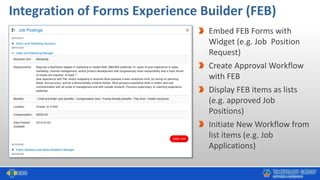
Integration of Forms Experience Builder (FEB)
Embed FEB Forms with
Widget (e.g. Job Position
Request)
Create Approval Workflow
with FEB
Display FEB items as lists
(e.g. approved Job
Positions)
Initiate New Workflow from
list items (e.g. Job
Applications)
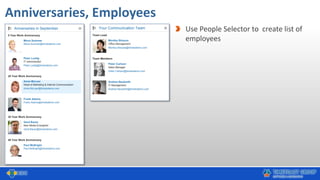
Anniversaries, Employees
Use People Selector to create list of
employees
What's in it for me?
Community
Managers
Line of
Business
Internal
Communication
s
Customers
& Partners
Mobile Users Anonymous
Access
Custom
Applications
Cloud Lovers
New Users
Average User
IT Department CFOs
http://www.slideshare.net/timetoact/xcc-benefits-who-profits-fr
Get Started with XCC - Alternatives
IBM Connections Cloud
See slide 8 in this presentation and
implement XCC in less then 60 min.
IBM Connections on Premises
Install XCC on your IBM Connections server
(see next slide)
Request from us an IBM Connections server with
XCC and demo content on
Get Started – Test drive XCC
1. Download XCC
https://greenhouse.lotus.com/communities/community/XCC
2. Install XCC
Less then 60 minutes
3. Test & Customize XCC
XCC now runs in Stealth Mode, i.e. is not visible to users.
XCC can therefore be installed, tested and customized in the
production environment without any interference with users.
Create and customize your first XCC pages
Customize Layout
Make XCC visible to all users, add new home button to CNX,
set XCC as CNX homepage
Call or Mail us for Questions !
Felix Binsack
(XCC Product Idea & Sponsor)
+49 221 97343-10
felix.binsack@timetoact.de
Babett Schäfer
(Intranet & XCC Consultant)
+ 49 221 97343-38
babett.schaefer@timetoact.de
Philipp van den Boom
(XCC Inside Sales)
+ 49 221 97343-66
Philipp.vandenBoom@timetoact.de
XCC Architects, Developers,
Customization & QA
Support Hotline
xcc-support@timetoact.de
http://xcc-support.timetoact.de
+ 49 221 97343-53
Thank you for your interest
xcc@timetoact.de
+49 221 97343 0
http://connections-apps.com/xcc

Xcc layout-options

  • 1.
    Layout Options & SampleUse CasesOct. 2015
  • 2.
  • 3.
    XCC “Connections Style” Insertnew items into IBM Connections main navigation, e.g. “My ACME”, “ACME INTRANET” “My ACME” contains a personalized and targeted page “ACME INTRANET” opens a Mega Menu to top landing pages. The menu is maintained with XCC / no programming required tools icon opens a Flyout Page with the most relevant widgets
  • 4.
    XCC “Intranet Style” Inserta new home icon in IBM Connections main navigation that opens the XCC based Intranet home page Rename the IBM Connections home icon with the activity stream to e.g. “Connections” The Intranet Home Page contains a navigation to the other landing pages Navigation with Highlight of active page and Breadcrumb Path tools icon opens a Flyout Page with the most relevant widgets
  • 5.
    XCC “Minimalist Style” Inserta new icon in the IBM Connections main navigation The icon links to the XCC based Intranet landing pages tools icon opens a Flyout Page with the most relevant widgets
  • 6.
    XCC for Communities Createa Custom Community Homepage in < 5 sec Add the app “Community Home (XCC)” in “Add Apps Define as “Community Home (XCC)” Start Page in “Edit Community” page will be created automatically All Community Owner have editor access to the “Community Home (XCC)” Create Widgets (over 25 widgets available) to customize the community home Design and customize the appearance of the community New: Suppress the IBM Connections Community Navigation, Create Custom Navigation https://youtu.be/fPksMAuJ2SE
  • 7.
    Flyout Page With XCCFlyOut Page your most frequented and important applications are always just one click away The FlyOut Page is available from the anywhere in IBM Connections
  • 8.
  • 9.
    Layout Sample “MegaDrop Down” IBM Connections and Intranet navigation merged into one navigation Single or multiple new entries in the IBM Connections main navigation
  • 10.
    Layout Sample “MegaDrop Down” Two new entries in IBM Connections main navigation Personalized & targeted landing page available at e.g. “My ACME” Intranet Landing pages available at e.g. “Our Company”
  • 11.
    Layout Sample “MegaDrop Down” Single new entry in IBM Connections main navigation Personalized & targeted landing page as top entry Links to all relevant landing pages, maintained with IBM Connections / XCC XCC based Landing Pages IBM Communities with XCC customized home page IBM Communities without customization Any URL
  • 12.
  • 13.
    Layout Sample “IndividualWidget Styles” Create an individual style for each widget Mimic Internet style Corporate Identity in the Intranet Optional: Fixed navigation that does not scroll
  • 14.
    Layout Sample “GraphicHeader” Charge Intranet with emotion with a branded header
  • 15.
    Layout Sample “LargePictures” Large pictures with inverted text White text on dark background
  • 16.
    Layout Sample “BackgroundPictures” Left hand navigation Large background image Slightly transparent widgets
  • 17.
    Layout Sample “SingleNews and Activity Stream” “News of the Day” next to the activity stream
  • 18.
    Layout Sample “NewsSection and Activity Stream” Personalized or targeted content on top of the activity stream, e.g. Corporate News Business News Regional News
  • 19.
  • 20.
    XCC for External/ Guest Users Create a landing page for External / Guest Users Welcome Message Instructions Help Desk Community Access etc. Use personalization to send External / Guest Users to “their” welcome page
  • 21.
    Employee Magazine Create aninteractive online presentation of a print magazine Create an online only employee magazine Choose between continuous or periodical publication
  • 22.
    Chairmen Communication Create adirect communication with the chairman Ideal for new chairman Ask questions to the chairman's office Submit ideas Create meeting opportunities
  • 23.
    REST Services andWidget to Widget Communication Use HTML Widget or Custom Widget API to consume REST Services Use messaging services to communicate between widgets
  • 24.
    Integration of FormsExperience Builder (FEB) Embed FEB Forms with Widget (e.g. Job Position Request) Create Approval Workflow with FEB Display FEB items as lists (e.g. approved Job Positions) Initiate New Workflow from list items (e.g. Job Applications)
  • 25.
    Anniversaries, Employees Use PeopleSelector to create list of employees
  • 26.
    What's in itfor me? Community Managers Line of Business Internal Communication s Customers & Partners Mobile Users Anonymous Access Custom Applications Cloud Lovers New Users Average User IT Department CFOs http://www.slideshare.net/timetoact/xcc-benefits-who-profits-fr
  • 27.
    Get Started withXCC - Alternatives IBM Connections Cloud See slide 8 in this presentation and implement XCC in less then 60 min. IBM Connections on Premises Install XCC on your IBM Connections server (see next slide) Request from us an IBM Connections server with XCC and demo content on
  • 28.
    Get Started –Test drive XCC 1. Download XCC https://greenhouse.lotus.com/communities/community/XCC 2. Install XCC Less then 60 minutes 3. Test & Customize XCC XCC now runs in Stealth Mode, i.e. is not visible to users. XCC can therefore be installed, tested and customized in the production environment without any interference with users. Create and customize your first XCC pages Customize Layout Make XCC visible to all users, add new home button to CNX, set XCC as CNX homepage
  • 29.
    Call or Mailus for Questions ! Felix Binsack (XCC Product Idea & Sponsor) +49 221 97343-10 felix.binsack@timetoact.de Babett Schäfer (Intranet & XCC Consultant) + 49 221 97343-38 babett.schaefer@timetoact.de Philipp van den Boom (XCC Inside Sales) + 49 221 97343-66 Philipp.vandenBoom@timetoact.de XCC Architects, Developers, Customization & QA Support Hotline xcc-support@timetoact.de http://xcc-support.timetoact.de + 49 221 97343-53
  • 30.
    Thank you foryour interest xcc@timetoact.de +49 221 97343 0 http://connections-apps.com/xcc