Unit testing Android
apps
Igor Filippov
About me
• Developing mobile apps for more than 5 years
• Primarily Android, but also iOS
• Experience with other languages and frameworks:

Go, Ruby, Python, JavaScript, Node
Working at Memorado - leading brain training app
memorado.com
Why bother at all?
• Manual testing doesn't scale
• CI and releases are easier when app is 

well-tested
• Test-first approach results in better code
What is a unit test?
• Unit tests focus on single class
• Unaware of external configuration, environment
• Real collaborators replaced with test doubles
Why should you focus on
unit tests?
• Fast to execute, unit test run directly on your
machine
• Easier to maintain
• Faster and easier to develop(compared to
integration, UI tests)
• TDD
What do you need to develop
unit tests on Android?
1. Separate business logic from platform code
2. SOLID (Single responsibility, Open-closed, Liskov
substitution, Interface segregation and Dependency
inversion)
3. Use the tools! JUnit, Mockito, Robolectric
Decouple business logic from platform code
It’s very important to keep your business logic away from
Activities, Fragments, Services, BroadcastReceivers.
Decouple business logic from platform code
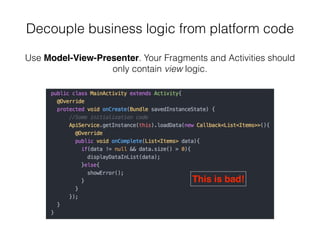
Use Model-View-Presenter. Your Fragments and Activities should
only contain view logic.
This is bad!
Decouple business logic from platform code
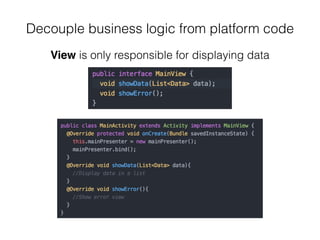
View is only responsible for displaying data
Decouple business logic from platform code
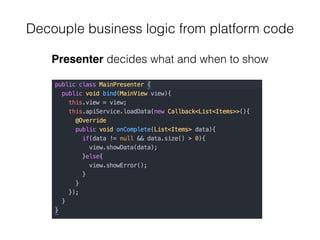
Presenter decides what and when to show
Decouple business logic from platform code
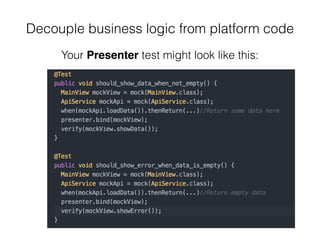
Your Presenter test might look like this:
Managing dependencies
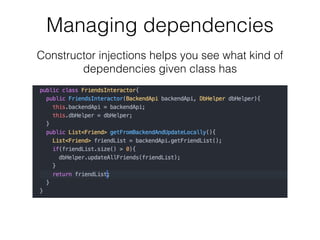
• It should be clear which dependencies your class
has
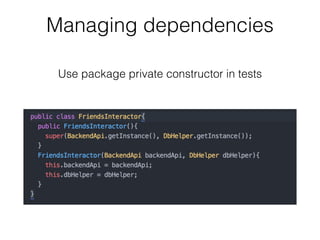
• You should be able to replace dependencies easily
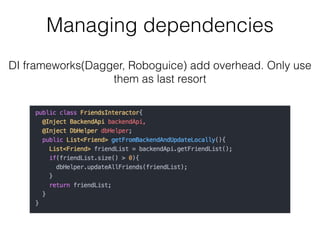
• Try not to use DI(Dagger, Roboguice) frameworks
right away, get some feeling for DI first
Managing dependencies
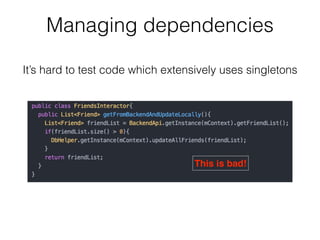
This is bad!
It’s hard to test code which extensively uses singletons
Managing dependencies
Constructor injections helps you see what kind of
dependencies given class has
Managing dependencies
DI frameworks(Dagger, Roboguice) add overhead. Only use
them as last resort
Managing dependencies
Use package private constructor in tests
Use the tools!
• JUnit - testing framework
• Robolectric - use to deal with Android
dependencies(Activities, Fragments)
• Mockito - create test doubles, verify behaviour
• AssertJ - fluent assertions
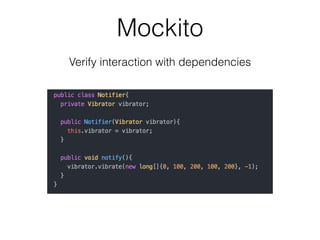
Mockito
Verify interaction with dependencies
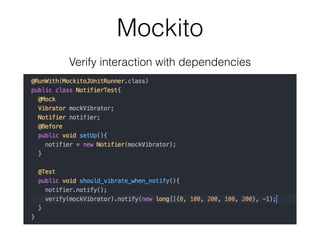
Mockito
Verify interaction with dependencies
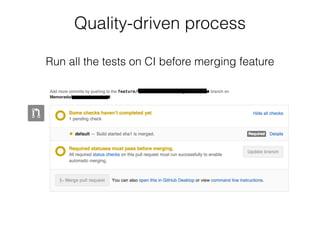
Quality-driven process
Run all the tests on CI before merging feature
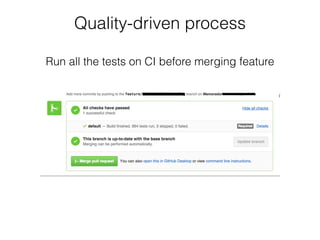
Quality-driven process
Run all the tests on CI before merging feature
Quality-driven process
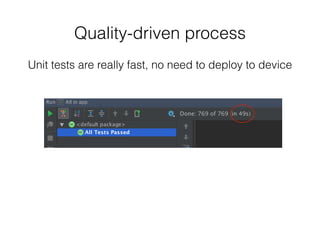
Unit tests are really fast, no need to deploy to device
Closing remarks
• In the end it’s all about your architecture
• If you follow software development good practices,
then you should be able to write unit tests
• https://github.com/f6v/android-good-practices
Join Memorado!
We’re making people smarter and we’re looking for
Android developers!
igor.filippov@memorado.com

Android testing

  • 1.
  • 2.
    About me • Developingmobile apps for more than 5 years • Primarily Android, but also iOS • Experience with other languages and frameworks:
 Go, Ruby, Python, JavaScript, Node Working at Memorado - leading brain training app memorado.com
  • 3.
    Why bother atall? • Manual testing doesn't scale • CI and releases are easier when app is 
 well-tested • Test-first approach results in better code
  • 4.
    What is aunit test? • Unit tests focus on single class • Unaware of external configuration, environment • Real collaborators replaced with test doubles
  • 5.
    Why should youfocus on unit tests? • Fast to execute, unit test run directly on your machine • Easier to maintain • Faster and easier to develop(compared to integration, UI tests) • TDD
  • 6.
    What do youneed to develop unit tests on Android? 1. Separate business logic from platform code 2. SOLID (Single responsibility, Open-closed, Liskov substitution, Interface segregation and Dependency inversion) 3. Use the tools! JUnit, Mockito, Robolectric
  • 7.
    Decouple business logicfrom platform code It’s very important to keep your business logic away from Activities, Fragments, Services, BroadcastReceivers.
  • 8.
    Decouple business logicfrom platform code Use Model-View-Presenter. Your Fragments and Activities should only contain view logic. This is bad!
  • 9.
    Decouple business logicfrom platform code View is only responsible for displaying data
  • 10.
    Decouple business logicfrom platform code Presenter decides what and when to show
  • 11.
    Decouple business logicfrom platform code Your Presenter test might look like this:
  • 12.
    Managing dependencies • Itshould be clear which dependencies your class has • You should be able to replace dependencies easily • Try not to use DI(Dagger, Roboguice) frameworks right away, get some feeling for DI first
  • 13.
    Managing dependencies This isbad! It’s hard to test code which extensively uses singletons
  • 14.
    Managing dependencies Constructor injectionshelps you see what kind of dependencies given class has
  • 15.
    Managing dependencies DI frameworks(Dagger,Roboguice) add overhead. Only use them as last resort
  • 16.
    Managing dependencies Use packageprivate constructor in tests
  • 17.
    Use the tools! •JUnit - testing framework • Robolectric - use to deal with Android dependencies(Activities, Fragments) • Mockito - create test doubles, verify behaviour • AssertJ - fluent assertions
  • 18.
  • 19.
  • 20.
    Quality-driven process Run allthe tests on CI before merging feature
  • 21.
    Quality-driven process Run allthe tests on CI before merging feature
  • 22.
    Quality-driven process Unit testsare really fast, no need to deploy to device
  • 23.
    Closing remarks • Inthe end it’s all about your architecture • If you follow software development good practices, then you should be able to write unit tests • https://github.com/f6v/android-good-practices
  • 24.
    Join Memorado! We’re makingpeople smarter and we’re looking for Android developers! igor.filippov@memorado.com