www.intermix.io
World-class
Data Engineering
with Amazon Redshift
San Francisco by intermix.io
www.intermix.io
Paul Lappas
CO-FOUNDER
& CEO
Lars Kamp
CO-FOUNDER
& COO
Dave Steinhoff
Chief Architect ParAccel
“Redshift Inventor”
SPEAKERS
We’ve seen more Redshift clusters than anybody else (besides maybe AWS)
www.intermix.io
This training is about making your job look like this.
www.intermix.io
And not like this.
Amazon Redshift has your data crown jewels. But as usage goes up, the red lamps
start to flash. Data loads fail, queries hang and dashboards slow down to a crawl.
www.intermix.io
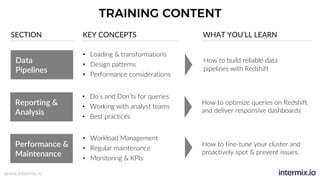
TRAINING CONTENT
Data
Pipelines
Reporting &
Analysis
Performance &
Maintenance
• Loading & transformations
• Design patterns
• Performance considerations
SECTION KEY CONCEPTS WHAT YOU’LL LEARN
• Do’s and Don’ts for queries
• Working with analyst teams
• Best practices
• Workload Management
• Regular maintenance
• Monitoring & KPIs
How to build reliable data
pipelines with Redshift
How to optimize queries on Redshift
and deliver responsive dashboards
How to fine-tune your cluster and
proactively spot & prevent issues.
www.intermix.io
Inventor of Redshift technology
Co-founder & Chief Architect @ ParAccel
Likes to invent databases & play pool
Co-founder intermix.io
AWS Customer Advisor Board
Runs massive multi-cluster environments
Paul Dave
WHY US?
SECTION 1
DATA PIPELINES
How to build reliable data
pipelines with Redshift
www.intermix.io
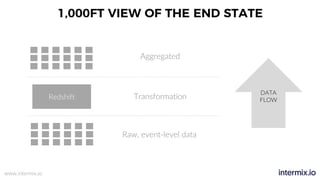
1,000FT VIEW OF THE END STATE
Redshift
Raw, event-level data
Transformation
Aggregated
DATA
FLOW
www.intermix.io
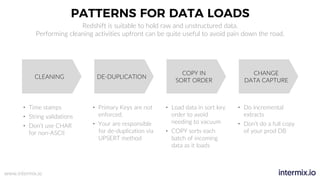
PATTERNS FOR DATA LOADS
CLEANING DE-DUPLICATION
COPY IN
SORT ORDER
CHANGE
DATA CAPTURE
• Time stamps
• String validations
• Don’t use CHAR
for non-ASCII
• Primary Keys are not
enforced.
• Your are responsible
for de-duplication via
UPSERT method
Redshift is suitable to hold raw and unstructured data.
Performing cleaning activities upfront can be quite useful to avoid pain down the road.
• Do incremental
extracts
• Don’t do a full copy
of your prod DB
• Load data in sort key
order to avoid
needing to vacuum
• COPY sorts each
batch of incoming
data as it loads
www.intermix.io
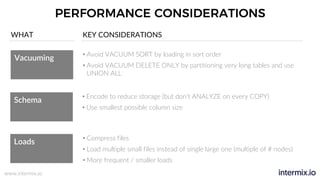
PERFORMANCE CONSIDERATIONS
Vacuuming
Schema
Loads
• Avoid VACUUM SORT by loading in sort order
• Avoid VACUUM DELETE ONLY by partitioning very long tables and use
UNION ALL
WHAT KEY CONSIDERATIONS
• Encode to reduce storage (but don’t ANALYZE on every COPY)
• Use smallest possible column size
• Compress files
• Load multiple small files instead of single large one (multiple of # nodes)
• More frequent / smaller loads
www.intermix.io
EXPLOSION OF DATA INTEGRATION MIDDLEWARE
Visibility is key
• Large tool ecosystem of
ETL vendors
• “More data sources, more
connectors”
• Roll your own when:
• Exotic data sources
• Cost / benefit
www.intermix.io
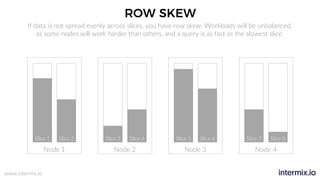
ROW SKEW
Node 1
Slice 1 Slice 2
Node 2
Slice 3 Slice 4
Node 3
Slice 5 Slice 6
Node 4
Slice 7 Slice 8
If data is not spread evenly across slices, you have row skew. Workloads will be unbalanced,
as some nodes will work harder than others, and a query is as fast as the slowest slice.
www.intermix.io
CHOOSING A DISTRIBUTION STYLE
Node 1
Slice
1
Slice
2
Node 2
Slice
3
Slice
4
Node 1
Slice
1
Slice
2
Node 2
Slice
3
Slice
4
Node 1
Slice
1
Slice
2
Node 2
Slice
3
Slice
4
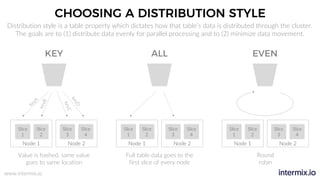
Distribution style is a table property which dictates how that table’s data is distributed through the cluster.
The goals are to (1) distribute data evenly for parallel processing and to (2) minimize data movement.
KEY ALL EVEN
keyA
keyB
keyC
keyD
Value is hashed, same value
goes to same location
Full table data goes to the
first slice of every node
Round
robin
www.intermix.io
SCHEMA DESIGN
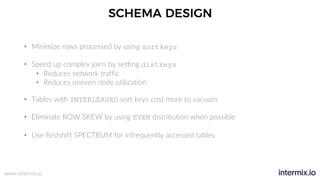
• Minimize rows processed by using sortkeys
• Speed up complex joins by setting distkeys
• Reduces network traffic
• Reduces uneven node utilization
• Tables with INTERLEAVED sort keys cost more to vacuum
• Eliminate ROW SKEW by using EVEN distribution when possible
• Use Redshift SPECTRUM for infrequently accessed tables
www.intermix.io
BATCH PIPELINE EXECUTION
• Jobs should be idempotent (ie produce the same results if executed once or multiple times)
• Minimize concurrency by reducing run times
• i.e. smaller, more frequent jobs (5 minute max. frequency)
• Eliminate queue wait times by matching concurrency with # of slots
• Minimize (<10 %) disk-based queries by allocating sufficient memory / slot
• Use a workflow tool like Airflow, Luigi, Pinball
www.intermix.io
Inventor of Redshift technology
Co-founder & Chief Architect @ ParAccel
Likes to invent databases & play pool
Co-founder intermix.io
AWS Customer Advisor Board
Runs massive multi-cluster environments
Paul Dave
WHY US?
SECTION 2
REPORTING & ANALYSIS
How to optimize queries on Redshift and
deliver responsive dashboards
www.intermix.io
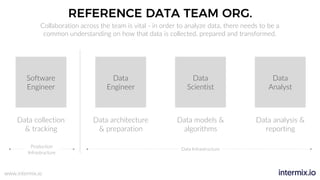
REFERENCE DATA TEAM ORG.
Software
Engineer
Data
Engineer
Data
Scientist
Data
Analyst
Data collection
& tracking
Data architecture
& preparation
Data models &
algorithms
Data analysis &
reporting
Production
Infrastructure
Data Infrastructure
Collaboration across the team is vital - in order to analyze data, there needs to be a
common understanding on how that data is collected, prepared and transformed.
www.intermix.io
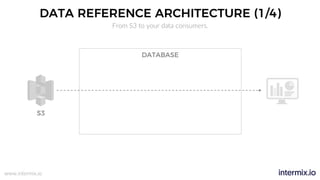
DATA REFERENCE ARCHITECTURE (1/4)
From S3 to your data consumers.
DATABASE
S3
www.intermix.io
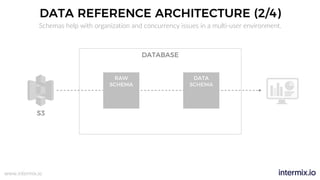
DATA REFERENCE ARCHITECTURE (2/4)
Schemas help with organization and concurrency issues in a multi-user environment.
RAW
SCHEMA
DATA
SCHEMA
DATABASE
S3
www.intermix.io
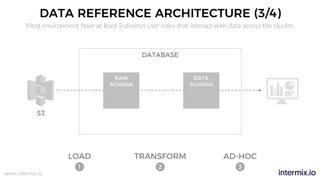
DATA REFERENCE ARCHITECTURE (3/4)
Most environment have at least 3 distinct user roles that interact with data across the cluster.
RAW
SCHEMA
DATA
SCHEMA
DATABASE
LOAD TRANSFORM AD-HOC
S3
1 2 3
www.intermix.io
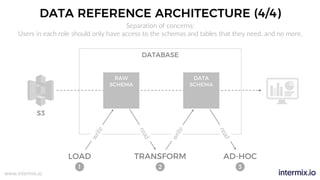
DATA REFERENCE ARCHITECTURE (4/4)
Separation of concerns:
Users in each role should only have access to the schemas and tables that they need, and no more.
RAW
SCHEMA
DATA
SCHEMA
DATABASE
S3
1 2 3
write
read
write
read
LOAD TRANSFORM AD-HOC
www.intermix.io
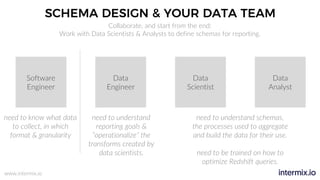
SCHEMA DESIGN & YOUR DATA TEAM
Software
Engineer
Data
Engineer
Data
Scientist
Data
Analyst
need to know what data
to collect, in which
format & granularity
Collaborate, and start from the end:
Work with Data Scientists & Analysts to define schemas for reporting.
need to understand
reporting goals &
“operationalize” the
transforms created by
data scientists.
need to understand schemas,
the processes used to aggregate
and build the data for their use.
need to be trained on how to
optimize Redshift queries.
www.intermix.io
AD-HOC QUERIES
Redshift can process billions of rows per query, but that doesn’t mean you should.
Consider some best practices that will greatly speed up query latency.
ü Limit the number of columns to scan
ü Reduce row processing with where clauses
• Row processing increases CPU and storage
ü Always use join conditions (avoid Cartesian products)
• Cross joins used nested-loops = slowest possible
ü Maximize ratio of rows returned : rows scanned
• e.g. don’t do ‘where id=345p4389579875423’
www.intermix.io
QUERY OPTIMIZATION
What’s wrong with this query?
with
table1_cte as
(
select * from table1
),
table2_cte as
(
select * from table2
),
select
*
from table1_cte as a
JOIN table2_cte as b
ON a.id = b.id
1
2
3
4
5
6
7
8
9
10
11
12
13
14
www.intermix.io
OPTIMIZATION #1
Better – limit rows processed
with
table1_cte as
(
select * from table1 where created_at>'{{l_bound}}' and
created_at <'{{u_bound}}'
),
table2_cte as
(
select * from table1 where created_at >'{{l_bound}}' and
created_at <'{{u_bound}}'
),
select
*
from table1_cte as a
JOIN table2_cte as b
ON a.id = b.id
1
2
3
4
5
6
7
8
9
10
11
12
13
14
15
16
www.intermix.io
OPTIMIZATION #2
Best – limit columns scanned
1
2
3
4
5
6
7
8
9
10
11
12
13
14
15
16
with
table1_cte as
(
select id,name,address from table1 where
start_time>'{{l_bound}}' and start_time<'{{u_bound}}'
),
table2_cte as
(
select id,name,address from table1 where
start_time>'{{l_bound}}' and start_time<'{{u_bound}}'
),
select
a.name,b.address
from table1_cte as a
JOIN table2_cte as b
ON a.id = b.id
www.intermix.io
Inventor of Redshift technology
Co-founder & Chief Architect @ ParAccel
Likes to invent databases & play pool
Co-founder intermix.io
AWS Customer Advisor Board
Runs massive multi-cluster environments
Paul Dave
WHY US?
SECTION 3
PERFORMANCE & MAINTENANCE
How to fine-tune your cluster and
proactively spot & prevent issues.
www.intermix.io
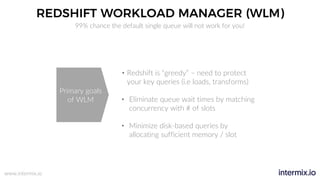
REDSHIFT WORKLOAD MANAGER (WLM)
99% chance the default single queue will not work for you!
• Redshift is “greedy” – need to protect
your key queries (i.e loads, transforms)
• Eliminate queue wait times by matching
concurrency with # of slots
• Minimize disk-based queries by
allocating sufficient memory / slot
Primary goals
of WLM
www.intermix.io
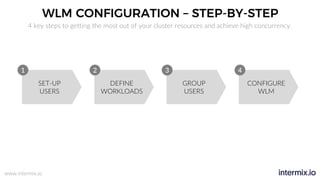
WLM CONFIGURATION – STEP-BY-STEP
SET-UP
USERS
DEFINE
WORKLOADS
GROUP
USERS
CONFIGURE
WLM
1 2 3 4
4 key steps to getting the most out of your cluster resources and achieve high concurrency.
www.intermix.io
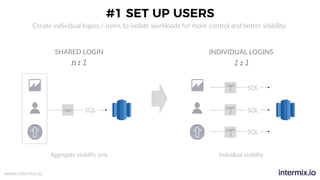
#1 SET UP USERS
Login SQL
Login
2 SQL
Login
1 SQL
Login
3
SQL
INDIVIDUAL LOGINS
n:1 1:1
SHARED LOGIN
Aggregate visibility only Individual visibility
Create individual logins / users to isolate workloads for more control and better visibility.
www.intermix.io
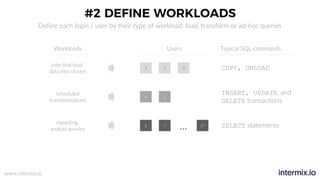
#2 DEFINE WORKLOADS
Define each login / user by their type of workload: load, transform or ad-hoc queries
Workloads Users Typical SQL commands
1 2 3 COPY, UNLOAD
4 5
INSERT, UPDATE, and
DELETE transactions
6 7
… 37 SELECT statements
jobs that load
data into cluster
scheduled
transformations
reporting,
analyst queries
www.intermix.io
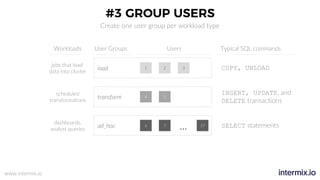
#3 GROUP USERS
Create one user group per workload type
User GroupsWorkloads Users Typical SQL commands
load 1 2 3
transform 4 5
ad_hoc 6 7
… 37
jobs that load
data into cluster
scheduled
transformations
dashboards,
analyst queries
COPY, UNLOAD
INSERT, UPDATE, and
DELETE transactions
SELECT statements
www.intermix.io
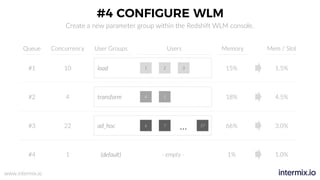
#4 CONFIGURE WLM
Create a new parameter group within the Redshift WLM console.
Queue User GroupsConcurrency Users Memory Mem / Slot
1 2#1 10 3 15% 1.5%
4 5#2 4 18% 4.5%
6 7
… 37#3 22 66% 3.0%
(default)#4 1 1% 1.0%
load
transform
ad_hoc
- empty -
www.intermix.io
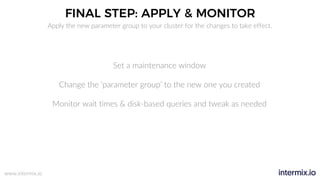
FINAL STEP: APPLY & MONITOR
Set a maintenance window
Change the ‘parameter group’ to the new one you created
Monitor wait times & disk-based queries and tweak as needed
Apply the new parameter group to your cluster for the changes to take effect.
www.intermix.io
REAL WORLD EXAMPLE
www.intermix.io
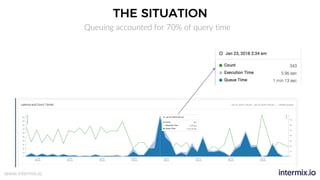
THE SITUATION
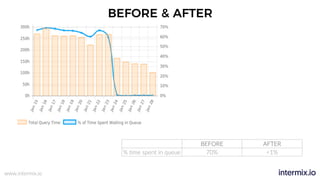
Queuing accounted for 70% of query time
www.intermix.io
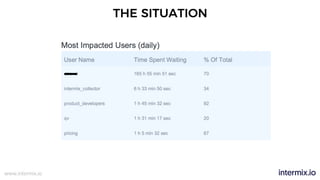
THE SITUATION
www.intermix.io
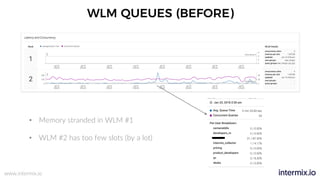
WLM QUEUES (BEFORE)
• Memory stranded in WLM #1
• WLM #2 has too few slots (by a lot)
www.intermix.io
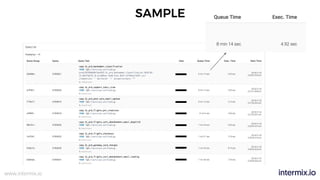
SAMPLE
www.intermix.io
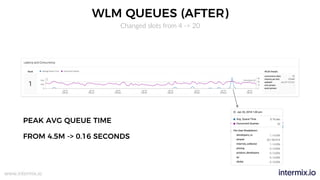
WLM QUEUES (AFTER)
PEAK AVG QUEUE TIME
FROM 4.5M -> 0.16 SECONDS
Changed slots from 4 -> 20
www.intermix.io
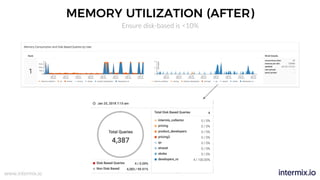
MEMORY UTILIZATION (AFTER)
Ensure disk-based is <10%
www.intermix.io
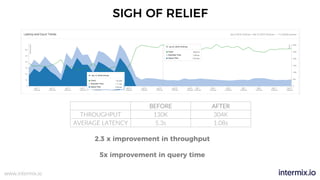
SIGH OF RELIEF
BEFORE AFTER
THROUGHPUT 130K 304K
AVERAGE LATENCY 5.3s 1.08s
2.3 x improvement in throughput
5x improvement in query time
www.intermix.io
BEFORE & AFTER
BEFORE AFTER
% time spent in queue 70% <1%
www.intermix.io
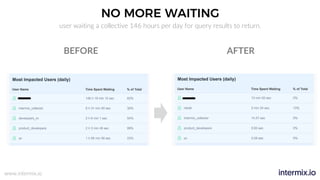
NO MORE WAITING
user waiting a collective 146 hours per day for query results to return.
AFTERBEFORE
www.intermix.io
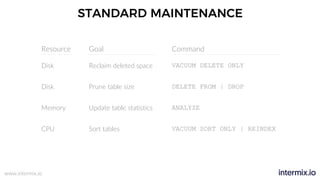
STANDARD MAINTENANCE
GoalResource
Disk
Disk
Memory
CPU
Reclaim deleted space
Prune table size
Update table statistics
Sort tables
Command
VACUUM DELETE ONLY
DELETE FROM | DROP
ANALYZE
VACUUM SORT ONLY | REINDEX
www.intermix.io
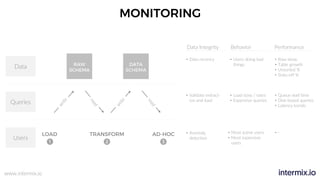
MONITORING
RAW
SCHEMA
DATA
SCHEMA
1 2 3
LOAD TRANSFORM AD-HOC
write
read
write
read
Users
Queries
Data
Data Integrity Behavior Performance
• Validate extract-
ion and load
• Data recency
• Anomaly
detection
• Users doing bad
things
• Load sizes / rates
• Expensive queries
• Most active users
• Most expensive
users
• Row skew
• Table growth
• Unsorted %
• Stats-off %
• Queue wait time
• Disk-based queries
• Latency trends
• -
www.intermix.io
World-class
Data Engineering
with Amazon Redshift
San Francisco by intermix.io

World-class Data Engineering with Amazon Redshift

  • 1.
    www.intermix.io World-class Data Engineering with AmazonRedshift San Francisco by intermix.io
  • 2.
    www.intermix.io Paul Lappas CO-FOUNDER & CEO LarsKamp CO-FOUNDER & COO Dave Steinhoff Chief Architect ParAccel “Redshift Inventor” SPEAKERS We’ve seen more Redshift clusters than anybody else (besides maybe AWS)
  • 3.
    www.intermix.io This training isabout making your job look like this.
  • 4.
    www.intermix.io And not likethis. Amazon Redshift has your data crown jewels. But as usage goes up, the red lamps start to flash. Data loads fail, queries hang and dashboards slow down to a crawl.
  • 5.
    www.intermix.io TRAINING CONTENT Data Pipelines Reporting & Analysis Performance& Maintenance • Loading & transformations • Design patterns • Performance considerations SECTION KEY CONCEPTS WHAT YOU’LL LEARN • Do’s and Don’ts for queries • Working with analyst teams • Best practices • Workload Management • Regular maintenance • Monitoring & KPIs How to build reliable data pipelines with Redshift How to optimize queries on Redshift and deliver responsive dashboards How to fine-tune your cluster and proactively spot & prevent issues.
  • 6.
    www.intermix.io Inventor of Redshifttechnology Co-founder & Chief Architect @ ParAccel Likes to invent databases & play pool Co-founder intermix.io AWS Customer Advisor Board Runs massive multi-cluster environments Paul Dave WHY US? SECTION 1 DATA PIPELINES How to build reliable data pipelines with Redshift
  • 7.
    www.intermix.io 1,000FT VIEW OFTHE END STATE Redshift Raw, event-level data Transformation Aggregated DATA FLOW
  • 8.
    www.intermix.io PATTERNS FOR DATALOADS CLEANING DE-DUPLICATION COPY IN SORT ORDER CHANGE DATA CAPTURE • Time stamps • String validations • Don’t use CHAR for non-ASCII • Primary Keys are not enforced. • Your are responsible for de-duplication via UPSERT method Redshift is suitable to hold raw and unstructured data. Performing cleaning activities upfront can be quite useful to avoid pain down the road. • Do incremental extracts • Don’t do a full copy of your prod DB • Load data in sort key order to avoid needing to vacuum • COPY sorts each batch of incoming data as it loads
  • 9.
    www.intermix.io PERFORMANCE CONSIDERATIONS Vacuuming Schema Loads • AvoidVACUUM SORT by loading in sort order • Avoid VACUUM DELETE ONLY by partitioning very long tables and use UNION ALL WHAT KEY CONSIDERATIONS • Encode to reduce storage (but don’t ANALYZE on every COPY) • Use smallest possible column size • Compress files • Load multiple small files instead of single large one (multiple of # nodes) • More frequent / smaller loads
  • 10.
    www.intermix.io EXPLOSION OF DATAINTEGRATION MIDDLEWARE Visibility is key • Large tool ecosystem of ETL vendors • “More data sources, more connectors” • Roll your own when: • Exotic data sources • Cost / benefit
  • 11.
    www.intermix.io ROW SKEW Node 1 Slice1 Slice 2 Node 2 Slice 3 Slice 4 Node 3 Slice 5 Slice 6 Node 4 Slice 7 Slice 8 If data is not spread evenly across slices, you have row skew. Workloads will be unbalanced, as some nodes will work harder than others, and a query is as fast as the slowest slice.
  • 12.
    www.intermix.io CHOOSING A DISTRIBUTIONSTYLE Node 1 Slice 1 Slice 2 Node 2 Slice 3 Slice 4 Node 1 Slice 1 Slice 2 Node 2 Slice 3 Slice 4 Node 1 Slice 1 Slice 2 Node 2 Slice 3 Slice 4 Distribution style is a table property which dictates how that table’s data is distributed through the cluster. The goals are to (1) distribute data evenly for parallel processing and to (2) minimize data movement. KEY ALL EVEN keyA keyB keyC keyD Value is hashed, same value goes to same location Full table data goes to the first slice of every node Round robin
  • 13.
    www.intermix.io SCHEMA DESIGN • Minimizerows processed by using sortkeys • Speed up complex joins by setting distkeys • Reduces network traffic • Reduces uneven node utilization • Tables with INTERLEAVED sort keys cost more to vacuum • Eliminate ROW SKEW by using EVEN distribution when possible • Use Redshift SPECTRUM for infrequently accessed tables
  • 14.
    www.intermix.io BATCH PIPELINE EXECUTION •Jobs should be idempotent (ie produce the same results if executed once or multiple times) • Minimize concurrency by reducing run times • i.e. smaller, more frequent jobs (5 minute max. frequency) • Eliminate queue wait times by matching concurrency with # of slots • Minimize (<10 %) disk-based queries by allocating sufficient memory / slot • Use a workflow tool like Airflow, Luigi, Pinball
  • 15.
    www.intermix.io Inventor of Redshifttechnology Co-founder & Chief Architect @ ParAccel Likes to invent databases & play pool Co-founder intermix.io AWS Customer Advisor Board Runs massive multi-cluster environments Paul Dave WHY US? SECTION 2 REPORTING & ANALYSIS How to optimize queries on Redshift and deliver responsive dashboards
  • 16.
    www.intermix.io REFERENCE DATA TEAMORG. Software Engineer Data Engineer Data Scientist Data Analyst Data collection & tracking Data architecture & preparation Data models & algorithms Data analysis & reporting Production Infrastructure Data Infrastructure Collaboration across the team is vital - in order to analyze data, there needs to be a common understanding on how that data is collected, prepared and transformed.
  • 17.
    www.intermix.io DATA REFERENCE ARCHITECTURE(1/4) From S3 to your data consumers. DATABASE S3
  • 18.
    www.intermix.io DATA REFERENCE ARCHITECTURE(2/4) Schemas help with organization and concurrency issues in a multi-user environment. RAW SCHEMA DATA SCHEMA DATABASE S3
  • 19.
    www.intermix.io DATA REFERENCE ARCHITECTURE(3/4) Most environment have at least 3 distinct user roles that interact with data across the cluster. RAW SCHEMA DATA SCHEMA DATABASE LOAD TRANSFORM AD-HOC S3 1 2 3
  • 20.
    www.intermix.io DATA REFERENCE ARCHITECTURE(4/4) Separation of concerns: Users in each role should only have access to the schemas and tables that they need, and no more. RAW SCHEMA DATA SCHEMA DATABASE S3 1 2 3 write read write read LOAD TRANSFORM AD-HOC
  • 21.
    www.intermix.io SCHEMA DESIGN &YOUR DATA TEAM Software Engineer Data Engineer Data Scientist Data Analyst need to know what data to collect, in which format & granularity Collaborate, and start from the end: Work with Data Scientists & Analysts to define schemas for reporting. need to understand reporting goals & “operationalize” the transforms created by data scientists. need to understand schemas, the processes used to aggregate and build the data for their use. need to be trained on how to optimize Redshift queries.
  • 22.
    www.intermix.io AD-HOC QUERIES Redshift canprocess billions of rows per query, but that doesn’t mean you should. Consider some best practices that will greatly speed up query latency. ü Limit the number of columns to scan ü Reduce row processing with where clauses • Row processing increases CPU and storage ü Always use join conditions (avoid Cartesian products) • Cross joins used nested-loops = slowest possible ü Maximize ratio of rows returned : rows scanned • e.g. don’t do ‘where id=345p4389579875423’
  • 23.
    www.intermix.io QUERY OPTIMIZATION What’s wrongwith this query? with table1_cte as ( select * from table1 ), table2_cte as ( select * from table2 ), select * from table1_cte as a JOIN table2_cte as b ON a.id = b.id 1 2 3 4 5 6 7 8 9 10 11 12 13 14
  • 24.
    www.intermix.io OPTIMIZATION #1 Better –limit rows processed with table1_cte as ( select * from table1 where created_at>'{{l_bound}}' and created_at <'{{u_bound}}' ), table2_cte as ( select * from table1 where created_at >'{{l_bound}}' and created_at <'{{u_bound}}' ), select * from table1_cte as a JOIN table2_cte as b ON a.id = b.id 1 2 3 4 5 6 7 8 9 10 11 12 13 14 15 16
  • 25.
    www.intermix.io OPTIMIZATION #2 Best –limit columns scanned 1 2 3 4 5 6 7 8 9 10 11 12 13 14 15 16 with table1_cte as ( select id,name,address from table1 where start_time>'{{l_bound}}' and start_time<'{{u_bound}}' ), table2_cte as ( select id,name,address from table1 where start_time>'{{l_bound}}' and start_time<'{{u_bound}}' ), select a.name,b.address from table1_cte as a JOIN table2_cte as b ON a.id = b.id
  • 26.
    www.intermix.io Inventor of Redshifttechnology Co-founder & Chief Architect @ ParAccel Likes to invent databases & play pool Co-founder intermix.io AWS Customer Advisor Board Runs massive multi-cluster environments Paul Dave WHY US? SECTION 3 PERFORMANCE & MAINTENANCE How to fine-tune your cluster and proactively spot & prevent issues.
  • 27.
    www.intermix.io REDSHIFT WORKLOAD MANAGER(WLM) 99% chance the default single queue will not work for you! • Redshift is “greedy” – need to protect your key queries (i.e loads, transforms) • Eliminate queue wait times by matching concurrency with # of slots • Minimize disk-based queries by allocating sufficient memory / slot Primary goals of WLM
  • 28.
    www.intermix.io WLM CONFIGURATION –STEP-BY-STEP SET-UP USERS DEFINE WORKLOADS GROUP USERS CONFIGURE WLM 1 2 3 4 4 key steps to getting the most out of your cluster resources and achieve high concurrency.
  • 29.
    www.intermix.io #1 SET UPUSERS Login SQL Login 2 SQL Login 1 SQL Login 3 SQL INDIVIDUAL LOGINS n:1 1:1 SHARED LOGIN Aggregate visibility only Individual visibility Create individual logins / users to isolate workloads for more control and better visibility.
  • 30.
    www.intermix.io #2 DEFINE WORKLOADS Defineeach login / user by their type of workload: load, transform or ad-hoc queries Workloads Users Typical SQL commands 1 2 3 COPY, UNLOAD 4 5 INSERT, UPDATE, and DELETE transactions 6 7 … 37 SELECT statements jobs that load data into cluster scheduled transformations reporting, analyst queries
  • 31.
    www.intermix.io #3 GROUP USERS Createone user group per workload type User GroupsWorkloads Users Typical SQL commands load 1 2 3 transform 4 5 ad_hoc 6 7 … 37 jobs that load data into cluster scheduled transformations dashboards, analyst queries COPY, UNLOAD INSERT, UPDATE, and DELETE transactions SELECT statements
  • 32.
    www.intermix.io #4 CONFIGURE WLM Createa new parameter group within the Redshift WLM console. Queue User GroupsConcurrency Users Memory Mem / Slot 1 2#1 10 3 15% 1.5% 4 5#2 4 18% 4.5% 6 7 … 37#3 22 66% 3.0% (default)#4 1 1% 1.0% load transform ad_hoc - empty -
  • 33.
    www.intermix.io FINAL STEP: APPLY& MONITOR Set a maintenance window Change the ‘parameter group’ to the new one you created Monitor wait times & disk-based queries and tweak as needed Apply the new parameter group to your cluster for the changes to take effect.
  • 34.
  • 35.
  • 36.
  • 37.
    www.intermix.io WLM QUEUES (BEFORE) •Memory stranded in WLM #1 • WLM #2 has too few slots (by a lot)
  • 38.
  • 39.
    www.intermix.io WLM QUEUES (AFTER) PEAKAVG QUEUE TIME FROM 4.5M -> 0.16 SECONDS Changed slots from 4 -> 20
  • 40.
  • 41.
    www.intermix.io SIGH OF RELIEF BEFOREAFTER THROUGHPUT 130K 304K AVERAGE LATENCY 5.3s 1.08s 2.3 x improvement in throughput 5x improvement in query time
  • 42.
    www.intermix.io BEFORE & AFTER BEFOREAFTER % time spent in queue 70% <1%
  • 43.
    www.intermix.io NO MORE WAITING userwaiting a collective 146 hours per day for query results to return. AFTERBEFORE
  • 44.
    www.intermix.io STANDARD MAINTENANCE GoalResource Disk Disk Memory CPU Reclaim deletedspace Prune table size Update table statistics Sort tables Command VACUUM DELETE ONLY DELETE FROM | DROP ANALYZE VACUUM SORT ONLY | REINDEX
  • 45.
    www.intermix.io MONITORING RAW SCHEMA DATA SCHEMA 1 2 3 LOADTRANSFORM AD-HOC write read write read Users Queries Data Data Integrity Behavior Performance • Validate extract- ion and load • Data recency • Anomaly detection • Users doing bad things • Load sizes / rates • Expensive queries • Most active users • Most expensive users • Row skew • Table growth • Unsorted % • Stats-off % • Queue wait time • Disk-based queries • Latency trends • -
  • 46.
    www.intermix.io World-class Data Engineering with AmazonRedshift San Francisco by intermix.io