

Powering interactive data analysis by
Amazon Redshift
Jie Li
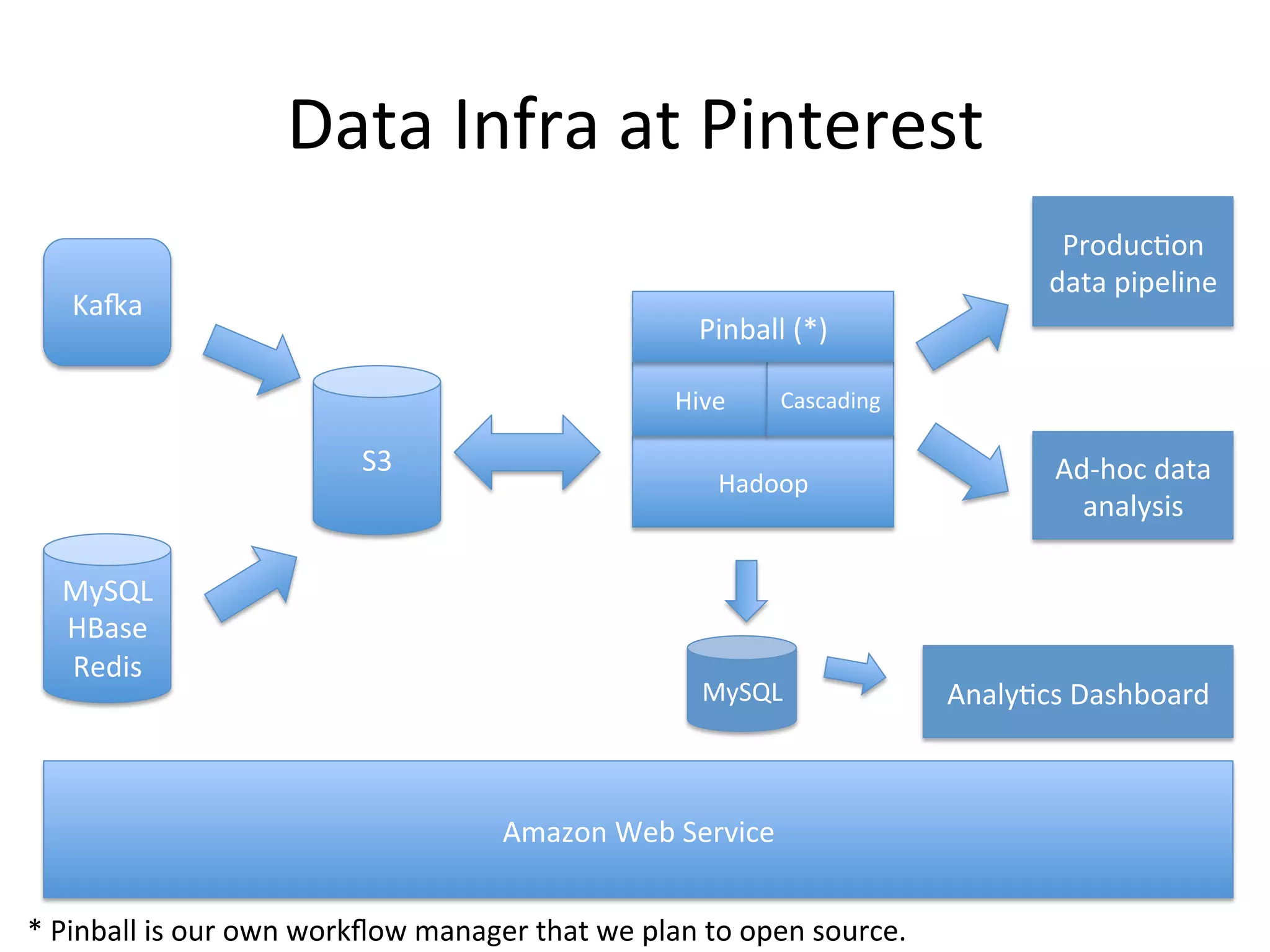
Data Infra at Pinterest
Pinterest: a place to get inspired and
plan for the future
Data Infra at Pinterest
Production
data pipeline

Kafka

Pinball (*)
Hive

S3

MySQL
HBase
Redis

Cascading

Hadoop

MySQL

Amazon Web Service
* Pinball is our own workflow manager that we plan to open source.

Ad-hoc data
analysis

Analytics Dashboard
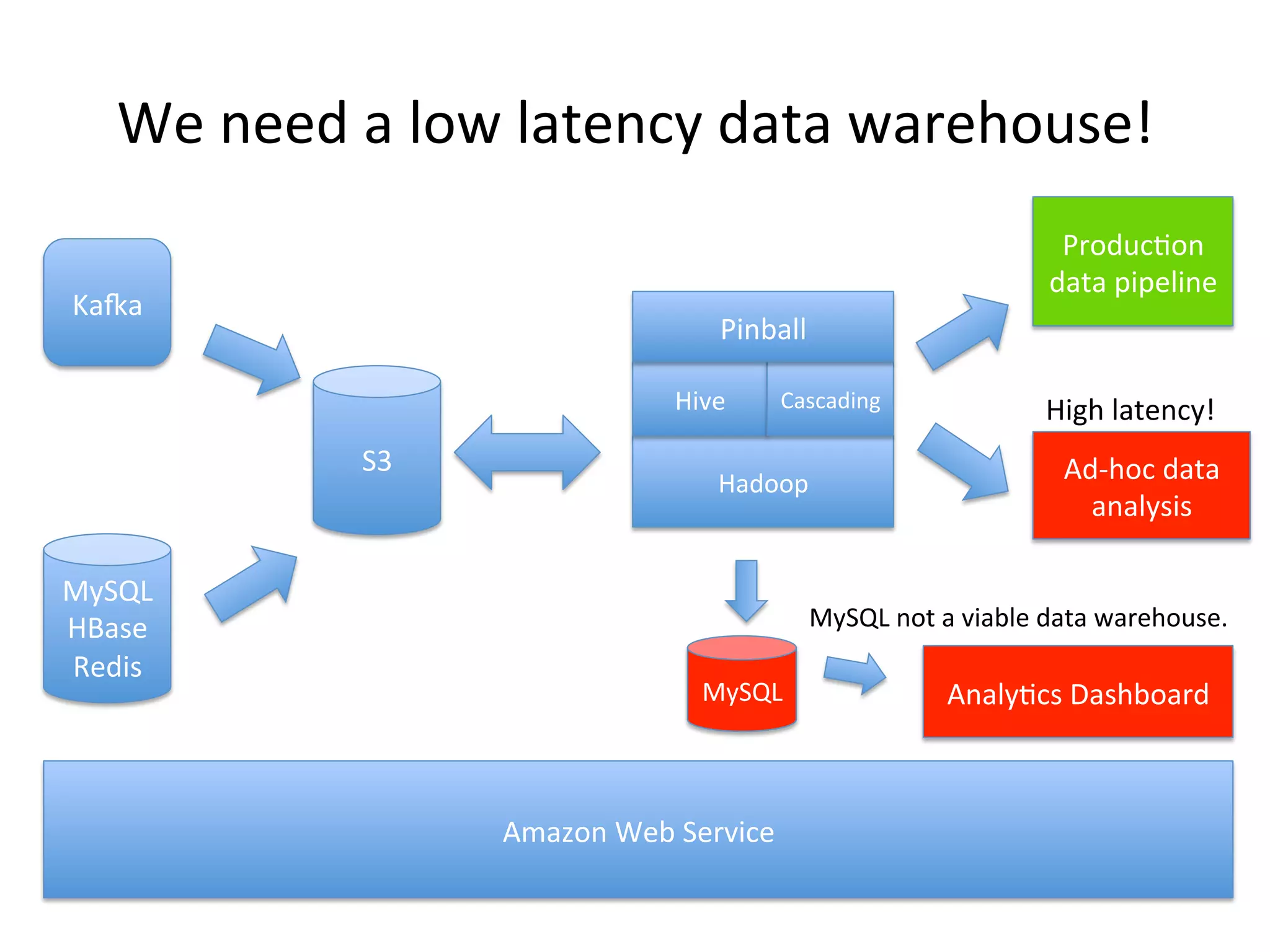
We need a low latency data warehouse!
Production
data pipeline

Kafka

Pinball
Hive

S3

MySQL
HBase
Redis

Cascading

Hadoop

High latency!

Ad-hoc data
analysis

MySQL not a viable data warehouse.
MySQL

Amazon Web Service

Analytics Dashboard
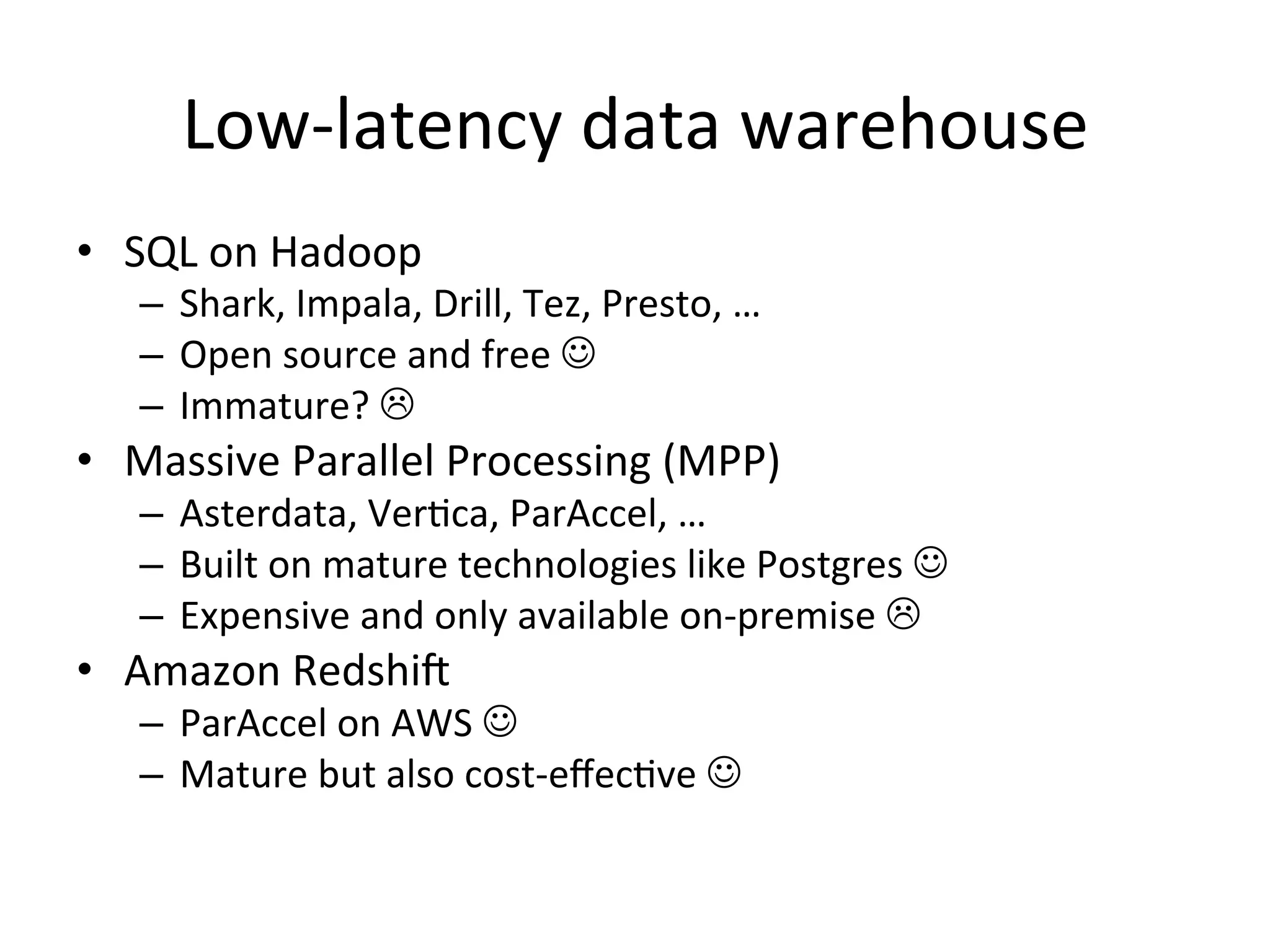
Low-latency data warehouse
• SQL on Hadoop
– Shark, Impala, Drill, Tez, Presto, …
– Open source and free 
– Immature? 

• Massive Parallel Processing (MPP)
– Asterdata, Vertica, ParAccel, …
– Built on mature technologies like Postgres 
– Expensive and only available on-premise 

• Amazon Redshift
– ParAccel on AWS 
– Mature but also cost-effective 
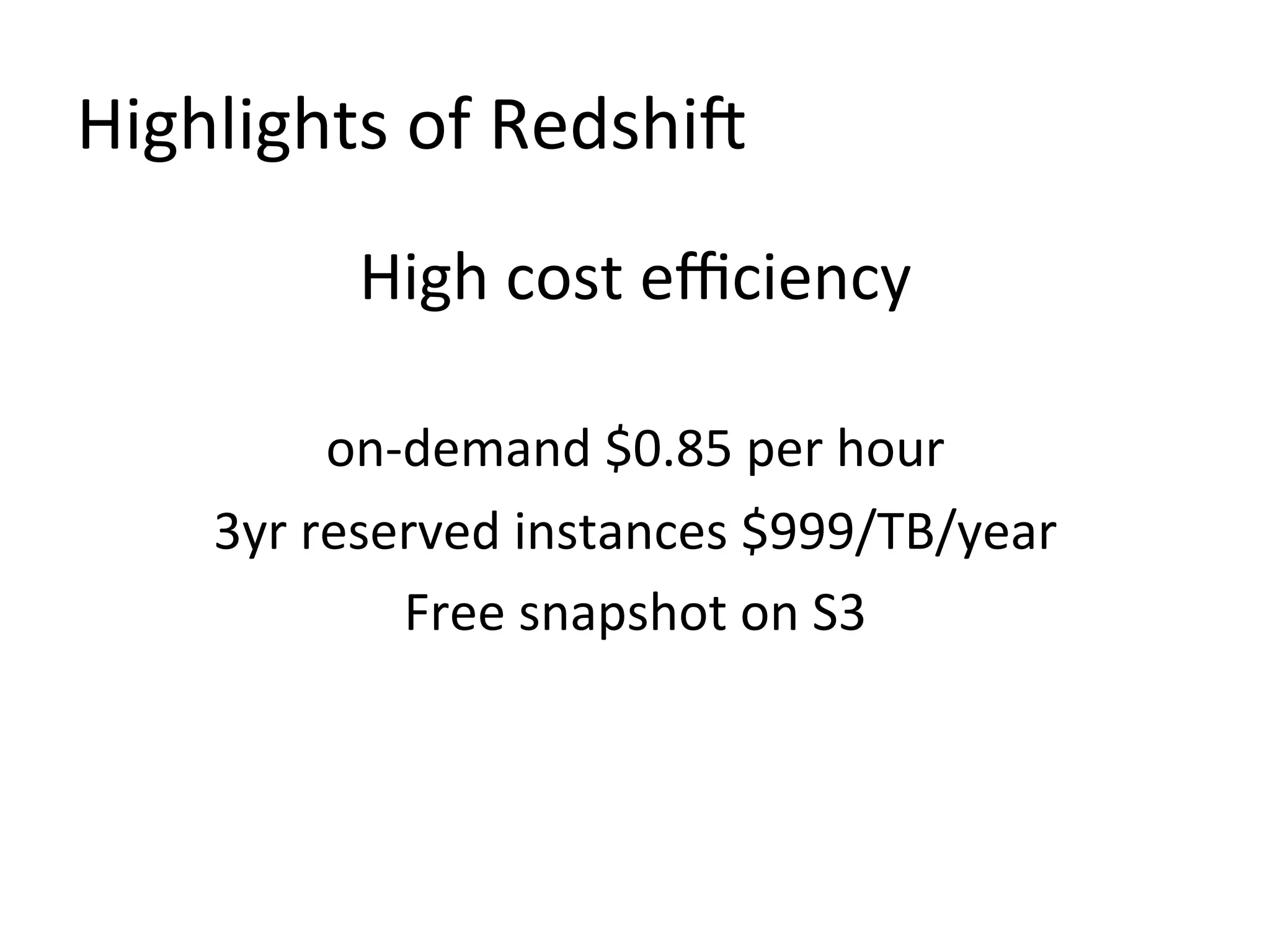
Highlights of Redshift
High cost efficiency
on-demand $0.85 per hour
3yr reserved instances $999/TB/year
Free snapshot on S3
Highlights of Redshift
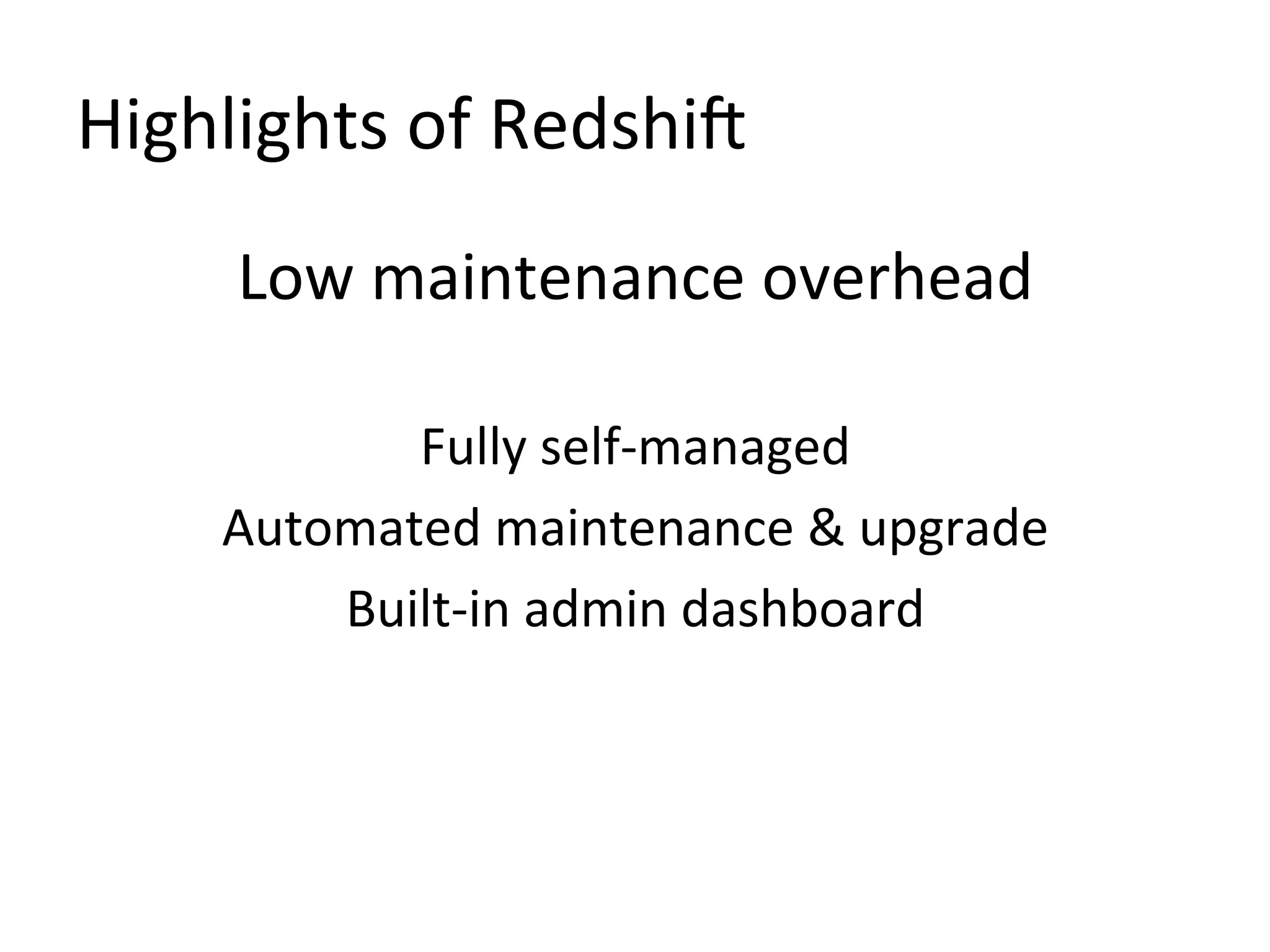
Low maintenance overhead
Fully self-managed
Automated maintenance & upgrade
Built-in admin dashboard
Highlights of Redshift
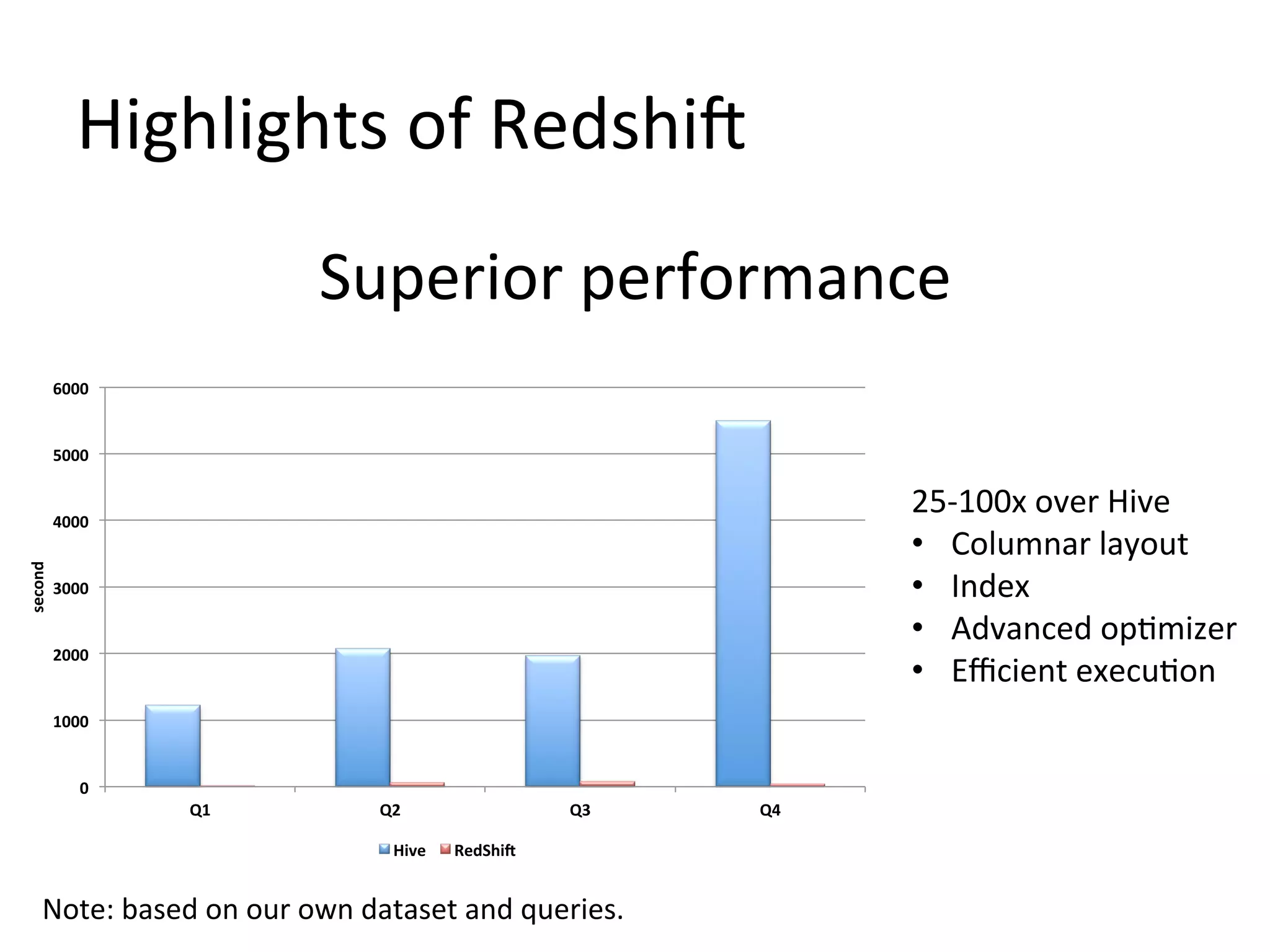
Superior performance
6000

5000

25-100x over Hive
• Columnar layout
• Index
• Advanced optimizer
• Efficient execution

second

4000

3000

2000

1000

0

Q1

Q2
Hive

Q3
RedShift

Note: based on our own dataset and queries.

Q4
Cool, but how to integrate Redshift with
Hive/Hadoop
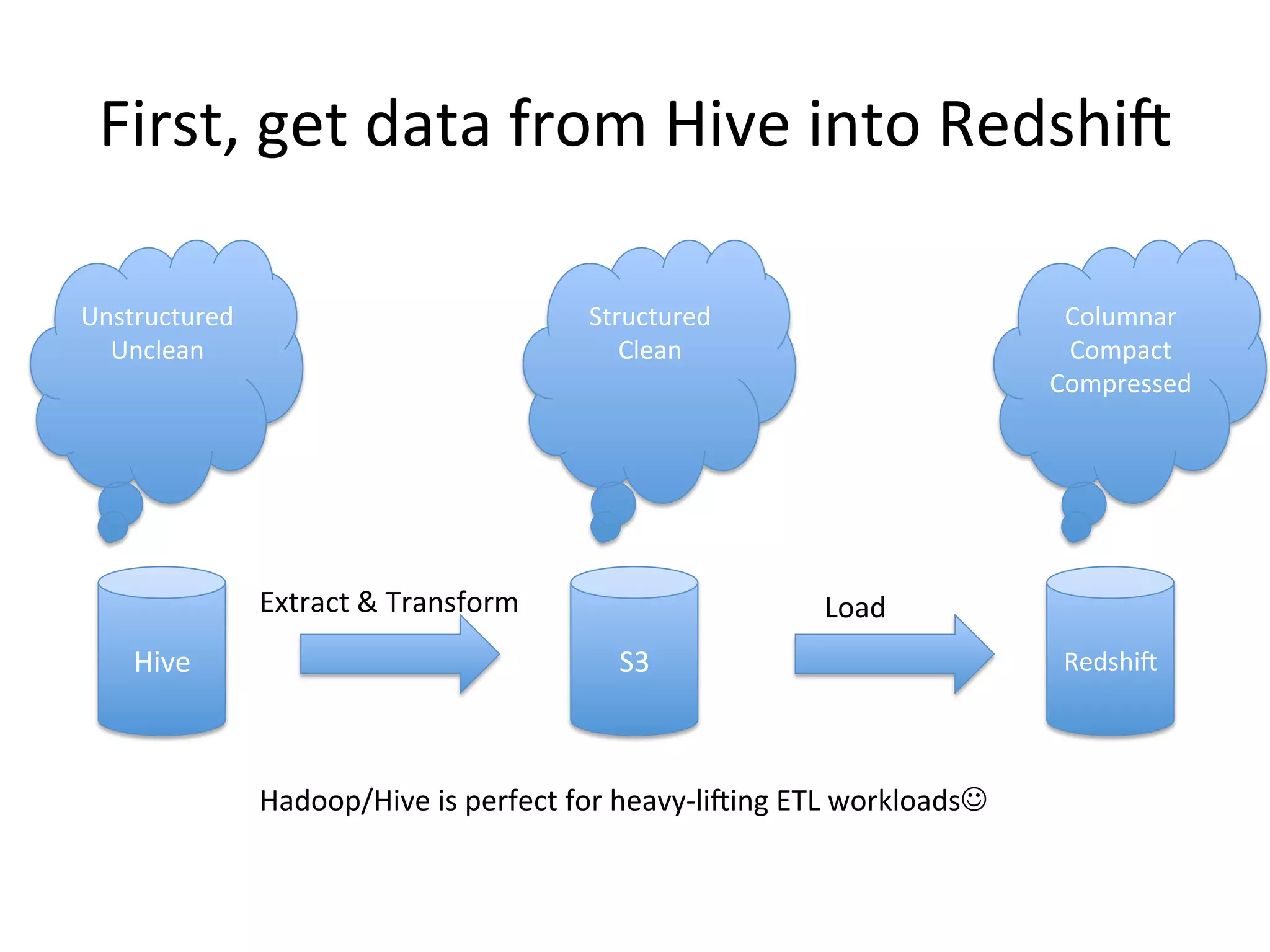
First, get data from Hive into Redshift
Unstructure
d
Unclean

Structured
Clean

Extract & Transform
Hive

Columnar
Compact
Compressed

Load
S3

Hadoop/Hive is perfect for heavy-lifting ETL workloads

Redshift
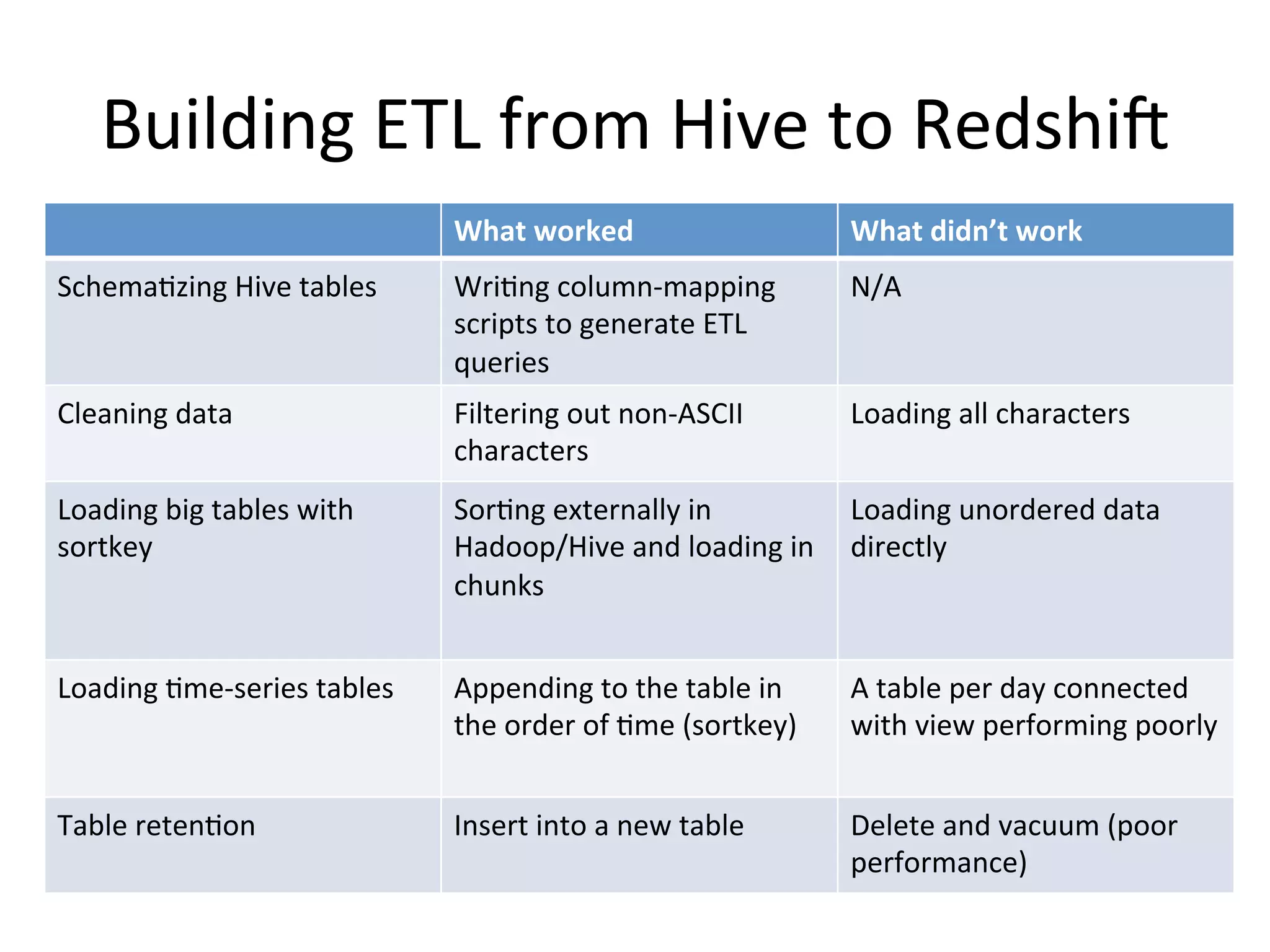
Building ETL from Hive to Redshift
What worked

What didn’t work

Schematizing Hive tables

Writing column-mapping
scripts to generate ETL
queries

N/A

Cleaning data

Filtering out non-ASCII
characters

Loading all characters

Loading big tables with
sortkey

Sorting externally in
Hadoop/Hive and loading in
chunks

Loading unordered data
directly

Loading time-series tables

Appending to the table in
the order of time (sortkey)

A table per day connected
with view performing poorly

Table retention

Insert into a new table

Delete and vacuum (poor
performance)
But it’s just the beginning.
Make sure you audit the ETL from Day 1
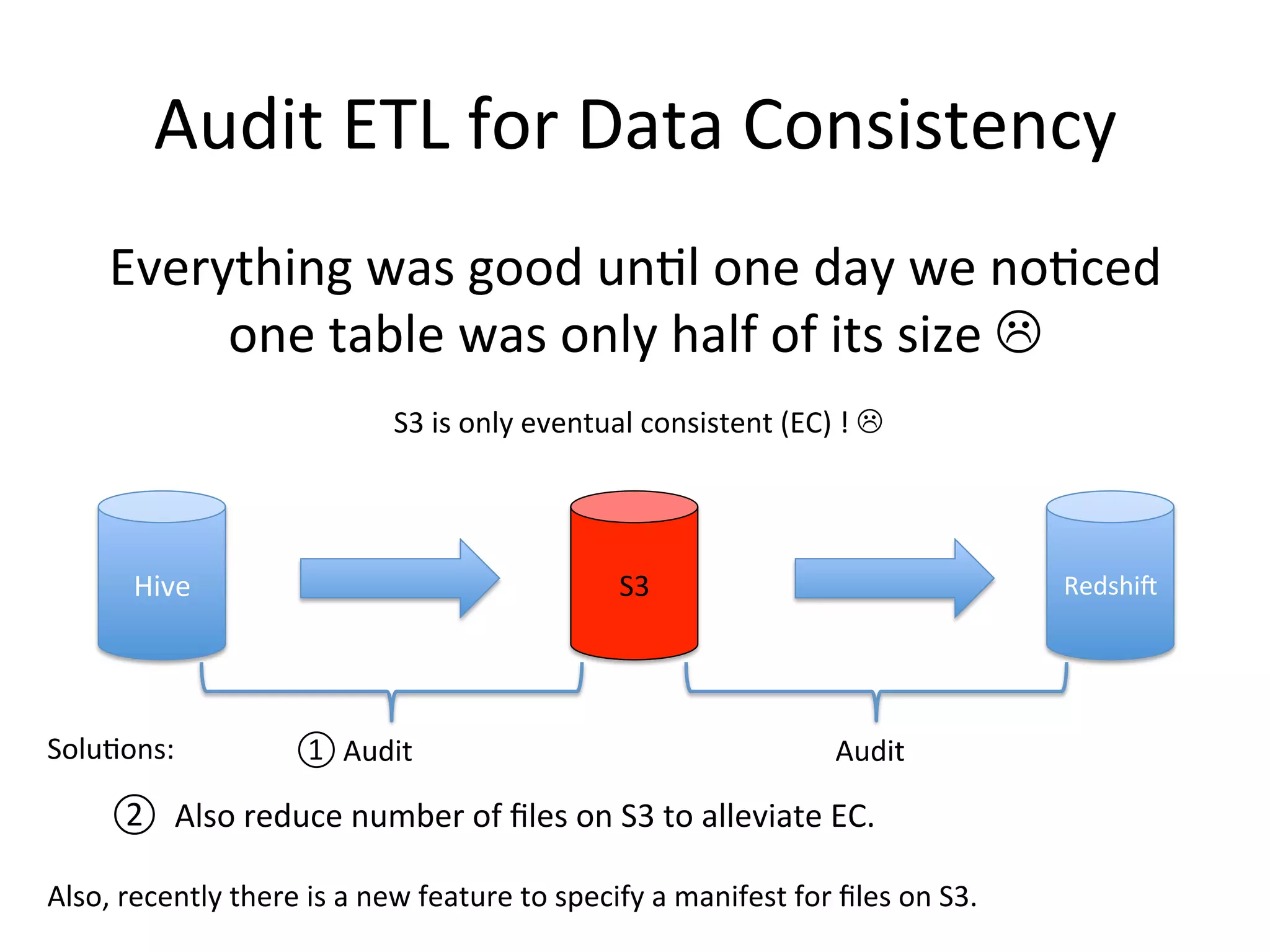
Audit ETL for Data Consistency
Everything was good until one day we noticed
one table was only half of its size 
S3 is only eventual consistent (EC) ! 

Hive

Solutions:

S3

① Audit

Redshift

Audit

② Also reduce number of files on S3 to alleviate EC.
Also, recently there is a new feature to specify a manifest for files on S3.
Now we got the data.
Is it ready for superior performance?
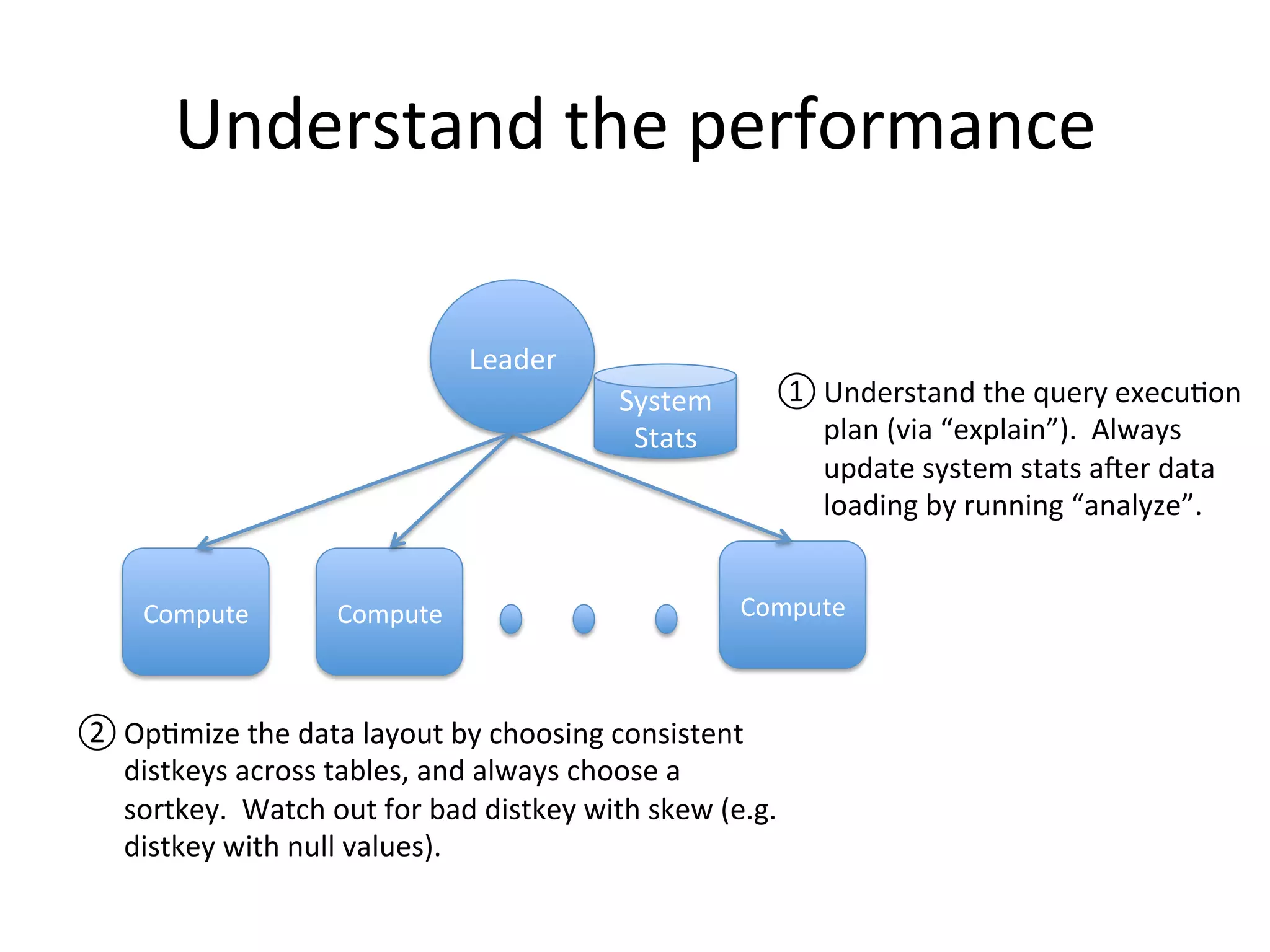
Understand the performance
Leader

① Understand the query execution
plan (via “explain”). Always
update system stats after data
loading by running “analyze”.

System
Stats

Compute

Compute

Compute

② Optimize the data layout by choosing consistent
distkeys across tables, and always choose a
sortkey. Watch out for bad distkey with skew (e.g.
distkey with null values).
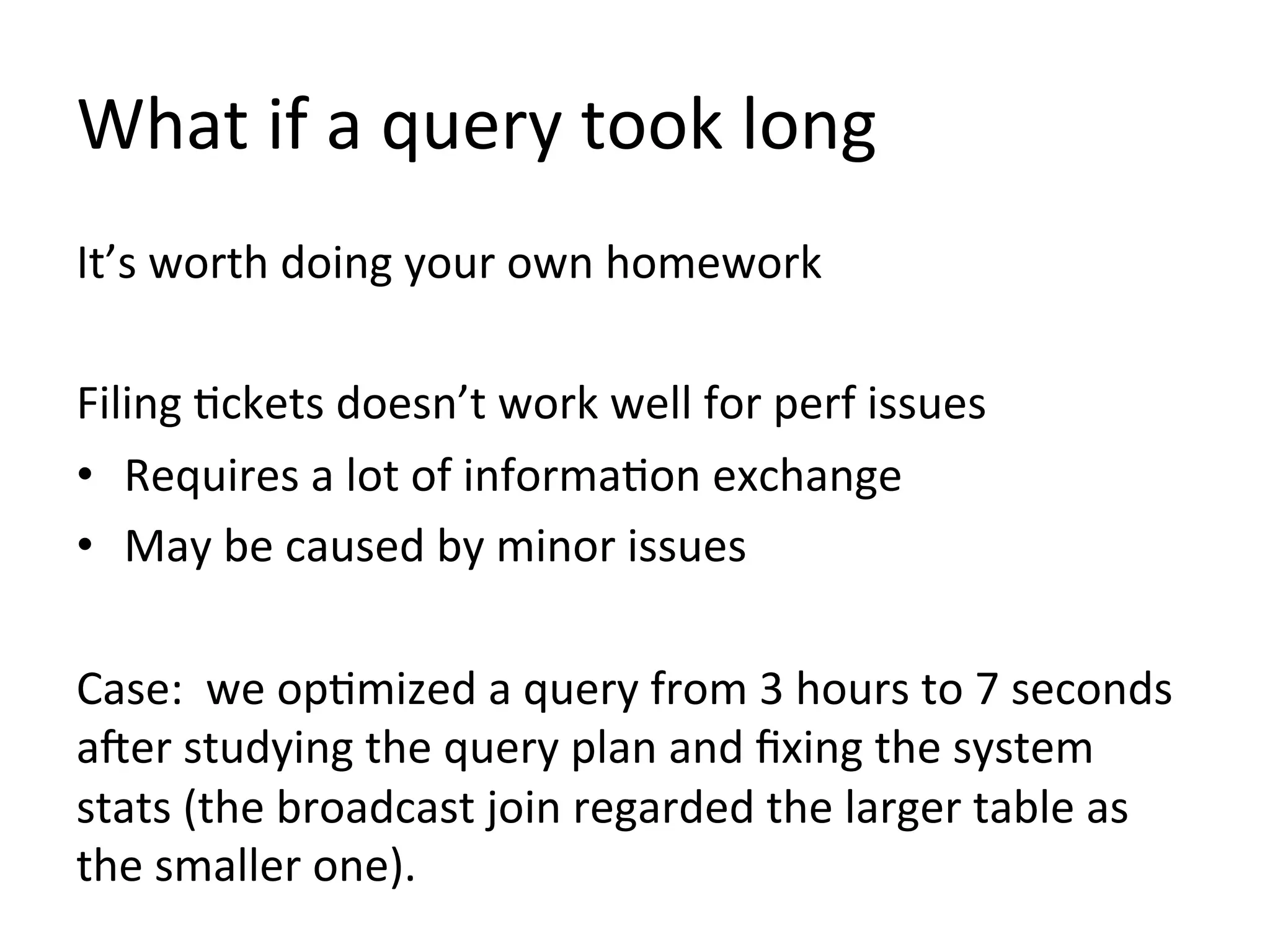
What if a query took long
It’s worth doing your own homework
Filing tickets doesn’t work well for perf issues
• Requires a lot of information exchange
• May be caused by minor issues
Case: we optimized a query from 3 hours to 7 seconds
after studying the query plan and fixing the system
stats (the broadcast join regarded the larger table as
the smaller one).
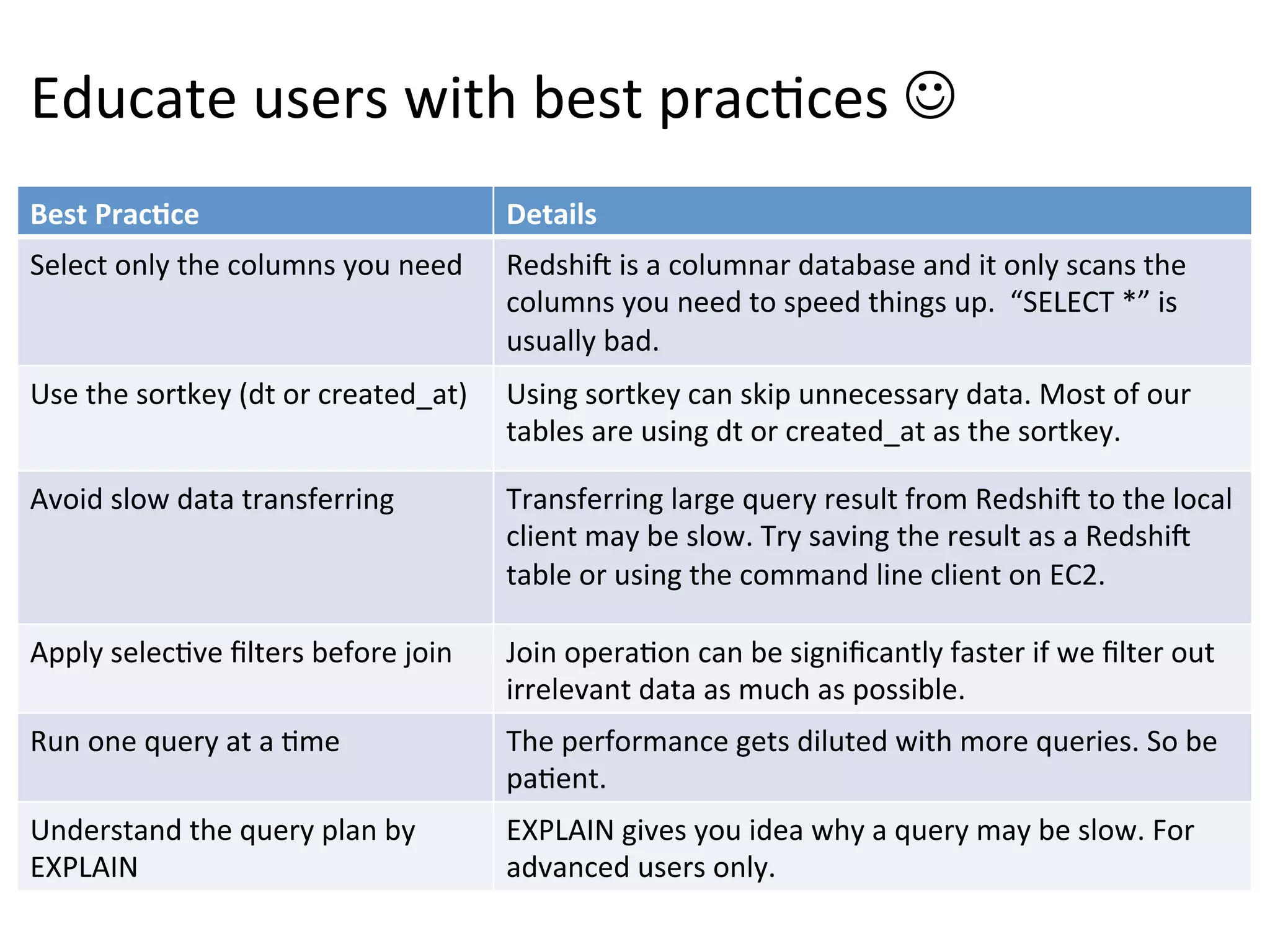
Educate users with best practices 
Best Practice

Details

Select only the columns you need

Redshift is a columnar database and it only scans the
columns you need to speed things up. “SELECT *” is
usually bad.

Use the sortkey (dt or created_at)

Using sortkey can skip unnecessary data. Most of our
tables are using dt or created_at as the sortkey.

Avoid slow data transferring

Transferring large query result from Redshift to the local
client may be slow. Try saving the result as a Redshift
table or using the command line client on EC2.

Apply selective filters before join

Join operation can be significantly faster if we filter out
irrelevant data as much as possible.

Run one query at a time

The performance gets diluted with more queries. So be
patient.

Understand the query plan by
EXPLAIN

EXPLAIN gives you idea why a query may be slow. For
advanced users only.
Hopefully users will follow the best practice 
But Redshift is a shared service

One query may slow down the whole cluster 
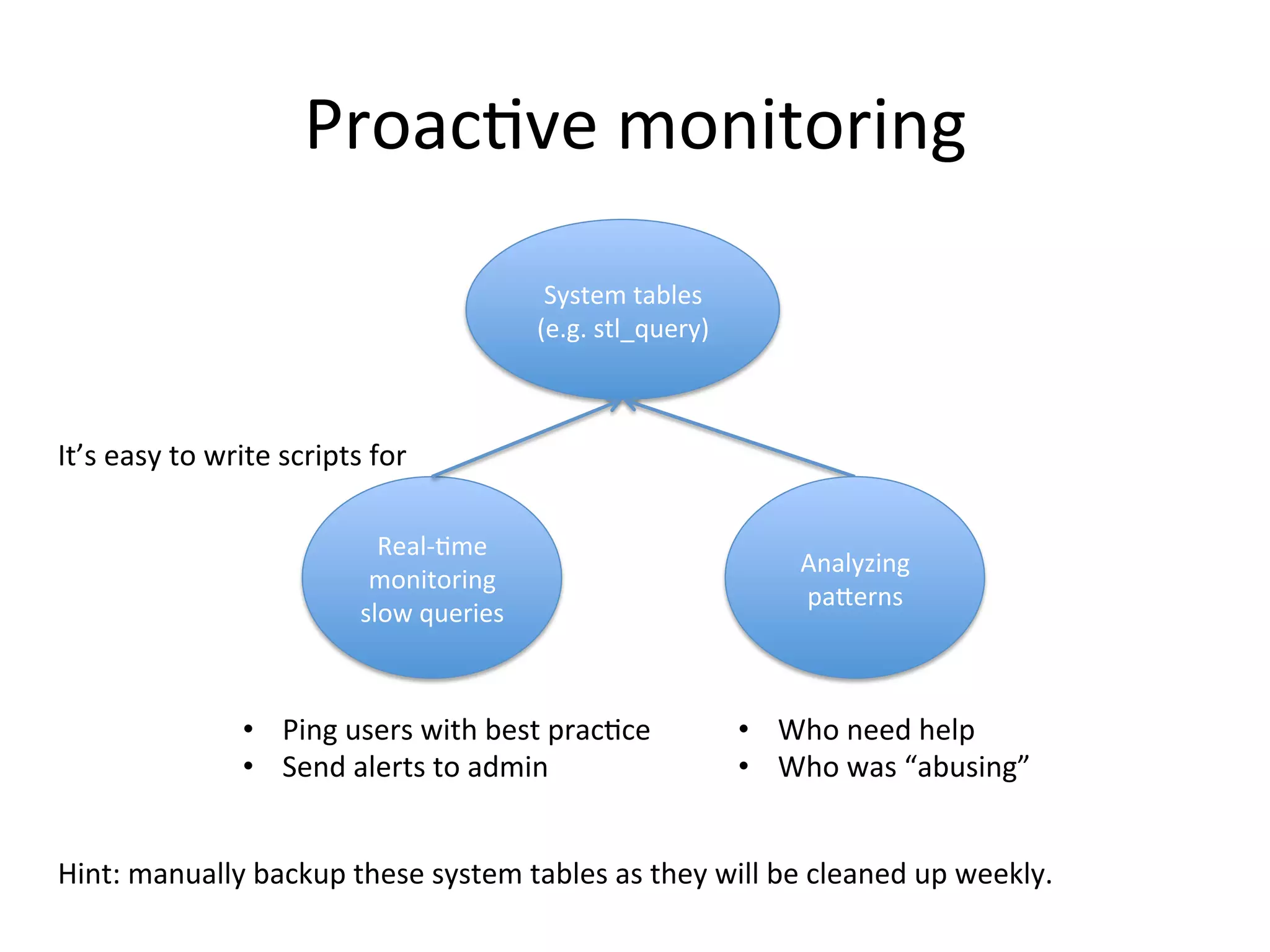
Proactive monitoring
System tables
(e.g. stl_query)

It’s easy to write scripts for
Real-time
monitoring
slow queries

• Ping users with best practice
• Send alerts to admin

Analyzing
patterns

• Who need help
• Who was “abusing”

Hint: manually backup these system tables as they will be cleaned up weekly.
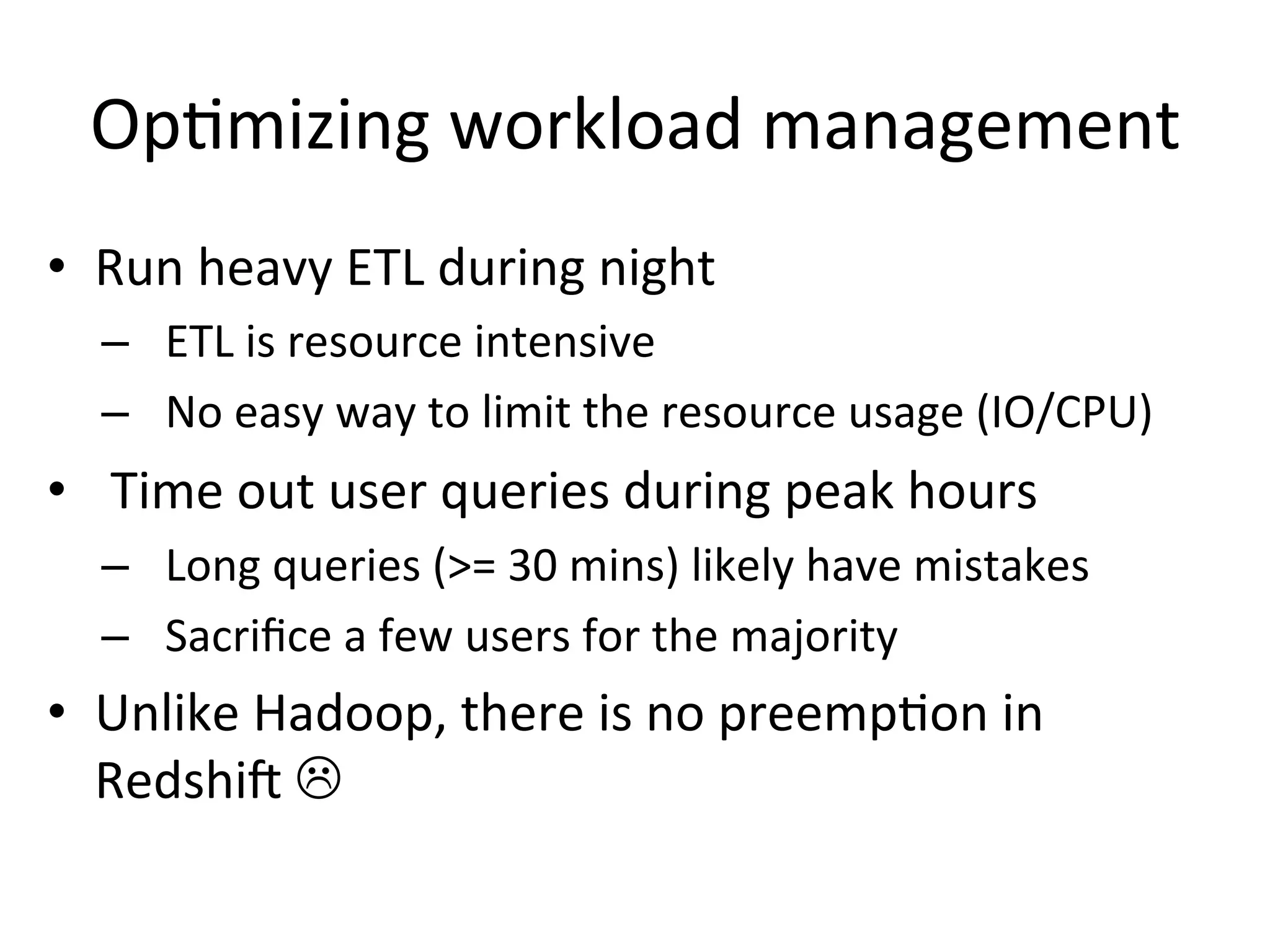
Optimizing workload management
• Run heavy ETL during night
– ETL is resource intensive
– No easy way to limit the resource usage (IO/CPU)

• Time out user queries during peak hours
– Long queries (>= 30 mins) likely have mistakes
– Sacrifice a few users for the majority

• Unlike Hadoop, there is no preemption in
Redshift 
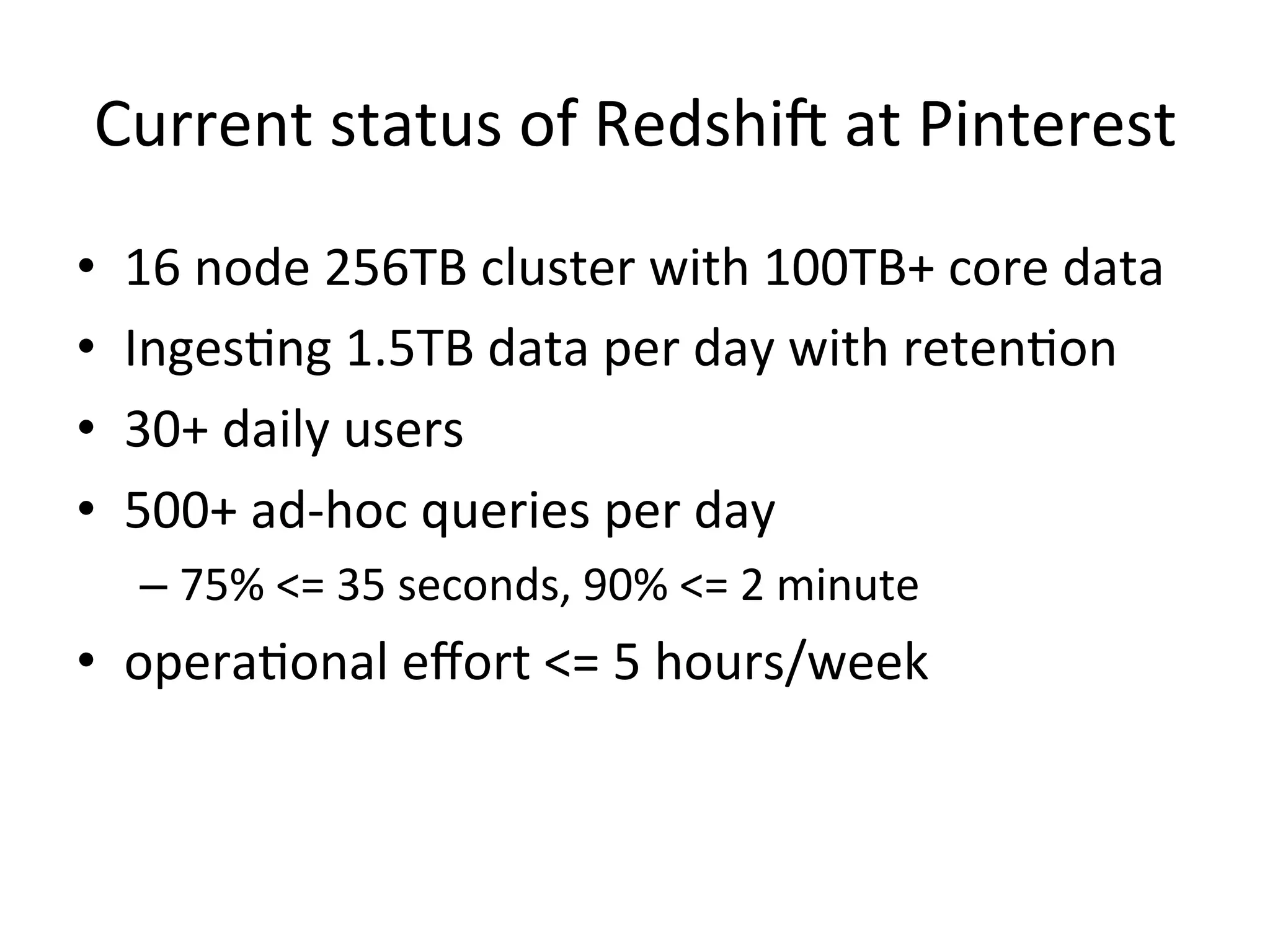
Current status of Redshift at Pinterest
•
•
•
•

16 node 256TB cluster with 100TB+ core data
Ingesting 1.5TB data per day with retention
30+ daily users
500+ ad-hoc queries per day
– 75% <= 35 seconds, 90% <= 2 minute

• operational effort <= 5 hours/week
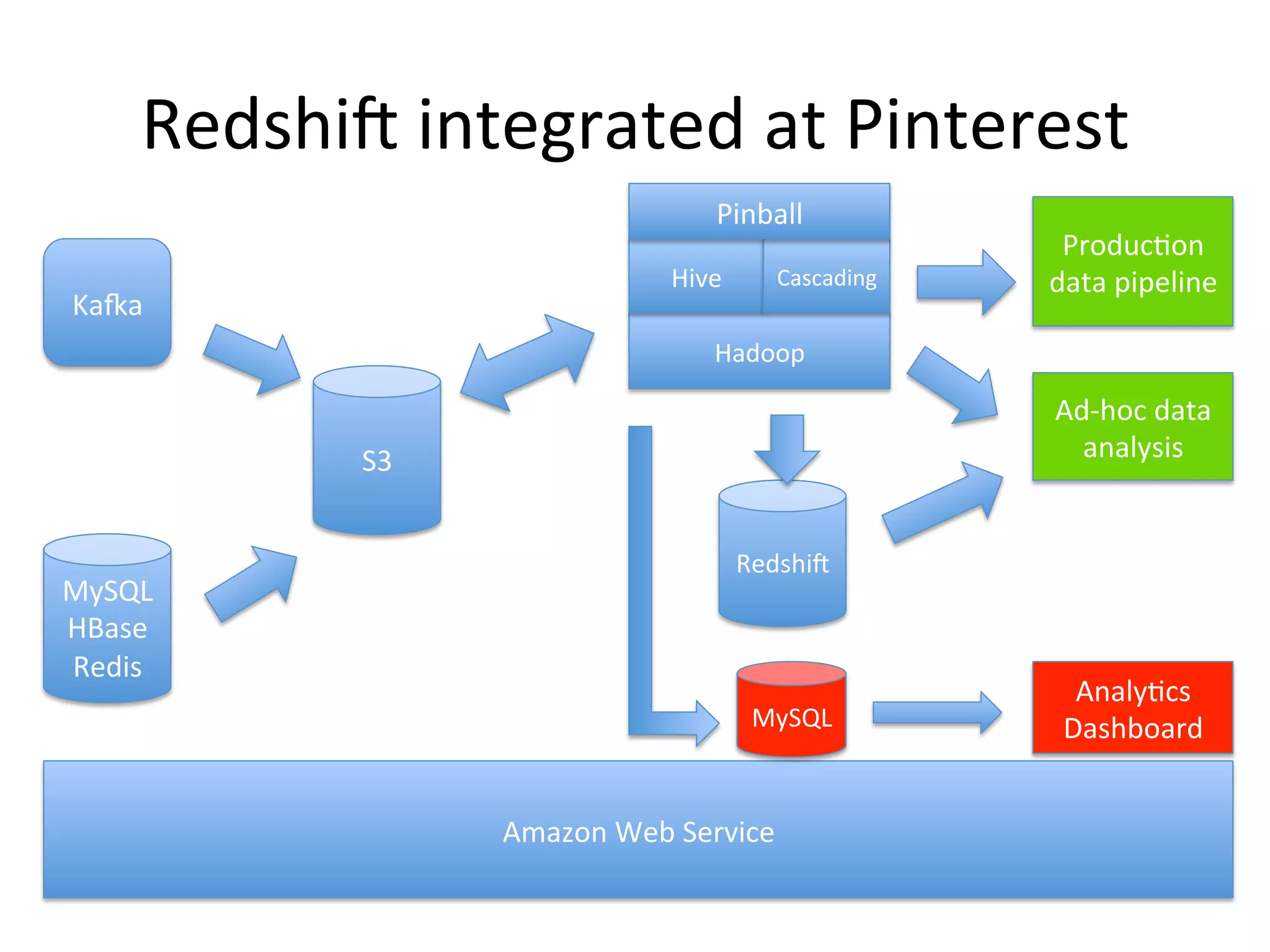
Redshift integrated at Pinterest
Pinball
Hive

Kafka

Cascading

Production
data pipeline

Hadoop

Ad-hoc data
analysis

S3

MySQL
HBase
Redis

Redshift

MySQL

Amazon Web Service

Analytics
Dashboard
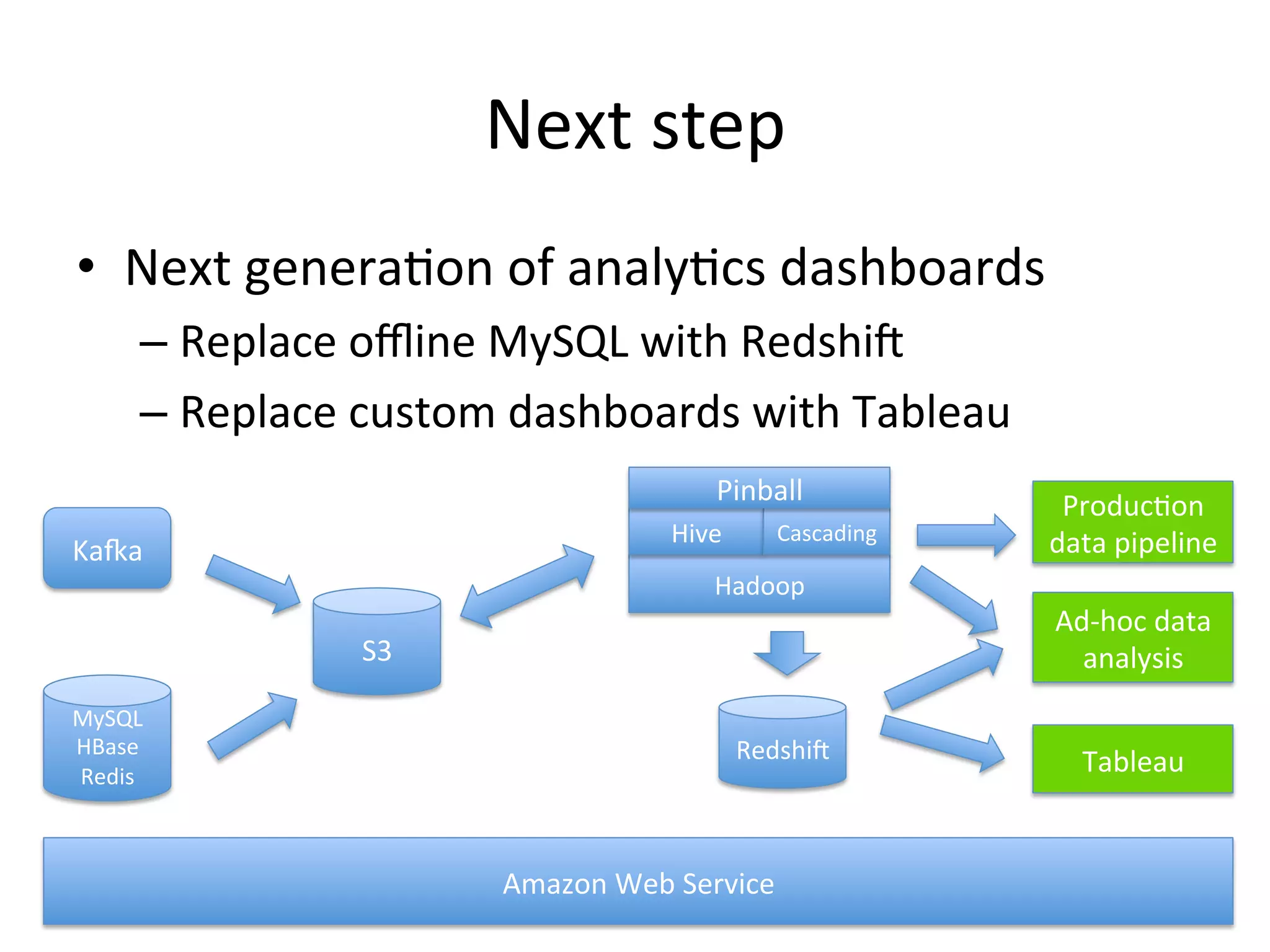
Next step
• Next generation of analytics dashboards
– Replace offline MySQL with Redshift
– Replace custom dashboards with Tableau
Pinball
Hive

Kafka

Cascading

Production
data pipeline

Hadoop

Ad-hoc data
analysis

S3
MySQL
HBase
Redis

Redshift

Amazon Web Service

Tableau
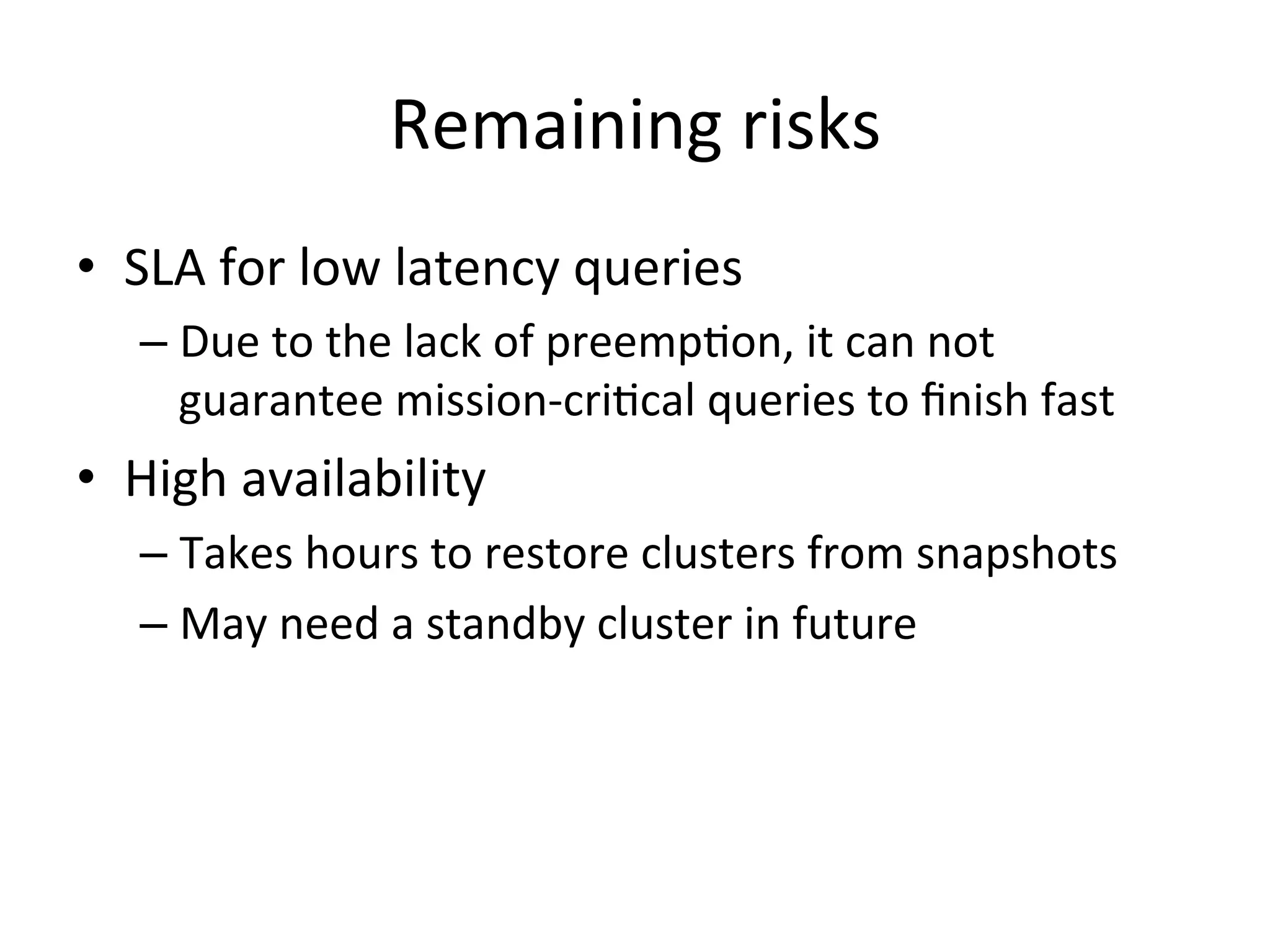
Remaining risks
• SLA for low latency queries
– Due to the lack of preemption, it can not
guarantee mission-critical queries to finish fast

• High availability
– Takes hours to restore clusters from snapshots
– May need a standby cluster in future
Questions?
• Quora: http://qr.ae/TwRJf
• Twitter: @jay23jack

Powering Interactive Data Analysis at Pinterest by Amazon Redshift

  • 1.
    Powering interactive dataanalysis by Amazon Redshift Jie Li Data Infra at Pinterest
  • 2.
    Pinterest: a placeto get inspired and plan for the future
  • 3.
    Data Infra atPinterest Production data pipeline Kafka Pinball (*) Hive S3 MySQL HBase Redis Cascading Hadoop MySQL Amazon Web Service * Pinball is our own workflow manager that we plan to open source. Ad-hoc data analysis Analytics Dashboard
  • 4.
    We need alow latency data warehouse! Production data pipeline Kafka Pinball Hive S3 MySQL HBase Redis Cascading Hadoop High latency! Ad-hoc data analysis MySQL not a viable data warehouse. MySQL Amazon Web Service Analytics Dashboard
  • 5.
    Low-latency data warehouse •SQL on Hadoop – Shark, Impala, Drill, Tez, Presto, … – Open source and free  – Immature?  • Massive Parallel Processing (MPP) – Asterdata, Vertica, ParAccel, … – Built on mature technologies like Postgres  – Expensive and only available on-premise  • Amazon Redshift – ParAccel on AWS  – Mature but also cost-effective 
  • 6.
    Highlights of Redshift Highcost efficiency on-demand $0.85 per hour 3yr reserved instances $999/TB/year Free snapshot on S3
  • 7.
    Highlights of Redshift Lowmaintenance overhead Fully self-managed Automated maintenance & upgrade Built-in admin dashboard
  • 8.
    Highlights of Redshift Superiorperformance 6000 5000 25-100x over Hive • Columnar layout • Index • Advanced optimizer • Efficient execution second 4000 3000 2000 1000 0 Q1 Q2 Hive Q3 RedShift Note: based on our own dataset and queries. Q4
  • 9.
    Cool, but howto integrate Redshift with Hive/Hadoop
  • 10.
    First, get datafrom Hive into Redshift Unstructure d Unclean Structured Clean Extract & Transform Hive Columnar Compact Compressed Load S3 Hadoop/Hive is perfect for heavy-lifting ETL workloads Redshift
  • 11.
    Building ETL fromHive to Redshift What worked What didn’t work Schematizing Hive tables Writing column-mapping scripts to generate ETL queries N/A Cleaning data Filtering out non-ASCII characters Loading all characters Loading big tables with sortkey Sorting externally in Hadoop/Hive and loading in chunks Loading unordered data directly Loading time-series tables Appending to the table in the order of time (sortkey) A table per day connected with view performing poorly Table retention Insert into a new table Delete and vacuum (poor performance)
  • 12.
    But it’s justthe beginning. Make sure you audit the ETL from Day 1
  • 13.
    Audit ETL forData Consistency Everything was good until one day we noticed one table was only half of its size  S3 is only eventual consistent (EC) !  Hive Solutions: S3 ① Audit Redshift Audit ② Also reduce number of files on S3 to alleviate EC. Also, recently there is a new feature to specify a manifest for files on S3.
  • 14.
    Now we gotthe data. Is it ready for superior performance?
  • 15.
    Understand the performance Leader ①Understand the query execution plan (via “explain”). Always update system stats after data loading by running “analyze”. System Stats Compute Compute Compute ② Optimize the data layout by choosing consistent distkeys across tables, and always choose a sortkey. Watch out for bad distkey with skew (e.g. distkey with null values).
  • 16.
    What if aquery took long It’s worth doing your own homework Filing tickets doesn’t work well for perf issues • Requires a lot of information exchange • May be caused by minor issues Case: we optimized a query from 3 hours to 7 seconds after studying the query plan and fixing the system stats (the broadcast join regarded the larger table as the smaller one).
  • 17.
    Educate users withbest practices  Best Practice Details Select only the columns you need Redshift is a columnar database and it only scans the columns you need to speed things up. “SELECT *” is usually bad. Use the sortkey (dt or created_at) Using sortkey can skip unnecessary data. Most of our tables are using dt or created_at as the sortkey. Avoid slow data transferring Transferring large query result from Redshift to the local client may be slow. Try saving the result as a Redshift table or using the command line client on EC2. Apply selective filters before join Join operation can be significantly faster if we filter out irrelevant data as much as possible. Run one query at a time The performance gets diluted with more queries. So be patient. Understand the query plan by EXPLAIN EXPLAIN gives you idea why a query may be slow. For advanced users only.
  • 18.
    Hopefully users willfollow the best practice  But Redshift is a shared service One query may slow down the whole cluster 
  • 19.
    Proactive monitoring System tables (e.g.stl_query) It’s easy to write scripts for Real-time monitoring slow queries • Ping users with best practice • Send alerts to admin Analyzing patterns • Who need help • Who was “abusing” Hint: manually backup these system tables as they will be cleaned up weekly.
  • 20.
    Optimizing workload management •Run heavy ETL during night – ETL is resource intensive – No easy way to limit the resource usage (IO/CPU) • Time out user queries during peak hours – Long queries (>= 30 mins) likely have mistakes – Sacrifice a few users for the majority • Unlike Hadoop, there is no preemption in Redshift 
  • 21.
    Current status ofRedshift at Pinterest • • • • 16 node 256TB cluster with 100TB+ core data Ingesting 1.5TB data per day with retention 30+ daily users 500+ ad-hoc queries per day – 75% <= 35 seconds, 90% <= 2 minute • operational effort <= 5 hours/week
  • 22.
    Redshift integrated atPinterest Pinball Hive Kafka Cascading Production data pipeline Hadoop Ad-hoc data analysis S3 MySQL HBase Redis Redshift MySQL Amazon Web Service Analytics Dashboard
  • 23.
    Next step • Nextgeneration of analytics dashboards – Replace offline MySQL with Redshift – Replace custom dashboards with Tableau Pinball Hive Kafka Cascading Production data pipeline Hadoop Ad-hoc data analysis S3 MySQL HBase Redis Redshift Amazon Web Service Tableau
  • 24.
    Remaining risks • SLAfor low latency queries – Due to the lack of preemption, it can not guarantee mission-critical queries to finish fast • High availability – Takes hours to restore clusters from snapshots – May need a standby cluster in future
  • 25.

Editor's Notes

  • #11 Add Hadoop Logo
  • #22 To verify machine generated queries
  • #23 Use logo for hadoop/hive. Add Pinball?