


APPLICATION ANATOMY 101
Will Koffel	

!
@wkoffel
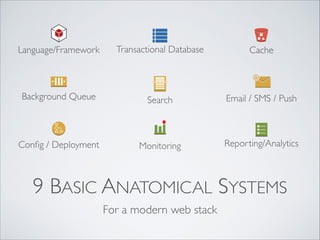
9 BASIC ANATOMICAL SYSTEMS
For a modern web stack
Background Queue Email / SMS / Push
Transactional Database
Monitoring
Search
Config / Deployment
Language/Framework Cache
Reporting/Analytics
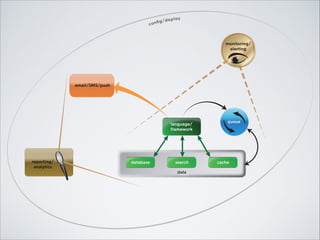
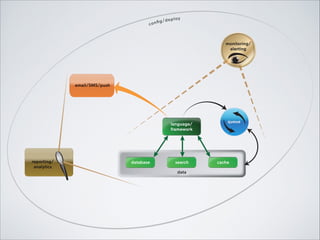
database search cache
data
queue
email/SMS/push
reporting/
analytics
monitoring/
alerting
config/deploy
language/
framework
You can’t build an amazing web	

product without some code.
Language/Framework
LANGUAGE / FRAMEWORK
• The programming language of your application
defines what your team develops in	

• Modern frameworks are set of libraries written
for a particular language which provide both a
methodology for building applications, and lots of
pre-built functionality
Language/Framework
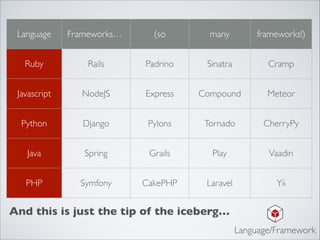
Language Frameworks…	

 (so many frameworks!)
Ruby Rails Padrino Sinatra Cramp
Javascript NodeJS Express Compound Meteor
Python Django Pylons Tornado CherryPy
Java Spring Grails Play	

 Vaadin
PHP Symfony CakePHP Laravel Yii
And this is just the tip of the iceberg…
Language/Framework
• Frameworks are tied tightly to their language.	

• Most modern frameworks encourage MVC
(model, view, controller) software design	

• Match the strength of the framework to the
kind of app you are building (highly
transactional? highly concurrent? fancy single
page web app?)
Language/Framework
• Learn about the community behind your
frameworks, their philosophy, and maturity. 	

• Framework choices will affect developer
culture in your organization.	

• Don’t worry so much about scale early on
(spoiler: it’s all about the architecture, so don’t
change that channel…)
Language/Framework
Your users want to actually interact with data and
content on your site, so you’re going to need
somewhere to keep that. Maybe a ton of it!
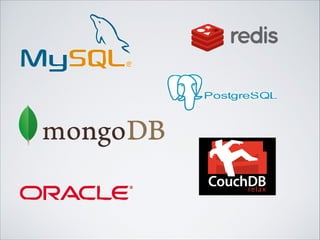
Transactional Database
TRANSACTIONAL DATABASE
• Stores all the data that your application needs to
service the user	

• Is talked to directly from your main framework
• Almost always represents the bottleneck to
scale for early stage companies.
Transactional Database
• Your data is your most precious asset, make
sure to have good backups, plus a slave
database for redundancy	

• As your application grows, it’s not uncommon to
have multiple databases, but keep it simple to
start	

• A single web page load often makes dozens or
even hundreds of database requests
Transactional Database
So great that you have this fancy powerful
framework, and this scalable transactional
database. But daaaamn, that’s a lot of work just
to deliver the same boring pages all day.	

!
Computers don’t mind doing lots of busy work
over and over. But wouldn’t it be nicer if they
didn’t? And faster for users too!
Cache
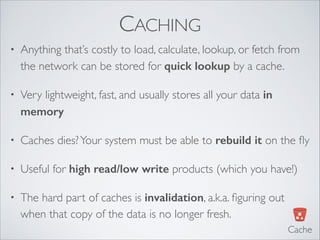
CACHING
• Anything that’s costly to load, calculate, lookup, or fetch from
the network can be stored for quick lookup by a cache.	

• Very lightweight, fast, and usually stores all your data in
memory
• Caches dies?Your system must be able to rebuild it on the fly	

• Useful for high read/low write products (which you have!)	

• The hard part of caches is invalidation, a.k.a. figuring out
when that copy of the data is no longer fresh.
Cache
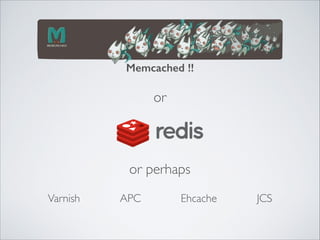
Memcached !!
Varnish APC
or
or perhaps
JCSEhcache
• Whole HTML pages (minus the personalized
parts)	

• Chunks of pages that rarely change	

• User info for currently active users	

• Database-backed objects
Cache
Now you’ve got a bunch of users joining your app!
And it’s speedy to load all those cached pages.	

!
But signup is super slow, because when they sign up,
you need to prepare their account, send them a
welcome email, link them up to all their FB friends.	

!
How do all those big sites not grind to a halt?!
Background Queue
BACKGROUND QUEUEING
• You should never make your users wait for
anything that could happen “whenever”, in the
background.	

• First part: the queue, onto which you put instructions
that need running when the system gets around to it.	

• Second part: the workers, who watch the queue for
all those instructions and execute them.
Background Queue
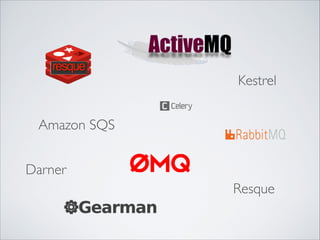
Darner
Kestrel
Resque
Amazon SQS
• Sending emails, SMS, push notifications	

• Recalculating leaderboards	

• Running slow analytics reports	

• Publishing FB open-graph data	

• Anything you aren’t absolutely sure has to happen
while the user is waiting for a page load	

• Or tasks that might be unreliable, like interfacing
with 3rd party vendors
Background Queue
Inevitably, you bring in more rich text content, like user
comments, blog posts, tweets, emails, news stories,
vendor descriptions, etc.	

!
You discover that your spiffyTransactional Database is
really terrible at search through all that stuff. It does a
poor job, and does it slowly!	

Search
SEARCH
• Most products need some kind of rich text search
even if it’s not obviously a core component	

• Many great cloud hosted solutions for search will save
you headaches. SaaS is perfect for low-volume search	

• Having a search index means a copy of your data is
stored in search. Common bugs when the transactional
data and the search data get out of sync
Search
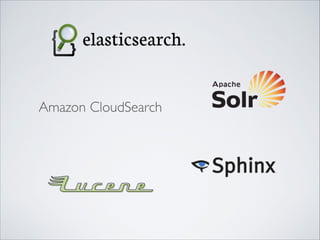
Amazon CloudSearch
• Anything that involves human text data is
better served by search	

• Search systems handle fuzzy matching, word
stemming, and lots of other goodies you want
Search
• Search by tag	

• Search through user bios	

• Admins searching for comments	

• Automated search for profanity
Search
With all these engaged users, you are spending more
effort creating relevant touch-points for them. That
means reaching them where they live, on email, SMS,
and mobile push notifications.	

!
Heaven help you if you are running those systems
yourself. You wouldn’t build your own postal fleet to
deliver postcards, right? Right??	

Email / SMS / Push
EMAIL / SMS / PUSH
• Widely distributed communications to
uncontrolled endpoints is tough	

• It’s easy to do it cheaply with very low volume, but
you will quickly hit headaches with deliverability,
performance, and security.
Email / SMS / Push
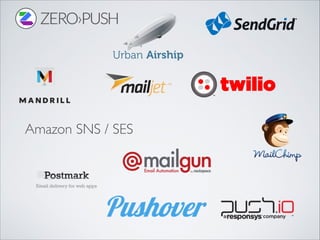
Amazon SNS / SES
• So many vendors, pricing changes all the time.
Avoid lock-in. Design your system to be
vendor agnostic.	

• Pick services that have lots of users like you
• Outreach for promotional, is different than
transactional. Pick the right partner for the job	

• Never run your own mail servers
Email / SMS / Push
Hopefully your developers have been house-keeping
their world all along, without you having to ask…	

!
The world’s best restaurants	

have impeccably run kitchens.
Config / Deployment
CONFIG / DEPLOYMENT
• How to provision a new machine	

• Organize code branches for parallel feature work	

• Spell out a process for emergency hot-fixes
• Automated testing before each deploy
• One-button deployment for any developer
Config / Deployment
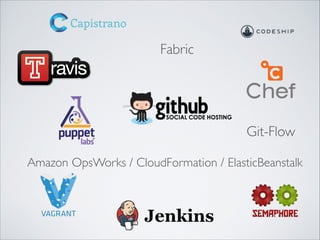
Amazon OpsWorks / CloudFormation / ElasticBeanstalk
Fabric
Git-Flow
• Release more frequently (every day, every
hour, or more)	

• Deploying code is dependable, no matter who
does it	

• Makes rollbacks trivial in case something goes
wrong	

• Dramatically lowers maintenance costs as
your infrastructure grows
Config / Deployment
No matter how good a job you do, there are
always things you can’t control. Your app will
have unexpected issues.	

!
But that doesn’t mean your customers should
find problems before you do!
Monitoring
MONITORING
• Internal monitoring watches for errors, plus
service or machine failures.	

• External monitoring simulates your application as
your users see it	

• Sentries monitor invariant conditions, a catch-all
for the unknown unknowns.
Monitoring
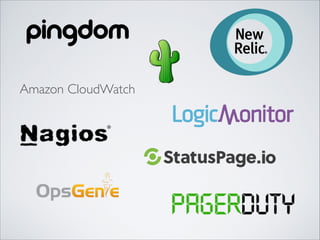
Amazon CloudWatch
• Alert monitoring must wake you up in the
wee hours if you are ever going to fix stuff	

• Run all issues through a single reporting
channel with an escalation policy	

• Non-critical / trend monitoring is just as
important, review it at least daily	

• Report issues immediately to your customers
viaTwitter and/or a status page
Monitoring
Now that you have a business, you need
some of that elusive “business intelligence”	

!
You want to extract insights from your data,
user behavior patterns from your logs,
revenue and growth forecasts, campaign
conversion rates, and deep app forensics.
Reporting/Analytics
REPORTING / ANALYTICS
• Analytics systems are fundamentally separate from
transactional data systems.	

• You might get away with one MySQL database serving both
purposes, but not for too long.	

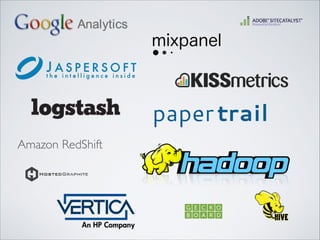
• Take advantage of great hosted analytics tools, and
augment with your own big data store for custom queries	

• Multiple tools to extract insights from your data
Reporting/Analytics
Amazon RedShift
• User behavior analytics	

• “What pages do users visit just before signing up?”	

• System / Data stats	

• “How many comments are being left per day?”	

• Ad-hoc data queries / Data science	

• “An investor asked us for a vanity metric we don’t track. Help!”	

• Forensics	

• “It seems like someone is trying to hack our API, what do we
know?”
Reporting/Analytics
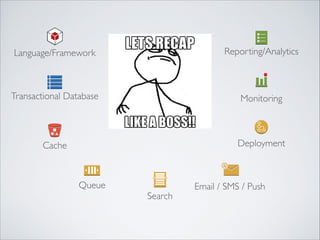
Queue Email / SMS / Push
Transactional Database Monitoring
Search
Deployment
Language/Framework
Cache
Reporting/Analytics
database search cache
data
queue
email/SMS/push
reporting/
analytics
monitoring/
alerting
config/deploy
language/
framework
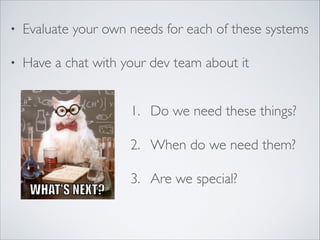
• Evaluate your own needs for each of these systems	

• Have a chat with your dev team about it
1. Do we need these things?	

2. When do we need them?	

3. Are we special?
Let’sTalk
APPLICATION ANATOMY 101
Will Koffel	

!
@wkoffel

Tech for the Non Technical - Anatomy of an Application Stack

  • 1.
  • 2.
    9 BASIC ANATOMICALSYSTEMS For a modern web stack Background Queue Email / SMS / Push Transactional Database Monitoring Search Config / Deployment Language/Framework Cache Reporting/Analytics
  • 3.
  • 4.
    You can’t buildan amazing web product without some code. Language/Framework
  • 5.
    LANGUAGE / FRAMEWORK •The programming language of your application defines what your team develops in • Modern frameworks are set of libraries written for a particular language which provide both a methodology for building applications, and lots of pre-built functionality Language/Framework
  • 6.
    Language Frameworks… (somany frameworks!) Ruby Rails Padrino Sinatra Cramp Javascript NodeJS Express Compound Meteor Python Django Pylons Tornado CherryPy Java Spring Grails Play Vaadin PHP Symfony CakePHP Laravel Yii And this is just the tip of the iceberg… Language/Framework
  • 7.
    • Frameworks aretied tightly to their language. • Most modern frameworks encourage MVC (model, view, controller) software design • Match the strength of the framework to the kind of app you are building (highly transactional? highly concurrent? fancy single page web app?) Language/Framework
  • 8.
    • Learn aboutthe community behind your frameworks, their philosophy, and maturity. • Framework choices will affect developer culture in your organization. • Don’t worry so much about scale early on (spoiler: it’s all about the architecture, so don’t change that channel…) Language/Framework
  • 9.
    Your users wantto actually interact with data and content on your site, so you’re going to need somewhere to keep that. Maybe a ton of it! Transactional Database
  • 10.
    TRANSACTIONAL DATABASE • Storesall the data that your application needs to service the user • Is talked to directly from your main framework • Almost always represents the bottleneck to scale for early stage companies. Transactional Database
  • 12.
    • Your datais your most precious asset, make sure to have good backups, plus a slave database for redundancy • As your application grows, it’s not uncommon to have multiple databases, but keep it simple to start • A single web page load often makes dozens or even hundreds of database requests Transactional Database
  • 13.
    So great thatyou have this fancy powerful framework, and this scalable transactional database. But daaaamn, that’s a lot of work just to deliver the same boring pages all day. ! Computers don’t mind doing lots of busy work over and over. But wouldn’t it be nicer if they didn’t? And faster for users too! Cache
  • 14.
    CACHING • Anything that’scostly to load, calculate, lookup, or fetch from the network can be stored for quick lookup by a cache. • Very lightweight, fast, and usually stores all your data in memory • Caches dies?Your system must be able to rebuild it on the fly • Useful for high read/low write products (which you have!) • The hard part of caches is invalidation, a.k.a. figuring out when that copy of the data is no longer fresh. Cache
  • 15.
  • 16.
    • Whole HTMLpages (minus the personalized parts) • Chunks of pages that rarely change • User info for currently active users • Database-backed objects Cache
  • 17.
    Now you’ve gota bunch of users joining your app! And it’s speedy to load all those cached pages. ! But signup is super slow, because when they sign up, you need to prepare their account, send them a welcome email, link them up to all their FB friends. ! How do all those big sites not grind to a halt?! Background Queue
  • 18.
    BACKGROUND QUEUEING • Youshould never make your users wait for anything that could happen “whenever”, in the background. • First part: the queue, onto which you put instructions that need running when the system gets around to it. • Second part: the workers, who watch the queue for all those instructions and execute them. Background Queue
  • 19.
  • 20.
    • Sending emails,SMS, push notifications • Recalculating leaderboards • Running slow analytics reports • Publishing FB open-graph data • Anything you aren’t absolutely sure has to happen while the user is waiting for a page load • Or tasks that might be unreliable, like interfacing with 3rd party vendors Background Queue
  • 21.
    Inevitably, you bringin more rich text content, like user comments, blog posts, tweets, emails, news stories, vendor descriptions, etc. ! You discover that your spiffyTransactional Database is really terrible at search through all that stuff. It does a poor job, and does it slowly! Search
  • 22.
    SEARCH • Most productsneed some kind of rich text search even if it’s not obviously a core component • Many great cloud hosted solutions for search will save you headaches. SaaS is perfect for low-volume search • Having a search index means a copy of your data is stored in search. Common bugs when the transactional data and the search data get out of sync Search
  • 23.
  • 24.
    • Anything thatinvolves human text data is better served by search • Search systems handle fuzzy matching, word stemming, and lots of other goodies you want Search
  • 25.
    • Search bytag • Search through user bios • Admins searching for comments • Automated search for profanity Search
  • 26.
    With all theseengaged users, you are spending more effort creating relevant touch-points for them. That means reaching them where they live, on email, SMS, and mobile push notifications. ! Heaven help you if you are running those systems yourself. You wouldn’t build your own postal fleet to deliver postcards, right? Right?? Email / SMS / Push
  • 27.
    EMAIL / SMS/ PUSH • Widely distributed communications to uncontrolled endpoints is tough • It’s easy to do it cheaply with very low volume, but you will quickly hit headaches with deliverability, performance, and security. Email / SMS / Push
  • 28.
  • 29.
    • So manyvendors, pricing changes all the time. Avoid lock-in. Design your system to be vendor agnostic. • Pick services that have lots of users like you • Outreach for promotional, is different than transactional. Pick the right partner for the job • Never run your own mail servers Email / SMS / Push
  • 30.
    Hopefully your developershave been house-keeping their world all along, without you having to ask… ! The world’s best restaurants have impeccably run kitchens. Config / Deployment
  • 31.
    CONFIG / DEPLOYMENT •How to provision a new machine • Organize code branches for parallel feature work • Spell out a process for emergency hot-fixes • Automated testing before each deploy • One-button deployment for any developer Config / Deployment
  • 32.
    Amazon OpsWorks /CloudFormation / ElasticBeanstalk Fabric Git-Flow
  • 33.
    • Release morefrequently (every day, every hour, or more) • Deploying code is dependable, no matter who does it • Makes rollbacks trivial in case something goes wrong • Dramatically lowers maintenance costs as your infrastructure grows Config / Deployment
  • 34.
    No matter howgood a job you do, there are always things you can’t control. Your app will have unexpected issues. ! But that doesn’t mean your customers should find problems before you do! Monitoring
  • 35.
    MONITORING • Internal monitoringwatches for errors, plus service or machine failures. • External monitoring simulates your application as your users see it • Sentries monitor invariant conditions, a catch-all for the unknown unknowns. Monitoring
  • 36.
  • 37.
    • Alert monitoringmust wake you up in the wee hours if you are ever going to fix stuff • Run all issues through a single reporting channel with an escalation policy • Non-critical / trend monitoring is just as important, review it at least daily • Report issues immediately to your customers viaTwitter and/or a status page Monitoring
  • 38.
    Now that youhave a business, you need some of that elusive “business intelligence” ! You want to extract insights from your data, user behavior patterns from your logs, revenue and growth forecasts, campaign conversion rates, and deep app forensics. Reporting/Analytics
  • 39.
    REPORTING / ANALYTICS •Analytics systems are fundamentally separate from transactional data systems. • You might get away with one MySQL database serving both purposes, but not for too long. • Take advantage of great hosted analytics tools, and augment with your own big data store for custom queries • Multiple tools to extract insights from your data Reporting/Analytics
  • 40.
  • 41.
    • User behavioranalytics • “What pages do users visit just before signing up?” • System / Data stats • “How many comments are being left per day?” • Ad-hoc data queries / Data science • “An investor asked us for a vanity metric we don’t track. Help!” • Forensics • “It seems like someone is trying to hack our API, what do we know?” Reporting/Analytics
  • 42.
    Queue Email /SMS / Push Transactional Database Monitoring Search Deployment Language/Framework Cache Reporting/Analytics
  • 43.
  • 44.
    • Evaluate yourown needs for each of these systems • Have a chat with your dev team about it 1. Do we need these things? 2. When do we need them? 3. Are we special?
  • 45.
  • 46.