Presentation on world wide web(WWW)
Introduction
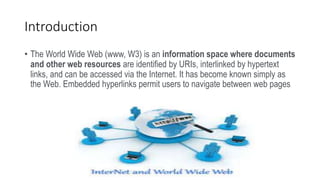
• The World Wide Web (www, W3) is an information space where documents
and other web resources are identified by URIs, interlinked by hypertext
links, and can be accessed via the Internet. It has become known simply as
the Web. Embedded hyperlinks permit users to navigate between web pages
Difference between World Wide Web and
Internet
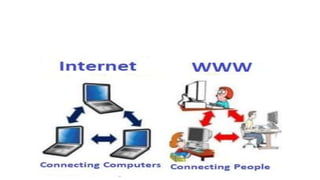
• Some people use the terms 'internet' and 'World
Wide Web' interchangeably. They think they are
the same thing, but it is not so. Internet is
entirely different from WWW. It is a worldwide
network of devices like computers, laptops,
tablets, etc. It enables users to send emails to
other users and chat with them online. For
example, when you send an email or chatting
with someone online, you are using the internet.
History of the World Wide Web
• The World Wide Web was invented by a British scientist,
Tim Berners-Lee in 1989. He was working at CERN at
that time. Originally, it was developed by him to fulfill
the need of automated information sharing between
scientists across the world, so that they could easily
share the data and results of their experiments and
studies with each other
The Web Grows
• Next computer platform was accessible by a few users.
Later, the development of 'line-mode' browser, which
could run on any system, started. In 1991, Berners-Lee
introduced his WWW software with 'line-mode' browser,
Web server software and a library for developers
How the World Wide Web Works
• Now, we have understood that WWW is a collection of
websites connected to the internet so that people can
search and share information. Now, let us understand
how it works
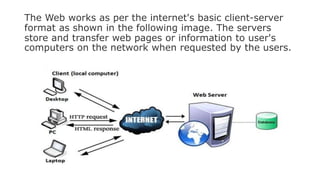
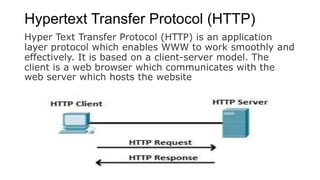
The Web works as per the internet's basic client-server
format as shown in the following image. The servers
store and transfer web pages or information to user's
computers on the network when requested by the users.
Hypertext Transfer Protocol (HTTP)
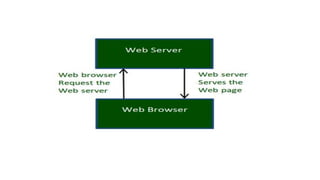
Hyper Text Transfer Protocol (HTTP) is an application
layer protocol which enables WWW to work smoothly and
effectively. It is based on a client-server model. The
client is a web browser which communicates with the
web server which hosts the website
System Architecture
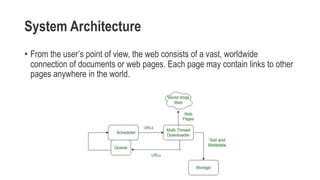
• From the user’s point of view, the web consists of a vast, worldwide
connection of documents or web pages. Each page may contain links to other
pages anywhere in the world.
Features of WWW
• HyperText Information System
• Cross-Platform
• Distributed
• Open Standards and Open Source
• Uses Web Browsers to provide a single interface for many services
• Dynamic, Interactive and Evolving.
• “Web 2.0”
Components of Web
• Uniform ResourceLocator (URL): serves as system for resources on web.
• HyperText Transfer Protocol (HTTP): specifies communication of browser and server.
• Hyper Text Markup Language (HTML): defines structure, organisation and content of
webpage.
Thanks You

World wide Web

  • 1.
    Presentation on worldwide web(WWW)
  • 2.
    Introduction • The WorldWide Web (www, W3) is an information space where documents and other web resources are identified by URIs, interlinked by hypertext links, and can be accessed via the Internet. It has become known simply as the Web. Embedded hyperlinks permit users to navigate between web pages
  • 3.
    Difference between WorldWide Web and Internet • Some people use the terms 'internet' and 'World Wide Web' interchangeably. They think they are the same thing, but it is not so. Internet is entirely different from WWW. It is a worldwide network of devices like computers, laptops, tablets, etc. It enables users to send emails to other users and chat with them online. For example, when you send an email or chatting with someone online, you are using the internet.
  • 5.
    History of theWorld Wide Web • The World Wide Web was invented by a British scientist, Tim Berners-Lee in 1989. He was working at CERN at that time. Originally, it was developed by him to fulfill the need of automated information sharing between scientists across the world, so that they could easily share the data and results of their experiments and studies with each other
  • 6.
    The Web Grows •Next computer platform was accessible by a few users. Later, the development of 'line-mode' browser, which could run on any system, started. In 1991, Berners-Lee introduced his WWW software with 'line-mode' browser, Web server software and a library for developers
  • 7.
    How the WorldWide Web Works • Now, we have understood that WWW is a collection of websites connected to the internet so that people can search and share information. Now, let us understand how it works
  • 9.
    The Web worksas per the internet's basic client-server format as shown in the following image. The servers store and transfer web pages or information to user's computers on the network when requested by the users.
  • 10.
    Hypertext Transfer Protocol(HTTP) Hyper Text Transfer Protocol (HTTP) is an application layer protocol which enables WWW to work smoothly and effectively. It is based on a client-server model. The client is a web browser which communicates with the web server which hosts the website
  • 11.
    System Architecture • Fromthe user’s point of view, the web consists of a vast, worldwide connection of documents or web pages. Each page may contain links to other pages anywhere in the world.
  • 12.
    Features of WWW •HyperText Information System • Cross-Platform • Distributed • Open Standards and Open Source • Uses Web Browsers to provide a single interface for many services • Dynamic, Interactive and Evolving. • “Web 2.0”
  • 13.
    Components of Web •Uniform ResourceLocator (URL): serves as system for resources on web. • HyperText Transfer Protocol (HTTP): specifies communication of browser and server. • Hyper Text Markup Language (HTML): defines structure, organisation and content of webpage.
  • 14.