TUGA IT 2016
LISBON, PORTUGAL
THANK YOU TO OUR
SPONSORS
THANK YOU TO OUR
TEAM
ANDRÉ BATISTA ANDRÉ MELANCIA ANDRÉ VALA ANTÓNIO LOURENÇO BRUNO LOPES
CLÁUDIO SILVA
RUI BASTOS
NIKO NEUGEBAUER
RUI REISRICARDO CABRAL
NUNO CANCELO PAULO MATOS PEDRO SIMÕES
SANDRA MORGADO SANDRO PEREIRA
Working with a Super
model for SharePoint
Sonja Madsen
Sonja Madsen
sp2013.blogspot.com
@sonjamadsen
dev@sonjasapps.com
Sonja
Madsen
Microsoft MVP, SONJAsAPPS
Best International Developer
Super model project
https://code.msdn.microsoft.com/officeapps/SharePoint-Super-Model-7855df3a
Read from Web API
Building views and pages
• SharePoint add-in
• Single Page Add-in
• App Part – web part
• SharePoint List View
• Multiple languages
• Design
• Modules
SharePoint add-in system view
.aspx page
.js files
.css files
.xml files
app manifest
list definition
content types
site columns
app part
modules
feature
aspx
Landing page HTML similar to a page layout
- Placeholders: PlaceHolderAdditionalPageHead,
PlaceHolderPageTitleInTitleArea, PlaceHolderMain
- SharePoint namespaces
- Inherits from
Microsoft.SharePoint.WebPartPages.WebPartPage
- Allows web part zones
- Allows web parts
- Parameters – properties in the URL: SPHostUrl, SPLanguage,
SPClientTag, SPProductNumber, SPAppWebUrl
App Part page
HTML
Inherits from Microsoft.SharePoint.WebPartPages.WebPartPage
No placeholders
No web part zones
No web parts
Parameters – properties in the URL: SPHostUrl, SPLanguage,
SPClientTag, SPProductNumber, SPAppWebUrl
Advanced Iframe
Advanced IFRAME
Edit web part: Title, layout, custom category and custom
properties
Resize
No data from the page
No data from parent page URL
Using SharePoint lists, libraries, and controls
• Controls such as
• List View,
• SharePoint:ScriptLink,
• SharePoint:EncodedLiteral,
• WebPartPages:XsltListViewWebPart
• Lists and libraries that are part of the add-in or part of a SharePoint site
• Lists and libraries that are part of the add-in do not have all the features
like the ones created on SharePoint
• No Site Contents
• No List Settings
Client-Side Object Model
_API
SharePoint 2013 - Office 365 - 2016
DEMO
REST and JSOM API
• JSOM - JavaScript Client Object Model
• REST - stateless, client-server, cacheable communications protocol
• What is better?
• Can we mix?
JavaScript
JSOM
context = new SP.ClientContext.get_current();
this.list =
context.get_web().get_lists().getByTitle(newsList);
var displayNewsQuery =
'<View><Query><OrderBy><FieldRef Name="ID"
Ascending="TRUE"/></OrderBy></Query></View>';
var query = new SP.CamlQuery();
query.set_viewXml(displayNewsQuery); news =
this.list.getItems(query);
context.load(news, 'Include(Title,ID)');
context.executeQueryAsync(onNewsSuccess,
onFail);
REST
var restUrl =
_spPageContextInfo.webAbsoluteUrl +
"/_api/web/lists/GetByTitle('Links')/items";
$.ajax({
url: restUrl,
method: "GET",
headers: { "ACCEPT":
"application/json;odata=verbose" },
success: onLinksSuccess,
error: onError
});
Resembles SharePoint Server API, SSOM
Strongly typed
Batch requests
Connection authentication to the server
Covers more SharePoint API than REST
JSOM Advantages
Add list and list columns with JSOM
var listCreationInfo = new SP.ListCreationInformation();
listCreationInfo.set_title(listName);
listCreationInfo.set_templateType(SP.ListTemplateType.genericList);
var list = web.get_lists().add(listCreationInfo);
var newCols = [
"<Field Type='DateTime' DisplayName='StartDate' />",
"<Field Name='LinkURL' DisplayName='Link URL' Type='URL' />", true];
var numberCols = newCols.length;
for (var i = 0; i < numberCols; i++) {

this.newColumns= list.get_fields().addFieldAsXml(newCols[i], true,
SP.AddFieldOptions.defaultValue);
}
context.load(this.newColumns);
DEMO
Office UI Fabric
Office UI Fabric
• http://dev.office.com/fabric/styles
• Fonts, colors, message colors
• Grid
• Icons
• Controls
<i class="ms-Icon ms-Icon--mail" aria-hidden="true"></i>
<a id="addLists" href="#"><i class="ms-Icon ms-Icon--circlePlus" style="font-size: xx-
large" aria-hidden="true"></i>Add lists</a>
<div>
Add a Site
<div>
<input id="sitename" class="ms-TextField-field" type="text">
<span class="ms-TextField-description">This should be the name of the site</span>
</div>
</div>
Responsive Grid
<div class="ms-Grid">
<div class="ms-Grid-row">
<div class="ms-Grid-col ms-u-md12">
<h1>Super DEMO</h1>
</div>
</div>
</div>
<div class="ms-Grid-row">
<div class="ms-Grid-col ms-u-md2">
<a id="addLists" href="#"><i class="ms-Icon ms-Icon--circlePlus" style="font-size: xx-large" aria-
hidden="true"></i>Add lists</a>
</div>
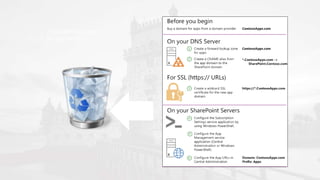
SharePoint Framework
Client-side web parts, list-and page based applications
No isolated app web
No app domain
&
Visual Studio Code
Or
Visual Studio
Workbench
SharePoint web part and Office 365
&
SharePoint 2016
SharePoint Web Part .spapp package
SharePoint web part .spapp
Development
Visual Studio Code
TypeScript
React is a suggested
framework
Office UI Fabric
List-based Applications
A list with custom list form pages
Page-based Applications
Webhooks
• List item receivers
• Add item, delete item, check-out, check-in
DEMO
Web part, React web part
What’s new
• Namespace – JavaScript
• Hosting of js and other files
• No cross-domain
• No .aspx page
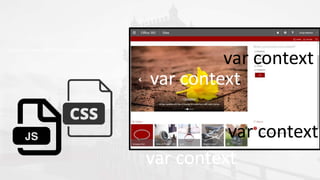
context = new SP.ClientContext.get_current();
var context
var context
var context
var context
JavaScript Patterns
function getImages() {
context = new SP.ClientContext.get_current();
var request = new SP.WebRequestInfo();
var url = rssurl;
var account = getProperty("Account");
}
var myApp = (function () {
var getImages = function () {
context = new SP.ClientContext.get_current();
var request = new SP.WebRequestInfo();
var url = rssurl;
var account = getProperty("Account");
};
TypeScript
• TypeScript is a typed superset of JavaScript that compiles to plain
JavaScript
JavaScript Frameworks
• Model-View-View Model (MVVM) is a design pattern for building user
interfaces
• Model - stored data
• View model - representation of the data and operations (add,
remove)
• View - visible, interactive UI
Reactjs
• React is front end library developed by Facebook
• Used for handling view layer for web and mobile apps
• JSX − JSX is JavaScript syntax extension
• Components − everything is a component
• Unidirectional data flow and Flux − React implements one way data
flow
• Virtual DOM which is JavaScript object
• Inline templating and JSX
SharePoint Add-ins - Advantages
• You can hide the lists from end-user
• Both pages and an app part
• .aspx page – HTML
• Images, scripts, stylesheets hosted on SharePoint
• Isolated is not always a bad thing
SharePoint Framework - Advantages
• Responsive mobile friendly
• No iframe
• Dynamic properties
• Webhooks
• List-based and Page-based
• No need for cross-domain library to access SharePoint resources
•SharePoint Add-ins on
Office 365
•Azure Web API
and Core 1.0
Front-end Back-end
SharePoint Azure
Core 1.0
Front-end
Back-end
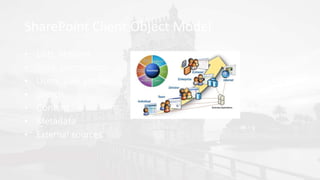
SharePoint Client Object Model
• Lists, libraries
• Sites, permissions
• Users, user profiles
• Search
• Content
• Metadata
• External sources
C# is what JavaScript is not
• Send email
• Connect to database
• Secret sauce, code-behind
Microsoft on Instagram
Code-behind
• Intelligent apps
• Current user name, takes pictures description, language-country,
customer profile, purchase history, your product inventory
• Secret sauce logic
Core 1.0
• Cross-platform
• project.json
• global.json
• appsettings.json
• Command line
• Rebirth of MVC
• Coexist with ASP.NET 4.6
DEMO
• Code-behind
Instagram
RSS feed
SharePoint
Add-in
JavaScript
Code-behind
Logic
REST
∫∞
Solution Architecture
SharePoint add-in Core 1.0
App manifest
XML files
JavaScript
CSS
C#
D E M O
DEMO
• SQL Database
THANK YOU TO OUR
SPONSORS

Working with a super model for SharePoint Tuga IT 2016

  • 1.
  • 2.
    THANK YOU TOOUR SPONSORS
  • 3.
    THANK YOU TOOUR TEAM ANDRÉ BATISTA ANDRÉ MELANCIA ANDRÉ VALA ANTÓNIO LOURENÇO BRUNO LOPES CLÁUDIO SILVA RUI BASTOS NIKO NEUGEBAUER RUI REISRICARDO CABRAL NUNO CANCELO PAULO MATOS PEDRO SIMÕES SANDRA MORGADO SANDRO PEREIRA
  • 4.
    Working with aSuper model for SharePoint Sonja Madsen
  • 5.
  • 6.
  • 7.
    Building views andpages • SharePoint add-in • Single Page Add-in • App Part – web part • SharePoint List View • Multiple languages • Design • Modules
  • 8.
    SharePoint add-in systemview .aspx page .js files .css files .xml files app manifest list definition content types site columns app part modules feature aspx
  • 9.
    Landing page HTMLsimilar to a page layout - Placeholders: PlaceHolderAdditionalPageHead, PlaceHolderPageTitleInTitleArea, PlaceHolderMain - SharePoint namespaces - Inherits from Microsoft.SharePoint.WebPartPages.WebPartPage - Allows web part zones - Allows web parts - Parameters – properties in the URL: SPHostUrl, SPLanguage, SPClientTag, SPProductNumber, SPAppWebUrl
  • 10.
    App Part page HTML Inheritsfrom Microsoft.SharePoint.WebPartPages.WebPartPage No placeholders No web part zones No web parts Parameters – properties in the URL: SPHostUrl, SPLanguage, SPClientTag, SPProductNumber, SPAppWebUrl Advanced Iframe Advanced IFRAME Edit web part: Title, layout, custom category and custom properties Resize No data from the page No data from parent page URL
  • 11.
    Using SharePoint lists,libraries, and controls • Controls such as • List View, • SharePoint:ScriptLink, • SharePoint:EncodedLiteral, • WebPartPages:XsltListViewWebPart • Lists and libraries that are part of the add-in or part of a SharePoint site • Lists and libraries that are part of the add-in do not have all the features like the ones created on SharePoint • No Site Contents • No List Settings
  • 12.
  • 13.
  • 14.
    REST and JSOMAPI • JSOM - JavaScript Client Object Model • REST - stateless, client-server, cacheable communications protocol • What is better? • Can we mix?
  • 15.
    JavaScript JSOM context = newSP.ClientContext.get_current(); this.list = context.get_web().get_lists().getByTitle(newsList); var displayNewsQuery = '<View><Query><OrderBy><FieldRef Name="ID" Ascending="TRUE"/></OrderBy></Query></View>'; var query = new SP.CamlQuery(); query.set_viewXml(displayNewsQuery); news = this.list.getItems(query); context.load(news, 'Include(Title,ID)'); context.executeQueryAsync(onNewsSuccess, onFail); REST var restUrl = _spPageContextInfo.webAbsoluteUrl + "/_api/web/lists/GetByTitle('Links')/items"; $.ajax({ url: restUrl, method: "GET", headers: { "ACCEPT": "application/json;odata=verbose" }, success: onLinksSuccess, error: onError });
  • 16.
    Resembles SharePoint ServerAPI, SSOM Strongly typed Batch requests Connection authentication to the server Covers more SharePoint API than REST JSOM Advantages
  • 17.
    Add list andlist columns with JSOM var listCreationInfo = new SP.ListCreationInformation(); listCreationInfo.set_title(listName); listCreationInfo.set_templateType(SP.ListTemplateType.genericList); var list = web.get_lists().add(listCreationInfo); var newCols = [ "<Field Type='DateTime' DisplayName='StartDate' />", "<Field Name='LinkURL' DisplayName='Link URL' Type='URL' />", true]; var numberCols = newCols.length; for (var i = 0; i < numberCols; i++) { this.newColumns= list.get_fields().addFieldAsXml(newCols[i], true, SP.AddFieldOptions.defaultValue); } context.load(this.newColumns);
  • 19.
  • 20.
  • 21.
    Office UI Fabric •http://dev.office.com/fabric/styles • Fonts, colors, message colors • Grid • Icons • Controls
  • 22.
    <i class="ms-Icon ms-Icon--mail"aria-hidden="true"></i> <a id="addLists" href="#"><i class="ms-Icon ms-Icon--circlePlus" style="font-size: xx- large" aria-hidden="true"></i>Add lists</a>
  • 23.
    <div> Add a Site <div> <inputid="sitename" class="ms-TextField-field" type="text"> <span class="ms-TextField-description">This should be the name of the site</span> </div> </div>
  • 24.
  • 25.
    <div class="ms-Grid"> <div class="ms-Grid-row"> <divclass="ms-Grid-col ms-u-md12"> <h1>Super DEMO</h1> </div> </div> </div> <div class="ms-Grid-row"> <div class="ms-Grid-col ms-u-md2"> <a id="addLists" href="#"><i class="ms-Icon ms-Icon--circlePlus" style="font-size: xx-large" aria- hidden="true"></i>Add lists</a> </div>
  • 26.
    SharePoint Framework Client-side webparts, list-and page based applications
  • 27.
    No isolated appweb No app domain
  • 28.
    & Visual Studio Code Or VisualStudio Workbench SharePoint web part and Office 365 & SharePoint 2016
  • 29.
    SharePoint Web Part.spapp package
  • 30.
  • 31.
    Development Visual Studio Code TypeScript Reactis a suggested framework Office UI Fabric
  • 32.
    List-based Applications A listwith custom list form pages
  • 33.
  • 34.
    Webhooks • List itemreceivers • Add item, delete item, check-out, check-in
  • 35.
  • 36.
    What’s new • Namespace– JavaScript • Hosting of js and other files • No cross-domain • No .aspx page
  • 37.
    context = newSP.ClientContext.get_current(); var context var context var context var context
  • 38.
    JavaScript Patterns function getImages(){ context = new SP.ClientContext.get_current(); var request = new SP.WebRequestInfo(); var url = rssurl; var account = getProperty("Account"); } var myApp = (function () { var getImages = function () { context = new SP.ClientContext.get_current(); var request = new SP.WebRequestInfo(); var url = rssurl; var account = getProperty("Account"); };
  • 39.
    TypeScript • TypeScript isa typed superset of JavaScript that compiles to plain JavaScript
  • 40.
    JavaScript Frameworks • Model-View-ViewModel (MVVM) is a design pattern for building user interfaces • Model - stored data • View model - representation of the data and operations (add, remove) • View - visible, interactive UI
  • 41.
    Reactjs • React isfront end library developed by Facebook • Used for handling view layer for web and mobile apps • JSX − JSX is JavaScript syntax extension • Components − everything is a component • Unidirectional data flow and Flux − React implements one way data flow • Virtual DOM which is JavaScript object • Inline templating and JSX
  • 42.
    SharePoint Add-ins -Advantages • You can hide the lists from end-user • Both pages and an app part • .aspx page – HTML • Images, scripts, stylesheets hosted on SharePoint • Isolated is not always a bad thing
  • 43.
    SharePoint Framework -Advantages • Responsive mobile friendly • No iframe • Dynamic properties • Webhooks • List-based and Page-based • No need for cross-domain library to access SharePoint resources
  • 44.
    •SharePoint Add-ins on Office365 •Azure Web API and Core 1.0
  • 45.
  • 46.
  • 47.
    SharePoint Client ObjectModel • Lists, libraries • Sites, permissions • Users, user profiles • Search • Content • Metadata • External sources
  • 48.
    C# is whatJavaScript is not • Send email • Connect to database • Secret sauce, code-behind
  • 49.
  • 50.
    Code-behind • Intelligent apps •Current user name, takes pictures description, language-country, customer profile, purchase history, your product inventory • Secret sauce logic
  • 51.
    Core 1.0 • Cross-platform •project.json • global.json • appsettings.json • Command line • Rebirth of MVC • Coexist with ASP.NET 4.6
  • 52.
  • 53.
  • 54.
    Solution Architecture SharePoint add-inCore 1.0 App manifest XML files JavaScript CSS C# D E M O
  • 55.
  • 57.
    THANK YOU TOOUR SPONSORS