

Intro to StratusForms Mark Rackley
mrackley@paitgroup.com
#SayNoToInfoPath
http://www.stratusforms.com
http://www.itunity.com/community/stratusforms
© 2015 PAIT Group PAITGroup.com
Mark Rackley / Partner & CTO
•20+ years software architecture and
development experience
•Office 365 MVP, SharePoint Junkie
since 2007
•Event Organizer (SharePointalooza.org)
•Blogger, Writer, Speaker
•Bacon aficionado
@mrackley
www.SharePointHillbilly.com
www.PaitGroup.com
www.SharePointaLooza.org
www.StratusForms.com
© 2015 PAIT Group PAITGroup.com
StratusForms
www.StratusForms.com
• A lightweight InfoPath alternative
• 100% Client Side Based
• Engine is 100% Free
• Build forms using standard HTML, CSS, and JavaScript
• They can look EXACTLY like you want
• You can write additional business logic using JavaScript to interact with other
systems
© 2015 PAIT Group PAITGroup.com
StratusForms
• Works in SharePoint 2007, 2010, 2013, & O365
• Stores all form fields in one object
• Can promote fields in the form to SharePoint list fields
• Supports many field types including People Pickers (2013 only)
• Other features
• Repeating content
• Parent / Child list relationships
• Reporting
• Form and Field encryption/password protection
© 2015 PAIT Group PAITGroup.com
StratusForms
•Available services
•Support
•Customizations
•Training
Contact StratusForms@PAITGroup.com for more information
© 2015 PAIT Group PAITGroup.com
StratusForms – Premium *Coming Soon*
• Will be available in the SharePoint Store
• Automated configuration
• Drag and Drop form designer
• Minimal cost compared to other 3rd party form solutions
• Uses JSOM for the data library
• Same engine as free tool
© 2015 PAIT Group PAITGroup.com
The Basics
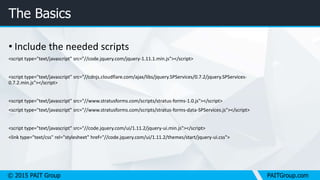
• Include the needed scripts
<script type="text/javascript" src="//code.jquery.com/jquery-1.11.1.min.js"></script>
<script type="text/javascript" src="//cdnjs.cloudflare.com/ajax/libs/jquery.SPServices/0.7.2/jquery.SPServices-
0.7.2.min.js"></script>
<script type="text/javascript" src="//www.stratusforms.com/scripts/stratus-forms-1.0.js"></script>
<script type="text/javascript" src="//www.stratusforms.com/scripts/stratus-forms-data-SPServices.js"></script>
<script type="text/javascript" src="//code.jquery.com/ui/1.11.2/jquery-ui.min.js"></script>
<link type="text/css" rel="stylesheet" href="//code.jquery.com/ui/1.11.2/themes/start/jquery-ui.css">
© 2015 PAIT Group PAITGroup.com
The Basics
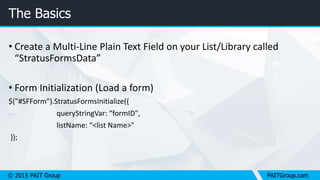
• Create a Multi-Line Plain Text Field on your List/Library called
“StratusFormsData”
• Form Initialization (Load a form)
$("#SFForm").StratusFormsInitialize({
queryStringVar: “formID",
listName: “<list Name>"
});
© 2015 PAIT Group PAITGroup.com
The Basics
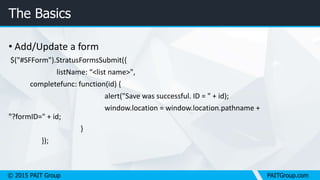
• Add/Update a form
$("#SFForm").StratusFormsSubmit({
listName: “<list name>",
completefunc: function(id) {
alert("Save was successful. ID = " + id);
window.location = window.location.pathname +
"?formID=" + id;
}
});
© 2015 PAIT Group PAITGroup.com
The Basics
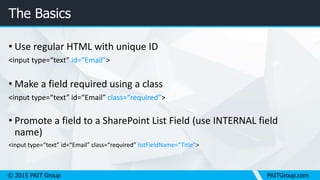
• Use regular HTML with unique ID
<input type=“text” id=“Email”>
• Make a field required using a class
<input type=“text” id=“Email” class=“required”>
• Promote a field to a SharePoint List Field (use INTERNAL field
name)
<input type=“text” id=“Email” class=“required” listFieldName=“Title”>
© 2015 PAIT Group PAITGroup.com
The Basics
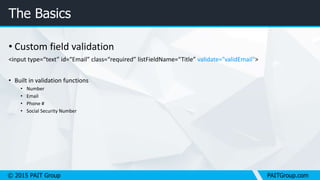
• Custom field validation
<input type=“text” id=“Email” class=“required” listFieldName=“Title” validate="validEmail">
• Built in validation functions
• Number
• Email
• Phone #
• Social Security Number
© 2015 PAIT Group PAITGroup.com
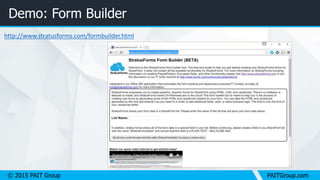
Demo: Form Builder
http://www.stratusforms.com/formbuilder.html
DEMO: Building your first Form
with StratusForms
InfoPath? We don’t need no stinking InfoPath!
© 2015 PAIT Group PAITGroup.com
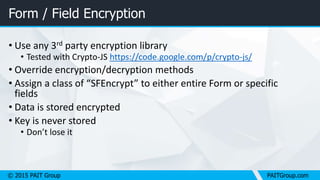
Form / Field Encryption
• Use any 3rd party encryption library
• Tested with Crypto-JS https://code.google.com/p/crypto-js/
• Override encryption/decryption methods
• Assign a class of “SFEncrypt” to either entire Form or specific
fields
• Data is stored encrypted
• Key is never stored
• Don’t lose it
© 2015 PAIT Group PAITGroup.com
Form / Field Encryption
• Use any 3rd party encryption library
• Tested with Crypto-JS https://code.google.com/p/crypto-js/
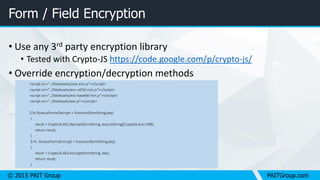
• Override encryption/decryption methods
<script src="../SiteAssets/core-min.js"></script>
<script src="../SiteAssets/enc-utf16-min.js"></script>
<script src="../SiteAssets/enc-base64-min.js"></script>
<script src="../SiteAssets/aes.js"></script>
$.fn.StratusFormsDecrypt = function(formString,key)
{
result = CryptoJS.AES.decrypt(formString, key).toString(CryptoJS.enc.Utf8);
return result;
}
$.fn. StratusFormsEncrypt = function(formString,key)
{
result = CryptoJS.AES.encrypt(formString, key);
return result;
}
Demo: Data Encryption
Encrypt field(s) or an entire form
© 2015 PAIT Group PAITGroup.com
Reporting on Form Data
• Uses DataTables http://www.datatables.net
<script type="text/javascript" src="//cdn.datatables.net/1.10.3/js/jquery.dataTables.min.js"></script>
<link type="text/css" rel="stylesheet" href="//cdn.datatables.net/1.10.3/css/jquery.dataTables.min.css" />
//Create a List View of Stratus Forms data using DataTables.
//#reportTable is a Table element that will contain the report
//ensure all fields reported against contain data or DataTables
//will throw an error.
$("#reportingTable").StratusFormsReporting({
listName: "messages", //list to report against
sourceData: ["name","email","age"], //id's of the fields to report on
columnDisplay: ["Contact Name","Email Address","Age"] //column header for fields in "sourceData"
});
Demo: Form Reporting
You can’t do THAT with InfoPath
Thank you.
© 2015 PAIT Group June 29, 2015

Introduction to StratusForms #SayNoToInfoPath

  • 1.
    Intro to StratusFormsMark Rackley mrackley@paitgroup.com #SayNoToInfoPath http://www.stratusforms.com http://www.itunity.com/community/stratusforms
  • 2.
    © 2015 PAITGroup PAITGroup.com Mark Rackley / Partner & CTO •20+ years software architecture and development experience •Office 365 MVP, SharePoint Junkie since 2007 •Event Organizer (SharePointalooza.org) •Blogger, Writer, Speaker •Bacon aficionado @mrackley www.SharePointHillbilly.com www.PaitGroup.com www.SharePointaLooza.org www.StratusForms.com
  • 3.
    © 2015 PAITGroup PAITGroup.com StratusForms www.StratusForms.com • A lightweight InfoPath alternative • 100% Client Side Based • Engine is 100% Free • Build forms using standard HTML, CSS, and JavaScript • They can look EXACTLY like you want • You can write additional business logic using JavaScript to interact with other systems
  • 4.
    © 2015 PAITGroup PAITGroup.com StratusForms • Works in SharePoint 2007, 2010, 2013, & O365 • Stores all form fields in one object • Can promote fields in the form to SharePoint list fields • Supports many field types including People Pickers (2013 only) • Other features • Repeating content • Parent / Child list relationships • Reporting • Form and Field encryption/password protection
  • 5.
    © 2015 PAITGroup PAITGroup.com StratusForms •Available services •Support •Customizations •Training Contact StratusForms@PAITGroup.com for more information
  • 6.
    © 2015 PAITGroup PAITGroup.com StratusForms – Premium *Coming Soon* • Will be available in the SharePoint Store • Automated configuration • Drag and Drop form designer • Minimal cost compared to other 3rd party form solutions • Uses JSOM for the data library • Same engine as free tool
  • 7.
    © 2015 PAITGroup PAITGroup.com The Basics • Include the needed scripts <script type="text/javascript" src="//code.jquery.com/jquery-1.11.1.min.js"></script> <script type="text/javascript" src="//cdnjs.cloudflare.com/ajax/libs/jquery.SPServices/0.7.2/jquery.SPServices- 0.7.2.min.js"></script> <script type="text/javascript" src="//www.stratusforms.com/scripts/stratus-forms-1.0.js"></script> <script type="text/javascript" src="//www.stratusforms.com/scripts/stratus-forms-data-SPServices.js"></script> <script type="text/javascript" src="//code.jquery.com/ui/1.11.2/jquery-ui.min.js"></script> <link type="text/css" rel="stylesheet" href="//code.jquery.com/ui/1.11.2/themes/start/jquery-ui.css">
  • 8.
    © 2015 PAITGroup PAITGroup.com The Basics • Create a Multi-Line Plain Text Field on your List/Library called “StratusFormsData” • Form Initialization (Load a form) $("#SFForm").StratusFormsInitialize({ queryStringVar: “formID", listName: “<list Name>" });
  • 9.
    © 2015 PAITGroup PAITGroup.com The Basics • Add/Update a form $("#SFForm").StratusFormsSubmit({ listName: “<list name>", completefunc: function(id) { alert("Save was successful. ID = " + id); window.location = window.location.pathname + "?formID=" + id; } });
  • 10.
    © 2015 PAITGroup PAITGroup.com The Basics • Use regular HTML with unique ID <input type=“text” id=“Email”> • Make a field required using a class <input type=“text” id=“Email” class=“required”> • Promote a field to a SharePoint List Field (use INTERNAL field name) <input type=“text” id=“Email” class=“required” listFieldName=“Title”>
  • 11.
    © 2015 PAITGroup PAITGroup.com The Basics • Custom field validation <input type=“text” id=“Email” class=“required” listFieldName=“Title” validate="validEmail"> • Built in validation functions • Number • Email • Phone # • Social Security Number
  • 12.
    © 2015 PAITGroup PAITGroup.com Demo: Form Builder http://www.stratusforms.com/formbuilder.html
  • 13.
    DEMO: Building yourfirst Form with StratusForms InfoPath? We don’t need no stinking InfoPath!
  • 14.
    © 2015 PAITGroup PAITGroup.com Form / Field Encryption • Use any 3rd party encryption library • Tested with Crypto-JS https://code.google.com/p/crypto-js/ • Override encryption/decryption methods • Assign a class of “SFEncrypt” to either entire Form or specific fields • Data is stored encrypted • Key is never stored • Don’t lose it
  • 15.
    © 2015 PAITGroup PAITGroup.com Form / Field Encryption • Use any 3rd party encryption library • Tested with Crypto-JS https://code.google.com/p/crypto-js/ • Override encryption/decryption methods <script src="../SiteAssets/core-min.js"></script> <script src="../SiteAssets/enc-utf16-min.js"></script> <script src="../SiteAssets/enc-base64-min.js"></script> <script src="../SiteAssets/aes.js"></script> $.fn.StratusFormsDecrypt = function(formString,key) { result = CryptoJS.AES.decrypt(formString, key).toString(CryptoJS.enc.Utf8); return result; } $.fn. StratusFormsEncrypt = function(formString,key) { result = CryptoJS.AES.encrypt(formString, key); return result; }
  • 16.
    Demo: Data Encryption Encryptfield(s) or an entire form
  • 17.
    © 2015 PAITGroup PAITGroup.com Reporting on Form Data • Uses DataTables http://www.datatables.net <script type="text/javascript" src="//cdn.datatables.net/1.10.3/js/jquery.dataTables.min.js"></script> <link type="text/css" rel="stylesheet" href="//cdn.datatables.net/1.10.3/css/jquery.dataTables.min.css" /> //Create a List View of Stratus Forms data using DataTables. //#reportTable is a Table element that will contain the report //ensure all fields reported against contain data or DataTables //will throw an error. $("#reportingTable").StratusFormsReporting({ listName: "messages", //list to report against sourceData: ["name","email","age"], //id's of the fields to report on columnDisplay: ["Contact Name","Email Address","Age"] //column header for fields in "sourceData" });
  • 18.
    Demo: Form Reporting Youcan’t do THAT with InfoPath
  • 19.
    Thank you. © 2015PAIT Group June 29, 2015