Agility Systems, philly.NET User Group
bill@businessagility.net
SharePoint 2013
Client Side Rendering
2 | SharePoint Saturday New York City 2013
OUTLINE & AGENDA
• What is CSR?
• Demo: Lap around SP 2013
• Using JSLink in Views
• Demo: MLB Teams
• Using Display Templates in Search
• Demo: Refiners, result types, templates, oh
my!
• Custom Hover Panels
• Demo: MLB Parks
3 | SharePoint Saturday New York City 2013
SOME PERSPECTIVE
• SharePoint 2007
• CAML on server
• SharePoint 2010
• XML data, CSOM
• XSLT on server
• SharePoint 2013
• REST, CSOM, JSON
• CSR JavaScript
4 | SharePoint Saturday New York City 2013
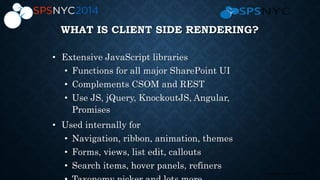
WHAT IS CLIENT SIDE RENDERING?
• Extensive JavaScript libraries
• Functions for all major SharePoint UI
• Complements CSOM and REST
• Use JS, jQuery, KnockoutJS, Angular,
Promises
• Used internally for
• Navigation, ribbon, animation, themes
• Forms, views, list edit, callouts
• Search items, hover panels, refiners
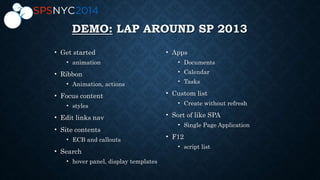
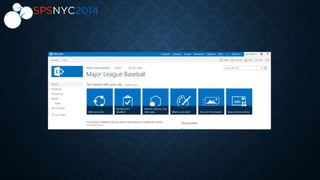
DEMO: LAP AROUND SP 2013
• Get started
• animation
• Ribbon
• Animation, actions
• Focus content
• styles
• Edit links nav
• Site contents
• ECB and callouts
• Search
• hover panel, display templates
• Apps
• Documents
• Calendar
• Tasks
• Custom list
• Create without refresh
• Sort of like SPA
• Single Page Application
• F12
• script list
7 | SharePoint Saturday New York City 2013
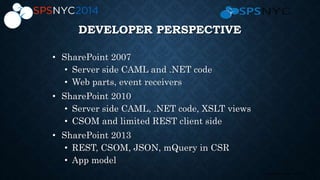
DEVELOPER PERSPECTIVE
• SharePoint 2007
• Server side CAML and .NET code
• Web parts, event receivers
• SharePoint 2010
• Server side CAML, .NET code, XSLT views
• CSOM and limited REST client side
• SharePoint 2013
• REST, CSOM, JSON, mQuery in CSR
• App model
8 | SharePoint Saturday New York City 2013
COMMON DEVELOPER TASKS
• JSLink
• Lists, views
• Field formatting
• Web parts
• Content types
• Display Templates
• Content Search web part
• Search hover panel
• List callouts
9 | SharePoint Saturday New York City 2013
JSLINK
• Element added to view definitions and web parts
• Similar to XSLT in 2010
• Set in code or Advanced web part properties
• Points to JavaScript file
• Convenient storage in _catalog/masterpage
• Content type collects required metadata
• Edit with SharePoint Designer, Visual Studio,
text
• Debug with browser tools or VS
10 | SharePoint Saturday New York City 2013
JSLINK RENDERCONTEXT
• Templates collection
• Header, item, footer, and others
• Register with scope
• BaseViewID, ListTemplateType, ControlMode
• Need additional commands for MDS timing
• RegisterModuleInit
11 | SharePoint Saturday New York City 2013
JSLINK RENDERCONTEXT
• OnPreRender
• Has data
• No markup
• Dynamic lookups
• OnPostRender
• Complete DOM
• jQuery tricks
• Operations on entire result set
12 | SharePoint Saturday New York City 2013
JSLINK RENDERCONTEXT
• ListData
• Stores data
• Columns based on CAML
• ListSchema
• Stores metadata
• ctx
• Context of current operation
• Instance metadata: user, site, list, etc.
13 | SharePoint Saturday New York City 2013
JSLINK ADVANCED
• SPClientRenderer.Render()
• From arbitrary data
• Outside of page context
• In AJAX methods
14 | SharePoint Saturday New York City 2013
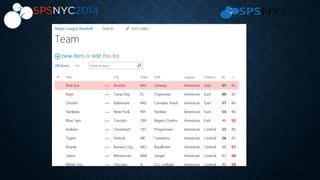
DEMO: JSLINK IN VIEWS
• _catalogmasterpage, upload file, content type
• JSLink pointer in default view
• Prove it works with Alert, anonymous function
• Custom field, multiple fields, formatting,
functions
• MDS issue and Register
• Row highlight with OnRender
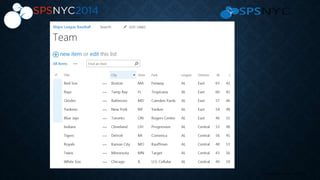
• Override entire view, show on new page
• Edit/New form hidden and read only fields
15 | SharePoint Saturday New York City 2013
16 | SharePoint Saturday New York City 2013
17 | SharePoint Saturday New York City 2013
DISPLAY TEMPLATES
• Work much like web parts
• Connected to some data source
• Use in search result web part via result type
• Use in content by search web part (on-premise)
• Similar to JSLink in approach
• Can share utility libraries
• Data comes from search index
• Managed properties with Retrieve flag
• <mso:ManagedPropertyMapping>
18 | SharePoint Saturday New York City 2013
DISPLAY TEMPLATES
• Stored in _catalogs/masterpage/Display Templates/
• Scope at collection or site level
• Library with content types
• Supports versioning
• Can deploy with solutions and feature receivers
• Editors
• Visual Studio
• SharePoint Designer
• NotePad++ or similar
19 | SharePoint Saturday New York City 2013
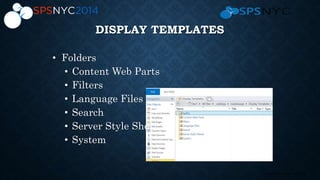
DISPLAY TEMPLATES
• Folders
• Content Web Parts
• Filters
• Language Files
• Search
• Server Style Sheets
• System
20 | SharePoint Saturday New York City 2013
DEMO: DISPLAY TEMPLATES
• Show location of display templates
• Show filter edit for refiner counts
• Explain refiners
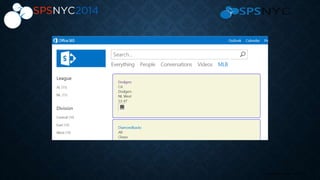
• Show team result type
• Demo team display template
21 | SharePoint Saturday New York City 2013
22 | SharePoint Saturday New York City 2013
HOVER PANELS
• Floating DIV with header, content, footer, actions
• AKA Callouts
• Used extensively in OOTB UI
• Essential to search experience
• Associated with a display template, result
type
• Use CalloutManager
• Attach to launchpoint
• Set beak orientation
23 | SharePoint Saturday New York City 2013
DEMO: HOVER PANELS
• Show existing JS templates
• Demo PDF object in Search page
• Explain team hover
24 | SharePoint Saturday New York City 2013
CSR SUMMARY
• Learn how Microsoft makes SP pages responsive
• Invest in JavaScript talent
• Use REST and JSON to retrieve data
• Convert some views to JSLink overrides
• Make some Search display templates
• Try some hover panels
• On-premise:
• Investigate Content by Search web part
THANK YOU
EVENT SPONSORS
• Please visit them and inquire about
their products & services
• To win prizes make sure to get your
bingo card stamped by ALL sponsors

SharePoint 2013 Client Side Rendering

  • 1.
    Agility Systems, philly.NETUser Group bill@businessagility.net SharePoint 2013 Client Side Rendering
  • 2.
    2 | SharePointSaturday New York City 2013 OUTLINE & AGENDA • What is CSR? • Demo: Lap around SP 2013 • Using JSLink in Views • Demo: MLB Teams • Using Display Templates in Search • Demo: Refiners, result types, templates, oh my! • Custom Hover Panels • Demo: MLB Parks
  • 3.
    3 | SharePointSaturday New York City 2013 SOME PERSPECTIVE • SharePoint 2007 • CAML on server • SharePoint 2010 • XML data, CSOM • XSLT on server • SharePoint 2013 • REST, CSOM, JSON • CSR JavaScript
  • 4.
    4 | SharePointSaturday New York City 2013 WHAT IS CLIENT SIDE RENDERING? • Extensive JavaScript libraries • Functions for all major SharePoint UI • Complements CSOM and REST • Use JS, jQuery, KnockoutJS, Angular, Promises • Used internally for • Navigation, ribbon, animation, themes • Forms, views, list edit, callouts • Search items, hover panels, refiners
  • 5.
    DEMO: LAP AROUNDSP 2013 • Get started • animation • Ribbon • Animation, actions • Focus content • styles • Edit links nav • Site contents • ECB and callouts • Search • hover panel, display templates • Apps • Documents • Calendar • Tasks • Custom list • Create without refresh • Sort of like SPA • Single Page Application • F12 • script list
  • 7.
    7 | SharePointSaturday New York City 2013 DEVELOPER PERSPECTIVE • SharePoint 2007 • Server side CAML and .NET code • Web parts, event receivers • SharePoint 2010 • Server side CAML, .NET code, XSLT views • CSOM and limited REST client side • SharePoint 2013 • REST, CSOM, JSON, mQuery in CSR • App model
  • 8.
    8 | SharePointSaturday New York City 2013 COMMON DEVELOPER TASKS • JSLink • Lists, views • Field formatting • Web parts • Content types • Display Templates • Content Search web part • Search hover panel • List callouts
  • 9.
    9 | SharePointSaturday New York City 2013 JSLINK • Element added to view definitions and web parts • Similar to XSLT in 2010 • Set in code or Advanced web part properties • Points to JavaScript file • Convenient storage in _catalog/masterpage • Content type collects required metadata • Edit with SharePoint Designer, Visual Studio, text • Debug with browser tools or VS
  • 10.
    10 | SharePointSaturday New York City 2013 JSLINK RENDERCONTEXT • Templates collection • Header, item, footer, and others • Register with scope • BaseViewID, ListTemplateType, ControlMode • Need additional commands for MDS timing • RegisterModuleInit
  • 11.
    11 | SharePointSaturday New York City 2013 JSLINK RENDERCONTEXT • OnPreRender • Has data • No markup • Dynamic lookups • OnPostRender • Complete DOM • jQuery tricks • Operations on entire result set
  • 12.
    12 | SharePointSaturday New York City 2013 JSLINK RENDERCONTEXT • ListData • Stores data • Columns based on CAML • ListSchema • Stores metadata • ctx • Context of current operation • Instance metadata: user, site, list, etc.
  • 13.
    13 | SharePointSaturday New York City 2013 JSLINK ADVANCED • SPClientRenderer.Render() • From arbitrary data • Outside of page context • In AJAX methods
  • 14.
    14 | SharePointSaturday New York City 2013 DEMO: JSLINK IN VIEWS • _catalogmasterpage, upload file, content type • JSLink pointer in default view • Prove it works with Alert, anonymous function • Custom field, multiple fields, formatting, functions • MDS issue and Register • Row highlight with OnRender • Override entire view, show on new page • Edit/New form hidden and read only fields
  • 15.
    15 | SharePointSaturday New York City 2013
  • 16.
    16 | SharePointSaturday New York City 2013
  • 17.
    17 | SharePointSaturday New York City 2013 DISPLAY TEMPLATES • Work much like web parts • Connected to some data source • Use in search result web part via result type • Use in content by search web part (on-premise) • Similar to JSLink in approach • Can share utility libraries • Data comes from search index • Managed properties with Retrieve flag • <mso:ManagedPropertyMapping>
  • 18.
    18 | SharePointSaturday New York City 2013 DISPLAY TEMPLATES • Stored in _catalogs/masterpage/Display Templates/ • Scope at collection or site level • Library with content types • Supports versioning • Can deploy with solutions and feature receivers • Editors • Visual Studio • SharePoint Designer • NotePad++ or similar
  • 19.
    19 | SharePointSaturday New York City 2013 DISPLAY TEMPLATES • Folders • Content Web Parts • Filters • Language Files • Search • Server Style Sheets • System
  • 20.
    20 | SharePointSaturday New York City 2013 DEMO: DISPLAY TEMPLATES • Show location of display templates • Show filter edit for refiner counts • Explain refiners • Show team result type • Demo team display template
  • 21.
    21 | SharePointSaturday New York City 2013
  • 22.
    22 | SharePointSaturday New York City 2013 HOVER PANELS • Floating DIV with header, content, footer, actions • AKA Callouts • Used extensively in OOTB UI • Essential to search experience • Associated with a display template, result type • Use CalloutManager • Attach to launchpoint • Set beak orientation
  • 23.
    23 | SharePointSaturday New York City 2013 DEMO: HOVER PANELS • Show existing JS templates • Demo PDF object in Search page • Explain team hover
  • 24.
    24 | SharePointSaturday New York City 2013 CSR SUMMARY • Learn how Microsoft makes SP pages responsive • Invest in JavaScript talent • Use REST and JSON to retrieve data • Convert some views to JSLink overrides • Make some Search display templates • Try some hover panels • On-premise: • Investigate Content by Search web part
  • 25.
    THANK YOU EVENT SPONSORS •Please visit them and inquire about their products & services • To win prizes make sure to get your bingo card stamped by ALL sponsors