Don’t Hack Me Bro’!
  Simple Backup & Security for WordPress


              This Presentation, more info and 
                    links, can be found at:
                     www.SaferPress.com


Randy Barnes
@rbarnesdotcom
www.rbarnes.com
linkedin.rbarnes.com
I Love 
WordPress
I Love 
WordPress
   too!
WordPress is a OPEN SOURCE Content management 
system (CMS) 
 
 
powered by PHP and MySQL !! ??
PHP: Hypertext Preprocessor

    made more sense originally as:
     "Personal Home Page"

• allows dynamically generated
  pages
• server-side scripting language
• embedded into an HTML document
MySQL - RDBMS

Structured Query Language
 
Relational Database Management System  
Apache HTTP Server

running ~66% of the web 
 
over 100 Million web sites 
Linux , Unix-like Operating
System
Leading Server Operating System 
in the world!

Runs 90% of Supercomputers!
Free - Open Source
Community of Developers
FREE - Huge numbers in use
Not so user-friendly
FREE

Hacker's Brier Patch
Protect your investment

 otime
 oenergy
 omoney
 oreputation
WordPress disaster recovery

 • very expensive problem
 • very high-level skill need for rebuilding 
   a hacked blog
 • deal with it in advance and the process 
   is far easier 
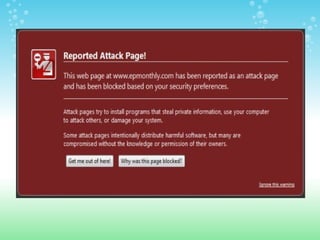
A Real World Example
Run this on yoursite in Google
       site:yourdomain
OMG!
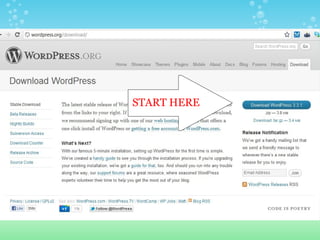
START HERE
Spam Comments -     

   Plugin - Akismet
     need API Key - get at wordpress.com
Only ~3,000 total visits
And 10,500+ spam comments!
!!! Update UPDATE Update !!!
    WordPress core ->


     Theme update ->


    Plugins update-
Hackers only need 2 pieces of info to take 
         control of your blog. 
     Don't give them the 1st one!
B| %{ua6+M%~
Tip #2: Use A Strong Password

 http://strongpasswordgenerator.com/ 


      d2]8pTkYr=.x
Tip #1: Change your Admin username

  
  1. use phpMyAdmin in your host account cPanel 
 to edit the fields in the 'admin' account, or..

  
 2. make a new admin user in your WP dashboard, 
 and then delete the existing 'admin' user 
How to video at youtube.com/help4wp
Three Strikes & You're Out!
    Limit the number of login attempts with a useful plugin
                                
 
congratulations    


                       Level 1
                      Security
                      achieved
You want more?
automated installers will put 
the same security keys in 
every blog, and all use the 
same table prefix "wp_"
Change your locks!
                    
      replace the security keys
           with new code
• open the wp-config.php file in a text or code 
  editor

• copy/paste new keys generated at:

  https://api.wordpress.org/secret-key/1.1/salt 
Next:  change the table prefix

your WordPress table prefix default is 
wp_ wp1_ wp2_ etc...
That wp_  table prefix is 
rotten, and has to go. 
This is minor surgery, and you 
         may feel some pressure ;-)

 
    • Use phpMyAdmin from your host account 
      cPanel
 
    • Text /Code Editor: 
 
    • go slow and follow a few simple steps..
Hope for the best,

Plan for the worst!
Backup your blog
•   WP-DB-Backup
Get it All - Get it Right    

backup your WP database 
 
 • automate it - daily: slow time of day
 • Get all the parts
Check your  table for new additions (some plugins or themes 
may add new tables that need to be selected and included in 
the backup]
 • email it  [to your gmail account]  
also:  Watch Those Files    


wp-File monitor: plugin

http://wordpress.org/extend/plugins/wordpress-file-
monitor/
more security strategies            

blank .html files
custom .htaccess files
limit access to your IP address
securing the folders with add'tl passwords
more plugins
Introducing...


Manage your Assets
 Security System
Introducing...


Manage your Assets
 Security System

          MyASS
Manage Your Assets Security System     
 1. Install WordPress Correctly
 2. Cook your Spam
 3. Kill your Admin
 4. Strong Password
 5. Updates as  available
 6. Limit Login Attempts
 7. Change Table Prefix & Keys
 8. Backup Database 
 9. Backup File Structure
10. Relax   & Blog 
Happiness is a secure
  WordPress Blog

                I'm a 
               blogger!


  Enjoy Atlanta!

WordPress Security & Backup