Where to Find Me
•brian@upthemes.com
•Twitter: brianfegter
•github: inspectorfegter
•The Interwebz: coderrr.com
About Me
•Live near Orlando, Florida
  (Titusville = the booming metropolis)
•Hobbies: photography, fountain
  pens, planking (not)
•I work for UpThemes.com and
  LiftUX.com as a lead developer
•Favorite vegetable: popcorn
The Anatomy of a
  Commercial
   Wordpress
     Theme

 A Developmental Overview
The TRUTH about
 commercial themes...

•There is not a single theme that does
  not require support. You must build
  a support system.
•Rarely does a purchased theme
  remain in its original condition.
•A strong percentage of buyers are
  international.
Ground Zero

           SOLID
           Template
          Architecture

http://codex.wordpress.org/Theme_Development
On your mark, get set...STOP


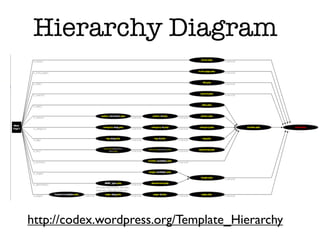
  Understand Template
      Hierarchy


 http://codex.wordpress.org/Template_Hierarchy
Hierarchy Diagram


http://codex.wordpress.org/Template_Hierarchy
Template Structure
       CREDO
            I pledge to:
•Follow template hierarchy patterns
•Clearly name my supporting files/folders
•Never, never, ever, NEVER, ever nest a
  plugin inside my theme
•Clarity over cleverness
Using Wordpress Assets
 •Clearly name your sidebars
 •Use custom post types only when
   necessary

 •Define theme locations for menus
 •Localize your strings - __() _e() are your
   friends

 •Set WP image sizes vs. image resizing
   scripts (TimThumb, etc...)

 •Leverage the power of CSS with
   body_class() and post_class()
To use or
not to use
 Theme
Options...
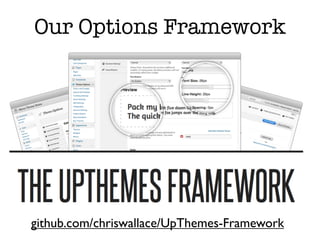
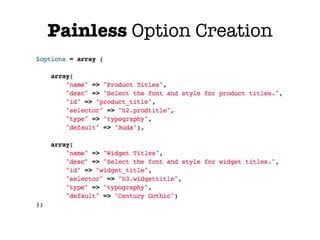
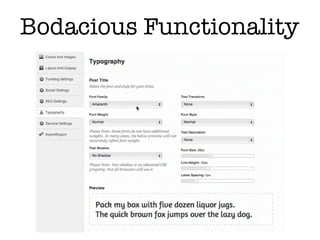
Our Options Framework


github.com/chriswallace/UpThemes-Framework
Painless Option Creation
Bodacious Functionality
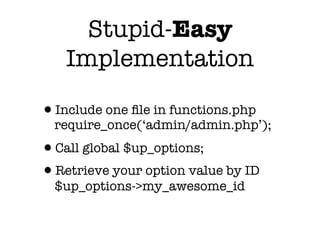
Stupid-Easy
   Implementation

•Include one file in functions.php
  require_once(‘admin/admin.php’);
•Call global $up_options;
•Retrieve your option value by ID
  $up_options->my_awesome_id
Theme Options
     User Health Alert!

•Too many options kill brain cells and
  raise blood pressure.
•No options make users MAD and
  could lead to permanent psychosis.
•Obscure options cause road rage and
  have been linked to chronic multiple-
  punctuationitis!!!!!!!!!!!!!
Code is Poetry
•Code is Narrative.
•Your theme tells a story and has an
  intended plot, characters, scenes,
  movements, etc...
•The back-end code (script) should
  clearly narrate the story of the
  front-end display.
•Clean code leverages the power of
  the brain to quickly identify and
  associate words and phrases with
Naming Stuff
•The sole purpose of names in code is to
  reveal the intent of the author.
•Choosing the right names can make or
  break future scalability.
•Bad names generate support requests.
•Obscure names destroy narrative.
•Avoid cultural references and slang.
•Good names make everyone happy.
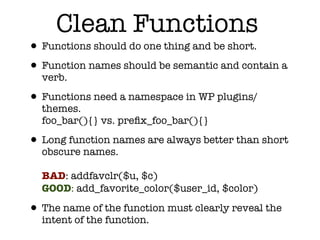
Clean Functions
• Functions should do one thing and be short.
• Function names should be semantic and contain a
  verb.

• Functions need a namespace in WP plugins/
  themes.
  foo_bar(){} vs. prefix_foo_bar(){}

• Long function names are always better than short
  obscure names.

  BAD: addfavclr($u, $c)
  GOOD: add_favorite_color($user_id, $color)

• The name of the function must clearly reveal the
  intent of the function.
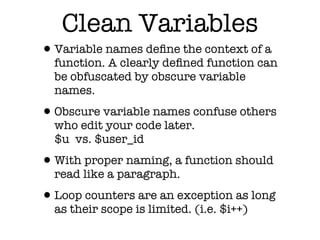
Clean Variables
•Variable names define the context of a
  function. A clearly defined function can
  be obfuscated by obscure variable
  names.

•Obscure variable names confuse others
  who edit your code later.
  $u vs. $user_id

•With proper naming, a function should
  read like a paragraph.

•Loop counters are an exception as long
  as their scope is limited. (i.e. $i++)
Clean Commenting
•If it’s necessary to comment about how
  a function works, your code stinketh.

•PHP comments should be used for
  attribution, licensing, phpdoc (for
  generating php-xref, IDE support,
  etc...), directing users to other files/
  layers/plugins.

•Comments quickly become obsolete
  with updates/upgrades.

• Descriptive HTML comments are a no-
  no unless required for attribution.
Clean Formatting
•Keep sibling functions in proximity.
•Indent your code properly to clearly
   show nested expressions.
•Follow Wordpress code/style standards.
•Do it. Now.

http://codex.wordpress.org/WordPress_Coding_Standards
Duplication
•Learn Wordpress functionality so
  you don’t create a duplicate function.
 •global $is_lynx, $is_gecko, $is_IE, $is_opera,
  Browser Detection:
   $is_NS4, $is_safari, $is_chrome, $is_iphone;

 •add_filter(‘the_content’, ‘my_function’);
  Global Content Filtering

•Duplication adds server overhead
  and user frustration.
Shortcode Fever
•Shortcodes here, shortcodes there...
  buttons, sliders, TABS, PRICE
  TABLES, LIST ICONS,
  Testimonials,
  DROPCAPS,
  QUOTES OMG
  YAY!!!!!!!
The Shortcode
     Problem
•A user inserts your theme
  shortcodes throughout their content.
•Said user decides to switch themes.
•Shortcodes no longer function and
  create loads of work.
•User loses mind.
The Shortcode Cure
•Stop being proprietary with your
  theme bling.
•Put your shortcodes in a sweet
  plugin.
•Use your new plugin as a loss-leader
  promotion.
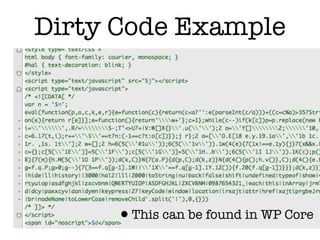
Dirty Code Example


     •This can be found in WP Core
•Wordpress core contains a <blink>
  tag. Dead Serious!!! Where is it
  located?
•Where can you find the Wordpress
 Easter Egg?
Thank You!


        Brian Fegter
       @brianfegter
brian@upthemes.com

Wordcamp St. Louis - Clean Coding

  • 2.
    Where to FindMe •brian@upthemes.com •Twitter: brianfegter •github: inspectorfegter •The Interwebz: coderrr.com
  • 3.
    About Me •Live nearOrlando, Florida (Titusville = the booming metropolis) •Hobbies: photography, fountain pens, planking (not) •I work for UpThemes.com and LiftUX.com as a lead developer •Favorite vegetable: popcorn
  • 4.
    The Anatomy ofa Commercial Wordpress Theme A Developmental Overview
  • 5.
    The TRUTH about commercial themes... •There is not a single theme that does not require support. You must build a support system. •Rarely does a purchased theme remain in its original condition. •A strong percentage of buyers are international.
  • 6.
    Ground Zero SOLID Template Architecture http://codex.wordpress.org/Theme_Development
  • 7.
    On your mark,get set...STOP Understand Template Hierarchy http://codex.wordpress.org/Template_Hierarchy
  • 8.
  • 9.
    Template Structure CREDO I pledge to: •Follow template hierarchy patterns •Clearly name my supporting files/folders •Never, never, ever, NEVER, ever nest a plugin inside my theme •Clarity over cleverness
  • 10.
    Using Wordpress Assets •Clearly name your sidebars •Use custom post types only when necessary •Define theme locations for menus •Localize your strings - __() _e() are your friends •Set WP image sizes vs. image resizing scripts (TimThumb, etc...) •Leverage the power of CSS with body_class() and post_class()
  • 11.
    To use or notto use Theme Options...
  • 12.
  • 13.
  • 14.
  • 15.
    Stupid-Easy Implementation •Include one file in functions.php require_once(‘admin/admin.php’); •Call global $up_options; •Retrieve your option value by ID $up_options->my_awesome_id
  • 16.
    Theme Options User Health Alert! •Too many options kill brain cells and raise blood pressure. •No options make users MAD and could lead to permanent psychosis. •Obscure options cause road rage and have been linked to chronic multiple- punctuationitis!!!!!!!!!!!!!
  • 17.
    Code is Poetry •Codeis Narrative. •Your theme tells a story and has an intended plot, characters, scenes, movements, etc... •The back-end code (script) should clearly narrate the story of the front-end display. •Clean code leverages the power of the brain to quickly identify and associate words and phrases with
  • 18.
    Naming Stuff •The solepurpose of names in code is to reveal the intent of the author. •Choosing the right names can make or break future scalability. •Bad names generate support requests. •Obscure names destroy narrative. •Avoid cultural references and slang. •Good names make everyone happy.
  • 19.
    Clean Functions • Functionsshould do one thing and be short. • Function names should be semantic and contain a verb. • Functions need a namespace in WP plugins/ themes. foo_bar(){} vs. prefix_foo_bar(){} • Long function names are always better than short obscure names. BAD: addfavclr($u, $c) GOOD: add_favorite_color($user_id, $color) • The name of the function must clearly reveal the intent of the function.
  • 20.
    Clean Variables •Variable namesdefine the context of a function. A clearly defined function can be obfuscated by obscure variable names. •Obscure variable names confuse others who edit your code later. $u vs. $user_id •With proper naming, a function should read like a paragraph. •Loop counters are an exception as long as their scope is limited. (i.e. $i++)
  • 21.
    Clean Commenting •If it’snecessary to comment about how a function works, your code stinketh. •PHP comments should be used for attribution, licensing, phpdoc (for generating php-xref, IDE support, etc...), directing users to other files/ layers/plugins. •Comments quickly become obsolete with updates/upgrades. • Descriptive HTML comments are a no- no unless required for attribution.
  • 22.
    Clean Formatting •Keep siblingfunctions in proximity. •Indent your code properly to clearly show nested expressions. •Follow Wordpress code/style standards. •Do it. Now. http://codex.wordpress.org/WordPress_Coding_Standards
  • 23.
    Duplication •Learn Wordpress functionalityso you don’t create a duplicate function. •global $is_lynx, $is_gecko, $is_IE, $is_opera, Browser Detection: $is_NS4, $is_safari, $is_chrome, $is_iphone; •add_filter(‘the_content’, ‘my_function’); Global Content Filtering •Duplication adds server overhead and user frustration.
  • 24.
    Shortcode Fever •Shortcodes here,shortcodes there... buttons, sliders, TABS, PRICE TABLES, LIST ICONS, Testimonials, DROPCAPS, QUOTES OMG YAY!!!!!!!
  • 25.
    The Shortcode Problem •A user inserts your theme shortcodes throughout their content. •Said user decides to switch themes. •Shortcodes no longer function and create loads of work. •User loses mind.
  • 26.
    The Shortcode Cure •Stopbeing proprietary with your theme bling. •Put your shortcodes in a sweet plugin. •Use your new plugin as a loss-leader promotion.
  • 27.
    Dirty Code Example •This can be found in WP Core
  • 28.
    •Wordpress core containsa <blink> tag. Dead Serious!!! Where is it located?
  • 29.
    •Where can youfind the Wordpress Easter Egg?
  • 30.
    Thank You! Brian Fegter @brianfegter brian@upthemes.com