KEEPYOUR CODE
ORGANIZED!
Templates, functions.php and custom plugins
http://jeremyclarke.org • @jeremyclarke
Download these slides:
http://slideshare.net/jeremyclarke
Creative Commons Share Alike
http://creativecommons.org/licenses/by-sa/3.0/
WHO IS JEREMY CLARKE?
• Communications Studies at Concordia
University.
• HTML+CSS since 2003
• Montreal WordPress Organizer
• Code & Design for GlobalVoices
GUIDING PRINCIPLES
• DRY: Don’t repeat yourself.
• Build APIs and use them.
• Code for the general case, use configuration for the specifics.
• Assume every feature will be disabled some day.
OUTLINE
• Themes and template hierarchy
• Functions.php is for theme programming
• Custom plugins are for site programming
• Build APIs for yourself
• Other vital practices
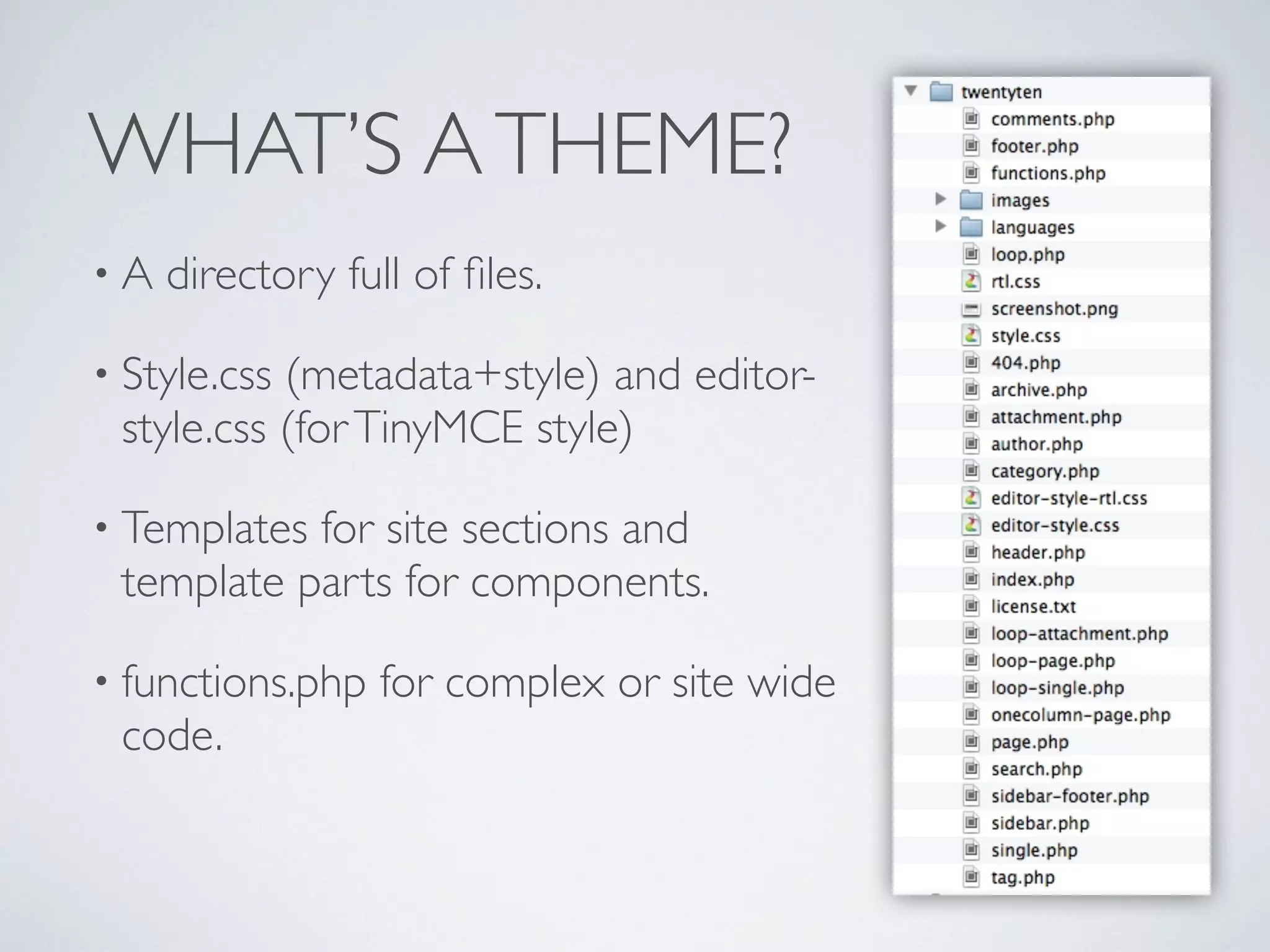
WHAT’S ATHEME?
• A directory full of files.
• Style.css (metadata+style) and editor-
style.css (forTinyMCE style)
• Templates for site sections and
template parts for components.
• functions.php for complex or site wide
code.
TEMPLATE HIERARCHY
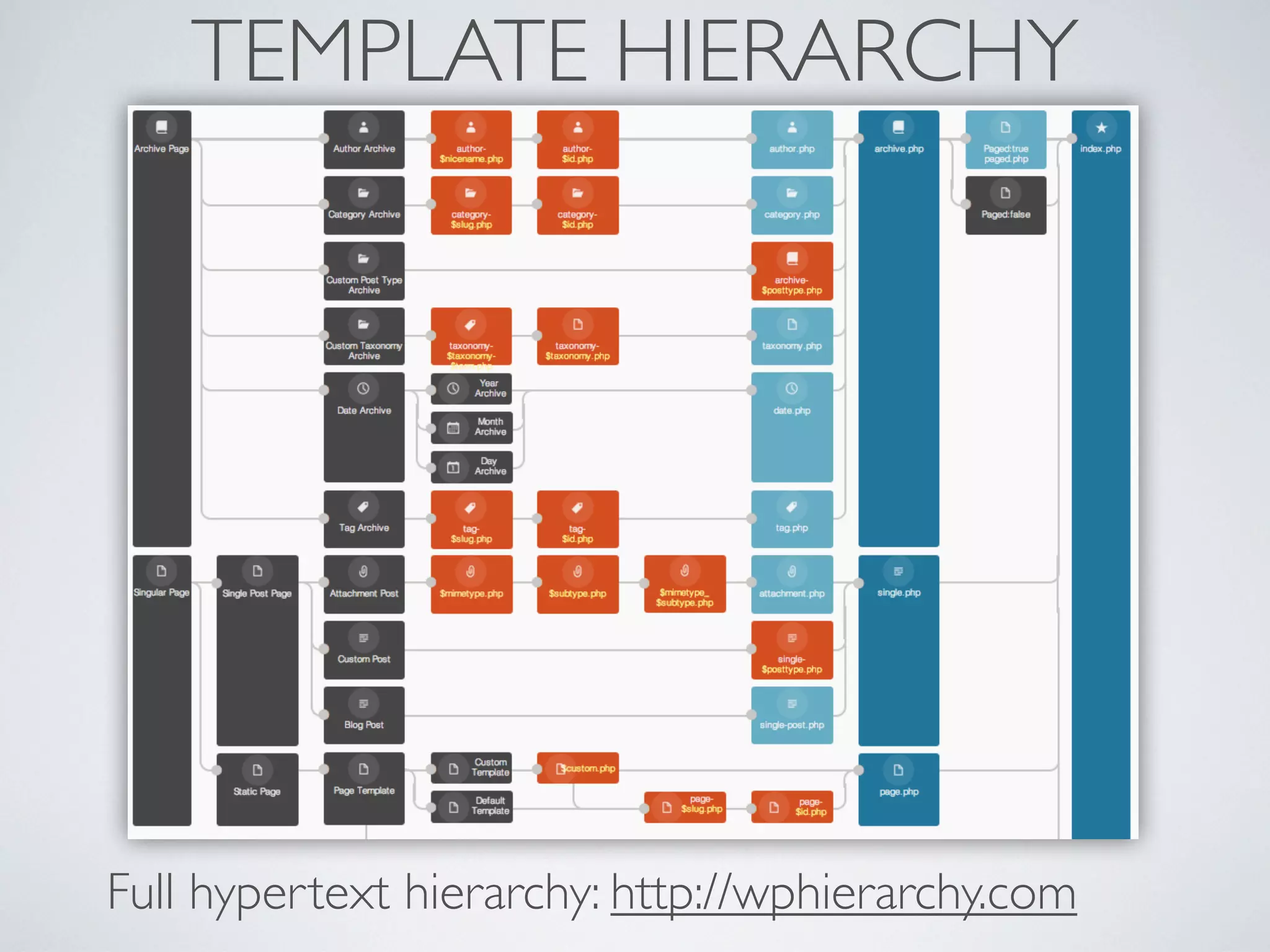
• index.php is default for all screens.
• If a more specific template exists (search.php) it is used.
• Very specific templates are possible to micro-manage
sections.
• Using fewer templates is a virtue.
TEMPLATE HIERARCHY
Full hypertext hierarchy: http://wphierarchy.com
TEMPLATE DUPLICATION
• archive.php > category.php + tag.php + date.php
• category.php > category-2.php + category-3.php
• Template specificity duplicates HTML/PHP and adds
work and bugs later if you change things. (DRY!)
• Avoid specific templates whenever possible.
• Use conditionals ( is_*) or display functions to manage
the differences instead.
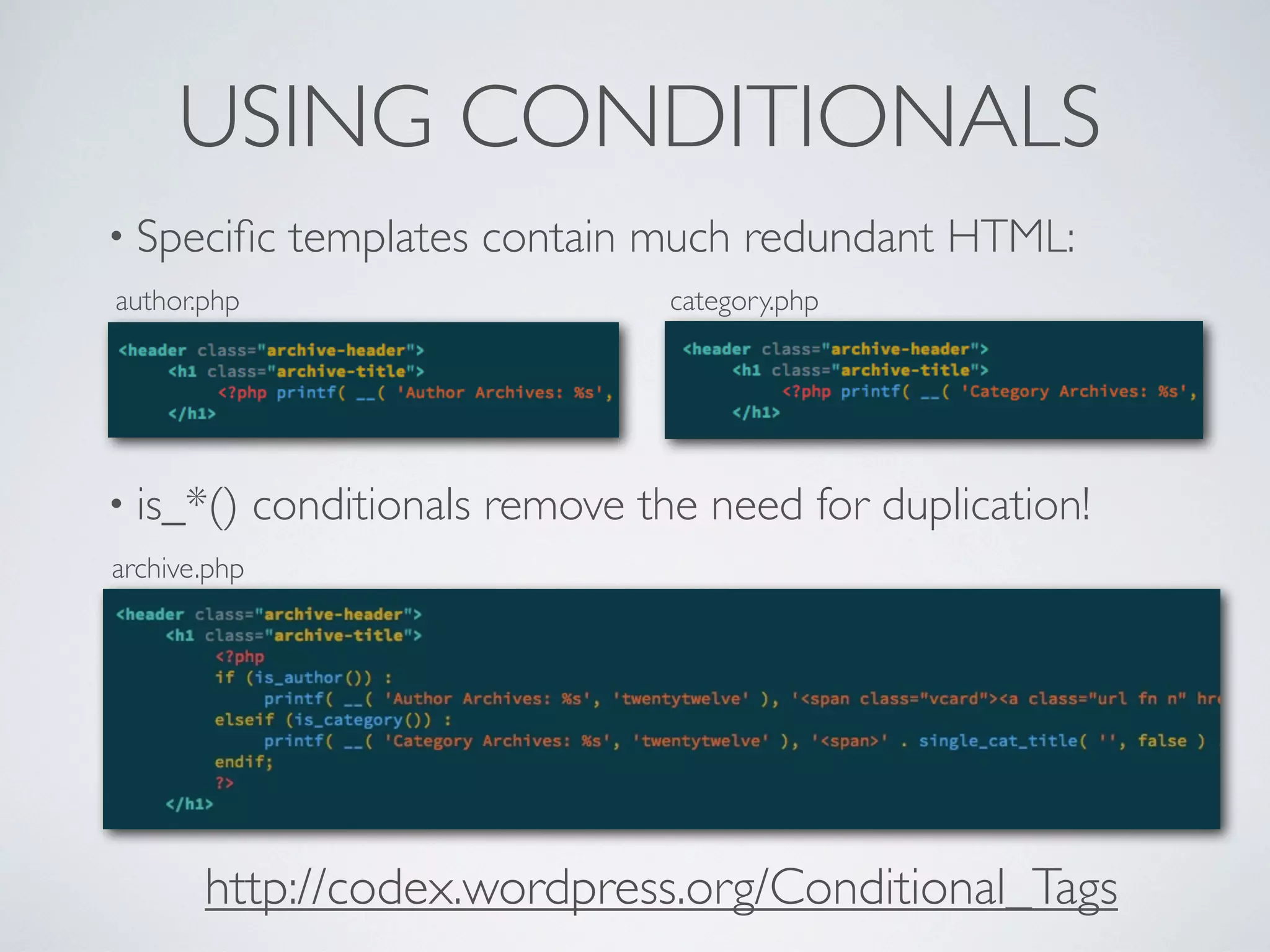
USING CONDITIONALS
• Specific templates contain much redundant HTML:
author.php category.php
• is_*() conditionals remove the need for duplication!
archive.php
http://codex.wordpress.org/Conditional_Tags
FUNCTIONS.PHP
• Intended to store functions used in the theme.
• Can contain any plugin code (PHP) you want loaded
along with the theme.
• De-activated along with its theme.
• Updated and changes lost when theme is updated.
• Child themes allow a second functions.php outside
main one.
FUNCTIONS.PHP USES
• PHP functions that encapsulate HTML re-used in
multiple templates (DRY!)
• Use of core or plugin APIs to activate features the
theme depends on (featured images, taxonomies).
• Hooks to alter core or plugin output to suit the theme
(excerpt length, unregister plugin widget).
• Custom configuration for this particular site (esp. child
theme functions.php).
PARENT AND CHILDTHEMES
• Child theme needs only a style.css file. Can include()
parent CSS so that only overrides are needed.
• Other templates imported from parent unless present
in child theme.
• Child theme’s functions.php loaded before and in
addition to parent’s functions.php.
• Updating parent won’t break changes in child theme
files.
http://codex.wordpress.org/Child_Themes
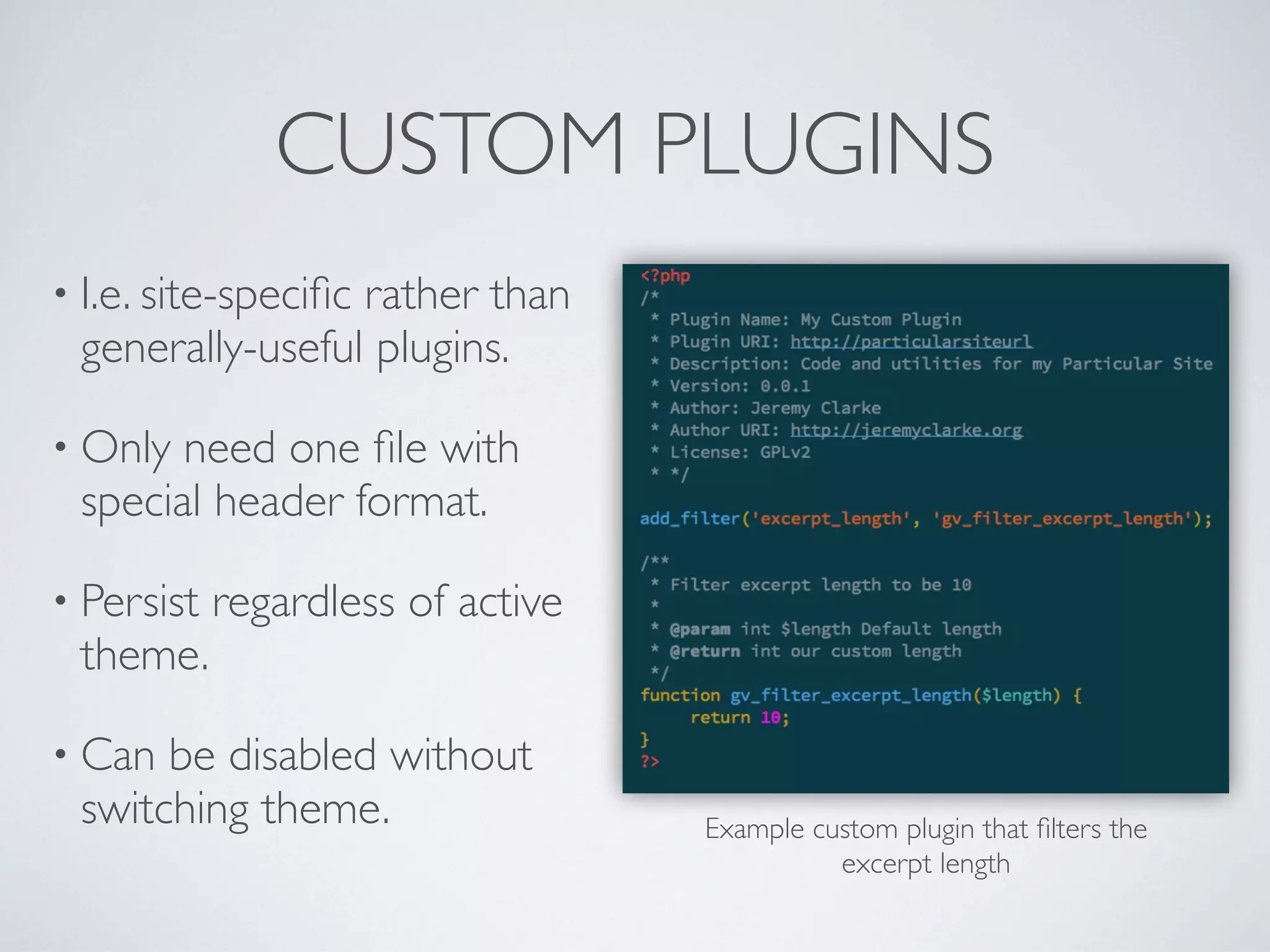
CUSTOM PLUGINS
• I.e. site-specific rather than
generally-useful plugins.
• Only need one file with
special header format.
• Persist regardless of active
theme.
• Can be disabled without
switching theme. Example custom plugin that filters the
excerpt length
CUSTOM PLUGIN USES
• Features needed by the site, regardless of active
theme (widgets, shortcodes, CPT)
• Features you might want to disable while keeping the
same theme.
• Any complex feature that would overwhelm
functions.php
• functions.php code if you use a 3rd party theme and
can’t use a child theme.
“MU-PLUGINS”:WTF
• “mu” is backronym for “must-use”.
• Any plugin in /wp-content/mu-plugins/ will always be
loaded and can’t be disabled by users.
• mu-plugin files are loaded before any other plugins.
• Plugins cannot be inside a folder. Most plugins do not
function well as mu-plugins.
• Use for server-scope configuration or fixes needed for
all themes & plugins.
• Also to modify other plugins by running code first.
LEARNTHE WORDPRESS API
• Actions/filters already exist throughout WordPress.
• “hook” in to run your code at a specific time (actions) or alter
output of internal functions (filters).
• Constants (WP_SITEURL) also used as a simple API for key
configuration, works in wp-config.php
• Learn the patterns used by WP and replicate them in your
code.
http://codex.wordpress.org/Plugin_API
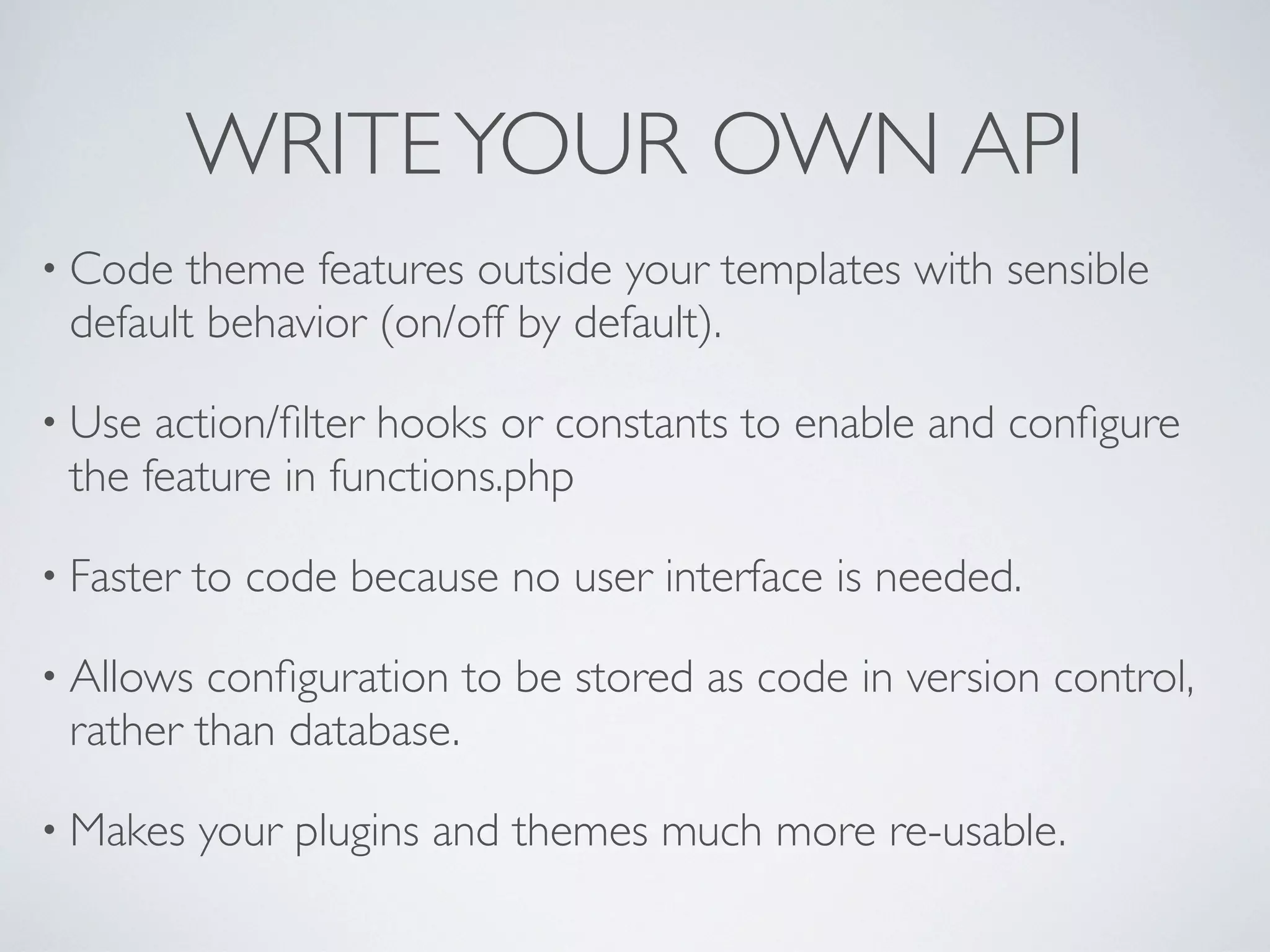
WRITEYOUR OWN API
• Code theme features outside your templates with sensible
default behavior (on/off by default).
• Use action/filter hooks or constants to enable and configure
the feature in functions.php
• Faster to code because no user interface is needed.
• Allows configuration to be stored as code in version control,
rather than database.
• Makes your plugins and themes much more re-usable.
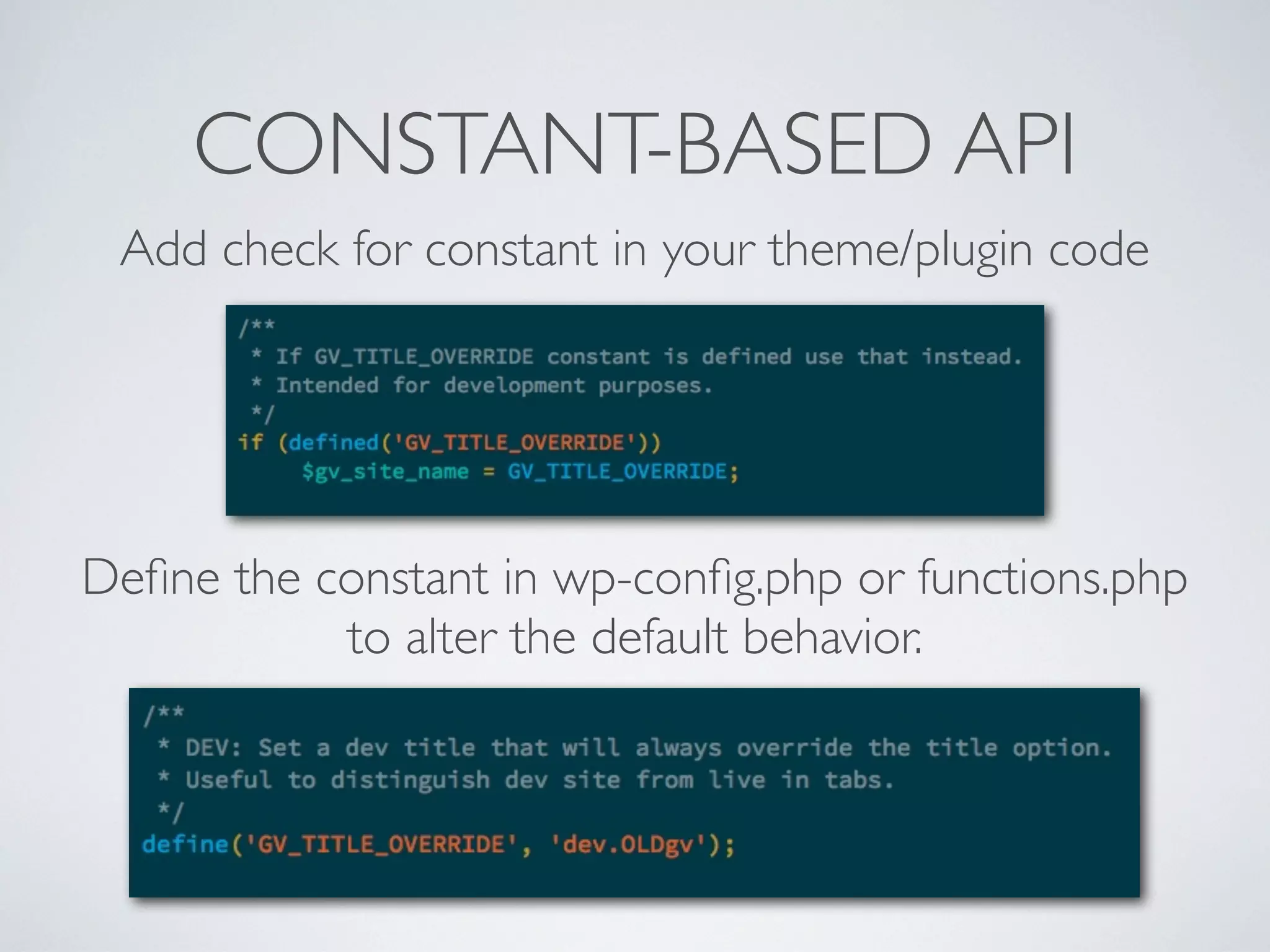
CONSTANT-BASED API
Add check for constant in your theme/plugin code
Define the constant in wp-config.php or functions.php
to alter the default behavior.
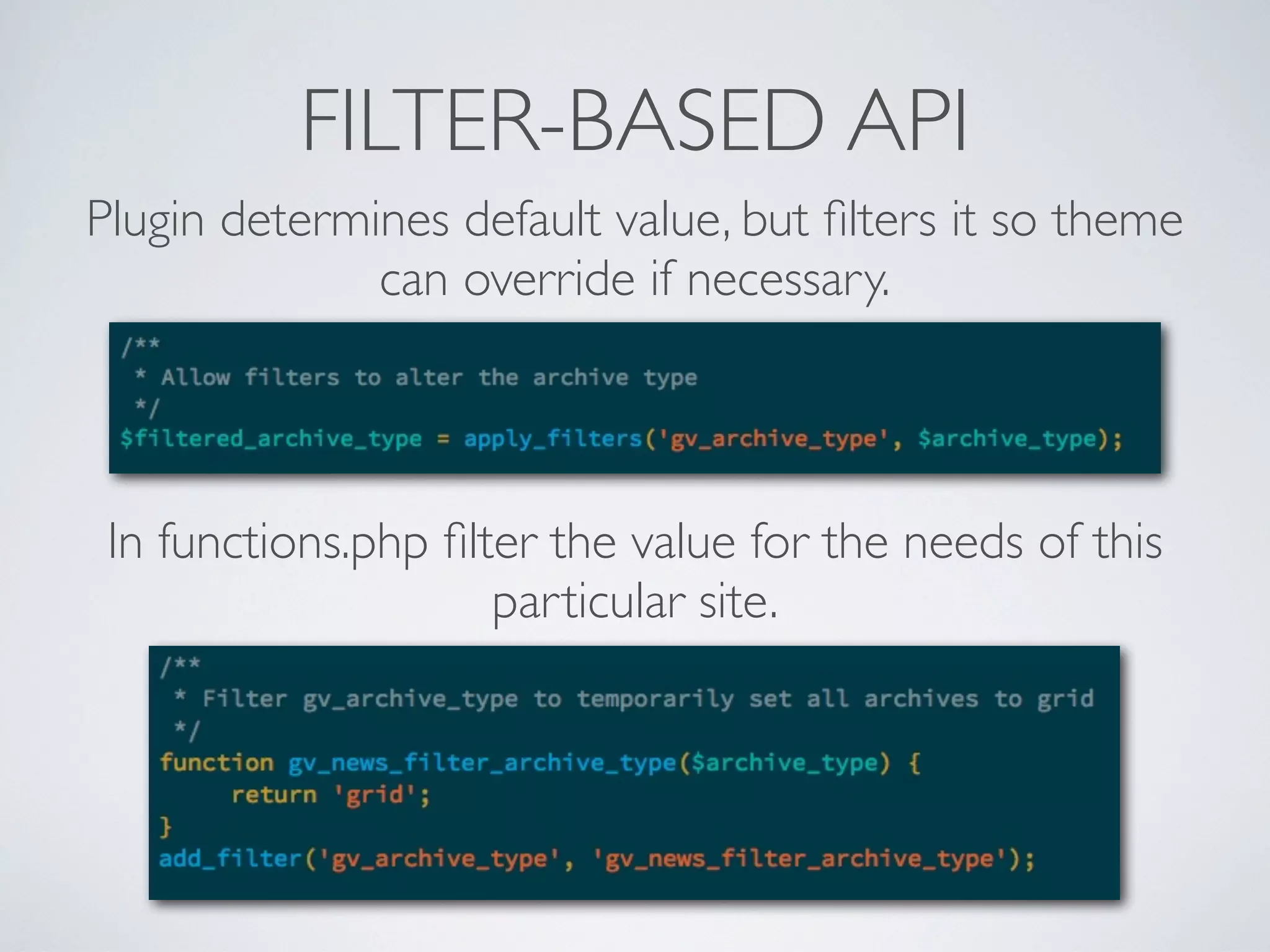
FILTER-BASED API
Plugin determines default value, but filters it so theme
can override if necessary.
In functions.php filter the value for the needs of this
particular site.
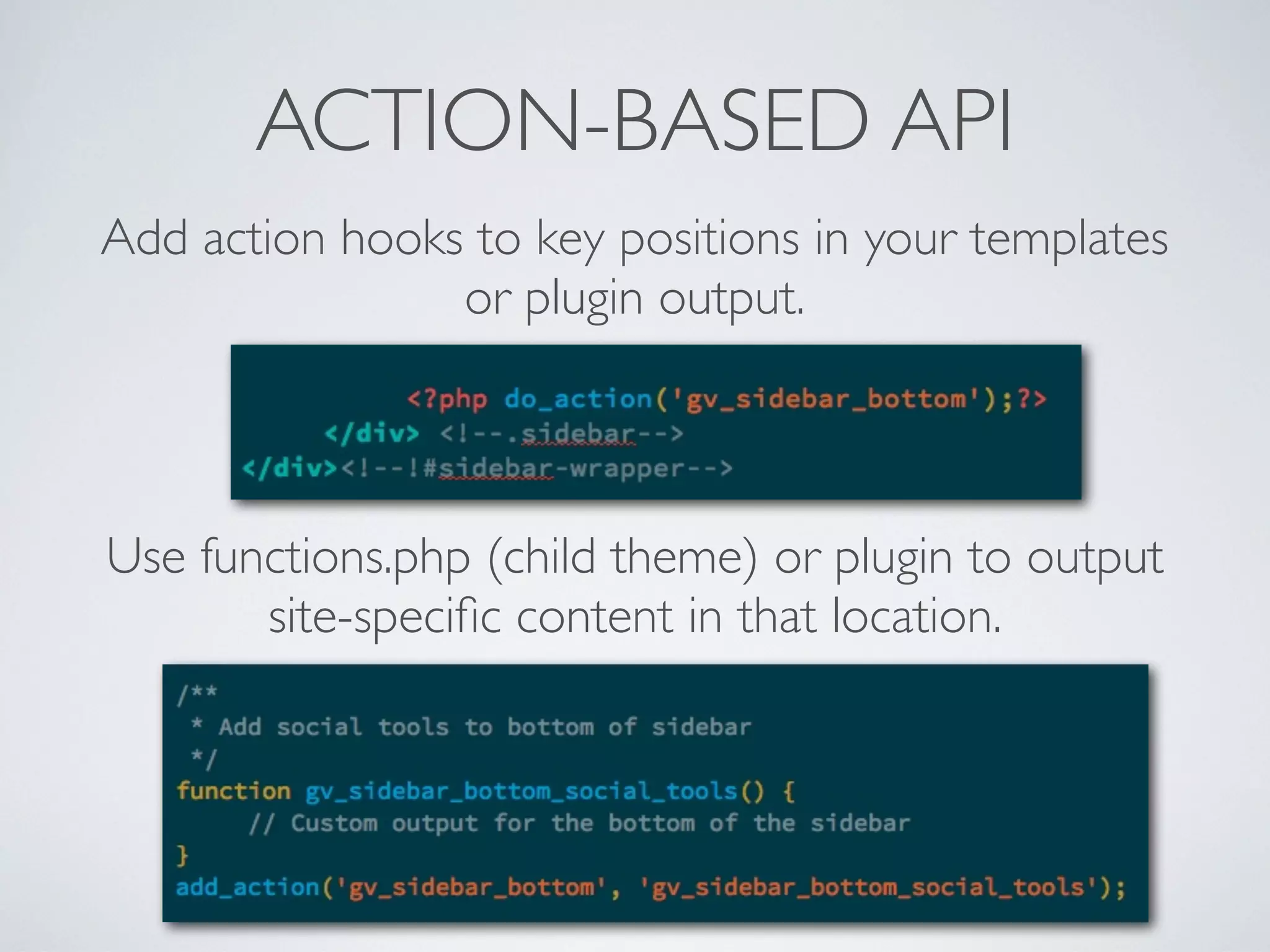
ACTION-BASED API
Add action hooks to key positions in your templates
or plugin output.
Use functions.php (child theme) or plugin to output
site-specific content in that location.
QUESTIONSTO ASKYOURSELF
• Where could this code or feature be stored?
• Which places are out of my control (3rd party themes
+plugins)
• What if I want to change themes?
• What if I want to disable the feature?
• Will the configuration be stored in database or version
control?
OTHER BEST PRACTICES
USEVERSION CONTROL (GIT)
• Version control is not optional.
• At minimum track your plugins and themes.
http://git-scm.com/book
OBJECT ORIENTATION
• Learn to write “OO”/object-oriented PHP if you aren’t
already.
• Encapsulate features as objects.
• Use wrapper functions that can be used in
functions.php to activate object-based features for a
theme.
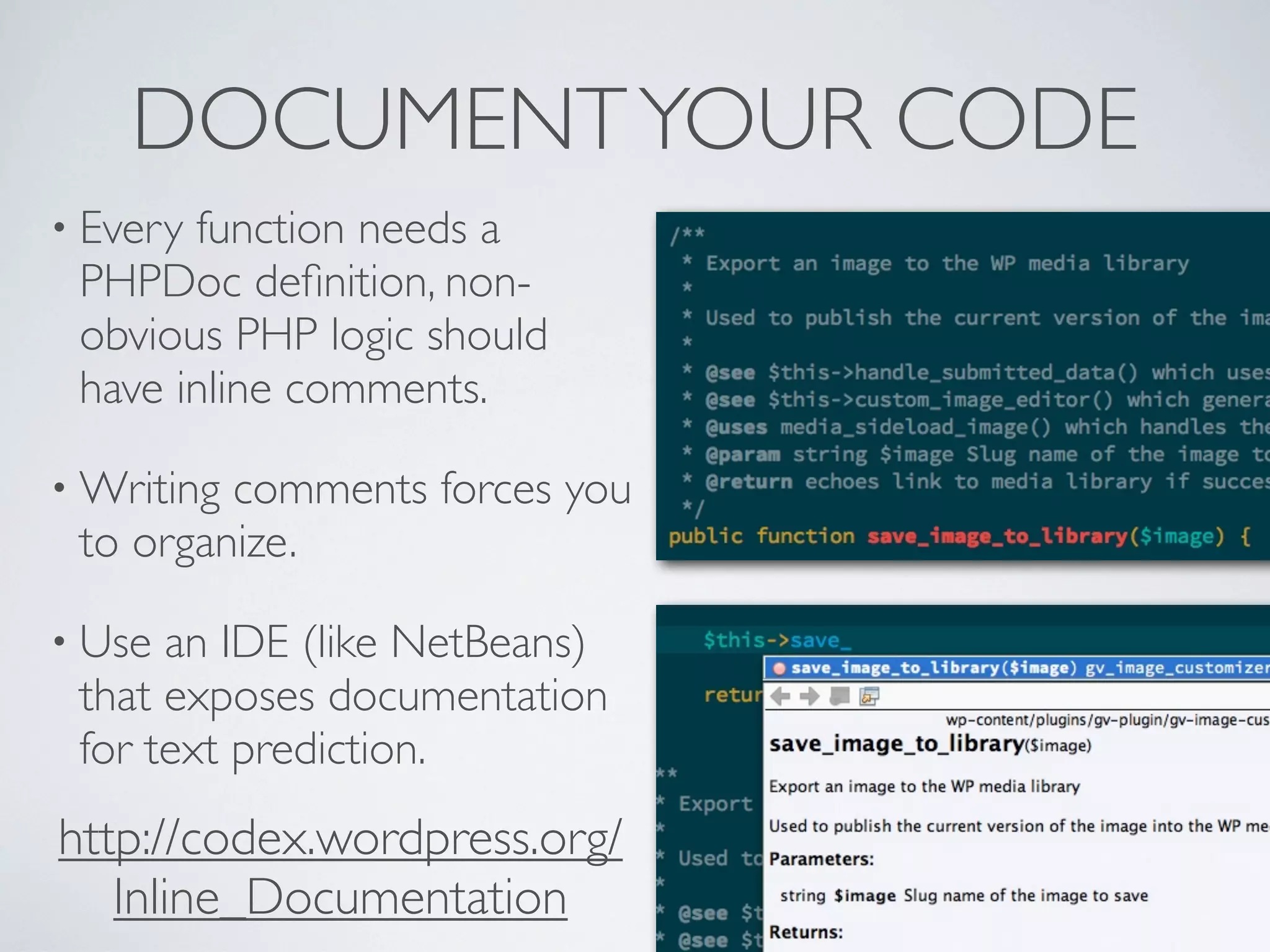
DOCUMENTYOUR CODE
• Every function needs a
PHPDoc definition, non-
obvious PHP logic should
have inline comments.
• Writing comments forces you
to organize.
• Use an IDE (like NetBeans)
that exposes documentation
for text prediction.
http://codex.wordpress.org/
Inline_Documentation
CSS PREPROCESSORS
• Sass gives CSS the programmability of PHP with
equivalents of variables and functions.
• Gives access to libraries of useful CSS like Compass,
Foundation and others.
• Very powerful but adds steps and complexity to your dev
process.
http://sass-lang.com/
See also: My DRY CSS philosophy for organizing normal CSS:
http://simianuprising.com/2012/03/07/video-of-my-dry-css-talk/
WIDGETIZE EVERYTHING
• Never hard-code content in a theme.
• All promo text or non-permanent features should be in
widget areas (sidebars).
• Allows users to alter content without editing theme.
• Add widget areas all over site in case you need
something there.
• Register custom widgets to display complex content
rather than using template tags.
http://codex.wordpress.org/Widgets_API
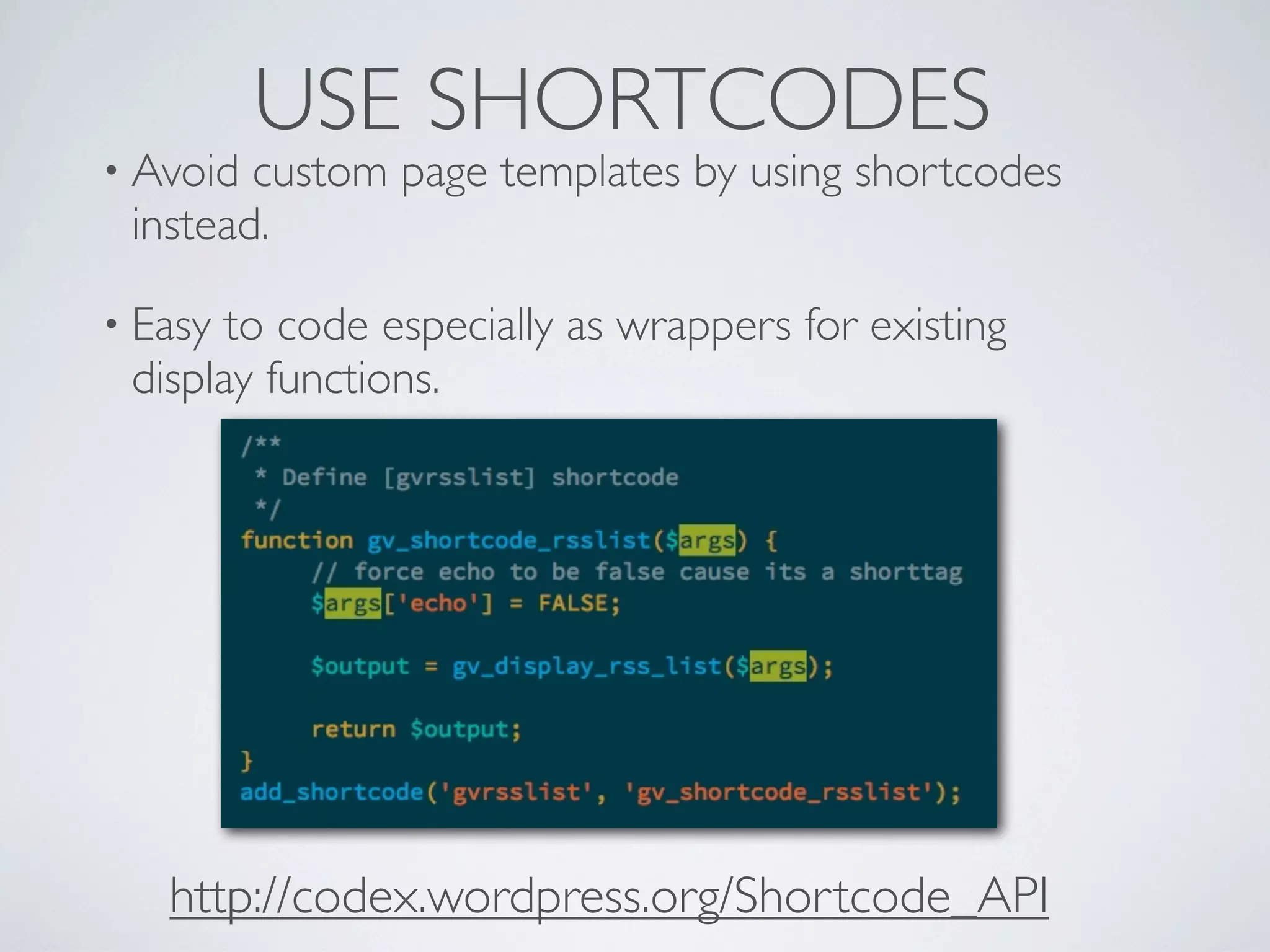
USE SHORTCODES
• Avoid custom page templates by using shortcodes
instead.
• Easy to code especially as wrappers for existing
display functions.
http://codex.wordpress.org/Shortcode_API
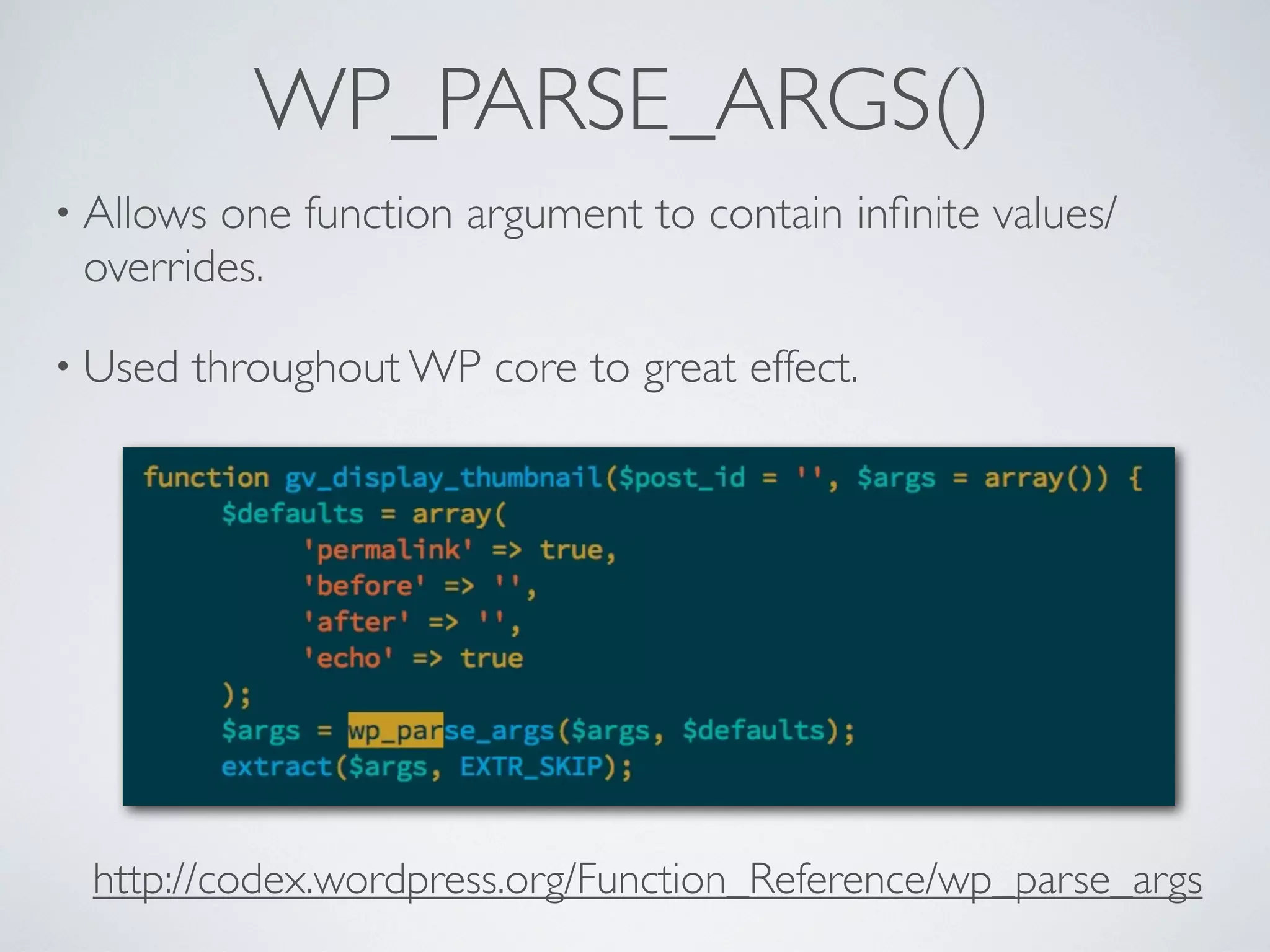
WP_PARSE_ARGS()
• Allows one function argument to contain infinite values/
overrides.
• Used throughout WP core to great effect.
http://codex.wordpress.org/Function_Reference/wp_parse_args
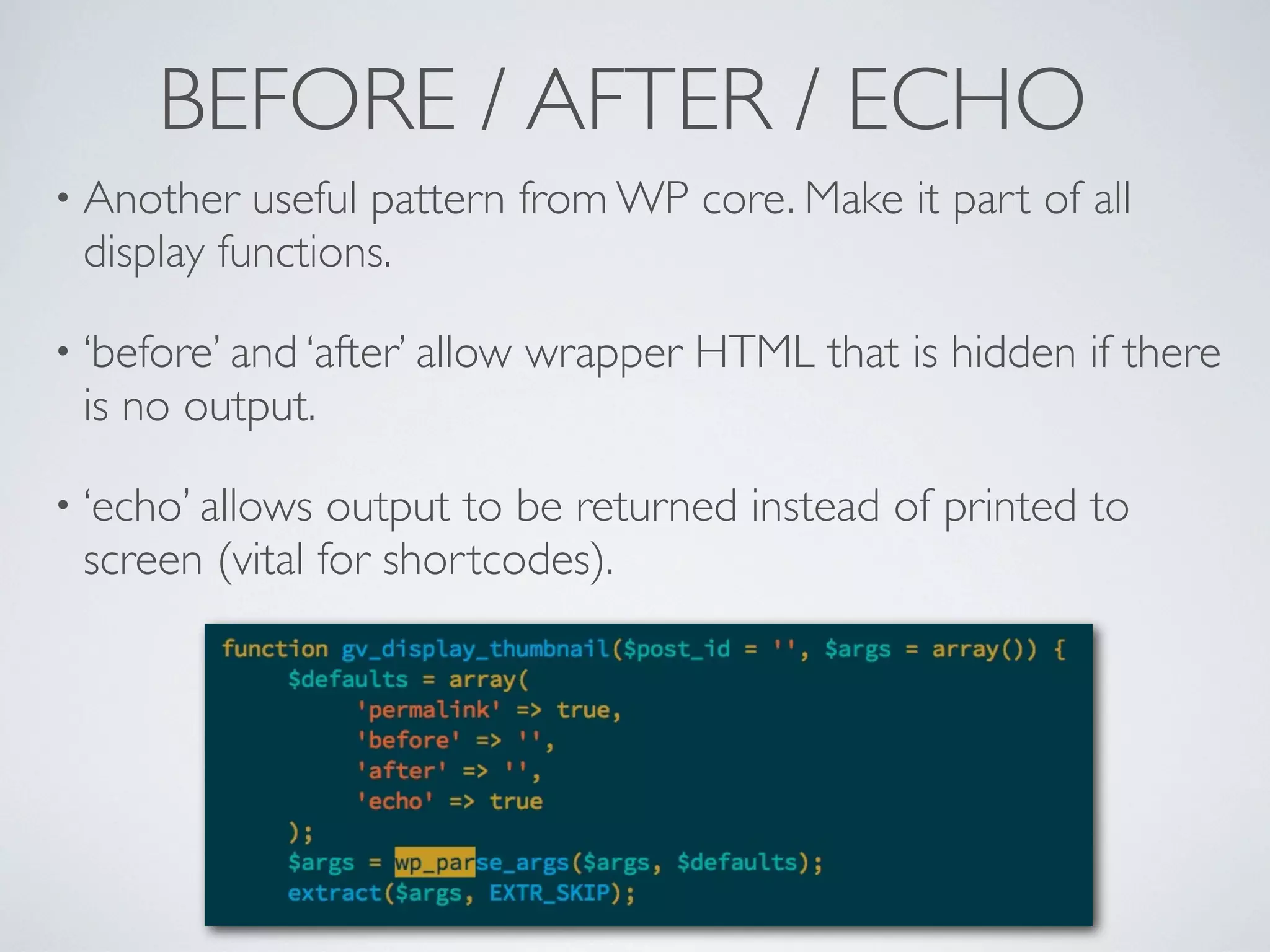
BEFORE / AFTER / ECHO
• Another useful pattern from WP core. Make it part of all
display functions.
• ‘before’ and ‘after’ allow wrapper HTML that is hidden if there
is no output.
• ‘echo’ allows output to be returned instead of printed to
screen (vital for shortcodes).
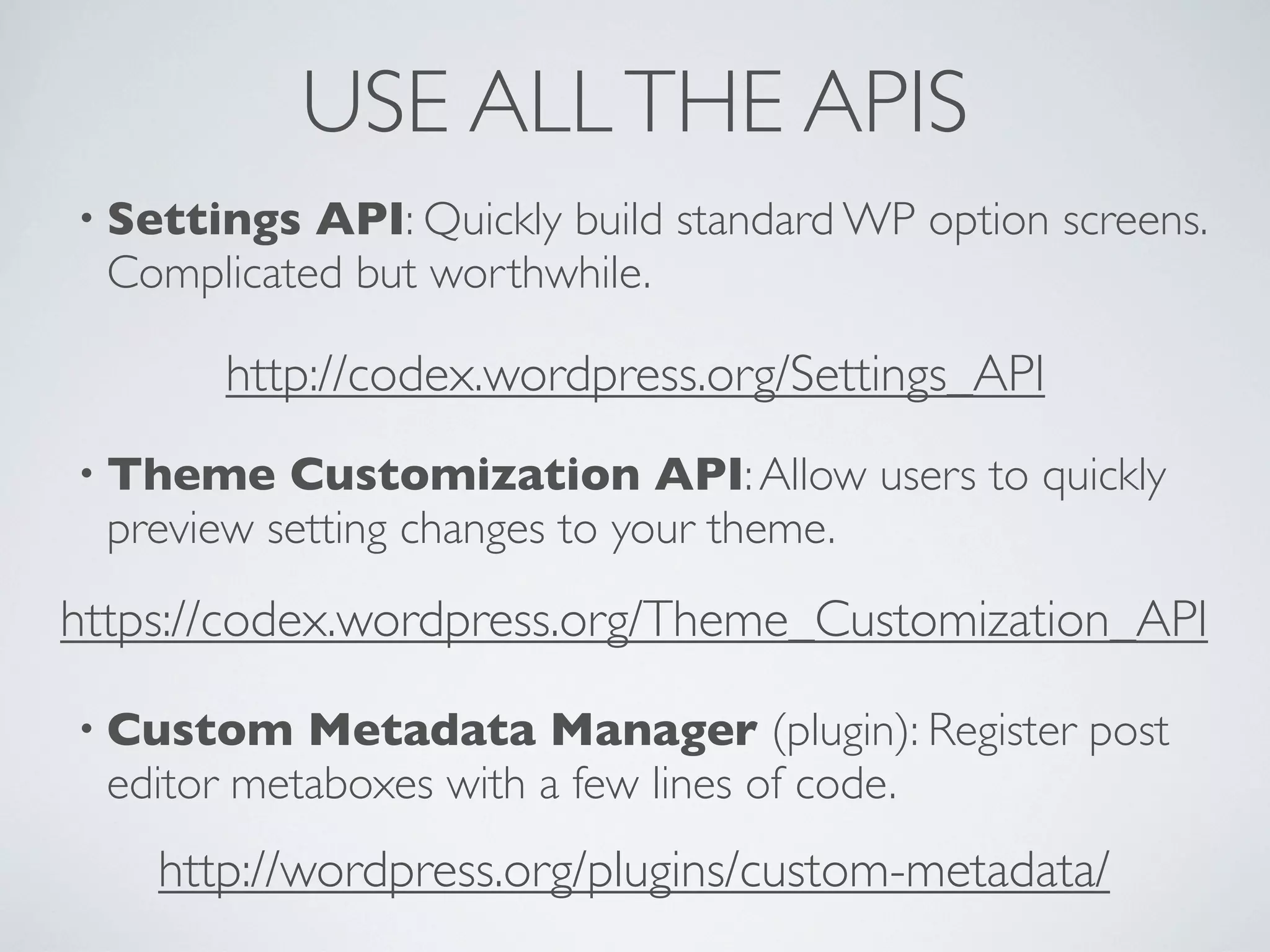
USE ALLTHE APIS
• Settings API: Quickly build standard WP option screens.
Complicated but worthwhile.
• Theme Customization API:Allow users to quickly
preview setting changes to your theme.
• Custom Metadata Manager (plugin): Register post
editor metaboxes with a few lines of code.
http://codex.wordpress.org/Settings_API
https://codex.wordpress.org/Theme_Customization_API
http://wordpress.org/plugins/custom-metadata/
POP QUIZ:
WHERE DOES IT GO?
• Sidebar registration
• Widget registration
• Shortcode registration
• Custom post type registration
• Image slider gallery PHP/JS
• Featured image size registration
KEEPYOUR CODE
ORGANIZED!
Templates, functions.php and custom plugins
http://jeremyclarke.org • @jeremyclarke
Download these slides:
http://slideshare.net/jeremyclarke
Creative Commons Share Alike
http://creativecommons.org/licenses/by-sa/3.0/

Keep Your Code Organized! WordCamp Montreal 2013 Presentation slides

  • 1.
    KEEPYOUR CODE ORGANIZED! Templates, functions.phpand custom plugins http://jeremyclarke.org • @jeremyclarke Download these slides: http://slideshare.net/jeremyclarke Creative Commons Share Alike http://creativecommons.org/licenses/by-sa/3.0/
  • 2.
    WHO IS JEREMYCLARKE? • Communications Studies at Concordia University. • HTML+CSS since 2003 • Montreal WordPress Organizer • Code & Design for GlobalVoices
  • 3.
    GUIDING PRINCIPLES • DRY:Don’t repeat yourself. • Build APIs and use them. • Code for the general case, use configuration for the specifics. • Assume every feature will be disabled some day.
  • 4.
    OUTLINE • Themes andtemplate hierarchy • Functions.php is for theme programming • Custom plugins are for site programming • Build APIs for yourself • Other vital practices
  • 5.
    WHAT’S ATHEME? • Adirectory full of files. • Style.css (metadata+style) and editor- style.css (forTinyMCE style) • Templates for site sections and template parts for components. • functions.php for complex or site wide code.
  • 6.
    TEMPLATE HIERARCHY • index.phpis default for all screens. • If a more specific template exists (search.php) it is used. • Very specific templates are possible to micro-manage sections. • Using fewer templates is a virtue.
  • 7.
    TEMPLATE HIERARCHY Full hypertexthierarchy: http://wphierarchy.com
  • 8.
    TEMPLATE DUPLICATION • archive.php> category.php + tag.php + date.php • category.php > category-2.php + category-3.php • Template specificity duplicates HTML/PHP and adds work and bugs later if you change things. (DRY!) • Avoid specific templates whenever possible. • Use conditionals ( is_*) or display functions to manage the differences instead.
  • 9.
    USING CONDITIONALS • Specifictemplates contain much redundant HTML: author.php category.php • is_*() conditionals remove the need for duplication! archive.php http://codex.wordpress.org/Conditional_Tags
  • 10.
    FUNCTIONS.PHP • Intended tostore functions used in the theme. • Can contain any plugin code (PHP) you want loaded along with the theme. • De-activated along with its theme. • Updated and changes lost when theme is updated. • Child themes allow a second functions.php outside main one.
  • 11.
    FUNCTIONS.PHP USES • PHPfunctions that encapsulate HTML re-used in multiple templates (DRY!) • Use of core or plugin APIs to activate features the theme depends on (featured images, taxonomies). • Hooks to alter core or plugin output to suit the theme (excerpt length, unregister plugin widget). • Custom configuration for this particular site (esp. child theme functions.php).
  • 12.
    PARENT AND CHILDTHEMES •Child theme needs only a style.css file. Can include() parent CSS so that only overrides are needed. • Other templates imported from parent unless present in child theme. • Child theme’s functions.php loaded before and in addition to parent’s functions.php. • Updating parent won’t break changes in child theme files. http://codex.wordpress.org/Child_Themes
  • 13.
    CUSTOM PLUGINS • I.e.site-specific rather than generally-useful plugins. • Only need one file with special header format. • Persist regardless of active theme. • Can be disabled without switching theme. Example custom plugin that filters the excerpt length
  • 14.
    CUSTOM PLUGIN USES •Features needed by the site, regardless of active theme (widgets, shortcodes, CPT) • Features you might want to disable while keeping the same theme. • Any complex feature that would overwhelm functions.php • functions.php code if you use a 3rd party theme and can’t use a child theme.
  • 15.
    “MU-PLUGINS”:WTF • “mu” isbackronym for “must-use”. • Any plugin in /wp-content/mu-plugins/ will always be loaded and can’t be disabled by users. • mu-plugin files are loaded before any other plugins. • Plugins cannot be inside a folder. Most plugins do not function well as mu-plugins. • Use for server-scope configuration or fixes needed for all themes & plugins. • Also to modify other plugins by running code first.
  • 16.
    LEARNTHE WORDPRESS API •Actions/filters already exist throughout WordPress. • “hook” in to run your code at a specific time (actions) or alter output of internal functions (filters). • Constants (WP_SITEURL) also used as a simple API for key configuration, works in wp-config.php • Learn the patterns used by WP and replicate them in your code. http://codex.wordpress.org/Plugin_API
  • 17.
    WRITEYOUR OWN API •Code theme features outside your templates with sensible default behavior (on/off by default). • Use action/filter hooks or constants to enable and configure the feature in functions.php • Faster to code because no user interface is needed. • Allows configuration to be stored as code in version control, rather than database. • Makes your plugins and themes much more re-usable.
  • 18.
    CONSTANT-BASED API Add checkfor constant in your theme/plugin code Define the constant in wp-config.php or functions.php to alter the default behavior.
  • 19.
    FILTER-BASED API Plugin determinesdefault value, but filters it so theme can override if necessary. In functions.php filter the value for the needs of this particular site.
  • 20.
    ACTION-BASED API Add actionhooks to key positions in your templates or plugin output. Use functions.php (child theme) or plugin to output site-specific content in that location.
  • 21.
    QUESTIONSTO ASKYOURSELF • Wherecould this code or feature be stored? • Which places are out of my control (3rd party themes +plugins) • What if I want to change themes? • What if I want to disable the feature? • Will the configuration be stored in database or version control?
  • 22.
  • 23.
    USEVERSION CONTROL (GIT) •Version control is not optional. • At minimum track your plugins and themes. http://git-scm.com/book
  • 24.
    OBJECT ORIENTATION • Learnto write “OO”/object-oriented PHP if you aren’t already. • Encapsulate features as objects. • Use wrapper functions that can be used in functions.php to activate object-based features for a theme.
  • 25.
    DOCUMENTYOUR CODE • Everyfunction needs a PHPDoc definition, non- obvious PHP logic should have inline comments. • Writing comments forces you to organize. • Use an IDE (like NetBeans) that exposes documentation for text prediction. http://codex.wordpress.org/ Inline_Documentation
  • 26.
    CSS PREPROCESSORS • Sassgives CSS the programmability of PHP with equivalents of variables and functions. • Gives access to libraries of useful CSS like Compass, Foundation and others. • Very powerful but adds steps and complexity to your dev process. http://sass-lang.com/ See also: My DRY CSS philosophy for organizing normal CSS: http://simianuprising.com/2012/03/07/video-of-my-dry-css-talk/
  • 27.
    WIDGETIZE EVERYTHING • Neverhard-code content in a theme. • All promo text or non-permanent features should be in widget areas (sidebars). • Allows users to alter content without editing theme. • Add widget areas all over site in case you need something there. • Register custom widgets to display complex content rather than using template tags. http://codex.wordpress.org/Widgets_API
  • 28.
    USE SHORTCODES • Avoidcustom page templates by using shortcodes instead. • Easy to code especially as wrappers for existing display functions. http://codex.wordpress.org/Shortcode_API
  • 29.
    WP_PARSE_ARGS() • Allows onefunction argument to contain infinite values/ overrides. • Used throughout WP core to great effect. http://codex.wordpress.org/Function_Reference/wp_parse_args
  • 30.
    BEFORE / AFTER/ ECHO • Another useful pattern from WP core. Make it part of all display functions. • ‘before’ and ‘after’ allow wrapper HTML that is hidden if there is no output. • ‘echo’ allows output to be returned instead of printed to screen (vital for shortcodes).
  • 31.
    USE ALLTHE APIS •Settings API: Quickly build standard WP option screens. Complicated but worthwhile. • Theme Customization API:Allow users to quickly preview setting changes to your theme. • Custom Metadata Manager (plugin): Register post editor metaboxes with a few lines of code. http://codex.wordpress.org/Settings_API https://codex.wordpress.org/Theme_Customization_API http://wordpress.org/plugins/custom-metadata/
  • 32.
    POP QUIZ: WHERE DOESIT GO? • Sidebar registration • Widget registration • Shortcode registration • Custom post type registration • Image slider gallery PHP/JS • Featured image size registration
  • 33.
    KEEPYOUR CODE ORGANIZED! Templates, functions.phpand custom plugins http://jeremyclarke.org • @jeremyclarke Download these slides: http://slideshare.net/jeremyclarke Creative Commons Share Alike http://creativecommons.org/licenses/by-sa/3.0/