Working with Themes, Style Sets,
Backgrounds, Quick Parts, and Text
Boxes
© 2014, John Wiley & Sons, Inc. Microsoft Official Academic Course, Microsoft Word 2013 1
Microsoft Word 2013 Lesson
7
Design Tab
• The Design Tab on the Word Ribbon is new to Word 2013.
• It offers several different ways to format a document using
Themes or selecting from the Document Formatting gallery.
• Once a theme or document formatting is applied, the colors,
fonts and effects can be changed or customized.
• You also have the option to set the formatting as your default
without having to reset each time you work on a new
document.
© 2014, John Wiley & Sons, Inc. Microsoft Official Academic Course, Microsoft Word 2013 2
Format a Document with a Theme
• Predefined formatting allow you
To change the overall appearance
Of the document by selecting and
Applying a theme.
• A document theme is a set of
Predefined formatting options that
Includes theme colors, fonts and
Effects.
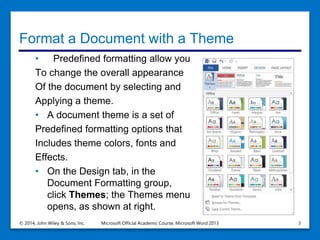
• On the Design tab, in the
Document Formatting group,
click Themes; the Themes menu
opens, as shown at right.
© 2014, John Wiley & Sons, Inc. Microsoft Official Academic Course, Microsoft Word 2013 3
Create and Customize a Document Color
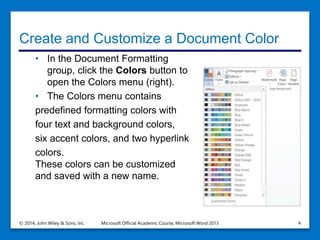
• In the Document Formatting
group, click the Colors button to
open the Colors menu (right).
• The Colors menu contains
predefined formatting colors with
four text and background colors,
six accent colors, and two hyperlink
colors.
These colors can be customized
and saved with a new name.
© 2014, John Wiley & Sons, Inc. Microsoft Official Academic Course, Microsoft Word 2013 4
Create and Customize a Document Color
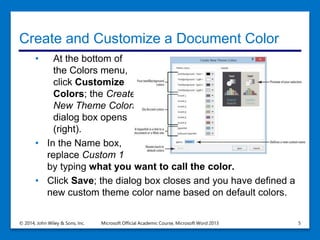
• At the bottom of
the Colors menu,
click Customize
Colors; the Create
New Theme Colors
dialog box opens
(right).
• In the Name box,
replace Custom 1
by typing what you want to call the color.
• Click Save; the dialog box closes and you have defined a
new custom theme color name based on default colors.
© 2014, John Wiley & Sons, Inc. Microsoft Official Academic Course, Microsoft Word 2013 5
Create and Customize Document Effects
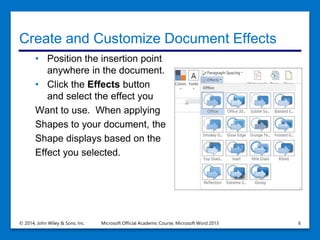
• Position the insertion point
anywhere in the document.
• Click the Effects button
and select the effect you
Want to use. When applying
Shapes to your document, the
Shape displays based on the
Effect you selected.
© 2014, John Wiley & Sons, Inc. Microsoft Official Academic Course, Microsoft Word 2013 6
Paragraph Spacing
• Applying a paragraph spacing changes the lines and
paragraph spacing for the entire document.
• You can apply one of the predefined options or customize
your own.
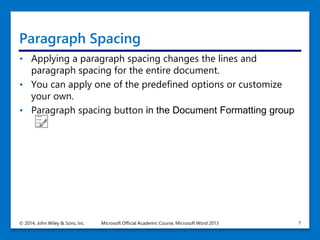
• Paragraph spacing button in the Document Formatting group
© 2014, John Wiley & Sons, Inc. Microsoft Official Academic Course, Microsoft Word 2013 7
Apply Paragraph Spacing
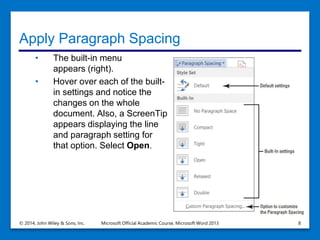
• The built-in menu
appears (right).
• Hover over each of the built-
in settings and notice the
changes on the whole
document. Also, a ScreenTip
appears displaying the line
and paragraph setting for
that option. Select Open.
© 2014, John Wiley & Sons, Inc. Microsoft Official Academic Course, Microsoft Word 2013 8
Apply a Style Set to a Document
• Word 2013 has a new group called Document
Formatting on the Design Tab
• This new group has many different Style Sets that
change the appearance of the whole document.
• These Style Sets are predefined styles with fonts and
paragraph spacing defined.
• You have an option to reset the document back to its
default or save a new Style Set.
• If you hover the mouse over a few of the built-in Style
Sets in the Document Formatting group, you can watch
how the appearance of the document changes.
• Note, before applying Style Sets, the document must
contain styles.
© 2014, John Wiley & Sons, Inc. Microsoft Official Academic Course, Microsoft Word 2013 9
Apply a Style Set to a Document
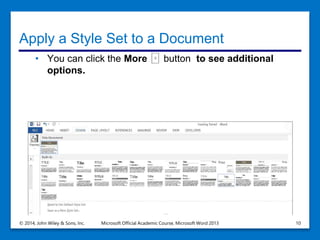
• You can click the More button to see additional
options.
© 2014, John Wiley & Sons, Inc. Microsoft Official Academic Course, Microsoft Word 2013 10
Insert a Page Color
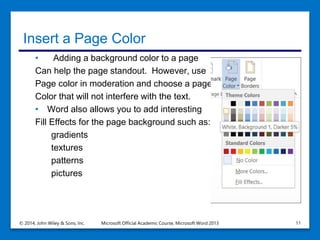
• Adding a background color to a page
Can help the page standout. However, use
Page color in moderation and choose a page
Color that will not interfere with the text.
• Word also allows you to add interesting
Fill Effects for the page background such as:
gradients
textures
patterns
pictures
© 2014, John Wiley & Sons, Inc. Microsoft Official Academic Course, Microsoft Word 2013 11
Insert a Watermark
• In business, some documents might contain sensitive
information and the nature of a document’s status should
be clearly conveyed on its pages.
• Word provides built-in text called Watermarks that display
lightly behind text.
• Examples include:
• Confidential
• Draft
• Urgent
Watermarks can be customized to include text or images including
company logos.
© 2014, John Wiley & Sons, Inc. Microsoft Official Academic Course, Microsoft Word 2013 12
Add a Page Border
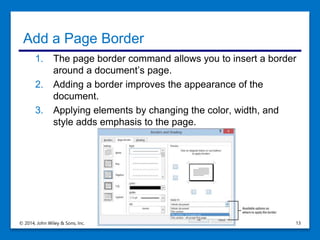
1. The page border command allows you to insert a border
around a document’s page.
2. Adding a border improves the appearance of the
document.
3. Applying elements by changing the color, width, and
style adds emphasis to the page.
© 2014, John Wiley & Sons, Inc. Microsoft Official Academic Course, Microsoft Word 2013 13
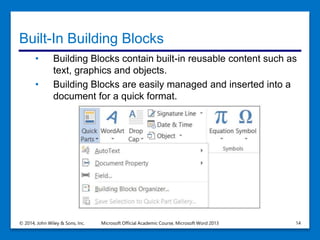
Built-In Building Blocks
• Building Blocks contain built-in reusable content such as
text, graphics and objects.
• Building Blocks are easily managed and inserted into a
document for a quick format.
© 2014, John Wiley & Sons, Inc. Microsoft Official Academic Course, Microsoft Word 2013 14
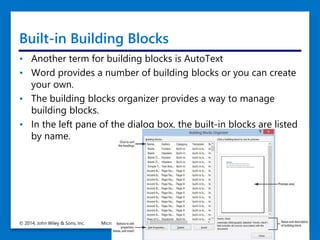
Built-in Building Blocks
• Another term for building blocks is AutoText
• Word provides a number of building blocks or you can create
your own.
• The building blocks organizer provides a way to manage
building blocks.
• In the left pane of the dialog box, the built-in blocks are listed
by name.
© 2014, John Wiley & Sons, Inc. Microsoft Official Academic Course, Microsoft Word 2013 15
Insert an Equation
• Word has built-in equations that can be inserted form the
Quick Parts gallery or by using the Equation command.
• When you create a table that contains values, you can
calculate your answer by inserting an equation.
• You can use the Equation Tools Design Tab which
displays when an equation is inserted in a document.
© 2014, John Wiley & Sons, Inc. Microsoft Official Academic Course, Microsoft Word 2013 16
Inserting a Field from Quick Parts
• A field is a placeholder where Word inserts content in a
document.
• Word automatically used fields when specific commands are
activated like:
1. Dates
2. Formulas
3. Page numbers
4. Table of contents
© 2014, John Wiley & Sons, Inc. Microsoft Official Academic Course, Microsoft Word 2013 17
Fields
• Fields are also called field codes
• They appear between curly brackets when displayed { }
• Field codes are turned off by default
• To display field codes in a document you can use Alt + F9
• To edit a field, place the insertion point within the field, right-
click and click edit field
© 2014, John Wiley & Sons, Inc. Microsoft Official Academic Course, Microsoft Word 2013 18
AutoText
• Auto Text adds text automatically when you type the first few letters.
• There are times when you type the same text many times and
creating Auto Text entries can save you time.
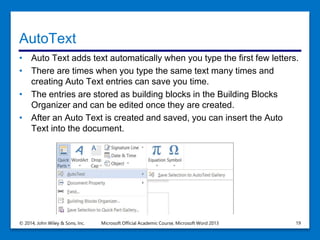
• The entries are stored as building blocks in the Building Blocks
Organizer and can be edited once they are created.
• After an Auto Text is created and saved, you can insert the Auto
Text into the document.
© 2014, John Wiley & Sons, Inc. Microsoft Official Academic Course, Microsoft Word 2013 19
Text Box Tools in the Ribbon
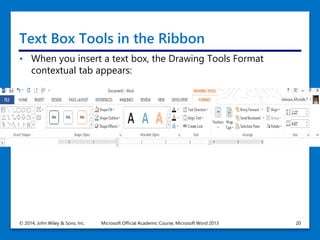
• When you insert a text box, the Drawing Tools Format
contextual tab appears:
© 2014, John Wiley & Sons, Inc. Microsoft Official Academic Course, Microsoft Word 2013 20
Applying and manipulating text boxes:
• A text box is a formatted box where you can insert and
position text and/or graphics objects.
• Most often text boxes are used to insert text within other
document text or to place specific emphasis or add visual
interest.
• After you insert a text box you can format the text in the box
using Font formats.
• A pull quote is a small selection of text that is pulled out or
quoted from a larger selection of text. It is displayed within
a box on the page that is formatted for emphasis and is
often used along with drop caps in newsletters, ads and
magazines.
© 2014, John Wiley & Sons, Inc. Microsoft Official Academic Course, Microsoft Word 2013 21
Insert a Text Box
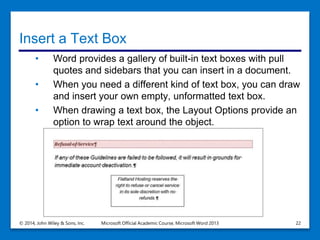
• Word provides a gallery of built-in text boxes with pull
quotes and sidebars that you can insert in a document.
• When you need a different kind of text box, you can draw
and insert your own empty, unformatted text box.
• When drawing a text box, the Layout Options provide an
option to wrap text around the object.
© 2014, John Wiley & Sons, Inc. Microsoft Official Academic Course, Microsoft Word 2013 22
Save a Selection to the Text Box Gallery
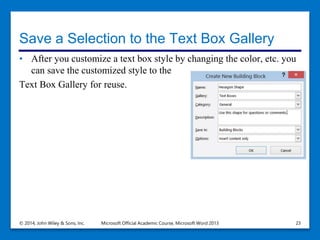
• After you customize a text box style by changing the color, etc. you
can save the customized style to the
Text Box Gallery for reuse.
© 2014, John Wiley & Sons, Inc. Microsoft Official Academic Course, Microsoft Word 2013 23
Drop Cap
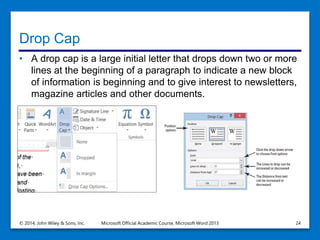
• A drop cap is a large initial letter that drops down two or more
lines at the beginning of a paragraph to indicate a new block
of information is beginning and to give interest to newsletters,
magazine articles and other documents.
© 2014, John Wiley & Sons, Inc. Microsoft Official Academic Course, Microsoft Word 2013 24
Special Characters
• Special characters include recognizable symbols used by
people or businesses.
• Copyright symbols are used to protect books, songs, and
other original work from authors or artists.
• Trademark is an unregistered trademark and is used to
promote the company’s goods.
• Depending on the font you select, you can insert international
monetary symbols.
• Unicode is a character code and enables most of the
languages in the world to be symbolized with a special
character identification.
• Special characters are placed in the document using the
Insert tab.
© 2014, John Wiley & Sons, Inc. Microsoft Official Academic Course, Microsoft Word 2013 25

Word2013lesson07s.pptx

  • 1.
    Working with Themes,Style Sets, Backgrounds, Quick Parts, and Text Boxes © 2014, John Wiley & Sons, Inc. Microsoft Official Academic Course, Microsoft Word 2013 1 Microsoft Word 2013 Lesson 7
  • 2.
    Design Tab • TheDesign Tab on the Word Ribbon is new to Word 2013. • It offers several different ways to format a document using Themes or selecting from the Document Formatting gallery. • Once a theme or document formatting is applied, the colors, fonts and effects can be changed or customized. • You also have the option to set the formatting as your default without having to reset each time you work on a new document. © 2014, John Wiley & Sons, Inc. Microsoft Official Academic Course, Microsoft Word 2013 2
  • 3.
    Format a Documentwith a Theme • Predefined formatting allow you To change the overall appearance Of the document by selecting and Applying a theme. • A document theme is a set of Predefined formatting options that Includes theme colors, fonts and Effects. • On the Design tab, in the Document Formatting group, click Themes; the Themes menu opens, as shown at right. © 2014, John Wiley & Sons, Inc. Microsoft Official Academic Course, Microsoft Word 2013 3
  • 4.
    Create and Customizea Document Color • In the Document Formatting group, click the Colors button to open the Colors menu (right). • The Colors menu contains predefined formatting colors with four text and background colors, six accent colors, and two hyperlink colors. These colors can be customized and saved with a new name. © 2014, John Wiley & Sons, Inc. Microsoft Official Academic Course, Microsoft Word 2013 4
  • 5.
    Create and Customizea Document Color • At the bottom of the Colors menu, click Customize Colors; the Create New Theme Colors dialog box opens (right). • In the Name box, replace Custom 1 by typing what you want to call the color. • Click Save; the dialog box closes and you have defined a new custom theme color name based on default colors. © 2014, John Wiley & Sons, Inc. Microsoft Official Academic Course, Microsoft Word 2013 5
  • 6.
    Create and CustomizeDocument Effects • Position the insertion point anywhere in the document. • Click the Effects button and select the effect you Want to use. When applying Shapes to your document, the Shape displays based on the Effect you selected. © 2014, John Wiley & Sons, Inc. Microsoft Official Academic Course, Microsoft Word 2013 6
  • 7.
    Paragraph Spacing • Applyinga paragraph spacing changes the lines and paragraph spacing for the entire document. • You can apply one of the predefined options or customize your own. • Paragraph spacing button in the Document Formatting group © 2014, John Wiley & Sons, Inc. Microsoft Official Academic Course, Microsoft Word 2013 7
  • 8.
    Apply Paragraph Spacing •The built-in menu appears (right). • Hover over each of the built- in settings and notice the changes on the whole document. Also, a ScreenTip appears displaying the line and paragraph setting for that option. Select Open. © 2014, John Wiley & Sons, Inc. Microsoft Official Academic Course, Microsoft Word 2013 8
  • 9.
    Apply a StyleSet to a Document • Word 2013 has a new group called Document Formatting on the Design Tab • This new group has many different Style Sets that change the appearance of the whole document. • These Style Sets are predefined styles with fonts and paragraph spacing defined. • You have an option to reset the document back to its default or save a new Style Set. • If you hover the mouse over a few of the built-in Style Sets in the Document Formatting group, you can watch how the appearance of the document changes. • Note, before applying Style Sets, the document must contain styles. © 2014, John Wiley & Sons, Inc. Microsoft Official Academic Course, Microsoft Word 2013 9
  • 10.
    Apply a StyleSet to a Document • You can click the More button to see additional options. © 2014, John Wiley & Sons, Inc. Microsoft Official Academic Course, Microsoft Word 2013 10
  • 11.
    Insert a PageColor • Adding a background color to a page Can help the page standout. However, use Page color in moderation and choose a page Color that will not interfere with the text. • Word also allows you to add interesting Fill Effects for the page background such as: gradients textures patterns pictures © 2014, John Wiley & Sons, Inc. Microsoft Official Academic Course, Microsoft Word 2013 11
  • 12.
    Insert a Watermark •In business, some documents might contain sensitive information and the nature of a document’s status should be clearly conveyed on its pages. • Word provides built-in text called Watermarks that display lightly behind text. • Examples include: • Confidential • Draft • Urgent Watermarks can be customized to include text or images including company logos. © 2014, John Wiley & Sons, Inc. Microsoft Official Academic Course, Microsoft Word 2013 12
  • 13.
    Add a PageBorder 1. The page border command allows you to insert a border around a document’s page. 2. Adding a border improves the appearance of the document. 3. Applying elements by changing the color, width, and style adds emphasis to the page. © 2014, John Wiley & Sons, Inc. Microsoft Official Academic Course, Microsoft Word 2013 13
  • 14.
    Built-In Building Blocks •Building Blocks contain built-in reusable content such as text, graphics and objects. • Building Blocks are easily managed and inserted into a document for a quick format. © 2014, John Wiley & Sons, Inc. Microsoft Official Academic Course, Microsoft Word 2013 14
  • 15.
    Built-in Building Blocks •Another term for building blocks is AutoText • Word provides a number of building blocks or you can create your own. • The building blocks organizer provides a way to manage building blocks. • In the left pane of the dialog box, the built-in blocks are listed by name. © 2014, John Wiley & Sons, Inc. Microsoft Official Academic Course, Microsoft Word 2013 15
  • 16.
    Insert an Equation •Word has built-in equations that can be inserted form the Quick Parts gallery or by using the Equation command. • When you create a table that contains values, you can calculate your answer by inserting an equation. • You can use the Equation Tools Design Tab which displays when an equation is inserted in a document. © 2014, John Wiley & Sons, Inc. Microsoft Official Academic Course, Microsoft Word 2013 16
  • 17.
    Inserting a Fieldfrom Quick Parts • A field is a placeholder where Word inserts content in a document. • Word automatically used fields when specific commands are activated like: 1. Dates 2. Formulas 3. Page numbers 4. Table of contents © 2014, John Wiley & Sons, Inc. Microsoft Official Academic Course, Microsoft Word 2013 17
  • 18.
    Fields • Fields arealso called field codes • They appear between curly brackets when displayed { } • Field codes are turned off by default • To display field codes in a document you can use Alt + F9 • To edit a field, place the insertion point within the field, right- click and click edit field © 2014, John Wiley & Sons, Inc. Microsoft Official Academic Course, Microsoft Word 2013 18
  • 19.
    AutoText • Auto Textadds text automatically when you type the first few letters. • There are times when you type the same text many times and creating Auto Text entries can save you time. • The entries are stored as building blocks in the Building Blocks Organizer and can be edited once they are created. • After an Auto Text is created and saved, you can insert the Auto Text into the document. © 2014, John Wiley & Sons, Inc. Microsoft Official Academic Course, Microsoft Word 2013 19
  • 20.
    Text Box Toolsin the Ribbon • When you insert a text box, the Drawing Tools Format contextual tab appears: © 2014, John Wiley & Sons, Inc. Microsoft Official Academic Course, Microsoft Word 2013 20
  • 21.
    Applying and manipulatingtext boxes: • A text box is a formatted box where you can insert and position text and/or graphics objects. • Most often text boxes are used to insert text within other document text or to place specific emphasis or add visual interest. • After you insert a text box you can format the text in the box using Font formats. • A pull quote is a small selection of text that is pulled out or quoted from a larger selection of text. It is displayed within a box on the page that is formatted for emphasis and is often used along with drop caps in newsletters, ads and magazines. © 2014, John Wiley & Sons, Inc. Microsoft Official Academic Course, Microsoft Word 2013 21
  • 22.
    Insert a TextBox • Word provides a gallery of built-in text boxes with pull quotes and sidebars that you can insert in a document. • When you need a different kind of text box, you can draw and insert your own empty, unformatted text box. • When drawing a text box, the Layout Options provide an option to wrap text around the object. © 2014, John Wiley & Sons, Inc. Microsoft Official Academic Course, Microsoft Word 2013 22
  • 23.
    Save a Selectionto the Text Box Gallery • After you customize a text box style by changing the color, etc. you can save the customized style to the Text Box Gallery for reuse. © 2014, John Wiley & Sons, Inc. Microsoft Official Academic Course, Microsoft Word 2013 23
  • 24.
    Drop Cap • Adrop cap is a large initial letter that drops down two or more lines at the beginning of a paragraph to indicate a new block of information is beginning and to give interest to newsletters, magazine articles and other documents. © 2014, John Wiley & Sons, Inc. Microsoft Official Academic Course, Microsoft Word 2013 24
  • 25.
    Special Characters • Specialcharacters include recognizable symbols used by people or businesses. • Copyright symbols are used to protect books, songs, and other original work from authors or artists. • Trademark is an unregistered trademark and is used to promote the company’s goods. • Depending on the font you select, you can insert international monetary symbols. • Unicode is a character code and enables most of the languages in the world to be symbolized with a special character identification. • Special characters are placed in the document using the Insert tab. © 2014, John Wiley & Sons, Inc. Microsoft Official Academic Course, Microsoft Word 2013 25

Editor's Notes

  • #6 Take Note: Throughout this chapter, you see information that appears in black text within brackets, such as [your e-mail address]. The information contained in the brackets is intended to be directions for you rather than something you actually type word for word. It instructs you to perform an action or substitute text. Do not type the actual text that appears within brackets.