802.11 Wireless LAN
Provides network connectivity over wireless media
An Access Point (AP) is installed to act as Bridge between
Wireless and Wired Network
The AP is connected to wired network and is equipped with
antennae to provide wireless connectivity
LAN Technologies
Network
connectivity to
the legacy
wired LAN
Desktop
with PCI 802.11 LAN card
Laptop
with PCMCIA 802.11 LAN card
Access Point
802.11 Wireless LAN
Range ( Distance between Access Point and WLAN client)
depends on structural and RF gain of the antenna at the
Access Point
To service larger areas, multiple APs may be installed with a
20-30% overlap
A client is always associated with one AP and when the
client moves closer to another AP, it associates with the
new AP (Hand-Off)
Three flavors:
802.11b
802.11a
802.11g
LAN Technologies
Multiple Access with Collision
Avoidance (MACA)
Before every data transmission
Sender sends a Request to Send (RTS) frame containing
the length of the transmission
Receiver respond with a Clear to Send (CTS) frame
Sender sends data
Receiver sends an ACK; now another sender can send data
When sender doesn’t get a CTS back, it assumes collision
LAN Technologies
sender receiver
other node in
sender’s range
RTS
CTS
ACK
data
other node in
receiver’s range
WLAN : 802.11b
The most popular 802.11 standard currently in deployment.
Supports 1, 2, 5.5 and 11 Mbps data rates in the 2.4 GHz ISM
(Industrial-Scientific-Medical) band
LAN Technologies
WLAN : 802.11a
Operates in the 5 GHz UNII (Unlicensed National
Information Infrastructure) band
Incompatible with devices operating in 2.4GHz
Supports Data rates up to 54 Mbps.
LAN Technologies
WLAN : 802.11g
Supports data rates as high as 54 Mbps on the 2.4 GHz band
Provides backward compatibility with 802.11b equipment
LAN Technologies
Repeater, HUB, Bridge & Switch
REPEATER, HUB, BRIDGE AND
SWITCH
Repeater
A repeater receives a signal, regenerates it, and passes it on.
It can regenerate and retime network signals at the bit level
to allow them to travel a longer distance on the media.
It operates at Physical Layer of OSI
The Four Repeater Rule for 10-Mbps Ethernet should be
used as a standard when extending LAN segments.
-------------This rule states that no more than four repeaters
can be used between hosts on a LAN.
This rule is used to limit latency added to frame travel by
each repeater.
Repeater, Hub, Bridge & Switch
Hub
Hubs are used to connect
multiple nodes to a single
physical device, which connects
to the network.
Hubs are actually multiport
repeaters.
Using a hub changes the network
topology from a linear bus, to a
star.
With hubs, data arriving over the
cables to a hub port is electrically
repeated on all the other ports
connected to the same network
segment, except for the port on
which the data was sent.
Repeater, Hub, Bridge & Switch
Bridge
Bridges are used to logically separate network
segments within the same network.
They operate at the OSI data link layer (Layer
2) and are independent of higher-layer
protocols.
The function of the bridge is to make
intelligent decisions about whether or not to
pass signals on to the next segment of a
network.
When a bridge receives a frame on the
network, the destination MAC address is
looked up in the bridge table to determine
whether to filter, flood, or copy the frame
onto another segment
Broadcast Packets are forwarded
Repeater, Hub, Bridge & Switch
Switch
Switches are Multiport Bridges.
Switches provide a unique network segment on each port,
thereby separating collision domains.
Today, network designers are replacing hubs in their wiring
closets with switches to increase their network performance
and bandwidth while protecting their existing wiring
investments.
Like bridges, switches learn certain information about the data
packets that are received from various computers on the
network.
Switches use this information to build forwarding tables to
determine the destination of data being sent by one computer
to another computer on the network.
Repeater, Hub, Bridge & Switch
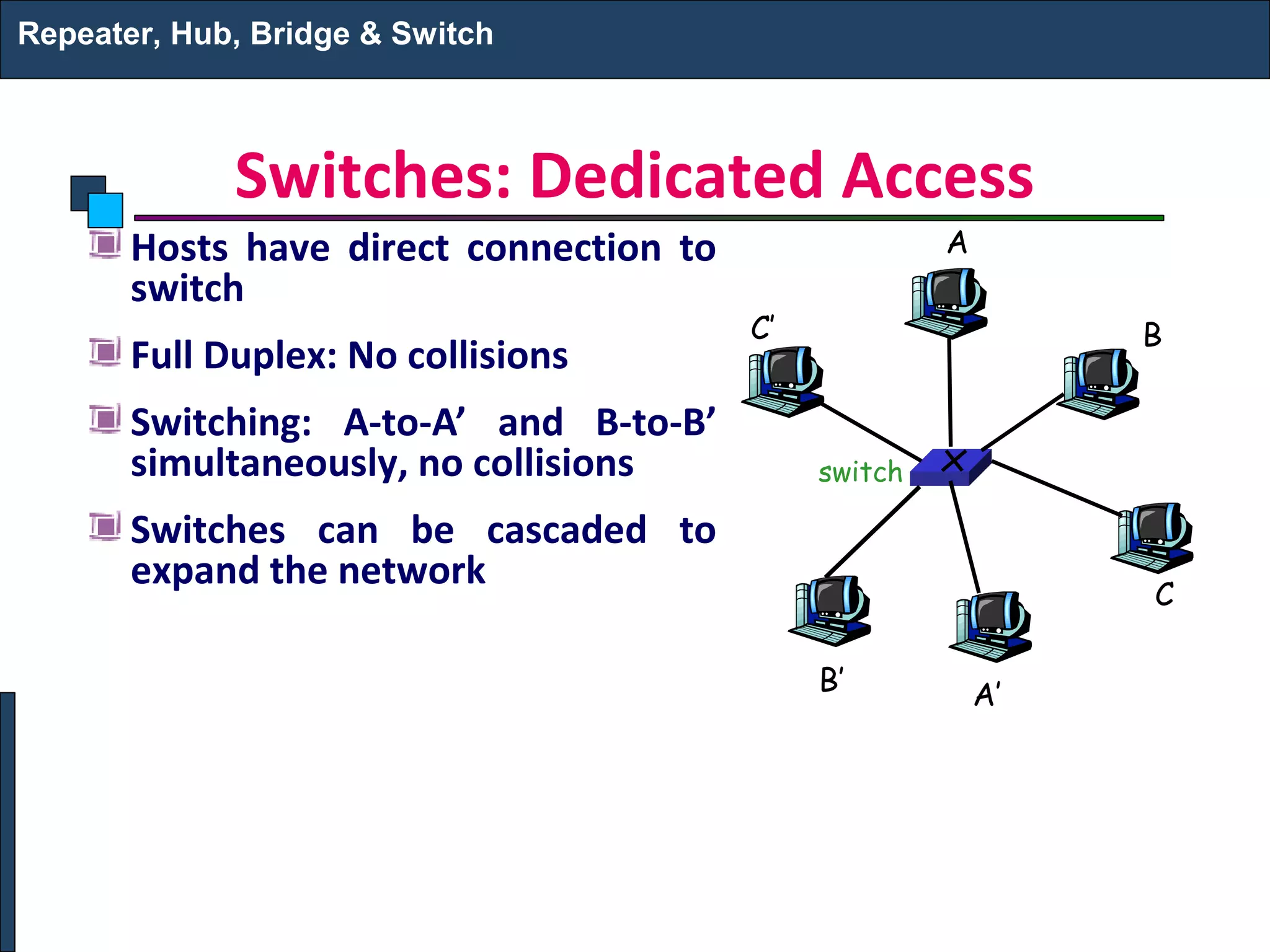
Switches: Dedicated Access
Hosts have direct connection to
switch
Full Duplex: No collisions
Switching: A-to-A’ and B-to-B’
simultaneously, no collisions
Switches can be cascaded to
expand the network
Repeater, Hub, Bridge & Switch
switch
A
A’
B
B’
C
C’
NASA : 91 gigabits per second
The space organization's shadow network can transfer 91 gigabits per second, or
91,000 megabits per second. For comparison, the average broadband connection
speed in the U.S. is 6.6 megabits per second - or more than 13,000 times
Technical specifications. Google Fiber provides an Internet connection speed of up
to one gigabit per second (1,000 Mbit/s) for both download and upload which is
roughly 100 times faster access than what most Americans have. Google Fiber says
its service allows for the download of a full movie in less than two minutes.

Wlan 1

  • 1.
    802.11 Wireless LAN Providesnetwork connectivity over wireless media An Access Point (AP) is installed to act as Bridge between Wireless and Wired Network The AP is connected to wired network and is equipped with antennae to provide wireless connectivity LAN Technologies Network connectivity to the legacy wired LAN Desktop with PCI 802.11 LAN card Laptop with PCMCIA 802.11 LAN card Access Point
  • 2.
    802.11 Wireless LAN Range( Distance between Access Point and WLAN client) depends on structural and RF gain of the antenna at the Access Point To service larger areas, multiple APs may be installed with a 20-30% overlap A client is always associated with one AP and when the client moves closer to another AP, it associates with the new AP (Hand-Off) Three flavors: 802.11b 802.11a 802.11g LAN Technologies
  • 3.
    Multiple Access withCollision Avoidance (MACA) Before every data transmission Sender sends a Request to Send (RTS) frame containing the length of the transmission Receiver respond with a Clear to Send (CTS) frame Sender sends data Receiver sends an ACK; now another sender can send data When sender doesn’t get a CTS back, it assumes collision LAN Technologies sender receiver other node in sender’s range RTS CTS ACK data other node in receiver’s range
  • 4.
    WLAN : 802.11b Themost popular 802.11 standard currently in deployment. Supports 1, 2, 5.5 and 11 Mbps data rates in the 2.4 GHz ISM (Industrial-Scientific-Medical) band LAN Technologies
  • 5.
    WLAN : 802.11a Operatesin the 5 GHz UNII (Unlicensed National Information Infrastructure) band Incompatible with devices operating in 2.4GHz Supports Data rates up to 54 Mbps. LAN Technologies
  • 6.
    WLAN : 802.11g Supportsdata rates as high as 54 Mbps on the 2.4 GHz band Provides backward compatibility with 802.11b equipment LAN Technologies
  • 7.
    Repeater, HUB, Bridge& Switch REPEATER, HUB, BRIDGE AND SWITCH
  • 8.
    Repeater A repeater receivesa signal, regenerates it, and passes it on. It can regenerate and retime network signals at the bit level to allow them to travel a longer distance on the media. It operates at Physical Layer of OSI The Four Repeater Rule for 10-Mbps Ethernet should be used as a standard when extending LAN segments. -------------This rule states that no more than four repeaters can be used between hosts on a LAN. This rule is used to limit latency added to frame travel by each repeater. Repeater, Hub, Bridge & Switch
  • 9.
    Hub Hubs are usedto connect multiple nodes to a single physical device, which connects to the network. Hubs are actually multiport repeaters. Using a hub changes the network topology from a linear bus, to a star. With hubs, data arriving over the cables to a hub port is electrically repeated on all the other ports connected to the same network segment, except for the port on which the data was sent. Repeater, Hub, Bridge & Switch
  • 10.
    Bridge Bridges are usedto logically separate network segments within the same network. They operate at the OSI data link layer (Layer 2) and are independent of higher-layer protocols. The function of the bridge is to make intelligent decisions about whether or not to pass signals on to the next segment of a network. When a bridge receives a frame on the network, the destination MAC address is looked up in the bridge table to determine whether to filter, flood, or copy the frame onto another segment Broadcast Packets are forwarded Repeater, Hub, Bridge & Switch
  • 11.
    Switch Switches are MultiportBridges. Switches provide a unique network segment on each port, thereby separating collision domains. Today, network designers are replacing hubs in their wiring closets with switches to increase their network performance and bandwidth while protecting their existing wiring investments. Like bridges, switches learn certain information about the data packets that are received from various computers on the network. Switches use this information to build forwarding tables to determine the destination of data being sent by one computer to another computer on the network. Repeater, Hub, Bridge & Switch
  • 12.
    Switches: Dedicated Access Hostshave direct connection to switch Full Duplex: No collisions Switching: A-to-A’ and B-to-B’ simultaneously, no collisions Switches can be cascaded to expand the network Repeater, Hub, Bridge & Switch switch A A’ B B’ C C’
  • 13.
    NASA : 91gigabits per second The space organization's shadow network can transfer 91 gigabits per second, or 91,000 megabits per second. For comparison, the average broadband connection speed in the U.S. is 6.6 megabits per second - or more than 13,000 times Technical specifications. Google Fiber provides an Internet connection speed of up to one gigabit per second (1,000 Mbit/s) for both download and upload which is roughly 100 times faster access than what most Americans have. Google Fiber says its service allows for the download of a full movie in less than two minutes.