NETWORK DESIGN:
• The first step in designing a wireless network is to identify the
areas that need to be covered, the number of users.
• From these requirements we need to determine how many
access point(AP) are required.
• The goal is to ensure adequate RF coverage to users.
• AP placement is typically determine using a combination of
theoretical principles and a thorough site survey.
• Use of APs with “antenna diversity” help to correct multipath
loss.
• RF interference is caused by other RF sources that also operate
in 2.4-GHz frequency band.
• These source can include microwave ovens and cordless
phones.
Scaling Capacity and Bandwidth :
•Aggregate Bandwidth in a localized coverage area helps
to service a more dense population of wireless clients or
to increase the bandwidth available to each wireless
client in a coverage area
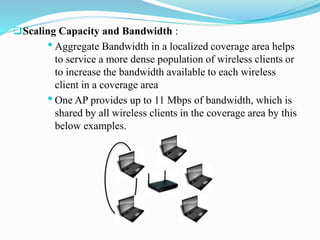
•One AP provides up to 11 Mbps of bandwidth, which is
shared by all wireless clients in the coverage area by this
below examples.
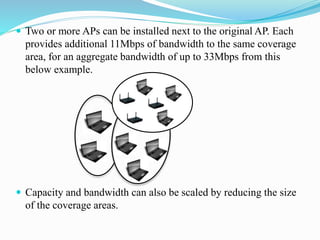
 Two or more APs can be installed next to the original AP. Each
provides additional 11Mbps of bandwidth to the same coverage
area, for an aggregate bandwidth of up to 33Mbps from this
below example.
 Capacity and bandwidth can also be scaled by reducing the size
of the coverage areas.
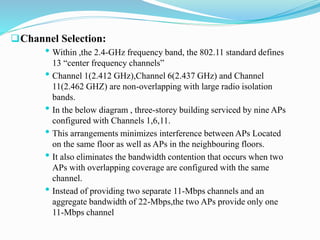
Channel Selection:
• Within ,the 2.4-GHz frequency band, the 802.11 standard defines
13 “center frequency channels”
• Channel 1(2.412 GHz),Channel 6(2.437 GHz) and Channel
11(2.462 GHZ) are non-overlapping with large radio isolation
bands.
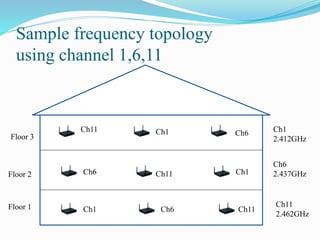
• In the below diagram , three-storey building serviced by nine APs
configured with Channels 1,6,11.
• This arrangements minimizes interference between APs Located
on the same floor as well as APs in the neighbouring floors.
• It also eliminates the bandwidth contention that occurs when two
APs with overlapping coverage are configured with the same
channel.
• Instead of providing two separate 11-Mbps channels and an
aggregate bandwidth of 22-Mbps,the two APs provide only one
11-Mbps channel
Sample frequency topology
using channel 1,6,11
Ch 11
Floor 3
Floor 2
Floor 1
Ch11
Ch11
Ch11
Ch1
Ch1
Ch1
Ch6
Ch6
Ch6 Ch1
2.412GHz
Ch6
2.437GHz
Ch11
2.462GHz
AP Transmission Power:
•The Transmission Power of most APs ranges from 1mw
up to 100mw.
•Transmission power affects the effective range of the
radio signal.
•The highest transmission power, the longer the range of
the signals.
•Higher power settings are appropriate in many large
enterprise installations with cube-wall offices and a lot of
open space.
•Lower settings are appropriate in environments such as
test labs or small offices where the longer range is not
required.
Configuring the Wireless LAN:
• This includes the configuration of both the access point and the
mobile station.
• The first level of configuration is to assign an IP address to AP.
• The WEP(Wired Equivalent Privacy)security , the shared key
needs to set both in the AP and the mobile station.
• AP can also be configured as a DHCP(Dynamic Host
Configuration Protocol )server where AP will supply IP address to
connecting client.
• This include configuring RADIUS(Remote Authentication Dial In
User Service) server or other authentication servers like Kerberos,
etc..
• Network Types can be either in infrastructure mode or ad hoc
mode.
Managing 802.11 Networks:
• Two Key components to successful wireless network deployment
are good management and monitoring tool.
•Providing stable and manageable network infrastructure with
effective support ,problem detection and problem resolution is
depend on good foundation of network products tool.
•For 802.11 wireless network, utilities on the client computer that
allow the user to monitor the health of their radio connection and
monitor the wireless network.
•Most of the clients provide tools to check the health of the link.
Managing Access Points:
•The task of managing APs can be broken down into
management and monitoring/reporting.
•Management tools are typically provided with AP.
•Management allows AP to perform :
 Initial set-up
 Overall Administration
•Initial set-up includes tasks such as configuring the device,
channel selection ,SSID settings, IP addressing, security
settings, Ethernet settings.
•Administrator includes tasks such as changing IP address and
WEP settings ,upgrading firmware, performing AP remote re-
boots and analyzing AP network and AP client connections.
Client Tool:
• The Client Network Interface Cards(NIC) with Wi-Fi
certification of interoperability, is easy to use client utilities for
diagnostics and determining the RF signal, strength and quality.
• It should also allow users to easily maintain multiple profiles
and to switch between them as required.
• There are some free tools that can be used:
 Aida32:(http://www.aida32.hu/aida32.php):
 It provides direct and rapid access to server’s Event
viewer, user manager , open files services and other
hidden terminals.
 Network Probe:(http://www.objectplanet.com/probe/):
It is a protocol analyzer developed by Object Planet of
Oslo, Norway.
This tool is designed to provide real-time view of network
traffic.
This software can track and isolate traffic problems and
congestion on network lines.
• Kismet:(http://www.kismetwireless.net/):
It is a network sniffer.
It can spot unauthorized wireless access point.
It works within any 802.11b wireless card that can report
raw wireless packets.
 There are several excellent tools that are capable of
mapping the access point in the area.
• NetStumbler (http://www.netstumber.com) for windows.
• PocketWarrior (http://www.pocketwarrior.org) for pocket PC.
• Kismet(http://www.kismetwireless.net)for Linux.
• THC-WarDrive(http://www.thc.org) for Linux.
• AirMagnet(http://www.airmagnet.com) for window,PDA.

Wireless LAN

  • 2.
    NETWORK DESIGN: • Thefirst step in designing a wireless network is to identify the areas that need to be covered, the number of users. • From these requirements we need to determine how many access point(AP) are required. • The goal is to ensure adequate RF coverage to users. • AP placement is typically determine using a combination of theoretical principles and a thorough site survey. • Use of APs with “antenna diversity” help to correct multipath loss. • RF interference is caused by other RF sources that also operate in 2.4-GHz frequency band. • These source can include microwave ovens and cordless phones.
  • 3.
    Scaling Capacity andBandwidth : •Aggregate Bandwidth in a localized coverage area helps to service a more dense population of wireless clients or to increase the bandwidth available to each wireless client in a coverage area •One AP provides up to 11 Mbps of bandwidth, which is shared by all wireless clients in the coverage area by this below examples.
  • 4.
     Two ormore APs can be installed next to the original AP. Each provides additional 11Mbps of bandwidth to the same coverage area, for an aggregate bandwidth of up to 33Mbps from this below example.  Capacity and bandwidth can also be scaled by reducing the size of the coverage areas.
  • 5.
    Channel Selection: • Within,the 2.4-GHz frequency band, the 802.11 standard defines 13 “center frequency channels” • Channel 1(2.412 GHz),Channel 6(2.437 GHz) and Channel 11(2.462 GHZ) are non-overlapping with large radio isolation bands. • In the below diagram , three-storey building serviced by nine APs configured with Channels 1,6,11. • This arrangements minimizes interference between APs Located on the same floor as well as APs in the neighbouring floors. • It also eliminates the bandwidth contention that occurs when two APs with overlapping coverage are configured with the same channel. • Instead of providing two separate 11-Mbps channels and an aggregate bandwidth of 22-Mbps,the two APs provide only one 11-Mbps channel
  • 6.
    Sample frequency topology usingchannel 1,6,11 Ch 11 Floor 3 Floor 2 Floor 1 Ch11 Ch11 Ch11 Ch1 Ch1 Ch1 Ch6 Ch6 Ch6 Ch1 2.412GHz Ch6 2.437GHz Ch11 2.462GHz
  • 7.
    AP Transmission Power: •TheTransmission Power of most APs ranges from 1mw up to 100mw. •Transmission power affects the effective range of the radio signal. •The highest transmission power, the longer the range of the signals. •Higher power settings are appropriate in many large enterprise installations with cube-wall offices and a lot of open space. •Lower settings are appropriate in environments such as test labs or small offices where the longer range is not required.
  • 8.
    Configuring the WirelessLAN: • This includes the configuration of both the access point and the mobile station. • The first level of configuration is to assign an IP address to AP. • The WEP(Wired Equivalent Privacy)security , the shared key needs to set both in the AP and the mobile station. • AP can also be configured as a DHCP(Dynamic Host Configuration Protocol )server where AP will supply IP address to connecting client. • This include configuring RADIUS(Remote Authentication Dial In User Service) server or other authentication servers like Kerberos, etc.. • Network Types can be either in infrastructure mode or ad hoc mode.
  • 9.
    Managing 802.11 Networks: •Two Key components to successful wireless network deployment are good management and monitoring tool. •Providing stable and manageable network infrastructure with effective support ,problem detection and problem resolution is depend on good foundation of network products tool. •For 802.11 wireless network, utilities on the client computer that allow the user to monitor the health of their radio connection and monitor the wireless network. •Most of the clients provide tools to check the health of the link.
  • 10.
    Managing Access Points: •Thetask of managing APs can be broken down into management and monitoring/reporting. •Management tools are typically provided with AP. •Management allows AP to perform :  Initial set-up  Overall Administration •Initial set-up includes tasks such as configuring the device, channel selection ,SSID settings, IP addressing, security settings, Ethernet settings. •Administrator includes tasks such as changing IP address and WEP settings ,upgrading firmware, performing AP remote re- boots and analyzing AP network and AP client connections.
  • 11.
    Client Tool: • TheClient Network Interface Cards(NIC) with Wi-Fi certification of interoperability, is easy to use client utilities for diagnostics and determining the RF signal, strength and quality. • It should also allow users to easily maintain multiple profiles and to switch between them as required. • There are some free tools that can be used:  Aida32:(http://www.aida32.hu/aida32.php):  It provides direct and rapid access to server’s Event viewer, user manager , open files services and other hidden terminals.
  • 12.
     Network Probe:(http://www.objectplanet.com/probe/): Itis a protocol analyzer developed by Object Planet of Oslo, Norway. This tool is designed to provide real-time view of network traffic. This software can track and isolate traffic problems and congestion on network lines. • Kismet:(http://www.kismetwireless.net/): It is a network sniffer. It can spot unauthorized wireless access point. It works within any 802.11b wireless card that can report raw wireless packets.
  • 13.
     There areseveral excellent tools that are capable of mapping the access point in the area. • NetStumbler (http://www.netstumber.com) for windows. • PocketWarrior (http://www.pocketwarrior.org) for pocket PC. • Kismet(http://www.kismetwireless.net)for Linux. • THC-WarDrive(http://www.thc.org) for Linux. • AirMagnet(http://www.airmagnet.com) for window,PDA.