Wireless Networks
Submitted by:
Javaria(ADPCS-023A21-81)
Anmol (ADPCS-023A21-24)
Sameen(ADpcs-023A21-83)
Ayesha(ADPCS-023R21-54)
Muqadas(ADPCS-023A21-03)
Submitted to:
Dr. Ansar Munir Shah
Presentation Outline
Wireless Technology overview
The IEEE 802.11 WLAN Standards
Secure Wireless LANs
Migrating to Wireless LANs (Cutting
the cord)
Wireless?
 A wireless LAN or WLAN is a wireless
local area network that uses radio
waves as its carrier.
 The last link with the users is wireless,
to give a network connection to all
users in a building or campus.
 The backbone network usually uses
cables
Common Topologies
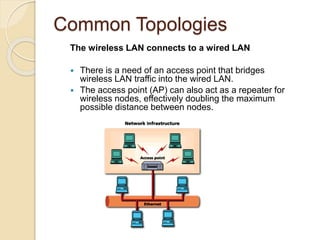
The wireless LAN connects to a wired LAN
 There is a need of an access point that bridges
wireless LAN traffic into the wired LAN.
 The access point (AP) can also act as a repeater for
wireless nodes, effectively doubling the maximum
possible distance between nodes.
Common Topologies
Complete Wireless Networks
 The physical size of the network is determined by the maximum
reliable propagation range of the radio signals.
 Referred to as ad hoc networks
 Are self-organizing networks without any centralized control
 Suited for temporary situations such as meetings and
conferences.
How do wireless LANs work?
Wireless LANs operate in almost the
same way as
wired LANs, using the same
networking protocols
and supporting the most of the same
applications.
How are WLANs Different?
 They use specialized physical and data
link protocols
 They integrate into existing networks
through access points which provide a
bridging function
 They let you stay connected as you roam
from one coverage area to another
 They have unique security considerations
 They have specific interoperability
requirements
 They require different hardware
 They offer performance that differs from
wired LANs.
Physical and Data Link
Layers
Physical Layer:
 The wireless NIC takes frames of
data from the link layer, scrambles the
data in a predetermined way, then
uses the modified data stream to
modulate a radio carrier signal.
Data Link Layer:
 Uses Carriers-Sense-Multiple-Access
with Collision Avoidance (CSMA/CA).
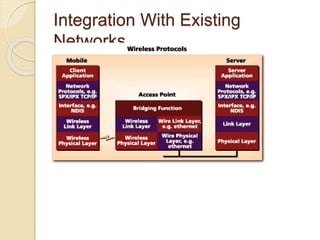
Integration With Existing
Networks
 Wireless Access Points (APs) - a
small device that bridges wireless
traffic to your network.
 Most access points bridge wireless
LANs into Ethernet networks, but
Token-Ring options are available as
well.
Integration With Existing
Networks
Roaming
 Users maintain a continuous connection as they
roam from one physical area to another
 Mobile nodes automatically register with the
new access point.
 Methods: DHCP, Mobile IP
 IEEE 802.11 standard does not
address roaming, you may need
to purchase equipment from one
vendor if your users need to roam
from one access point to another.
Security
 In theory, spread spectrum radio
signals are inherently difficult to
decipher without knowing the exact
hopping sequences or direct
sequence codes used
 The IEEE 802.11 standard specifies
optional security called "Wired
Equivalent Privacy" whose goal is that
a wireless LAN offer privacy
equivalent to that offered by a wired
LAN. The standard also specifies
optional authentication measures.
Hardware
 PC Card, either with integral antenna
or with external antenna/RF module.
 ISA Card with external antenna
connected by cable.
 Handheld terminals
 Access points
Hardware
CISCO Aironet 350 series
Wireless Handheld Terminal
Semi Parabolic Antenna BreezeCOM AP
Performance
 802.11a offers speeds with a
theoretically maximum rate of 54Mbps
in the 5 GHz band
 802.11b offers speeds with a
theoretically maximum rate of 11Mbps
at in the 2.4 GHz spectrum band
 802.11g is a new standard for data
rates of up to a theoretical maximum
of 54 Mbps at 2.4 GHz.
What is 802.11?
 A family of wireless LAN (WLAN)
specifications developed by a working
group at the Institute of Electrical and
Electronic Engineers (IEEE)
 Defines standard for WLANs using the
following four technologies
◦ Frequency Hopping Spread Spectrum (FHSS)
◦ Direct Sequence Spread Spectrum (DSSS)
◦ Infrared (IR)
◦ Orthogonal Frequency Division Multiplexing
(OFDM)
 Versions: 802.11a, 802.11b, 802.11g,
802.11e, 802.11f, 802.11i
802.11 - Transmission
 Most wireless LAN products operate in
unlicensed radio bands
◦ 2.4 GHz is most popular
◦ Available in most parts of the world
◦ No need for user licensing
 Most wireless LANs use spread-
spectrum radio
◦ Resistant to interference, secure
◦ Two popular methods
 Frequency Hopping (FH)
 Direct Sequence (DS)
Frequency Hopping Vs. Direct
Sequence
 FH systems use a radio carrier that “hops” from
frequency to frequency in a pattern known to both
transmitter and receiver
◦ Easy to implement
◦ Resistance to noise
◦ Limited throughput (2-3 Mbps @ 2.4 GHz)
 DS systems use a carrier that remains fixed to a
specific frequency band. The data signal is spread onto
a much larger range of frequencies (at a much lower
power level) using a specific encoding scheme.
◦ Much higher throughput than FH (11 Mbps)
◦ Better range
◦ Less resistant to noise (made up for by redundancy – it
transmits at least 10 fully redundant copies of the original
signal at the same time)
802.11a
 Employs Orthogonal Frequency
Division Multiplexing (OFDM)
◦ Offers higher bandwidth than that of
802.11b, DSSS (Direct Sequence Spread
Spectrum)
◦ 802.11a MAC (Media Access Control) is
same as 802.11b
 Operates in the 5 GHz range
802.11a Advantages
 Ultra-high spectrum efficiency
◦ 5 GHz band is 300 MHz (vs. 83.5 MHz @
2.4 GHz)
◦ More data can travel over a smaller
amount of bandwidth
 High speed
◦ Up to 54 Mbps
 Less interference
◦ Fewer products using the frequency
 2.4 GHz band shared by cordless phones,
microwave ovens, Bluetooth, and WLANs
802.11a Disadvantages
 Standards and Interoperability
◦ Standard not accepted worldwide
◦ No interoperability certification available
for 802.11a products
◦ Not compatible or interoperable with 802.11b
 Legal issues
◦ License-free spectrum in 5 GHz band not
available worldwide
 Market
◦ Beyond LAN-LAN bridging, there is limited
interest for
5 GHz adoption
802.11a Disadvantages
 Cost
◦ 2.4 GHz will still has >40% cost
advantage
 Range
◦ At equivalent power, 5 GHz range will be
~50% of 2.4 GHz
 Power consumption
◦ Higher data rates and increased signal
require more power
 OFDM is less power-efficient then DSSS
802.11a Applications
 Building-to-building connections
 Video, audio conferencing/streaming video,
and audio
 Large file transfers, such as engineering
CAD drawings
 Faster Web access and browsing
 High worker density or high throughput
scenarios
◦ Numerous PCs running graphics-intensive
applications
802.11a Vs. 802.11b
802.11a vs.
802.11b
802.11a 802.11b
Raw data rates Up to 54 Mbps
(54, 48, 36, 24,18, 12
and 6 Mbps)
Up to 11 Mbps
(11, 5.5, 2, and
1 Mbps)
Range 50 Meters 100 Meters
Bandwidth UNII and ISM
(5 GHz range)
ISM (2.4000—
2.4835 GHz range)
Modulation OFDM technology DSSS technology
Authentication
Means:
 Based on cryptography
 Non-cryptographic
 Both are identity-based verification
mechanisms (devices request access
based on the SSID – Service Set
Identifier of the wireless network).
Data Integrity
 Data integrity is ensured by a simple
encrypted version of CRC (Cyclic
Redundant Check)
 Also vulnerable to some attacks
Security Problems
 Security features in Wireless products are
frequently not enabled.
 Use of static WEP keys (keys are in use for
a very long time). WEP does not provide
key management.
 Cryptographic keys are short.
 No user authentication occurs – only
devices are authenticated. A stolen device
can access the network.
 Identity based systems are vulnerable.
 Packet integrity is poor.
Essential Questions
 Why is the organization considering
wireless? Allows to clearly define
requirements of the WLAN ->
development plan
 How many users require mobility?
 What are the applications that will run
over the WLAN? Helps to determine
bandwidth requirements, a criteria to
choose between available technologies.
Wireless is a shared medium, not
switched!!!
Choose the right technology
 Usually IEEE 802.11b or 802.11a
 802.11b offers interoperability (WECA
Wi-Fi Certification Program)
 802.11a offers higher data rates (up to
54 mbps) -> higher throughput per
user. Limited interoperability.
Data rates
 Data rates affect range
 802.11b 1 to 11 Mbps in 4 increments
 802.11a 6 to 54 Mbps in 7 increments
 The minimum data rate must be determined
at design time
 Selecting only the highest data rate will
require a greater number of APs to cover a
specific area
 Compromise between data rates and
overall system cost
Antenna Selection and
Placement
 Permanently attached.
 Remote antennas connected using an
antenna cable.
 Coax cable used for RF has a high signal
loss, should not be mounted more than a 1
or 2 meters away from the device.
 Placement: consider building construction,
ceiling height, obstacles, and aesthetics.
Different materials (cement, steel) have
different radio propagation characteristics.
Connecting to the Wired LAN
 Consider user mobility
 If users move between subnets, there
are challenges to consider.
 OSes like Windows XP and 2000,
Linux support DHCP to obtain the new
IP address for the subnet. Certain
applications such as VPN will fail.
 Solution: access points in a roaming
area are on the same segment.
Vendor Information
 CISCO Systems Wireless
http://www.cisco.com/warp/public/44/jump/wirel
ess.shtml
 3Com Wireless
http://www.3com.com/products/en_US/prodlist.j
sp?tab=cat&pathtype=purchase&cat=13&selcat
=Wireless+Products
 Breeze Wireless Communications
http://www.breezecom.com
 Lucent Technologies
http://www.wavelan.com
 Symbol Technologies http://www.symbol.com
References
 CISCO Packet Magazine, 2nd Quarter
2002
http://www.cisco.com/en/US/about/ac123
/ac114/ac173/ac168/about_cisco_packet
_issue_home.html
 3Com University – Wireless LANs A
Technology Overview
www.3com.com/3comu
 National Institute of Standards and
Technology Wireless Network Security
http://csrc.nist.gov/publications/drafts/dra
ft-sp800-48.pdf

Wireless Networks.pptx

  • 1.
    Wireless Networks Submitted by: Javaria(ADPCS-023A21-81) Anmol(ADPCS-023A21-24) Sameen(ADpcs-023A21-83) Ayesha(ADPCS-023R21-54) Muqadas(ADPCS-023A21-03) Submitted to: Dr. Ansar Munir Shah
  • 2.
    Presentation Outline Wireless Technologyoverview The IEEE 802.11 WLAN Standards Secure Wireless LANs Migrating to Wireless LANs (Cutting the cord)
  • 3.
    Wireless?  A wirelessLAN or WLAN is a wireless local area network that uses radio waves as its carrier.  The last link with the users is wireless, to give a network connection to all users in a building or campus.  The backbone network usually uses cables
  • 4.
    Common Topologies The wirelessLAN connects to a wired LAN  There is a need of an access point that bridges wireless LAN traffic into the wired LAN.  The access point (AP) can also act as a repeater for wireless nodes, effectively doubling the maximum possible distance between nodes.
  • 5.
    Common Topologies Complete WirelessNetworks  The physical size of the network is determined by the maximum reliable propagation range of the radio signals.  Referred to as ad hoc networks  Are self-organizing networks without any centralized control  Suited for temporary situations such as meetings and conferences.
  • 6.
    How do wirelessLANs work? Wireless LANs operate in almost the same way as wired LANs, using the same networking protocols and supporting the most of the same applications.
  • 7.
    How are WLANsDifferent?  They use specialized physical and data link protocols  They integrate into existing networks through access points which provide a bridging function  They let you stay connected as you roam from one coverage area to another  They have unique security considerations  They have specific interoperability requirements  They require different hardware  They offer performance that differs from wired LANs.
  • 8.
    Physical and DataLink Layers Physical Layer:  The wireless NIC takes frames of data from the link layer, scrambles the data in a predetermined way, then uses the modified data stream to modulate a radio carrier signal. Data Link Layer:  Uses Carriers-Sense-Multiple-Access with Collision Avoidance (CSMA/CA).
  • 9.
    Integration With Existing Networks Wireless Access Points (APs) - a small device that bridges wireless traffic to your network.  Most access points bridge wireless LANs into Ethernet networks, but Token-Ring options are available as well.
  • 10.
  • 11.
    Roaming  Users maintaina continuous connection as they roam from one physical area to another  Mobile nodes automatically register with the new access point.  Methods: DHCP, Mobile IP  IEEE 802.11 standard does not address roaming, you may need to purchase equipment from one vendor if your users need to roam from one access point to another.
  • 12.
    Security  In theory,spread spectrum radio signals are inherently difficult to decipher without knowing the exact hopping sequences or direct sequence codes used  The IEEE 802.11 standard specifies optional security called "Wired Equivalent Privacy" whose goal is that a wireless LAN offer privacy equivalent to that offered by a wired LAN. The standard also specifies optional authentication measures.
  • 13.
    Hardware  PC Card,either with integral antenna or with external antenna/RF module.  ISA Card with external antenna connected by cable.  Handheld terminals  Access points
  • 14.
    Hardware CISCO Aironet 350series Wireless Handheld Terminal Semi Parabolic Antenna BreezeCOM AP
  • 15.
    Performance  802.11a offersspeeds with a theoretically maximum rate of 54Mbps in the 5 GHz band  802.11b offers speeds with a theoretically maximum rate of 11Mbps at in the 2.4 GHz spectrum band  802.11g is a new standard for data rates of up to a theoretical maximum of 54 Mbps at 2.4 GHz.
  • 16.
    What is 802.11? A family of wireless LAN (WLAN) specifications developed by a working group at the Institute of Electrical and Electronic Engineers (IEEE)  Defines standard for WLANs using the following four technologies ◦ Frequency Hopping Spread Spectrum (FHSS) ◦ Direct Sequence Spread Spectrum (DSSS) ◦ Infrared (IR) ◦ Orthogonal Frequency Division Multiplexing (OFDM)  Versions: 802.11a, 802.11b, 802.11g, 802.11e, 802.11f, 802.11i
  • 17.
    802.11 - Transmission Most wireless LAN products operate in unlicensed radio bands ◦ 2.4 GHz is most popular ◦ Available in most parts of the world ◦ No need for user licensing  Most wireless LANs use spread- spectrum radio ◦ Resistant to interference, secure ◦ Two popular methods  Frequency Hopping (FH)  Direct Sequence (DS)
  • 18.
    Frequency Hopping Vs.Direct Sequence  FH systems use a radio carrier that “hops” from frequency to frequency in a pattern known to both transmitter and receiver ◦ Easy to implement ◦ Resistance to noise ◦ Limited throughput (2-3 Mbps @ 2.4 GHz)  DS systems use a carrier that remains fixed to a specific frequency band. The data signal is spread onto a much larger range of frequencies (at a much lower power level) using a specific encoding scheme. ◦ Much higher throughput than FH (11 Mbps) ◦ Better range ◦ Less resistant to noise (made up for by redundancy – it transmits at least 10 fully redundant copies of the original signal at the same time)
  • 19.
    802.11a  Employs OrthogonalFrequency Division Multiplexing (OFDM) ◦ Offers higher bandwidth than that of 802.11b, DSSS (Direct Sequence Spread Spectrum) ◦ 802.11a MAC (Media Access Control) is same as 802.11b  Operates in the 5 GHz range
  • 20.
    802.11a Advantages  Ultra-highspectrum efficiency ◦ 5 GHz band is 300 MHz (vs. 83.5 MHz @ 2.4 GHz) ◦ More data can travel over a smaller amount of bandwidth  High speed ◦ Up to 54 Mbps  Less interference ◦ Fewer products using the frequency  2.4 GHz band shared by cordless phones, microwave ovens, Bluetooth, and WLANs
  • 21.
    802.11a Disadvantages  Standardsand Interoperability ◦ Standard not accepted worldwide ◦ No interoperability certification available for 802.11a products ◦ Not compatible or interoperable with 802.11b  Legal issues ◦ License-free spectrum in 5 GHz band not available worldwide  Market ◦ Beyond LAN-LAN bridging, there is limited interest for 5 GHz adoption
  • 22.
    802.11a Disadvantages  Cost ◦2.4 GHz will still has >40% cost advantage  Range ◦ At equivalent power, 5 GHz range will be ~50% of 2.4 GHz  Power consumption ◦ Higher data rates and increased signal require more power  OFDM is less power-efficient then DSSS
  • 23.
    802.11a Applications  Building-to-buildingconnections  Video, audio conferencing/streaming video, and audio  Large file transfers, such as engineering CAD drawings  Faster Web access and browsing  High worker density or high throughput scenarios ◦ Numerous PCs running graphics-intensive applications
  • 24.
    802.11a Vs. 802.11b 802.11avs. 802.11b 802.11a 802.11b Raw data rates Up to 54 Mbps (54, 48, 36, 24,18, 12 and 6 Mbps) Up to 11 Mbps (11, 5.5, 2, and 1 Mbps) Range 50 Meters 100 Meters Bandwidth UNII and ISM (5 GHz range) ISM (2.4000— 2.4835 GHz range) Modulation OFDM technology DSSS technology
  • 25.
    Authentication Means:  Based oncryptography  Non-cryptographic  Both are identity-based verification mechanisms (devices request access based on the SSID – Service Set Identifier of the wireless network).
  • 26.
    Data Integrity  Dataintegrity is ensured by a simple encrypted version of CRC (Cyclic Redundant Check)  Also vulnerable to some attacks
  • 27.
    Security Problems  Securityfeatures in Wireless products are frequently not enabled.  Use of static WEP keys (keys are in use for a very long time). WEP does not provide key management.  Cryptographic keys are short.  No user authentication occurs – only devices are authenticated. A stolen device can access the network.  Identity based systems are vulnerable.  Packet integrity is poor.
  • 28.
    Essential Questions  Whyis the organization considering wireless? Allows to clearly define requirements of the WLAN -> development plan  How many users require mobility?  What are the applications that will run over the WLAN? Helps to determine bandwidth requirements, a criteria to choose between available technologies. Wireless is a shared medium, not switched!!!
  • 29.
    Choose the righttechnology  Usually IEEE 802.11b or 802.11a  802.11b offers interoperability (WECA Wi-Fi Certification Program)  802.11a offers higher data rates (up to 54 mbps) -> higher throughput per user. Limited interoperability.
  • 30.
    Data rates  Datarates affect range  802.11b 1 to 11 Mbps in 4 increments  802.11a 6 to 54 Mbps in 7 increments  The minimum data rate must be determined at design time  Selecting only the highest data rate will require a greater number of APs to cover a specific area  Compromise between data rates and overall system cost
  • 31.
    Antenna Selection and Placement Permanently attached.  Remote antennas connected using an antenna cable.  Coax cable used for RF has a high signal loss, should not be mounted more than a 1 or 2 meters away from the device.  Placement: consider building construction, ceiling height, obstacles, and aesthetics. Different materials (cement, steel) have different radio propagation characteristics.
  • 32.
    Connecting to theWired LAN  Consider user mobility  If users move between subnets, there are challenges to consider.  OSes like Windows XP and 2000, Linux support DHCP to obtain the new IP address for the subnet. Certain applications such as VPN will fail.  Solution: access points in a roaming area are on the same segment.
  • 33.
    Vendor Information  CISCOSystems Wireless http://www.cisco.com/warp/public/44/jump/wirel ess.shtml  3Com Wireless http://www.3com.com/products/en_US/prodlist.j sp?tab=cat&pathtype=purchase&cat=13&selcat =Wireless+Products  Breeze Wireless Communications http://www.breezecom.com  Lucent Technologies http://www.wavelan.com  Symbol Technologies http://www.symbol.com
  • 34.
    References  CISCO PacketMagazine, 2nd Quarter 2002 http://www.cisco.com/en/US/about/ac123 /ac114/ac173/ac168/about_cisco_packet _issue_home.html  3Com University – Wireless LANs A Technology Overview www.3com.com/3comu  National Institute of Standards and Technology Wireless Network Security http://csrc.nist.gov/publications/drafts/dra ft-sp800-48.pdf