Sensitivity: Internal & Restricted
SPEED PLANNING - FP&A
SNAPSHOTS
Sensitivity: Internal & Restricted
CFO Dashboard
Sensitivity: Internal & Restricted © confidential 3
CFO Dashboard(1 of 4)
CFO Dashboard (1 of 4)
CFO Dashboard showcases all essential KPIs that are needed for
a timely decision making. Some of the key aspects showcased
here are Revenue, Cost, Margins, Monthly trends, Revenue
breakups by Country & Products, DSO, Cashflow trends. All these
views are customizable to suit the requirements of the client.
Sensitivity: Internal & Restricted © confidential 4
CFO Dashboard(2 of 4)
CFO Dashboard (2 of 4)
Sensitivity: Internal & Restricted © confidential 5
CFO Dashboard(3 of 4)
CFO Dashboard (3 of 4)
Sensitivity: Internal & Restricted © confidential 6
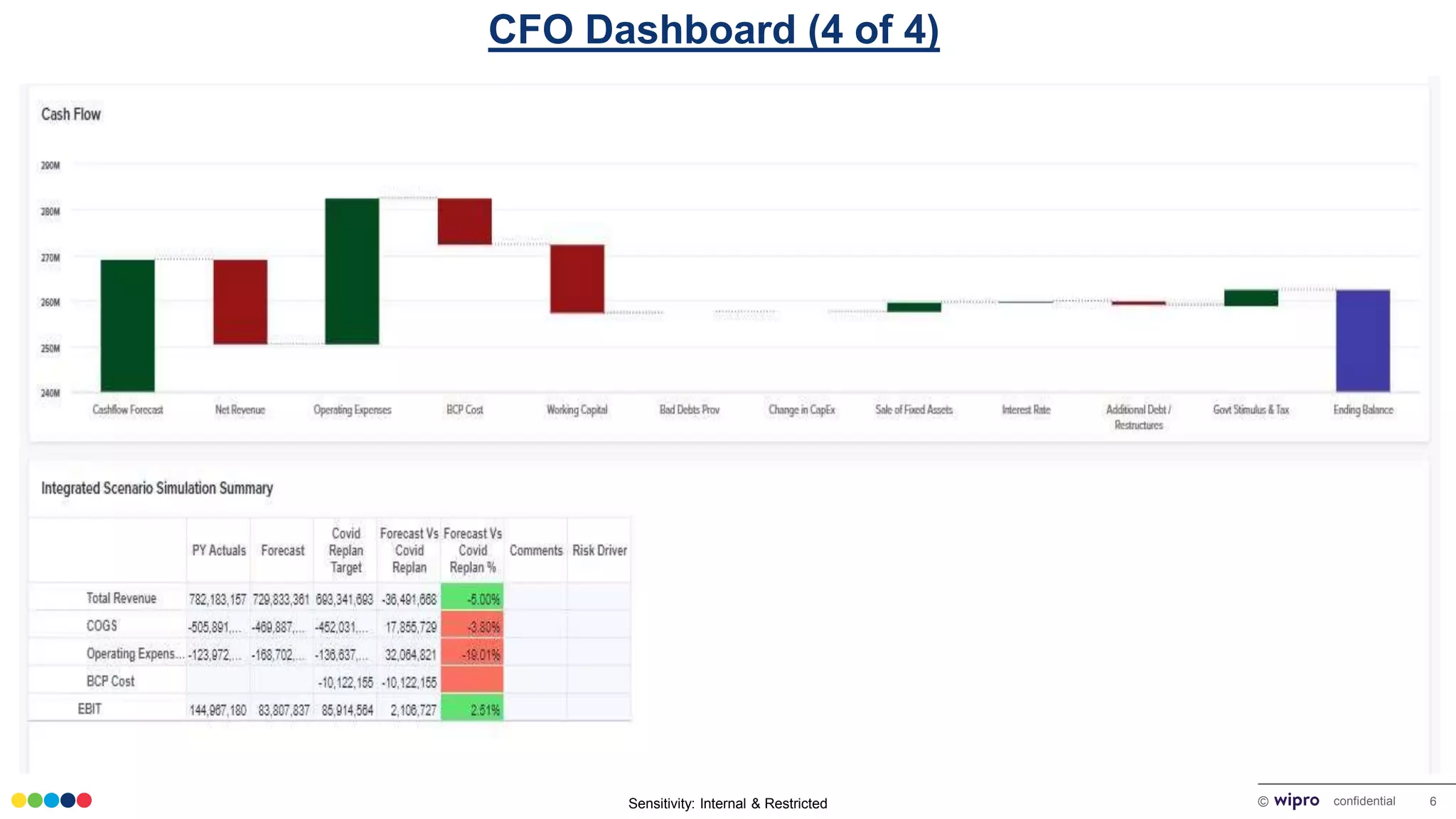
CFO Dashboard(4 of 4)
CFO Dashboard (4 of 4)
Sensitivity: Internal & Restricted
Strategic Initiative
Setup
Sensitivity: Internal & Restricted © confidential 8
Strategic Initiatives
Strategic Initiative Setup
This window assist Planners in
launching a new initiative on a
click of a button.
Input Section
Sensitivity: Internal & Restricted
Integrated Scenario
Planning – Top Down
Sensitivity: Internal & Restricted © confidential 10
Integrated Scenario Simulation(1 of 3)
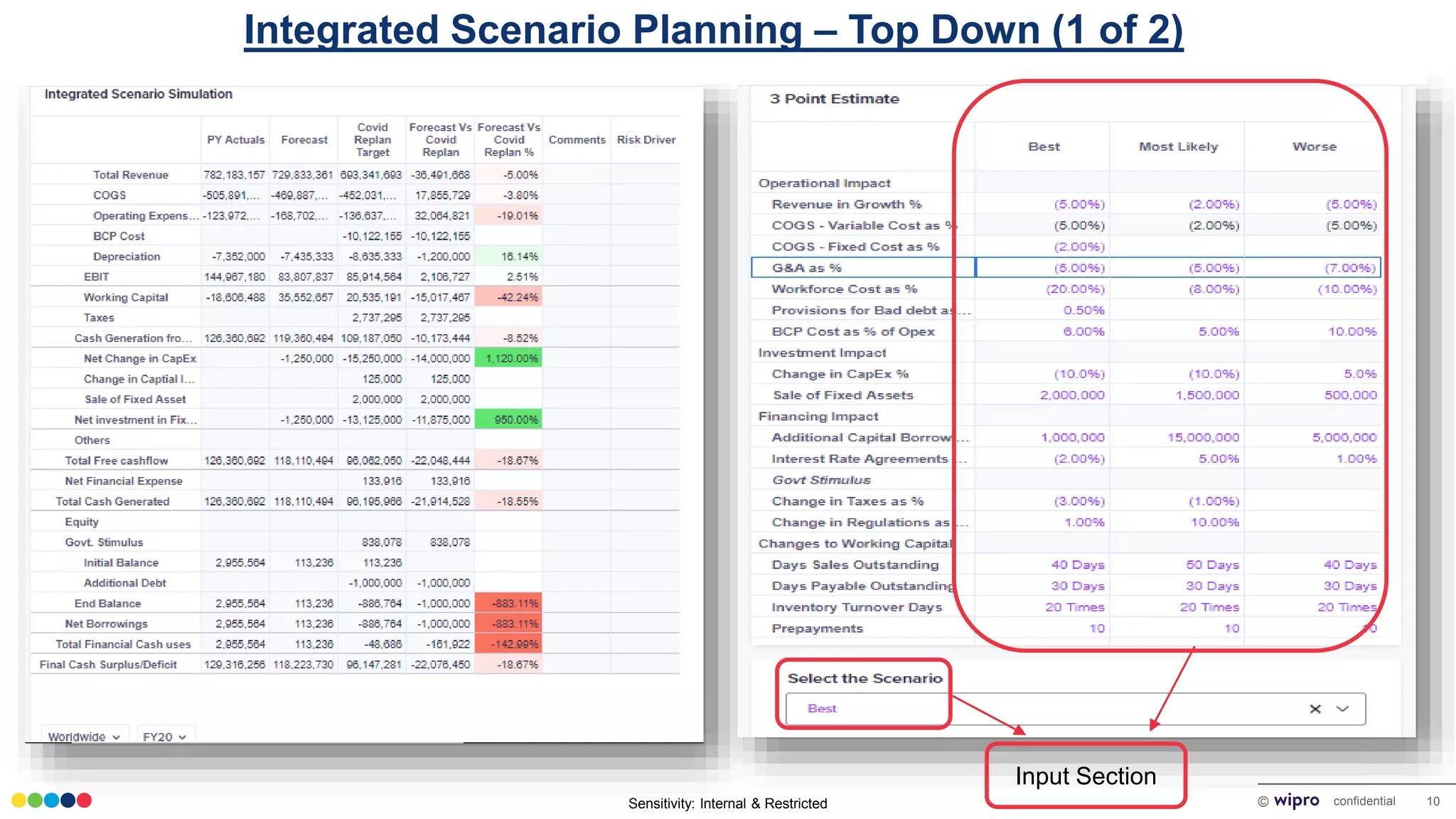
Integrated Scenario Planning – Top Down (1 of 2)
Input Section
Sensitivity: Internal & Restricted © confidential 11
Integrated Scenario Simulation(2 of 3)
Integrated Scenario Planning – Top Down (2 of 2)
Integrated Simulation
Window gives planners
an option to run a "What
if" scenario Simulation by
entering the estimates
based on best / most
likely / worst case
scenario. This is a top
down planning window
that can assist in target
assigning & cascading.
The View offers an
integrated impact
analysis of the Revenue,
cost & Cashflow as well
as planners can
accurately plan a monthly
cash inflow and outflow
simulation by playing with
Cash borrowing and
Govt. Stimulus.
Sensitivity: Internal & Restricted
Integrated Scenario
Planning – Bottoms up
Sensitivity: Internal & Restricted © confidential 13
Integrated Scenario Simulation – Location Level(1 of 3)
Integrated Scenario Planning – Bottoms up (1 of 2)
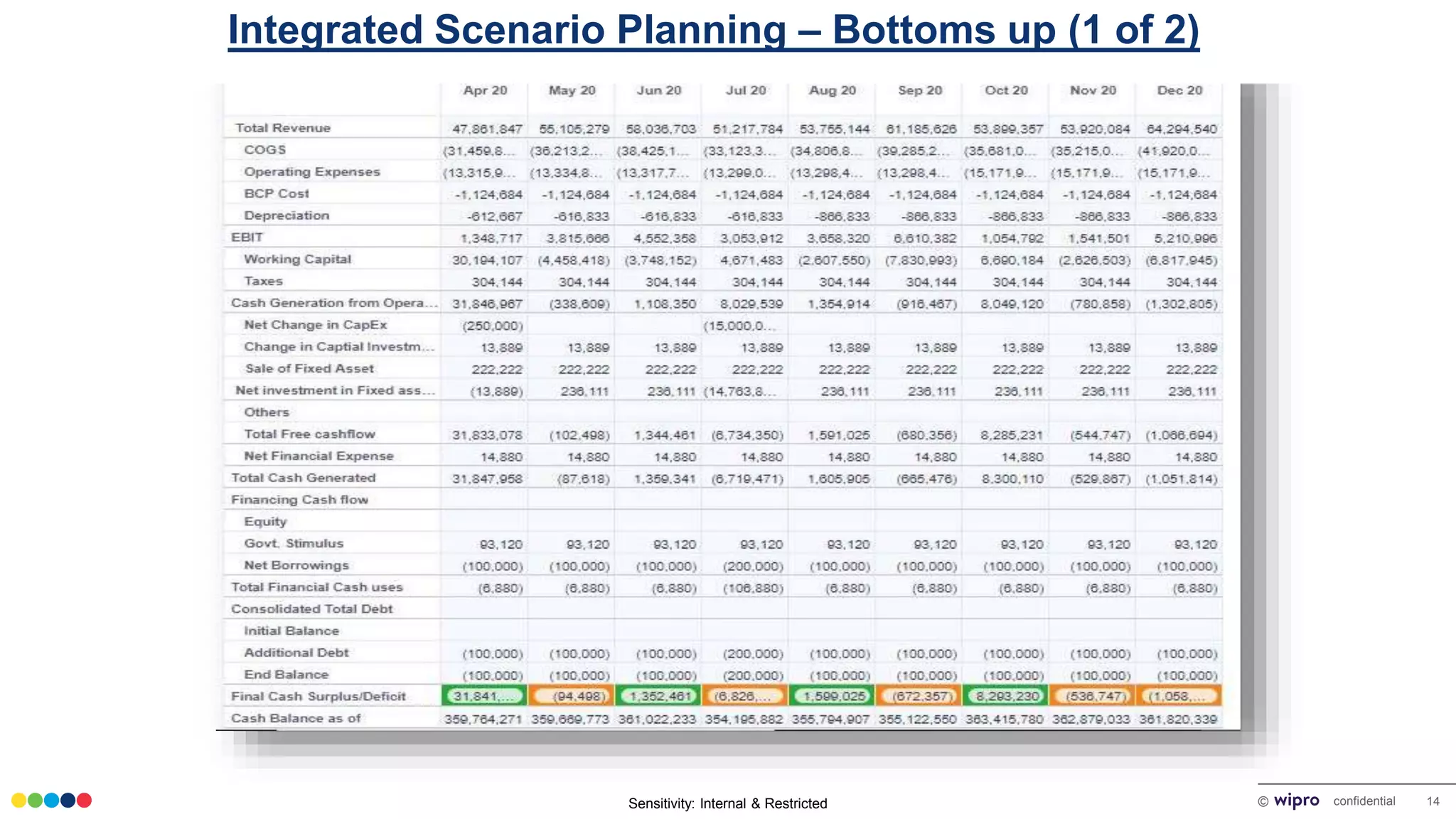
This window gives
the planner an option to
run a "What if" scenario
Simulation similar to the
previous view but from
a bottoms up approach.
It also gives an option to
override the target
cascaded by Topdown
planning window and
plan based on the latest
situation.
Input Section
Sensitivity: Internal & Restricted © confidential 14
Integrated Scenario Simulation – Location Level(3 of 3)
Integrated Scenario Planning – Bottoms up (1 of 2)
Sensitivity: Internal & Restricted
Top Down
vs
Bottoms Up
Sensitivity: Internal & Restricted © confidential 16
Target Vs Bottoms- Up Comparison
Integrated Scenario Planning – Bottoms up (1 of 2)
The window helps the planner to draw an
accurate comparison between the top
down planning vs bottoms up planning.
It helps in identifying the gaps and
supports the planner in plugging them on
priority. It also provides an option to input
comments and recommendations that
are reviewed by the top leadership.
Input Section
Sensitivity: Internal & Restricted
Revenue Planning
Sensitivity: Internal & Restricted © confidential 18
Topline Revenue Planning(1 of 3)
Revenue Planning (1 of 3)
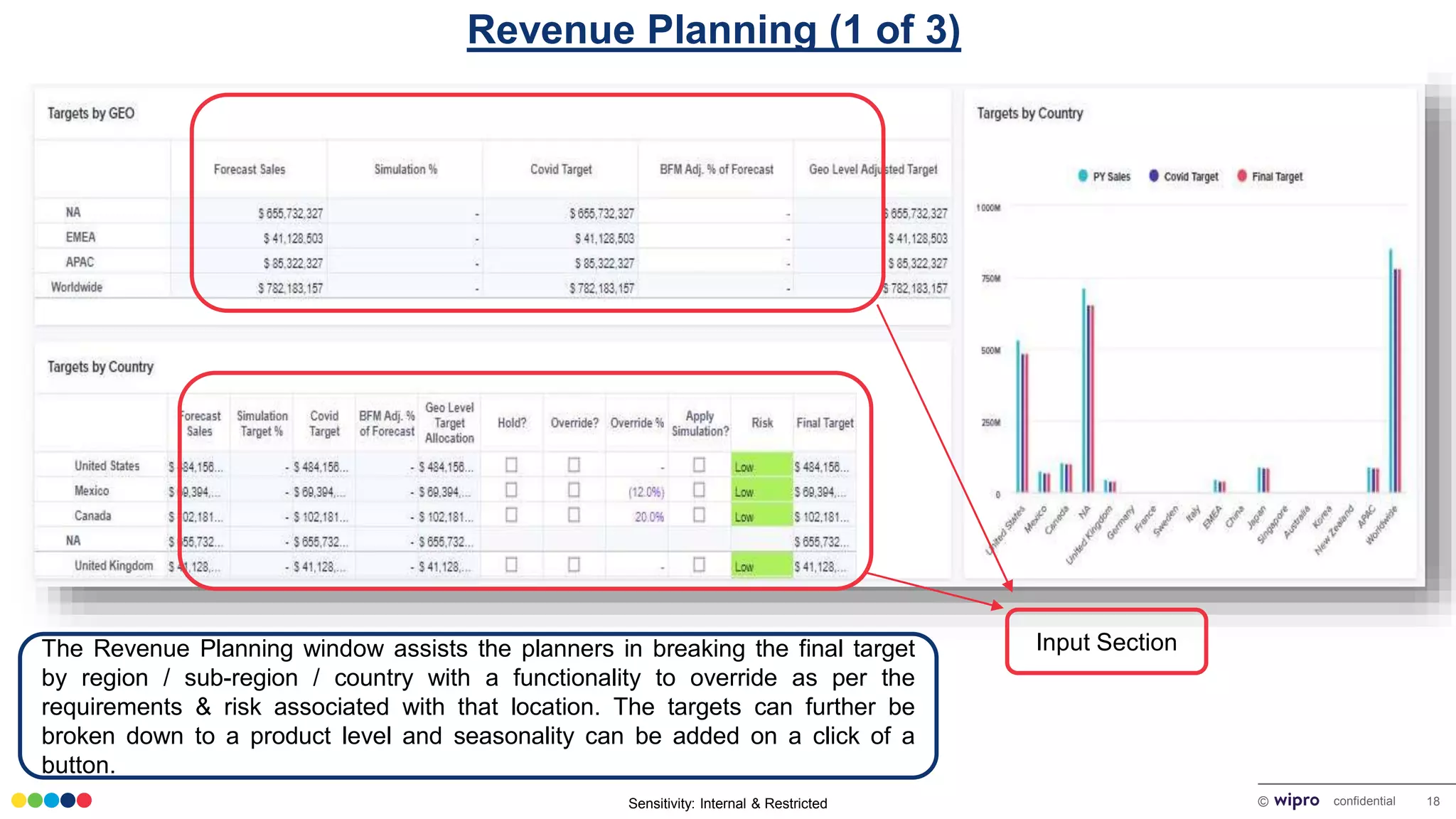
The Revenue Planning window assists the planners in breaking the final target
by region / sub-region / country with a functionality to override as per the
requirements & risk associated with that location. The targets can further be
broken down to a product level and seasonality can be added on a click of a
button.
Input Section
Sensitivity: Internal & Restricted © confidential 19
Revenue Planning (2 of 3)
Input Section
Sensitivity: Internal & Restricted © confidential 20
Bottoms- Up Revenue Planning(1 of 2)
Revenue Planning (3 of 3)
Input Section
Sensitivity: Internal & Restricted
Workforce Cost Planning
Sensitivity: Internal & Restricted © confidential 22
Workforce Cost Optimization(1 of 3)
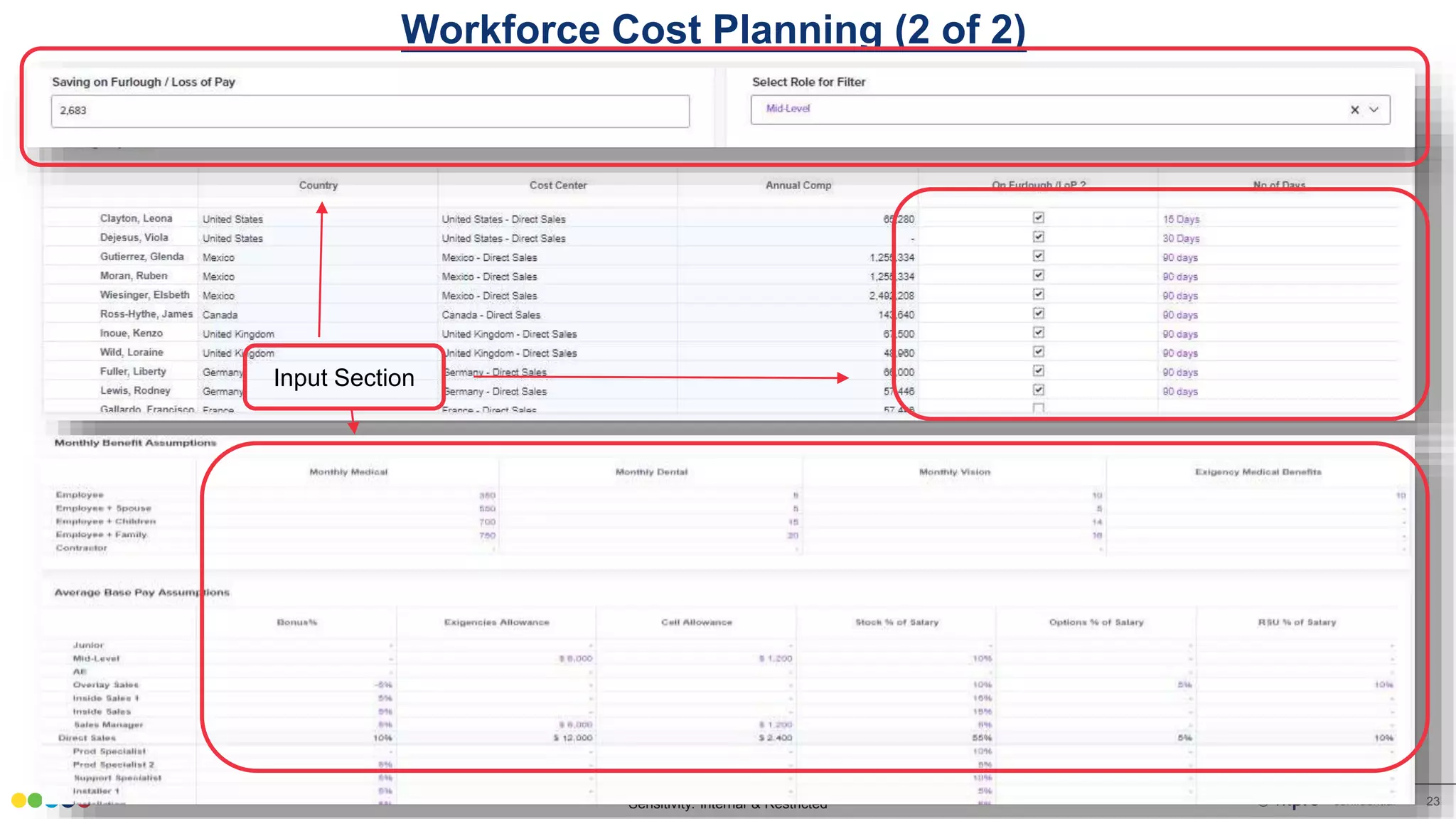
Workforce Cost Planning (1 of 2)
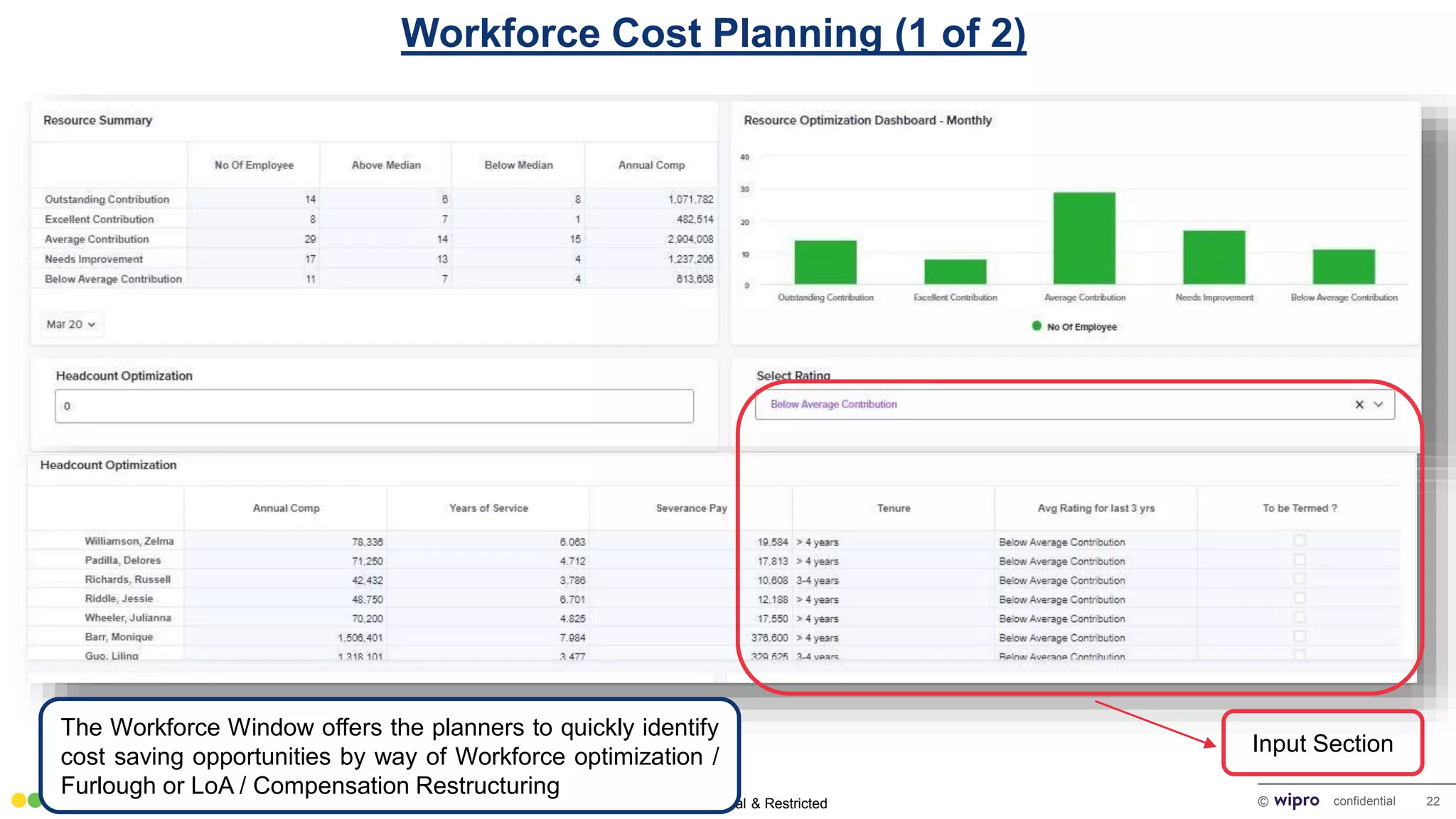
The Workforce Window offers the planners to quickly identify
cost saving opportunities by way of Workforce optimization /
Furlough or LoA / Compensation Restructuring
Input Section
Sensitivity: Internal & Restricted © confidential 23
Workforce Cost Optimization(2 of 3)
Workforce Cost Planning (2 of 2)
Input Section
Sensitivity: Internal & Restricted
Accounts Receivables
Management
Sensitivity: Internal & Restricted © confidential 25
Receivable Management
Accounts Receivables Management
Input Section
AR Management window helps planners simulate cost of
reducing the DSO my means of offering discounts on
invoices.
Sensitivity: Internal & Restricted
Capital Asset Management
Sensitivity: Internal & Restricted © confidential 27
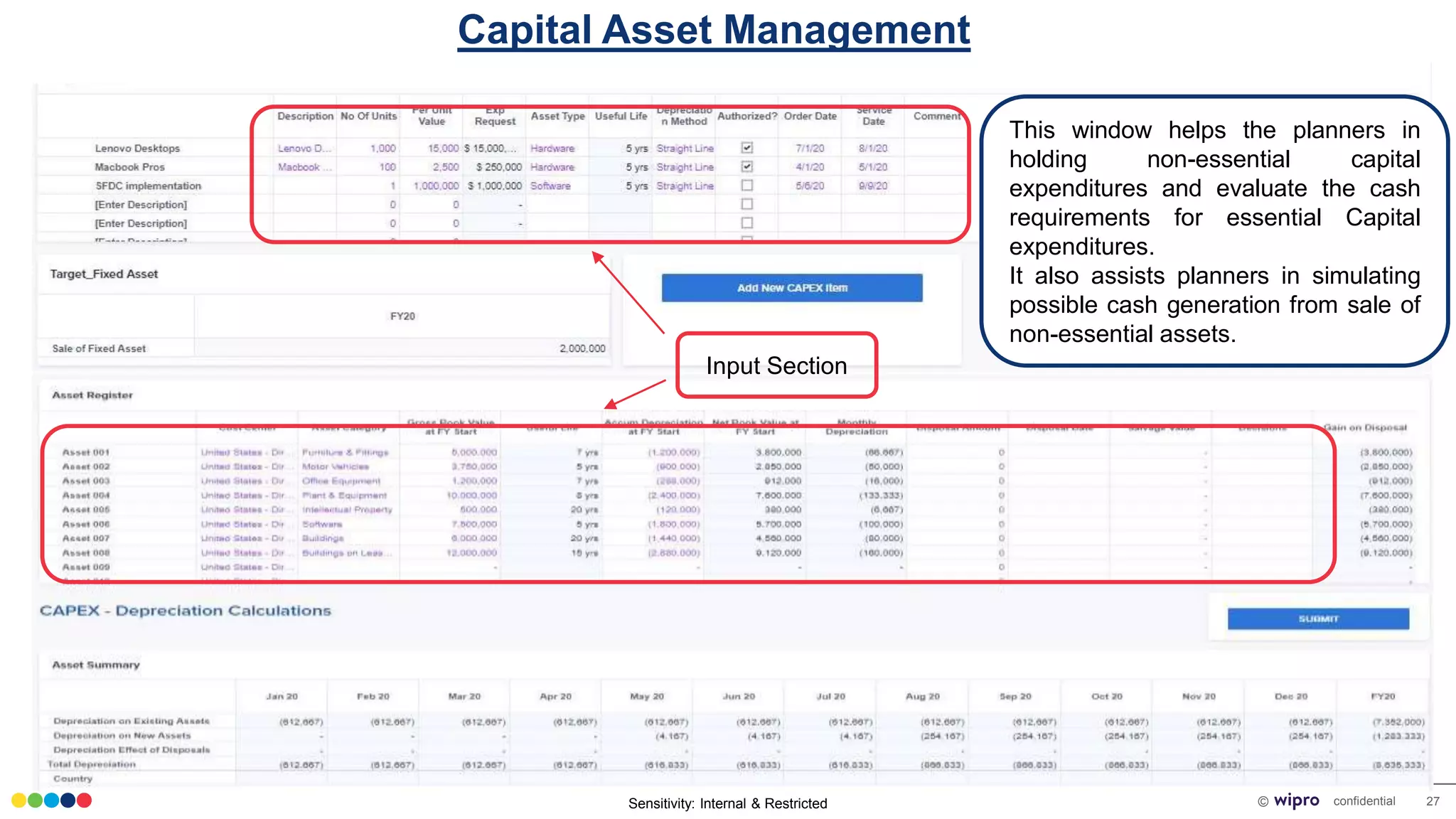
Capital Expenditure Request
Input Section
This window helps the planners in
holding non-essential capital
expenditures and evaluate the cash
requirements for essential Capital
expenditures.
It also assists planners in simulating
possible cash generation from sale of
non-essential assets.
Capital Asset Management
Sensitivity: Internal & Restricted
External Data Drivers
Sensitivity: Internal & Restricted © confidential 29
Macro Economic Factor
External Data Drivers
The solution also has an option to draw external data feeds
like GDP data, CPI data, Stock Index, FX that might assist
organizations in planning more accurately.
Sensitivity: Internal & Restricted
Thanks

Wipro FP&A Planning

  • 1.
    Sensitivity: Internal &Restricted SPEED PLANNING - FP&A SNAPSHOTS
  • 2.
    Sensitivity: Internal &Restricted CFO Dashboard
  • 3.
    Sensitivity: Internal &Restricted © confidential 3 CFO Dashboard(1 of 4) CFO Dashboard (1 of 4) CFO Dashboard showcases all essential KPIs that are needed for a timely decision making. Some of the key aspects showcased here are Revenue, Cost, Margins, Monthly trends, Revenue breakups by Country & Products, DSO, Cashflow trends. All these views are customizable to suit the requirements of the client.
  • 4.
    Sensitivity: Internal &Restricted © confidential 4 CFO Dashboard(2 of 4) CFO Dashboard (2 of 4)
  • 5.
    Sensitivity: Internal &Restricted © confidential 5 CFO Dashboard(3 of 4) CFO Dashboard (3 of 4)
  • 6.
    Sensitivity: Internal &Restricted © confidential 6 CFO Dashboard(4 of 4) CFO Dashboard (4 of 4)
  • 7.
    Sensitivity: Internal &Restricted Strategic Initiative Setup
  • 8.
    Sensitivity: Internal &Restricted © confidential 8 Strategic Initiatives Strategic Initiative Setup This window assist Planners in launching a new initiative on a click of a button. Input Section
  • 9.
    Sensitivity: Internal &Restricted Integrated Scenario Planning – Top Down
  • 10.
    Sensitivity: Internal &Restricted © confidential 10 Integrated Scenario Simulation(1 of 3) Integrated Scenario Planning – Top Down (1 of 2) Input Section
  • 11.
    Sensitivity: Internal &Restricted © confidential 11 Integrated Scenario Simulation(2 of 3) Integrated Scenario Planning – Top Down (2 of 2) Integrated Simulation Window gives planners an option to run a "What if" scenario Simulation by entering the estimates based on best / most likely / worst case scenario. This is a top down planning window that can assist in target assigning & cascading. The View offers an integrated impact analysis of the Revenue, cost & Cashflow as well as planners can accurately plan a monthly cash inflow and outflow simulation by playing with Cash borrowing and Govt. Stimulus.
  • 12.
    Sensitivity: Internal &Restricted Integrated Scenario Planning – Bottoms up
  • 13.
    Sensitivity: Internal &Restricted © confidential 13 Integrated Scenario Simulation – Location Level(1 of 3) Integrated Scenario Planning – Bottoms up (1 of 2) This window gives the planner an option to run a "What if" scenario Simulation similar to the previous view but from a bottoms up approach. It also gives an option to override the target cascaded by Topdown planning window and plan based on the latest situation. Input Section
  • 14.
    Sensitivity: Internal &Restricted © confidential 14 Integrated Scenario Simulation – Location Level(3 of 3) Integrated Scenario Planning – Bottoms up (1 of 2)
  • 15.
    Sensitivity: Internal &Restricted Top Down vs Bottoms Up
  • 16.
    Sensitivity: Internal &Restricted © confidential 16 Target Vs Bottoms- Up Comparison Integrated Scenario Planning – Bottoms up (1 of 2) The window helps the planner to draw an accurate comparison between the top down planning vs bottoms up planning. It helps in identifying the gaps and supports the planner in plugging them on priority. It also provides an option to input comments and recommendations that are reviewed by the top leadership. Input Section
  • 17.
    Sensitivity: Internal &Restricted Revenue Planning
  • 18.
    Sensitivity: Internal &Restricted © confidential 18 Topline Revenue Planning(1 of 3) Revenue Planning (1 of 3) The Revenue Planning window assists the planners in breaking the final target by region / sub-region / country with a functionality to override as per the requirements & risk associated with that location. The targets can further be broken down to a product level and seasonality can be added on a click of a button. Input Section
  • 19.
    Sensitivity: Internal &Restricted © confidential 19 Revenue Planning (2 of 3) Input Section
  • 20.
    Sensitivity: Internal &Restricted © confidential 20 Bottoms- Up Revenue Planning(1 of 2) Revenue Planning (3 of 3) Input Section
  • 21.
    Sensitivity: Internal &Restricted Workforce Cost Planning
  • 22.
    Sensitivity: Internal &Restricted © confidential 22 Workforce Cost Optimization(1 of 3) Workforce Cost Planning (1 of 2) The Workforce Window offers the planners to quickly identify cost saving opportunities by way of Workforce optimization / Furlough or LoA / Compensation Restructuring Input Section
  • 23.
    Sensitivity: Internal &Restricted © confidential 23 Workforce Cost Optimization(2 of 3) Workforce Cost Planning (2 of 2) Input Section
  • 24.
    Sensitivity: Internal &Restricted Accounts Receivables Management
  • 25.
    Sensitivity: Internal &Restricted © confidential 25 Receivable Management Accounts Receivables Management Input Section AR Management window helps planners simulate cost of reducing the DSO my means of offering discounts on invoices.
  • 26.
    Sensitivity: Internal &Restricted Capital Asset Management
  • 27.
    Sensitivity: Internal &Restricted © confidential 27 Capital Expenditure Request Input Section This window helps the planners in holding non-essential capital expenditures and evaluate the cash requirements for essential Capital expenditures. It also assists planners in simulating possible cash generation from sale of non-essential assets. Capital Asset Management
  • 28.
    Sensitivity: Internal &Restricted External Data Drivers
  • 29.
    Sensitivity: Internal &Restricted © confidential 29 Macro Economic Factor External Data Drivers The solution also has an option to draw external data feeds like GDP data, CPI data, Stock Index, FX that might assist organizations in planning more accurately.
  • 30.
    Sensitivity: Internal &Restricted Thanks