Application Requirements for Rolling Forecasts Rand Heer, CEO Ben Lamorte, VP Business Development Alight Planning
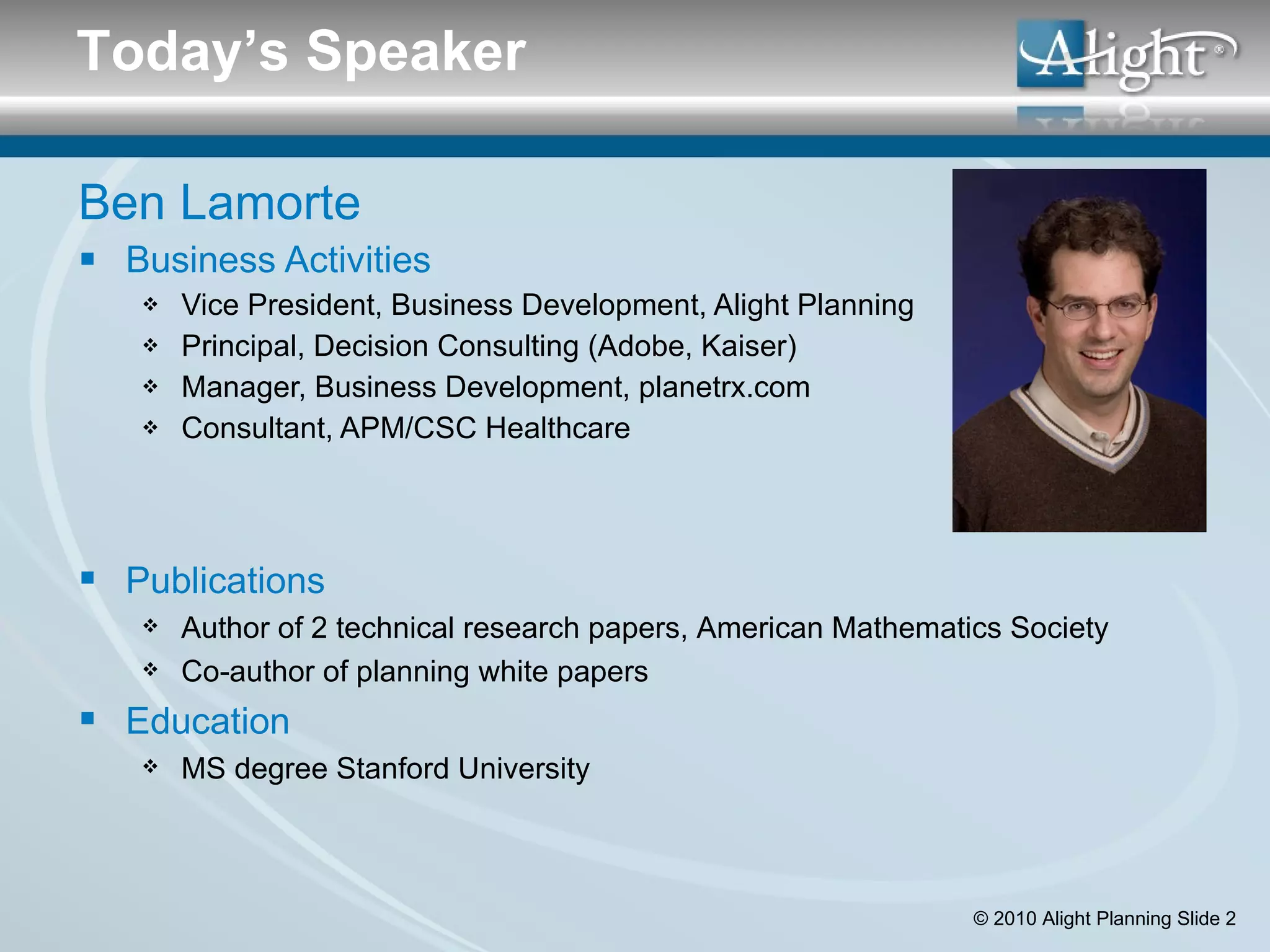
Ben Lamorte Business Activities Vice President, Business Development, Alight Planning Principal, Decision Consulting (Adobe, Kaiser) Manager, Business Development, planetrx.com Consultant, APM/CSC Healthcare Today’s Speaker Publications Author of 2 technical research papers, American Mathematics Society Co-author of planning white papers Education MS degree Stanford University
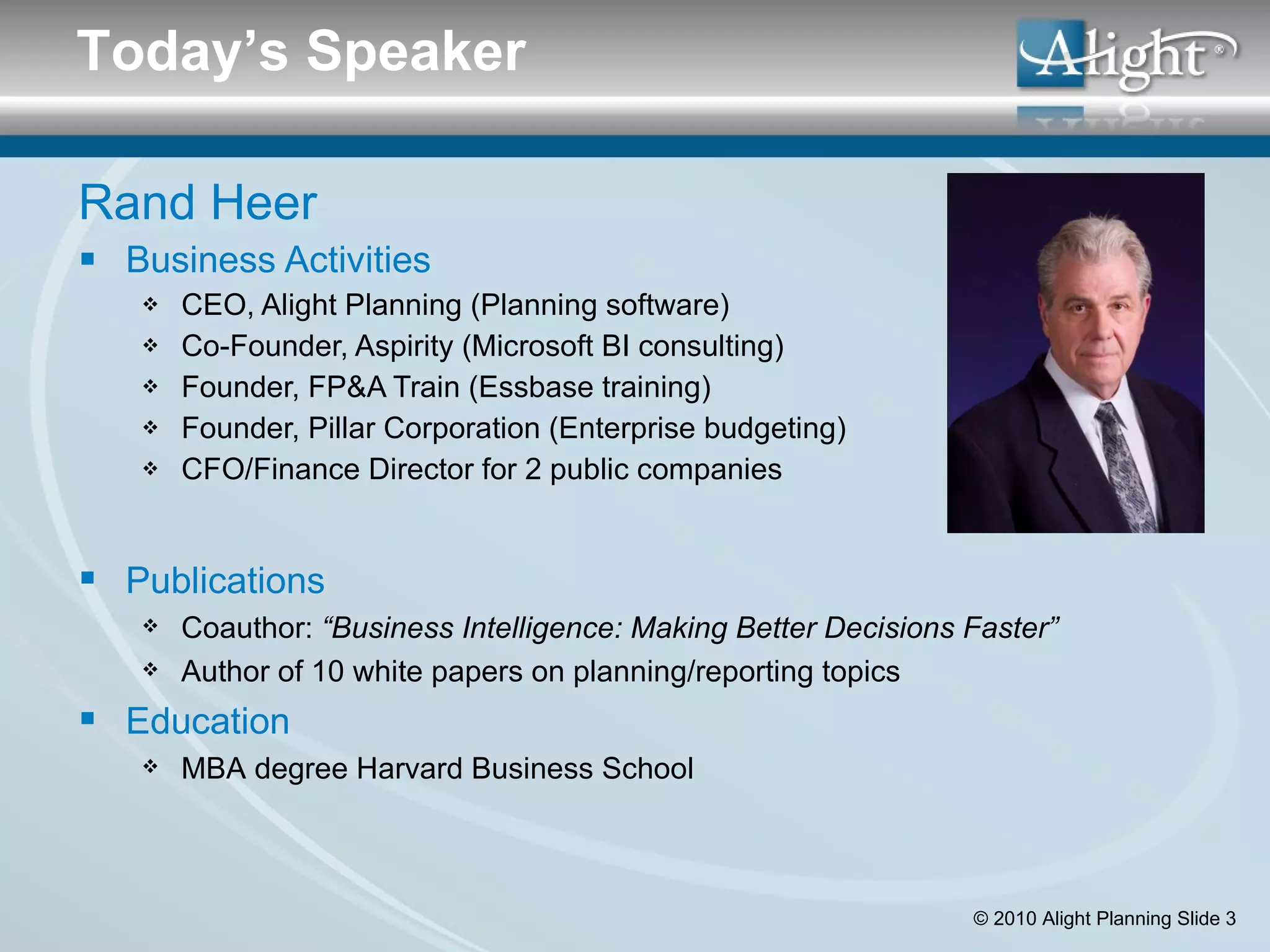
Rand Heer Business Activities CEO, Alight Planning (Planning software) Co-Founder, Aspirity (Microsoft BI consulting) Founder, FP&A Train (Essbase training) Founder, Pillar Corporation (Enterprise budgeting) CFO/Finance Director for 2 public companies Today’s Speaker Publications Coauthor:  “Business Intelligence: Making Better Decisions Faster” Author of 10 white papers on planning/reporting topics Education MBA degree Harvard Business School
Agenda: App Requirements for Rolling Forecasts Introductions Overview Why Rolling Forecasts? Budgeting Vs Rolling Forecasts Robust Scenario Analysis Scenario Questions & Checklist Case Study: Kaiser Permanente Break Driver Based Modeling Driver Modeling Questions and Checklist Case Study: Down East Enterprises Integrated Actuals Integrated Actuals Questions & Checklist
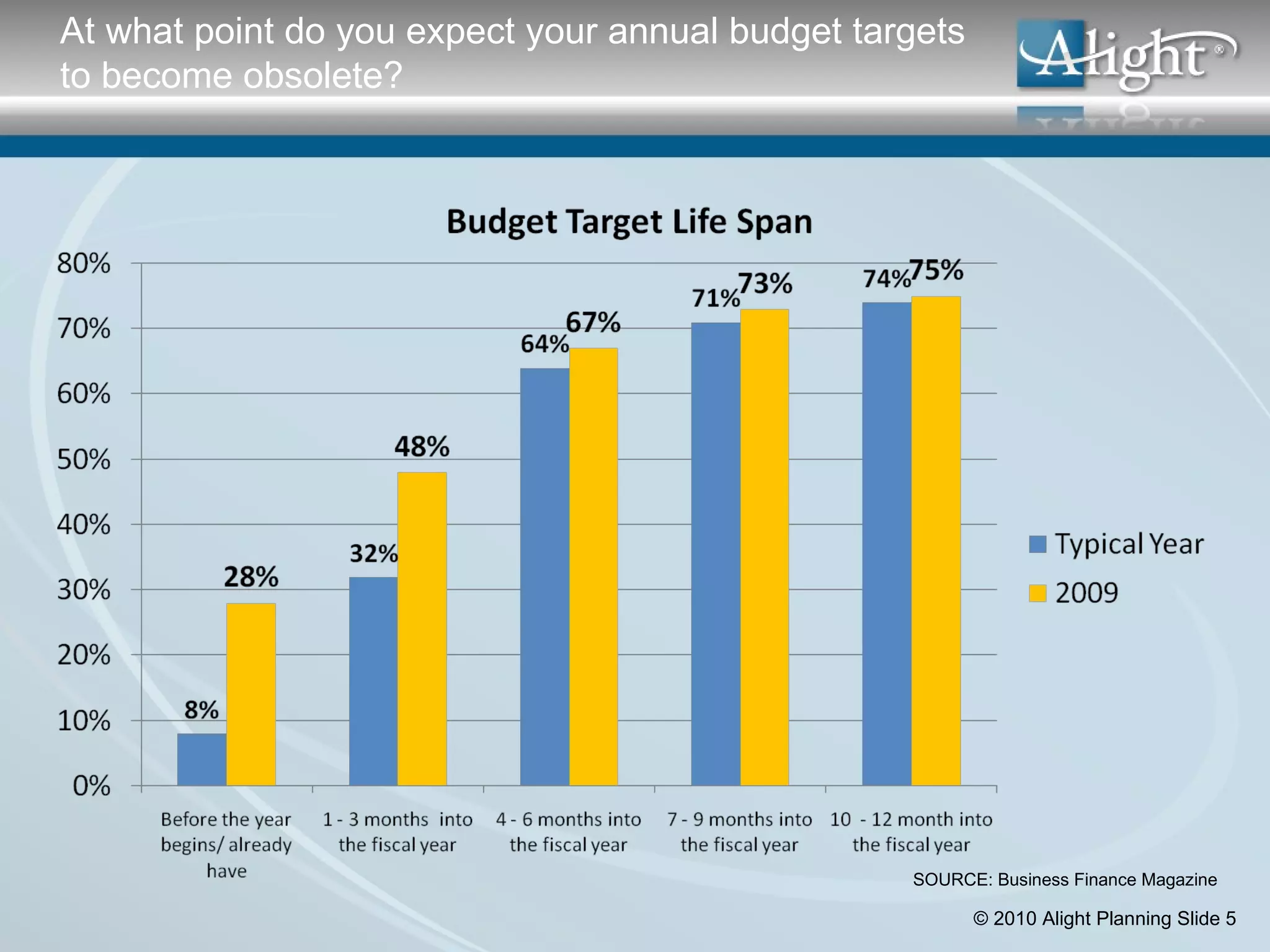
At what point do you expect your annual budget targets to become obsolete? SOURCE: Business Finance Magazine
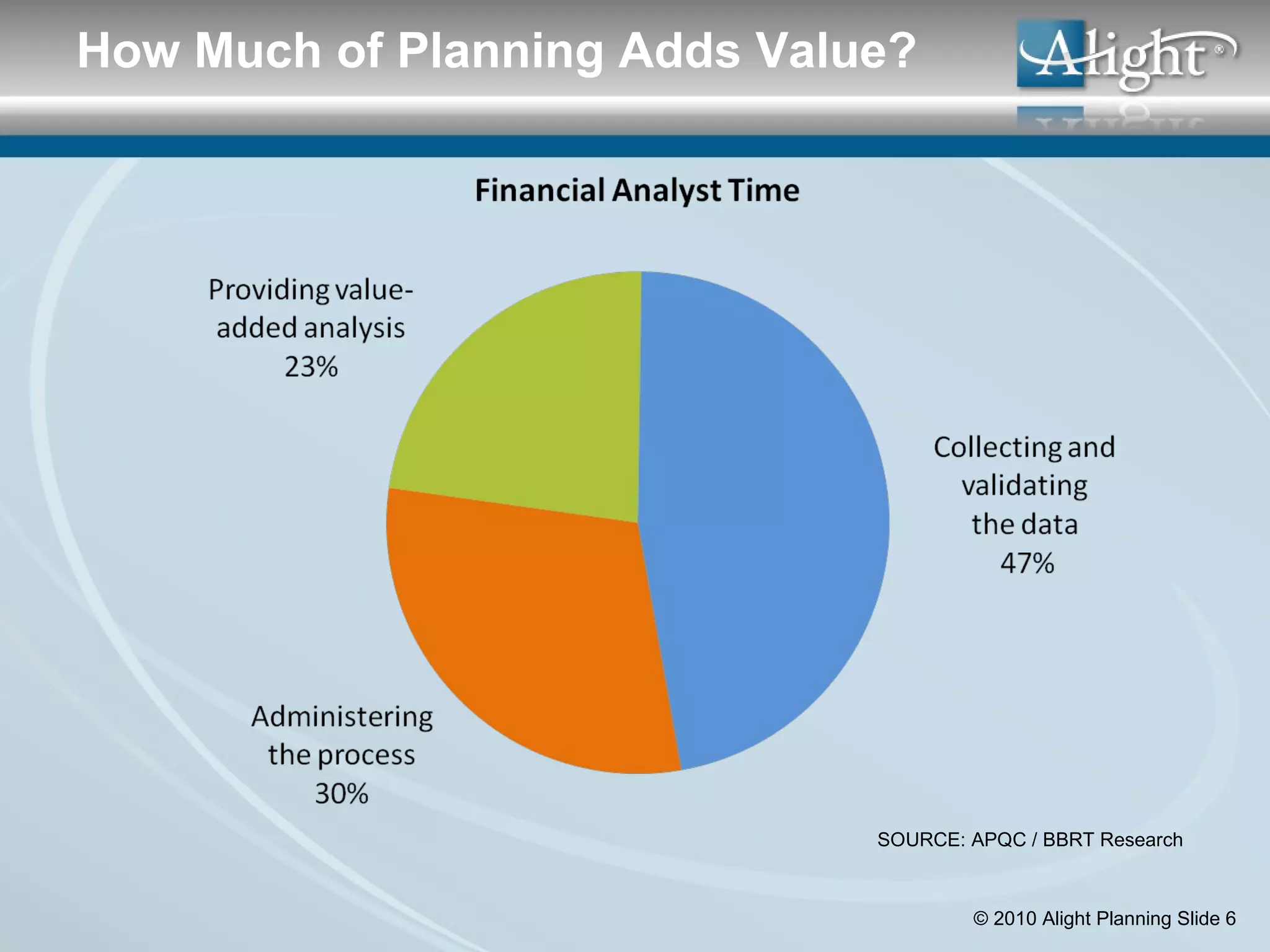
SOURCE: APQC / BBRT Research How Much of Planning Adds Value?
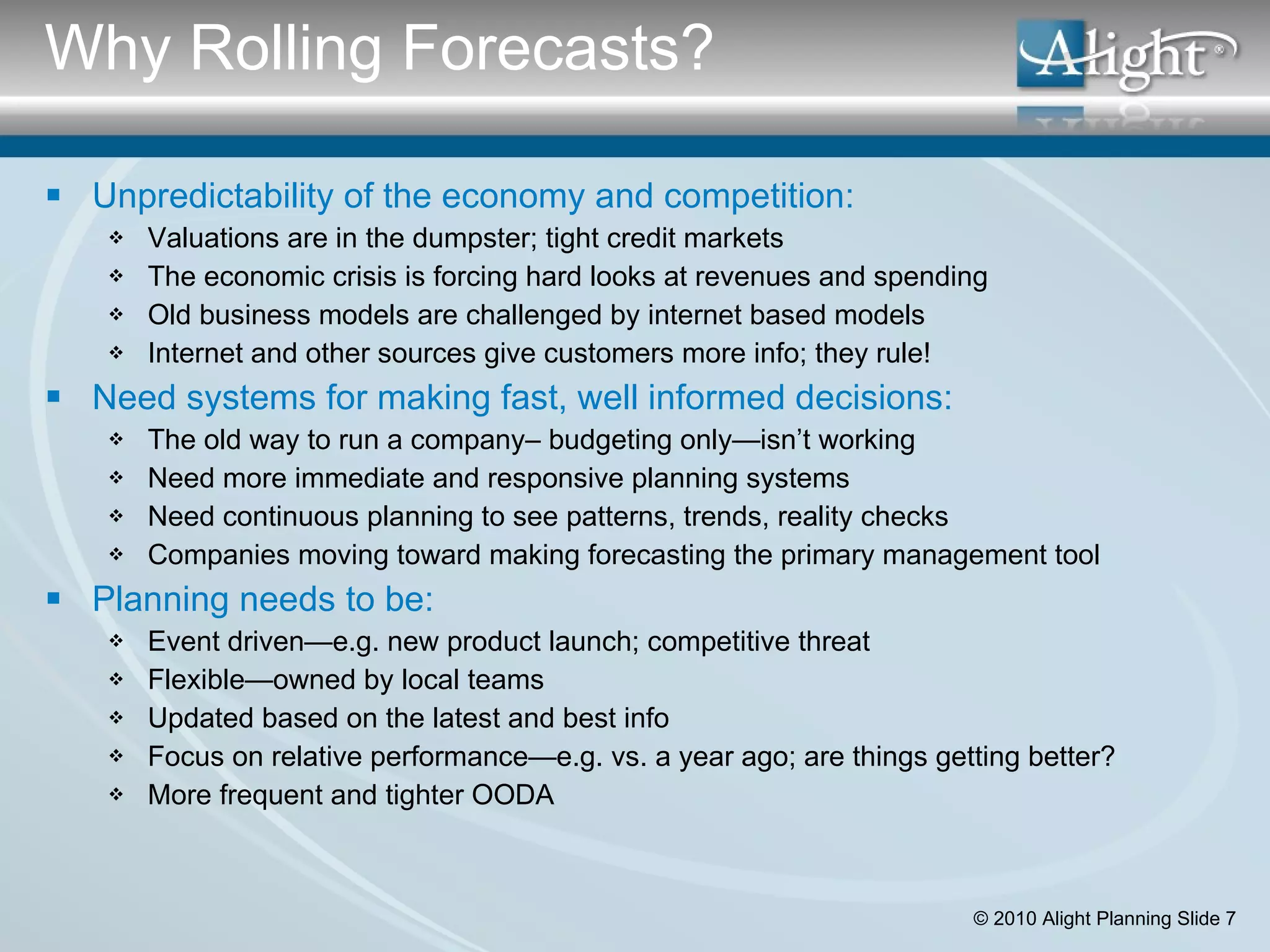
Why Rolling Forecasts? Unpredictability of the economy and competition: Valuations are in the dumpster; tight credit markets The economic crisis is forcing hard looks at revenues and spending  Old business models are challenged by internet based models Internet and other sources give customers more info; they rule! Need systems for making fast, well informed decisions: The old way to run a company– budgeting only—isn’t working Need more immediate and responsive planning systems Need continuous planning to see patterns, trends, reality checks  Companies moving toward making forecasting the primary management tool Planning needs to be: Event driven—e.g. new product launch; competitive threat Flexible—owned by local teams Updated based on the latest and best info Focus on relative performance—e.g. vs. a year ago; are things getting better? More frequent and tighter OODA
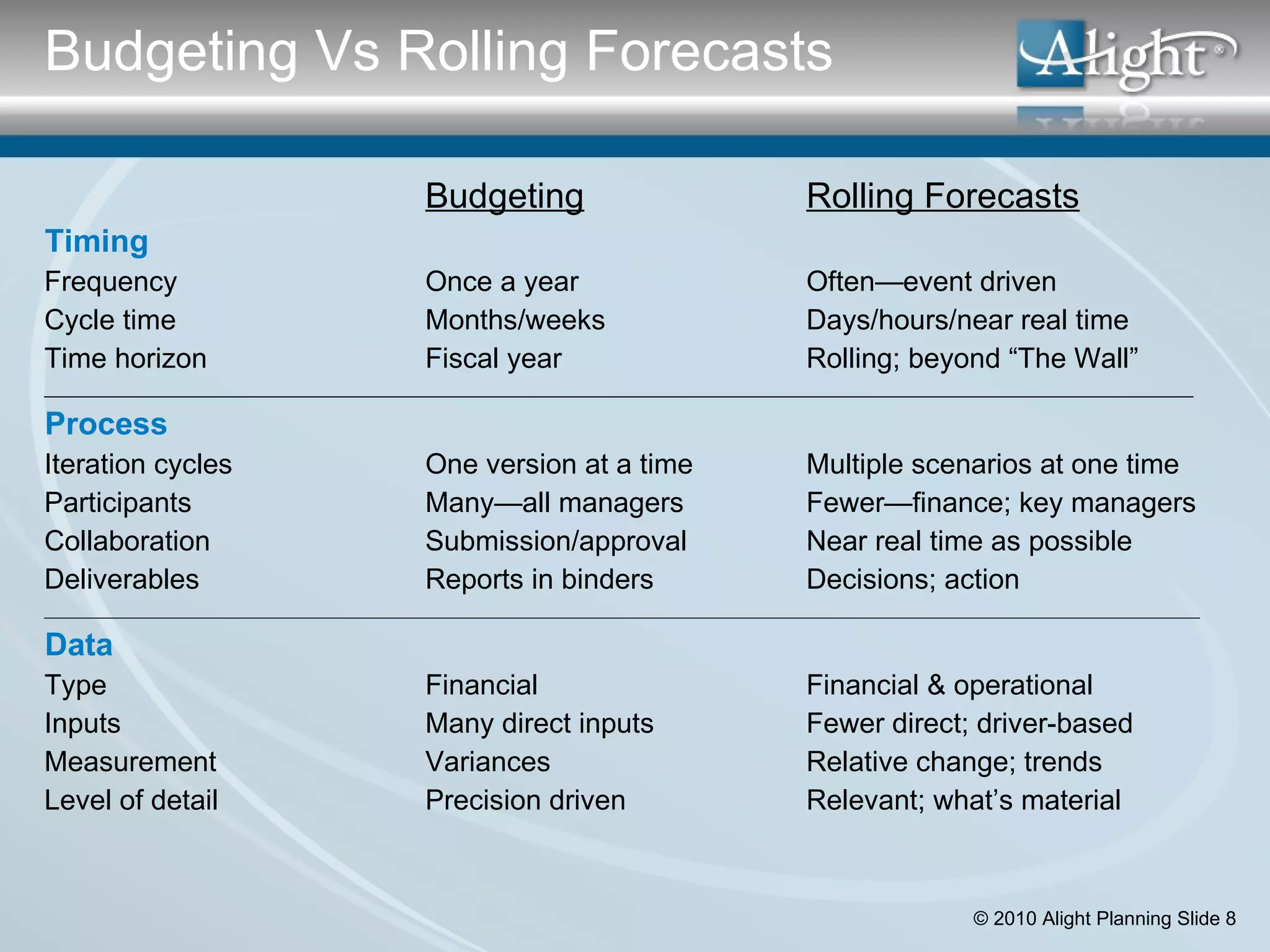
Budgeting Rolling Forecasts Timing Frequency Once a year Often—event driven Cycle time Months/weeks Days/hours/near real time Time horizon Fiscal year Rolling; beyond “The Wall” ______________________________________________________________________________________________________________________ Process Iteration cycles One version at a time Multiple scenarios at one time Participants Many—all managers Fewer—finance; key managers Collaboration Submission/approval Near real time as possible Deliverables Reports in binders Decisions; action __________________________________________________________________________________________________________________________________ Data Type Financial Financial & operational Inputs Many direct inputs Fewer direct; driver-based Measurement Variances Relative change; trends Level of detail Precision driven Relevant; what’s material Budgeting Vs Rolling Forecasts
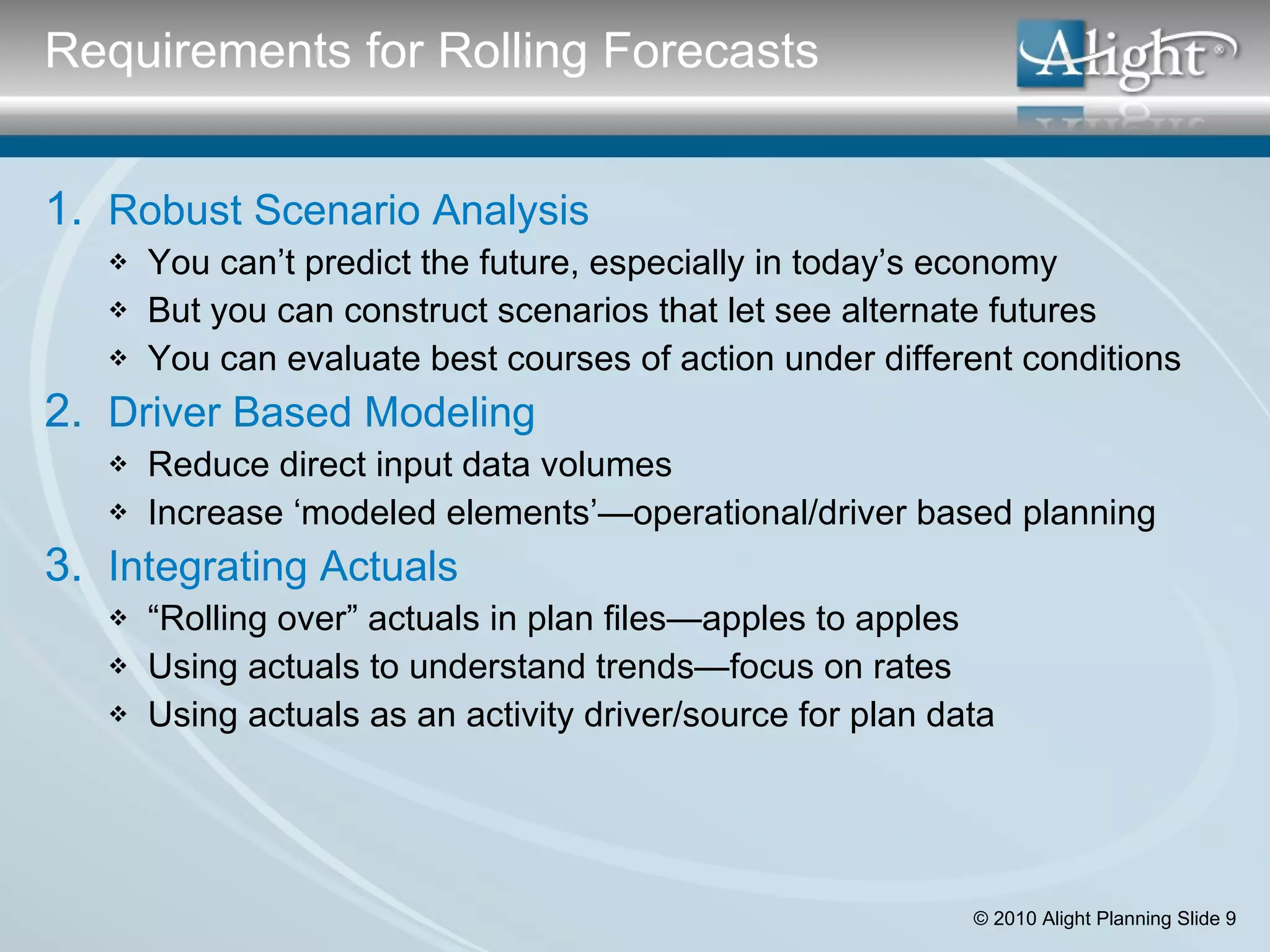
Robust Scenario Analysis You can’t predict the future, especially in today’s economy But you can construct scenarios that let see alternate futures You can evaluate best courses of action under different conditions Driver Based Modeling Reduce direct input data volumes Increase ‘modeled elements’—operational/driver based planning Integrating Actuals “ Rolling over” actuals in plan files—apples to apples Using actuals to understand trends—focus on rates Using actuals as an activity driver/source for plan data Requirements for Rolling Forecasts
Scenarios In Spreadsheets Separate workbooks is the principal mechanism A nightmare for maintenance & comparisons Scenarios In Budgeting Applications Manage to budget versions– aka “version control” Process control: who changed that number? what’s approved? Compare versions at the product/cost center/account level Scenarios In Planning Applications Reporting functionality Maintenance issues Performance [meeting the “need for speed”] Requirement #1: Robust Scenario Analysis
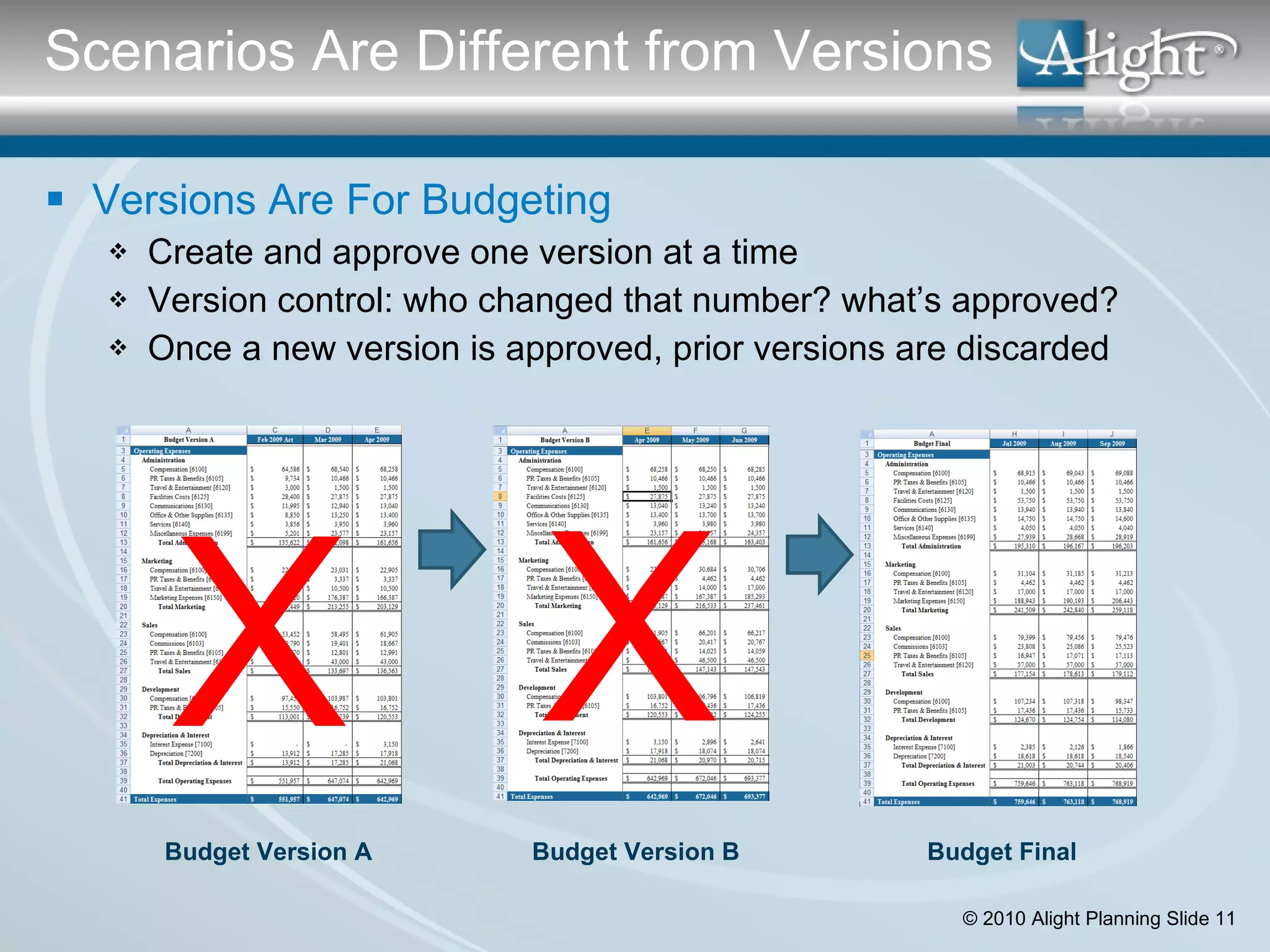
Versions Are For Budgeting Create and approve one version at a time Version control: who changed that number? what’s approved? Once a new version is approved, prior versions are discarded  Scenarios Are Different from Versions X X Budget Version A Budget Version B Budget Final
Forecasts = Scenarios (lots of them!) Assessing risk—BE/Hi/Low ranges  Evaluating alternative strategies/programs Managing uncertainty— external events Actionable knowledge/decisions Go/no go decisions on programs Reallocate resources Change underlying processes Manage timing What You Can Do with Scenarios
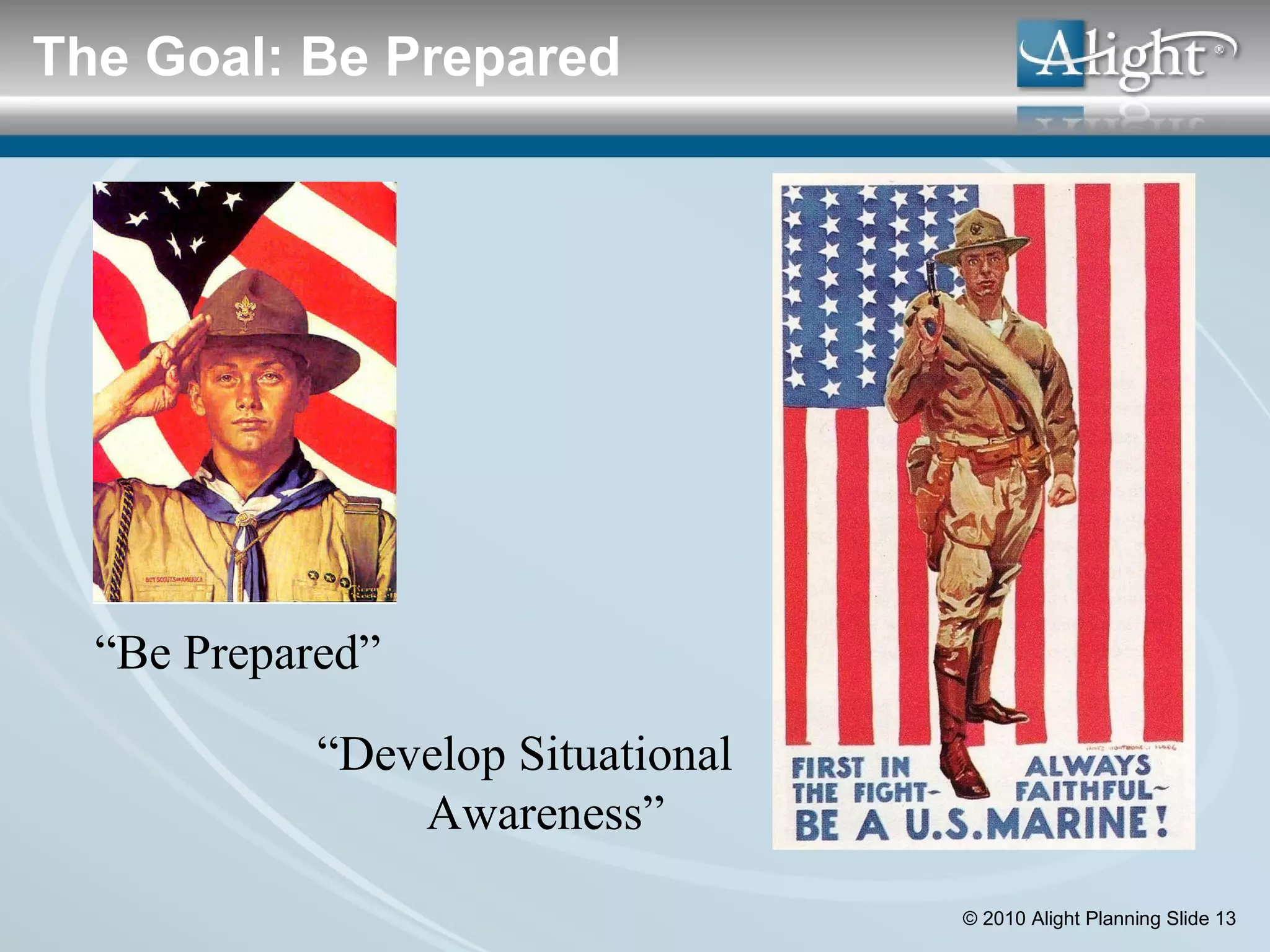
“ Be Prepared” “ Develop Situational Awareness” The Goal: Be Prepared
What are the three scenarios that your company needs to be analyzing now as part of your planning process? What are the three most important decisions your company will be making over the next 12 months? Questions about Scenarios
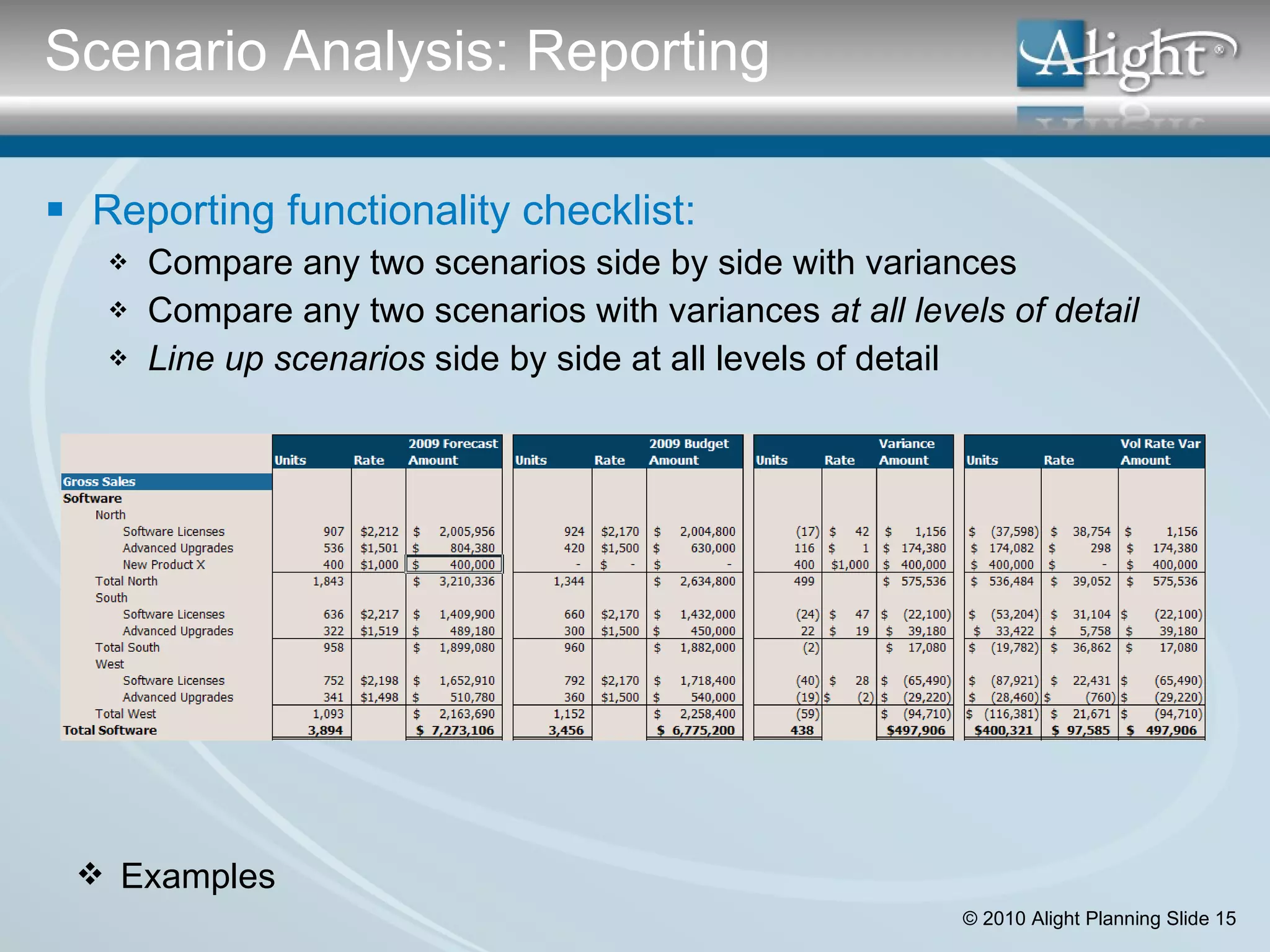
Reporting functionality checklist: Compare any two scenarios side by side with variances Compare any two scenarios with variances  at all levels of detail Line up scenarios  side by side at all levels of detail Examples Scenario Analysis: Reporting
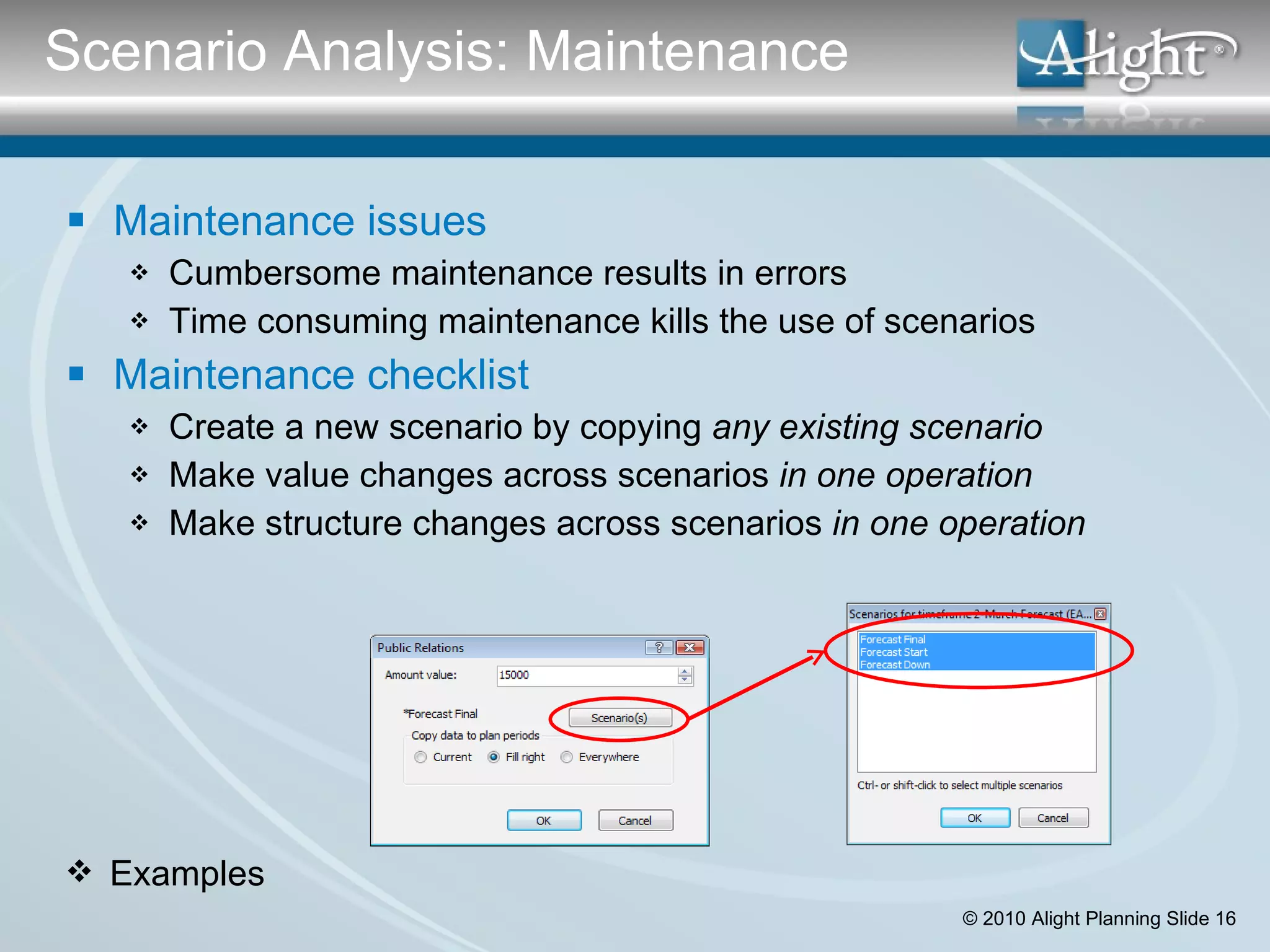
Maintenance issues Cumbersome maintenance results in errors  Time consuming maintenance kills the use of scenarios Maintenance checklist Create a new scenario by copying  any   existing scenario Make value changes across scenarios  in one operation  Make structure changes across scenarios  in one operation Examples Scenario Analysis: Maintenance
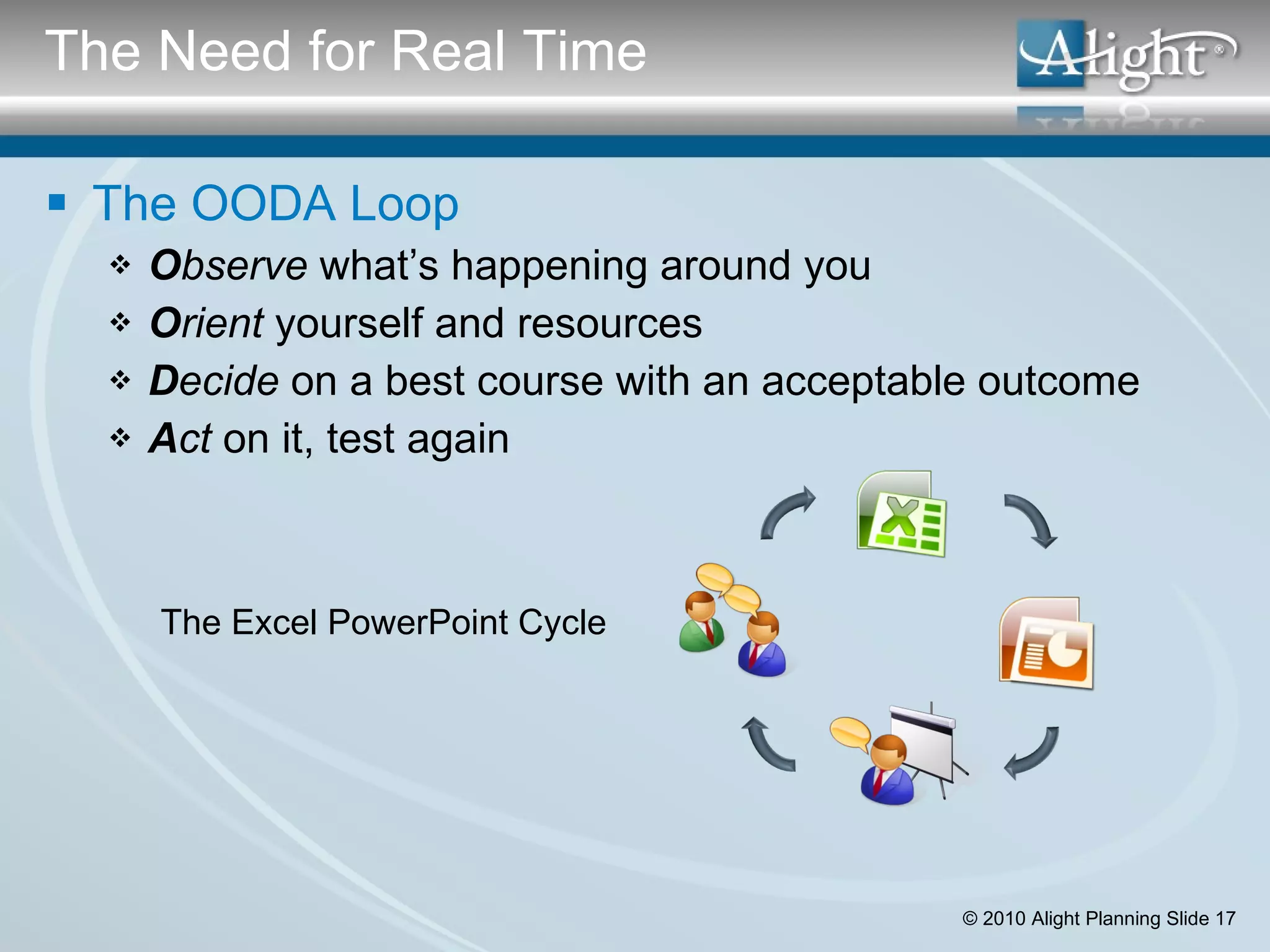
The OODA Loop O bserve  what’s happening around you O rient  yourself and resources  D ecide  on a best course with an acceptable outcome A ct  on it, test again The Excel PowerPoint Cycle The Need for Real Time
The “need for speed” Everything refreshes in  near real time The planning tool is the presentation tool The planning tool enables collaboration on-the-fly Scenario Analysis: Performance
The “need for speed” Everything refreshes in  near real time The planning tool is the presentation tool The planning tool enables collaboration on-the-fly Performance checklist Change  values  of a scenario with ripple through in real time Change  dimension filters  with ripple through in real time  Toggle between scenarios in seconds Update scenarios for structure changes in seconds or minutes Scenario Analysis: Performance
Planning Model Kaiser IT/Pharmacy: Implement National Pharmacy Management System Activity Drivers: membership, benefits, timing of go-live, allocations Output: 8  Cash flow statements  with 15-Yr NPV by region Decision Analysis Process Define benefits (revenue enhancers & cost reducers) Scenarios: “All regions go live” “Delay by 1 Year” “Critical regions only” Include/exclude benefits and show impact in real time Define and allocate implementation costs and benefits across regions Case Study: Kaiser Permanente
Scenario Analysis Checklist Scenarios have comparative reporting: Compare any two scenarios side by side with variances Compare any two scenarios with variances  at all levels of detail Line up scenarios  side by side at all levels of detail  Scenarios are easy to create and maintain: Create a new scenario by copying  any   existing scenario Make value changes across scenarios  in one operation  Make structure changes across scenarios  in one operation Application meet “need for speed” for scenario analysis: Change  values  of a scenario with ripple through in real time Change  dimension filters  with ripple through in real time  Toggle between scenarios in seconds   Update scenarios for structure changes in seconds or minutes   Complete Checklist: Scenarios
Modeling In Spreadsheets Cell based modeling—maintenance intensive; difficult to audit No cross dimensional functionality Modeling In Budgeting Applications Preset algorithms: headcount and benefits; revenues; capital  Simple model replication—e.g. across departments/products Modeling In Planning Applications Object based linking Modeling using operational activity drivers Modeling  across  multiple dimensions and attributes Requirement #2: Driver Based Modeling
How many “line items” are in your complete budget…What % are direct inputs versus “modeled” relationships? What are the top three drivers that most impact profitability in your business? What are the top three variable headcount categories? Questions about Driver Modeling
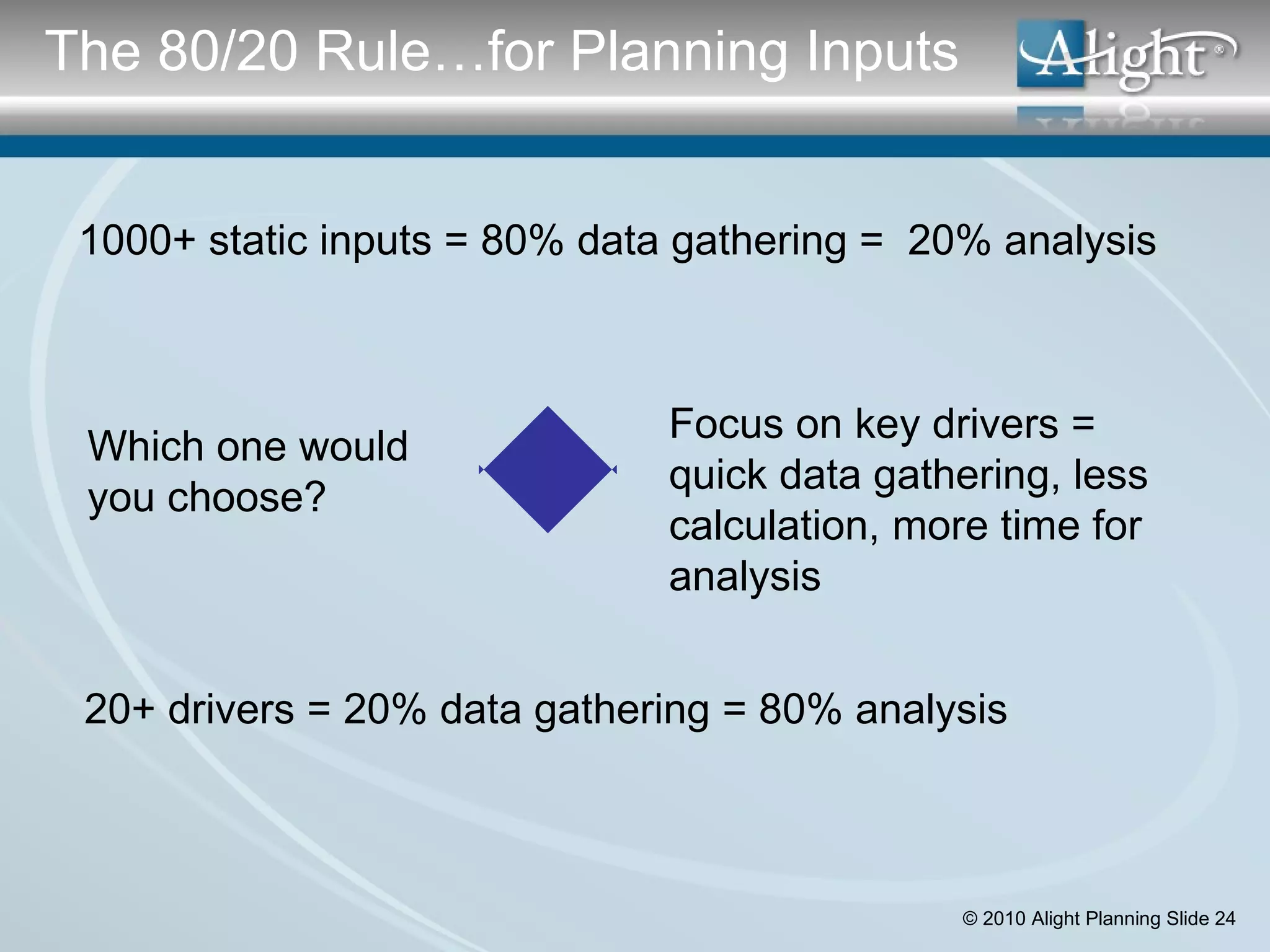
1000+ static inputs = 80% data gathering =  20% analysis Focus on key drivers = quick data gathering, less calculation, more time for analysis 20+ drivers = 20% data gathering = 80% analysis Which one would you choose? The 80/20 Rule…for Planning Inputs
Reduces data volumes; focuses input assumptions Driver-based planning links KPIs to financials in a dynamic way – forces cause & effect Encourages dialogue rather than sand-bagging during the budgeting process Facilitates scenario modeling & development of multiple versions Facilitates quarterly rolling forecast through automation  Benefits of Driver-Based Approach
Software Checklist for Driver Modeling Modeling supports operational activity drivers Modeling is across dimensions and attributes Modeling utilizes “object based linking”  Driver-Based Modeling
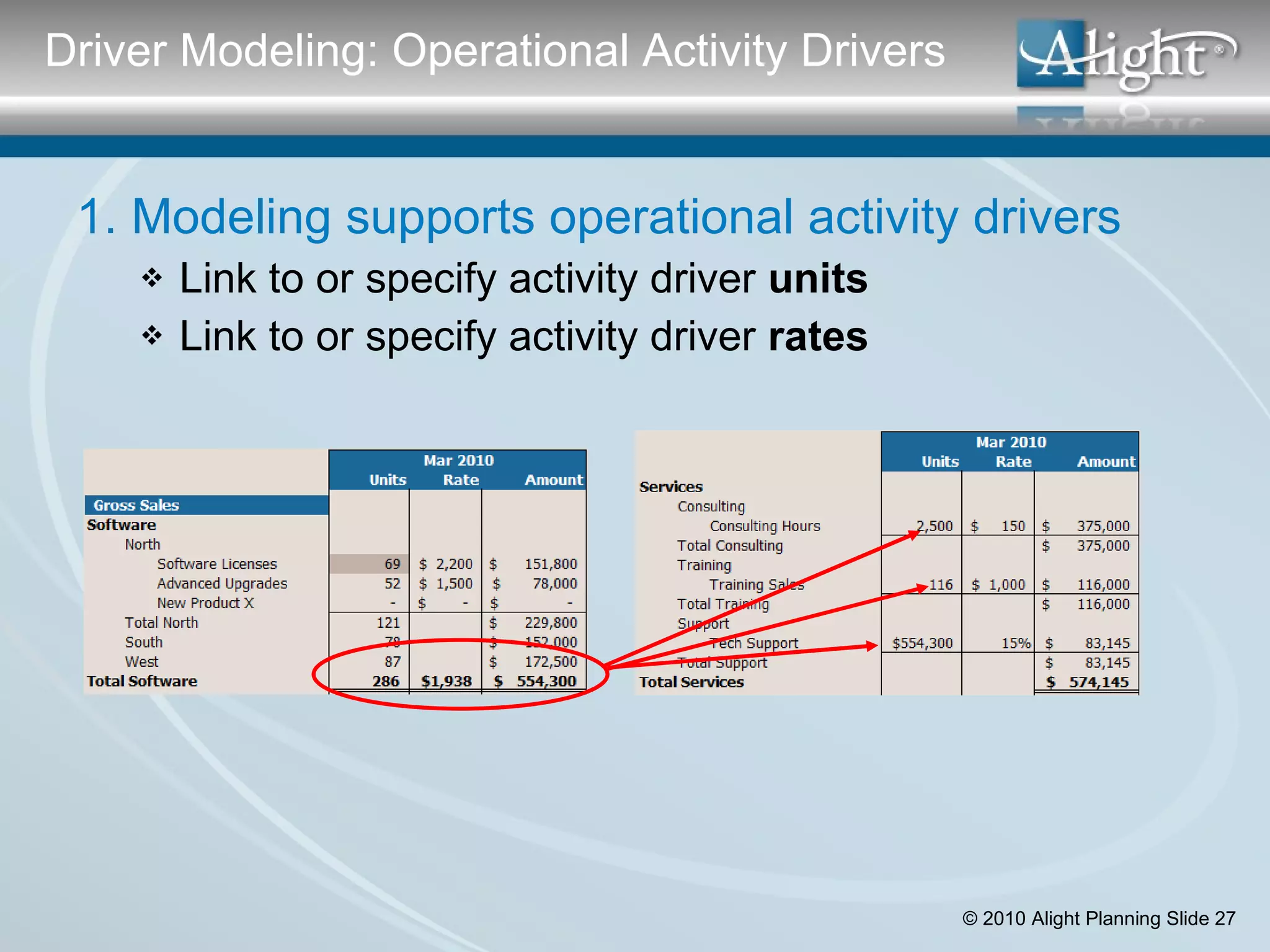
1. Modeling supports operational activity drivers Link to or specify activity driver  units Link to or specify activity driver  rates Driver Modeling: Operational Activity Drivers
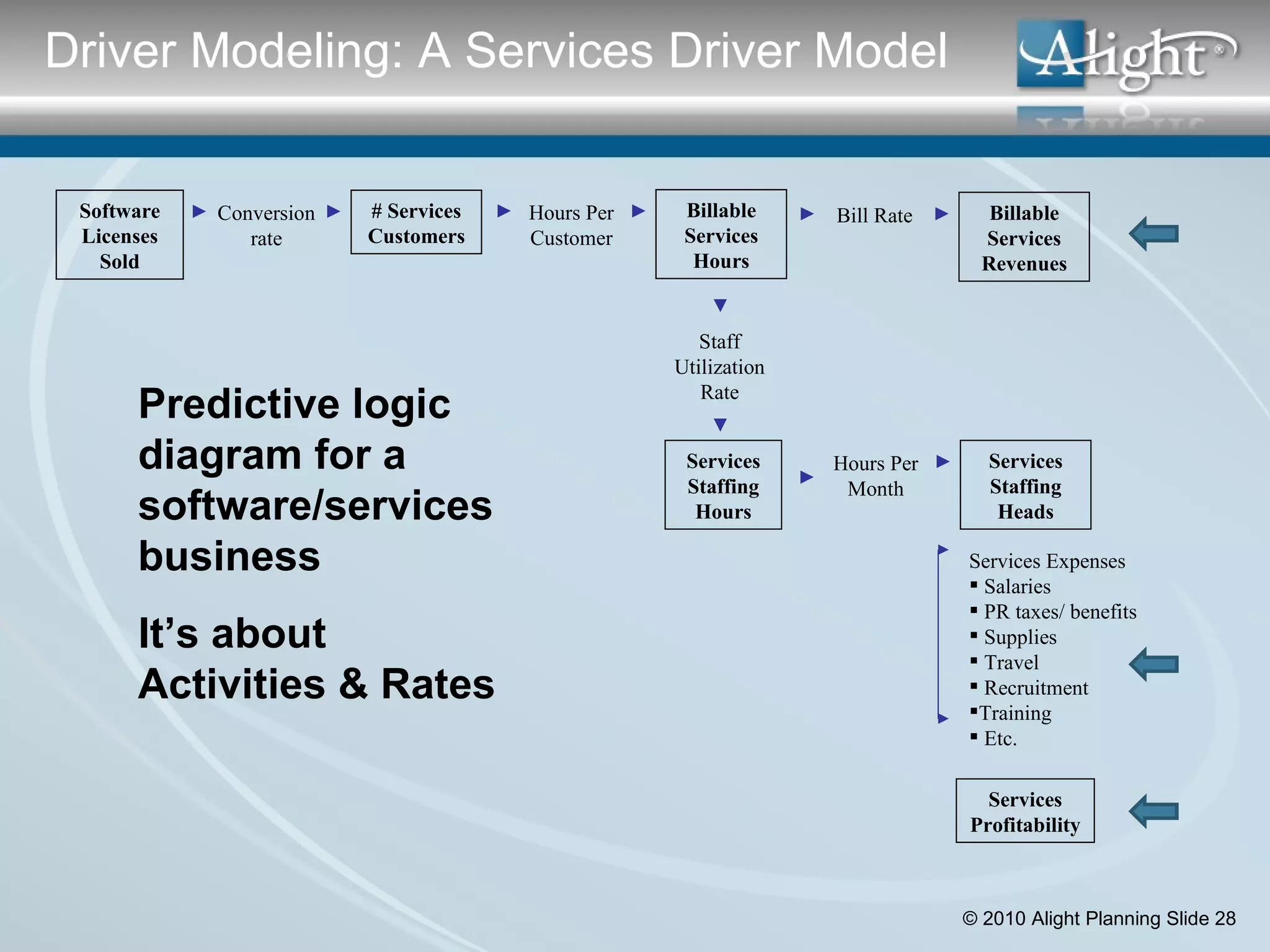
Software Licenses Sold Conversion rate # Services Customers Services Staffing Hours Services Expenses Salaries PR taxes/ benefits Supplies Travel Recruitment Training Etc. Predictive logic diagram for a software/services business It’s about Activities & Rates Hours Per Customer Billable Services Hours Staff Utilization Rate Bill Rate Billable Services Revenues Hours Per Month Services Staffing Heads Services Profitability Examples Driver Modeling: A Services Driver Model
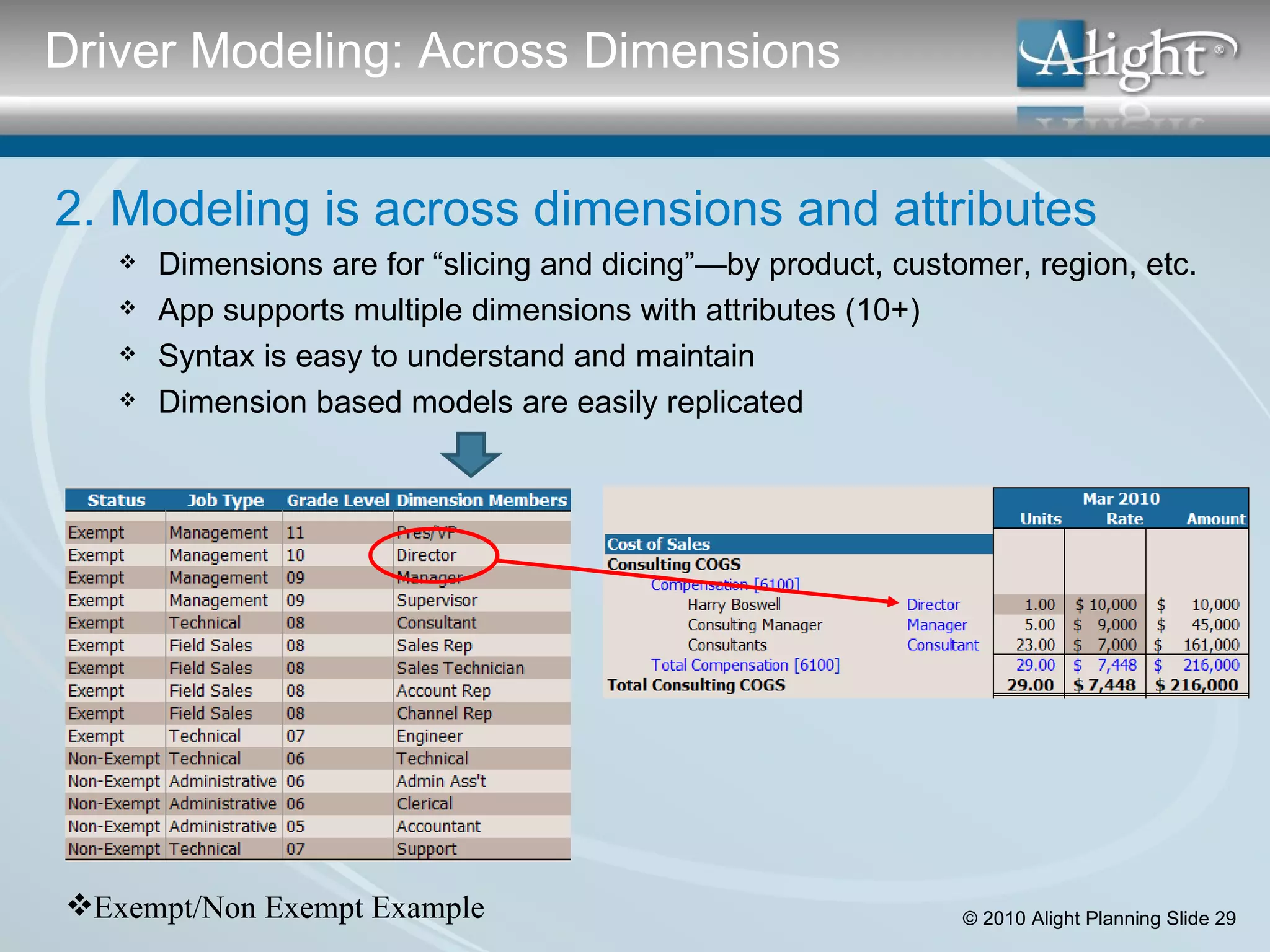
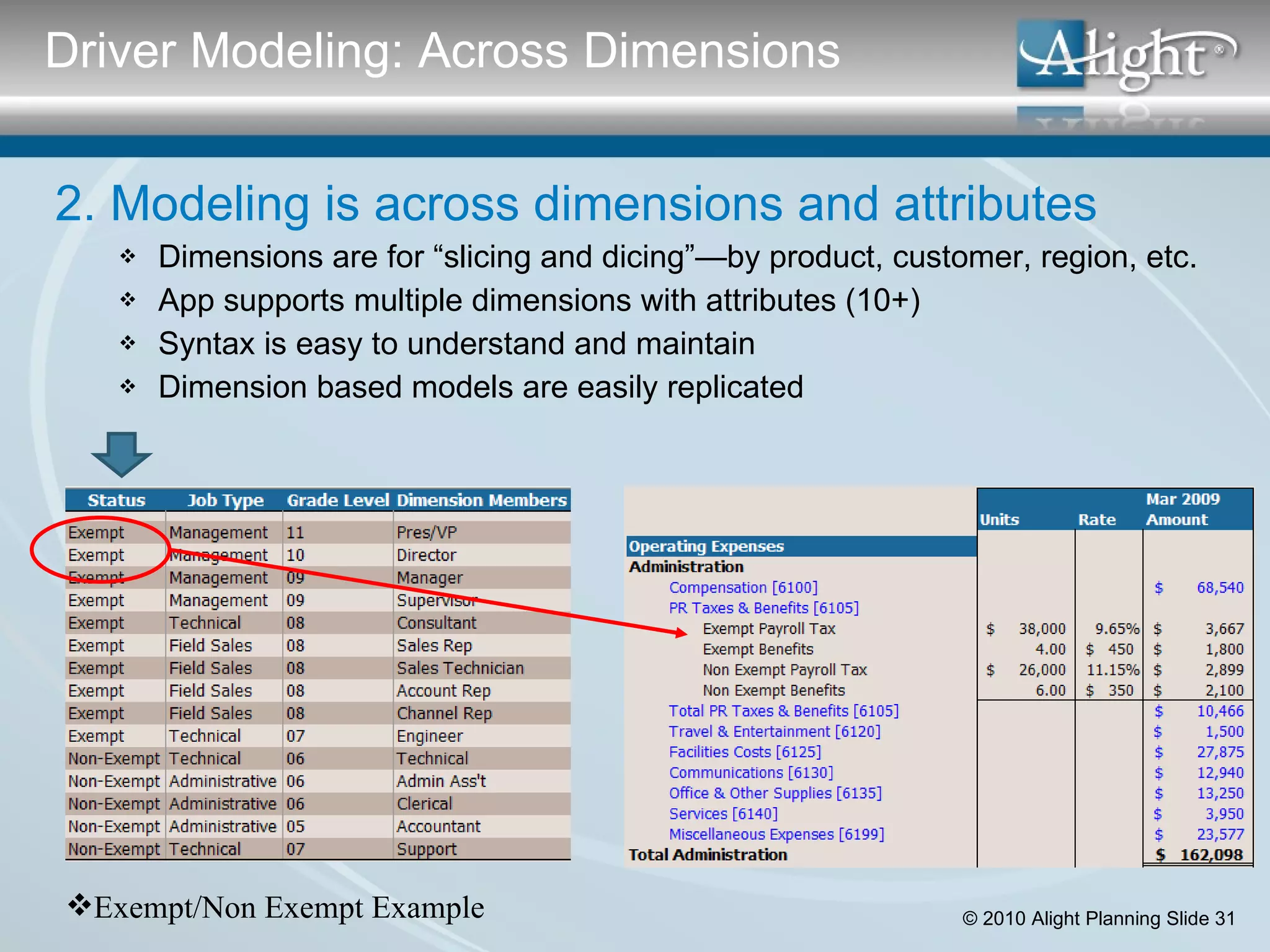
Driver Modeling: Across Dimensions Exempt/Non Exempt Example 2. Modeling is across dimensions and attributes Dimensions are for “slicing and dicing”—by product, customer, region, etc. App supports multiple dimensions with attributes (10+) Syntax is easy to understand and maintain Dimension based models are easily replicated
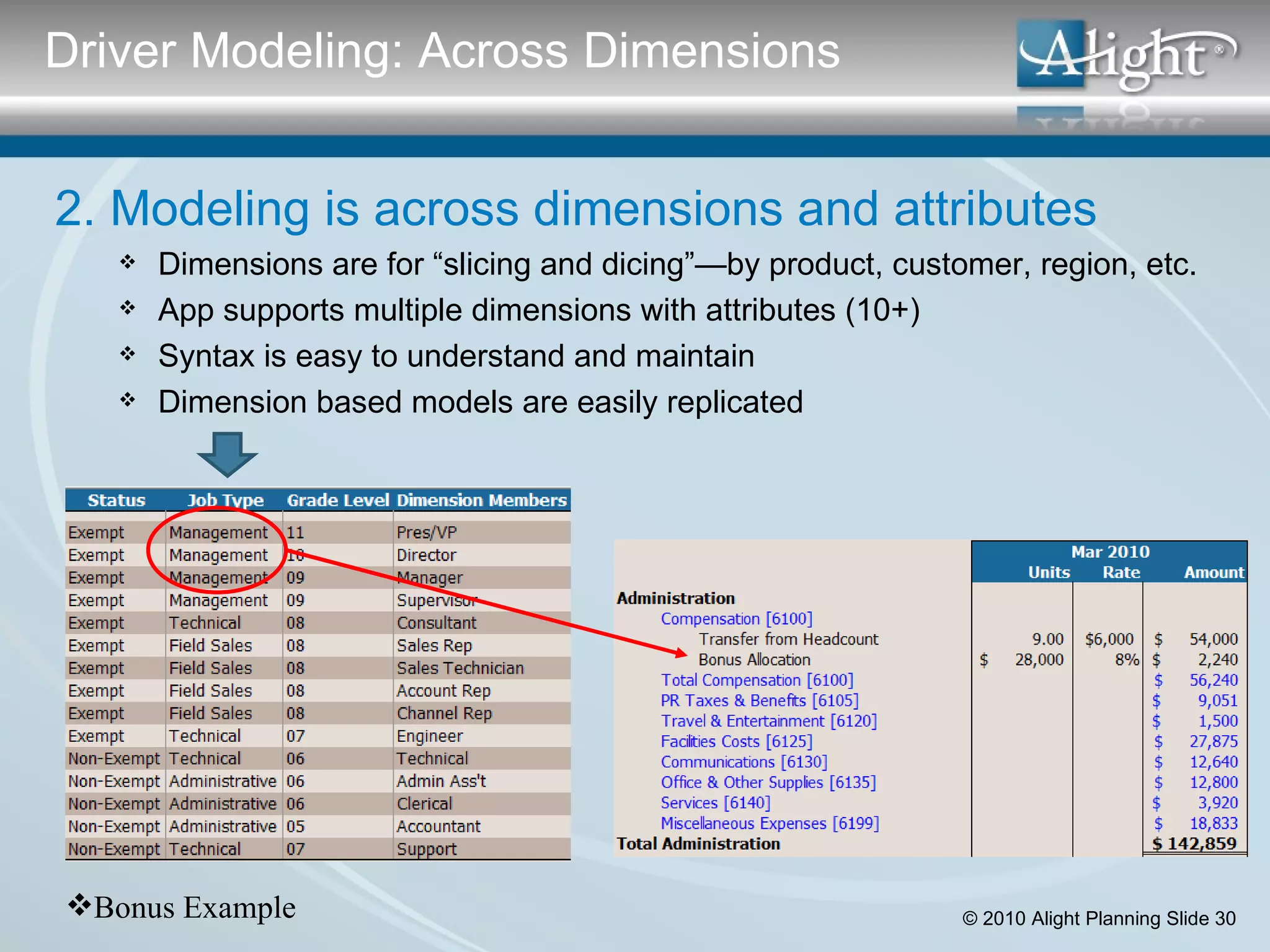
2. Modeling is across dimensions and attributes Dimensions are for “slicing and dicing”—by product, customer, region, etc. App supports multiple dimensions with attributes (10+) Syntax is easy to understand and maintain Dimension based models are easily replicated Driver Modeling: Across Dimensions Bonus Example
2. Modeling is across dimensions and attributes Dimensions are for “slicing and dicing”—by product, customer, region, etc. App supports multiple dimensions with attributes (10+) Syntax is easy to understand and maintain Dimension based models are easily replicated Driver Modeling: Across Dimensions Exempt/Non Exempt Example
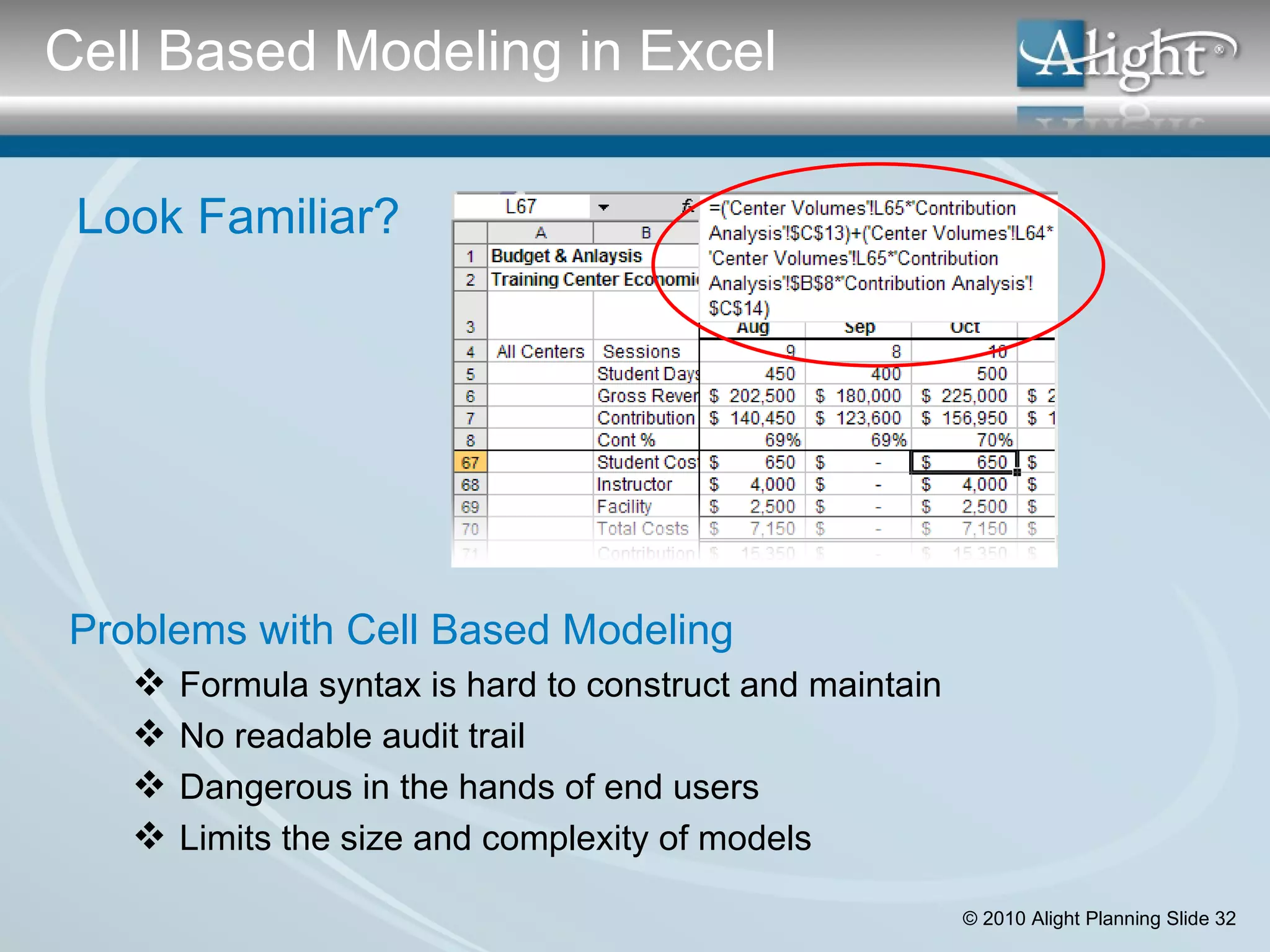
Look Familiar? Problems with Cell Based Modeling Formula syntax is hard to construct and maintain No readable audit trail Dangerous in the hands of end users Limits the size and complexity of models Cell Based Modeling in Excel
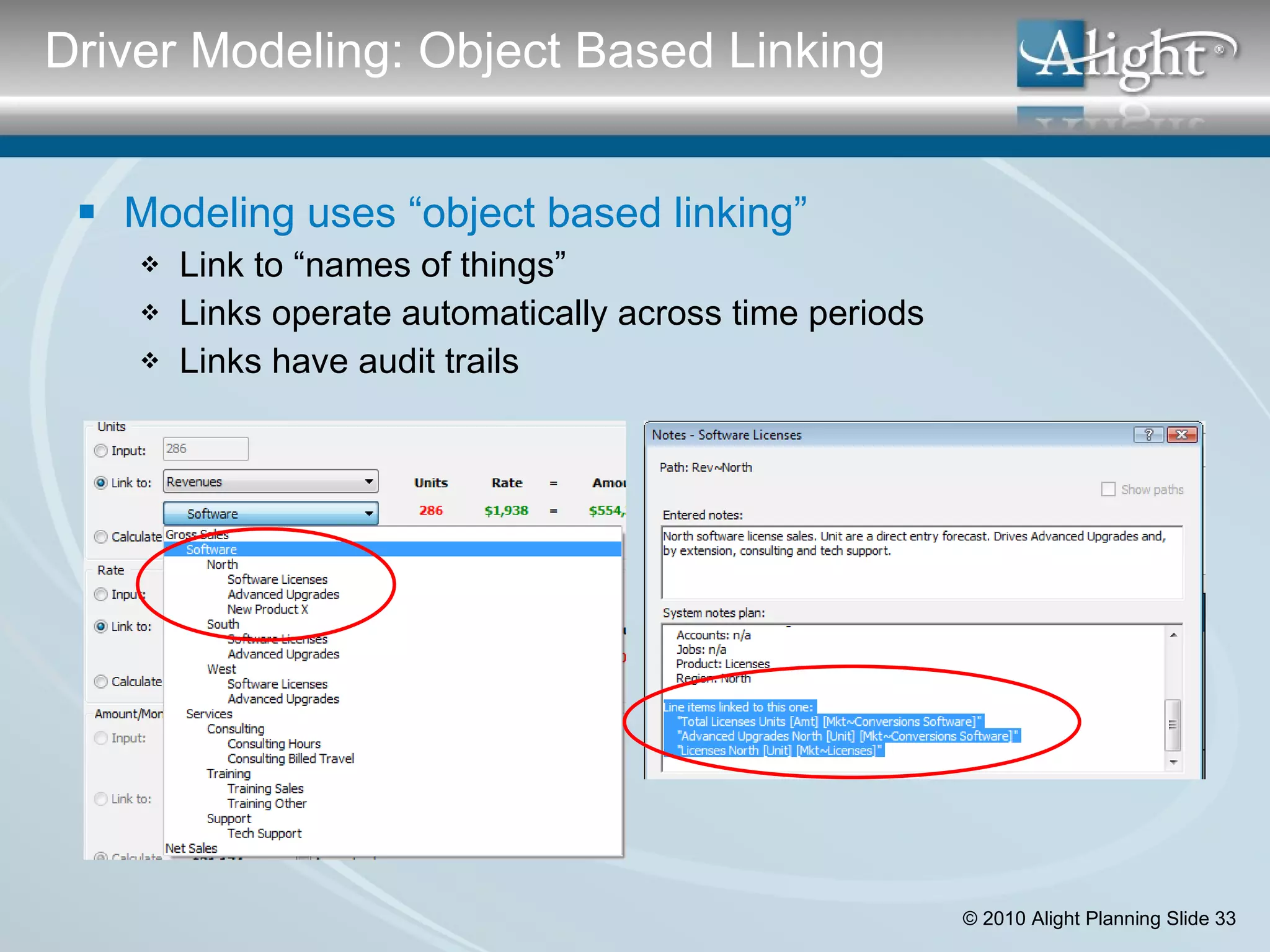
Modeling uses “object based linking” Link to “names of things” Links operate automatically across time periods Links have audit trails Driver Modeling: Object Based Linking
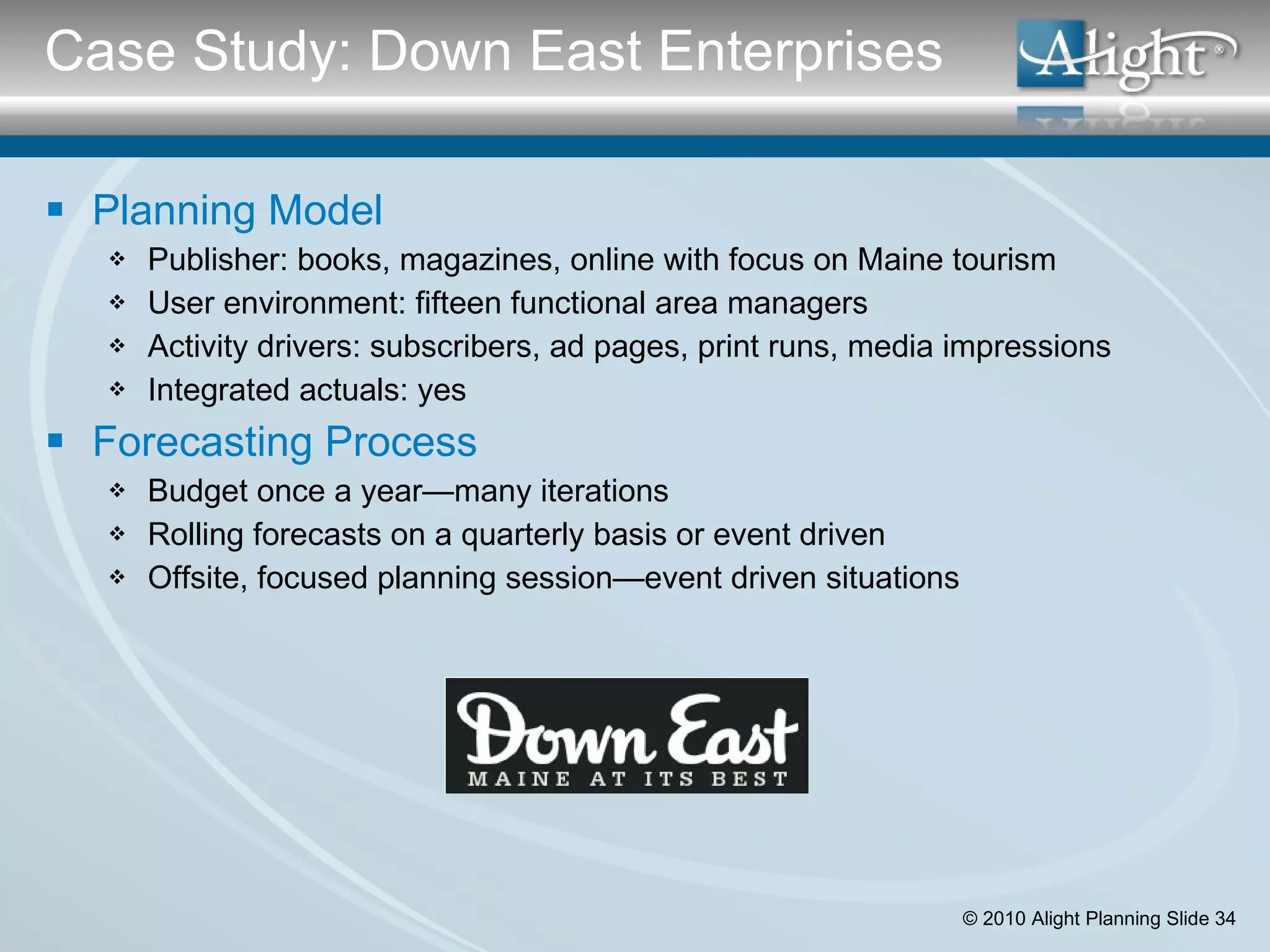
Planning Model Publisher: books, magazines, online with focus on Maine tourism User environment: fifteen functional area managers Activity drivers: subscribers, ad pages, print runs, media impressions Integrated actuals: yes Forecasting Process Budget once a year—many iterations Rolling forecasts on a quarterly basis or event driven Offsite, focused planning session—event driven situations Case Study: Down East Enterprises
Driver Modeling Checklist Modeling supports operational activity drivers: Link to or specify activity driver units Link to or specific activity driver rates Modeling is across dimensions and attributes: Application supports multiple dimensions with attributes (at least 10) Syntax is easy to understand and maintain Dimension based models are easily replicated Modeling uses Object Based Linking: Link to “names of things” Links operate automatically across time periods Links have audit trails  Complete Checklist: Driver Modeling
Actuals In Spreadsheets Manual entry/rekeying of general ledger data Actuals In Budgeting Applications Import actuals from  General ledger at the account level  Headcount detail from HR Compute variances—actual versus plan at account level Marginal support for non-financial data Actuals In Planning Applications Import actuals from any source at any level of detail Model actuals for apples-to-apples Use actuals as drivers for plan Requirement #3: Integrated Actuals
Do you agree with this statement? “ The more the data, the better the plan.” Name two data elements for each: Must be included in your planning/reporting model Must not be included in your planning/reporting model Not sure if to include in your planning/reporting model Questions about Integrating Actuals
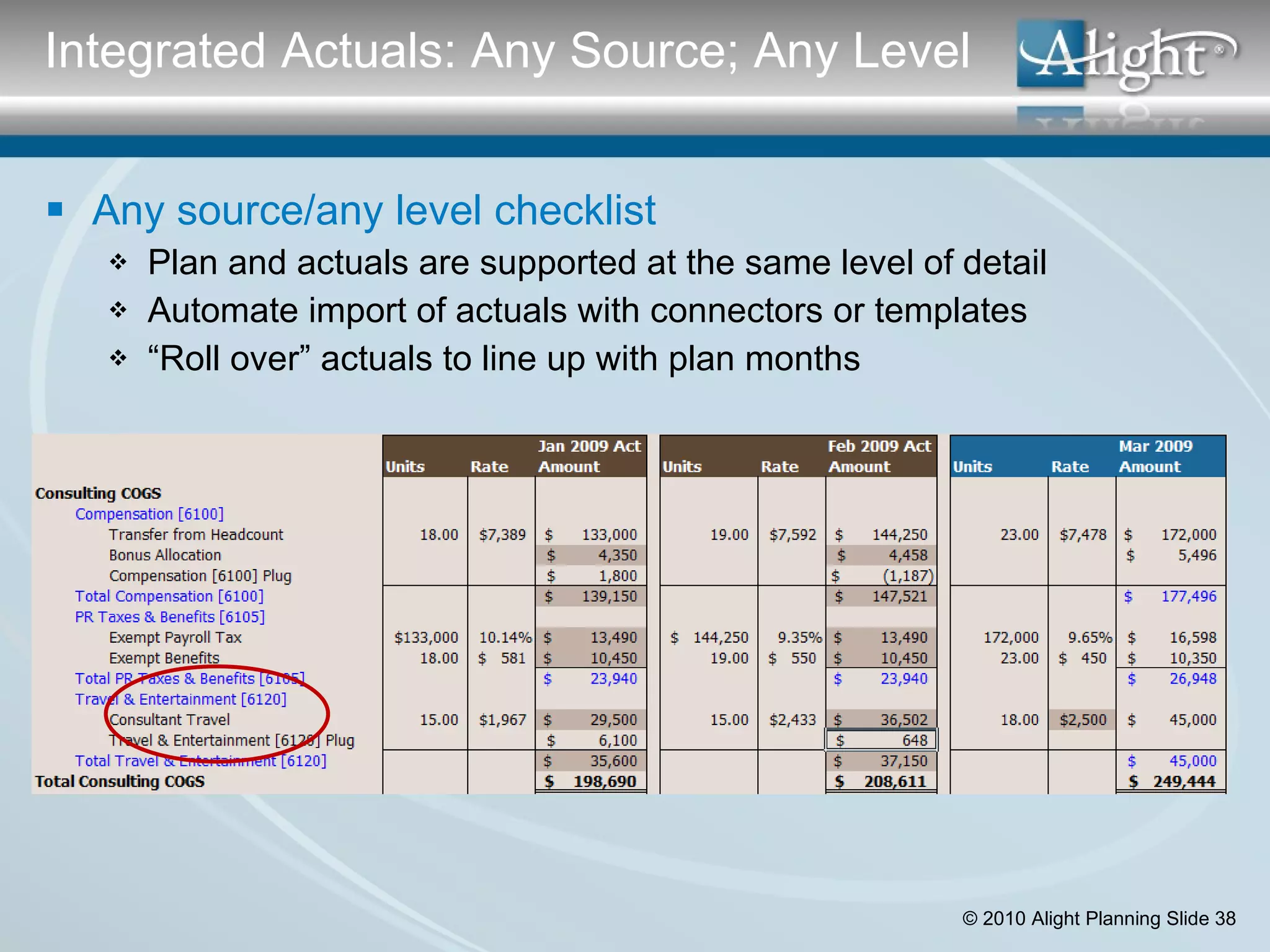
Any source/any level checklist Plan and actuals are supported at the same level of detail Automate import of actuals with connectors or templates “ Roll over” actuals to line up with plan months Integrated Actuals: Any Source; Any Level
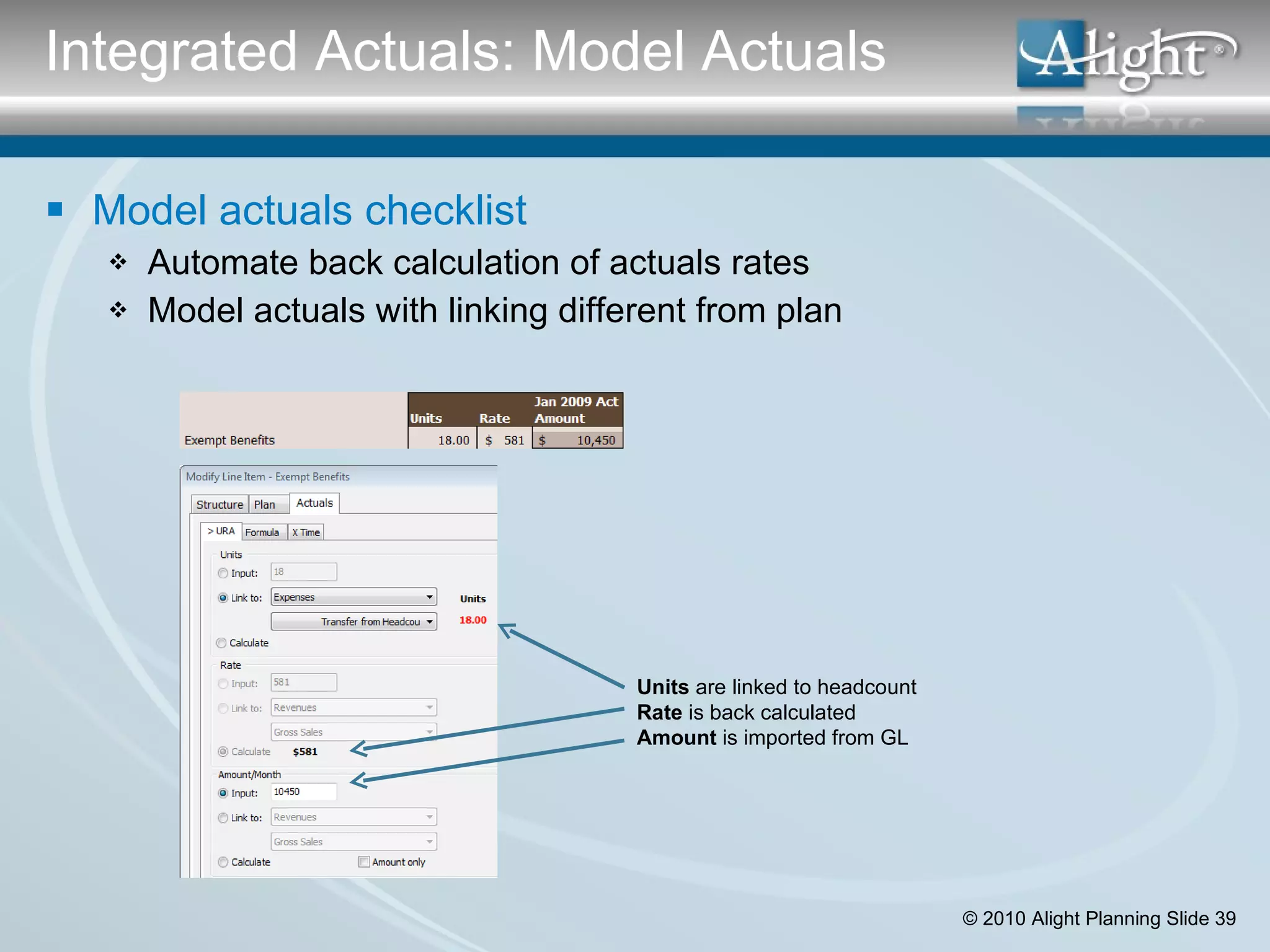
Model actuals checklist Automate back calculation of actuals rates Model actuals with linking different from plan Units  are linked to headcount Rate  is back calculated Amount  is imported from GL Integrated Actuals: Model Actuals
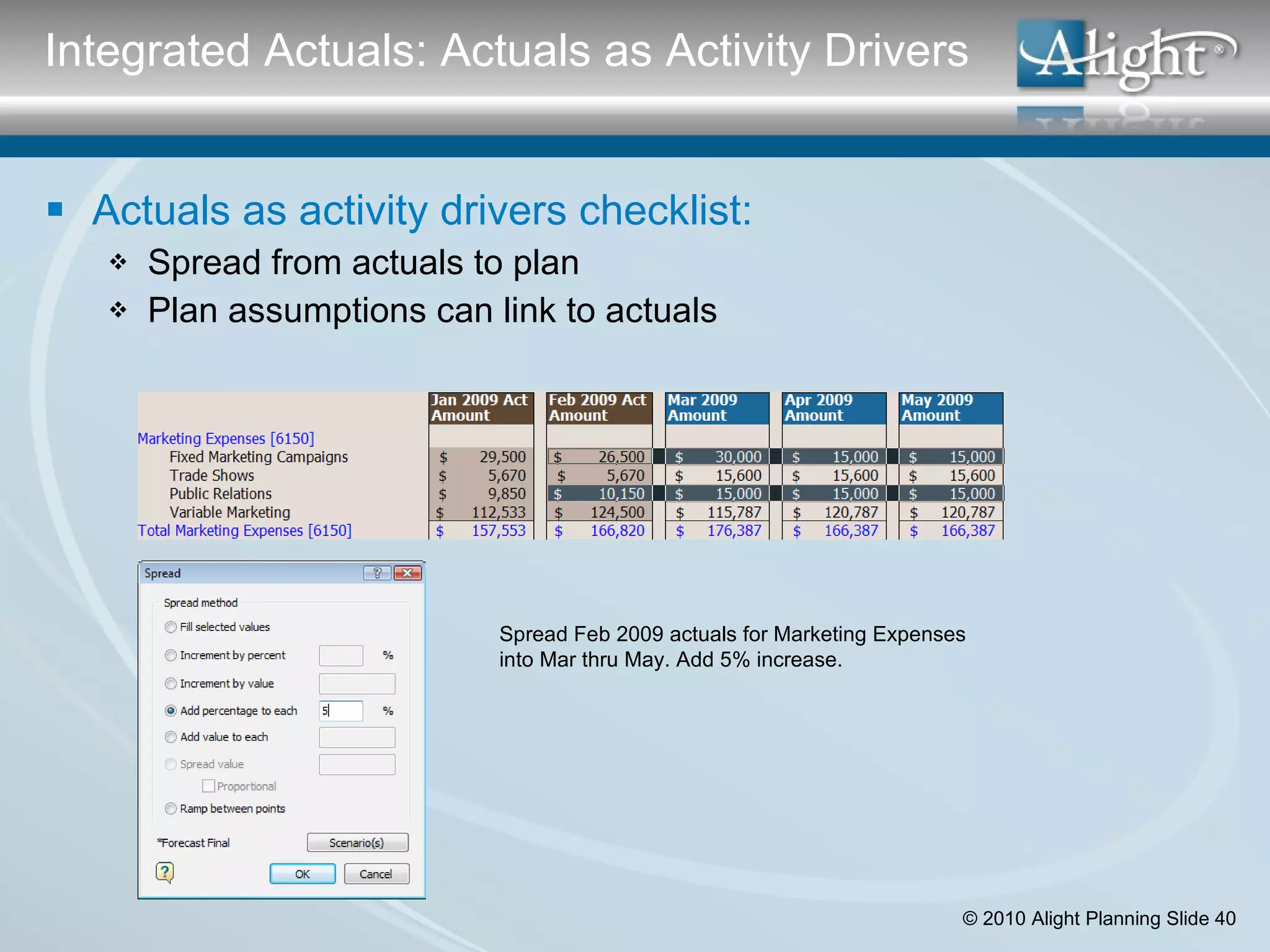
Actuals as activity drivers checklist: Spread from actuals to plan Plan assumptions can link to actuals Spread Feb 2009 actuals for Marketing Expenses into Mar thru May. Add 5% increase. Integrated Actuals: Actuals as Activity Drivers
  Integration of Actuals Checklist Import from any source/any level: Plan and actuals are supported at the same level of detail Automate import of actuals with connectors or templates “ Roll over” actuals to line up with plan months Model actuals: Automate back calculation of actuals rates Model actuals with linking different from plan Use Actuals as activity drivers: Spread from actuals to plan Plan assumptions can link to actuals Complete Checklist: Integrated Actuals
Visit Our Website WWW.AlightPlanning.com Follow up with Ben Contact: Ben Lamorte, VP Business Development [email_address] (415) 456-8528 Follow Up with Alight

Application Requirements For Rolling Forecasts

  • 1.
    Application Requirements forRolling Forecasts Rand Heer, CEO Ben Lamorte, VP Business Development Alight Planning
  • 2.
    Ben Lamorte BusinessActivities Vice President, Business Development, Alight Planning Principal, Decision Consulting (Adobe, Kaiser) Manager, Business Development, planetrx.com Consultant, APM/CSC Healthcare Today’s Speaker Publications Author of 2 technical research papers, American Mathematics Society Co-author of planning white papers Education MS degree Stanford University
  • 3.
    Rand Heer BusinessActivities CEO, Alight Planning (Planning software) Co-Founder, Aspirity (Microsoft BI consulting) Founder, FP&A Train (Essbase training) Founder, Pillar Corporation (Enterprise budgeting) CFO/Finance Director for 2 public companies Today’s Speaker Publications Coauthor: “Business Intelligence: Making Better Decisions Faster” Author of 10 white papers on planning/reporting topics Education MBA degree Harvard Business School
  • 4.
    Agenda: App Requirementsfor Rolling Forecasts Introductions Overview Why Rolling Forecasts? Budgeting Vs Rolling Forecasts Robust Scenario Analysis Scenario Questions & Checklist Case Study: Kaiser Permanente Break Driver Based Modeling Driver Modeling Questions and Checklist Case Study: Down East Enterprises Integrated Actuals Integrated Actuals Questions & Checklist
  • 5.
    At what pointdo you expect your annual budget targets to become obsolete? SOURCE: Business Finance Magazine
  • 6.
    SOURCE: APQC /BBRT Research How Much of Planning Adds Value?
  • 7.
    Why Rolling Forecasts?Unpredictability of the economy and competition: Valuations are in the dumpster; tight credit markets The economic crisis is forcing hard looks at revenues and spending Old business models are challenged by internet based models Internet and other sources give customers more info; they rule! Need systems for making fast, well informed decisions: The old way to run a company– budgeting only—isn’t working Need more immediate and responsive planning systems Need continuous planning to see patterns, trends, reality checks Companies moving toward making forecasting the primary management tool Planning needs to be: Event driven—e.g. new product launch; competitive threat Flexible—owned by local teams Updated based on the latest and best info Focus on relative performance—e.g. vs. a year ago; are things getting better? More frequent and tighter OODA
  • 8.
    Budgeting Rolling ForecastsTiming Frequency Once a year Often—event driven Cycle time Months/weeks Days/hours/near real time Time horizon Fiscal year Rolling; beyond “The Wall” ______________________________________________________________________________________________________________________ Process Iteration cycles One version at a time Multiple scenarios at one time Participants Many—all managers Fewer—finance; key managers Collaboration Submission/approval Near real time as possible Deliverables Reports in binders Decisions; action __________________________________________________________________________________________________________________________________ Data Type Financial Financial & operational Inputs Many direct inputs Fewer direct; driver-based Measurement Variances Relative change; trends Level of detail Precision driven Relevant; what’s material Budgeting Vs Rolling Forecasts
  • 9.
    Robust Scenario AnalysisYou can’t predict the future, especially in today’s economy But you can construct scenarios that let see alternate futures You can evaluate best courses of action under different conditions Driver Based Modeling Reduce direct input data volumes Increase ‘modeled elements’—operational/driver based planning Integrating Actuals “ Rolling over” actuals in plan files—apples to apples Using actuals to understand trends—focus on rates Using actuals as an activity driver/source for plan data Requirements for Rolling Forecasts
  • 10.
    Scenarios In SpreadsheetsSeparate workbooks is the principal mechanism A nightmare for maintenance & comparisons Scenarios In Budgeting Applications Manage to budget versions– aka “version control” Process control: who changed that number? what’s approved? Compare versions at the product/cost center/account level Scenarios In Planning Applications Reporting functionality Maintenance issues Performance [meeting the “need for speed”] Requirement #1: Robust Scenario Analysis
  • 11.
    Versions Are ForBudgeting Create and approve one version at a time Version control: who changed that number? what’s approved? Once a new version is approved, prior versions are discarded Scenarios Are Different from Versions X X Budget Version A Budget Version B Budget Final
  • 12.
    Forecasts = Scenarios(lots of them!) Assessing risk—BE/Hi/Low ranges Evaluating alternative strategies/programs Managing uncertainty— external events Actionable knowledge/decisions Go/no go decisions on programs Reallocate resources Change underlying processes Manage timing What You Can Do with Scenarios
  • 13.
    “ Be Prepared”“ Develop Situational Awareness” The Goal: Be Prepared
  • 14.
    What are thethree scenarios that your company needs to be analyzing now as part of your planning process? What are the three most important decisions your company will be making over the next 12 months? Questions about Scenarios
  • 15.
    Reporting functionality checklist:Compare any two scenarios side by side with variances Compare any two scenarios with variances at all levels of detail Line up scenarios side by side at all levels of detail Examples Scenario Analysis: Reporting
  • 16.
    Maintenance issues Cumbersomemaintenance results in errors Time consuming maintenance kills the use of scenarios Maintenance checklist Create a new scenario by copying any existing scenario Make value changes across scenarios in one operation Make structure changes across scenarios in one operation Examples Scenario Analysis: Maintenance
  • 17.
    The OODA LoopO bserve what’s happening around you O rient yourself and resources D ecide on a best course with an acceptable outcome A ct on it, test again The Excel PowerPoint Cycle The Need for Real Time
  • 18.
    The “need forspeed” Everything refreshes in near real time The planning tool is the presentation tool The planning tool enables collaboration on-the-fly Scenario Analysis: Performance
  • 19.
    The “need forspeed” Everything refreshes in near real time The planning tool is the presentation tool The planning tool enables collaboration on-the-fly Performance checklist Change values of a scenario with ripple through in real time Change dimension filters with ripple through in real time Toggle between scenarios in seconds Update scenarios for structure changes in seconds or minutes Scenario Analysis: Performance
  • 20.
    Planning Model KaiserIT/Pharmacy: Implement National Pharmacy Management System Activity Drivers: membership, benefits, timing of go-live, allocations Output: 8 Cash flow statements with 15-Yr NPV by region Decision Analysis Process Define benefits (revenue enhancers & cost reducers) Scenarios: “All regions go live” “Delay by 1 Year” “Critical regions only” Include/exclude benefits and show impact in real time Define and allocate implementation costs and benefits across regions Case Study: Kaiser Permanente
  • 21.
    Scenario Analysis ChecklistScenarios have comparative reporting: Compare any two scenarios side by side with variances Compare any two scenarios with variances at all levels of detail Line up scenarios side by side at all levels of detail Scenarios are easy to create and maintain: Create a new scenario by copying any existing scenario Make value changes across scenarios in one operation Make structure changes across scenarios in one operation Application meet “need for speed” for scenario analysis: Change values of a scenario with ripple through in real time Change dimension filters with ripple through in real time Toggle between scenarios in seconds Update scenarios for structure changes in seconds or minutes Complete Checklist: Scenarios
  • 22.
    Modeling In SpreadsheetsCell based modeling—maintenance intensive; difficult to audit No cross dimensional functionality Modeling In Budgeting Applications Preset algorithms: headcount and benefits; revenues; capital Simple model replication—e.g. across departments/products Modeling In Planning Applications Object based linking Modeling using operational activity drivers Modeling across multiple dimensions and attributes Requirement #2: Driver Based Modeling
  • 23.
    How many “lineitems” are in your complete budget…What % are direct inputs versus “modeled” relationships? What are the top three drivers that most impact profitability in your business? What are the top three variable headcount categories? Questions about Driver Modeling
  • 24.
    1000+ static inputs= 80% data gathering = 20% analysis Focus on key drivers = quick data gathering, less calculation, more time for analysis 20+ drivers = 20% data gathering = 80% analysis Which one would you choose? The 80/20 Rule…for Planning Inputs
  • 25.
    Reduces data volumes;focuses input assumptions Driver-based planning links KPIs to financials in a dynamic way – forces cause & effect Encourages dialogue rather than sand-bagging during the budgeting process Facilitates scenario modeling & development of multiple versions Facilitates quarterly rolling forecast through automation Benefits of Driver-Based Approach
  • 26.
    Software Checklist forDriver Modeling Modeling supports operational activity drivers Modeling is across dimensions and attributes Modeling utilizes “object based linking” Driver-Based Modeling
  • 27.
    1. Modeling supportsoperational activity drivers Link to or specify activity driver units Link to or specify activity driver rates Driver Modeling: Operational Activity Drivers
  • 28.
    Software Licenses SoldConversion rate # Services Customers Services Staffing Hours Services Expenses Salaries PR taxes/ benefits Supplies Travel Recruitment Training Etc. Predictive logic diagram for a software/services business It’s about Activities & Rates Hours Per Customer Billable Services Hours Staff Utilization Rate Bill Rate Billable Services Revenues Hours Per Month Services Staffing Heads Services Profitability Examples Driver Modeling: A Services Driver Model
  • 29.
    Driver Modeling: AcrossDimensions Exempt/Non Exempt Example 2. Modeling is across dimensions and attributes Dimensions are for “slicing and dicing”—by product, customer, region, etc. App supports multiple dimensions with attributes (10+) Syntax is easy to understand and maintain Dimension based models are easily replicated
  • 30.
    2. Modeling isacross dimensions and attributes Dimensions are for “slicing and dicing”—by product, customer, region, etc. App supports multiple dimensions with attributes (10+) Syntax is easy to understand and maintain Dimension based models are easily replicated Driver Modeling: Across Dimensions Bonus Example
  • 31.
    2. Modeling isacross dimensions and attributes Dimensions are for “slicing and dicing”—by product, customer, region, etc. App supports multiple dimensions with attributes (10+) Syntax is easy to understand and maintain Dimension based models are easily replicated Driver Modeling: Across Dimensions Exempt/Non Exempt Example
  • 32.
    Look Familiar? Problemswith Cell Based Modeling Formula syntax is hard to construct and maintain No readable audit trail Dangerous in the hands of end users Limits the size and complexity of models Cell Based Modeling in Excel
  • 33.
    Modeling uses “objectbased linking” Link to “names of things” Links operate automatically across time periods Links have audit trails Driver Modeling: Object Based Linking
  • 34.
    Planning Model Publisher:books, magazines, online with focus on Maine tourism User environment: fifteen functional area managers Activity drivers: subscribers, ad pages, print runs, media impressions Integrated actuals: yes Forecasting Process Budget once a year—many iterations Rolling forecasts on a quarterly basis or event driven Offsite, focused planning session—event driven situations Case Study: Down East Enterprises
  • 35.
    Driver Modeling ChecklistModeling supports operational activity drivers: Link to or specify activity driver units Link to or specific activity driver rates Modeling is across dimensions and attributes: Application supports multiple dimensions with attributes (at least 10) Syntax is easy to understand and maintain Dimension based models are easily replicated Modeling uses Object Based Linking: Link to “names of things” Links operate automatically across time periods Links have audit trails Complete Checklist: Driver Modeling
  • 36.
    Actuals In SpreadsheetsManual entry/rekeying of general ledger data Actuals In Budgeting Applications Import actuals from General ledger at the account level Headcount detail from HR Compute variances—actual versus plan at account level Marginal support for non-financial data Actuals In Planning Applications Import actuals from any source at any level of detail Model actuals for apples-to-apples Use actuals as drivers for plan Requirement #3: Integrated Actuals
  • 37.
    Do you agreewith this statement? “ The more the data, the better the plan.” Name two data elements for each: Must be included in your planning/reporting model Must not be included in your planning/reporting model Not sure if to include in your planning/reporting model Questions about Integrating Actuals
  • 38.
    Any source/any levelchecklist Plan and actuals are supported at the same level of detail Automate import of actuals with connectors or templates “ Roll over” actuals to line up with plan months Integrated Actuals: Any Source; Any Level
  • 39.
    Model actuals checklistAutomate back calculation of actuals rates Model actuals with linking different from plan Units are linked to headcount Rate is back calculated Amount is imported from GL Integrated Actuals: Model Actuals
  • 40.
    Actuals as activitydrivers checklist: Spread from actuals to plan Plan assumptions can link to actuals Spread Feb 2009 actuals for Marketing Expenses into Mar thru May. Add 5% increase. Integrated Actuals: Actuals as Activity Drivers
  • 41.
      Integration ofActuals Checklist Import from any source/any level: Plan and actuals are supported at the same level of detail Automate import of actuals with connectors or templates “ Roll over” actuals to line up with plan months Model actuals: Automate back calculation of actuals rates Model actuals with linking different from plan Use Actuals as activity drivers: Spread from actuals to plan Plan assumptions can link to actuals Complete Checklist: Integrated Actuals
  • 42.
    Visit Our WebsiteWWW.AlightPlanning.com Follow up with Ben Contact: Ben Lamorte, VP Business Development [email_address] (415) 456-8528 Follow Up with Alight

Editor's Notes

  • #2 Application Requirements for Rolling Forecasts
  • #3 Alight Planning Presentation Ben to do the intro. Self then partners. Then Rand.
  • #4 Alight Planning Presentation Ben to do the intro. Position as the high tech entrepreneur with finance credentials. Hit Pillar hard. Industry guru.
  • #5 Application Requirements for Rolling Forecasts Rand walk thru the agenda. Also discuss what’s in the handout package. Please ask questions, but not about Alight software. Catch us later for that. Let’s have some fun!
  • #6 Ask the questions of the audience. When do you go obsolete… Unpredictability of the economy and competition: Valuations are in the dumpster; tight credit markets The economic crisis is forcing hard looks at revenues and spending Old business models are challenged by internet based models Internet and other sources give customers more info; they rule! Need systems for making fast, well informed decisions: The old way to run a company– budgeting—isn’t working Need more immediate and responsive planning systems Need continuous planning to see patterns, trends, reality checks Companies moving toward making forecasting the primary management tool Planning needs to be: Event driven—e.g. new product launch; competitive threat Flexible—owned by local teams Updated based on the latest and best info Focus on relative performance—e.g. vs. a year ago; are things getting better? More frequent and tighter OODA Application Requirements for Rolling Forecasts
  • #8 Application Requirements for Rolling Forecasts Rand walk thru the agenda. Also discuss what’s in the handout package. Please ask questions, but not about Alight software. Catch us later for that. Let’s have some fun!
  • #9 Application Requirements for Rolling Forecasts Rand only. Worth a heavy duty discussion… Do not get into BBRT trap. Relay the Clorox methodology.
  • #10 Application Requirements for Rolling Forecasts Rand only. Overview/roadmap slide.
  • #11 Application Requirements for Rolling Forecasts Ben starts with some questions: What are the key scenarios that you need to evaluate in the short or longer term? What are the three most important decisions you need to make in the next twelve months. What is the biggest challenge to making that decisions. Who wants to share? Budgeting applications explanations
  • #12 Application Requirements for Rolling Forecasts Rand. Like legal documents, you burn the old outdated version fast. Everybody talks about “locking down” the budget. Forecast is more fluent, changing things.
  • #13 Application Requirements for Rolling Forecasts Scenarios Address a Range of Forecasting Issues… Strategy development: testing alternate courses of action Address risk: test hi/lo ranges from a current trend Interventions: test new/different courses of action Address uncertainty: test the impact of specific events Understanding sensitivity: “what’s important”/actionable knowledge
  • #15 Application Requirements for Rolling Forecasts Ben starts with some questions: What are the key scenarios that you need to evaluate in the short or longer term? What are the three most important decisions you need to make in the next twelve months. What is the biggest challenge to making that decisions. Who wants to share? Budgeting applications explanations
  • #16 Application Requirements for Rolling Forecasts Rand only, mainly demo.
  • #17 Application Requirements for Rolling Forecasts Ben on first bullet. Rand on second with demo. Show public relations. Show change in each one. Then show in one operation. Add a line item in one operation.
  • #18 Application Requirements for Rolling Forecasts Ben only. In the background Rand runs the update links.
  • #19 Application Requirements for Rolling Forecasts Rand on demo. Ben chime in.
  • #20 Application Requirements for Rolling Forecasts Rand on demo. Ben chime in.
  • #21 Application Requirements for Rolling Forecasts Rand and Don
  • #22 Application Requirements for Rolling Forecasts Rand discuss from slide
  • #23 Application Requirements for Rolling Forecasts
  • #24 Application Requirements for Rolling Forecasts Ben starts with some questions: What are the key scenarios that you need to evaluate in the short or longer term? What are the three most important decisions you need to make in the next twelve months. What is the biggest challenge to making that decisions. Who wants to share? Budgeting applications explanations
  • #25 Put a slide in: don’t use too much detail.
  • #27 Application Requirements for Rolling Forecasts Need info from Chris.
  • #28 Application Requirements for Rolling Forecasts Demo setup: Mar, April, May showing. Revenues and Headcount at 120%. Key measures pre-formatted. Demo sequence: Revenues and then analyze driver relationships. Jump to HC. Show consulting heads Change March to 150. Open key measures and test
  • #29 Rand. Focus on activities and rates.
  • #30 Application Requirements for Rolling Forecasts Need a good discussion here.
  • #31 Application Requirements for Rolling Forecasts Need a good discussion here.
  • #32 Application Requirements for Rolling Forecasts Need a good discussion here.
  • #33 Application Requirements for Rolling Forecasts Need a good discussion here.
  • #34 Application Requirements for Rolling Forecasts Rand demo. Ben chime in with a “pain” comment related to Excel
  • #35 Application Requirements for Rolling Forecasts Rand and Don
  • #36 Application Requirements for Rolling Forecasts Rand discuss from slide
  • #37 Application Requirements for Rolling Forecasts If build a rolling forecast, balance materiality with precision. Name three data points you would bring in. Three things you would not bring in. Three things you’re not sure about. The big issue is not IT style integration between systems. What is the right level at which to plan. “ Be careful what you ask for” Dispel some myths discussions. OLAP cubes are about bringing in lots of data. We’re trying to help and understand. The biggest level.
  • #38 Application Requirements for Rolling Forecasts Ben starts with some questions:
  • #39 Application Requirements for Rolling Forecasts Rand discuss from slide
  • #40 Application Requirements for Rolling Forecasts Rand discuss from slide
  • #41 Application Requirements for Rolling Forecasts Rand discuss from slide
  • #42 Application Requirements for Rolling Forecasts Rand discuss from slide
  • #43 Application Requirements for Rolling Forecasts Ben to discuss from slide