
Windows Server 2012
Failover Clustering
New Features
Joe D’Antoni
Philadelphia SQL Server Users Group
13 February 2013
@jdanton
           Joedantoni.wordpress.com
About Me   jdanton1@yahoo.com
Easier Management
Overview of
Changes
              Increase Scailability—Hyper V
              Greater Flexibility
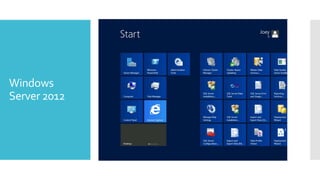
Windows
Server 2012
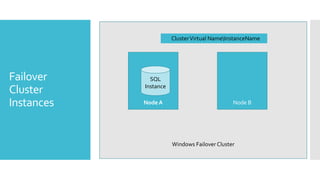
Cluster Virtual NameInstanceName


Failover      SQL
            Instance
Cluster
Instances   Node A                            Node B


                       Windows Failover Cluster
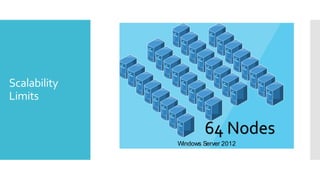
Scalability
Limits

              16 Nodes 64 Nodes
                   Windows Server 2008R2
                    Windows Server 2012
 Search, filtering, and custom views. Administrators can manage
               and navigate large numbers of clustered virtual machines or other
               clustered roles.


              Multiselect. Administrators can select a specific collection of
               virtual machines and then perform any needed operation (such as
Failover       live migration, save, shutdown, or start).
Cluster
Management    Simplified live migration and quick migration of virtual
               machines and virtual machine storage. Live migration and quick
(Hyper-V)      migration are easier to perform.
             
                 Support for Hyper-V Replica. Hyper-V Replica provides point-in-
                 time replication of virtual machines between storage
                 systems, clusters, and data centers for disaster recovery.
 4000 Hyper V VMs per cluster
Server
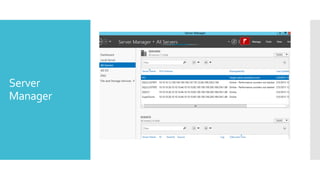
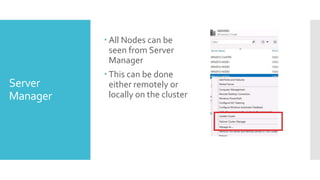
           Server Manager will show all nodes, including the name of the
Manager     cluster and any VMs in the cluster
 All Nodes can be
            seen from Server
            Manager
           This can be done
Server      either remotely or
Manager     locally on the cluster
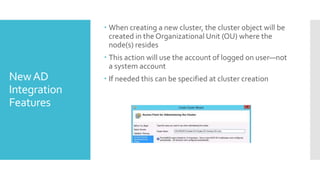
 When creating a new cluster, the cluster object will be
                created in the Organizational Unit (OU) where the
                node(s) resides
               This action will use the account of logged on user—not
                a system account
New AD         If needed this can be specified at cluster creation
Integration
Features
 Automated repair of cluster virtual computer
             objects (VCOs) if they are deleted accidentally
            Cluster access only to Read-only domain
             controllers
AD New      Ability of the cluster to start with no AD DS
Features     dependencies
            Failover clusters do not support group
             Managed Service Accounts
               However services running on a cluster (e.g. SQL
                Server) do
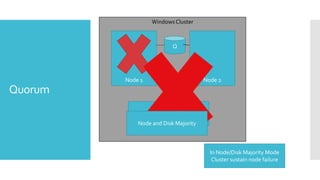
Quorum
Windows Cluster


                            Q


         Node 1                        Node 2
Quorum
                  Node Majority Mode
             Node and Disk Majority


                                         In Node/Disk Majority Mode
                                          Cluster sustain node failure
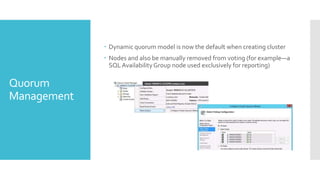
 Dynamic quorum model is now the default when creating cluster
              Nodes and also be manually removed from voting (for example—a
               SQL Availability Group node used exclusively for reporting)

Quorum
Management
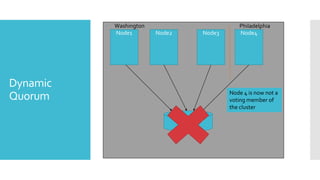
Washington                                Philadelphia
          Node1        Node2             Node3      Node4


Dynamic
                                                 Node 4 is now not a
Quorum                                           voting member of
                                                 the cluster

                               Quorum File
                                 Share
 Storage Tests will run significantly faster
              Tests are now integrated with WMI
Cluster       New Checks are Included for Cluster Shared Volumes (CSV) for
Validation     Hyper-V and its VMs
                   Tests check to see if networking is optimal so live migrations can
                    function as expected
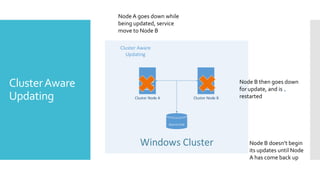
Node A goes down while
                being updated, service
                move to Node B

                Cluster Aware
                  Updating


Cluster Aware                                                         Node B then goes down
                                                                      for update, and is
Updating              Cluster Node A                 Cluster Node B   restarted


                                       Quorum Disk


                        Windows Cluster                                  Node B doesn’t begin
                                                                         its updates until Node
                                                                         A has come back up
 Cluster-Aware Updating (CAU) is an automated feature that allows
                  you to update clustered servers with little or no loss in availability
                  during the update process. During an Updating Run, CAU
                  transparently performs the following tasks:


                 Puts each node of the cluster into node maintenance mode
                  Moves the clustered roles off the node

                 Installs the updates and any dependent updates
Cluster Aware
                 Performs a restart if necessary
Updating
                 Brings the node out of maintenance mode

                 Restores the clustered roles on the node

                 Moves to update the next node
 For services like SQL Server—there is a minimal amount of
                  downtime
                 With Hyper-V Virtuals Machines, no downtime is needed
                 This can also be used to apply SQL Service Packs and Cumulative
Cluster Aware     Updates
Updating         Different CAU run profiles can be applied to different sets of
                  Failover Clusters
                 Can be run on Server Core
                 Operated remotely
 By using the updated Migrate a Cluster Wizard in Windows Server
                2012, administrators can migrate the configuration settings for
                clustered roles (formerly called clustered services and
                applications) from clusters that are running Windows Server
                2012, Windows Server 2008 R2, or Windows Server 2008.
                Migration enhancements in Windows Server 2012 include:
Cluster
Upgrade and        Export and reimport Hyper-V virtual machines.

Migration          Migrate to CSV disks.

                   Map storage and virtual networks.

                    Reuse existing storage.
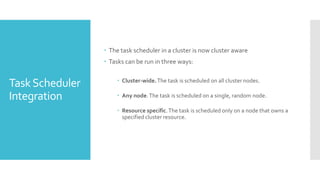
 The task scheduler in a cluster is now cluster aware
                  Tasks can be run in three ways:

                      Cluster-wide. The task is scheduled on all cluster nodes.
Task Scheduler
Integration           Any node. The task is scheduled on a single, random node.

                      Resource specific. The task is scheduled only on a node that owns a
                       specified cluster resource.
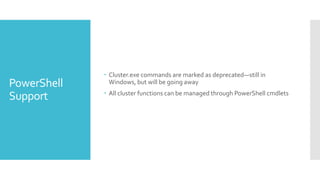
 Cluster.exe commands are marked as deprecated—still in
PowerShell     Windows, but will be going away
              All cluster functions can be managed through PowerShell cmdlets
Support
 Majority of changes are designed for increase flexibility for Hyper-
            V virtual environments
           Cluster Aware Updating is the feature we will use most frequently
Summary
           Flexible quorum allows for easier cluster repair in an emergency
Questions

Windows server 2012 failover clustering new features

  • 1.
    Windows Server 2012 FailoverClustering New Features Joe D’Antoni Philadelphia SQL Server Users Group 13 February 2013
  • 2.
    @jdanton Joedantoni.wordpress.com About Me jdanton1@yahoo.com
  • 3.
    Easier Management Overview of Changes Increase Scailability—Hyper V Greater Flexibility
  • 4.
  • 5.
    Cluster Virtual NameInstanceName Failover SQL Instance Cluster Instances Node A Node B Windows Failover Cluster
  • 6.
    Scalability Limits 16 Nodes 64 Nodes Windows Server 2008R2 Windows Server 2012
  • 7.
     Search, filtering,and custom views. Administrators can manage and navigate large numbers of clustered virtual machines or other clustered roles.  Multiselect. Administrators can select a specific collection of virtual machines and then perform any needed operation (such as Failover live migration, save, shutdown, or start). Cluster Management  Simplified live migration and quick migration of virtual machines and virtual machine storage. Live migration and quick (Hyper-V) migration are easier to perform.  Support for Hyper-V Replica. Hyper-V Replica provides point-in- time replication of virtual machines between storage systems, clusters, and data centers for disaster recovery.
  • 8.
     4000 HyperV VMs per cluster Server  Server Manager will show all nodes, including the name of the Manager cluster and any VMs in the cluster
  • 9.
     All Nodescan be seen from Server Manager  This can be done Server either remotely or Manager locally on the cluster
  • 10.
     When creatinga new cluster, the cluster object will be created in the Organizational Unit (OU) where the node(s) resides  This action will use the account of logged on user—not a system account New AD  If needed this can be specified at cluster creation Integration Features
  • 11.
     Automated repairof cluster virtual computer objects (VCOs) if they are deleted accidentally  Cluster access only to Read-only domain controllers AD New  Ability of the cluster to start with no AD DS Features dependencies  Failover clusters do not support group Managed Service Accounts  However services running on a cluster (e.g. SQL Server) do
  • 12.
  • 13.
    Windows Cluster Q Node 1 Node 2 Quorum Node Majority Mode Node and Disk Majority In Node/Disk Majority Mode Cluster sustain node failure
  • 14.
     Dynamic quorummodel is now the default when creating cluster  Nodes and also be manually removed from voting (for example—a SQL Availability Group node used exclusively for reporting) Quorum Management
  • 15.
    Washington Philadelphia Node1 Node2 Node3 Node4 Dynamic Node 4 is now not a Quorum voting member of the cluster Quorum File Share
  • 16.
     Storage Testswill run significantly faster  Tests are now integrated with WMI Cluster  New Checks are Included for Cluster Shared Volumes (CSV) for Validation Hyper-V and its VMs  Tests check to see if networking is optimal so live migrations can function as expected
  • 17.
    Node A goesdown while being updated, service move to Node B Cluster Aware Updating Cluster Aware Node B then goes down for update, and is Updating Cluster Node A Cluster Node B restarted Quorum Disk Windows Cluster Node B doesn’t begin its updates until Node A has come back up
  • 18.
     Cluster-Aware Updating(CAU) is an automated feature that allows you to update clustered servers with little or no loss in availability during the update process. During an Updating Run, CAU transparently performs the following tasks:  Puts each node of the cluster into node maintenance mode Moves the clustered roles off the node  Installs the updates and any dependent updates Cluster Aware  Performs a restart if necessary Updating  Brings the node out of maintenance mode  Restores the clustered roles on the node  Moves to update the next node
  • 19.
     For serviceslike SQL Server—there is a minimal amount of downtime  With Hyper-V Virtuals Machines, no downtime is needed  This can also be used to apply SQL Service Packs and Cumulative Cluster Aware Updates Updating  Different CAU run profiles can be applied to different sets of Failover Clusters  Can be run on Server Core  Operated remotely
  • 20.
     By usingthe updated Migrate a Cluster Wizard in Windows Server 2012, administrators can migrate the configuration settings for clustered roles (formerly called clustered services and applications) from clusters that are running Windows Server 2012, Windows Server 2008 R2, or Windows Server 2008. Migration enhancements in Windows Server 2012 include: Cluster Upgrade and  Export and reimport Hyper-V virtual machines. Migration  Migrate to CSV disks.  Map storage and virtual networks. Reuse existing storage.
  • 21.
     The taskscheduler in a cluster is now cluster aware  Tasks can be run in three ways:  Cluster-wide. The task is scheduled on all cluster nodes. Task Scheduler Integration  Any node. The task is scheduled on a single, random node.  Resource specific. The task is scheduled only on a node that owns a specified cluster resource.
  • 22.
     Cluster.exe commandsare marked as deprecated—still in PowerShell Windows, but will be going away  All cluster functions can be managed through PowerShell cmdlets Support
  • 23.
     Majority ofchanges are designed for increase flexibility for Hyper- V virtual environments  Cluster Aware Updating is the feature we will use most frequently Summary  Flexible quorum allows for easier cluster repair in an emergency
  • 24.

Editor's Notes

  • #3 A little bit about myself. I’m @jdanton on Twitter---how many of you are on Twitter? It’s a really great resource for the SQL Community—we have a lot of interaction and discussion there, and additionally there is a great hashtag called SQLHelp. Where you can get questions answered by experts. My blog is at joedantoni.wordpress.com—I have posts on a lot of the topics we will talk about today, and have instructions on setting up an AlwaysOn environment there. Lastly you can reach me by email at jdanton1@yahoo.com. I have a blog post with my slides and additional resources from today’s presentation up at this bit.ly URL.Lastly, stop me at anytime if you have questions for me, I’ll do my best to answer, or direct you to an answer.