All Rights Reserved - Logsign 2015
Windows Auditing
Security Information and Event Management
LOGSIGN V4.0
WORKSHOP
All Rights Reserved - Logsign 2015
All Rights Reserved - Logsign 2015 www.logsign.com http://support.logsign.com
Overview
We always have to figure out the critical changes on our systems through finding
the answers to these questions.
They are the same for everyone:
● Who did it?
● What was changed?
● When? and
● Where?
System administrators should be ready and prepared to address such issues.
All Rights Reserved - Logsign 2015 www.logsign.com http://support.logsign.com
Agenda
● Windows Security Event Categories
● Windows Events and Logsign’s Event Mapping Technique
● Windows Policy and Tracking Suggestions
● Compliance Reporting
● Advantages of Logsign on Windows Auditing Environment
All Rights Reserved - Logsign 2015 www.logsign.com http://support.logsign.com
Security Event Categories
Main categories of Windows OS are:
● Account Logon
● Account Management
● Logon/Logoff
● DS Access
● Object Access
● Policy Change
● Privilege Use
● System
Logsign provides predefined reports related to Windows Security Event
Categories.
All Rights Reserved - Logsign 2015 www.logsign.com http://support.logsign.com
Windows Events & Logsign
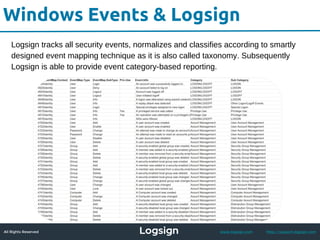
Logsign tracks all security events, normalizes and classifies according to smartly
designed event mapping technique as it is also called taxonomy. Subsequently
Logsign is able to provide event category-based reporting.
All Rights Reserved - Logsign 2015 www.logsign.com http://support.logsign.com
Logsign’s Event Mapping
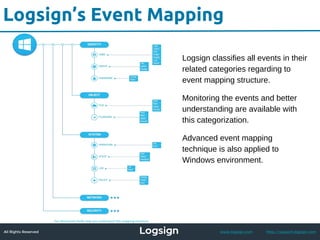
Logsign classifies all events in their
related categories regarding to
event mapping structure.
Monitoring the events and better
understanding are available with
this categorization.
Advanced event mapping
technique is also applied to
Windows environment.
All Rights Reserved - Logsign 2015 www.logsign.com http://support.logsign.com
Policy and Tracking Suggestions
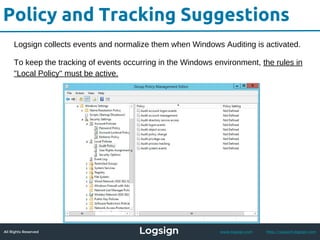
Logsign collects events and normalize them when Windows Auditing is activated.
To keep the tracking of events occurring in the Windows environment, the rules in
"Local Policy" must be active.
All Rights Reserved - Logsign 2015 www.logsign.com http://support.logsign.com
Policy and Tracking Suggestions
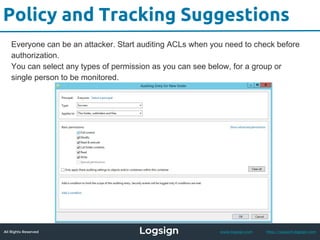
Everyone can be an attacker. Start auditing ACLs when you need to check before
authorization.
You can select any types of permission as you can see below, for a group or
single person to be monitored.
All Rights Reserved - Logsign 2015 www.logsign.com http://support.logsign.com
Compliance & Reporting
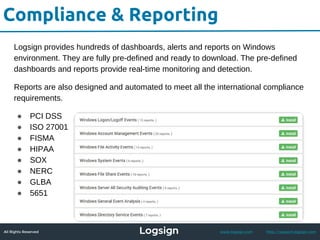
Logsign provides hundreds of dashboards, alerts and reports on Windows
environment. They are fully pre-defined and ready to download. The pre-defined
dashboards and reports provide real-time monitoring and detection.
Reports are also designed and automated to meet all the international compliance
requirements.
● PCI DSS
● ISO 27001
● FISMA
● HIPAA
● SOX
● NERC
● GLBA
● 5651
All Rights Reserved - Logsign 2015 www.logsign.com http://support.logsign.com
Advantages of Logsign
Logsign collects all the audit messages from the Windows environment however
many others collect only the basic ones.
Regardless of traditional solutions significantly handle small amounts of message
IDs, Logsign normalizes every message and classifies up to 400 message IDs.
This capacity keeps growing every time Logsign familiarizes with unknown new
messages which reduces the complexity of Windows events.
All Rights Reserved - Logsign 2015 www.logsign.com http://support.logsign.com
Advantages of Logsign
Logsign Windows Auditing helps in these areas:
● Real-time Control.
● User Behavior Analysis.
● File Integrity Monitoring.
● Archiving Data for Forensic Investigations and analysis.
● Compliance Reporting.
● Perfect Visualization within reports, alerts and dashboards.
For more details:
https://www.logsign.com/page/windows-auditing
http://support.logsign.net

Logsign Windows Auditing

  • 1.
    All Rights Reserved- Logsign 2015 Windows Auditing Security Information and Event Management LOGSIGN V4.0 WORKSHOP All Rights Reserved - Logsign 2015
  • 2.
    All Rights Reserved- Logsign 2015 www.logsign.com http://support.logsign.com Overview We always have to figure out the critical changes on our systems through finding the answers to these questions. They are the same for everyone: ● Who did it? ● What was changed? ● When? and ● Where? System administrators should be ready and prepared to address such issues.
  • 3.
    All Rights Reserved- Logsign 2015 www.logsign.com http://support.logsign.com Agenda ● Windows Security Event Categories ● Windows Events and Logsign’s Event Mapping Technique ● Windows Policy and Tracking Suggestions ● Compliance Reporting ● Advantages of Logsign on Windows Auditing Environment
  • 4.
    All Rights Reserved- Logsign 2015 www.logsign.com http://support.logsign.com Security Event Categories Main categories of Windows OS are: ● Account Logon ● Account Management ● Logon/Logoff ● DS Access ● Object Access ● Policy Change ● Privilege Use ● System Logsign provides predefined reports related to Windows Security Event Categories.
  • 5.
    All Rights Reserved- Logsign 2015 www.logsign.com http://support.logsign.com Windows Events & Logsign Logsign tracks all security events, normalizes and classifies according to smartly designed event mapping technique as it is also called taxonomy. Subsequently Logsign is able to provide event category-based reporting.
  • 6.
    All Rights Reserved- Logsign 2015 www.logsign.com http://support.logsign.com Logsign’s Event Mapping Logsign classifies all events in their related categories regarding to event mapping structure. Monitoring the events and better understanding are available with this categorization. Advanced event mapping technique is also applied to Windows environment.
  • 7.
    All Rights Reserved- Logsign 2015 www.logsign.com http://support.logsign.com Policy and Tracking Suggestions Logsign collects events and normalize them when Windows Auditing is activated. To keep the tracking of events occurring in the Windows environment, the rules in "Local Policy" must be active.
  • 8.
    All Rights Reserved- Logsign 2015 www.logsign.com http://support.logsign.com Policy and Tracking Suggestions Everyone can be an attacker. Start auditing ACLs when you need to check before authorization. You can select any types of permission as you can see below, for a group or single person to be monitored.
  • 9.
    All Rights Reserved- Logsign 2015 www.logsign.com http://support.logsign.com Compliance & Reporting Logsign provides hundreds of dashboards, alerts and reports on Windows environment. They are fully pre-defined and ready to download. The pre-defined dashboards and reports provide real-time monitoring and detection. Reports are also designed and automated to meet all the international compliance requirements. ● PCI DSS ● ISO 27001 ● FISMA ● HIPAA ● SOX ● NERC ● GLBA ● 5651
  • 10.
    All Rights Reserved- Logsign 2015 www.logsign.com http://support.logsign.com Advantages of Logsign Logsign collects all the audit messages from the Windows environment however many others collect only the basic ones. Regardless of traditional solutions significantly handle small amounts of message IDs, Logsign normalizes every message and classifies up to 400 message IDs. This capacity keeps growing every time Logsign familiarizes with unknown new messages which reduces the complexity of Windows events.
  • 11.
    All Rights Reserved- Logsign 2015 www.logsign.com http://support.logsign.com Advantages of Logsign Logsign Windows Auditing helps in these areas: ● Real-time Control. ● User Behavior Analysis. ● File Integrity Monitoring. ● Archiving Data for Forensic Investigations and analysis. ● Compliance Reporting. ● Perfect Visualization within reports, alerts and dashboards.
  • 12.