Second Semester - Semi Final
System Administration 4th Year
“Local, global, universal and
virtualization”
Instructor: Mark John Perez – Lado
Webpage:
http://markjohnplado.wixsite.com/index
What is the difference between local, global
and universal groups?
• Domain local groups assign access permissions to global
domain groups for local domain resources. Global groups
provide access to resources in other trusted domains.
Universal groups grant access to resources in all trusted
domains.
What is group nesting?
• Adding one group as a member of another group is called
'group nesting'. This will help for easy administration and
reduced replication traffic.
What is Domain control?
• A domain controller (DC) is a server that handles all the
security requests from other computers and servers within
the Windows Server domain there was a primary domain
controller and a backup domain controller. The primary DC
focused on domain services only to avoid the possibility of
a system slow down or crash due to overtasking from
managing other functionality and security requests. In the
event of a primary DC going down, a backup DC could be
promoted and become the primary DC to keep the rest of
the server systems functioning correctly.
What is domain?
• A domain is a set of network resources (applications,
printers, and so forth) for a group of users. The user needs
only to log in to the domain to gain access to the
resources, which may be located on a number of different
servers in the network. The ‘domain’ is simply your
computer address not to confuse with an URL. A domain
address might look something like 211.170.469.
What is Forest?
• A collection of one or more Active Directory domains that
share a common schema, configuration, and global
catalog.
What is global catalog?
• The Active Directory Global Catalog is the central storage
of information about objects in an Active Directory forest.
A Global Catalog is created automatically on the first
domain controller in the first domain in the forest. The
Domain Controller which is hosting the Global Catalog is
known as a Global catalog server.
What is tree?
• An Active Directory tree is a collection of Active Directory
domains that begins at a single root and branches out into
peripheral, child domains. Domains in an Active Directory
tree share the same namespace. An Active Directory forest
is a collection of Active Directory trees, similar to a real
world forest. Catalog Server.
What is site?
• A Site object in Active Directory represents a geographic
location that hosts networks.
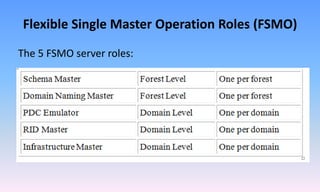
Flexible Single Master Operation Roles (FSMO)
The 5 FSMO server roles:
Setting File Permissions on a Folder Using
Group Policy
• The setting is located under Computer Configuration, Windows
Settings, Security Settings, File System. Here's the procedure:
1. Go to the location in the Group Policy listed above.
2. Right-click File System.
3. Click Add File.
4. In the "Add a file or folder" window, select the folder (or file)
for which you want the permissions to be set, and click OK.
5. In the security box that pops up, you can add a user or a
group that needs permission to the folder.
Define virtualization?
• Hyper-V virtualization will provide an environment in
which we can run multiple operating systems at the same
time on one physical computer, by running each operating
system in its own virtual machine.
What are the benefits of virtualization?
• Reduce the number of physical servers
• Reduce the infrastructure needed for your data center
What is a Hypervisor?
• You can think of a Hypervisor as the kernel or the core of a
virtualization platform. The Hypervisor is also called the
Virtual Machine Monitor. The Hypervisor has access to the
physical host hardware.
What are a host, guest, and virtual machine?
• A host system (host operating system) would be the primary & first
installed operating system. If you are using a bare metal Virtualization
platform like Hyper-V or ESX, there really isn’t a host operating system
besides the Hypervisor. If you are using a Type-2 Hypervisor like
VMware Server or Virtual Server, the host operating system is
whatever operating system those applications are installed into.
• A guest system (guest operating system) is a virtual guest or virtual
machine (VM) that is installed under the host operating system. The
guests are the VMs that you run in your virtualization platform.
• Some admins also call the host & guest the parent and child.
Hyper v Snap shot
How to create Hyper v Snap shot?
• Just select the Virtual machine in Hyper-V Manager and
select Snapshot from the Actions pane. The status of the
virtual machine will change to “Taking Snapshot” and
show the progress of the action using a percentage value.
File extension = .avhd
Virtual Machine files
The first thing to know is what files are used
to create a virtual machine.
.XML files
• These files contain the virtual machine configuration
details. There is one of these for each virtual machine and
each snapshot of a virtual machine. They are always
named with the GUID used to internally identify the virtual
machine or snapshot in question.
.BIN files
• This file contains the memory of a virtual machine or
snapshot that is in a saved state.
.VSV files
• This file contains the saved state from the devices
associated with the virtual
• This file contains the saved state from the devices
associated with the virtual machine.
.VHD files
• These are the virtual hard disk files for the virtual machine.
.AVHD files
• These are the differencing disk files used for virtual
machine snapshots
Second Semester - Semi Final
System Administration 4th Year
“Local, global, universal and
virtualization”
Instructor: Mark John Perez – Lado
Webpage:
http://markjohnplado.wixsite.com/index

System admin virtualization

  • 1.
    Second Semester -Semi Final System Administration 4th Year “Local, global, universal and virtualization” Instructor: Mark John Perez – Lado Webpage: http://markjohnplado.wixsite.com/index
  • 2.
    What is thedifference between local, global and universal groups? • Domain local groups assign access permissions to global domain groups for local domain resources. Global groups provide access to resources in other trusted domains. Universal groups grant access to resources in all trusted domains.
  • 3.
    What is groupnesting? • Adding one group as a member of another group is called 'group nesting'. This will help for easy administration and reduced replication traffic.
  • 4.
    What is Domaincontrol? • A domain controller (DC) is a server that handles all the security requests from other computers and servers within the Windows Server domain there was a primary domain controller and a backup domain controller. The primary DC focused on domain services only to avoid the possibility of a system slow down or crash due to overtasking from managing other functionality and security requests. In the event of a primary DC going down, a backup DC could be promoted and become the primary DC to keep the rest of the server systems functioning correctly.
  • 5.
    What is domain? •A domain is a set of network resources (applications, printers, and so forth) for a group of users. The user needs only to log in to the domain to gain access to the resources, which may be located on a number of different servers in the network. The ‘domain’ is simply your computer address not to confuse with an URL. A domain address might look something like 211.170.469.
  • 6.
    What is Forest? •A collection of one or more Active Directory domains that share a common schema, configuration, and global catalog.
  • 7.
    What is globalcatalog? • The Active Directory Global Catalog is the central storage of information about objects in an Active Directory forest. A Global Catalog is created automatically on the first domain controller in the first domain in the forest. The Domain Controller which is hosting the Global Catalog is known as a Global catalog server.
  • 8.
    What is tree? •An Active Directory tree is a collection of Active Directory domains that begins at a single root and branches out into peripheral, child domains. Domains in an Active Directory tree share the same namespace. An Active Directory forest is a collection of Active Directory trees, similar to a real world forest. Catalog Server.
  • 9.
    What is site? •A Site object in Active Directory represents a geographic location that hosts networks.
  • 10.
    Flexible Single MasterOperation Roles (FSMO) The 5 FSMO server roles:
  • 11.
    Setting File Permissionson a Folder Using Group Policy • The setting is located under Computer Configuration, Windows Settings, Security Settings, File System. Here's the procedure: 1. Go to the location in the Group Policy listed above. 2. Right-click File System. 3. Click Add File. 4. In the "Add a file or folder" window, select the folder (or file) for which you want the permissions to be set, and click OK. 5. In the security box that pops up, you can add a user or a group that needs permission to the folder.
  • 12.
    Define virtualization? • Hyper-Vvirtualization will provide an environment in which we can run multiple operating systems at the same time on one physical computer, by running each operating system in its own virtual machine.
  • 13.
    What are thebenefits of virtualization? • Reduce the number of physical servers • Reduce the infrastructure needed for your data center
  • 14.
    What is aHypervisor? • You can think of a Hypervisor as the kernel or the core of a virtualization platform. The Hypervisor is also called the Virtual Machine Monitor. The Hypervisor has access to the physical host hardware.
  • 15.
    What are ahost, guest, and virtual machine? • A host system (host operating system) would be the primary & first installed operating system. If you are using a bare metal Virtualization platform like Hyper-V or ESX, there really isn’t a host operating system besides the Hypervisor. If you are using a Type-2 Hypervisor like VMware Server or Virtual Server, the host operating system is whatever operating system those applications are installed into. • A guest system (guest operating system) is a virtual guest or virtual machine (VM) that is installed under the host operating system. The guests are the VMs that you run in your virtualization platform. • Some admins also call the host & guest the parent and child.
  • 16.
  • 17.
    How to createHyper v Snap shot? • Just select the Virtual machine in Hyper-V Manager and select Snapshot from the Actions pane. The status of the virtual machine will change to “Taking Snapshot” and show the progress of the action using a percentage value. File extension = .avhd
  • 18.
    Virtual Machine files Thefirst thing to know is what files are used to create a virtual machine.
  • 19.
    .XML files • Thesefiles contain the virtual machine configuration details. There is one of these for each virtual machine and each snapshot of a virtual machine. They are always named with the GUID used to internally identify the virtual machine or snapshot in question.
  • 20.
    .BIN files • Thisfile contains the memory of a virtual machine or snapshot that is in a saved state.
  • 21.
    .VSV files • Thisfile contains the saved state from the devices associated with the virtual • This file contains the saved state from the devices associated with the virtual machine.
  • 22.
    .VHD files • Theseare the virtual hard disk files for the virtual machine.
  • 23.
    .AVHD files • Theseare the differencing disk files used for virtual machine snapshots
  • 24.
    Second Semester -Semi Final System Administration 4th Year “Local, global, universal and virtualization” Instructor: Mark John Perez – Lado Webpage: http://markjohnplado.wixsite.com/index