Introduction to BlackBerry
Widgets
Tim Neil
Manager, Development Tools
What are BlackBerry Widgets?
• Based off of the W3C widget specification as standalone
applications that are entirely created with standard web
technology
• BlackBerry® widgets leverage BlackBerry API’s in a
secure manageable container
• Same distribution/management model as native
applications and can be distributed through BlackBerry
App World™
• Will be available in an upcoming version of the
BlackBerry Operating System
What are BlackBerry Widgets?
• User interface is entirely authored in HTML/CSS
• Application logic is written in JavaScript with access to
BlackBerry Widget API extensions
• Access to Gears API’s for multi-threading, local storage
via SQLite and Geolocation
• Access to SD Card, PIM, native applications, data push
and more
• Packaged as a ZIP archive and converted into a
BlackBerry Widget via using the BlackBerry Widget SDK
BlackBerry Widget Model
BlackBerry Widget API’s
Application and System Events
• onBackground, onCoverageChange, etc.
Push Services
• Both Corporate and Consumer push using existing techniques
Identity information
• Phone numbers, PIN, email addresses
Personal Information Management
• Search and edit Email, Calendar, Tasks, Notepad, Contacts, etc.
BlackBerry Widget API’s
Application Launcher
– Invoke native apps with data, Invoke 3rd party Java®
apps with data
File IO
– Read, write, traverse local files on eMMC and SDCard
System Properties
– Change home screen icon, background etc.
User Interface
– System Dialogs, Dynamic Menu items
Utilities
– Parsing URL’s, BlobToString, Generate unique ID, etc.
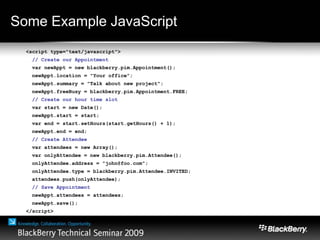
Some Example JavaScript
<script type="text/javascript">
// Create our Appointment
var newAppt = new blackberry.pim.Appointment();
newAppt.location = "Your office";
newAppt.summary = "Talk about new project";
newAppt.freeBusy = blackberry.pim.Appointment.FREE;
// Create our hour time slot
var start = new Date();
newAppt.start = start;
var end = start.setHours(start.getHours() + 1);
newAppt.end = end;
// Create Attendee
var attendees = new Array();
var onlyAttendee = new blackberry.pim.Attendee();
onlyAttendee.address = "john@foo.com";
onlyAttendee.type = blackberry.pim.Attendee.INVITED;
attendees.push(onlyAttendee);
// Save Appointment
newAppt.attendees = attendees;
newAppt.save();
</script>
BlackBerry Widget Packager
Standalone command line utility which is part of the
BlackBerry Widget SDK for packaging your Widget
• Input: Widget archive
• Output: Packaged BlackBerry Widget
Integrated into BlackBerry Web Plug-in Tools
• Widget plug-ins available in both Microsoft® Visual Studio®
2008 and in Eclipse®
• No Debugging support available in first Beta
Signs your application with a BlackBerry Code
Signing key
BlackBerry Widget Security Model
How to secure your BlackBerry Widget
BlackBerry Widget Security Overview
• BlackBerry Widgets must be signed with a Research In
Motion (RIM) code signing key
• The same access control policies can be applied to
Widgets as can be applied to native applications
• Web resources outside of the widget can be pulled in
from external sources as long as those sources match
the white list provided with your widget
• Widget JavaScript API’s are only provided in a
BlackBerry Widget, and not in the BlackBerry® Browser
White Listing Domains
• The core to a BlackBerry widget is the config.xml file
based on the W3C specification for widgets
• This configuration document specifies many things like
the name, author, description, version, icon etc for the
widget
• It also contains an area where you list domains that will
be white listed so that content from those domains can
be pulled into the widget
• Comparing a URL for compliance is based on the Same
Origin policy rules
Allowing Access To API’s
• Allowing access to Widget JavaScript API’s must also be
declared in the config.xml file
• This is done with the <feature> element
• For each API you wish to use, there is an associated
feature id that must be specified in your configuration
• Outside domains can access widget API’s if they have
been properly assigned in the white list
Last Mile Security
• Always follow proper security practices when bringing in
outside content into your widget
• i.e. Content from only trusted sources, and it is valuable to SSL
secure the connection for any man in the middle attacks
• A user or Corporate Administrator can set security
policies for each widget to specify which functionality
they will allow that application to access
Time For a Demo
Let’s Take a look at BlackBerry Widgets
Custom BlackBerry Widget API Extensions
• RIM will continue to add new BlackBerry Widget API’s.
Most will not require new OS versions to be used
• As a Java developer you can create your own custom
JavaScript extension to package with your widget
• Wrap any of the BlackBerry API’s by implementing the
provided JavaScript interfaces
• Package your BlackBerry Widget API extension in the
widget archive to be distributed with your application
Digging Deeper with BlackBerry Widgets
Some under the hood details
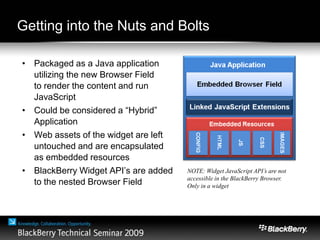
Getting into the Nuts and Bolts
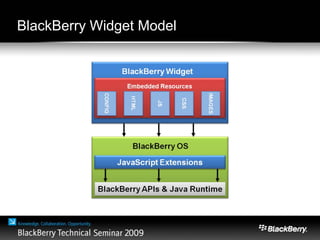
• Packaged as a Java application
utilizing the new Browser Field
to render the content and run
JavaScript
• Could be considered a “Hybrid”
Application
• Web assets of the widget are left
untouched and are encapsulated
as embedded resources
• BlackBerry Widget API’s are added
to the nested Browser Field
NOTE: Widget JavaScript API’s are not
accessible in the BlackBerry Browser.
Only in a widget
Summary
• BlackBerry Widgets are completely authored with web technologies
• HTML, JavaScript, CSS, etc
• Widgets run on BlackBerry® Device Software v5.0 and can be
distributed through BlackBerry App World
• Are generated using the BlackBerry Widget SDK
• Tooling integration with Eclipse and Microsoft Visual Studio is now
available
• JavaScript debugging support coming soon
• Custom JavaScript extensions will be supported soon, but they are
not available in the current available release
Another way to give us your feedback…
• There is an online survey for mobile web application
developers on Widget APIs:
• Which APIs are you most interested in?
• Which ones are the most / least important to you?
• Which other Widget APIs would you like us to provide?
• Why should I complete this survey?
• Opportunity to directly give us feedback about your Widget API
requirements
• Participants receive a gift card ($$) for participation
• Survey URL: _________________________
Tim Neil – Manager,
Development Tools
Thank You

Widgets neil

  • 1.
    Introduction to BlackBerry Widgets TimNeil Manager, Development Tools
  • 2.
    What are BlackBerryWidgets? • Based off of the W3C widget specification as standalone applications that are entirely created with standard web technology • BlackBerry® widgets leverage BlackBerry API’s in a secure manageable container • Same distribution/management model as native applications and can be distributed through BlackBerry App World™ • Will be available in an upcoming version of the BlackBerry Operating System
  • 3.
    What are BlackBerryWidgets? • User interface is entirely authored in HTML/CSS • Application logic is written in JavaScript with access to BlackBerry Widget API extensions • Access to Gears API’s for multi-threading, local storage via SQLite and Geolocation • Access to SD Card, PIM, native applications, data push and more • Packaged as a ZIP archive and converted into a BlackBerry Widget via using the BlackBerry Widget SDK
  • 4.
  • 5.
    BlackBerry Widget API’s Applicationand System Events • onBackground, onCoverageChange, etc. Push Services • Both Corporate and Consumer push using existing techniques Identity information • Phone numbers, PIN, email addresses Personal Information Management • Search and edit Email, Calendar, Tasks, Notepad, Contacts, etc.
  • 6.
    BlackBerry Widget API’s ApplicationLauncher – Invoke native apps with data, Invoke 3rd party Java® apps with data File IO – Read, write, traverse local files on eMMC and SDCard System Properties – Change home screen icon, background etc. User Interface – System Dialogs, Dynamic Menu items Utilities – Parsing URL’s, BlobToString, Generate unique ID, etc.
  • 7.
    Some Example JavaScript <scripttype="text/javascript"> // Create our Appointment var newAppt = new blackberry.pim.Appointment(); newAppt.location = "Your office"; newAppt.summary = "Talk about new project"; newAppt.freeBusy = blackberry.pim.Appointment.FREE; // Create our hour time slot var start = new Date(); newAppt.start = start; var end = start.setHours(start.getHours() + 1); newAppt.end = end; // Create Attendee var attendees = new Array(); var onlyAttendee = new blackberry.pim.Attendee(); onlyAttendee.address = "john@foo.com"; onlyAttendee.type = blackberry.pim.Attendee.INVITED; attendees.push(onlyAttendee); // Save Appointment newAppt.attendees = attendees; newAppt.save(); </script>
  • 8.
    BlackBerry Widget Packager Standalonecommand line utility which is part of the BlackBerry Widget SDK for packaging your Widget • Input: Widget archive • Output: Packaged BlackBerry Widget Integrated into BlackBerry Web Plug-in Tools • Widget plug-ins available in both Microsoft® Visual Studio® 2008 and in Eclipse® • No Debugging support available in first Beta Signs your application with a BlackBerry Code Signing key
  • 9.
    BlackBerry Widget SecurityModel How to secure your BlackBerry Widget
  • 10.
    BlackBerry Widget SecurityOverview • BlackBerry Widgets must be signed with a Research In Motion (RIM) code signing key • The same access control policies can be applied to Widgets as can be applied to native applications • Web resources outside of the widget can be pulled in from external sources as long as those sources match the white list provided with your widget • Widget JavaScript API’s are only provided in a BlackBerry Widget, and not in the BlackBerry® Browser
  • 11.
    White Listing Domains •The core to a BlackBerry widget is the config.xml file based on the W3C specification for widgets • This configuration document specifies many things like the name, author, description, version, icon etc for the widget • It also contains an area where you list domains that will be white listed so that content from those domains can be pulled into the widget • Comparing a URL for compliance is based on the Same Origin policy rules
  • 12.
    Allowing Access ToAPI’s • Allowing access to Widget JavaScript API’s must also be declared in the config.xml file • This is done with the <feature> element • For each API you wish to use, there is an associated feature id that must be specified in your configuration • Outside domains can access widget API’s if they have been properly assigned in the white list
  • 13.
    Last Mile Security •Always follow proper security practices when bringing in outside content into your widget • i.e. Content from only trusted sources, and it is valuable to SSL secure the connection for any man in the middle attacks • A user or Corporate Administrator can set security policies for each widget to specify which functionality they will allow that application to access
  • 14.
    Time For aDemo Let’s Take a look at BlackBerry Widgets
  • 15.
    Custom BlackBerry WidgetAPI Extensions • RIM will continue to add new BlackBerry Widget API’s. Most will not require new OS versions to be used • As a Java developer you can create your own custom JavaScript extension to package with your widget • Wrap any of the BlackBerry API’s by implementing the provided JavaScript interfaces • Package your BlackBerry Widget API extension in the widget archive to be distributed with your application
  • 16.
    Digging Deeper withBlackBerry Widgets Some under the hood details
  • 17.
    Getting into theNuts and Bolts • Packaged as a Java application utilizing the new Browser Field to render the content and run JavaScript • Could be considered a “Hybrid” Application • Web assets of the widget are left untouched and are encapsulated as embedded resources • BlackBerry Widget API’s are added to the nested Browser Field NOTE: Widget JavaScript API’s are not accessible in the BlackBerry Browser. Only in a widget
  • 18.
    Summary • BlackBerry Widgetsare completely authored with web technologies • HTML, JavaScript, CSS, etc • Widgets run on BlackBerry® Device Software v5.0 and can be distributed through BlackBerry App World • Are generated using the BlackBerry Widget SDK • Tooling integration with Eclipse and Microsoft Visual Studio is now available • JavaScript debugging support coming soon • Custom JavaScript extensions will be supported soon, but they are not available in the current available release
  • 19.
    Another way togive us your feedback… • There is an online survey for mobile web application developers on Widget APIs: • Which APIs are you most interested in? • Which ones are the most / least important to you? • Which other Widget APIs would you like us to provide? • Why should I complete this survey? • Opportunity to directly give us feedback about your Widget API requirements • Participants receive a gift card ($$) for participation • Survey URL: _________________________
  • 20.
    Tim Neil –Manager, Development Tools Thank You