









What’s New for DevsMohamed Yehia
About the SpeakerTechnical ArchitectMCP since 2001, MCAD, MCSD, MCTSEgypt SharePoint User Group LeadSharePoint4Arabs Co-FounderA SharePoint Friend since 2004
OutlineTechnology StackDeveloper ProductivityPlatform ImprovementsList ImprovementsData Access TechnologiesUI ImprovementsSandbox Solutions
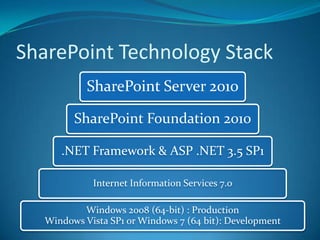
SharePoint Technology Stack
Developer PlatformWorkstation : Windows 7 or Vista SP164 bit OS onlyNot supported on productionSharePoint Foundation or SharePoint ServerSingle Server Install
Developer ToolsDev Life with SP 2007VS is LimitedEdit CAML filesUnderstanding RootFiles directory of WSSManual edits to manifest.xml fileWSP packaging nightmare
Developer ToolsDev Life with SP 2010End to End Development StoryVisual Studio 2010SharePoint Designer 2010Developer Dashboard
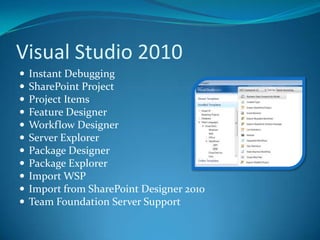
Visual Studio 2010Instant DebuggingSharePoint ProjectProject ItemsFeature DesignerWorkflow DesignerServer ExplorerPackage DesignerPackage ExplorerImport WSPImport from SharePoint Designer 2010Team Foundation Server Support
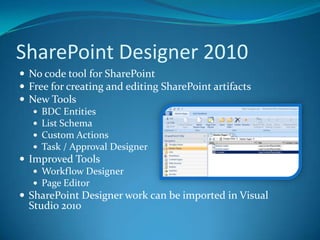
SharePoint Designer 2010No code tool for SharePointFree for creating and editing SharePoint artifactsNew Tools BDC EntitiesList SchemaCustom ActionsTask / Approval DesignerImproved Tools Workflow DesignerPage EditorSharePoint Designer work can be imported in Visual Studio 2010
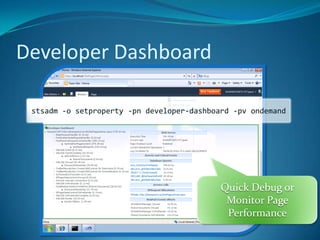
Developer Dashboardstsadm -o setproperty -pn developer-dashboard -pvondemandQuick Debug or Monitor Page Performance
demo SP Dev Life in 2010
List ImprovementsLarge List Support (50M items)Relationships with Cascade or BlockValidation RulesExcel Like FormulaFields and ItemsList Query ThrottlingXSLT Views
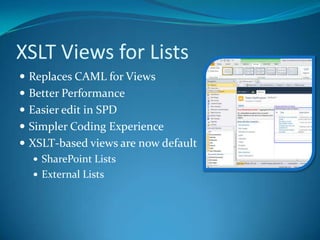
XSLT Views for ListsReplaces CAML for ViewsBetter PerformanceEasier edit in SPDSimpler Coding ExperienceXSLT-based views are now defaultSharePoint ListsExternal Lists
Events ImprovementsNew EventsListAdding & ListAddedListDeleting & ListDeletedSynchronous “after” eventsMore User Interface Control Custom error pages
DEMORelational ListsValidation List Events
Accessing DataLINQ for SharePointClient Object ModelECMA ScriptSilverlight OM.Net OMREST APIs
LINQ for SharePointStrong TypesLINQ QueriesReference AssembliesMicrosoft.SharePoint.LinqSPMetal code generation utilityCan modify list data
demoLINQ for SharePoint
Client Object ModelMajor request to increase web servicesClient OM isSimple APIan abstraction layer to return results as recognizable SharePoint objectsConsistent developer experience across platforms.NETECMAScriptSilverlight
Using the Client Object ModelECMAScriptControlsand LogicBrowserServer OMJSON ResponseECMAScript OMClient.svcXML RequestProxyXML RequestProxyContentdatabaseJSON ResponseManaged OMManaged ClientManaged Controls and LogicSharePoint Server
demoClient Object Model
REST APIs
UI EnhancementsCSSSplit into multiple files, only download what’s necessary for the pageJavascriptScript On Demand allows delaying JavaScript download until it’s neededDebug versions of files show clear JavaScript before optimizing
UI EnhancementsPages EverywhereEdit Like in WordWell-Formed XHTML 1.0Cross-Browser (IE, Firefox, better support for Safari)WCAG 2.0 AACSSSplit into multiple files, only download what’s necessary for the pageJavascriptScript On Demand allows delaying JavaScript download until it’s neededDebug versions of files show clear JavaScript before optimizing
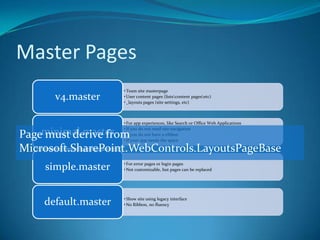
Master PagesPage must derive from Microsoft.SharePoint.WebControls.LayoutsPageBase
Ribbon and Dialog FrameworkClient Site Custom Actions in RibbonContext Sensitive RibbonThe RibbonStatus BarNotification Area
Ribbon and Dialog FrameworkReplaceable SharePoint OOB formsOpen as Web Page or as DialogClient Site Custom Actions in RibbonContext Sensitive Ribbon
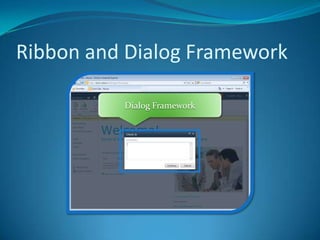
Ribbon and Dialog FrameworkDialog Framework
demoDialog Framework
Silverlight in SP2010Office Web ApplicationsSilverlight Web PartSimple way to uploadSilverlight CLR compatible Client Object ModelCall SharePoint API’s
Built on BDC from MOSSBrings LOB Data Into SharePointSharePoint List with External DataRead / WriteSharePoint FoundationOffice AppsClient RuntimeOffline OperationsCacheDesign ToolsSharePointVisual Studio 2010EnterpriseSearchDevelopmentPlatformBusiness IntelligenceEnterprise content mgmtCollaboration socialSharePoint Designer 2010ECT StoreRuntimeSecuritySolution PackagingOut of the box UIWeb 2.0DBWCFWeb Service.NET LOBBusiness Connectivity Services
Workflow ImprovementsVisual Studio 2010 Initiation and Association FormsNew Workflow Design Surface in SPDImport SPD Workflows into Visual StudioBuild SPD Actions in Visual Studio Visio 2010 Workflow DesignBrowser Based VisualizationControl Where Service RunsSite WorkflowsList Workflow Event ReceiversPluggable Workflow ServicesApproval Designer
demoWorkflow in VS 2010

What’s New for Devs

  • 1.
    What’s New forDevsMohamed Yehia
  • 2.
    About the SpeakerTechnicalArchitectMCP since 2001, MCAD, MCSD, MCTSEgypt SharePoint User Group LeadSharePoint4Arabs Co-FounderA SharePoint Friend since 2004
  • 3.
    OutlineTechnology StackDeveloper ProductivityPlatformImprovementsList ImprovementsData Access TechnologiesUI ImprovementsSandbox Solutions
  • 4.
  • 5.
    Developer PlatformWorkstation :Windows 7 or Vista SP164 bit OS onlyNot supported on productionSharePoint Foundation or SharePoint ServerSingle Server Install
  • 6.
    Developer ToolsDev Lifewith SP 2007VS is LimitedEdit CAML filesUnderstanding RootFiles directory of WSSManual edits to manifest.xml fileWSP packaging nightmare
  • 7.
    Developer ToolsDev Lifewith SP 2010End to End Development StoryVisual Studio 2010SharePoint Designer 2010Developer Dashboard
  • 8.
    Visual Studio 2010InstantDebuggingSharePoint ProjectProject ItemsFeature DesignerWorkflow DesignerServer ExplorerPackage DesignerPackage ExplorerImport WSPImport from SharePoint Designer 2010Team Foundation Server Support
  • 9.
    SharePoint Designer 2010Nocode tool for SharePointFree for creating and editing SharePoint artifactsNew Tools BDC EntitiesList SchemaCustom ActionsTask / Approval DesignerImproved Tools Workflow DesignerPage EditorSharePoint Designer work can be imported in Visual Studio 2010
  • 10.
    Developer Dashboardstsadm -osetproperty -pn developer-dashboard -pvondemandQuick Debug or Monitor Page Performance
  • 11.
    demo SP DevLife in 2010
  • 12.
    List ImprovementsLarge ListSupport (50M items)Relationships with Cascade or BlockValidation RulesExcel Like FormulaFields and ItemsList Query ThrottlingXSLT Views
  • 13.
    XSLT Views forListsReplaces CAML for ViewsBetter PerformanceEasier edit in SPDSimpler Coding ExperienceXSLT-based views are now defaultSharePoint ListsExternal Lists
  • 14.
    Events ImprovementsNew EventsListAdding& ListAddedListDeleting & ListDeletedSynchronous “after” eventsMore User Interface Control Custom error pages
  • 15.
  • 16.
    Accessing DataLINQ forSharePointClient Object ModelECMA ScriptSilverlight OM.Net OMREST APIs
  • 17.
    LINQ for SharePointStrongTypesLINQ QueriesReference AssembliesMicrosoft.SharePoint.LinqSPMetal code generation utilityCan modify list data
  • 18.
  • 19.
    Client Object ModelMajorrequest to increase web servicesClient OM isSimple APIan abstraction layer to return results as recognizable SharePoint objectsConsistent developer experience across platforms.NETECMAScriptSilverlight
  • 20.
    Using the ClientObject ModelECMAScriptControlsand LogicBrowserServer OMJSON ResponseECMAScript OMClient.svcXML RequestProxyXML RequestProxyContentdatabaseJSON ResponseManaged OMManaged ClientManaged Controls and LogicSharePoint Server
  • 21.
  • 22.
  • 23.
    UI EnhancementsCSSSplit intomultiple files, only download what’s necessary for the pageJavascriptScript On Demand allows delaying JavaScript download until it’s neededDebug versions of files show clear JavaScript before optimizing
  • 24.
    UI EnhancementsPages EverywhereEditLike in WordWell-Formed XHTML 1.0Cross-Browser (IE, Firefox, better support for Safari)WCAG 2.0 AACSSSplit into multiple files, only download what’s necessary for the pageJavascriptScript On Demand allows delaying JavaScript download until it’s neededDebug versions of files show clear JavaScript before optimizing
  • 25.
    Master PagesPage mustderive from Microsoft.SharePoint.WebControls.LayoutsPageBase
  • 26.
    Ribbon and DialogFrameworkClient Site Custom Actions in RibbonContext Sensitive RibbonThe RibbonStatus BarNotification Area
  • 27.
    Ribbon and DialogFrameworkReplaceable SharePoint OOB formsOpen as Web Page or as DialogClient Site Custom Actions in RibbonContext Sensitive Ribbon
  • 28.
    Ribbon and DialogFrameworkDialog Framework
  • 29.
  • 30.
    Silverlight in SP2010OfficeWeb ApplicationsSilverlight Web PartSimple way to uploadSilverlight CLR compatible Client Object ModelCall SharePoint API’s
  • 31.
    Built on BDCfrom MOSSBrings LOB Data Into SharePointSharePoint List with External DataRead / WriteSharePoint FoundationOffice AppsClient RuntimeOffline OperationsCacheDesign ToolsSharePointVisual Studio 2010EnterpriseSearchDevelopmentPlatformBusiness IntelligenceEnterprise content mgmtCollaboration socialSharePoint Designer 2010ECT StoreRuntimeSecuritySolution PackagingOut of the box UIWeb 2.0DBWCFWeb Service.NET LOBBusiness Connectivity Services
  • 32.
    Workflow ImprovementsVisual Studio2010 Initiation and Association FormsNew Workflow Design Surface in SPDImport SPD Workflows into Visual StudioBuild SPD Actions in Visual Studio Visio 2010 Workflow DesignBrowser Based VisualizationControl Where Service RunsSite WorkflowsList Workflow Event ReceiversPluggable Workflow ServicesApproval Designer
  • 33.
  • 34.
    Sandbox SolutionsSharePoint 2007Noproper hosting model definedHard to control what is being done in custom codeSP 2010Allow a subset of ‘full’ solution featuresCode executes in sandbox Are deployed by a Site Collection administratorStored in the Solution Gallery
  • 35.
    Sandboxed Solution ElementsWebPartsListsList TemplatesCustom ActionsWorkflowsEvent ReceiversContent TypesSite Columns…
  • 36.
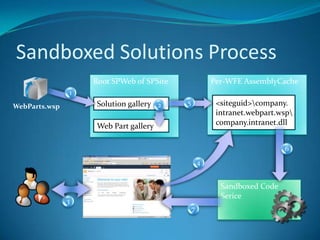
    Sandboxed Solutions Process2156743Per-WFEAssemblyCacheRootSPWeb of SPSite<siteguid>\company.intranet.webpart.wsp\company.intranet.dllSolution galleryWeb Part gallerySandboxed Code SericeWebParts.wsp
  • 37.
    Sandbox Solution MonitoringSitecollection quotas specify the warning and hard limits for number of resources that can be used per dayCan be load balanced or executed on dedicated SharePoint ServersRestrict the solutions that are allowed to runInstall with a farm level feature[GuidAttribute("34805697-1FC4-4b66-AF09-AB48AC0F9D97")]publicclassPublisherValidator:SPSolutionValidator{[Persisted]List<string>_allowedPublishers;publicoverridevoidValidateSolution(SPSolutionValidationProperties properties){}publicoverridevoidValidateAssembly(SPSolutionValidationPropertiesproperties,SPSolutionFileassembly){}}
  • 38.
  • 39.
  • 40.
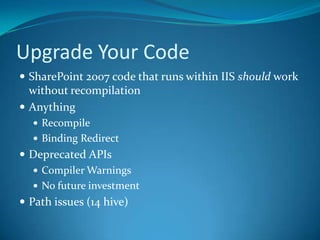
    Upgrade Your CodeSharePoint2007 code that runs within IIS should work without recompilationAnythingRecompileBinding RedirectDeprecated APIsCompiler WarningsNo future investmentPath issues (14 hive)
  • 41.
    Keep Up withthe RaceIIS 7.0JavascriptjQueryAJAXXSLTPowershellLINQWCFWFSilverlight
  • 42.
    Learn MoreMSDN (http://MSSharePointDeveloper.com)TechNet(http://MSSharePointITPro.com)Twitter Search #SP2010
  • 43.
    Egypt SharePoint UserGroupwww.sharepointgroups.org/egysug
  • 44.
  • 45.
  • 46.
    Coming SessionsDecember 5thsponsoredby dotnetworkgroupAin Shams UniversityDecember 19thStay tuned to EgySUG site

Editor's Notes

  • #20 This diagram displays how the transport mechanism worksManage client OM = .NET / SilverlightAll communication goes through the client.svc WCF serviceMicrosoft implemented the client OM by decorating the core SharePoint OM with attributes if it was “client aware”[ClientCallableType(Name=“Web”,[…]),[…]]public class SPWeb {}Then a code gen tool generates the client OM assemblies and JavaScriptThis ensures that there’s fidelity between all the client OM’s and the server equiv
  • #26 Now that pages are the topic of discussion, master pages and a little branding fits in too. SharePoint 2010 ships with a number of master pages. Important topics to discuss on this slide is how application pages can now also make use of branded master pages, and how there is a default.master that ships the (non-fluent) v3 UI for backwards compatibility.
  • #36 Generally you can do most things you can with full solutions, at least those within the context of a site collection. You cannot deploy files on disc or assemblies to the GAC.
  • #37 This chronicles the process of using a custom "bugs" Web Part and solution in a particular site.The SPSite adminuploads a new solution package (*.wsp) into the Solution Gallery of the SPSite. The SPSite admin"activates" the solution.  This activates the features within the solution.  Web Part files are copied into the Web Part gallery.As part of the activation, solution is validated using the validation framework. Custom validator can be added for example to check that only solutions signed with certain key can be activated. Customers and partners can develop their own validators based on their needs.Some time later, a user decides to add a Web Part to their home page.  They go into Web Part edit mode, and click "Add a Web Part".  They notice the additional Web Part options, and click Add. SharePoint now checks to see if the bugs.dll file, which backs this Web Part, is installed into the assembly cache.  It is not. The assembly is faulted into the assembly cache; it is extracted and copied from the solution file to temporary folder in disk and loaded to memory (disk is cleaned immediately). Now the Web Part is about to be used. It is loaded into Sandbox Code service host.Processes deliver the Web Part to be executed to the service.
  • #38 Resource monitors keep sandbox solutions from over taxing the server.The SUM of all resource measures is the number applied to the quota.The MAX of all resource measures is used to determine if the sandbox should be turned off for a given solution one day.
  • #39 %