


Introducing SharePoint 2010 Development to ALM#ALM07Jeremy Thakewss.made4the.netjthake@made4the.net@jthake – MCTS – MCT - vTSP
Jeremy  ThakeMicrosoft Virtual Technology SpecialistSharePoint ConsultantMicrosoft Certified Trainer (MCT)Facilitator of Perth SharePoint User Group
AgendaChallenges of SharePoint 2007 DevelopmentEnhancementsEnvironment, Platform, ToolsetDemosCode Analysis, Build Server
Keep your hand up if…You’ve developed on SharePointYou used source controlYou used a build serverYou ran SPDisposeCheckYou have grey hair
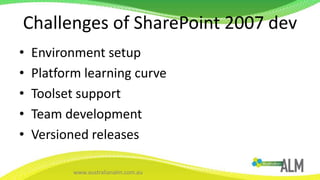
Challenges of SharePoint 2007 devEnvironment setupPlatform learning curveToolset supportTeam developmentVersioned releases
ENHANCEMENTS
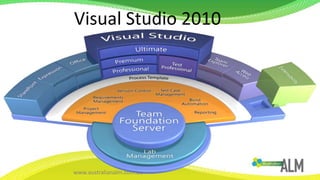
Visual Studio 2010
DEVELOPMENT ENVIRONMENT
Development EnvironmentWindows 7/Vista SP1 supportMust be 64-bitRequires min 4Gb RAM for FoundationSharePoint 2010 must be installed locallyWizard installs and configures most things
PLATFORM ENHANCEMENTS
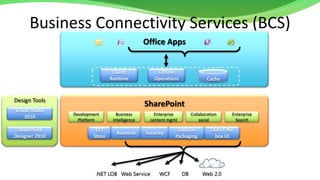
Business Connectivity Services (BCS)Office AppsClient RuntimeOffline OperationsCacheDesign ToolsSharePointVisual Studio 2010EnterpriseSearchDevelopmentPlatformBusiness IntelligenceEnterprise content mgmtCollaboration socialECT StoreRuntimeSecuritySolution PackagingOut of the box UISharePoint Designer 2010Web 2.0DBWCFWeb Service.NET LOB
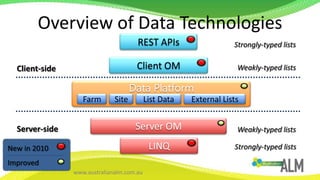
Overview of Data TechnologiesREST APIsStrongly-typed listsClientOMWeakly-typed listsClient-sideData PlatformFarmSiteList DataExternal ListsServerOMServer-sideWeakly-typed listsLINQNew in 2010ImprovedStrongly-typed lists
SolutionsSandboxed solutions (think cloud)Developer dashboardSupport for feature versioning
List ImprovementsScalability and PerformanceRelationshipsValidationLookup to multiple columnsList Index Auto creationList Query ThrottlingXSLT views
TOOL ENHANCEMENTS
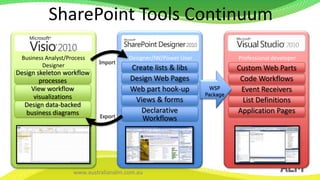
SharePoint Tools ContinuumProfessional developerBusiness Analyst/Process DesignerDesigner/IW/Power UserImportCreate lists & libsDesign Web PagesWeb part hook-upViews & formsDeclarative WorkflowsCustom Web PartsCode WorkflowsEvent ReceiversList DefinitionsApplication PagesDesign skeleton workflow processesView workflow visualizationsDesign data-backed business diagramsWSP PackageExport
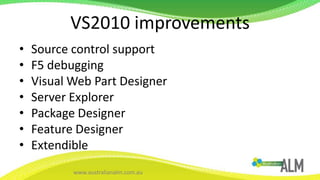
VS2010 improvementsSource control supportF5 debuggingVisual Web Part DesignerServer ExplorerPackage DesignerFeature DesignerExtendible
F5 DebuggingDEMO
CODE ANALYSIS – SPDisposecheckDEMO
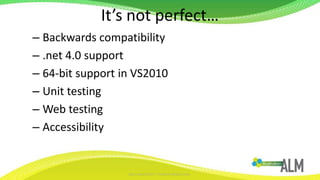
It’s not perfect…Backwards compatibility.net 4.0 support64-bit support in VS2010Unit testingWeb testingAccessibility
BUILD SERVERDEEP DIVE
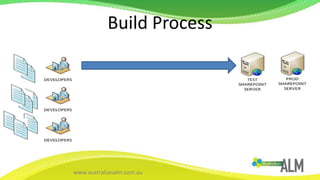
Build Process
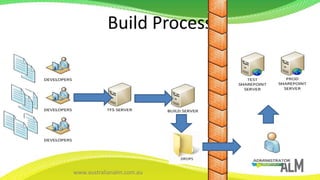
Build Process
Natalie (Excelle),0273316688Natalie (Excelle),0273316688Dev PCTeam Foundation ServerFix Bugs(repeat as necessary)Check InDevelopmentF5 DeploySmoke TestingNightly build-OR-ContinuousIntegrationStagingBuild ServerTeam BuildCheck in WSPBuildSP2010 DLL’sBugsUnit TestingWarm-bloodeduser testingWSPWSPInstall and Activate [script]Automated testing
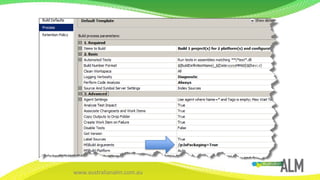
Configuring a buildDEMO
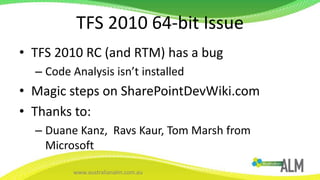
TFS 2010 64-bit IssueTFS 2010 RC (and RTM) has a bugCode Analysis isn’t installedMagic steps on SharePointDevWiki.comThanks to:Duane Kanz,  Ravs Kaur, Tom Marsh from Microsoft
QUESTIONSDEMO
SharePoint 2010http://sharepoint.microsoft.com/SharePoint Developer Centrehttp://msdn.microsoft.com/en-us/office/aa905503.aspxFREE conference videos & slideshttp://msdn.microsoft.com/en-us/sharepoint/ff405669.aspxhttp://www.microsoft.com/downloads/details.aspx?FamilyID=f8cb362c-75ad-4cb9-9fbc-3abcdf6afeaf&displaylang=enSharePoint Patterns & Practices Group (SPG)http://www.microsoft.com/spgSPDevWikiWeb Casthttp://sharepointdevwiki.com/x/A4BlAQSharePoint ALM White Paperhttp://www.repliweb.com/SPDisposeCheckStatichttp://spdisposecheckstatic.codeplex.com/Resources
#ALM07

Jeremy thake introducing alm to share point development implementations (apr2010)

  • 1.
    Introducing SharePoint 2010Development to ALM#ALM07Jeremy Thakewss.made4the.netjthake@made4the.net@jthake – MCTS – MCT - vTSP
  • 2.
    Jeremy ThakeMicrosoftVirtual Technology SpecialistSharePoint ConsultantMicrosoft Certified Trainer (MCT)Facilitator of Perth SharePoint User Group
  • 3.
    AgendaChallenges of SharePoint2007 DevelopmentEnhancementsEnvironment, Platform, ToolsetDemosCode Analysis, Build Server
  • 4.
    Keep your handup if…You’ve developed on SharePointYou used source controlYou used a build serverYou ran SPDisposeCheckYou have grey hair
  • 5.
    Challenges of SharePoint2007 devEnvironment setupPlatform learning curveToolset supportTeam developmentVersioned releases
  • 6.
  • 7.
  • 8.
  • 9.
    Development EnvironmentWindows 7/VistaSP1 supportMust be 64-bitRequires min 4Gb RAM for FoundationSharePoint 2010 must be installed locallyWizard installs and configures most things
  • 10.
  • 11.
    Business Connectivity Services(BCS)Office AppsClient RuntimeOffline OperationsCacheDesign ToolsSharePointVisual Studio 2010EnterpriseSearchDevelopmentPlatformBusiness IntelligenceEnterprise content mgmtCollaboration socialECT StoreRuntimeSecuritySolution PackagingOut of the box UISharePoint Designer 2010Web 2.0DBWCFWeb Service.NET LOB
  • 12.
    Overview of DataTechnologiesREST APIsStrongly-typed listsClientOMWeakly-typed listsClient-sideData PlatformFarmSiteList DataExternal ListsServerOMServer-sideWeakly-typed listsLINQNew in 2010ImprovedStrongly-typed lists
  • 13.
    SolutionsSandboxed solutions (thinkcloud)Developer dashboardSupport for feature versioning
  • 14.
    List ImprovementsScalability andPerformanceRelationshipsValidationLookup to multiple columnsList Index Auto creationList Query ThrottlingXSLT views
  • 15.
  • 16.
    SharePoint Tools ContinuumProfessionaldeveloperBusiness Analyst/Process DesignerDesigner/IW/Power UserImportCreate lists & libsDesign Web PagesWeb part hook-upViews & formsDeclarative WorkflowsCustom Web PartsCode WorkflowsEvent ReceiversList DefinitionsApplication PagesDesign skeleton workflow processesView workflow visualizationsDesign data-backed business diagramsWSP PackageExport
  • 17.
    VS2010 improvementsSource controlsupportF5 debuggingVisual Web Part DesignerServer ExplorerPackage DesignerFeature DesignerExtendible
  • 18.
  • 19.
    CODE ANALYSIS –SPDisposecheckDEMO
  • 20.
    It’s not perfect…Backwardscompatibility.net 4.0 support64-bit support in VS2010Unit testingWeb testingAccessibility
  • 21.
  • 22.
  • 23.
  • 24.
    Natalie (Excelle),0273316688Natalie (Excelle),0273316688DevPCTeam Foundation ServerFix Bugs(repeat as necessary)Check InDevelopmentF5 DeploySmoke TestingNightly build-OR-ContinuousIntegrationStagingBuild ServerTeam BuildCheck in WSPBuildSP2010 DLL’sBugsUnit TestingWarm-bloodeduser testingWSPWSPInstall and Activate [script]Automated testing
  • 25.
  • 27.
    TFS 2010 64-bitIssueTFS 2010 RC (and RTM) has a bugCode Analysis isn’t installedMagic steps on SharePointDevWiki.comThanks to:Duane Kanz, Ravs Kaur, Tom Marsh from Microsoft
  • 28.
  • 29.
    SharePoint 2010http://sharepoint.microsoft.com/SharePoint DeveloperCentrehttp://msdn.microsoft.com/en-us/office/aa905503.aspxFREE conference videos & slideshttp://msdn.microsoft.com/en-us/sharepoint/ff405669.aspxhttp://www.microsoft.com/downloads/details.aspx?FamilyID=f8cb362c-75ad-4cb9-9fbc-3abcdf6afeaf&displaylang=enSharePoint Patterns & Practices Group (SPG)http://www.microsoft.com/spgSPDevWikiWeb Casthttp://sharepointdevwiki.com/x/A4BlAQSharePoint ALM White Paperhttp://www.repliweb.com/SPDisposeCheckStatichttp://spdisposecheckstatic.codeplex.com/Resources
  • 30.

Editor's Notes

  • #6 Environment setupInstalling SharePointHardware requirementsTeam developmentbuilding implementationsTool supportsource control in VSeWSSprojectsDebugging trickyno out of the box build server abilityVersioned releasesFeaturesContent typesVersion 1.1 was always a scary thoughtSee also: http://wss.made4the.net/archive/2009/10/26/factors.aspxhttp://wss.made4the.net/archive/2009/07/06/how-asp-net-developers-can-leverage-sharepoint-webcast.aspx
  • #8 SharePoint is now a part of the toolset out of the gates!
  • #10 Windows 7/Vista SP1 supportSome manual “hacks” to get to install but is supported for developmentMust be 64-bitVirtual PC - no support…so VMWare Workstation, Sun VirtualBoxRequires min 4Gb RAM for FoundationFoundation requires 4Gb RAMServer 2010 requires 6Gb RAMWizards installs and configures most things- Seehttp://autospinstaller.codeplex.com/ for PowerShell automated install script (AWESOME!)See also:Installing SharePoint 2010 Beta 2http://sharepointdevwiki.com/display/spadmin2010/Install+SharePoint+2010+Public+Beta+on+Standalone+Windows+Server+2008Building a SharePoint 2010 Development Environmenthttp://sharepointdevwiki.com/display/sp2010/Building+a+SharePoint+2010+Development+machineMicrosoft SharePoint 2010 Demo VM Tips & Tricks (downloadable pre-built VM)http://sharepointdevwiki.com/pages/viewpage.action?pageId=23429169
  • #12 LOB data becomes SharePoint List data- Leverage SharePoint Workspace 2010-Leverage Outlook 2010 integration with Contacts, Tasks, CalendarsRead/Write- Now reads and writes to Line of Business DataIncluded in SharePoint FoundationComes with Foundation Edition (so free!)Design Tools- Can use both VS2010 and SPD2010 (no code) to create BCS connections
  • #13 REST ADO.NET Data ServicesClient OMSupport for:.netSilverLightJavaScriptCoding is very similar in each languageCan batch up commands and send to execute on serverLINQUse spmetal.exe to generate LINQ proxy class to use to query SharePoint Lists
  • #14 Sandboxed SolutionsSite Collection Administrations can upload WSPsReduce reliance on Server AdminsMonitoring of performance of managed code in WSPsDeveloper Dashboard- Detailed performance metrics on page load to troubleshoot errorsFeature versioningcall imperative Feature Receivers and declarative Manifest XMLs per version rangeFeature upgrade query object modelAbility to check what version is installed/activated in sitesMapFile element – moving existing files that have been deployed by features
  • #16 Workflow between different roles in Organisation.Can finally move workflows built by business into other tool sets easily!
  • #18 Source Control supportOut of the box TFS 2010 support and team build supportDeployment StepsDeployment steps in Visual Studio 2010 allow for custom activities to occurE.g. cleaning up a list and inserting rows once a WSP has been deployed and feature activated
  • #19 Demonstrate creating a Visual Web Part and then hitting F5 to deploy to environment and hit breakpoint.
  • #20 Demonstrate how adding inefficient code can be flagged by Code Analysis
  • #21 Backwards compatibilityVS2010 tooling does not support SharePoint 2007 development.WSPBuilder 2010 will support this..net 4.0 support Does not leverage .net 4.0, only .net 3.5.Unit Testing3rd party: xUnit.net, Pex/Moles, TypeMockhttp://wss.made4the.net/archive/2009/03/25/sharepoint-development-with-unit-testing-webcast.aspxhttp://www.sharepointdevwiki.com/pages/viewpage.action?pageId=7340352Web testingNot all of UI supported (form submissions, ribbon clicks)Accessibility- Not W3C compliant, WCAG 2.0 compliant
  • #23 Devs“It works on my machine”“Can’t find the source control for this version”“Haven’t got the source control”“I’ve made changes in SharePoint Root”“I copied it to the GAC manually”Admins“We don’t know where to deploy it!”“What version is in Production?”
  • #24 Automate building of WSPEnforce that all artefacts get deployed via WSP.No manual copying of files to SharePoint RootDisaster RecoveryCheck in policyBuild StampingBuild ServerSeparate serverDon’t install SharePoint on it!Get administrators to push to environments…or automate it (PowerShell 2.0 remoting)
  • #25 We’ve discussed the operating system options, now let’s look at what needs to be installed. The developer’s PC will have Visual Studio and SharePoint 2010 installed. You will use unit testing, smoke testing, and leverage the capabilities of Visual Studio for F5 deployment. In a SharePoint 2007 environment, you can use a number of tools to enable this such as WSP Builder, VSeWSS 1.3, or STSDEV. In a 2010 environment, Visual Studio 2010 provides integrated development capabilities for SharePoint. (build)Once you have written and unit tested your code, you check it into a source code repository such as Visual Studio Team System’s Team Foundation Server. Team Foundation Server provides the enterprise source code repository and application lifecycle management capabilities to support an enterprise development team. (build)After the code is checked in, a nightly build or continuous integration server will create the WSP. Here, we see Visual Studio Team System’s Team Build installed on a server with only the SharePoint 2010 DLLs. The product team will be releasing guidance to show how to configure a build server with only the SharePoint 2010 DLLs deployed so that you do not need to install SharePoint on your build server. This allows you to perform unit testing and build operations in a clean environment. Further guidance will be coming from the SharePoint product team as we near RTM on how to achieve this. (build)Since the build server created the WSP, it should be checked into the source repository so that the installation can be repeated in the future and its version maintained. The next step is to install and activate the WSP. This can be achieved as part of the build process. (build)The staging environment is now ready for automated testing and warm-blooded user testing.
  • #26 Demonstrate configuring builds in VS2010 and running one, demonstrating the build dropDemonstrate configuring build definition in VS2010 and running one, demonstrating the build drop.Demonstrate steps required to get builds working on Build Server.
  • #28 Get:Microsoft.SharePoint.dllMicrosoft.SharePoint.Security.dllMicrosoft.SharePoint.WorkflowActions.dllFROM:C:Program FilesCommon FilesMicrosoft SharedWeb Server Extensions14ISAPIGet:Microsoft.VisualStudio.CodeAnlaysisMicrosoft.VisualStudio.CodeAnlaysis.SdkMicroosft.VisualStudio.SharePointMicrosoft.VisualStudio.SharePoint.Designers.ModelsMicrosoft.VisualStudio.SharePoint.Designers.Models.FeaturesMicrosoft.VisualStudio.SharePoint.Designers.Models.PackagesFrom:C:WindowsMicrosoft.NETassemblyGAC_MSILGet:Gacutil.exeGacutil.exe.configFrom:C:Program Files (x86)Microsoft SDKsWindowsv7.0ABinNETFX 4.0 ToolsGet:Microsoft.VisualStudio.SharePoint.targetsMicrosoft.VisualStudio.SharePoint.Tasks.dllFrom:C:Program Files (x86)MSBuildMicrosoftVisualStudiov10.0SharePointToolsrenamed PhoenixAnalysisEngine.dll to PhoenixAnalysisEngine.dll.bak in directory:C:Program Files (x86)Microsoft Visual Studio 10.0Team ToolsStatic Analysis ToolsFxCopEnginesrenamed DataflowRules.dll to DataflowRules.dll.bak in directory:C:Program Files (x86)Microsoft Visual Studio 10.0Team ToolsStatic Analysis ToolsFxCopRules