Copyright © 2019 ONE BCG. All rights reserved.
Load, Stress and Endurance
Testing
2
Copyright © 2019 ONE BCG. All rights reserved.
• What is Endurance Testing?
• Goals of Endurance Testing
• What to monitor in Endurance Testing?
• How to perform Endurance Testing?
• Advantages of Endurance Testing
• Disadvantages of Endurance Testing
• Endurance Testing Tools
• Endurance Testing in Jmeter
Agenda
3
Copyright © 2019 ONE BCG. All rights reserved.
Load vs Stress Testing
● A load test measures the performance of a system under an expected load. In contrast, a stress test overloads
a system to find the breaking point.
● In load testing load limit is a threshold of a break. In stress testing load limit is above the threshold of a break.
● Fact - As of February 2017, there were more than 400 hours of content uploaded to YouTube each minute, and
one billion hours of content being watched on YouTube every day. As of July 2019, more than 575 hours of
video content are uploaded to YouTube every minute. So will YouTube or Cloud run out of space one day?
4
Copyright © 2019 ONE BCG. All rights reserved.
• One difference between a load test and stress test is that you may inject pauses into a load test to simulate
real user traffic. With a stress test, you may run as many simultaneous users as fast as possible to generate
excessive traffic for a stress test.
• The goals of a load test are very different than the goals of a stress test. A load test is performed in order to
ensure that a website or web application is capable of handling specific numbers of users at once. Load
Testing is often used in the process of capacity planning, to ensure that a system is able to handle growth to
specified levels of simultaneous traffic.
• A stress test is used to specifically push a system beyond its intended capacity to identify components that
begin to slow down, identify bottlenecks in the system, and bring to light possible points of failure.
When to Choose a Load Test or Stress Test?
5
Copyright © 2019 ONE BCG. All rights reserved.
• The word Endurance means ‘the capacity of something to last or to withstand the wear and tear.’ You can
simply call it as durability, lasting power or longevity.
• In Endurance Testing, a system is tested with a load extended over a significant amount of time, to analyze
the behavior of the system under sustained use.
• This type of testing is performed at the last stage of the performance run cycle. It ensures that the application
is capable enough to handle the extended load without any deterioration of response time.
• Endurance testing is a long process and sometimes last for even up to a year. This may include applying
external loads such as Internet traffic or user actions. This makes endurance testing differ from Load Testing,
which usually ends in a couple of hours or so.
• "Endurance means capacity so, in other words, you can term Endurance Testing as Soak testing/Longevity
testing/Capacity Testing."
What is Endurance testing?
6
Copyright © 2019 ONE BCG. All rights reserved.
• The primary goal of Endurance testing is to check for memory leaks.
• To discover how the system performs under sustained usage.
• To ensure that after a long period, the system response time will remain the same or better than the start of
the test.
• To determine the number of users and/or transactions a given system will support and meet performance
goals.
• To manage future loads, we need to understand how many additional resources (like processor capacity, disk
capacity, memory usage, or network bandwidth) are necessary to support usage in the future.
• Endurance testing is generally done by either overloading the system or by reducing certain system resources
and evaluating the consequences.
Goals of Endurance Testing
7
Copyright © 2019 ONE BCG. All rights reserved.
In Endurance Testing, the following things are tested.
● Test memory leakage- Checks are done to verify if there is any memory leakage in the application, which can
cause crashing of the system or O.S.
● Test connection closure between the layer of the system – If the connection between the layers of the
system is not closed successfully, it may stall some or all modules of the system.
● Test database connection close successfully- If the database connection is not closed successfully, may
result in a system crash.
● Test response time – System is tested for the response time of the system as the application becomes less
efficient as a result of the prolonged use of the system.
What to monitor in Endurance Testing?
8
Copyright © 2019 ONE BCG. All rights reserved.
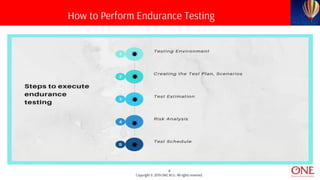
How to Perform Endurance Testing
9
Copyright © 2019 ONE BCG. All rights reserved.
• Testing Environment – Identify the hardware, software, operating system required for the endurance testing,
assigning roles and responsibilities within the team, etc. The environment should be ready before the test
execution. You also need to estimate common database production size and yearly growth. This is required as
such you need to test how your application will respond after a year, two or five.
• Creating the Test Plan, Scenarios - Based on the nature of testing - manual or automation or combination of
both, Test Case design, reviews, and execution should be planned. Testing to stress the system, breakpoint
testing, etc. should also be part of the test plan. Testing to stress the system determines the breakpoint in the
application.
• Test Estimation – Provide the estimation of how long it will take to complete the testing phase. It should be
analyzed based on several testers involved and the number of test cycles required.
10
Copyright © 2019 ONE BCG. All rights reserved.
• Risk Analysis - Analyzing the risk and taking appropriate action for prevention. Prioritization of test cases as
per the Risk factor and identify the below risk and issues tester may phase during the endurance test.
– Will performance remain consistent over time?
– Are there other minor issues that have not yet been detected?
– Is there external interference that was not addressed?
• Test Schedule - Determine the budget, deliverables within the time frames. Endurance Testing applies a huge
but natural load arrangement of transactions to the system/application for a continuous period.
11
Copyright © 2019 ONE BCG. All rights reserved.
● Isolating all traffic to one particular geographic region
● Artificially limiting available disk space
● Repeatedly sending one particularly large GET request
● Limiting the maximum number of data connections
● Downloading a large file from the application
● Repeatedly sending an intense POST that writes heavily to a database
Steps to identify points of Failure
12
Copyright © 2019 ONE BCG. All rights reserved.
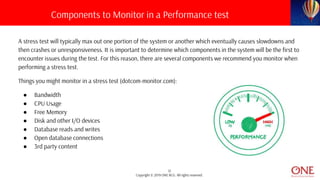
A stress test will typically max out one portion of the system or another which eventually causes slowdowns and
then crashes or unresponsiveness. It is important to determine which components in the system will be the first to
encounter issues during the test. For this reason, there are several components we recommend you monitor when
performing a stress test.
Things you might monitor in a stress test (dotcom-monitor.com):
● Bandwidth
● CPU Usage
● Free Memory
● Disk and other I/O devices
● Database reads and writes
● Open database connections
● 3rd party content
Components to Monitor in a Performance test
13
Copyright © 2019 ONE BCG. All rights reserved.
• It helps in determining how much workload can the System Under Load handle.
• Provides accurate data that customer can use to validate or enhance their infrastructure needs.
• Identifies performance problems that may occur after a system has been running at a high level for a longer
period.
• Typical issues are identified in smaller targeted performance tests, which means it ensures the application
remains available even when there is a huge load in a very short span time.
• The endurance test is also used to check whether there is any performance degradation after a long period of
execution.
• Possible recovery measures for wear and tear can be rectified in the early stages.
Advantages of Endurance Testing
14
Copyright © 2019 ONE BCG. All rights reserved.
• It is often hard to define how much stress is worth applying.
• Endurance Testing could cause application and/or network failures that may result in significant disruption if
Test Environment is not isolated.
• Permanent Data loss or corruption can occur by over-stressing the system.
• Resource utilization remains very high after the stress is removed.
• Some application components fail to respond.
• Unhandled exceptions are observed by the end-user.
Disadvantages of Endurance testing
15
Copyright © 2019 ONE BCG. All rights reserved.
• Apache JMeter
• LoadRunner
• LoadStorm
• LoadUI
• Appvance
• OpenSTA
• WebLOAD
• Rational Performance Tester
Endurance Testing Tools
16
Copyright © 2019 ONE BCG. All rights reserved.
In order to effectively performing endurance testing with Apache JMeter, there are certain settings that you need to
be keeping in mind. When performing this type of test with Apache Jmeter, there are certain settings that you should
have in mind.
• Setting the Thread Group Properties
• Run the Test in Non-GUI Mode
• Monitor Your Load Generator
• Run your JMeter Script With Taurus and Use the BlazeMeter Reporting Feature
Endurance Testing in Jmeter
17
Copyright © 2019 ONE BCG. All rights reserved.
The script should be created according to your business objectives. Either we can run tests for 2 users for 10 days or
100 users for 7 days. After the script, the next step is configuring the thread group settings before running the tests.
On a “normal” load test, set the number of threads, ramp-up period, and loop count values and we are ready to go.
When running endurance tests, which implies running the test for long periods, how would you configure those
values if you need to run the test for, let’s say, 12 hours? It can be a complex task
and you would probably spend too much time on that.
So, the first thing you should have in mind when running endurance
the test is set the “loop count” to “forever” and use the scheduler
functionality to determine when to start and finish the test.
Duration works combined with startup delay, and start time with end time,
which means there are two ways of setting this configuration.
Endurance Testing in Jmeter
18
Copyright © 2019 ONE BCG. All rights reserved.
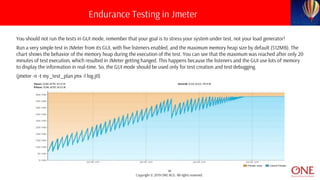
You should not run the tests in GUI mode, remember that your goal is to stress your system under test, not your load generator!
Run a very simple test in JMeter from its GUI, with five listeners enabled, and the maximum memory heap size by default (512MB). The
chart shows the behavior of the memory heap during the execution of the test. You can see that the maximum was reached after only 20
minutes of test execution, which resulted in JMeter getting hanged. This happens because the listeners and the GUI use lots of memory
to display the information in real-time. So, the GUI mode should be used only for test creation and test debugging.
(jmeter -n -t my_test_plan.jmx -l log.jtl)
Endurance Testing in Jmeter
19
Copyright © 2019 ONE BCG. All rights reserved.
Monitor Your Load Generator
Running the test in non-GUI mode does not guarantee that the load generator will not be overloaded, so during the
test execution, pay attention to at least the CPU, memory, disk, and network usage.
How can you do this for many hours? You have to prepare in advance according to the tool you use, which depends
on your OS. For instance, if you are running on a Unix-based environment, you can use NMON for this, and you have
to pass the appropriate parameters to have the monitor running during the whole test execution.
It’s also a good practice to increase the Java Heap Size to prevent the “out of memory” failure, as JMeter’s default
value is set to 512 MB only.
Endurance Testing in Jmeter
20
Copyright © 2019 ONE BCG. All rights reserved.
Run Your JMeter Script With Taurus and Use the BlazeMeter Reporting Feature
Last but not least, you will have to monitor your test in real time but also avoid stressing your load generator.
But, don’t worry! You can easily achieve this by running your existing JMeter script using Taurus, which also
allows you to generate real time BlazeMeter reports enabling in-depth analysis. To learn how to do this, check
out the post Taurus and Jenkins for Smoke Testing With JMeter.
Endurance Testing in Jmeter
21
Copyright © 2019 ONE BCG. All rights reserved.

What is Load, Stress and Endurance Testing?

  • 1.
    Copyright © 2019ONE BCG. All rights reserved. Load, Stress and Endurance Testing
  • 2.
    2 Copyright © 2019ONE BCG. All rights reserved. • What is Endurance Testing? • Goals of Endurance Testing • What to monitor in Endurance Testing? • How to perform Endurance Testing? • Advantages of Endurance Testing • Disadvantages of Endurance Testing • Endurance Testing Tools • Endurance Testing in Jmeter Agenda
  • 3.
    3 Copyright © 2019ONE BCG. All rights reserved. Load vs Stress Testing ● A load test measures the performance of a system under an expected load. In contrast, a stress test overloads a system to find the breaking point. ● In load testing load limit is a threshold of a break. In stress testing load limit is above the threshold of a break. ● Fact - As of February 2017, there were more than 400 hours of content uploaded to YouTube each minute, and one billion hours of content being watched on YouTube every day. As of July 2019, more than 575 hours of video content are uploaded to YouTube every minute. So will YouTube or Cloud run out of space one day?
  • 4.
    4 Copyright © 2019ONE BCG. All rights reserved. • One difference between a load test and stress test is that you may inject pauses into a load test to simulate real user traffic. With a stress test, you may run as many simultaneous users as fast as possible to generate excessive traffic for a stress test. • The goals of a load test are very different than the goals of a stress test. A load test is performed in order to ensure that a website or web application is capable of handling specific numbers of users at once. Load Testing is often used in the process of capacity planning, to ensure that a system is able to handle growth to specified levels of simultaneous traffic. • A stress test is used to specifically push a system beyond its intended capacity to identify components that begin to slow down, identify bottlenecks in the system, and bring to light possible points of failure. When to Choose a Load Test or Stress Test?
  • 5.
    5 Copyright © 2019ONE BCG. All rights reserved. • The word Endurance means ‘the capacity of something to last or to withstand the wear and tear.’ You can simply call it as durability, lasting power or longevity. • In Endurance Testing, a system is tested with a load extended over a significant amount of time, to analyze the behavior of the system under sustained use. • This type of testing is performed at the last stage of the performance run cycle. It ensures that the application is capable enough to handle the extended load without any deterioration of response time. • Endurance testing is a long process and sometimes last for even up to a year. This may include applying external loads such as Internet traffic or user actions. This makes endurance testing differ from Load Testing, which usually ends in a couple of hours or so. • "Endurance means capacity so, in other words, you can term Endurance Testing as Soak testing/Longevity testing/Capacity Testing." What is Endurance testing?
  • 6.
    6 Copyright © 2019ONE BCG. All rights reserved. • The primary goal of Endurance testing is to check for memory leaks. • To discover how the system performs under sustained usage. • To ensure that after a long period, the system response time will remain the same or better than the start of the test. • To determine the number of users and/or transactions a given system will support and meet performance goals. • To manage future loads, we need to understand how many additional resources (like processor capacity, disk capacity, memory usage, or network bandwidth) are necessary to support usage in the future. • Endurance testing is generally done by either overloading the system or by reducing certain system resources and evaluating the consequences. Goals of Endurance Testing
  • 7.
    7 Copyright © 2019ONE BCG. All rights reserved. In Endurance Testing, the following things are tested. ● Test memory leakage- Checks are done to verify if there is any memory leakage in the application, which can cause crashing of the system or O.S. ● Test connection closure between the layer of the system – If the connection between the layers of the system is not closed successfully, it may stall some or all modules of the system. ● Test database connection close successfully- If the database connection is not closed successfully, may result in a system crash. ● Test response time – System is tested for the response time of the system as the application becomes less efficient as a result of the prolonged use of the system. What to monitor in Endurance Testing?
  • 8.
    8 Copyright © 2019ONE BCG. All rights reserved. How to Perform Endurance Testing
  • 9.
    9 Copyright © 2019ONE BCG. All rights reserved. • Testing Environment – Identify the hardware, software, operating system required for the endurance testing, assigning roles and responsibilities within the team, etc. The environment should be ready before the test execution. You also need to estimate common database production size and yearly growth. This is required as such you need to test how your application will respond after a year, two or five. • Creating the Test Plan, Scenarios - Based on the nature of testing - manual or automation or combination of both, Test Case design, reviews, and execution should be planned. Testing to stress the system, breakpoint testing, etc. should also be part of the test plan. Testing to stress the system determines the breakpoint in the application. • Test Estimation – Provide the estimation of how long it will take to complete the testing phase. It should be analyzed based on several testers involved and the number of test cycles required.
  • 10.
    10 Copyright © 2019ONE BCG. All rights reserved. • Risk Analysis - Analyzing the risk and taking appropriate action for prevention. Prioritization of test cases as per the Risk factor and identify the below risk and issues tester may phase during the endurance test. – Will performance remain consistent over time? – Are there other minor issues that have not yet been detected? – Is there external interference that was not addressed? • Test Schedule - Determine the budget, deliverables within the time frames. Endurance Testing applies a huge but natural load arrangement of transactions to the system/application for a continuous period.
  • 11.
    11 Copyright © 2019ONE BCG. All rights reserved. ● Isolating all traffic to one particular geographic region ● Artificially limiting available disk space ● Repeatedly sending one particularly large GET request ● Limiting the maximum number of data connections ● Downloading a large file from the application ● Repeatedly sending an intense POST that writes heavily to a database Steps to identify points of Failure
  • 12.
    12 Copyright © 2019ONE BCG. All rights reserved. A stress test will typically max out one portion of the system or another which eventually causes slowdowns and then crashes or unresponsiveness. It is important to determine which components in the system will be the first to encounter issues during the test. For this reason, there are several components we recommend you monitor when performing a stress test. Things you might monitor in a stress test (dotcom-monitor.com): ● Bandwidth ● CPU Usage ● Free Memory ● Disk and other I/O devices ● Database reads and writes ● Open database connections ● 3rd party content Components to Monitor in a Performance test
  • 13.
    13 Copyright © 2019ONE BCG. All rights reserved. • It helps in determining how much workload can the System Under Load handle. • Provides accurate data that customer can use to validate or enhance their infrastructure needs. • Identifies performance problems that may occur after a system has been running at a high level for a longer period. • Typical issues are identified in smaller targeted performance tests, which means it ensures the application remains available even when there is a huge load in a very short span time. • The endurance test is also used to check whether there is any performance degradation after a long period of execution. • Possible recovery measures for wear and tear can be rectified in the early stages. Advantages of Endurance Testing
  • 14.
    14 Copyright © 2019ONE BCG. All rights reserved. • It is often hard to define how much stress is worth applying. • Endurance Testing could cause application and/or network failures that may result in significant disruption if Test Environment is not isolated. • Permanent Data loss or corruption can occur by over-stressing the system. • Resource utilization remains very high after the stress is removed. • Some application components fail to respond. • Unhandled exceptions are observed by the end-user. Disadvantages of Endurance testing
  • 15.
    15 Copyright © 2019ONE BCG. All rights reserved. • Apache JMeter • LoadRunner • LoadStorm • LoadUI • Appvance • OpenSTA • WebLOAD • Rational Performance Tester Endurance Testing Tools
  • 16.
    16 Copyright © 2019ONE BCG. All rights reserved. In order to effectively performing endurance testing with Apache JMeter, there are certain settings that you need to be keeping in mind. When performing this type of test with Apache Jmeter, there are certain settings that you should have in mind. • Setting the Thread Group Properties • Run the Test in Non-GUI Mode • Monitor Your Load Generator • Run your JMeter Script With Taurus and Use the BlazeMeter Reporting Feature Endurance Testing in Jmeter
  • 17.
    17 Copyright © 2019ONE BCG. All rights reserved. The script should be created according to your business objectives. Either we can run tests for 2 users for 10 days or 100 users for 7 days. After the script, the next step is configuring the thread group settings before running the tests. On a “normal” load test, set the number of threads, ramp-up period, and loop count values and we are ready to go. When running endurance tests, which implies running the test for long periods, how would you configure those values if you need to run the test for, let’s say, 12 hours? It can be a complex task and you would probably spend too much time on that. So, the first thing you should have in mind when running endurance the test is set the “loop count” to “forever” and use the scheduler functionality to determine when to start and finish the test. Duration works combined with startup delay, and start time with end time, which means there are two ways of setting this configuration. Endurance Testing in Jmeter
  • 18.
    18 Copyright © 2019ONE BCG. All rights reserved. You should not run the tests in GUI mode, remember that your goal is to stress your system under test, not your load generator! Run a very simple test in JMeter from its GUI, with five listeners enabled, and the maximum memory heap size by default (512MB). The chart shows the behavior of the memory heap during the execution of the test. You can see that the maximum was reached after only 20 minutes of test execution, which resulted in JMeter getting hanged. This happens because the listeners and the GUI use lots of memory to display the information in real-time. So, the GUI mode should be used only for test creation and test debugging. (jmeter -n -t my_test_plan.jmx -l log.jtl) Endurance Testing in Jmeter
  • 19.
    19 Copyright © 2019ONE BCG. All rights reserved. Monitor Your Load Generator Running the test in non-GUI mode does not guarantee that the load generator will not be overloaded, so during the test execution, pay attention to at least the CPU, memory, disk, and network usage. How can you do this for many hours? You have to prepare in advance according to the tool you use, which depends on your OS. For instance, if you are running on a Unix-based environment, you can use NMON for this, and you have to pass the appropriate parameters to have the monitor running during the whole test execution. It’s also a good practice to increase the Java Heap Size to prevent the “out of memory” failure, as JMeter’s default value is set to 512 MB only. Endurance Testing in Jmeter
  • 20.
    20 Copyright © 2019ONE BCG. All rights reserved. Run Your JMeter Script With Taurus and Use the BlazeMeter Reporting Feature Last but not least, you will have to monitor your test in real time but also avoid stressing your load generator. But, don’t worry! You can easily achieve this by running your existing JMeter script using Taurus, which also allows you to generate real time BlazeMeter reports enabling in-depth analysis. To learn how to do this, check out the post Taurus and Jenkins for Smoke Testing With JMeter. Endurance Testing in Jmeter
  • 21.
    21 Copyright © 2019ONE BCG. All rights reserved.