What Is Cloud Computing?
TS PLUS INDIA
What is cloud computing?
Cloud computing is the delivery of computing services—including servers,
storage, databases, networking, software, analytics, and intelligence—over
the Internet (“the cloud”) to offer faster innovation, flexible resources, and
economies of scale. You typically pay only for cloud services you use,
helping lower your operating costs, run your infrastructure more efficiently
and scale as your business needs change.
How did it come into existence?
Before emerging the cloud computing, there was Client/Server computing which is basically
a centralized storage in which all the software applications, all the data and all the controls
are resided on the server side.
If a single user wants to access specific data or run a program, he/she need to connect to
the server and then gain appropriate access, and then he/she can do his/her business.
Then after, distributed computing came into picture, where all the computers are networked
together and share their resources when needed.
What is its architecture?
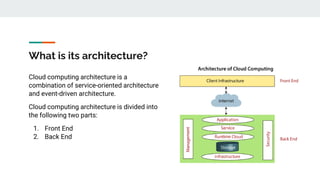
Cloud computing architecture is a
combination of service-oriented architecture
and event-driven architecture.
Cloud computing architecture is divided into
the following two parts:
1. Front End
2. Back End
Front End
The front end is used by the client. It contains client-side interfaces and applications that
are required to access the cloud computing platforms. The front end includes web servers
(including Chrome, Firefox, internet explorer, etc.), thin & fat clients, tablets, and mobile
devices.
Back End
The back end is used by the service provider. It manages all the resources that are
required to provide cloud computing services. It includes a huge amount of data storage,
security mechanism, virtual machines, deploying models, servers, traffic control
mechanisms, etc.
What are its components?
1. Client Infrastructure
Client Infrastructure is a Front end component. It provides GUI (Graphical User Interface) to interact with
the cloud.
2. Application
The application may be any software or platform that a client wants to access.
3. Service
A Cloud Services manages that which type of service you access according to the client’s requirement.
Cloud computing offers the following three type of services:
i. Software as a Service (SaaS) – It is also known as cloud application services. Mostly, SaaS
applications run directly through the web browser means we do not require to download and install
these applications.
ii. Platform as a Service (PaaS) – It is also known as cloud platform services. It is quite similar to SaaS,
but the difference is that PaaS provides a platform for software creation, but using SaaS, we can
access software over the internet without the need of any platform.
iii. Infrastructure as a Service (IaaS) – It is also known as cloud infrastructure services. It is responsible
for managing applications data, middleware, and runtime environments.
4. Runtime Cloud
Runtime Cloud provides the execution and runtime environment to the virtual machines.
5. Storage
Storage is one of the most important components of cloud computing. It provides a huge amount of storage
capacity in the cloud to store and manage data.
6. Infrastructure
It provides services on the host level, application level, and network level. Cloud infrastructure includes hardware
and software components such as servers, storage, network devices, virtualization software, and other storage
resources that are needed to support the cloud computing model.
7. Management
Management is used to manage components such as application, service, runtime cloud, storage, infrastructure,
and other security issues in the backend and establish coordination between them.
What are its benefits?
Reduced IT costs
Moving to cloud computing may reduce the cost of managing and maintaining your IT systems.
Rather than purchasing expensive systems and equipment for your business, you can reduce your
costs by using the resources of your cloud computing service provider. You may be able to
reduce your operating costs because:
● the cost of system upgrades, new hardware and software may be included in your contract
● you no longer need to pay wages for expert staff
● your energy consumption costs may be reduced
● there are fewer time delays.
Scalability
Your business can scale up or scale down your operation and storage needs quickly to suit your
situation, allowing flexibility as your needs change. Rather than purchasing and installing
expensive upgrades yourself, your cloud computer service provider can handle this for you. Using
the cloud frees up your time so you can get on with running your business.
Business continuity
Protecting your data and systems is an important part of business continuing planning Whether
you experience a natural disaster, power failure or other crisis, having your data stored in the
cloud ensures it is backed up and protected in a secure and safe location. Being able to access
your data again quickly allows you to conduct business as usual, minimising any downtime and
loss of productivity.
Collaboration efficiency
Collaboration in a cloud environment gives your business the ability to communicate and share more
easily outside of the traditional methods. If you are working on a project across different locations, you
could use cloud computing to give employees, contractors and third parties access to the same files.
You could also choose a cloud computing model that makes it easy for you to share your records with
your advisers (e.g. a quick and secure way to share accounting records with your accountant or
financial adviser).
Flexibility of work practices
Cloud computing allows employees to be more flexible in their work practices. For example, you have
the ability to access data from home, on holiday, or via the commute to and from work (providing you
have an internet connection). If you need access to your data while you are off-site, you can connect to
your virtual office, quickly and easily.
THANK YOU!
Visit us: https://www.tsplusindia.com/

What is cloud computing

  • 1.
    What Is CloudComputing? TS PLUS INDIA
  • 2.
    What is cloudcomputing? Cloud computing is the delivery of computing services—including servers, storage, databases, networking, software, analytics, and intelligence—over the Internet (“the cloud”) to offer faster innovation, flexible resources, and economies of scale. You typically pay only for cloud services you use, helping lower your operating costs, run your infrastructure more efficiently and scale as your business needs change.
  • 3.
    How did itcome into existence? Before emerging the cloud computing, there was Client/Server computing which is basically a centralized storage in which all the software applications, all the data and all the controls are resided on the server side. If a single user wants to access specific data or run a program, he/she need to connect to the server and then gain appropriate access, and then he/she can do his/her business. Then after, distributed computing came into picture, where all the computers are networked together and share their resources when needed.
  • 4.
    What is itsarchitecture? Cloud computing architecture is a combination of service-oriented architecture and event-driven architecture. Cloud computing architecture is divided into the following two parts: 1. Front End 2. Back End
  • 5.
    Front End The frontend is used by the client. It contains client-side interfaces and applications that are required to access the cloud computing platforms. The front end includes web servers (including Chrome, Firefox, internet explorer, etc.), thin & fat clients, tablets, and mobile devices. Back End The back end is used by the service provider. It manages all the resources that are required to provide cloud computing services. It includes a huge amount of data storage, security mechanism, virtual machines, deploying models, servers, traffic control mechanisms, etc.
  • 6.
    What are itscomponents? 1. Client Infrastructure Client Infrastructure is a Front end component. It provides GUI (Graphical User Interface) to interact with the cloud. 2. Application The application may be any software or platform that a client wants to access. 3. Service A Cloud Services manages that which type of service you access according to the client’s requirement. Cloud computing offers the following three type of services:
  • 7.
    i. Software asa Service (SaaS) – It is also known as cloud application services. Mostly, SaaS applications run directly through the web browser means we do not require to download and install these applications. ii. Platform as a Service (PaaS) – It is also known as cloud platform services. It is quite similar to SaaS, but the difference is that PaaS provides a platform for software creation, but using SaaS, we can access software over the internet without the need of any platform. iii. Infrastructure as a Service (IaaS) – It is also known as cloud infrastructure services. It is responsible for managing applications data, middleware, and runtime environments.
  • 8.
    4. Runtime Cloud RuntimeCloud provides the execution and runtime environment to the virtual machines. 5. Storage Storage is one of the most important components of cloud computing. It provides a huge amount of storage capacity in the cloud to store and manage data. 6. Infrastructure It provides services on the host level, application level, and network level. Cloud infrastructure includes hardware and software components such as servers, storage, network devices, virtualization software, and other storage resources that are needed to support the cloud computing model. 7. Management Management is used to manage components such as application, service, runtime cloud, storage, infrastructure, and other security issues in the backend and establish coordination between them.
  • 9.
    What are itsbenefits? Reduced IT costs Moving to cloud computing may reduce the cost of managing and maintaining your IT systems. Rather than purchasing expensive systems and equipment for your business, you can reduce your costs by using the resources of your cloud computing service provider. You may be able to reduce your operating costs because: ● the cost of system upgrades, new hardware and software may be included in your contract ● you no longer need to pay wages for expert staff ● your energy consumption costs may be reduced ● there are fewer time delays.
  • 10.
    Scalability Your business canscale up or scale down your operation and storage needs quickly to suit your situation, allowing flexibility as your needs change. Rather than purchasing and installing expensive upgrades yourself, your cloud computer service provider can handle this for you. Using the cloud frees up your time so you can get on with running your business. Business continuity Protecting your data and systems is an important part of business continuing planning Whether you experience a natural disaster, power failure or other crisis, having your data stored in the cloud ensures it is backed up and protected in a secure and safe location. Being able to access your data again quickly allows you to conduct business as usual, minimising any downtime and loss of productivity.
  • 11.
    Collaboration efficiency Collaboration ina cloud environment gives your business the ability to communicate and share more easily outside of the traditional methods. If you are working on a project across different locations, you could use cloud computing to give employees, contractors and third parties access to the same files. You could also choose a cloud computing model that makes it easy for you to share your records with your advisers (e.g. a quick and secure way to share accounting records with your accountant or financial adviser). Flexibility of work practices Cloud computing allows employees to be more flexible in their work practices. For example, you have the ability to access data from home, on holiday, or via the commute to and from work (providing you have an internet connection). If you need access to your data while you are off-site, you can connect to your virtual office, quickly and easily.
  • 12.
    THANK YOU! Visit us:https://www.tsplusindia.com/